

In addition to supporting baked morphs (see Morph Node), Mutable can also add real-time morph targets to generated meshes.
Enable Real-Time Morph Targets
This feature needs to be enabled for each CutomizableObject in its compilation options. Go to the Object Properties tab and click Compile Options > Enable Real Time Morph Targets.

Once enabled, any selected morph target present in a skeletal mesh participating of a generated mutable skeletal mesh will be added to that mesh. If a morph target is present with the same name in multiple meshes composing the generated mesh, the morph targets will be merged so that all affected vertices will be driven by the same curve.
Morph Target Selection
There are three ways to select which morph targets need to be considered.
SkeletalMesh Node
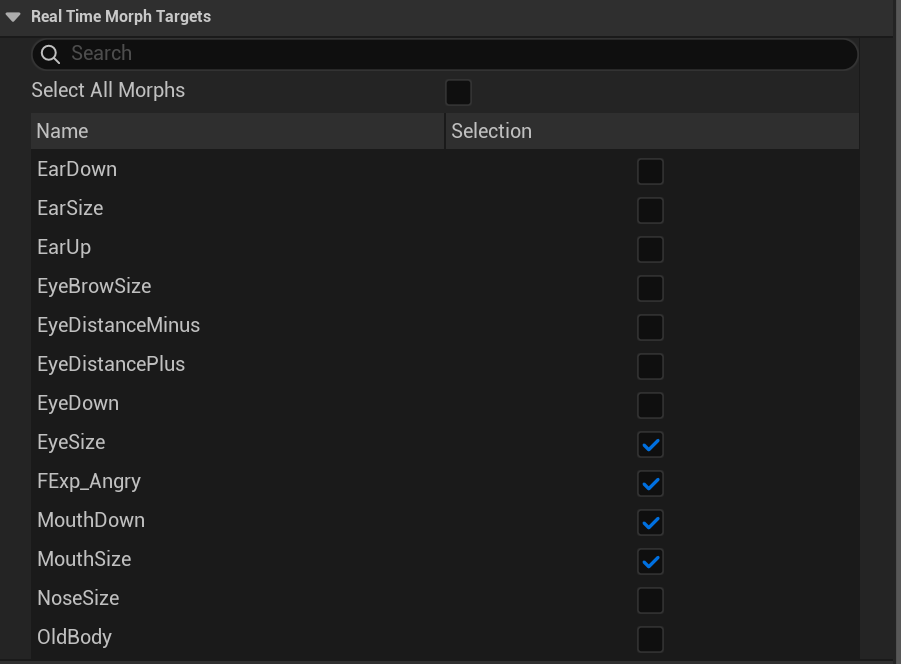
One way to select morph targets is in the SkeletalMesh node. In the Node's properties view, a list of all morphs targets found in the SkeletalMesh is shown. There individual or all morph targets can be selected.
Tables
When working with data tables, there is no list where morph targets can be selected. In this case, the default SkeletalMesh, set in the data table struct, is used to determine which morph will be selected. If the morph target name is present in the default skeletal mesh list of morph targets then the morph is selected for all skeletal meshes in the table.
Global Selection
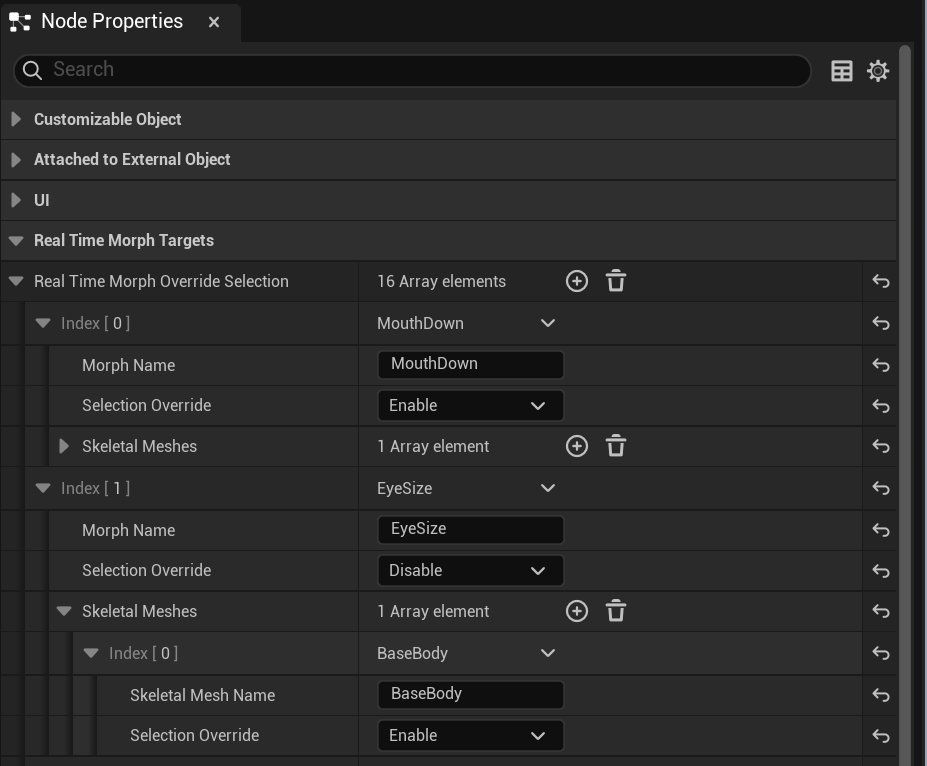
Sometimes it is useful to select all morph targets with a specific name for all meshes in the graph. Going to all SkeletalMeshes nodes in the CustomizableObject and selecting manually one particular morph target can be cumbersome and error-prone if the graph is very large or has a lot of sub-graphs. To help with these cases, a list of override selected morphs can be edited at the graph root Base Object's Node Properties panel. In the Node Properties panel, click Real Time Morph Targets > Real Time Morph Override Selection.
This list lets you override the morphs target selection in the SkeletalMesh nodes globally. Each entry is composed of a morph target name and a selection override with three values: No Override, Enable, or Disable. No Override is the default option and indicates the Nodes selection will be used. Enable and Disable force all morph targets with that name to be enabled or disabled regardless of the Node selection. If a more fine-tuned per skeletal mesh override is needed, a list of per-skeletal mesh overrides can be specified. The skeletal mesh override value always has preference over the morph target override, so if a mesh does not need to override the morph target then the mesh name should not be in the list.
Additional considerations
The real-time morph targets that will end up in the mutable generated meshes are regular SkeletalMesh morph targets, so the same workflows apply. For example, to check which morphs are being used for a particular CustomizableObjectInstance, inspect the SkeletalMesh generated using the SkeletalMesh viewer Morph Target Preview tab.