

새로운 기능
언리얼 엔진 5.2는 5.0 및 5.1의 프레임워크와 기능을 한층 발전시켜 사용자에게 다양한 새로운 툴을 제공합니다. 5.2는 차세대 리얼타임 3D 콘텐츠와 경험을 보다 편리하게 제작할 수 있도록 추가로 업데이트 및 향상되었습니다. 에픽게임즈는 항상 다양한 분야의 요구 사항을 충족하는 동시에 기능 세트를 더 강력하고, 워크플로에 친화적이며, 유연하게 만드는 데 초점을 맞추고 있습니다.
프로시저럴 콘텐츠 생성
프로시저럴 콘텐츠 생성(Procedural Content Generation, PCG) 프레임워크는 자신만의 프로시저럴 콘텐츠를 생성할 수 있게 해 줍니다. PCG는 아티스트와 디자이너가 건물이나 생물군 생성부터 전체 월드에 이르기까지 빠른 반복작업 툴을 빌드할 수 있도록 지원합니다.
서브스트레이트
서브스트레이트(Substrate)는 오브젝트의 룩 앤 필을 더욱 세밀하게 제어할 수 있게 해 주는 새로운 머티리얼 제작 방식입니다. 이 기능을 활성화하면 고정된 셰이딩 모델 툴세트를 보다 표현력이 풍부하고 더 광범위한 표면 외양과 더 넓은 파라미터 스페이스를 제공하는 모듈형 멀티 로브(multi-lobe) 프레임워크로 대체합니다.
버추얼 프로덕션 향상
SMPTE 2110 통합
nDisplay 클러스터 구성에서 Rivermax SMPTE 2110을 사용하여 다음을 수행할 수 있습니다.
- 4K 비디오의 다중 스트림을 사용할 수 있습니다.
- 카메라의 내부 프러스텀을 전용 머신에 렌더링할 수 있습니다.
iOS 스테이지 앱
스테이지에서 다음에 대해 간소화된 제어를 제공하는 iOS 기본 오퍼레이터 앱을 사용할 수 있습니다.
- 라이트 카드
- 플래그
- 색 보정 창
가상 카메라 향상
가상 카메라를 사용하여 다음을 수행할 수 있습니다.
- 단일 에디터 세션에서 여러 대의 카메라를 스트리밍할 수 있습니다.
- 릭레일을 사용할 수 있습니다. 버추얼 카메라 블루프린트도 간소화되었습니다.
DMX 향상
DMX에 간소화된 컨트롤 콘솔이 추가되어 물리적 픽스처와 가상 픽스처를 더 빠르게 디버깅하고 제어할 수 있을 뿐만 아니라 일부 UI가 향상되었습니다.
ML 디포머 샘플
새로운 머신 러닝(Machine Learning, ML) 디포머 샘플 프로젝트를 다운로드하여 ML 디포머 시스템을 사용하는 전신 캐릭터 메시 디포메이션 쇼케이스를 확인하세요.
런처 빌드 - 이제 macOS용 유니버설 바이너리 사용
이제 에픽게임즈 런처를 통해 배포되는 언리얼 엔진 빌드에 macOS용 유니버설 바이너리가 포함되어 Apple Silicon(ARM64) 및 Intel 기반(x86-64) Mac을 모두 기본 지원합니다. 언리얼 엔진 5.2를 macOS 머신에 다운로드하여 설치하면 언리얼 에디터가 사용자의 아키텍처에 적합한 바이너리 슬라이스를 자동으로 선택합니다. Apple Silicon 사용자는 향상된 퍼포먼스를 경험할 수 있습니다. 그 외에도, 에픽게임즈는 Apple Silicon 디바이스를 위한 macOS 사용자 경험을 다음과 같이 몇 가지 향상했습니다.
- 창 포커스 처리 문제 수정
- 최신 세대 Mac 화면 상단의 '노치' 지원
자세한 내용은 언리얼 에디터의 기본 Apple Silicon 지원 문서를 참고하세요. 또한 이번 업데이트를 통해 5.2 버전 언리얼 엔진 마켓플레이스 콘텐츠는 이제 macOS 사용자도 이용할 수 있습니다!
이러한 툴에 대한 자세한 내용과 언리얼 엔진 5.2에서 향상된 사항의 전체 목록을 확인하려면 아래에 정리되어 있는 내용을 참고하세요.
이 출시 버전에는 GitHub의 언리얼 엔진 개발자 커뮤니티에서 제공한 개선 사항도 포함됩니다. 언리얼 엔진 5.2에 기여해 주신 모든 분들께 감사드립니다.
909185693, aaronmjacobs, ActiveXSturcture, AfterThunk, aidinabedi, alexirae, ameaninglessname, ameyghan, amuTBKT, anon-oss, APandaWithAGun, aquanox, bestofact, bretternst, brian2524, brumenn, brunnio, chris03, dapetcu21, davidyrgilbert, dbsigurd, DecoyRS, disseminate, dman82499, dorgonman, DreikaEru, Duroxxigar, EchoRed-3D, Edstub207, ennorehling, Erlite, foobit, forsakenyang, gaborpapp, galeone, gameknife, geordiemhall, gtreshchev, hach-que, huklen, HunterVacui, Ident, imatakeharuhiko, iniside, jlnordin, jlsalmon, jm00517, joeycarr, jszakmeister, kedamazigoku, KeithRare, kentzhang-geek, l2oe, LairdWT, leith-bartrich, LiamGiiV, lineageiori, LizardThief, LouRohanNV, marcussvensson92, Mattiwatti, Megafunk, MichaelBell, MilkyEngineer, MothDoctor, Murazaki, nklose, nutti, oxxxydimon, PapeCoding, pear-studio, Pico-XR, RadAlex, RandomInEqualities, real-mikhail, Ryan-DowlingSoka, satoshi-iwaki, Scaless, SeamusBao666, SlashParadox, slonopotamus, Sn-a-ke, SRombauts, stlnkm, sunduk, SungJJinKang, Sythenz, Temaran, TheJamsh, thomasvanta, timrademaker, TroutZhang, Tryum, tustanivsky, tuxerr, UntamedLoli, VesCodes, Victov, vorixo, whatthesamuel, x157, zorbathut
렌더링
나나이트
나나이트 기능 및 퍼포먼스 업데이트에는 다음이 포함됩니다.
-
커스텀 뎁스 및 스텐실, 라이팅 채널 및 글로벌 클립 면에 대한 추가 기능 지원
-
가변 정밀도노멀(예: 자동차의 고퀄리티 리플렉션을 위한 가변 정밀도 노멀)
-
나나이트에서 월드 포지션 오프셋을 사용하는 오브젝트에서 흔히 발생하는 부작용을 완화하는 새로운 '최대 월드 포지션 오프셋 디스플레이스먼트(Max World Position Offset Displacement)' 세팅 추가
- '뷰포트(Viewport)' 뷰 모드에서 시각화(Visualize) > 경계를 벗어난 픽셀(Out of Bounds Pixels) 을 사용하여 최대 오프셋에 의해 WPO가 범위제한되는 위치를 확인할 수 있습니다.
-
퍼포먼스와 안전성 및 향상된 통계치를 위해 지오메트리 데이터 클러스터를 디스크에서 스트리밍하는 나나이트 스트리머를 업데이트하였습니다.
-
스태틱 텍스처 맵으로 사전 계산되는 나나이트 디스플레이스먼트 매핑(베타).
자세한 내용은 나나이트를 참고하세요.
루멘
루멘의 퀄리티 및 퍼포먼스가 다음과 같이 업데이트되었습니다.

-
얇은 지오메트리(셔츠, 코, 귀의 주름 등)에 대한 캐릭터의 GI 및 오클루전이 향상되었고 헤어 그룸과의 통합 또한 향상되었습니다.
-
반투명에 대한 고퀄리티 리플렉션이 이제 머티리얼 러프니스를 지원하여 거울 재질 이외에도 사용가능하게 되었습니다.
-
'표면 캐시(Surface Cache)'는 이제 소프트웨어 레이 트레이스(Software Ray-Traced, SWRT) 리플렉션에 대한 피드백을 기반으로 구동되어 더 높은 해상도의 리플렉션과 씬 변경사항에 대한 더 빠른 반응을 제공합니다.
-
SWRT 모드는 기본적으로 콘솔에서 비동기 계산을 사용합니다.
-
하드웨어 레이 트레이싱(Hardware Ray Tracing, HWRT) 히트 라이팅을 사용한 리플렉션의 2차 바운스 추정이 향상되었습니다.
-
HWRT 히트 라이팅에서 양면 폴리지를 지원합니다.
자세한 내용은 루멘 글로벌 일루미네이션 및 리플렉션, 루멘 기술 세부 정보 및 루멘 퍼포먼스 가이드를 참고하세요.
서브스트레이트(실험단계)
이전에는 스트라타(Strata)라고 부르던 서브스트레이트(Substrate)는 Default Lit 및 Clear Coat와 같은 정형화된 셰이딩 모델을 보다 표현력이 풍부하고 더 광범위한 표면 외양과 더 넓은 파라미터 범위를 제공하는 모듈형 프레임워크로 대체합니다. 복잡성과 원하는 예산에 따라 퍼포먼스를 조절할 수 있으며 레거시 머티리얼의 비용은 이전과 비슷합니다.
서브스트레이트는 UE 5.1에서 초기 테스트용으로 출시되었으며, 5.2에서도 여전히 실험단계에 있습니다. 프로덕션 씬에 사용해서는 안 되지만, 이 개발 단계에서 테스트를 권장하며 피드백을 구하고 있습니다.
언리얼 엔진 5.2에는 기능, 안정성, 퍼포먼스 측면에서 많은 향상점이 포함되어 있습니다. 일부 변경사항은 다음과 같습니다.

-
Slab 노드의 로직을 단순화하기 위해 메탈릭 파라미터화가 제거되었습니다. Substrate Metalness-To-DiffuseAlbedo-F0 헬퍼 노드를 사용하여 메탈릭 스타일 파라미터로 변환할 수 있습니다.
-
이제 Vertical Layering 노드에서 Slab 두께를 지정하여 독립적으로 레이어링을 제어하면서 Slab이 포함된 머티리얼 함수를 보다 쉽게 재사용할 수 있습니다.
-
이제 레거시 머티리얼 노드와 유사하게 서브스트레이트 노드를 미리 볼 수 있습니다.
-
클로스 머티리얼의 레이어링/에너지 보존이 향상되었고 독립적인 러프니스 값이 추가되었습니다.
-
디퍼드 모바일을 제외한 모바일 플랫폼에 대한 초기 지원이 추가되었습니다.
-
Nintendo Switch에 대한 초기 지원이 추가되었습니다.
-
레거시 머티리얼을 서브스트레이트로 변환할 때 가독성을 위해 노드 배치가 향상되었습니다.
-
포스트 프로세스에서 씬 GBuffer 데이터 읽기와 관련된 문제가 수정되었습니다.
-
머티리얼 에디터에서 노드 프리뷰가 향상되었습니다.
-
리프랙션 제어가 향상되어 기본적으로 F0 입력에서 굴절률(Index Of Refraction, IOR)을 처리하지만 필요에 따라 오버라이드할 수 있습니다.
-
서브스트레이트 블렌드 모드가 업데이트되어 이제 머티리얼 인스턴스에서 사용할 수 있습니다.
-
이제 '머티리얼 에디터'의 '서브스트레이트(Substrate)' 탭에서 전체 머티리얼의 단순화를 미리 볼 수 있습니다.
-
여러 크래시와 버그가 수정되었습니다.
실험단계인 서브스트레이트에 대한 자세한 내용은 에픽 디벨로퍼 커뮤니티 포럼을 참고하세요.
DX12 PSO 사전 캐싱
새로운 PSO 사전 캐싱 메커니즘은 DX12 타이틀의 PSO 히치를 개선하기 위해 5.1에서 실험단계로 도입되었습니다. 5.2에서 이 시스템의 개선 사항은 다음과 같습니다.
-
시스템의 퍼포먼스 및 안정성이 향상되었습니다. 기존의 다양한 코너 케이스들을 해결하였습니다.
-
이제 PSO가 아직 준비되지 않은 경우 오브젝트 드로를 건너뜁니다. 시스템은 오브젝트를 그리기위해 제 시간에 PSO를 준비하려고 하지만 이제 이를 보장하지는 않습니다. PSO 준비가 늦어지는 경우, 이제 완료 대기로 인한 히치를 발생시키는 대신 오브젝트 드로를 건너뛸 수 있습니다.
-
사용되지 않을 PSO를 생략하는 로직이 개선되어 미리 캐싱할 PSO의 수를 줄였습니다.
-
미리 캐시와 함께 사용할 수 있도록 기존 수동 방식의 PSO 캐시 시스템을 개선했습니다.
패스 트레이서
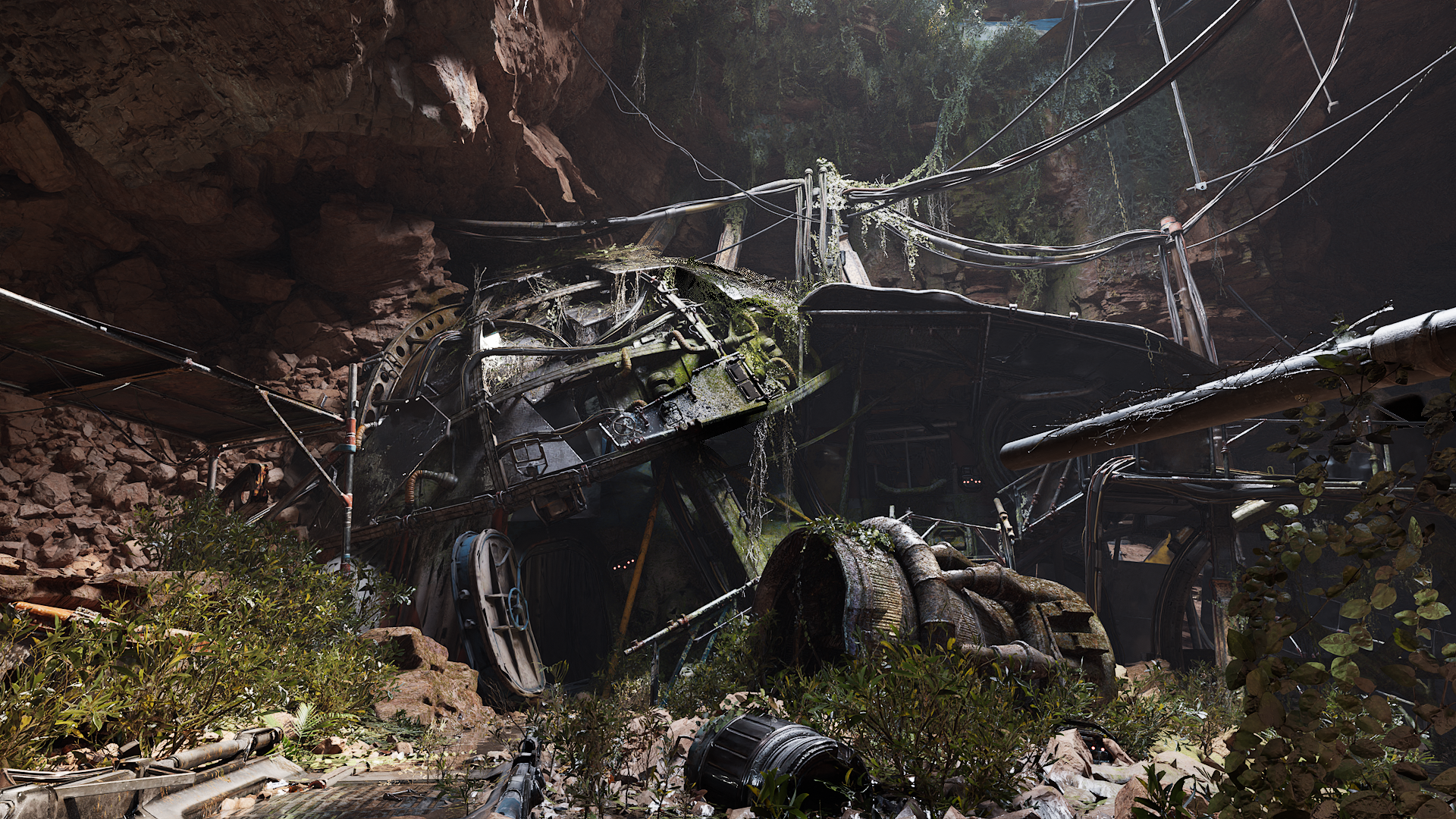
5.2에서 패스 트레이서는 래스터라이저와의 기능적 동등성 측면에서 몇 가지 격차를 해소하고 오프라인 렌더링 파이프라인에서 사용할 수 있는 것과 유사한 몇 가지 새로운 기능을 제공합니다.
-
이제 패스 트레이서의 서브서피스 셰이딩에서 스캐터링 애니소트로피 및 '평균 자유 행로 파라미터(Mean Free Path)'를 사용한 맵 기반 서브서피스 컬러가 선택적으로 지원됩니다.
-
메시 데칼 지원이 추가되었고, 데칼의 전반적인 퍼포먼스가 향상되었습니다.
-
스플라인 메시 지원이 추가되었습니다.
-
라이트의 '스페큘러 스케일(Specular Scale)' 값에 대한 지원이 추가되었습니다.
-
이제 레이가 유리를 통과하며 휘어지는 굴절률에서 유리의 반사율(프레넬 이펙트)을 선택적으로 분리할 수 있습니다.
-
오브젝트를 카메라 레이에는 보이지만 글로벌 일루미네이션/섀도에는 보이지 않게 만드는 기능이 추가되었습니다.
-
머티리얼을 변경하지 않고도 오브젝트를 홀드아웃으로 렌더링하는 기능이 추가되었습니다.
-
'머티리얼 그래프(Material Graph)'에 패스 트레이서 레이 타입별로 필터링할 수 있는 Path Tracing Ray Type Switch 노드가 추가되었습니다.
-
디퓨즈, 스페큘러, 간접광 등 AOV라고도 하는 기본 라이팅 패스를 이제 개별적으로 렌더링할 수 있습니다. 이러한 패스는 각 렌더 시 비용없이 얻을 수 없으며 개별적으로 렌더링해야 합니다.
-
'비저빌리티(Visibility)' 비활성화, '숨겨진 섀도(Hidden Shadow)' 활성화, '숨겨진 동안 간접광에 영향(Affect Indirect Lighting While Hidden)' 활성화에 대한 프라이머리 비저빌리티 토글과 함께 '그림자 드리우기(Cast Shadow)', '숨겨진 섀도', '다이내믹 간접광 영향(Affect Dynamic Indirect Lighting)', '숨겨진 동안 간접광에 영향'에 대한 프라이머리 레이 비저빌리티 토글이 추가되었습니다.
-
새로운 Enable Path Tracing 블루프린트 노드를 사용하여 런타임에서 패스 트레이싱을 토글할 수 있습니다.
자세한 내용은 패스 트레이서를 참고하세요.
버추얼 텍스처
버추얼 텍스처는 다음과 같은 향상점 및 기능을 포함합니다.
-
표시되는 버추얼 텍스처 페이지에서 스트리밍 요청을 비활성화하는 Runtime Virtual Texture Sample 노드에 대한 피드백 옵션이 추가되었습니다.
- 사용 예시로는 그래스 머티리얼이 랜드스케이프 런타임 버추얼 텍스처를 샘플링하는 경우가 있습니다. 일반적으로 랜드스케이프가 버추얼 텍스처 업데이트를 구동하지만, 그래스가 랜드스케이프에 사용되는 것과 동일한 밉을 샘플링하도록 만들고 싶을 수 있습니다. 이 옵션을 사용하면 그래스가 필요 이상으로 높은 밉을 요구하지 않게 됩니다.
-
우클릭 에셋 액션(Asset Actions) 옵션을 사용하여 모든 UDIM을 익스포트하는 기능이 추가되었습니다. 이렇게 하면 별도의 UDIM 텍스처 블록으로 익스포트됩니다.
자세한 내용은 버추얼 텍스처링을 참고하세요.
향상된 섀도 렌더링
레이 트레이스 섀도가 다음과 같이 향상되었습니다.
- 이제 렉트 라이트와 소스 크기가 있는 라이트의 레이 트레이스드 섀도가 더 정확해지고 패스 트레이서의 결과와 더 비슷해졌습니다.

(왼쪽에서 오른쪽으로) 기존 렉트 라이트 섀도, 새로운 렉트 라이트 섀도, 패스 트레이싱된 렉트 라이트 섀도
자세한 내용은 하드웨어 레이 트레이싱을 참고하세요.
버추얼 섀도 맵은 다음과 같은 향상점을 포함합니다.
-
디스턴트 라이트 구현으로 로컬 라이트가 많은 씬에서 섀도 렌더링 비용을 크게 줄였습니다.
-
단일 패스 버추얼 섀도 맵의 섀도 투영은 현재 최신 GPU를 충분히 활용하지 않는 섀도 샘플링 스테이지와 동일한 결과를 구현하며, 단일 패스에서 모든 로컬 라이트의 버추얼 섀도 맵을 투영하므로 더 나은 퍼포먼스를 보여줍니다.
자세한 내용은 버추얼 섀도 맵을 참고하세요.
머티리얼 향상
머티리얼 에디터에는 다음과 같은 추가 및 향상이 이뤄졌습니다.
- 여러 텍스처 타입을 쉽게 전환할 수 있게 해 주는 Switch 노드가 추가되었습니다. 이 노드는 모든 입력을 취해 여러 노드가 각 텍스처 샘플러 타입을 반영할 때 발생하는 오버헤드를 줄여 줍니다.
-
월드 포지션 오프셋에 의해 유발되는 컬링 및 셀프 오클루전 문제를 해결하는 최대 월드 포지션 오프셋 디스플레이스먼트 세팅이 머티리얼에 추가되었습니다. 이를 통해 허용되는 오프셋의 양을 제한할 수도 있으므로 나나이트 메시에 할당된 WPO 머티리얼에도 유용하게 사용할 수 있습니다.
-
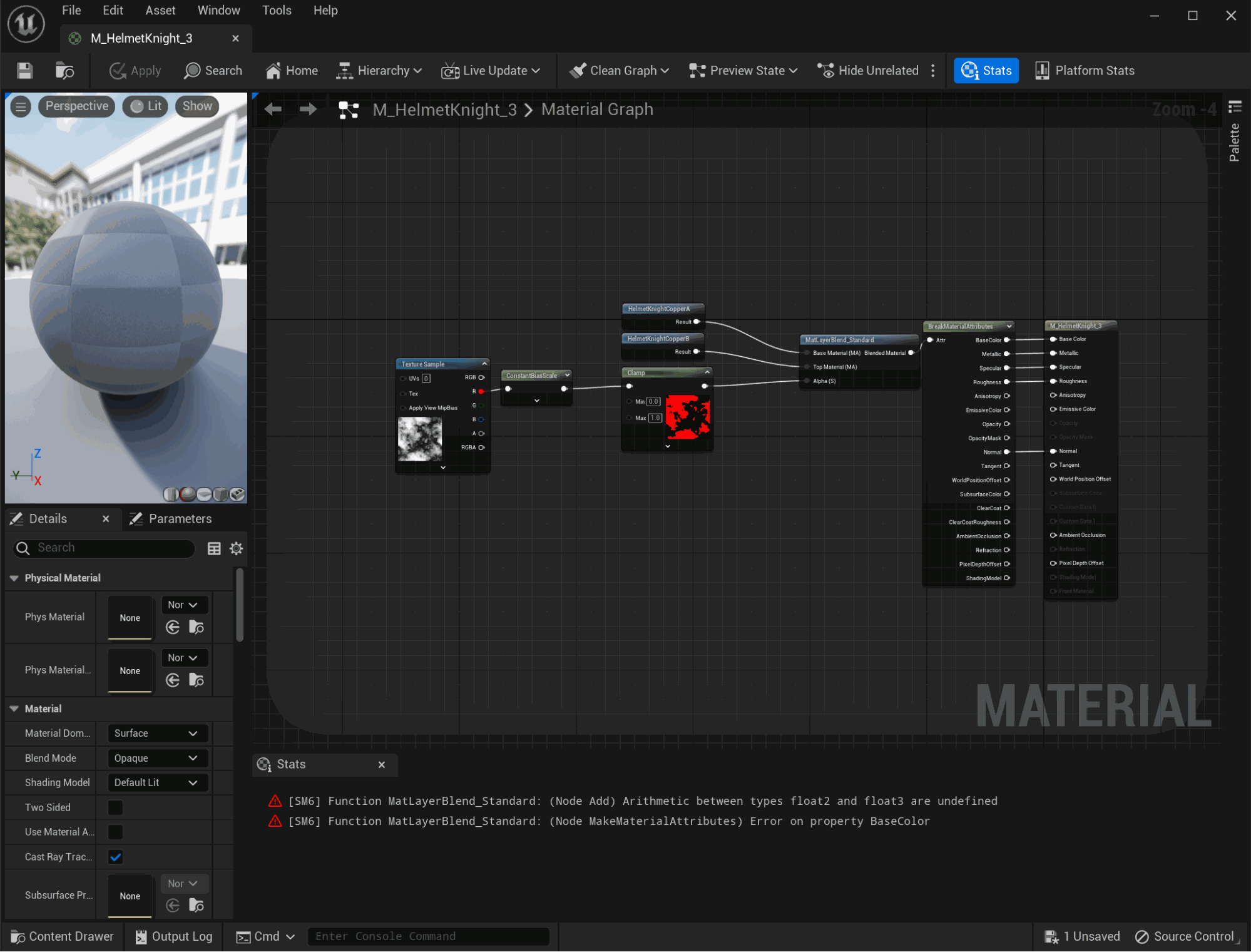
'머티리얼 그래프'에서 오류로 점프하는 기능이 추가되었습니다.
-
이제 '머티리얼 에디터'의 코멘트 블록이 블루프린트의 코멘트 블록과 동일한 기능을 제공합니다.
-
축소 시 코멘트 버블을 표시할 수 있습니다.
-
컬러를 넣거나 넣지 않고 코멘트 버블을 그릴 수 있습니다.
-
코멘트 블록이 표현식을 그룹화하거나 단독으로 사용될 수 있습니다.
-

템포럴 슈퍼 해상도 향상/최적화
템포럴 슈퍼 해상도에는 다음과 같은 변경사항이 포함됩니다.
-
안티 에일리어싱(Anti-Aliasing) 에 대한 엔진 퀄리티를 에픽(Epic) 으로 설정하면 스크린 퍼센티지가 200으로 설정됩니다. 7
- 이는
Scalability.ini환경설정 파일의r.TSR.History.ScreenPercentage=200에서 정의됩니다.
- 이는
-
TSR은 이제 픽셀보다 얇은 스태틱(속도버퍼를 그리지 않는) 지오메트릭 디테일을 재투영할 수 있습니다. 이는
r.TSR.Subpixel.Method 2를 통해 기본적으로 활성화됩니다.
자세한 내용은 템포럴 슈퍼 해상도를 참고하세요. TSR 피드백 스레드에 있는 EDC 포럼에서 개발 팀에 피드백을 남길 수도 있습니다.
노출 향상
노출은 다음과 같은 향상점을 포함합니다.
-
로컬 노출 하이라이트/섀도 대비 스케일에 대한 별도의 컨트롤이 추가되었습니다.
-
시각 적응 텍스처(Eye Adaptation Texture)가 시각 적응 버퍼(Eye Adaptation Buffer)로 대체되어 지원이 중단되며, 언리얼 엔진 5.3에서 제거될 예정입니다.
-
조도 기반 노출 계산에 대한 실험단계 지원이 추가되었습니다.
자세한 내용은 자동 노출을 참고하세요.
향상된 하드웨어 레이 트레이싱 툴
-
런타임에 레이 트레이싱을 토글할 수 있는 초기 지원이 추가되었습니다. 이 기능은 실험단계이며, 모든 가능한 지오메트리 타입을 지원하지는 않습니다.
-
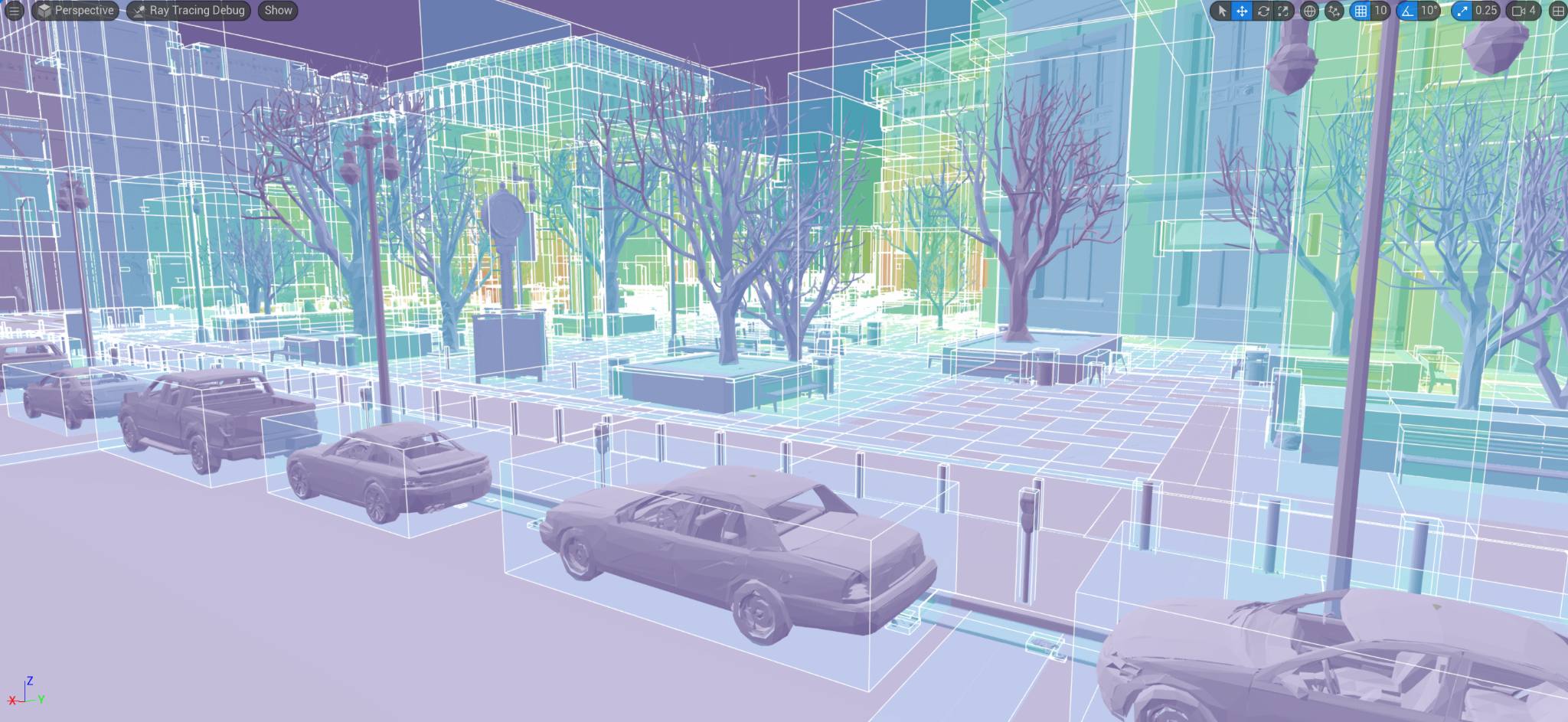
레이 트레이싱 씬 진단 및 최적화에 도움이 되도록 오버랩되는 레이 트레이싱 인스턴스를 표시하는 새로운 디버그 시각화 모드(라이팅포함(Lit) > 레이 트레이싱 디버그(Ray Tracing Debug) > 인스턴스 오버랩(Instance Overlap))가 추가되었습니다. 이는 다이내믹 인스턴스를 제외한 GPUScene에서 읽은 바운딩 박스를 표시합니다. 이 모드는 모든 플랫폼에서 작동하므로 에디터에서 아티스트가 사용할 수 있습니다.
-
이제 인라인 레이 트레이싱 패스에서 비동기 컴퓨트를 지원합니다.
자세한 내용은 하드웨어 레이 트레이싱을 참고하세요.
멀티 뷰 최적화
버추얼 프로덕션을 사용하면 퍼포먼스가 CPU 렌더 스레드 시간이나 때로는 GPU 시간에 의해 제한될 수 있습니다. 이 프로세스에서 퍼포먼스를 유지하기 위해서는 스테이지의 멀티 뷰 및 멀티 스레드 렌더링이 매우 중요합니다.
이 출시 버전에서는 다음과 같은 영역에서 최적화 및 향상이 이뤄졌습니다.
-
멀티 뷰 레이 트레이싱
-
서브미션 스레드를 통한 최적화
-
크로스 GPU 스톨(나이아가라 작업)
-
엔진의 Development 빌드에 대한 CPU 및 디버그 코드 오버헤드 감소
서브서피스 스캐터링 향상
서브서피스 스캐터링은 다음과 같은 향상점을 포함합니다.
-
인간의 피부를 보다 잘 표현하기 위해 거친 표면 렌더링이 향상되었습니다.
-
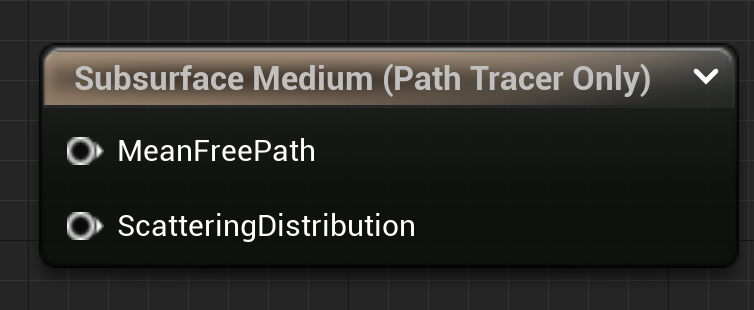
'머티리얼 에디터'에서 Subsurface Medium 출력 노드를 사용하는 패스 트레이스된 애니소트로픽 서브서피스 스캐터링이 추가되었습니다.
렌더 리소스 뷰어 툴
렌더 리소스 뷰어(Render Resource Viewer) 는 모든 GPU 메모리 할당 위치와 버텍스 버퍼 및 인덱스 버퍼 같은 렌더 리소스, 스태틱 및 스켈레탈 메시 같은 소스 에셋에 대한 완전한 비저빌리티를 제공합니다. 이를 통해 아티스트와 개발자는 GPU 메모리를 최적화하고 렌더링 예산 내에서 프로젝트를 유지하는 데 필요한 정보를 얻을 수 있습니다.
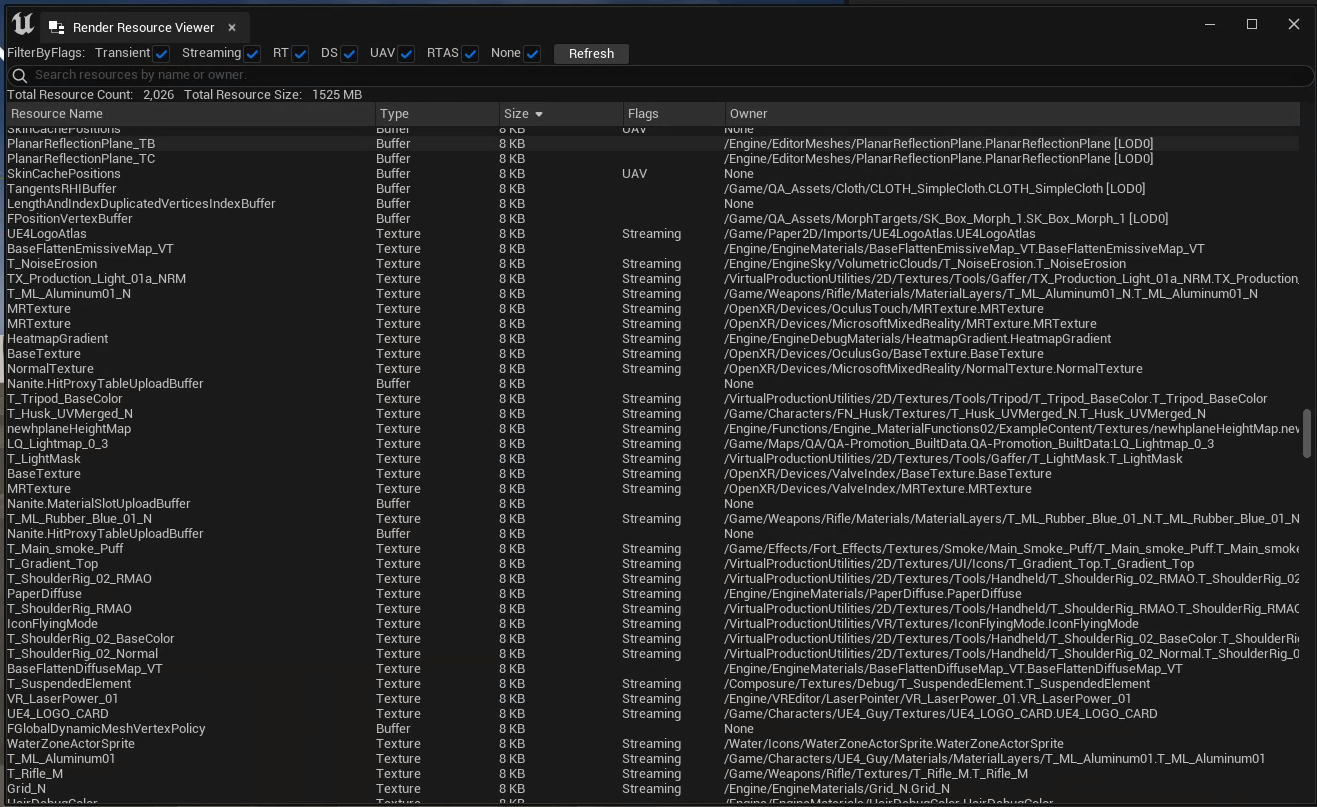
'렌더 리소스 뷰어'는 다음을 포함합니다.
-
각 렌더 리소스 할당을 이름, 크기, 타입, 플래그 및 오너와 함께 표시하는 에디터 내 인터랙티브 UI
-
정렬 및 필터링할 수 있는 할당 테이블
-
어떤 에셋으로 인해 할당이 되었는지 식별 및 파악하기 위한 정보를 제공하는 명확한 뷰
셰이더 컴파일 향상
셰이더 컴파일은 종종 발생하며 에디터 로딩, 맵 열기, PIE 실행 시 개발자 및 아티스트의 반복작업에 큰 영향을 미치고 프로젝트 쿠킹에도 상당한 영향을 미칩니다. 이 부분은 지속적으로 개발 및 향상 중인 영역입니다.
이번 출시 버전에는 다음이 포함됩니다.
-
셰이더 프리프로세싱에서 속도가 2배 향상된 새로운 셰이더 프리프로세서를 구현했습니다. 이 옵션은 기본적으로 활성화됩니다.
-
DDC에서 셰이더 캐시 시 비결정론적 문제를 유발하는 중복 컴파일을 줄였습니다.
-
엔진과 함께 배포되는 프로젝트에서 셰이더 DDC 캐싱이 수정되었으므로 이제 에픽게임즈에서 배포한 샘플 프로젝트 및 템플릿 실행 시 셰이더를 컴파일하는 것을 기다리지 않아도 됩니다.
-
셰이더 컴파일러 워커 프로세스의 언리얼 인사이트 트레이스 기능이 추가되었습니다.
-
이제 셰이더 컴파일 워커가 예외를 파악하고 이를 메인 쿠킹 프로세스로 다시 보고하기 때문에 충돌을 진단하기가 더 쉬워졌습니다.
티어 2 가변 비율 셰이딩(실험단계)
이전에는 XR 디바이스에서만 사용할 수 있었던 가변 비율 셰이딩(Variable Rate Shading)이 UE 5.2에서 데스크톱으로 확장되었습니다. 이제 이전 프레임을 분석하여 최종 이미지에 눈에 띄는 변화 없이 더 거친 셰이딩 레이트로 렌더링할 수 있는 영역을 결정하는 새로운 접근 방식인 대비 적응형 셰이딩(Contrast Adaptive Shading)을 지원합니다. 데스크톱 VRS는 5.2 버전에서 실험단계로 제공되며, 향후 출시 버전에서 추가 업데이트 및 향상이 이뤄질 예정입니다.
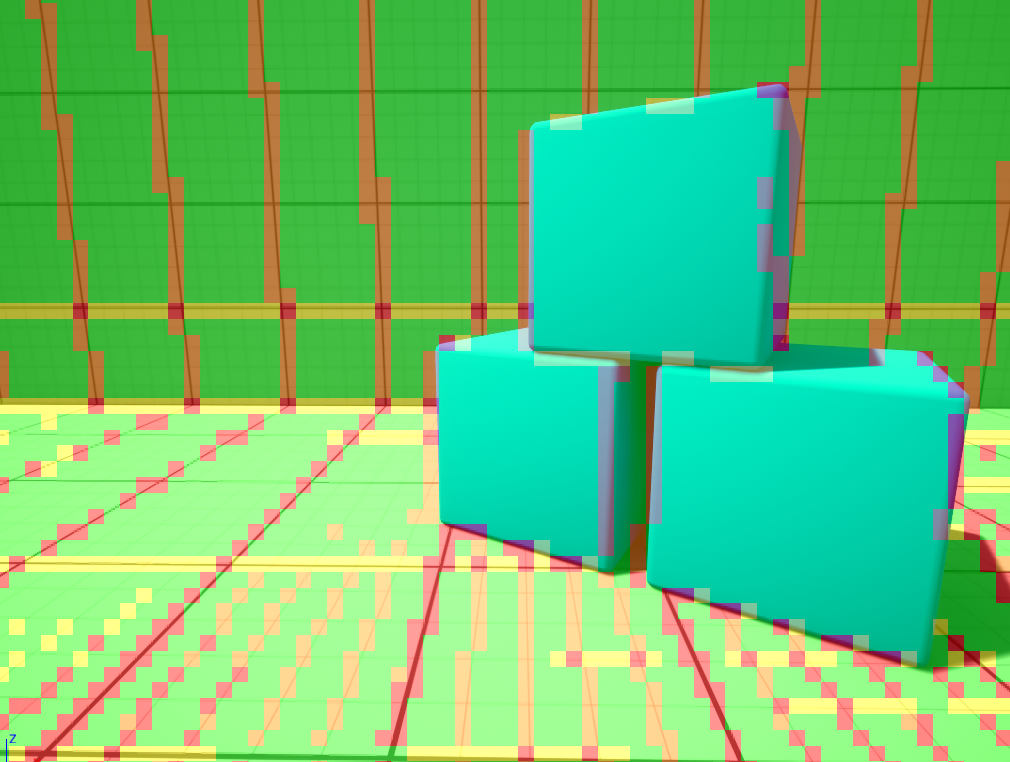
대비 적응형 셰이딩 + 디버그 비주얼라이저
-
대비 적응형 셰이딩에 대한 지원이 추가되었으며, 콘솔 명령
r.VRS.ContrastAdaptiveShading 1로 활성화할 수 있습니다. 사용 가능한 파라미터의 전체 목록은ContrastAdaptiveImageGenerator.cpp를 참고하세요. -
이제 나나이트, 라이트 함수, 디퍼드 데칼, 스크린 스페이스 리플렉션이 가변 비율 셰이딩의 영향을 받아 VRS를 활성화하면 해당 기능의 비용이 낮아질 수 있습니다.
-
개발자가 실시간으로 씬에 어떤 영향을 미치는지 확인할 수 있도록 VRS 매니저에 새로운 디버그 비주얼라이저가 추가되었으며, 콘솔 명령
r.VRS.Preview로 토글할 수 있습니다. -
XR 디바이스에서는 새로운 대비 적응형 셰이딩 제네레이터를 기존 XR 전용 포비티드 셰이딩 제네레이터와 함께 사용할 수 있으며, 두 기능을 한 번에 활성화하여 사용할 수도 있습니다.
오디오
오디오 파라미터 모듈레이션 향상
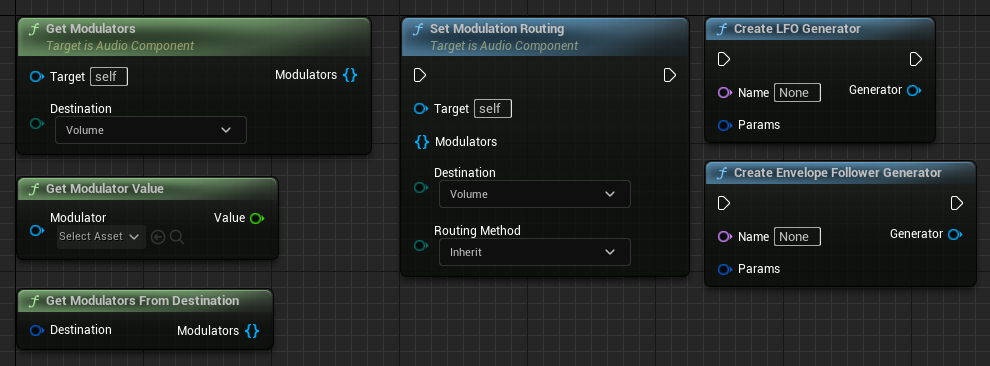
오디오 파라미터 모듈레이션의 편의성을 높이는 몇 가지 조치를 통해 워크플로를 향상했습니다.
-
이제 블루프린트에서 모듈레이션 파이프라인 전체를 구성할 수 있습니다.
-
블루프린트에서 LFO 및 엔벨로프 팔로워 제네레이터를 생성할 수 있습니다.
-
더 깔끔하고 읽기 쉬운 그래프를 생성할 수 있도록 블루프린트 노드를 업데이트했습니다.
-
이제 활성 사운드 라우팅에 대한 변경사항이 재시작 없이 즉시 적용되므로 더 빠르게 반복작업할 수 있습니다.
오디오 파라미터 모듈레이션에 대한 자세한 내용은 오디오 파라미터 모듈레이션 문서를 참고하세요.
새 메타사운드 노드
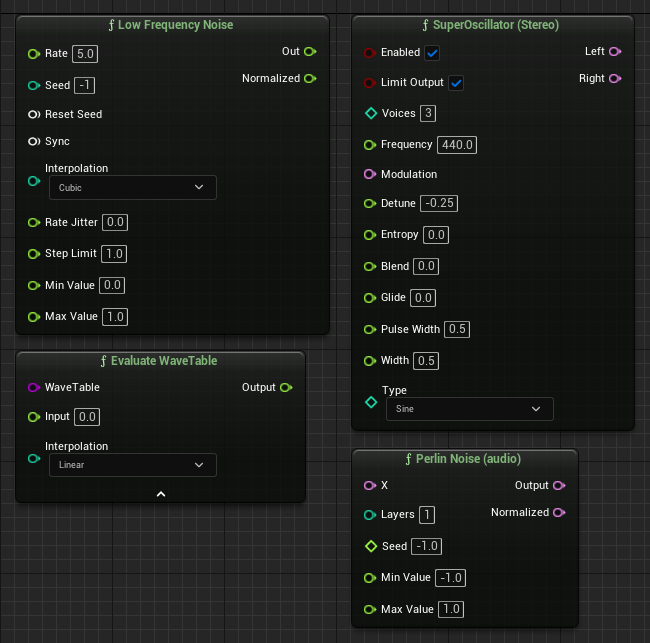
퍼포먼스가 뛰어난 그래프 기반 오디오 시스템인 메타사운드에서 노드 라이브러리를 확장했습니다.
-
Perlin Noise
-
Low Frequency Noise
-
Super Oscillator
-
Evaluate WaveTable
메타사운드 및 새 노드에 대한 자세한 내용은 메타사운드 문서를 참고하세요.
에디터 - UI
현지화 키 디버깅 향상
UE 5.2의 현지화 툴은 이제 UI에서 현지화 키를 표시하기 위한 디버그 컬처를 포함합니다. 콘솔 또는 명령줄에서 -culture=keys 명령을 사용하여 프로젝트를 이 컬처로 설정할 수 있습니다. 이렇게 하면 일반 텍스트의 자리에 현지화할 수 있는 텍스트에 대한 현지화 키가 표시됩니다. 이는 현지화 QA가 서식 또는 번역이 잘못된 텍스트의 현지화 키를 찾는 데 도움을 주며, 디버깅하는 동안 현지화되지 않은 텍스트가 노출됩니다.
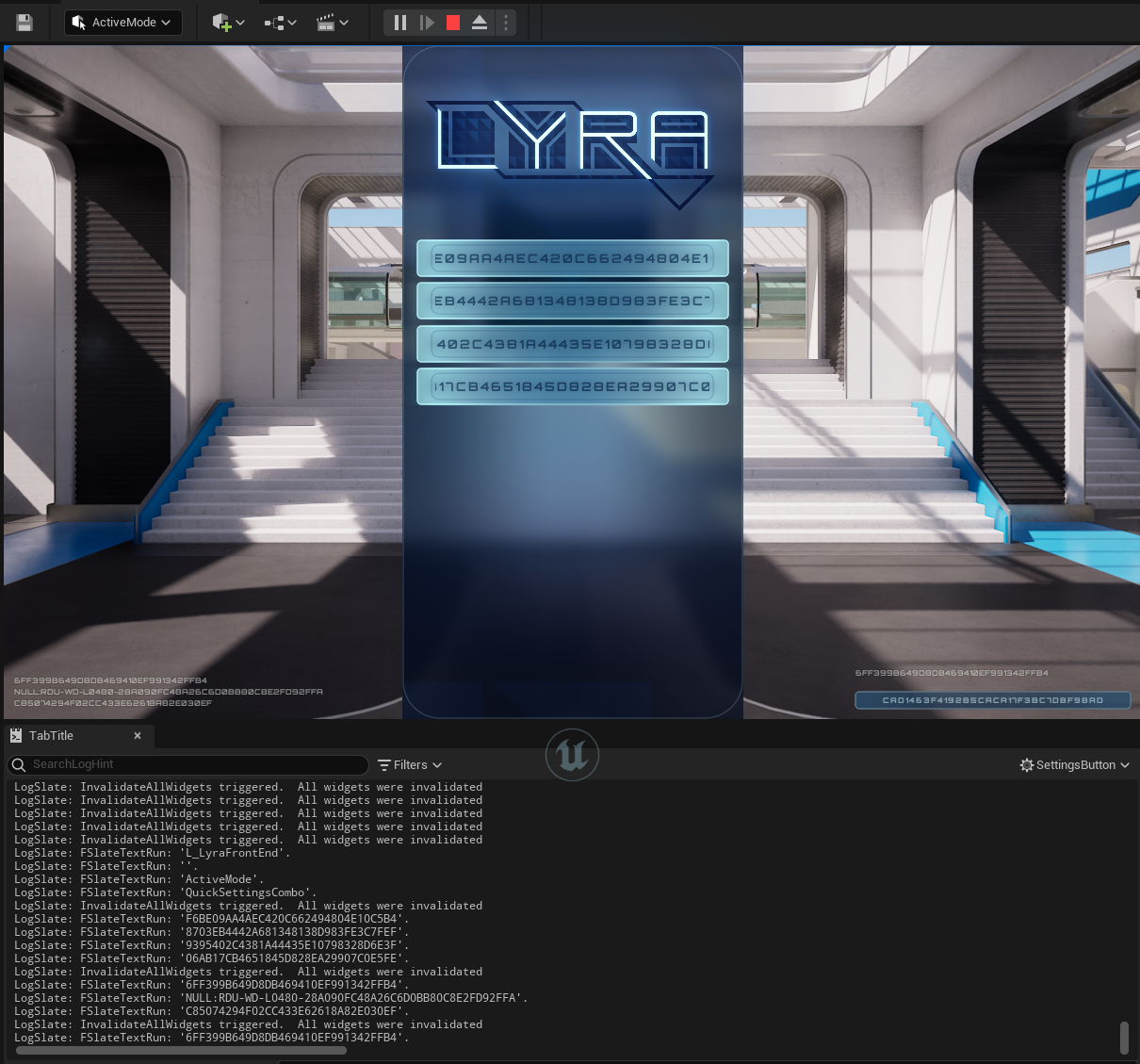
또한 화면상의 텍스트를 디버깅하는 Slate.LogPaintedText 라는 CVar도 있습니다. Slate.LogPaintedText 를 true 로 설정하면 현재 화면에 페인팅된 텍스트가 로그에 표시됩니다. 이것을 위에서 설명한 키 컬처와 결합하면 UI 클리핑 문제 없이 로그에서 전체 현지화 키를 볼 수 있습니다.
향상된 CommonUI 입력 지원(실험단계)
UE 5.2에서 CommonUI는 향상된 입력 시스템과 제한적으로 호환됩니다. 이 지원은 실험단계이며, 좀 더 테스트를 거쳐 다듬어지기 전까지는 프로덕션에 사용하지 않는 것을 권장합니다.
CommonUI에서 향상된 입력 지원을 활성화하려면 프로젝트에서 두 플러그인이 모두 활성화되어 있는지 확인한 후 프로젝트 세팅(Project Settings) 을 열고 게임(Game) > 일반 입력 세팅(Common Input Settings) > 향상된 입력 활성화(Enable Enhanced Input) 로 이동한 다음 '향상된 입력 지원 활성화(Enable Enhanced Input Support)'를 토글합니다.

그러면 향상된 입력 액션을 CommonUI의 UI 액션에 매핑할 수 있습니다. 자세한 내용은 향상된 입력과 함께 CommonUI 사용하기를 참고하세요.
확장된 CommonUI 문서
또한 CommonUI 문서에 입력 관리에 대한 자세한 내용이 추가되었습니다. 입력 라우팅의 작동 방식과 프로젝트에서 CommonUI를 미세조정하는 데 도움이 되는 몇 가지 툴에 대한 자세한 내용은 이 문서를 참고하세요.
스크립터블 툴 프레임워크(실험단계)
인터랙티브 툴 프레임워크(Interactive Tools Framework) 를 블루프린트 에 노출하는 새로운 실험단계 플러그인 세트가 추가되었습니다. 스크립터블 인터랙티브 툴(Scriptable Interactive Tool) 베이스 클래스의 BP 서브클래스를 생성하여 스크립터블 툴(Scriptable Tools) 에디터 모드에 커스텀 사용자 정의 툴을 추가할 수 있습니다. 이러한 툴은 모델링 모드(Modeling Mode) 의 툴과 유사하게 행동하며, 다음과 같은 특징을 갖습니다.
-
마우스 입력을 캡처할 수 있는 모달 툴입니다.
-
기즈모를 생성할 수 있습니다.
-
수락 및 취소할 수 있습니다.
또한 '모델링 모드'의 툴 프로퍼티 같은 표준 디테일 뷰를 통해 툴 프로퍼티를 추가하고 시각화할 수 있습니다. 델리게이트를 사용하여 프로퍼티 변경사항에 반응하는 기능도 지원됩니다.
'스크립터블 툴'은 지오메트리 스크립팅(Geometry Scripting) 을 함께 사용하여 복잡한 모델링 및 에셋 편집 워크플로를 구현할 수 있습니다. 하지만 '스크립터블 툴'을 사용하여 '모델링 모드' 또는 '지오메트리 스크립팅'과 관련이 없는 간단한 기능도 수행할 수 있습니다.
이러한 기능에 액세스하려면 편집(Edit) > 플러그인(Plugins) 에서 스크립터블 툴 프레임워크(Scriptable Tools Framework) 를 활성화합니다.

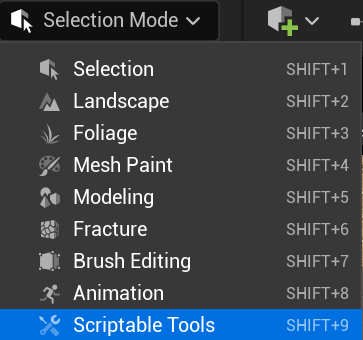
스크립터블 툴 에디터 모드는 선택 모드(Selection Mode) 아래에 표시됩니다.
모델링
모델링 워크플로 향상(베타)
모델링 워크플로는 다양한 인터랙션을 포함하는 수많은 단계로 구성될 수 있습니다. UE 5.2에서는 아티스트의 워크플로 효율성을 높이기 위해 진행 중인 프로세스에 여러 향상점이 도입되었습니다.
트랜스폼 패널
정밀한 트랜스폼 제어를 위해 새로운 트랜스폼 패널(Transform Panel) 위젯을 구현했습니다. 아티스트는 이를 모델링 기즈모와 결합하여 월드 스페이스와 로컬 델타 값을 수치로 제어할 수 있습니다. 위젯은 뷰포트에 직접 표시되며 다양한 모델링 및 UV 툴에서 사용할 수 있습니다.
이제 아티스트는 크기 비교를 위한 레퍼런스 에셋 없이도 모델을 정확하게 빌드하고 스케일 조절할 수 있습니다.
기즈모 향상
에픽게임즈는 '트랜스폼 패널'을 추가했을 뿐만 아니라 다음과 같이 모델링 기즈모를 지속적으로 향상하고 있습니다.
-
에디터 설정을 통해 에디터 표준 이동, 회전 및 스케일과 동일한 개별 기즈모를 켤 수 있습니다.
-
로컬 좌표계에서 이동 및 회전 스내핑을 지원합니다.
이러한 기즈모 옵션은 모델링 모드 빠른 세팅(Modeling Mode Quick Settings) 에서 톱니바퀴 아이콘을 클릭하면 표시되는 새 드롭다운 메뉴에서 액세스할 수 있습니다.
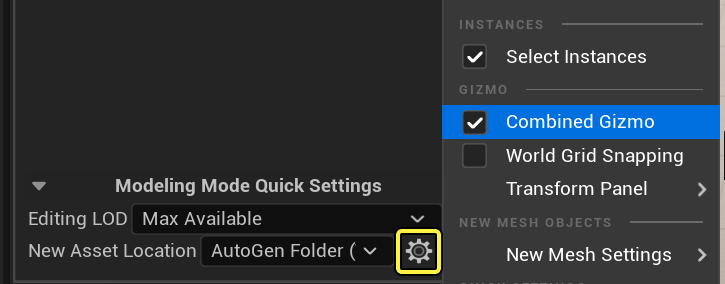
기즈모 기능의 확장을 통해 아티스트는 모델링 모드(Modeling Mode) 에서 지오메트리를 트랜스폼하는 복잡한 제어 기능을 사용할 수 있습니다.
'모델링 모드' 및 모델링 기즈모에 대한 자세한 내용은 모델링 모드 개요를 참고하세요.
폴리 편집 툴
폴리 편집(PolyEdit) 의 에지 삽입(Insert Edge) 작업에 에지를 연속적으로 삽입할 수 있는 옵션이 추가되어 토폴로지 편집을 보다 빠르고 정확하게 수행할 수 있습니다.
'폴리 편집' 툴에 대한 자세한 내용은 폴리모델 카테고리를 참고하세요.
심 툴
UV를 생성하는 것은 모델링 과정에서 뿐만 아니라 모델링 이후에 있어서도 중요한 단계이므로 이 프로세스를 간소화하기 위해 지속적으로 노력하고 있습니다. 5.2에서는 'UV 에디터(UV Editor)'의 '심(Seam)' 툴에 심을 추가 및 제거할 수 있는 옵션이 추가되었습니다. 이에 따라 3D 프리뷰 패널에서 인터랙티브하게 직접 심을 편집할 수 있어 아티스트의 UV 워크플로 경험이 보다 매끄러워졌습니다.
심 툴 및 기타 UV 툴에 대한 자세한 내용은 UV 에디터 문서를 참고하세요.
패턴 툴(베타)
지터
패턴(Pattern) 툴에 새로운 지터 프로퍼티를 추가했습니다. 아티스트는 이 세팅을 사용하여 보다 자연스럽게 반복작업을 수행하고 씬을 생성할 수 있습니다. 지터 세팅을 사용하면 다른 모델링 툴과 함께 결합하여 레벨 윤곽 작업을 빠르게 수행할 수 있습니다.
패턴 투영
또한 '패턴' 툴로 생성된 패턴을 월드에 투영할 수 있습니다. 이 생성 기능을 사용하면 패턴 엘리먼트를 랜드스케이프뿐만 아니라 다른 메시에도 분포할 수 있습니다. 이 같은 구현으로 메시, 특히 대규모 메시의 디테일을 효율적으로 추가할 수 있는 워크플로가 마련되었습니다.
또한 범위 내 패킹을 개선 하기 위해 Packed 모드가 이제 시작 스케일과 시작 회전을 고려하도록 업데이트되었습니다.
렌더 캡처 베이킹 툴(베타)
5.1에서는 모델링 모드 의 Baking 카테고리에 BakeRC 라는 '렌더 캡처 베이킹(Render Capture Baking)' 툴을 추가했습니다. BakeRC는 가상 사진 또는 렌더 캡처를 통해 여러 소스 메시에서 타깃 메시의 텍스처를 베이킹 합니다.
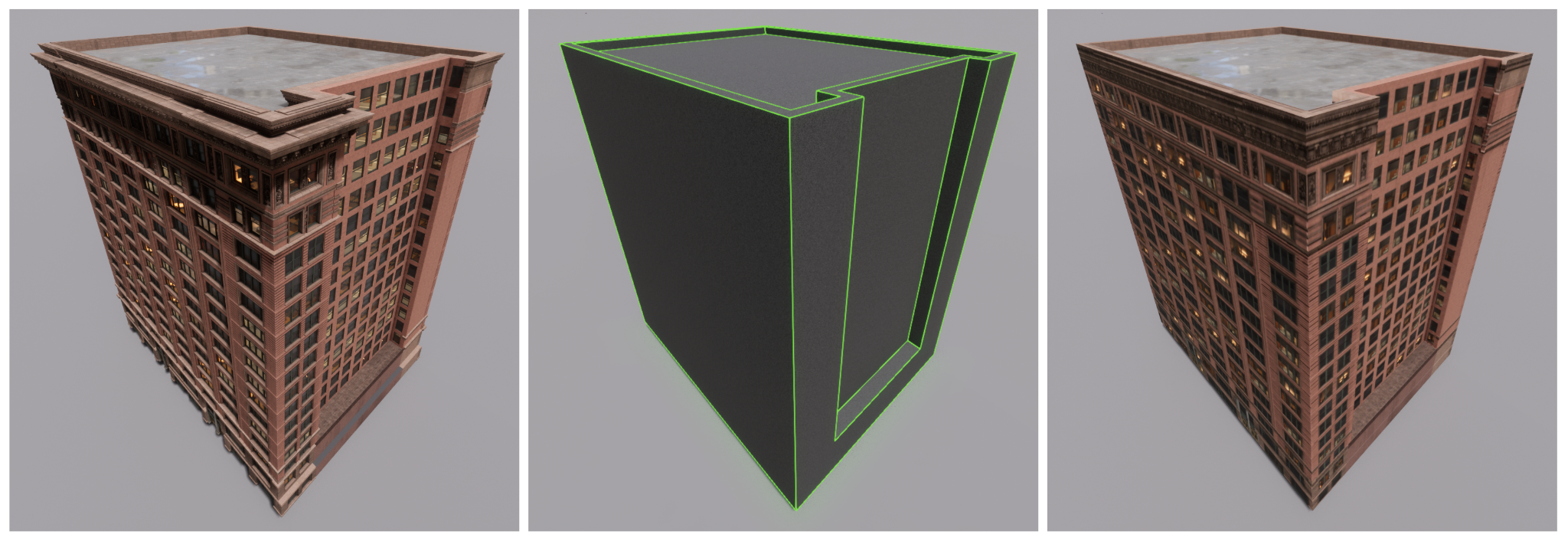
5.2에서 다음을 지원하도록 툴이 업데이트되었습니다.
-
서브서피스 컬러 채널
-
오파시티 채널
-
더 높은 퀄리티의 텍스처 멀티샘플링
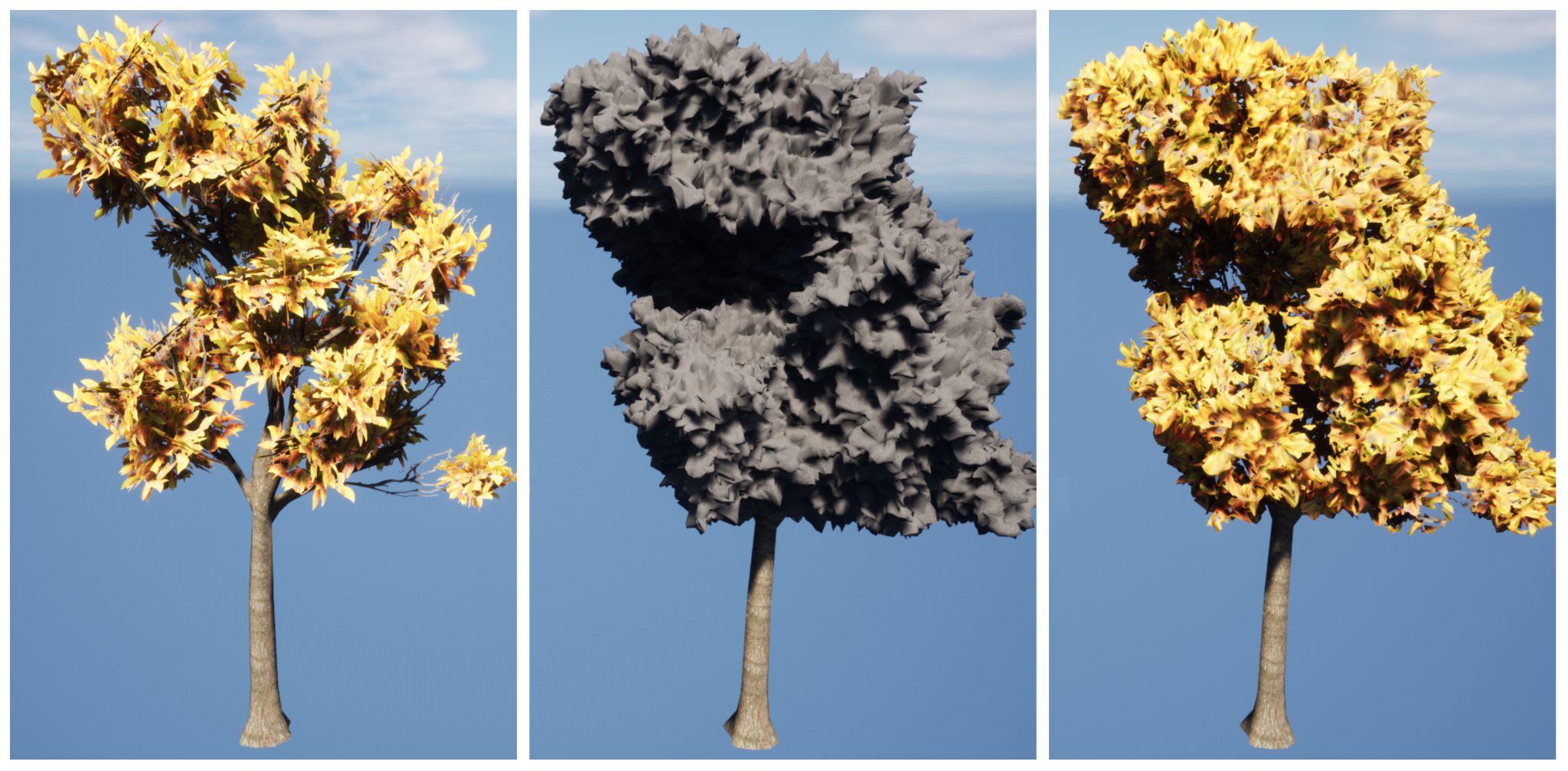
또한 아티스트가 정확하지 않은 오클루전 테스트로 인한 굽기 아티팩트를 제거하는 데 도움이 되는 클린업 한계치(Cleanup Threshold) 옵션이 툴에 추가되었습니다. 이러한 새로운 기능은 퍼포먼스 및 반복작업 시간을 향상해 줍니다.
지오메트리 스크립팅(실험단계)
지오메트리 스크립팅(Geometry Scripting) 은 테크니컬 아티스트가 커스텀 모델링 툴과 워크플로를 제작할 수 있는 툴키트를 제공합니다. 에픽게임즈는 다음과 같은 추가 및 향상점을 통해 기능을 지속적으로 확장하고 있습니다.
-
사용자 요청에 따라 로컬 피벗 위치를 기준으로 공간에서 메시의 위치를 손쉽게 지정할 수 있는 Translate Pivot To Location 을 추가했습니다.
-
Copy Mesh From Component 노드는 이제 스플라인 메시 컴포넌트, 포즈가 지정된 스킨 적용된 메시 컴포넌트, 스켈레탈 메시 컴포넌트 에서 다이내믹 메시를 (현재 디폼된 상태로) 복사할 수 있습니다.
-
트랜스폼을 생성하고 쿼리할 수 있는 몇 가지 유틸리티 및 편의 기능을 구현했습니다.
-
메시 버텍스에 저장된 프로퍼티의 무게중심 트라이앵글 보간을 위한 함수 세트와 메시 트라이앵글 내의 한 점에 대한 무게중심 좌표를 계산하는 함수를 추가했습니다. 이러한 함수를 사용하면 메시 프로퍼티를 다른 용도로 손쉽게 샘플링할 수 있습니다.
레이 함수
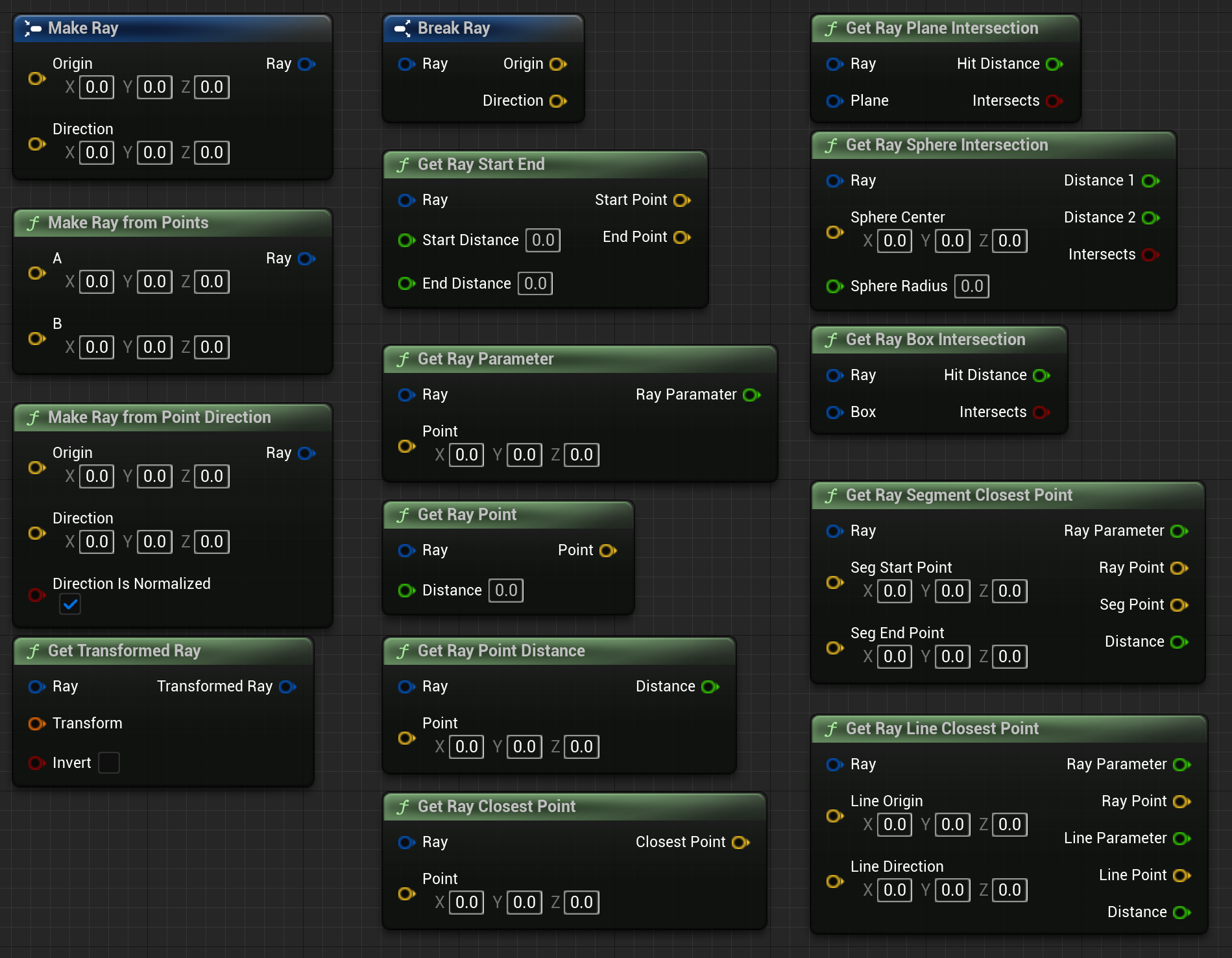
레이(Ray) 유틸리티 함수는 블루프린트에 FRay 타입을 노출하고 레이 생성 및 쿼리를 위한 함수 라이브러리를 추가합니다. 블루프린트에서 인터랙티브 유저 인터페이스를 빌드하는 데 특히 유용하며, 스크립터블 툴(Scriptable Tools) 플러그인을 지원하도록 특별히 디자인되었습니다.
박스 함수
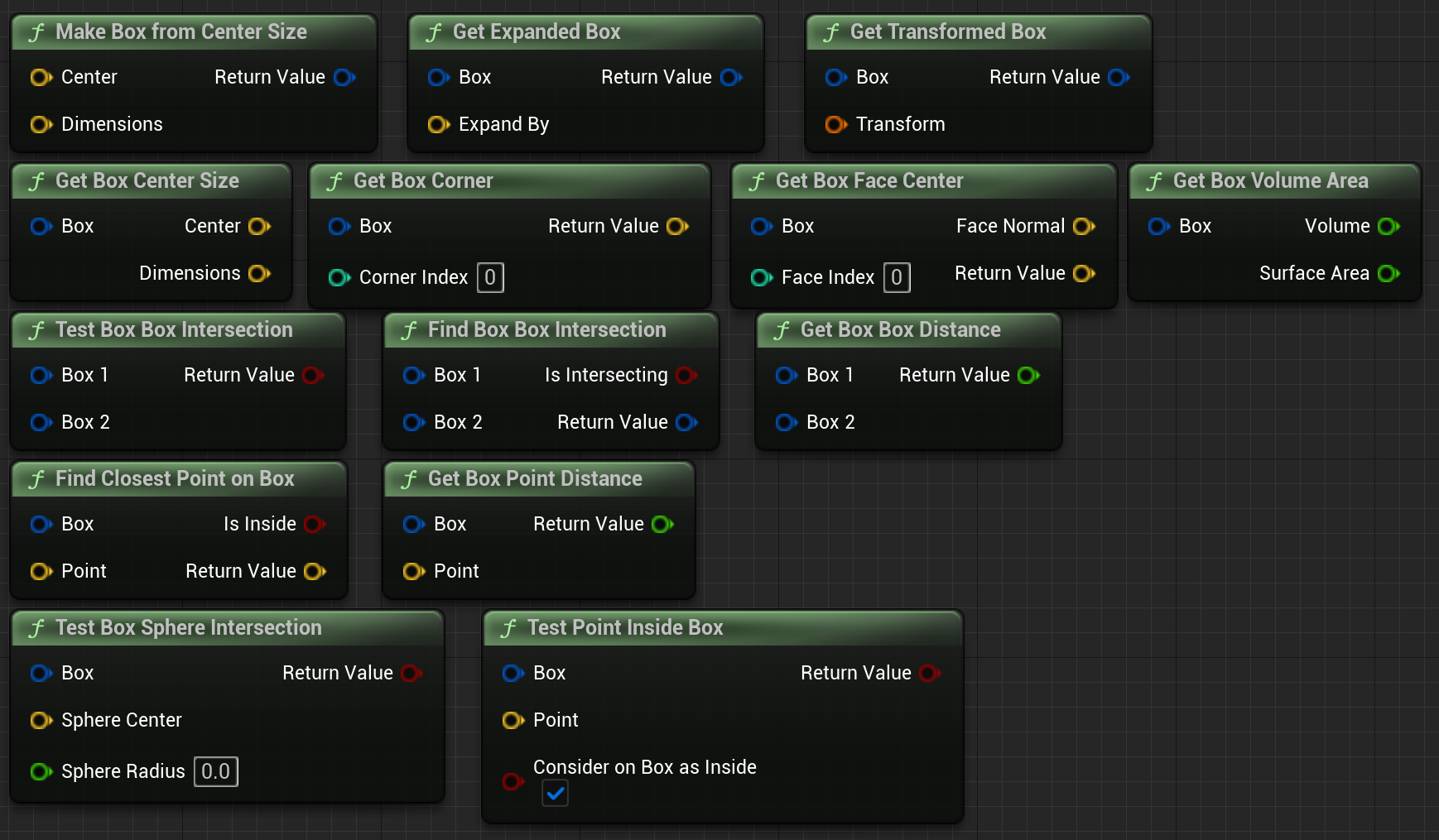
FBox 오브젝트로 작업하기 위한 새로운 박스(Box) 함수 유틸리티 라이브러리를 추가했습니다. 이는 기존 C++ API와 유사한 블루프린트 API를 노출합니다. 이러한 종류의 기본적인 수학 함수와 노드는 다수의 기본적인 수학 노드를 사용하여 일반적인 수학 연산을 다시 구현해야 하는 시간을 크게 절약할 수 있습니다.
본 웨이트
스킨 웨이트를 조작하기 위한 소규모의 함수 라이브러리를 추가했습니다. UDynamicMesh 오브젝트는 Copy Mesh From Skeletal Mesh 함수를 통해 스켈레탈 메시 에셋에서 복사되어 초기화 될 때 스킨 웨이트를 지원합니다. 버텍스에서 스킨 웨이트를 쿼리하고 수정한 다음 스켈레탈 메시로 다시 쓸 수 있어 단순하지만 잘 작동하는 프로시저럴 스킨 웨이트 제작 메커니즘을 제공합니다.
메시 표면 샘플링
임의의 3D 메시에 적절하게 분포된 샘플 포인트를 생성하기 위해 새로운 기법을 구현하였습니다. 이 기법은 푸아송 다트 던지기(Poisson Dart Throwing)를 기반으로 하며, 스피어를 각 샘플 포인트 및 반경 내에 배치할 때 교차하는 스피어가 없도록 해 줍니다. 균등한 간격과 균등하지 않은 간격이 모두 지원됩니다.
새로운 기법을 사용하기 위해 다음과 같은 노드가 추가되었습니다.
-
Compute Point Sampling
-
Compute Non Uniform Point Sampling
-
Compute Vertex Weighted Point Sampling
이러한 함수는 GeometryCore 라이브러리의 새로운 FMeshSurfacePointSampling 클래스를 기반으로 합니다.
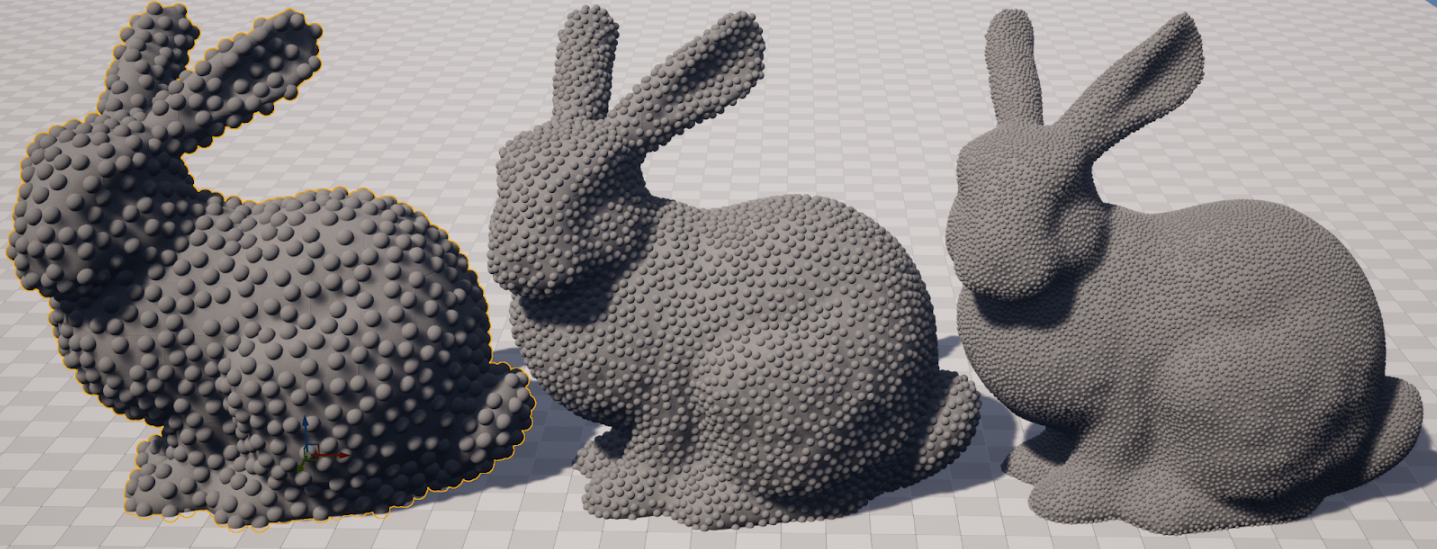
지오메트리 스크립팅 및 전체 노드 목록에 대한 자세한 내용은 지오메트리 스크립팅 사용자 가이드 및 지오메트리 스크립팅 레퍼런스 문서를 참고하세요.
애니메이션
시퀀서
무비 렌더 큐의 콘솔 변수 프리셋(베타)
이제 무비 렌더 큐(Movie Render Queue, MRQ)에서 프리셋 콘솔 변수(Console Variable, CVar) 에셋을 사용할 수 있습니다. 콘솔 변수 에디터에서 프리셋 CVar를 만들고 나면 MRQ에서 이를 지정하여 렌더링 전에 CVar 프리셋을 설정한 순서대로 적용할 수 있습니다. 또한 MRQ에서 프리셋을 사용하여 CVar를 오버라이드할 수 있습니다.
서브시퀀스 트랙 향상
이제 레벨 시퀀스 내에서 서브시퀀스를 동적으로 블렌딩하여 브로드캐스트 및 게임플레이 동안 런타임 재생을 보다 세부적으로 제어할 수 있습니다.
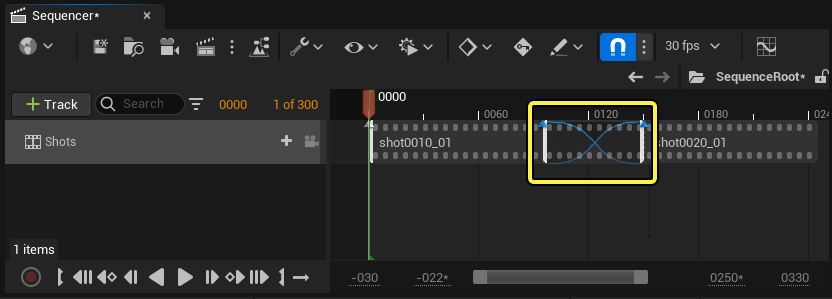
또한 블렌드를 변형할 때 포즈 간에 가장 짧은 루트를 취하기 위해 쿼터니언 보간(Quaternion Interpolation) 을 사용하도록 시퀀스 블렌드를 설정할 수 있습니다.
애님 트랙 루트 모션 향상
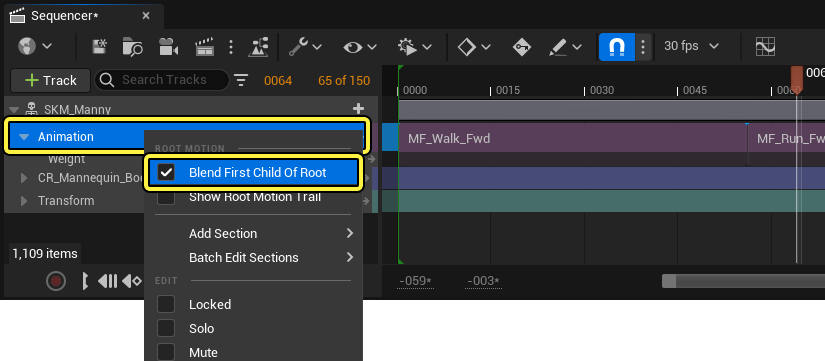
루트의 첫 번째 자손 블렌드(Blend First Child of Root) 프로퍼티를 사용하여 루트 모션 애니메이션 시퀀스를 블렌딩하면 루트 모션이 루트 본의 첫 번째 자손 본에 있는 경우에도 포즈를 블렌딩할 수 있습니다. 또한 루트 모션 오프셋을 적용할 때 이제 매니퓰레이터가 항상 일치하는 공간에서 작동합니다.
섹션 컬러
이제 시퀀서 샷(Shot) 및 섹션(Section) 에 컬러를 지정하여 보기 편하게 정리할 수 있습니다.
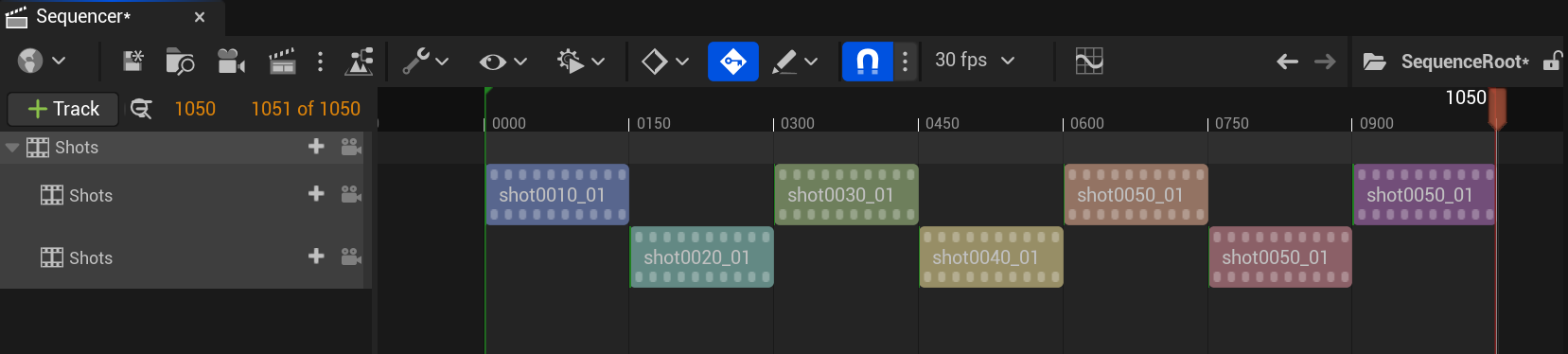
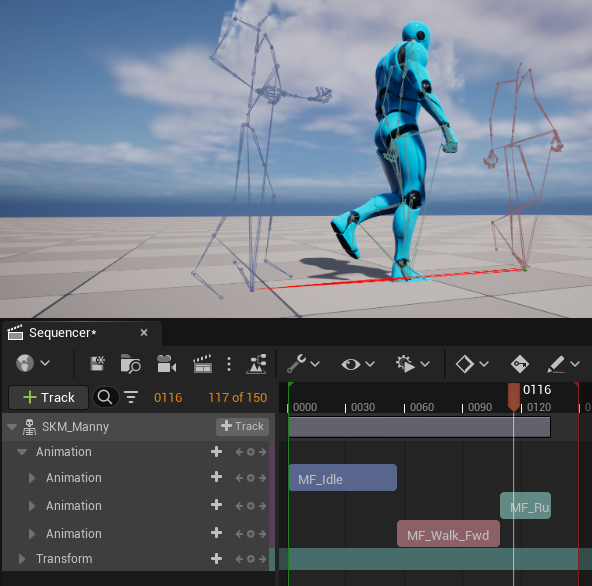
그리고 샷을 블랜드할 때 지정한 샷 및 섹션 컬러를 디버깅 툴로도 사용할 수 있습니다. 샷 내에서 섹션에 컬러를 할당한 후 섹션 컬러에 따라 본에 컬러가 지정된 캐릭터 스켈레톤의 디버그 렌더를 활성화할 수 있습니다.
프레임 마커 향상
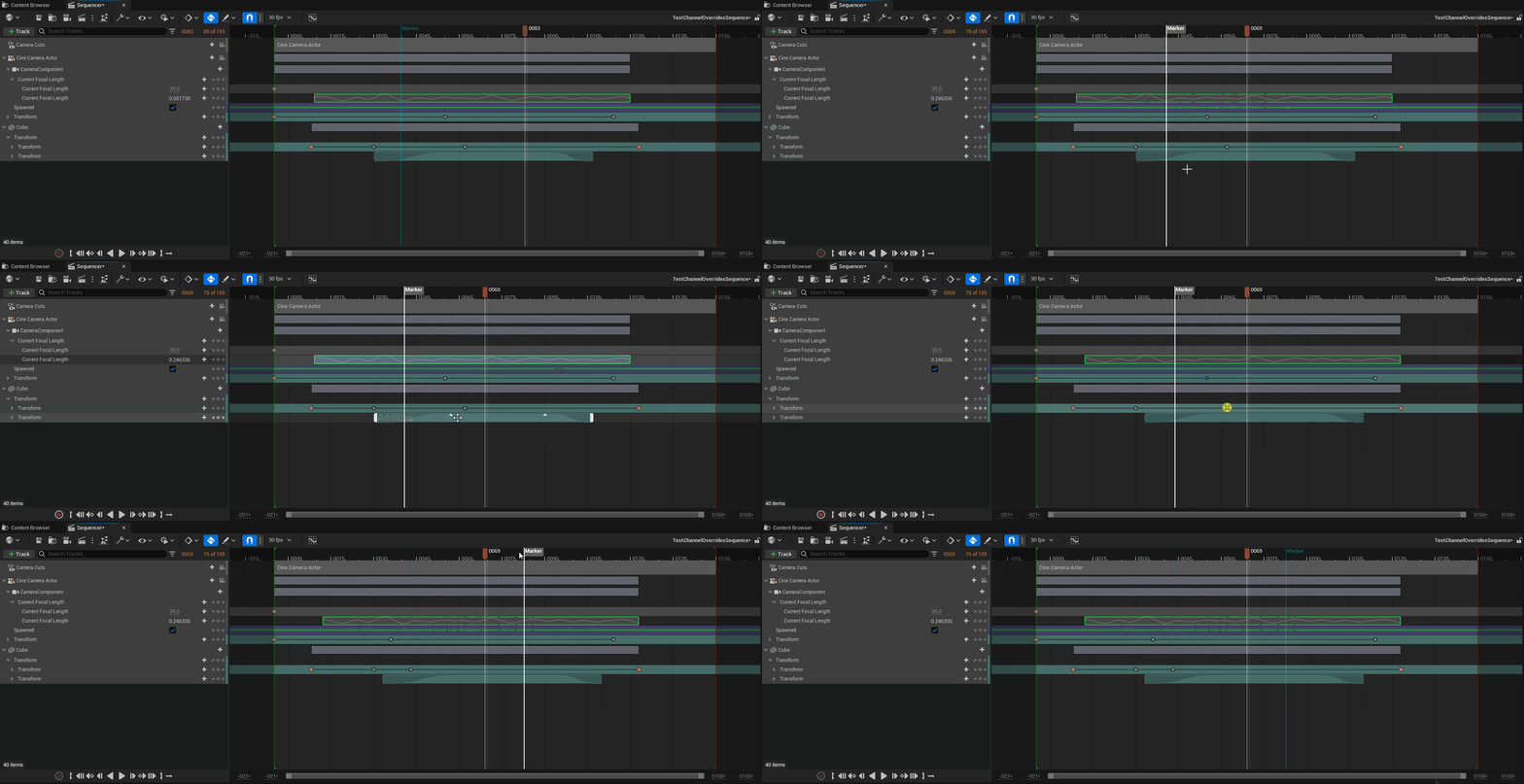
타임라인에서 시퀀스를 편집할 때 프레임 마커를 보고, 선택하고, 편집하기가 더 쉬워졌습니다. 이제 프레임 마커를 우클릭하여 마커 컬러 조정, 코멘트 추가, 마커의 결정론 펜스(Determinism Fence) 여부 설정 등 프로퍼티 및 세팅이 제공되는 컨텍스트 메뉴를 열 수 있습니다.
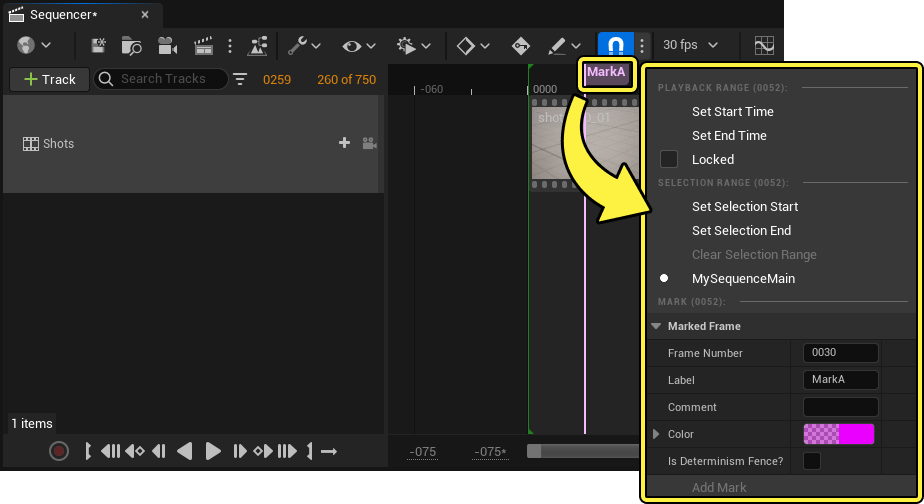
또한 다른 시퀀서 요소와 함께 프레임 마커를 다중 선택하여 일괄 편집할 수 있습니다.
리타기팅
리타기팅 Python 지원
이제 커스텀 Python 스크립트를 구현하여 IK 릭을 사용한 리타기팅 프로세스를 자동화하고 더 빠르게 처리할 수 있습니다.
리타깃 체인을 위한 새로운 매핑 툴
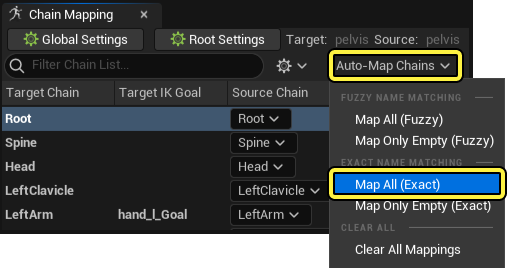
IK 릭을 사용하여 리타깃 체인을 생성할 때 팝업 대화창은 줄이고 소스 및 타깃 캐릭터와 관련된 컨텍스트 버튼을 표시하는 데 치중하도록 유저 인터페이스가 간소화되었습니다.
또한 소스 및 타깃 캐릭터 간에 리타기팅된 체인을 매핑할 때 정확한 이름을 사용할 수 있습니다.
컨트롤 릭
컨트롤 릭 닫힌 스플라인
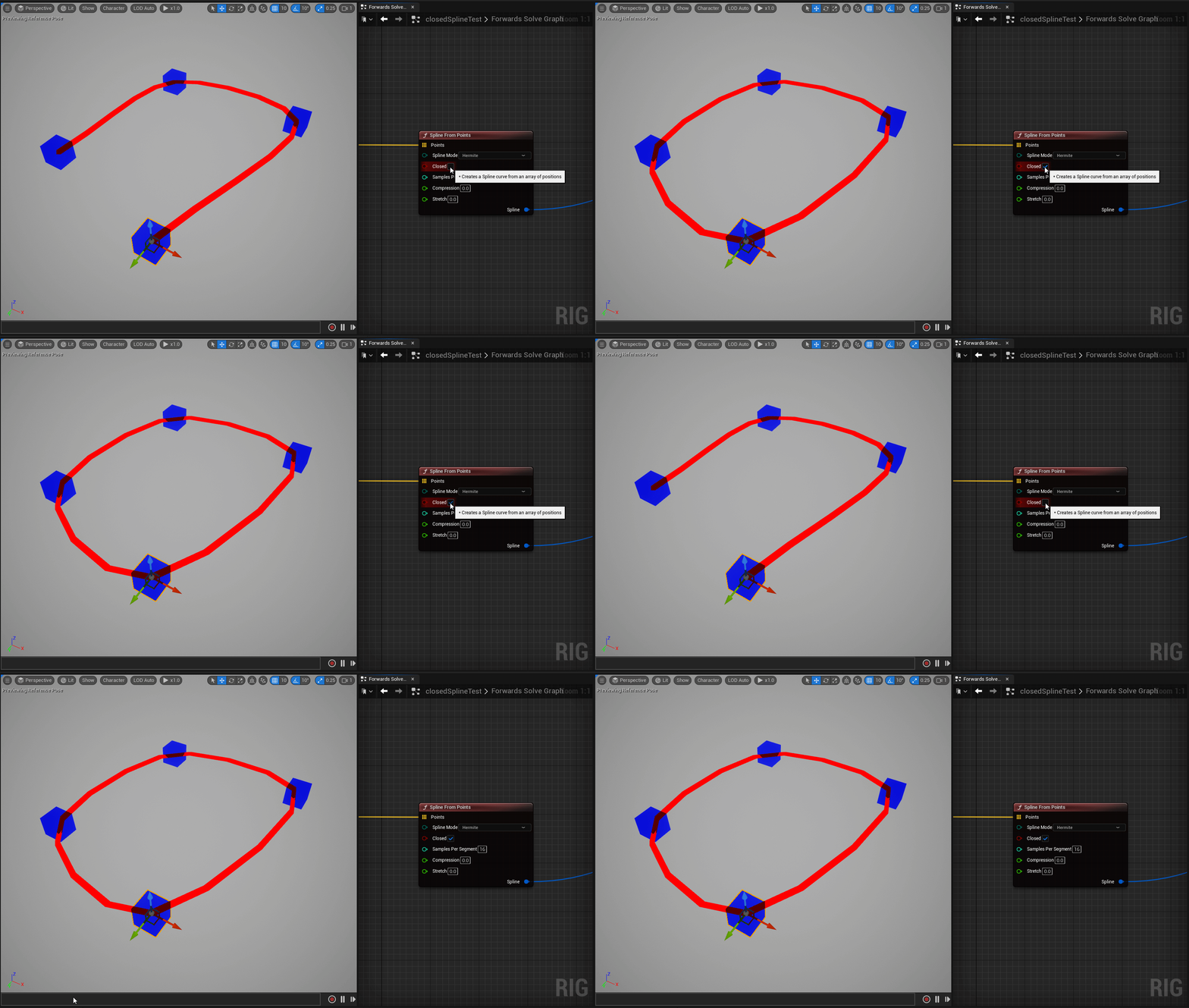
컨트롤 릭에서 스플라인을 생성할 때 이제 Spline from Points 노드의 Closed 핀을 활성화하여 닫힌 스플라인(Closed Spline) 을 생성할 수 있습니다.
컨트롤 릭 그래프 향상
-
ItemNameSearch 노드는 이제 와일드카드 레퍼런스를 지원합니다.
-
컨트롤 릭을 사용하여 애니메이팅하는 동안 신규 Restrict Switching 프로퍼티를 컨트롤에서 활성화하면 스페이스 전환을 제한하여 컨트롤 조작 오류를 방지할 수 있습니다.
-
그리고 컨스트럭션 그래프(Construction Graph) 를 사용하여 프로시저럴 컨트롤을 스폰할 때 새로운 Get Shape Settings 및 Set Shape Settings 노드를 사용하여 쿼리하고 컨트롤 셰이프를 설정할 수 있습니다.
-
컨트롤 릭을 사용하여 애니메이팅하는 경우 이제 필터링된 채널(Filtered Channel) 이 컨트롤의 채널별 비저빌리티 및 키 지정 기능을 지원합니다.
-
또한, 실행 스택(Execution Stack) 의 특정 인스트럭션으로 점프할 수 있습니다.
애니메이션 블루프린트
스테이트 머신 다시 링크하기
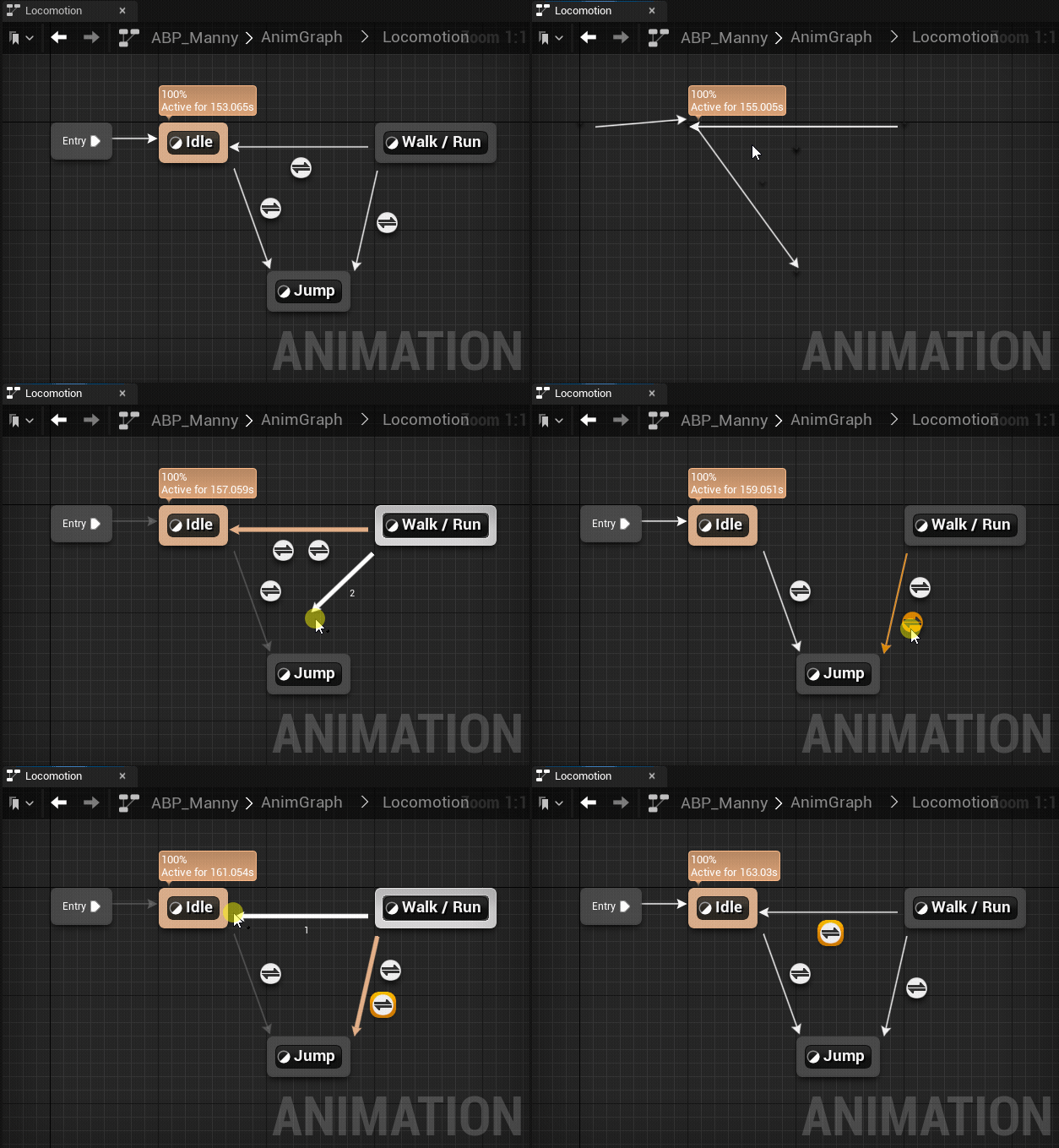
이제 스테이트 머신에서 트랜지션 룰을 다시 링크할 수 있습니다. 트랜지션 화살표를 새 스테이트로 드래그하면 모든 트랜지션 룰 및 로직이 새 링크로 넘어갑니다. 또는 일부 트랜지션 룰을 다중 선택한 후 트랜지션 화살표를 새 스테이트로 드래그하면 선택된 트랜지션 로직만 넘어가고 선택되지 않은 규칙은 여전히 이전 애니메이션 스테이트에 링크된 채로 유지됩니다.
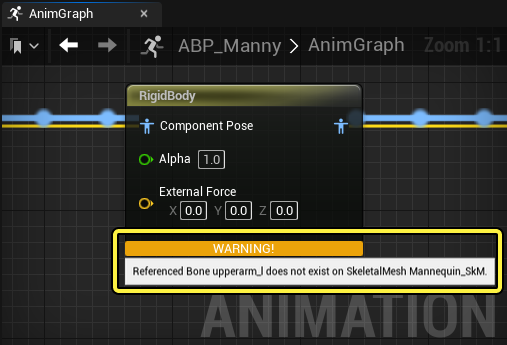
RigidBody 노드 경고
애니메이션 블루프린트의 RigidBody 노드는 이제 체인에 본이 없는 경우 시각적 경고를 표시합니다.
런타임
스켈레톤 호환성 향상
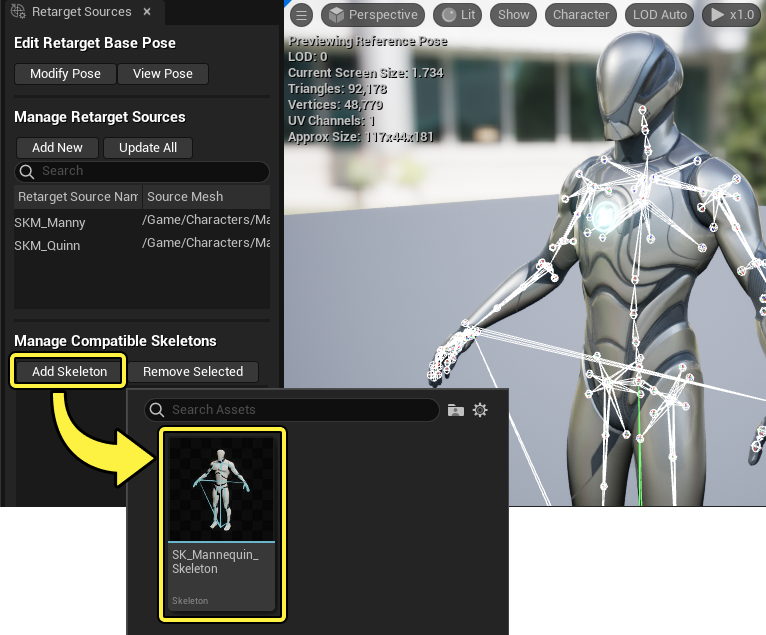
이제 동일한 스켈레탈 구조를 공유하는 스켈레톤 에셋 간의 스켈레톤 호환성이 언리얼 엔진에서 자동으로 인식됩니다. 해당하는 경우 동일한 스켈레탈 구조를 공유하는 스켈레톤 에셋 간에 애니메이션과 같은 에셋을 공유할 수 있으며, 에셋 선택 프로퍼티에서 이를 선택할 수 있습니다.
기본적으로 호환되지 않는 스켈레톤은 에셋 선택 프로퍼티에 표시되지 않으며, 에디터 개인설정(Editor Preferences) 또는 에셋 선택 세팅(Settings) 메뉴의 호환되지 않는 스켈레톤 선택 허용(Allow Incompatible Skeleton Selection) 을 사용하여 표시 여부를 토글할 수 있습니다.
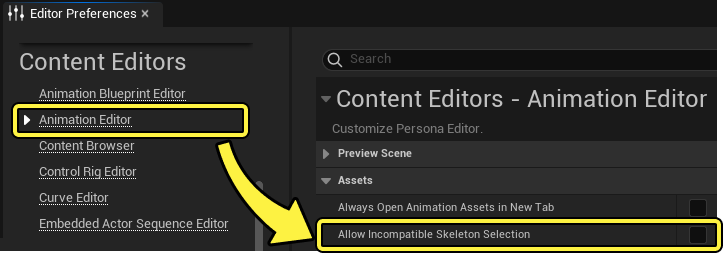
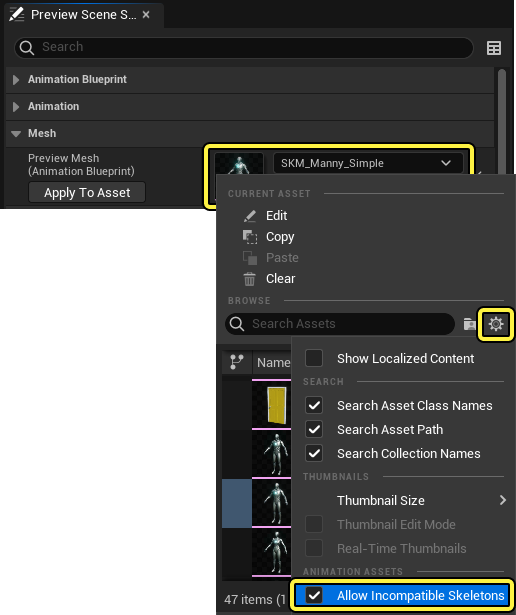
또한 스켈레톤 호환성을 수동으로 설정하는 작업은 이제 양방향으로 이뤄집니다. 즉, 한 스켈레톤을 다른 스켈레톤과 호환되도록 설정한 후 애니메이션을 두 스켈레톤에서 공유할 수 있습니다.
되감기 디버거 향상
이제 되감기 디버거는 녹화 세션당 하나의 트레이스 파일 을 출력하여 디버그 데이터를 정리하고 파일 크기를 줄입니다.
또한 되감기 디버거는 다음 기능을 제공합니다.
-
새 프로퍼티 감시 트랙을 사용하면 애니메이션 시스템의 값을 되감기 디버거 타임라인의 자체 트랙처럼 분리하여 관찰할 수 있습니다.
-
이제 되감기 디버거를 사용하는 동안 캐릭터 스켈레톤의 포즈 감시 디버그 렌더를 토글할 수 있습니다.
애니메이션 합성
ML 디포머 샘플 프로젝트
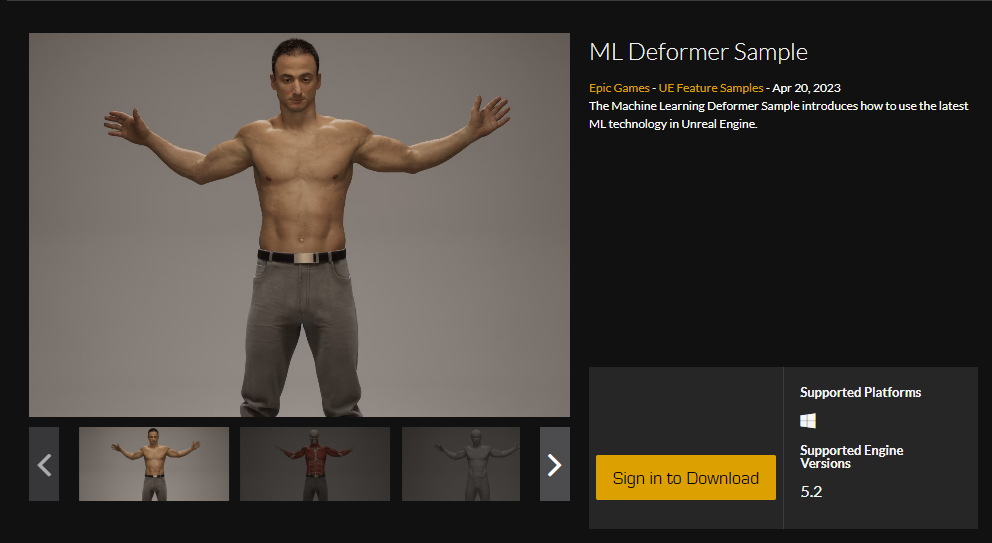
이제 머신 러닝(Machine Learning, ML) 디포머 시스템을 사용하는 전신 캐릭터 메시 디포메이션 쇼케이스가 포함된 새로운 ML 디포머 샘플 프로젝트 를 다운로드할 수 있습니다. 이 샘플 프로젝트에는 컨트롤 릭으로 구동되는 애니메이팅된 캐릭터의 인터랙티브 시네마틱이 포함되어 있으며, 선형적으로 스킨된 메시의 재생과 ML 디포머에서 생성된 디포메이션을 비교하여 관찰할 수 있습니다. 또한 대체 애니메이션, 컨트롤 릭 편집, 클로딩 및 스킨 비저빌리티 토글을 통해 캐릭터를 조작하여 메시가 실시간으로 변화를 관찰하고 ML 디포머 시스템과 기능에 대해 자세히 살펴볼 수 있습니다.
ML 디포머 샘플 프로젝트는 언리얼 엔진 마켓플레이스 의 UE 온라인 러닝 탭에서 다운로드할 수 있습니다.
ML 디포머 향상
머신 러닝(ML) 디포머 시스템이 크게 향상되어 보다 빠르고 효율적인 워크플로와 한층 디테일하고 정확한 결과물을 제공합니다. 다음과 같은 주목할 만한 향상이 이뤄졌습니다.
-
뉴럴 모프 모델의 추론 퍼포먼스가 대폭 향상되었습니다. 경우에 따라 CPU 측에서 최대 20배 더 빨라졌으며, 이제 일반적으로 업데이트별로 수 밀리초밖에 걸리지 않습니다.
-
로컬 모드의 뉴럴 모프 모델이 커브를 지원합니다.
-
뉴럴 모프 모델의 로컬 모드에 본 및 커브 그룹 지원이 추가되었습니다. 이를 통해 디포메이션이 여러 본 또는 커브에 의존하는 경우 더 높은 퀄리티의 디포메이션이 가능합니다.
-
뉴럴 모프 모델의 퀄리티 레벨을 통해 활성 모프 타깃의 최대 수를 LOD 형식처럼 설정할 수 있습니다. 하지만 이는 현재 LOD 0에서만 작동합니다.
플랫폼
macOS 개발 요구 사항
macOS에서 언리얼 엔진 5.2를 실행하는 경우 반드시 다음과 같은 개발 요구 사항을 충족해야 합니다.
-
최소 macOS 버전: 12.5 Monterey 이상
-
권장 macOS 버전: 최신 macOS Ventura
-
최소 Xcode 버전: 14.1
이는 App Store의 신규/예정 최소 사양을 반영합니다. 향후 macOS 요구 사항에 iOS, tvOS 및 iPadOS의 요구 사항을 반영하여 Apple 플랫폼 전반을 일관성 있게 지원할 예정입니다.
언리얼 에디터를 위한 Apple Silicon 기본 지원
UE 5.2부터 에픽게임즈 런처는 macOS용 언리얼 에디터 빌드를 유니버설 바이너리와 함께 배포합니다. 이러한 바이너리는 x86-64 및 arm64 아키텍처 모두를 위한 슬라이스를 가지고 있어 이전 세대의 Intel 기반 Mac과 현재 세대 Apple Silicon Mac을 모두 기본 지원합니다. 어느 쪽을 사용하든 에디터는 하드웨어 아키텍처에 적합한 슬라이스를 사용하여 자동으로 실행됩니다. 에디터가 이제 인스트럭션 변환을 위해 Rosetta2에 의존하지 않으므로 Apple Silicon 사용자는 이전보다 적은 프로세싱 오버헤드를 경험할 수 있습니다.
언리얼 엔진을 소스에서 빌드하는 Mac 개발자의 경우, 에디터를 유니버설 바이너리로 빌드하려면 타깃 아키텍처를 x64+arm64 로 명시적으로 설정해야 합니다. Xcode의 디폴트 값이 사용자의 기본 아키텍처용으로 빌드하는 것이기 때문입니다.
UE 마켓플레이스의 Apple Silicon 지원
5.2부터 UE 마켓플레이스에서 코드 플러그인을 출시하는 개발자는 macOS와 호환되는 유니버설 바이너리로 플러그인을 빌드해야 합니다. 이에 따라 코드 플러그인을 최소한의 버전 관리만으로도 모든 Mac 사용자에게 배포할 수 있습니다.
UE 5.2의 macOS 제한 사항
Apple Silicon 기본 지원이 프로세싱 오버헤드를 줄여 주기는 하지만 전반적인 macOS 지원은 아직 개발 중입니다. 현재 macOS에서 제한적이거나 지원되지 않는 기능의 목록은 다음과 같습니다.
-
나나이트는 Apple 하드웨어에서 지원하지 않을 수도 있는 이미지 아토믹 및 순방향 진행 보증(forward progress guarantee)에 의존합니다. 이 기능을 향후 지원하기를 바라지만 현재로서는 macOS에서 지원되지 않습니다.
-
나나이트를 사용하도록 설정된 퀵셀 에셋은 해당 에셋의 비나나이트 버전으로 예비 전환됩니다. 그 외에는 예상한 대로 작동합니다.
-
헤어/퍼/그룸 스트랜드는 macOS에서 지원되지 않지만 헤어 카드와 메시는 지원됩니다.
-
루멘의 하드웨어 레이 트레이싱 지원은 macOS에서 지원되지 않습니다. 루멘은 소프트웨어 전용 레이 트레이서를 사용하도록 예비 전환됩니다. 즉, 루멘은 하드웨어 레이 트레이싱을 지원하는 디바이스에 비해 Apple Silicon에서 리플렉션 디테일이 떨어지고 다이내믹 메시가 표시되지 않는 등 퀄리티가 낮은 결과물을 생성합니다.
XR
OpenXR 페이스 잠금 스테레오 레이어 에뮬레이션 지원
페이스 잠금 스테레오 레이어 에뮬레이션을 추가하여 OpenXR에서 제공하는 최소 레이어 수(16개)를 지원하지 않는 플랫폼에서도 페이스 잠금 스테레오 레이어를 사용할 수 있게 되었습니다.
이 세팅은 xr.OpenXRForceStereoLayerEmulation CVar를 true로 변경하여 활성화할 수 있습니다.
XR 디바이스 시각화 컴포넌트
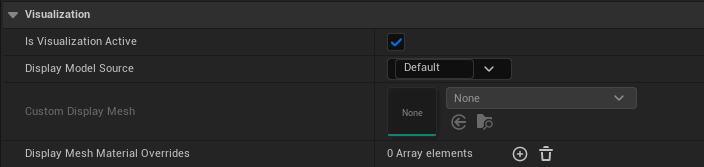
모션 컨트롤러 컴포넌트의 시각화를 트래킹 부분과 분리하기 위해 새로운 XR 디바이스 시각화 컴포넌트를 도입했습니다. 이를 통해 프로젝트 내에서 모션 컨트롤러의 시각화를 직접 수정할 수 있습니다.
이 기능은 '디테일(Details)' 패널에서 시각화 활성(Visualization Active) 체크박스를 선택하거나 블루프린트에서 Visualization Active 블루프린트 노드를 사용하여 활성화할 수 있습니다.
XR 크리에이티브 프레임워크 플러그인 실험단계 지원
XR 크리에이티브 프레임워크(XR Creative Framework)는 OpenXR용으로 빌드되었으며, XR 디바이스용 에디터 툴을 제작할 수 있습니다. 스테레오 렌더링, 헤드 마운트 디스플레이 포즈, 모션 컨트롤러 포즈 및 입력을 지원합니다. 엔진 코드나 플러그인을 수정할 필요 없이 블루프린트에서 확장할 수 있도록 디자인되었습니다. 이러한 툴의 예로는 레벨 디자인, 모델링 및 애니메이션을 들 수 있습니다.
VR 알림 컴포넌트 델리게이트는 OpenXR 런타임과 함께 작동합니다.
VR 알림 컴포넌트 델리게이트는 이제 OpenXR 런타임과 함께 작동합니다.
최적화된 인스턴스드 스테레오 렌더링 및 모바일 멀티뷰
인스턴스드 스테레오 렌더링과 모바일 멀티뷰를 최적화하여 Meta Quest 2에서 최대 5%의 GPU 퍼포먼스 향상을 기대할 수 있습니다.
Meta Quest 디바이스의 웹브라우저 위젯 지원
Meta Quest 디바이스용 웹브라우저 위젯 지원이 추가되었습니다. 여기에는 WidgetInteractionComponent를 통한 입력 지원이 포함됩니다.
Vive Tracker 실험단계 지원
이제 OpenXRViveTracker 플러그인을 사용하여 XR 프로젝트에 Vive Tracker 지원을 추가할 수 있습니다. Vive Tracker 구성 및 OpenXRViveTracker 플러그인에 대한 자세한 내용은 이 에픽 디벨로퍼 커뮤니티 튜토리얼을 참고하세요.
팜 포즈 확장
이제 OpenXR 팜 포즈를 MotionController 모션 소스로 사용할 수 있습니다.
모바일
모바일 개발 요구 사항 및 호환 하드웨어
다음은 언리얼 엔진 5.2에서 지원되는 모바일 디바이스 OS 버전 및 최소 하드웨어입니다. 필요한 SDK 및 IDE에 대한 자세한 내용은 플랫폼 SDK 업그레이드 섹션을 참고하세요.
iOS, iPadOS 및 tvOS
UE 5.2는 버전 타깃 SDK 15 이상을 지원하며 Apple A8 이상 프로세서를 사용하는 OS를 갖춘 iOS, iPadOS 및 tvOS 디바이스를 지원합니다.
다음은 UE 5.2에서 호환 가능한 최소 디바이스 모델입니다.
-
iOS 15
-
iPhone 6S 이상
-
iPod Touch 7세대
-
-
iPadOS 15
-
iPad 5세대 이상
-
iPad Air 2* 이상
-
iPad Mini 4* 이상
-
iPad Pro(모든 모델)
-
-
tvOS 15
-
Apple TV HD*
-
Apple TV 4K(1세대)
-
Apple TV 4K(2세대)
-
*Apple A8/A8X 기반 디바이스(iPad Air 2, iPad Mini 4 및 Apple TV HD)에서 지원을 활성화하려면 프로젝트 세팅이 필요합니다.
5.2는 A8/A8X 디바이스를 지원하는 마지막 출시 버전이 될 가능성이 있습니다.
필요한 SDK 및 MacOS 버전에 대한 자세한 내용은 아래의 플랫폼 SDK 업그레이드를 참고하세요.
Android
UE 5.2는 다음 사양을 충족하는 Android 디바이스를 지원합니다.
-
Android 8 이상
-
64비트 ARM 기반 CPU
-
호환 GPU
-
Mali T8xx, G7x 및 G71x 시리즈
-
Adreno 5xx, 6xx 또는 7xx 시리즈
-
PowerVR GM9xxx
-
Xclipse 920
-
-
호환 그래픽 API
-
OpenGL ES 3.2
-
Vulkan은 호환 드라이버를 갖춘 Android 10 이상 디바이스에서 지원됨
-
필수 SDK 버전에 대한 자세한 내용은 아래의 플랫폼 SDK 업그레이드를 참고하세요.
Android Game Development Extension에 JDK 17 필요
이제 Android Game Development Extension (AGDE) for Visual Studio 플러그인에 JDK 17이 필요합니다. JDK 17을 사용하려면 다음 단계에 따라 진행해 주세요.
- 컴퓨터에 Microsoft OpenJDK 17을 다운로드하여 설치합니다.
- 환경 변수를 JDK_AGDE_HOME 시스템에 추가합니다.
- JDK 17의 설치 경로에 Set the path for JDK_AGDE_HOME 경로를 설정합니다.
자세한 내용은 언리얼 엔진에서 AGDE 사용하기 문서를 참고하세요.
iOS, tvOS 및 iPadOS 디버깅 준비(베타)
UE 5.2에서는 iOS, tvOS 및 iPadOS를 위한 디버깅 준비(Prepare for Debugging) 명령이 새롭게 추가되었습니다. 이전까지 개발자는 코드를 빌드하고 콘텐츠를 쿠킹해야 프로젝트 패키징 단계로 넘어갈 수 있었지만, '디버깅 준비'는 사전에 쿠킹된 데이터를 빌드에 주입하여 쿠킹 단계를 건너뜀으로써 이 프로세스를 보다 유연하게 해 줍니다. 프로그래머는 에디터 빌드를 만들 필요 없이 UAT에서 '디버깅 준비'를 사용하여 로컬에서 생성된 실행 파일과 함께 빌드 팜에서 생성된 빌드에서 디바이스 콘텐츠에 디플로이할 수 있어 특히 유용합니다.
UAT를 사용하여 '디버깅 준비'에 액세스하려면 Turnkey -command=WrangleContentForDebugging -project=[name of your .uproject file] 명령을 사용합니다. 또는 언리얼 에디터에서 플랫폼(Platforms) 드롭다운을 클릭하고 iOS 또는 tvOS 로 이동하여 디버깅 준비 를 클릭해도 됩니다.
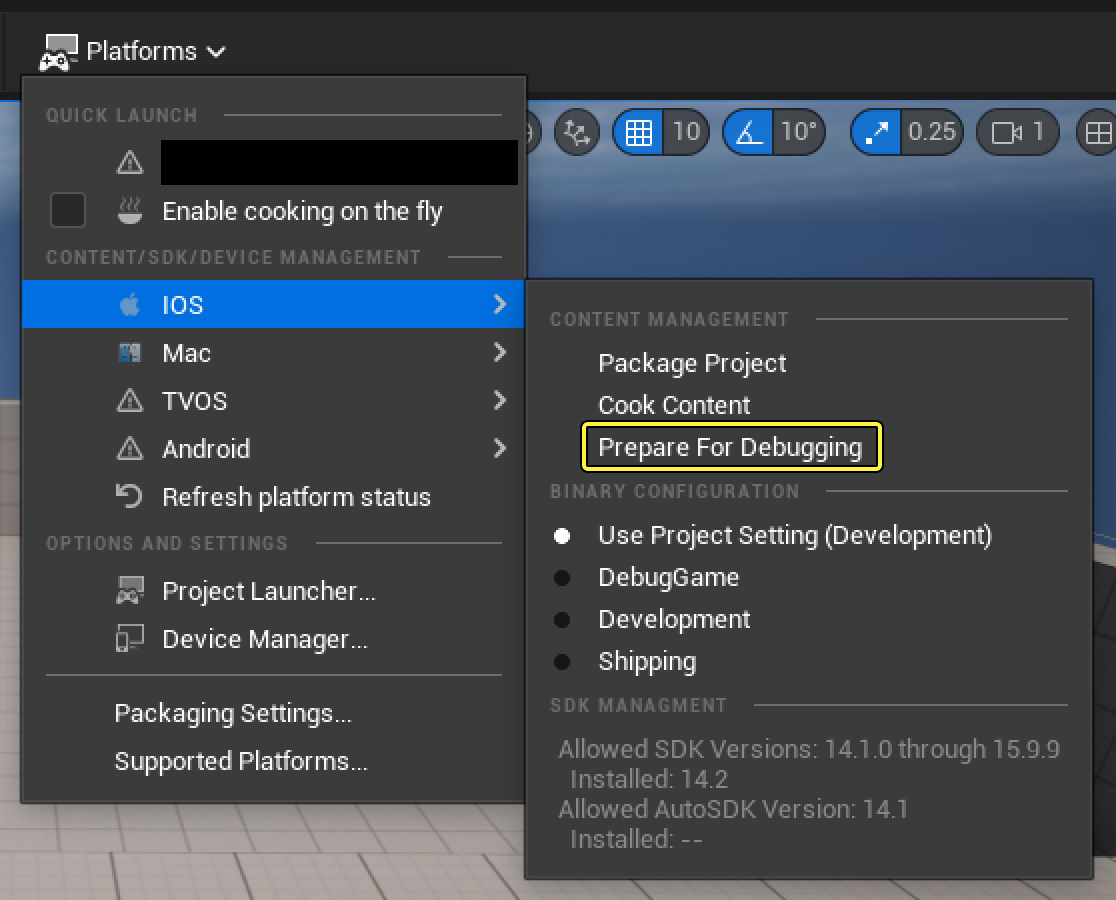
iOS의 디버깅 준비는 베타로 간주됩니다. Xcode를 통해 macOS 머신에서 이를 사용하여 .ipa 에서 쿠킹된 데이터를 Xcode 빌드로 주입할 수 있지만, 이는 현재 Windows에서 원격 빌드를 지원하지 않습니다.
모바일 프리뷰 향상
UE 5.2 버전에서는 언리얼 에디터의 '모바일 프리뷰(Mobile Preview)' 모드의 안정성과 정확도가 일부 향상되었으며, '세팅(Settings)' 메뉴에서 '프리뷰 렌더링 레벨(Preview Rendering Level)' 디바이스를 선택하여 사용할 수 있습니다.
-
프리뷰 디바이스 변경 시 안정성이 향상되었습니다.
-
에디터의 '엔진 퀄리티 세팅(Engine Scalability Settings)' 창을 사용하면 이제 프리뷰 플랫폼의 퀄리티 세팅이 적용되어 플랫폼 오버라이드 엔진 퀄리티 변수가 에디터의 '뷰포트(Viewport)'에 적용됩니다. 예를 들어 플랫폼 Scalability.ini 파일의 오버라이드에 따라 달라지는 메시 LOD 트랜지션 거리와 같은 세팅을 올바르게 미리 볼 수 있습니다.
-
이제 타깃 프리뷰 플랫폼의 디바이스 프로파일에서 설정된 모든 콘솔 변수가 적용되므로 디바이스에서 실행할 때 활성화되는 렌더링 기능 세트를 에디터의 '뷰포트'에서 정확하게 미리 볼 수 있습니다.
iOS, tvOS, iPadOS 향상
UE 5.2는 iOS, tvOS 및 iPadOS에 다음과 같은 기능에 대한 지원을 추가합니다.
iOS 및 iPadOS 백그라운드 오디오 지원
이제 UE 5.2를 사용하는 iOS 및 iPadOS 프로젝트에서 백그라운드 오디오가 지원됩니다. 이를 통해 다른 앱으로 전환 시 애플리케이션의 오디오를 백그라운드에서 계속 재생할 수 있습니다. 프로젝트 세팅(Project Settings) > 플랫폼(Platforms) > iOS > 오디오(Audio) 에서 오디오 백그라운드 재생 여부(whether audio from this plays in the background) 세팅을 사용하여 토글할 수 있습니다.

게임패드 및 입력 향상
iOS, tvOS 및 iPadOS 디바이스에서 게임패드 지원이 다음과 같이 향상되었습니다.
-
이제 게임패드가 슬레이트 UI와 인터랙션할 수 있습니다. 이는 콘솔의 게임패드 UI 지원과 유사하게 작동합니다.
-
이제 Nintendo 컨트롤러가 iOS, tvOS 및 iPadOS 디바이스에서 작동합니다. 여기에는 Pro 컨트롤러와 Joy-Con 컨트롤러가 모두 포함됩니다.
-
이제 마우스를 입력 디바이스로 사용할 수 있습니다. 하지만 하드웨어 마우스 커서가 제공되지 않으므로 앱에서 마우스 커서를 렌더링해야 합니다.
게임플레이
게임플레이 타기팅 시스템 플러그인
게임플레이 타기팅 시스템(Gameplay Targeting System)은 데이터 주도 타기팅 요청을 생성할 수 있게 해 줍니다. 게임플레이 어빌리티 시스템(Gameplay Ability System) 플러그인을 확장한 것이지만 이 기능의 외부에서도 사용될 수 있습니다.
에디터에서 타기팅 시스템을 활성화하려면 편집(Edit) > 플러그인(Plugins) > 게임플레이(Gameplay) > 게임플레이 어빌리티(Gameplay Abilities) > 타기팅 시스템(Targeting System) 으로 이동합니다.
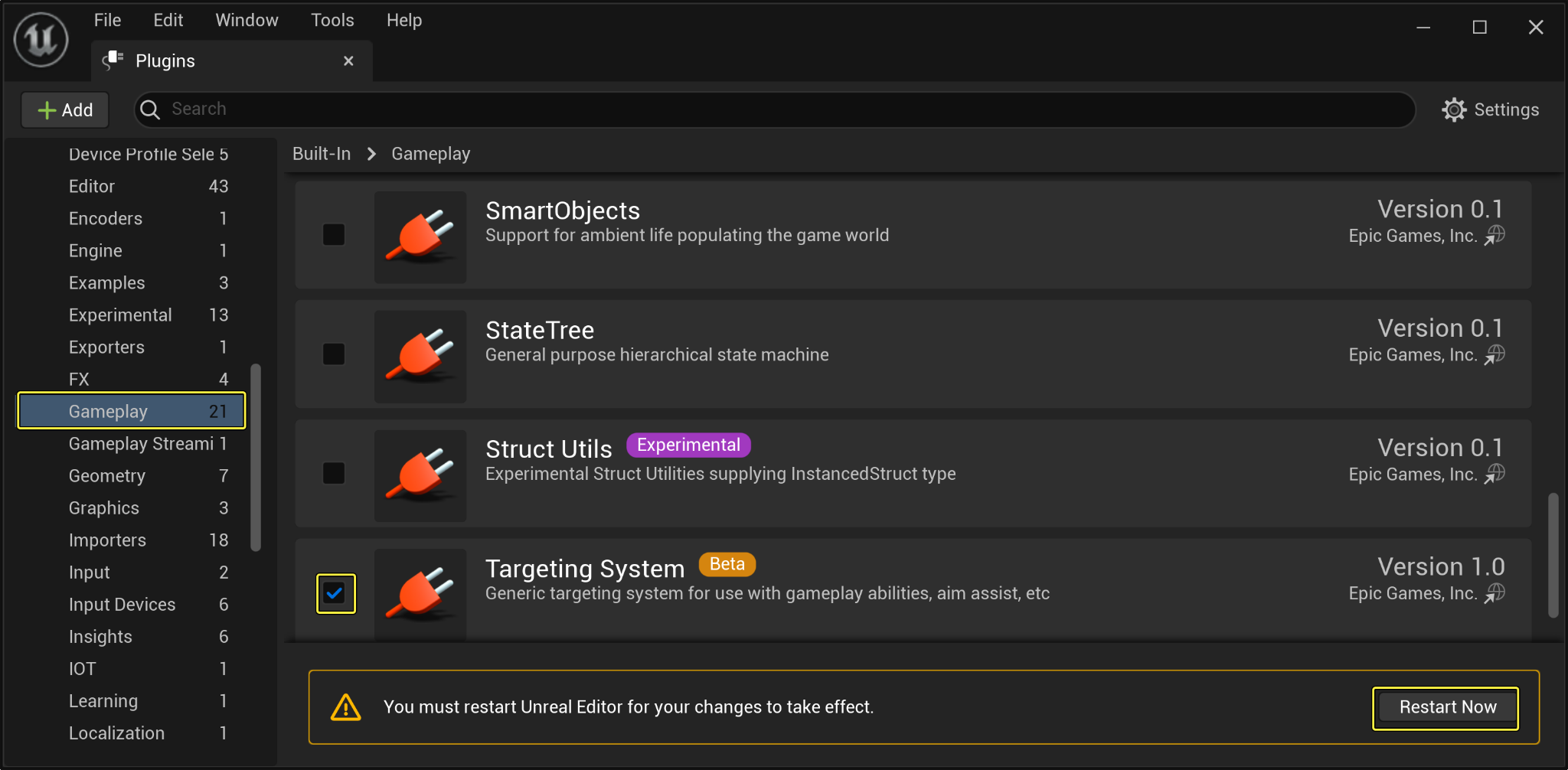
타기팅 시스템은 타기팅 프리셋(Targeting Preset) 을 사용합니다. 이 타기팅 프리셋은 타기팅 요청을 위에서 아래 순으로 실행하는 타기팅 작업(Targeting Tasks) 세트를 정의하는 데이터 에셋입니다.
타기팅 프리셋의 특징은 각 작업이 인라인 프로퍼티 편집을 지원한다는 것입니다. 즉, 재사용 가능한 타기팅 작업 및 프리셋을 정의하여 각각에 대한 UAsset을 정의하지 않고도 작업의 행동 방식을 구성할 수 있습니다.
이 기능에 대한 자세한 내용은 게임플레이 타기팅 시스템 문서를 참고하세요.
포스 피드백 에셋
언리얼 엔진에서 포스 피드백 에셋으로 작업할 때, 각 플랫폼은 진동 모터 또는 피드백 시스템의 작동 방식을 서로 다르게 구현합니다. 포스 피드백 에셋은 이제 값에 대한 디바이스별 오버라이드를 지원합니다.
이는 추상 레이어로, 사용자에게 각 플랫폼의 서로 다른 피드백 세팅을 설정하는 메서드를 제공합니다. 예를 들어 Xbox 컨트롤러에는 강한 진동을 적용하고, PlayStation 컨트롤러에는 보다 섬세한 진동을 적용할 수도 있습니다.
이러한 내용은 '포스 피드백 이펙트(Force Feedback Effect)' 디바이스 프로퍼티의 디바이스별 오버라이드(Per Device Overrides) 에서 확인할 수 있습니다.
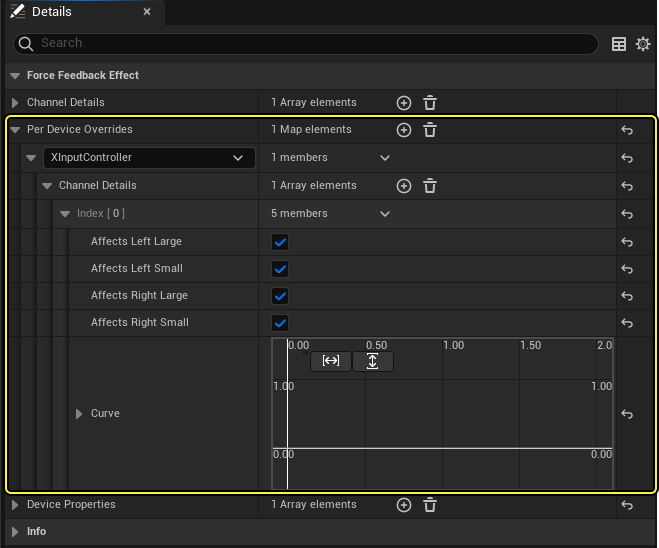
자세한 내용은 포스 피드백 문서를 참고하세요.
디바이스 프로퍼티
디바이스 프로퍼티(Device Properties) 는 라이트 컬러 디스플레이나 햅틱 트리거 저항 등 입력 디바이스의 여러 물리적 프로퍼티를 나타냅니다. 디바이스 프로퍼티는 버스트 게임플레이 큐 노티파이 블루프린트(Burst Gameplay Cue Notify Blueprint) 또는 입력 디바이스 서브시스템(Input Device subsystem) 에서 '디바이스 프로퍼티(Device Properties)' 카테고리의 기존 포스 피드백 에셋에 추가하여 활성화할 수 있습니다.
디바이스 프로퍼티에는 커스터마이징할 수 있는 가상 함수와 함께 노출되는 간단한 수명이 있습니다. 각 디바이스 프로퍼티에는 경과시간 이 있으며, 이는 포스 피드백 이펙트의 경과시간 어트리뷰트와 동일합니다. 프로퍼티는 활성화, 평가 및 적용 된 후 경과시간에 도달하면 리셋 됩니다.
소지한 무기의 종류에 따라 트리거의 저항력을 높이거나 시간이 지남에 따라 라이트 컬러를 변경하여 특수한 이펙트를 연출하고 다른 게임플레이 기능을 부여할 수 있습니다.
디바이스 목록은 환경설정 파일에서 채워지므로 서드파티 벤더는 자사의 디바이스를 옵션으로 추가할 수 있습니다. 기본적으로 에픽게임즈는 모든 콘솔을 지원합니다. 에디터에서 이러한 환경설정 세팅을 확인하려면 프로젝트 세팅(Project Settings) > 입력(Input) > 플랫폼 세팅(Platform Settings) > (해당 플랫폼) > 하드웨어(Hardware) 로 이동합니다.
예를 들어 PS5는 DualSense 또는 DualShock4를 옵션으로 가질 수 있습니다.
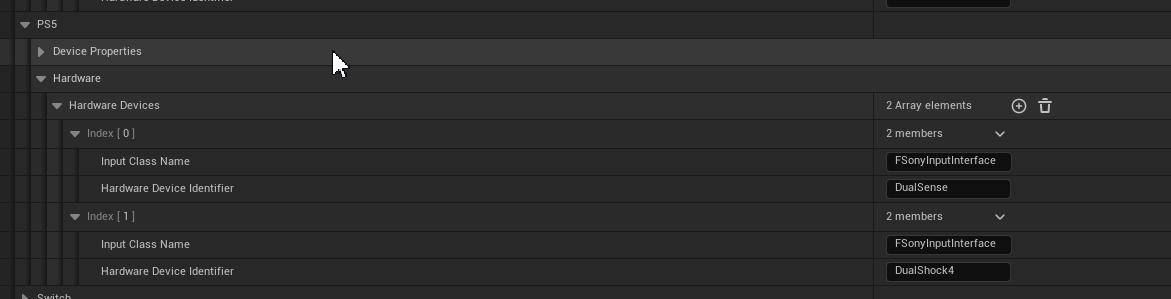
자세한 내용은 디바이스 프로퍼티 문서를 참고하세요.
비교 툴
UE 비교 툴(Diff Tool) 은 언리얼 엔진에서 에셋을 비교하는 데 사용할 수 있습니다. 에셋을 소스 컨트롤의 이전 버전과 비교하거나 서로 다른 두 에셋을 비교할 수 있습니다. 현재는 블루프린트 및 블루프린트 인접 타입에서 지원됩니다.
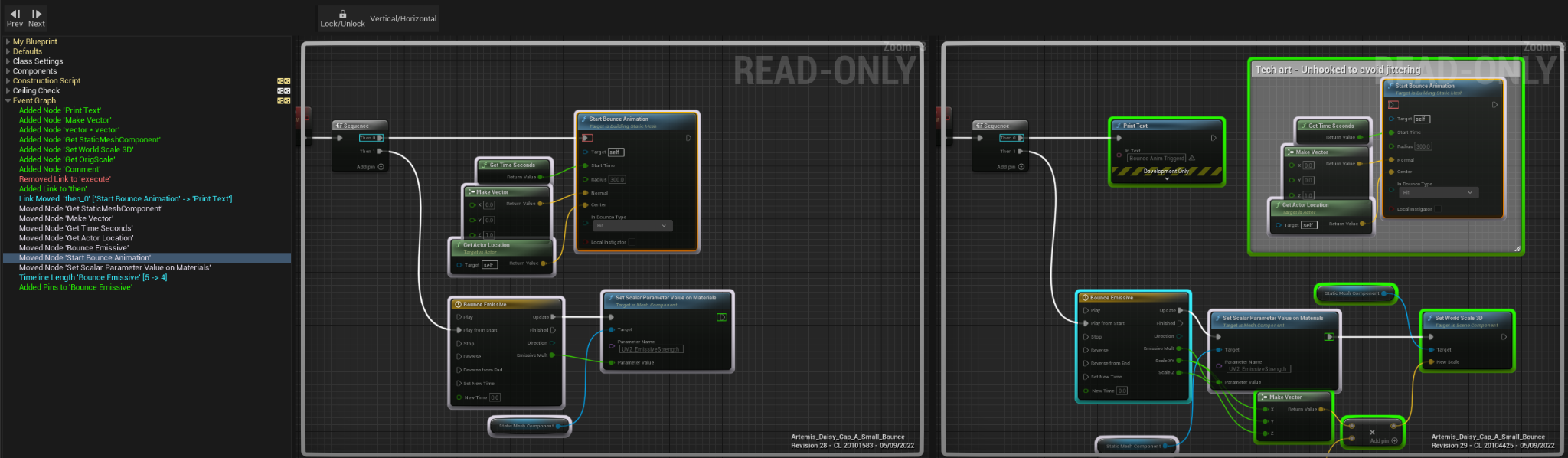
두 에셋을 서로 비교하려면 '콘텐츠 브라우저(Content Browser)'로 이동하여 두 에셋을 선택한 다음 우클릭하고 컨텍스트 메뉴에서 선택 비교(Diff Selected) 를 선택합니다.
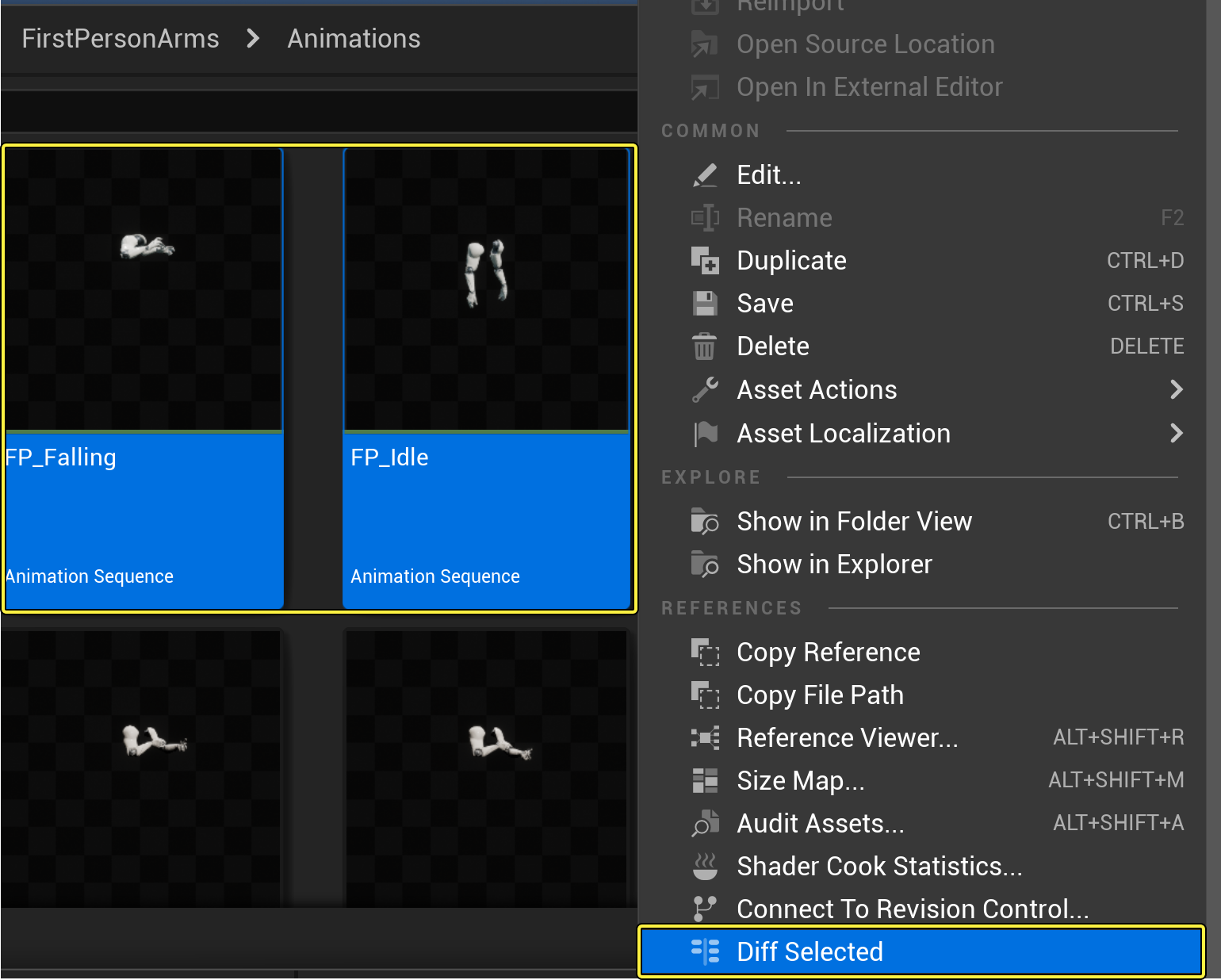
비교 툴은 로컬 에셋을 특정 소스 컨트롤 리비전과 비교하는 옵션도 제공합니다. 이 기능에 대한 자세한 내용은 UE 비교 툴 페이지를 참고하세요.
리뷰 툴
UE 리뷰 툴(Review Tool) 은 보류되거나 제출된 체인지리스트의 모든 에셋을 나열하는 데 사용할 수 있습니다. UE 비교 툴을 사용할 때 이러한 에셋을 리뷰하기 위해 리뷰 툴을 사용합니다. 현재 리뷰 툴은 Perforce만 지원합니다.
인공 지능
스테이트 트리
UE 5.2에서는 스테이트 트리와 관련하여 몇 가지 사항이 향상되었습니다.
스테이트 트리는 이제 글로벌 작업(Global Task) 을 가질 수 있습니다. 이는 트리 시작 및 중지 이벤트 사이에 있는 스테이트 트리 작업을 실행할 수 있게 해 줍니다.
글로벌 작업은 스테이트 선택에 사용할 수 있는 영구적인 데이터가 필요한 경우 사용할 수 있습니다. 예를 들어 시간 시스템은 현재 시간을 결정하는 글로벌 작업을 생성할 수 있습니다. 글로벌 작업은 트리에서 루트 스테이트 이전에 시작되므로 트리 시작 시 및 첫 스테이트 선택 동안 이 정보를 사용할 수 있습니다.
스마트 오브젝트
UE 5.2에서는 스마트 오브젝트와 관련하여 몇 가지 사항이 업데이트되었습니다.
스마트 오브젝트 컬렉션은 이제 자동으로 생성되지 않습니다. 대신, 필요에 따라 레벨별로 하나 이상의 컬렉션을 생성할 수 있습니다.
또한 스마트 오브젝트는 이제 월드 파티션, 데이터 레이어 등을 보다 효율적으로 지원하며 퍼시스턴트 레벨에서도 원활하게 작동합니다.
[신규] 신경망 엔진(NNE)
이제 신경망 엔진(Neural Network Engine, NNE) 플러그인을 사용하여 게임 내에서 신경망을 실행할 수 있습니다.
ONNX 파일을 프로젝트에 임포트하고 플러그인으로 전달하여 실행 가능 모델을 생성할 수 있습니다. 이 모델은 CPU에서 실행되거나 그래프 빌더를 렌더링하여 GPU에서 실행되도록 큐에 등록할 수 있습니다. 이는 데스크톱 플랫폼과 일부 현재 세대 콘솔에 모두 해당됩니다.
이 플러그인은 실험단계로 간주되며 향후 엔진 버전에서 계속 향상될 예정입니다. 업데이트는 퍼포먼스 향상 및 추가 플랫폼 지원을 목표로 합니다.
자세한 내용은 에픽 디벨로퍼 커뮤니티의 NNE 강좌를 참고하세요.
피직스
머신 러닝 클로스 시뮬레이션
언리얼 엔진 5.2에서는 머신 러닝 클로스 시스템이 크게 향상되었습니다.
다음과 같은 기능이 구현되었습니다.
-
자동 포즈 선택: 가장 가까운 이웃 데이터 세트의 포즈를 자동으로 선택하는 새로운 툴이 도입되어 머신 러닝 모델을 보다 쉽게 미세조정할 수 있습니다.
-
더 빠른 신경망 추론: 신경망 추론의 퍼포먼스가 향상되어 이전 출시 버전보다 4배 빨라졌습니다.
-
향상된 메시 디포메이션: 메시 디포메이션을 계산하는 새로운 방법이 도입되어 모델 정확도가 크게 향상되었습니다.
-
버그 수정 및 UI 향상: 클로스 시뮬레이션을 생성하는 프로세스를 향상하기 위해 몇 가지 버그가 수정되었고 UI가 향상되었습니다.
[신규] 카오스 플레시 시뮬레이션
언리얼 엔진 5.2에는 새로운 카오스 플레시(Chaos Flesh) 시스템이 도입되었습니다. 이 시스템은 언리얼 엔진에서 디폼 가능한 소프트 바디의 고퀄리티 리얼타임 시뮬레이션을 제공합니다. 리지드 바디 시뮬레이션과 달리 소프트 바디의 셰이프는 시뮬레이션 동안 프로퍼티를 기반으로 변경할 수 있습니다.
카오스 플레시 시스템은 다양한 파라미터를 사용한 스태틱 및 스켈레탈 메시 시뮬레이션을 지원하므로 아티스트가 지금까지와는 전혀 다른 수준으로 최종 결과를 제어할 수 있게 해 줍니다. 이 시스템의 주요 초점은 스켈레탈 애니메이션 동안 캐릭터의 근육 디포메이션을 시뮬레이션하는 것입니다.
카오스 플레시 시스템은 런타임에서 저해상도 지오메트리를 시뮬레이션하고 고해상도 시네마틱 퀄리티 지오메트리의 오프라인 시뮬레이션에서 캐싱된 결과를 활용하여 높은 퍼포먼스를 구현합니다.
에셋 모델링
소프트 바디 시뮬레이션의 첫 번째 단계로, 오브젝트의 표면 표현을 동일한 오브젝트의 볼류메트릭 표현으로 변환해야 합니다. 카오스 플레시 시스템은 스태틱 또는 스켈레탈 메시를 시뮬레이션 동안 사용할 수 있도록 동등한 사면체 지오메트리 표현으로 변환합니다.
이 시스템은 다음을 지원합니다.
-
스태틱 또는 스켈레탈 메시 표면 내에 저장된 닫힌 지오메트리의 등위면 스터핑 사면체화
-
닫힌 표면의 자동 사면체화를 위한 야생에서의 사면체 메싱(Tetrahedral Meshing in the Wild, Tet Wild) 알고리즘
-
커스텀 생성 알고리즘을 통한 사면체화
사면체 시뮬레이션
카오스 플레시 시스템은 생성된 사면체 지오메트리를 사용하여 물리 기반 시뮬레이션을 실시간으로 실행합니다.
이 시뮬레이션은 다음을 지원합니다:
-
사면체 구조의 물리 기반 리얼타임 및 오프라인 시뮬레이션
-
시뮬레이션 메시의 제한적으로 애니메이팅된 버텍스에 대한 키네마틱
-
조인트 해제된 시뮬레이션 지오메트리를 바인딩하는 약한 컨스트레인트
-
파티클별 시뮬레이션 프로퍼티를 설정하는 기능
-
파티클별 프로퍼티 초기화를 위한 필드 시스템 과의 통합
-
프로시저럴 노드 그래프 인터페이스를 통한 에셋 제작
월드 솔버 인터랙션
카오스 플레시 시뮬레이션은 실시간으로 환경과 인터랙션할 수 있습니다.
이러한 외부 인터랙션에는 다음이 포함됩니다.
-
월드 솔버 오브젝트와의 단방향 콜리전 인터랙션
-
볼록 및 분석 지오메트리에 대한 콜리전 지원
-
스켈레탈 애니메이션을 사용하여 제한된 사면체 버텍스 구동
-
월드 솔버를 기준으로 사용자가 환경설정할 수 있는 틱 순서
-
스태틱 월드 지오메트리에 대한 표면 레이캐스트
-
조정 가능한 콜리전 퍼포먼스
시뮬레이션 렌더링하기
사면체 메시는 시뮬레이션에 적합한 볼류메트릭 구조이지만, 일반적으로 렌더링에 이상적인 표면은 아닙니다. 렌더링 표면을 보기 좋게 만드는 것이 주요 관심사이므로 시스템은 시뮬레이션 결과를 렌더링에 최적화된 표면으로 전송합니다.
이 시스템은 현재 다음을 지원합니다.
-
시뮬레이션 결과를 스켈레탈 메시로 전송하는 디포머
-
스태틱 메시 지오메트리의 디스플레이스먼트에 대한 월드 포지션 오프셋
-
시뮬레이션 메시의 사면체 디버그 드로잉
시뮬레이션 캐싱하기
플레시 시뮬레이션을 실시간으로 실행하면 계산 비용이 매우 많이 들 수 있습니다. 따라서 카오스 플레시 시스템에는 시뮬레이션 결과를 캐싱하여 보다 원활한 런타임 재생이 가능하도록 기능이 제공됩니다.
이 시스템은 다음 기능을 지원합니다.
-
캡처 시뮬레이션 결과는 재생을 위한 캐싱 에셋으로 저장됩니다.
-
게임에서 결과를 캔 모양의 디포메이션으로 재생합니다.
-
시퀀서 내에서 캐시 결과를 시네마틱 이벤트 시간에 맞춰 스크럽합니다.
-
'테이크 구하기(Get Take)'와 '무비 렌더 큐(Movie Render Queue, MRQ)'를 사용한 렌더링 및 시뮬레이션
카오스 플레시 시뮬레이션에 대한 자세한 내용은 카오스 플레시 개요 문서를 참고하세요.
나이아가라 유체 시뮬레이션

나이아가라 유체 시뮬레이션이 5.2에서 대폭 향상되었습니다.
더 뛰어난 퍼포먼스
UE 5.2에서는 이전 출시 버전에 비해 2D 가스 및 액체 시뮬레이션은 200% 더 빠르며 3D 가스 및 액체 시뮬레이션은 최대 60% 더 빠릅니다.
또한 모든 Grid2DCollection 및 Grid3DCollection 사용이 이전보다 현저하게 빨라졌습니다. 3D 그리드의 경우, 플로트 또는 벡터 같은 단일 어트리뷰트 컬렉션이 뛰어난 메모리 관리 덕분에 훨씬 더 빠릅니다.
향상된 사용성
3D 가스 이미터를 더욱 강력하게 업데이트하여 보다 풍부한 기능을 갖춘 템플릿 시스템을 제공합니다.
'요약 뷰(Summary View)'와 사용자 파라미터 또한 보다 사용자 친화적으로 간소화되었습니다.
시퀀서 캐싱
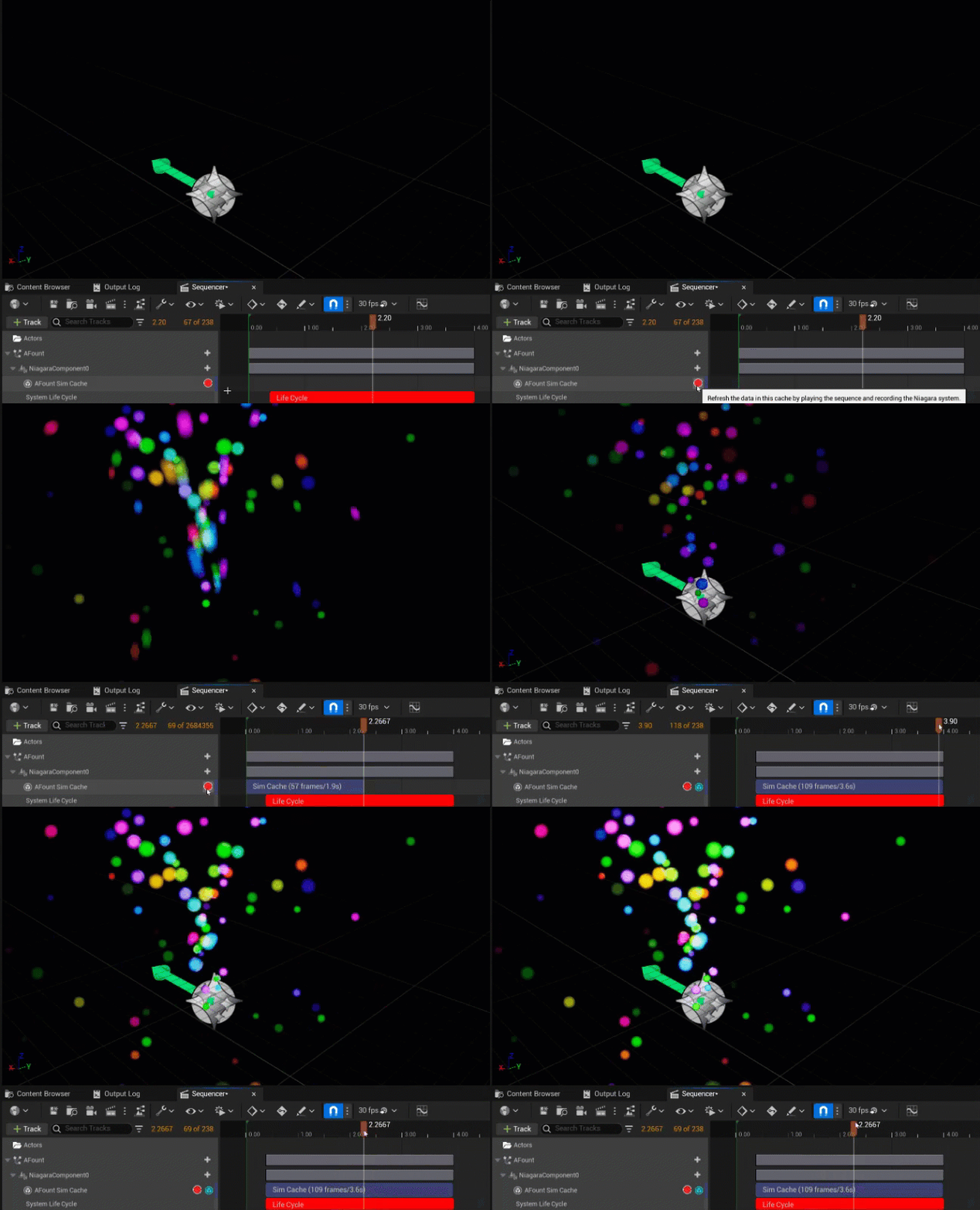
이제 시퀀서 와 새로운 나이아가라 시뮬레이션 캐시(Niagara Sim Cache) 워크플로를 사용하여 모든 유체 시뮬레이션을 캐싱할 수 있습니다. 이는 시뮬레이션을 굽고, 즉 캐싱하고 나서 시퀀서에서 스크럽하거나, '무비 렌더 큐'로 렌더링하거나, 게임에서 재생하는 기능을 제공합니다.
렌더링 향상
3D 가스 시뮬레이션은 이제 이종 볼륨 렌더링 프레임워크로만 렌더링됩니다. 이는 라이트 및 지오메트리 섀도잉 볼륨을 임의의 수만큼 사용할 수 있게 해 줍니다.
또한 이번 업데이트는 커스텀 코드 없이도 머티리얼을 강력하고 손쉽게 제작할 수 있는 방법을 제공합니다.
전반적인 향상
유체 시뮬레이션은 다음과 같이 향상되었습니다.
-
더 뛰어난 콜리전: 이제 리지드 메시 콜리전 DI에서 서브프레임이 정확한 콜리전을 사용할 수 있습니다. 이는 2D 및 3D 유체 시뮬레이터와 통합됩니다.
-
얕은 물: 메시 SDF 콜리전, 보다 부드러운 결과, 향상된 퍼포먼스를 통해 얕은 물 시뮬레이션을 더 잘 지원합니다.
-
3D 액체의 SDF 스무딩이 훨씬 더 빨라졌습니다.
나이아가라
데칼 렌더러
UE 5.2에서는 데칼 렌더러(Decal Renderer) 라는 새로운 렌더러를 추가했습니다. 데칼 액터(Decal Actor)와 유사하게 데칼 렌더러를 사용하여 나이아가라 시스템을 통해 데칼을 생성 및 적용할 수 있습니다. 데칼 렌더러는 CPU에서만 사용할 수 있습니다.
데칼 렌더러로 데칼을 생성하면 데칼이 교차된 지오메트리 위에 투영됩니다. 표면에 표시되어야 하는 페인트 같은 사례에서 매우 유용합니다.
데칼은 '나이아가라 에디터(Niagara Editor)'의 '프리뷰(Preview)' 창에 표시되지 않으므로 이펙트를 보려면 '레벨 에디터(Level Editor)'의 액터 표면에 이를 적용해야 합니다. 또한 나이아가라 시스템을 통해 데칼 컬러를 변경하고 싶은 경우 DecalColor 및 DecalLifetimeOpacity 라는 새로운 프로퍼티를 사용할 수 있습니다. 이를 ParticleColor 어트리뷰트와 링크하여 함께 업데이트할 수도 있습니다.
모든 렌더러 바인딩이 예상대로 작동해야 하지만 다이내믹 파라미터는 지원되지 않습니다.
데칼 액터를 통한 개별 데칼 렌더링 비용과 나이아가라를 통한 데칼 렌더링 비용은 동일합니다. 하지만 많은 데칼을 한 번에 렌더링하는 경우에는 나이아가라를 사용하는 것이 비용이 더 낮습니다.
자세한 내용은 렌더 모듈을 참고하세요.
나이아가라 시뮬레이션 캐싱(실험단계)
새로운 실험단계의 플러그인, NiagaraSimCaching 은 나중에 재사용할 수 있도록 나이아가라 시뮬레이션 결과를 캡처하고 저장할 수 있게 해 줍니다. 시뮬레이션 캐시는 위치, 렌더링 정보 같은 시스템, 이미터 및 파티클 어트리뷰트 데이터를 저장합니다. 전체 캐시는 모든 어트리뷰트를 저장하는 반면 렌더링 캐시는 해당 캐시와 관련된 어트리뷰트만 저장합니다. '렌더 타깃 볼륨(Render Target Volume)' 같은 일부 데이터 인터페이스를 캐시에 저장할 수도 있습니다.
나이아가라 시뮬레이션을 실행할 때 작은 베리에이션이 발생합니다. 시뮬레이션 캐시를 베이크하면 데이터를 스태틱하고 예측 가능하게 만들어 주기 때문에 '무비 렌더 큐(Movie Render Queue)'에서 안정적인 결과가 필요한 시네마틱 워크플로에 유용할 수 있습니다. 시뮬레이션 결과를 캐싱한 뒤에는 시퀀서에 가져오거나 블루프린트에 데이터를 로드하여 원하는 대로 사용할 수 있습니다. 또한 런타임에서 퍼포먼스를 위해 일반 이펙트의 최적화된 스탠드-인(대역)을 생성하거나, 이미 존재하는 파티클로 시작할 수 있도록 라이브 시뮬레이션의 런-업(준비 기간)을 생성하거나, 예상대로 행동하지 않는 게임 내 시스템 시뮬레이션을 디버깅하는 등의 용도로도 사용할 수 있습니다.
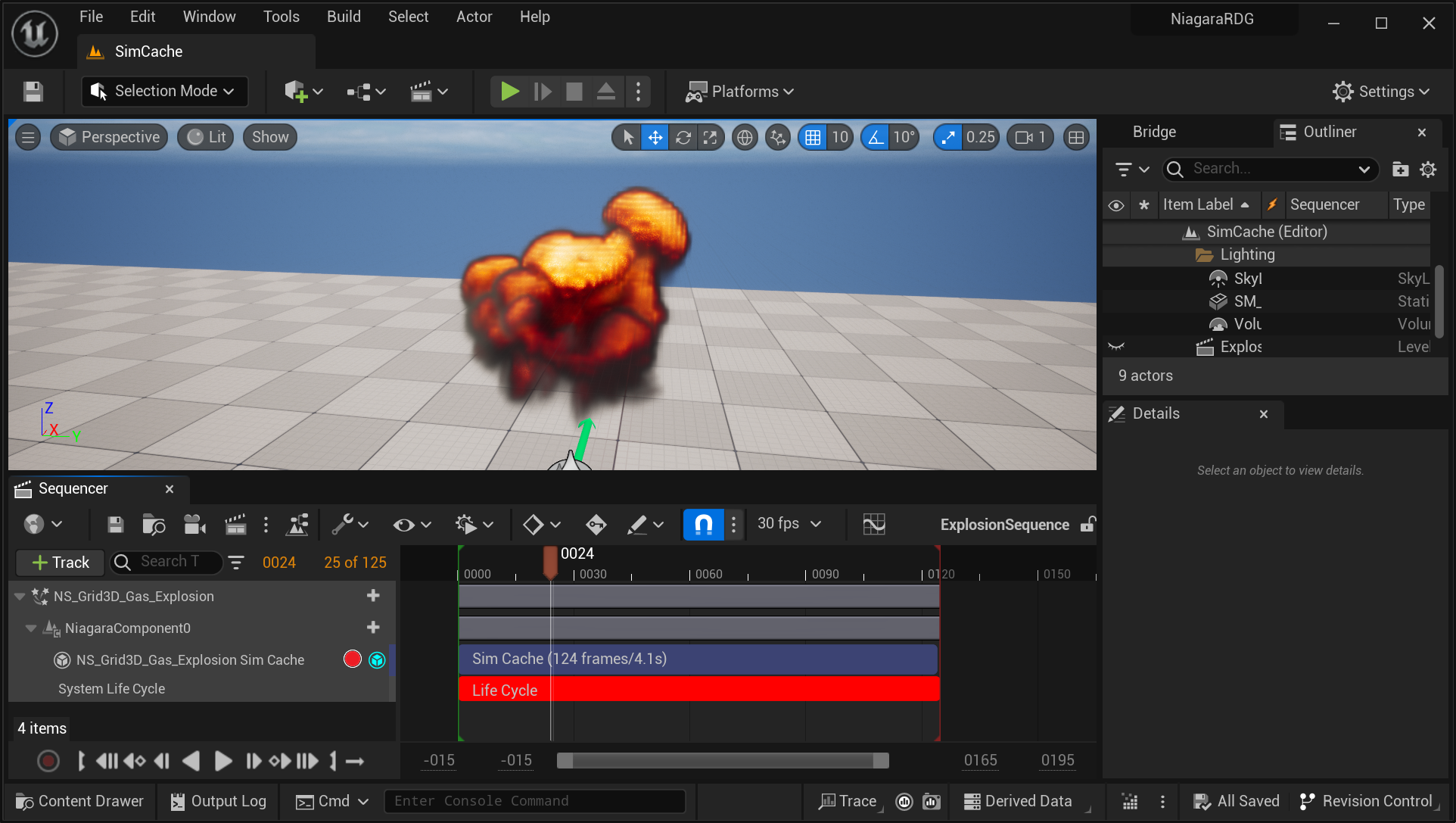
시뮬레이션 캐시는 다음과 같은 몇 가지 방법을 사용하여 저장할 수 있습니다.
-
베이커 사용하기
-
시퀀서를 통해 사용하기
-
레벨 에디터에서 사용하기
베이커 사용하기
플립북 베이커(Flipbook Baker)를 사용하고 '시뮬레이션 캐시 출력(실험단계)(Simulation Cache Output (Experimental))' 옵션을 선택하여 시뮬레이션을 캐싱합니다. 자세한 내용은 플립북 베이커 를 참고하세요.
이 방법의 장점은 시퀀서를 사용한 작업에 익숙하지 않은 아티스트도 나이아가라에서 캐시 파일을 직접 저장할 수 있다는 것입니다. 시뮬레이션 캐시는 독립된 에셋으로 저장됩니다. 따라서 대용량 캐시 파일을 처리할 때 버전 관리의 이점을 활용할 수 있습니다. 시뮬레이션 캐시를 저장한 후에는 시퀀서에서 적용하거나 블루프린트에서 데이터를 사용할 수 있습니다.
시퀀서를 통해 사용하기
시퀀서에서 직접 시뮬레이션 캐시를 녹화할 수도 있습니다. 방법은 다음과 같습니다.
-
(권장 사항) 나이아가라 컴포넌트에 캐시 트랙을 삽입하고 여기에서 녹화합니다.
-
'테이크 레코더(Take Recorder)'를 사용하여 녹화합니다.
시퀀서에서 시뮬레이션 캐시를 저장하면 별도의 독립형 에셋이 아닌 시퀀스에 자동으로 저장됩니다. 이 방법은 빠른 반복작업과 캡처에 이상적입니다.
'테이크 레코더'에서 시뮬레이션 캐시를 녹화하면 나이아가라 액터가 포제서블이 아닌 스포너블로 추가됩니다. 이 방법의 장점은 여러 소스와 캐시를 동시에 녹화할 수 있다는 것입니다.
레벨 에디터에서 사용하기
'레벨 에디터(Level Editor)'에서 시뮬레이션 캐시를 녹화할 수 있습니다. 나이아가라 액터를 선택한 다음 '디테일(Details)' 패널의 '나이아가라 유틸리티(Niagara Utilities)' 섹션에서 캡처 버튼을 찾을 수 있습니다. '프로젝트 세팅(Project Settings)'의 나이아가라(Niagara) > 시뮬레이션 캐싱(Simulation Caching) > 퀵 시뮬레이션 캐시 캡처 프레임 수(Quick Sim Cache Capture Frame Count) 에서 이 캡처의 길이를 설정할 수 있습니다. 기본적으로 이 캡처는 5프레임의 퀵 시뮬레이션 캐시를 수행합니다.
시뮬레이션 캐시에 대한 자세한 내용은 시퀀서에서의 나이아가라 시뮬레이션 캐싱을 참고하세요.
다이내믹 메시 데이터 인터페이스
다이내믹 메시 데이터 인터페이스를 사용하여 CPU 또는 GPU 시뮬레이션 내에서 지오메트리를 빌드할 수 있습니다. 모든 프레임을 리빌드하고, 트라이앵글을 수정하고, 버텍스 서브셋을 수정하여 빌드된 지오메트리를 원하는 대로 수정하거나 한 번에 빌드할 수 있습니다.
다이내믹 메시 데이터 인터페이스를 사용할 때 프레임마다 지오메트리를 복사할 수 있습니다. 그런 다음 이를 다른 이미터에서 파티클별로 인스턴싱할 수 있습니다. 예를 들어 캐릭터 애니메이션의 사본이 여러 개 있는 도플갱어 이펙트를 생성할 수 있습니다. 현재 스켈레탈 메시별로 하나의 머티리얼만 지원합니다.
다음은 나이아가라 내부에서 마칭 큐브(marching cube)를 실행한 예시입니다. 한 이미터가 파티클 스피어를 제어하며, 그러면 다른 이미터는 파티클을 읽고 메시를 생성합니다.
다이내믹 메시 데이터 인터페이스를 사용하려면 커스텀 모듈 및 시뮬레이션 스테이지를 생성해야 합니다.
향상된 로드 및 컴파일 시간
UE 5.2에서는 나이아가라 시스템을 로드하는 데 걸리는 시간과 DDC에서 이전에 컴파일된 결과를 읽는 데 걸리는 시간, 두 가지 주요 영역에서 나이아가라의 퍼포먼스가 크게 향상되었습니다.
나이아가라 시스템 로딩이 발생하는 시점은 다음과 같습니다.
-
'나이아가라 에디터'에서 에셋을 처음 열 때
-
나이아가라 에셋이 포함된 맵을 로드할 때
-
나이아가라 시스템을 컴파일할 때
이러한 타입의 연산을 위해 계산의 일부인 PostLoad 를 최대 5배 더 빠르게 향상했습니다.
로딩 관련 향상점 외에도 나이아가라 시스템 컴파일에 다음과 같은 향상이 이루어졌습니다. 시스템을 처음 컴파일할 때 다양한 연산 결과가 파생 데이터 캐시(Derived Data Cache, DDC)에 저장됩니다. 이렇게 하면 에디터를 닫았다가 다시 열고 동일한 작업을 다시 수행해도 UE가 나이아가라 시스템을 다시 컴파일할 필요가 없습니다.
이전 버전에서는 DDC에서 데이터를 가져오는 데 상당한 비용이 들었습니다. UE 5.2에서는 DDC에서 데이터를 가져오는 속도가 최대 4배 빨라졌습니다. 특히, 나이아가라 에셋이 많이 포함된 대규모 프로젝트 파일에서 차이를 느낄 수 있습니다.
나이아가라 유체
나이아가라 유체에 대한 향상점은 피직스 섹션을 참고하세요.
언리얼 인사이트
인사이트 에디터
이제 에디터 우측 하단에 위치한 인사이트/트레이스 상태 표시줄 위젯을 사용하여 언리얼 인사이트를 실행하고 관리할 수 있습니다.
새로 도입된 이 위젯은 새로운 유저 인터페이스를 통해 트레이스 제어 기능을 통합합니다. 여기에서 트레이싱 중인 채널 관리, 트레이스 스크린샷 캡처, 트레이스 북마크 삽입 또는 트레이스 시작 및 중지 작업을 수행할 수 있습니다.
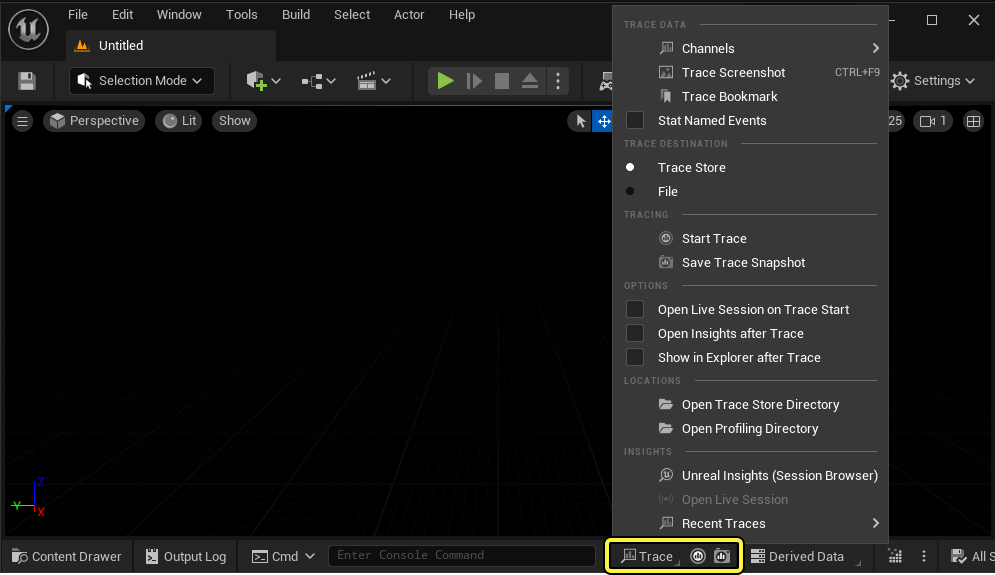
이러한 메뉴 기능의 전체 개요는 언리얼 인사이트 문서 페이지를 참고하세요.
트레이스
언리얼 엔진 5.2에서는 트레이스 인사이트에서 몇 가지 향상이 이뤄졌습니다.
-
디폴트 채널 프리셋에 스크린샷 채널이 추가되었습니다.
-
새로운 콘솔 명령 Trace.SnapshotSend [
] [ ] 가 추가되었습니다. 이 명령은 호스트 및 포트에 대해 제공된 실행인자를 사용하여 현재 메모리 내 트레이스 버퍼의 스냅샷을 트레이스 스토어로 전송합니다. -
트레이스가 최적화되어 트레이스 분석 동안 메모리 관리가 향상되었습니다.
-
범위가 지정된 이벤트에 대한 지연 연결 기능 수정 등 몇 가지 버그 수정이 이뤄졌습니다.
-
이제 트레이스는 트레이스 분석에서 애플리케이션으로 오류 피드백을 제공합니다. 여기에는 지원되지 않는 트레이스 버전에 대한 오류가 포함됩니다.
타이밍 인사이트
카운터
카운터 데이터에 새 익스포트 기능이 추가되었습니다. 이 새로운 옵션은 '카운터(Counters)' 패널의 컨텍스트 메뉴에서 찾을 수 있습니다.
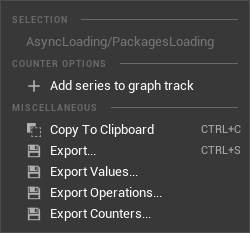
| 메뉴 옵션 | 설명 |
|---|---|
| 익스포트...(Export...) | 선택된 카운터 및 집계된 통계를 탭 또는 쉼표로 구분된 값의 텍스트 파일로 익스포트합니다. |
| 값 익스포트...(Export Values...) | 선택된 카운터의 값을 탭 또는 쉼표로 구분된 값의 텍스트 파일로 익스포트합니다. 선택된 시간 리전(있는 경우)의 값만 익스포트합니다. 시간 리전이 선택되지 않은 경우 전체 세션을 익스포트합니다. |
| 연산 익스포트...(Export Operations...) | 선택된 카운터의 증분 연산/값을 탭 또는 쉼표로 구분된 값의 텍스트 파일로 익스포트합니다. 선택된 시간 리전(있는 경우)의 연산/값만 익스포트합니다. 시간 리전이 선택되지 않은 경우 전체 세션을 익스포트합니다. |
| 카운터 익스포트...(Export Counters...) | 카운터 목록을 탭 또는 쉼표로 구분된 값의 텍스트 파일로 익스포트합니다. |
실행 명령
- TimingInsights.ExportTimerStatistics 실행 명령에서 리전을 지정할 때 알려지지 않은 와일드카드 타입에 대한 지원이 추가되었습니다.
타이밍 뷰
이제 이벤트를 더블클릭하여 타이밍 이벤트에 대한 하이라이트를 리셋할 수 있습니다. 빈 공간을 더블클릭해도 하이라이트가 리셋됩니다.
런타임
-
메타데이터가 있는 CPU 타이밍 이벤트가 '지연 연결' 세션에서 올바른 타임스탬프를 갖지 않는 문제가 수정되었습니다.
-
'LoadModule'에 대한 세부적인 CPU 퍼포먼스 범위가 추가되었습니다.
메모리 인사이트
메모리 할당 테이블
- 컨텍스트 메뉴에 스냅샷 익스포트(Export Snapshot) 가 추가되었습니다. 이는 메모리 할당을 '테이블 비교(Table Diff)' 모드에서 임포트 가능한
.csv/.tsv파일로 익스포트합니다.
'테이블 비교' 모드는 실험단계 기능입니다.
런타임
-
D3D11 및 D3D12 리소스를 위한 메모리 할당 트레이싱이 추가되었습니다.
-
자유 및 힙 트레이스 이벤트에 대한 콜스택이 추가되었습니다.
에셋 로딩 인사이트
- '에셋 로딩 인사이트 에디터(Asset Loading Insights Editor)'에 대한 지원이 추가되었습니다.
트리/테이블 뷰
-
열 헤더의 컨텍스트 메뉴에 모든 열 숨김(Hide All Columns) 옵션이 추가되었습니다.
-
두 메모리 할당 스냅샷을 위한 '세션 브라우저(Session Browser)' 및 '테이블 비교'가 추가되었습니다.
-
'세션 브라우저' 드롭다운 메뉴에 '테이블 비교' 및 '임포트 테이블(Import Table)'이 추가되었습니다.
메모리 프로파일러
UnrealFrontend의 이전 프로파일러 및 런타임은 UE 5.0에서 지원이 중단되었습니다.
MemoryProfiler2 툴 및 MallocProfiler 런타임은 UE 5.0에서 지원이 중단되었습니다.
데이터스미스
데이터스미스 Solidworks 익스포터 플러그인
Solidworks 환경설정 지원
Solidworks에서 환경설정을 사용하여 단일 문서에서 모델의 여러 베리에이션을 생성할 수 있습니다. 이제 여러 Solidworks 환경설정을 레벨 베리언트 세트(Level Variant set)의 베리언트로 익스포트할 수 있습니다.
데이터스미스 Solidworks 익스포터는 익스포트하는 환경설정마다 별도의 스태틱 메시를 익스포트합니다. 일부분이 일부 환경설정에서 보이지 않는 경우 익스포터는 비저빌리티 토글을 사용하여 이를 숨깁니다.
데이터스미스 glTF 임포터 플러그인
인터체인지 glTF 플러그인으로의 전환이 마무리되어 데이터스미스 glTF 플러그인은 이제 '플러그인(Plugins)' 창에서 지원이 중단된 것으로 표시됩니다.
인터체인지 glTF 플러그인
익스포터 - 액터 라벨 사용
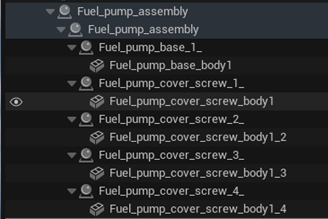
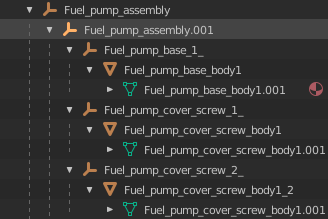
glTF 익스포터는 이제 액터 이름 대신 액터 라벨을 익스포트합니다. 액터 라벨은 익스포트된 계층구조에서 보다 유의미한 정보를 제공합니다.
커스텀 익스텐션 제거
모든 커스텀 에픽 glTF 익스텐션을 glTF 익스포터에서 제거했습니다. 해당 익스포트 옵션은 이제 익스포트 옵션(Export Options) 대화창에 표시되지 않습니다.
| 제거된 익스텐션 | 제거된 익스포트 옵션 |
|---|---|
| EPIC_blend_modes | 머티리얼 옵션(Material Options) > 추가 블렌드 모드 익스포트(Export Extra Blend Modes) |
| EPIC_animation_playback | 애니메이션 옵션(Animation options) > 재생 세팅 익스포트(Export Playback Settings) |
| EPIC_lightmap_textures | 텍스처 옵션(Texture Options) > 라이트맵 익스포트(Export Lightmaps) |
| EPIC_texture_hdr_encoding | 텍스처 옵션 > 손실 이미지 포맷 사용 안 함(No Lossy Image Format For) 텍스처 옵션 > 텍스처 HDR 인코딩(Texture HDR encoding) |
| EPIC_hdri_backdrops | 씬 옵션(Scene Options) > HDRI 백드롭 익스포트(Export HDRI Backdrops) |
| EPIC_sky_spheres | 씬 옵션 > 스카이 스피어 익스포트(Export Sky Spheres) |
| EPIC_level_variant_set | 씬 옵션 > 베리언트 세트 모드(Variant Sets Mode) 베리언트 세트 옵션(Variant Set Options) > 메시 베리언트 익스포트(Export Mesh Variants) 베리언트 세트 옵션 > 비저빌리티 베리언트 익스포트(Export Visibility Variants) |
CAD 임포트
이제 CADKernel 테셀레이션 엔진은 정식 버전으로 간주됩니다. 하지만 아직은 기본적으로 활성화되지 않습니다.
이 출시 버전에서는 CADKernel에 다음과 같은 몇 가지 안정성 향상점을 추가했습니다.
-
중복 표면 제거
-
ISO 커브를 따르는 메시 작업 향상
-
아주 크고 평평한 표면에서 최대 에지 길이 세팅을 우회하는 기능
또한 데이터스미스 CAD 변환기에 새 콘솔 변수를 추가했습니다. ds.CADTranslator.RemoveDuplicatedTriangle은 메시에서 중복 트라이앵글(버텍스 3개가 모두 같은 트라이앵글 2개)을 방지합니다. 중복 트라이앵글은 표면 패치가 복제될 때 나타날 수 있습니다. 두 패치의 메시가 동일한 경우 글로벌 메시에서 중복 트라이앵글을 생성합니다.
USD 지원
에셋 캐시
이제 USD 스테이지를 열 때 언리얼 엔진에서 생성 및 재사용하는 에셋의 캐시를 생성할 수 있습니다. 에셋 캐시를 사용하면 언리얼 엔진에서 캐시된 에셋을 재처리할 필요가 없으므로 동일한 에셋을 사용하는 여러 스테이지로 작업할 때 로드 시간을 향상할 수 있습니다.
이제 프로젝트에 대한 기본 에셋 캐시를 지정하거나, 필요한 각 스테이지 액터에 대해 새로운 에셋 캐시를 생성하도록 언리얼 엔진을 설정할 수 있습니다. 프로젝트에 대한 디폴트 에셋 캐시를 설정하면, 모든 스테이지 액터는 새로운 에셋 캐시가 지정되어 있지 않은 경우 자동으로 디폴트 에셋 캐시를 사용하게 됩니다.
프로젝트에서 처음 USD 스테이지 액터를 열면 언리얼 엔진에서 디폴트 에셋 캐시를 생성하거나 지정할지 묻는 창을 표시합니다. '콘텐츠 브라우저'의 추가(Add) 메뉴(추가 > 기타(Miscellaneous) > USD 에셋 캐시(USD Asset Cache)에서 에셋 캐시를 생성하고 프로젝트 세팅에서 이를 디폴트로 설정할 수 있습니다. 디폴트 에셋 캐시(Default Asset Cache) 세팅은 '프로젝트 세팅(Project Settings)' 창의 엔진(Engine) > USD 임포터(USDImporter) 섹션에 있습니다.
USD 에셋 캐시는 다른 에셋과 마찬가지로 '콘텐츠 브라우저(Content Browser)'에서 열고 편집할 수 있는 에셋입니다. 에셋 캐시를 편집하면 캐시 내의 모든 에셋을 볼 수 있으며, 항상 디스크에 저장되는 지속적인 에셋 및 현재 세션에 로드되는 참조되지 않은 에셋에 대한 메모리 한도를 설정할 수 있습니다. 이를 통해 사용하지 않는 에셋을 로드하지 않고 메모리를 절약할 수 있습니다.
개발자 툴
디폴트 Visual Studio 버전
Visual Studio 2022 는 이제 언리얼 엔진 컴파일에 사용되는 디폴트 Visual Studio 버전입니다. 선호되는 Visual Studio 2022(VS2022) 및 Microsoft Visual C++(MSVC) 버전은 다음과 같습니다.
-
VS2022: 17.4.x 이상
-
MSVC: 14.34.31933
언리얼 헤더 툴
UE 5.1에서 지원이 중단된 C++ 언리얼 헤더 툴(Unreal Header Tool, UHT)이 제거되었습니다. 언리얼 엔진은 이제 UE 5.1에서 새롭게 도입된 C# 언리얼 헤더 툴을 사용합니다.
IWYU 툴
이제 IWYU(Include-What-You-Use) 툴 이 언리얼 엔진 의 언리얼 빌드 툴 에 통합되었습니다. IWYU는 Clang을 기반으로 작성된 명령줄 툴입니다. IWYU는 Clang과 동일한 방식으로 파일을 컴파일하지만 오브젝트 파일은 출력하지 않습니다. 그 대신 IWYU는 제공된 소스 파일을 컴파일하는 데 필요한 #include 지시문 목록을 출력합니다.
IWYU를 사용하려면 Linux에서 타깃을 빌드하고 다음 구문을 사용합니다.
RunUBT.bat <TARGET> Linux Development -IWYU
기본 사항 - 코어
버추얼 에셋 향상
UE 5.2에서는 버추얼 에셋 시스템에 다음과 같은 사용자 경험 향상점을 몇 가지 추가했습니다.
버추얼 에셋 오프라인 지원(실험단계)
긴 시간 동안 오프라인을 유지해야 하는 사용자를 지원하기 위해 버추얼 에셋 시스템에 오프라인 모드를 추가했습니다. 오프라인 모드를 사용하려면 가상화된 데이터를 스토리지 위치에서 로컬 머신으로 다운로드하는 프리캐시 패스를 실행한 후, 온라인 스토리지에 연결하는 대신 로컬 캐시를 사용하는 백엔드 그래프로 전환합니다. 현재 이 기능은 기반이 되는 백그라운드 그래프를 수동으로 생성해야 하므로 실험단계로 간주됩니다.
비가상화한 체크인 자동 수정
사용자가 의도치 않게 가상화해야 하는 에셋을 실수로 비가상화할 수도 있습니다. 이 같은 문제를 바로잡기 위해 UAT는 이제 파일을 프로젝트 전체에서 다시 저장 및 다시 가상화하는 스크립트를 포함합니다. 이를 통해 조직에서 에셋을 일관되게 가상화하는 빌드 팜 등의 워크플로를 환경설정할 수 있습니다. 이 작업을 실행하려면 -run=VirtualizationEditor.VirtualizeProject 명령을 사용합니다. 이 기능은 패키지를 다시 저장하지 않으며, 프로젝트 콘텐츠의 가상화 세팅이 최신 상태여야 합니다.
Clang 스태틱 분석 정식 버전 전환
UE 5.2에서는 5.1의 Clang 스태틱 분석기에서 활성화된 모든 경고를 해결했습니다. 따라서 Clang 스태틱 분석은 이제 실험단계에서 정식 버전으로 전환되었습니다.
픽셀 스트리밍
에픽게임즈는 Google이 WebRTC 버전에서 공개한 취약성을 알고 있으며, EOS SDK에 미치는 영향과 향후 단계에 대해 조사하고 있습니다. 자세한 내용은 여기를 참고하세요.
VR 픽셀 스트리밍(실험단계)
픽셀 스트리밍이 이제 VR을 지원합니다. 기존처럼 웹 브라우저로도 스트리밍할 수 있지만, 이제 XR 디바이스가 연결되어 있는 경우 'VR 모드(VR Mode)' 버튼을 클릭하여 비디오 스트림을 HMD에서 볼 수 있습니다. 또한 시스템은 HMD 및 XR 컨트롤러 움직임을 캡처하여 이를 언리얼 엔진으로 전송하여, 픽셀 스트리밍과 XR 디바이스만으로 언리얼 엔진의 VR 기능이 활성화된 애플리케이션과 상호작용할 수 있게 됩니다. 이로 인해 설치가 전혀 필요 없는 XR 경험을 구축할 수 있으며, 언리얼 엔진에서 다양한 XR 스트리밍 사용 사례를 구현할 수 있습니다.
이 기능은 언리얼 엔진 5.2에서 실험단계이며 다음과 같은 제한이 있습니다.
-
Quest 2 및 HTC Vive로 테스트했지만 모든 XR 디바이스가 지원되는 것은 아닙니다.
-
예측 또는 지연시간 완화 기법이 구현되지 않았기 때문에 헤드셋에 네트워크 지연시간이 있습니다. 즉, VR 픽셀 스트리밍은 현재 로컬 구성에 가장 적합합니다.
-
인스턴스드 스테레오스코픽 렌더링을 활용하려면
-PixelStreamingEnableHMD를 사용하여 애플리케이션을 실행해야 합니다. -
OpenXR 플러그인을 비활성화해야 픽셀 스트리밍 HMD를 사용할 수 있습니다.
-
Meta Quest 브라우저와 같은 헤드셋에 내장된 브라우저를 사용하려면 HTTPS를 통해 콘텐츠를 제공하도록 신호 서버를 환경설정해야 합니다.
다중 스트리머 지원
픽셀 스트리밍은 이제 다수의 스트리머가 같은 신호 서버에 연결할 수 있도록 지원하며, 브라우저 측에서 누구와 인터랙션하는지 선택하는 기능을 제공합니다. 이를 통해 시점을 전환하거나, 로컬 플레이어 경험을 스트리밍하거나, 여러 픽셀 스트리밍 VCam을 동시에 조작할 수 있습니다.
소비자용 NVIDIA GPU에서 스트리밍하는 경우 비디오 인코딩 세션이 3개로 제한됩니다. 모든 세션이 소진되면 소프트웨어 인코딩으로 예비 전환합니다. 하지만 이 경우 CPU 처리 용량이 빠르게 소모됩니다. 1080p 스트림으로 테스트한 결과, 대부분의 최신 시스템에서 3개의 GPU 인코딩 스트림과 1개의 소프트웨어 인코딩 스트림을 구현할 수 있었습니다.
픽셀 스트리밍 프론트엔드 라이브러리
UE 5.2에서 픽셀 스트리밍 프론트엔드(.html, .js, .css)를 전면 개편하여 현대적인 웹 개발을 도입하고, 프론트엔드 작업, 디버깅 및 구축이 더 쉬워졌습니다. 기존의 모놀리식 JavaScript 파일을 TypeScript 클래스 세트로 변환하고, NPM 패키지를 생성하며, SemVer를 따르는 공개 API를 제공합니다. 또한 핵심 함수 기능을 UI 코드와 분리하여 UE 5.2부터는 프론트엔드를 위해 다음과 같이 2가지 NPM 패키지를 제공하게 됩니다.
lib-pixelstreamingfrontend: WebRTC, 세팅, 입력 및 일반적인 함수 기능을 위한 핵심 픽셀 스트리밍 프론트엔드입니다.lib-pixelstreamingfrontend-ui: 필요한 경우, 핵심 라이브러리에서 수정하거나 적용할 수 있는 레퍼런스 픽셀 스트리밍 UI입니다.
사용자는 핵심 라이브러리에 자신만의 UI를 구축하거나 레퍼런스 UI를 시작점으로 사용하여 커스터마이징할 수 있습니다. 이러한 라이브러리 또는 픽셀 스트리밍 프론트엔드에 대한 자세한 내용은 공식 픽셀 스트리밍 인프라스트럭처 Github Repository를 참고하세요.
업데이트된 픽셀 스트리밍 데모
새 픽셀 스트리밍 프론트엔드 라이브러리를 기반으로 빌드된 새 프론트엔드를 포함하도록 픽셀 스트리밍 데모(Pixel Streaming Demo) 쇼케이스 프로젝트를 업데이트했습니다. 여기에는 특정 기능 쇼케이스와 관련 설명 텍스트도 포함됩니다. 이는 픽셀 스트리밍 기능에 대해 더 알고 싶거나 픽셀 스트리밍을 처음 접하는 사용자에게 픽셀 스트리밍을 교육적인 방식으로 선보입니다. 이 쇼케이스 프로젝트는 앞으로 출시될 새로운 기능을 보여줄 수 있도록 지속적으로 업그레이드될 예정입니다.
프로시저럴 콘텐츠 생성 프레임워크(실험단계)
프로시저럴 콘텐츠 생성(Procedural Content Generation, PCG) 프레임워크 는 언리얼 엔진 내에서 직접 프로시저럴 콘텐츠를 생성할 수 있는 초기 단계의 툴세트입니다. PCG는 아티스트와 디자이너가 건물이나 생물군 생성부터 전체 월드에 이르기까지 다양한 에셋 유틸리티를 아우르는 빠른 반복작업 툴 및 콘텐츠를 빌드할 수 있도록 지원합니다.
PCG 프레임워크는 확장 가능성과 인터랙션을 향상하기 위해 제작되었으며, 기존 월드 빌딩 파이프라인에 손쉽게 통합되어 프로시저럴 워크플로와 기존 워크플로 간의 경계를 허물어뜨립니다.

PCG는 콘텐츠를 생성하고 월드 내 데이터와 인터랙션하기 위한 새 노드 그래프, 연산자 라이브러리 및 컴포넌트를 제공합니다. 노드 그래프(Node Graph) 에디터는 완전히 인터랙티브한 방식으로 사용할 수 있으며, 변경사항을 실시간으로 업데이트함으로써 라이브 워크플로를 지원합니다.
프로시저럴 생성 프레임워크에 대한 자세한 내용은 프로시저럴 생성 프레임워크 문서를 참고하세요.
버추얼 프로덕션
nDisplay
SMPTE 2110 지원

nDisplay 시스템에서 Nvidia Mellanox - Rivermax SDK를 통해 SMPTE 2110 표준을 지원하도록 업데이트되었습니다. 이는 다수의 비디오 스트리밍 입/출력을 가질 수 있으며, 콘텐츠 퍼포먼스를 높이기 위해 각 내부 프러스텀이 전용 머신에 의해 렌더링될 수 있는 nDisplay 시스템 하드웨어 구성을 사용할 수 있음을 의미합니다.
멀티 프로세스 및 오프스크린 렌더링
이는 nDisplay 렌더 노드에서 리소스의 병렬처리를 향상시키는 새로운 클러스터 구성 방법론이며, 여러 개의 GPU가 장착된 시스템에서 성능을 향상시켜주는 경우가 많습니다.
간단히 말해, 여러 개의 GPU를 장착한 PC는 화면 출력 기능이 없는 Headless render 노드를 실행하여 렌더링 작업을 처리하며, 이를 cross-GPU로 공유하여 동일한 컴퓨터에서 실행 중인 출력 화면과 합쳐 출력합니다.
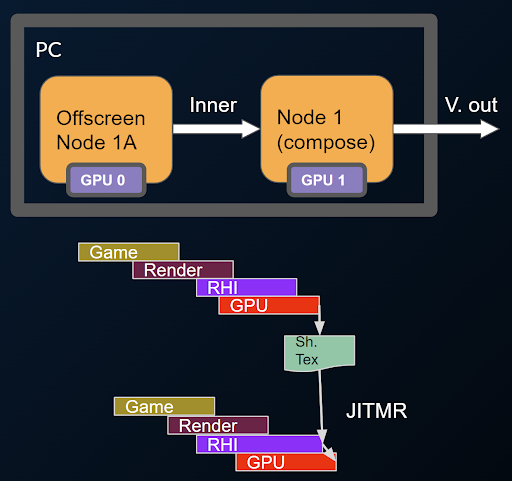
JITMR은 'Just In Time Media Rendering'의 약어로 미디어 I/O 프레임워크의 새로운 기능입니다. 엔진이 이미지를 처리할 때 거의 실시간으로 처리하기 위해 이 기능을 활용합니다. nDisplay에서 이미지를 생성하는 과정에서 마지막 단계에 가까운 시점에 JITMR기능이 작동하여, 최종 화면에 출력하는 과정을 최적화할 수 있습니다.
클러스터 PIE 프리뷰
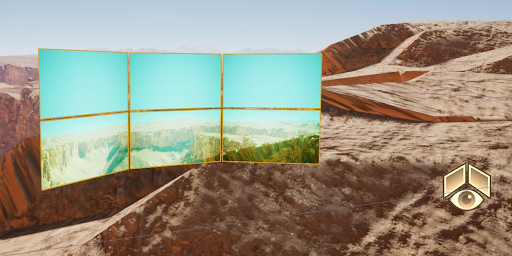
이제 nDisplay 루트 액터를 에디터에서 플레이(Play in Editor, PIE) 모드에서 미리 볼 수 있으므로 클러스터링된 구성을 사전 시각화할 수 있습니다.
ICVFX
iOS 스테이지 앱
이제 iOS 원격 제어 앱을 사용할 수 있으며, 이를 통해 다양한 일반적인 인카메라 VFX 기능을 쉽게 제어할 수 있습니다. 이 앱을 통해 라이트 카드, 플래그, 색 보정 창 및 크로마키 카드를 LED 볼륨에서 nDisplay 렌더의 라이브 인터랙티브 스타일로 구성된 비주얼 프리뷰에 배치할 수 있습니다. 또한 컬러 그레이딩을 수행하고 자주 변경되는 ICVFX 프로퍼티를 수정할 수 있습니다.
크로마키 카드
그린 또는 블루 스크린을 볼륨 내에 배치하고 ICVFX 에디터의 라이트 카드처럼 손쉽게 배치하여 자동으로 nDisplay 크로마키 세팅의 특징을 활용할 수 있게 해 줍니다.
멀티 유저 수신 전용 모드
이제 멀티 유저 세션에서 로컬 인스턴스를 토글하여 멀티 유저 세션의 업데이트를 수신만 하도록 설정할 수 있습니다. 수신 전용 모드에서는 업데이트를 수신하지만 씬에 적용되는 수정 사항은 서버에 전송되지 않습니다. 이를 사용하여 디폴트 또는 전송 전용 모드로 다시 토글하고 멀티 유저 세션에 변경사항을 적용하기 전에 로컬에서 먼저 변경사항을 적용할 수 있습니다.
버추얼 카메라
단일 에디터 멀티캠
픽셀 스트리밍 출력 제공자에서 액세스할 수 있는 단일 서버에서 여러 개의 명명된 동시 스트림으로 WebRTC 픽셀 스트리밍 지원을 확장했습니다. 또한 버추얼 카메라에서의 입력 지원 기능이 향상되어 버추얼 카메라별로 허용되는 입력 디바이스를 선택할 수 있습니다. 이러한 변경사항은 단일 에디터 인스턴스에서 여러 개의 버추얼 카메라를 동시에 운영할 수 있게 해 줍니다.
라이브 링크 VCam 앱
이제 iPadOS 및 iOS용 라이브 링크 VCam에서 멀티 스트리밍 서버를 타기팅할 때 타깃 스트림 선택을 지원합니다. 에디터에서 스트리밍된 텍스트 박스와 인터랙션할 수 있는 가상 키보드 사용 지원도 추가되었습니다.
버추얼 카메라에서 레일 생성
이제 VCamActor는 VCam 인터페이스에서 직접 레일을 구성하고, 편집하며, 따라갈 수 있는 기능을 제공합니다. 이를 통해 복잡하거나 사전에 계획된 카메라 움직임을 실행할 수 있습니다.
타깃 디바이스에 맞는 종횡비 적용
이제 버추얼 카메라가 픽셀 스트리밍을 사용하여 연결할 때 '뷰포트(Viewport)' 해상도를 타깃 디바이스의 적절한 종횡비에 맞게 조정합니다. 더는 '뷰포트' 크기를 조정하거나 오버라이드 해상도를 수동으로 입력하지 않아도 됩니다.
브로드캐스트
렌더 그리드
새로운 '렌더 그리드(Render Grid)' 플러그인은 MRQ 작업 렌더링의 버전 관리를 쉽게 도와줍니다. 새로운 플레이리스트 에셋을 생성하고, '무비 렌더 큐(Movie Render Queue)' 패널과 유사한 작업 흐름으로 작업을 만들 수 있습니다. 저장된 프로퍼티 값들을 가진 작업을 원격 제어 프리셋에 할당할 수 있으며, 이를 통해 작업을 빠르게 복제하고 다른 작업들에 동일한 레벨 시퀀스 애니메이션을 사용할 수 있습니다.
DMX
DMX 컨트롤 콘솔
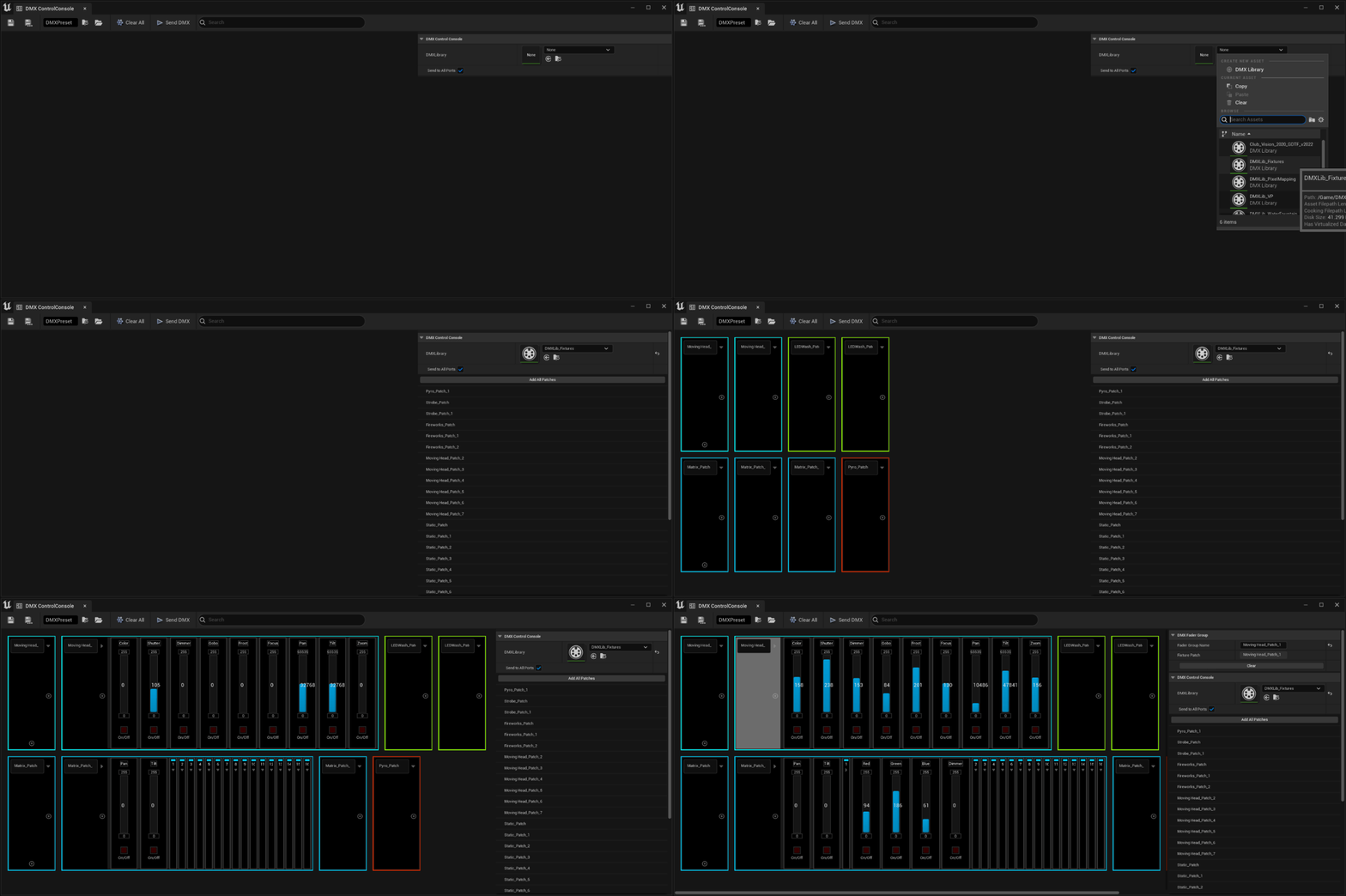
DMX 컨트롤 콘솔이 간소화되어 물리적 및 가상 조명 장치의 빠른 디버깅과 제어가 가능해졌습니다.. 이제 출력 콘솔 UI 내에서 DMX 라이브러리 및 경로를 선택하면 슬라이더가 자동으로 채워져, 즉시 DMX를 생성하여 사용할 수 있습니다..
글로벌 검색을 통해 노출된 컨트롤 슬라이더 내에서 빠르게 필터링함으로써 미세조정할 프로퍼티를 손쉽게 탐색할 수 있습니다.
DMX UI 향상
DMX UI에서는 다음과 같은 사항을 향상해 리얼타임 프리뷰용으로 에디터 내 엘리먼트를 구동하기 위해 DMX를 사용하려는 라이브 쇼 디자이너, 버추얼 프로덕션 오퍼레이터 등이 쉽게 작업할 수 있도록 했습니다.
-
픽스처 패치 일괄 추가
-
업데이트된 명명 규칙(_OX vs _X)
-
유니버스 선택
-
픽스처 배열 복사 및 붙여넣기
-
픽스처 패치 다중 선택 및 이동
-
MVR 임포트 옵션
미디어 IO
미디어 IO 섬네일 및 프리뷰
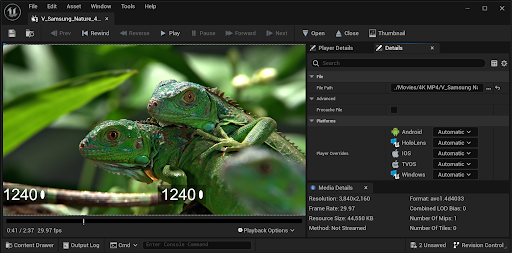
미디어 IO 섬네일
이제 하나 이상의 비디오 파일을 드래그 앤 드롭하여 이미지 및 미디어 소스 에셋의 섬네일을 생성할 수 있습니다. 섬네일로 만들 비디오 프레임도 선택할 수 있습니다.
비디오 프리뷰
이제 파일 미디어 소스, 플레이리스트 또는 이미지 미디어 소스 에셋을 더블클릭하여 비디오를 미리 볼 수 있습니다.
크로스페이드
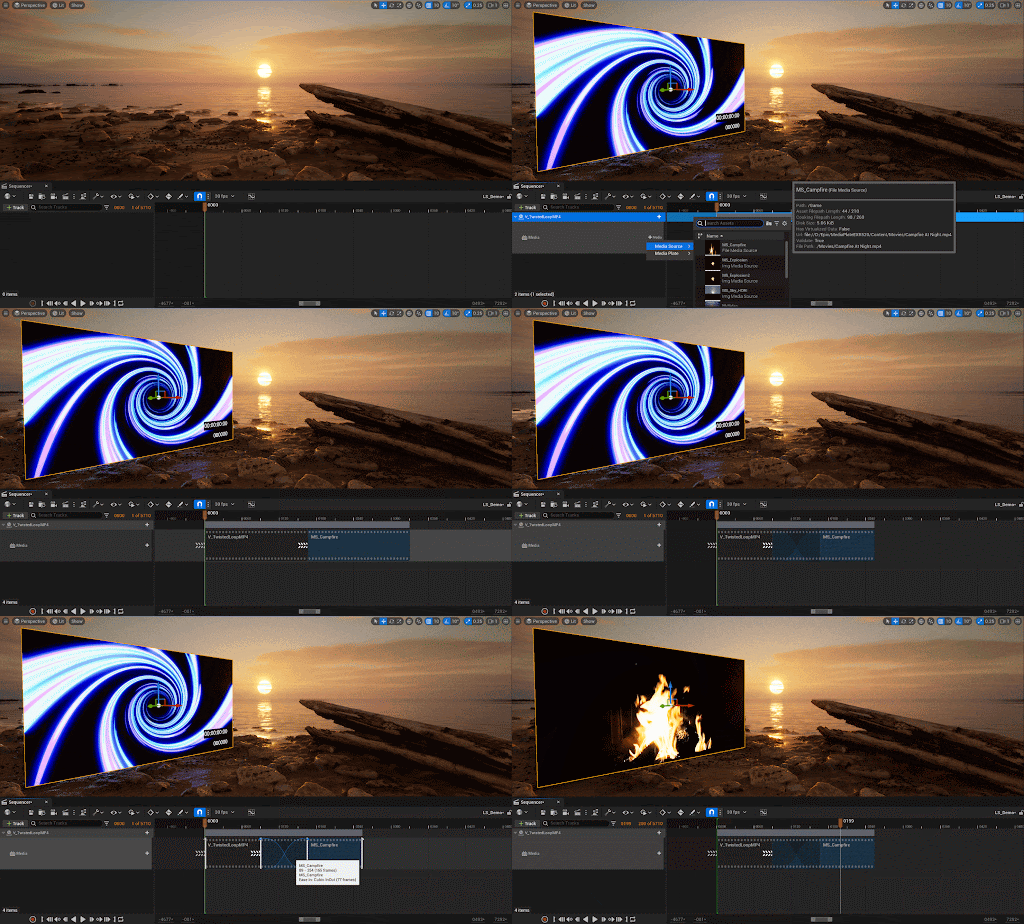
이제 미디어 플레이트 액터에서 미디어 간 크로스페이드를 생성할 수 있습니다. 여러 미디어 플레이어 조합을 사용하여 최대 2개(2배) 트랙을 크로스 페이드할 수 있습니다.
컬러 파이프라인
작업 중인 컬러 스페이스
'작업 중인 컬러 스페이스(Working Color Space)'는 사용자가 엔진에 정보를 제공함으로써 텍스처 입력 및 디스플레이 출력이 의도된 작업 중인 컬러 스페이스로 적절하게 변환되도록 해 주는 프로젝트 세팅입니다.
OCIOv2 향상
OpenColorIO 플러그인 라이브러리가 버전 2.2로 업데이트되면서 기본 환경설정 및 .ocioz 압축 환경설정 아카이브 지원 같은 새로운 기능이 추가되었습니다.
ICVFX 라이트 카드에 대한 OCIO 지원
이제 OCIO를 라이트 카드에 적용할 수 있습니다. 이는 LED 월에 정확한 강도와 색상으로 표현될 수 있음을 의미하며, 선택적으로 카메라를 위한 보정과 분리할 수 있습니다.
색 보정 영역을 사용한 액터별 컬러 그레이딩에 대한 나나이트 지원
이제 색 보정 영역을 사용한 컬러 그레이딩을 영역/볼륨뿐만 아니라 특정 나나이트 액터에도 사용할 수 있습니다. 즉, 기존 액터와 마찬가지로 원하는 나나이트 액터에도 컬러 그레이딩 효과를 제한할 수 있습니다.
플랫폼 SDK 업그레이드

-
Windows
-
IDE: Visual Studio 2022 v17.4 이상
-
Windows SDK 10.0.18362 이상
-
LLVM Clang 14.0.1
-
.NET 4.6.2 Targeting Pack
-
.NET 6.0
-
-
빌드 팜 컴파일 대상 IDE 버전
-
Visual Studio: Visual Studio 2022 17.4 14.34.31933 툴체인 및 Windows 10 SDK(10.0.18362.0)
-
Xcode: Xcode 14.2
-
-
GDK
-
Windows SDK: 10.0.19041.0
-
GDK: October 2022 Update 1
-
펌웨어 버전: Recovery November 2022 10.0.22621.2864
-
지원되는 IDE: Visual Studio 2022
-
-
Linux
-
기본 Linux 개발
-
권장 OS: Ubuntu 22.04 또는 CentOS 7
-
컴파일러: Clang 15.0.1
-
-
크로스 플랫폼 개발
- 크로스 컴파일 툴체인: v21 Clang-15.0.1 기반(CentOS 7)
-
-
macOS
-
권장 사양
-
최신 macOS 13 Ventura
-
최신 Xcode 14.1 이상
-
-
최소 사양
-
macOS 12.5 Monterey
-
Xcode 14.1
-
-
-
iOS/tvOS/iPadOS
-
권장 사양
-
최신 macOS 13 Ventura
-
최신 Xcode 14.2 이상
-
-
최소 사양
-
macOS 12.5 Monterey
-
Xcode 14.1
-
-
지원 타깃 SDK 버전: iOS 15 이상
-
그래픽 API: Metal 2.4 및 Metal 3.0
-
-
Android
-
Android Studio 4.0
-
Android NDK r25b
-
Android SDK
-
권장 사양: SDK 32
-
UE 컴파일 최소 사양: SDK 30
-
디바이스 실행용 타깃 SDK 최소 사양: SDK 26
-
AGDE 디버깅을 사용하는 경우 AGDE v23.1.82+ 필요
- AGDE에는 JDK 17이 필요합니다. OpenJDK 17을 사용할 것을 권장합니다.
-
-
-
ARCore
- 1.22
-
ARKit
- 4.0
-
Oculus
- 33.0
-
OpenXR
- 1.0.22
-
Steam
- 1.47
-
Steam VR
- 1.5.17
-
Switch
-
SDK 14.3.0 또는 15.3.0 + NEX 4.6.7(선택 사항)
-
최소 펌웨어 버전: 14.3.0-1.0
-
Nintendo Dev Interface 2.5.5
-
지원되는 IDE: Visual Studio 2022(SDK 버전 15.3.0), Visual Studio 2019(SDK 버전 14.3.0)
-
-
PS4
-
Orbis SDK 10.008.011
-
시스템 소프트웨어 10.010.001
-
지원되는 IDE: Visual Studio 2022
-
-
PS5
*Prospero SDK 7.00.00.38
-
시스템 소프트웨어 7.01.00.00
-
지원되는 IDE: Visual Studio 2022
-
Release Notes
Animation
New:
-
You can now relinking State Machine transitions in the AnimGraph. Additionally, you can make selective relinks by multi-selecting a subset of the transition nodes.
-
You can now use per-bone blend profiles as overrides in Blend Spaces.
-
Added a new visual Blend Curve widget to replace the previous text-based solution. The new widget shows the selected blend curve and displays animate information while hovering over it with the mouse.
-
Shared AnimGraph State Machines transitions can now be used and referenced across hierarchy levels by their parent and child state machines.
-
Exposed more animation blueprint features to the animation blueprint templates to support the new expanded skeleton compatibility.
-
Unreal Engine will now prefer to use the physics asset of the currently displayed mesh instead of the one who's preview mesh matches the current mesh.
-
You can now add Animation Composite Assets to Motion Matching Database assets in order to select poses from them at runtime.
- You can now set a limit to define the number of bone influences, per-vertex, below what the project supports.
- You can use the
BoneInfluencesLimitproperty to set a limit on each LOD of an asset. - You can also use the
DefaultBoneInfluencesLimitproperty as a per-platform global default, that can be set from the Project Settings. - For example, you can enable Unlimited Bone Influences on a project while ensuring that meshes don't use more than
8influences by default, even if they've been imported with more.
- You can use the
-
You can now toggle the Unlimited Bone Influences property as a per platform default, rather than having one global setting for all platforms.
- Skeletal Mesh Assets now display their Max Bone Influences in the metadata tooltip that you can access by hovering over an asset in the Content Browser.
- Additionally, you can now filter assets by Max Bone Influences.
Improvement:
-
Improved the accuracy of some comments about how the Support Ray Tracing setting on Skeletal Meshes affects their usage of the skin cache.
-
Deprecated properties have been wrapped with
WITH_EDITORONLY_DATAin order to avoid runtime waste.
Crash Fix:
- Fixed an issue that could cause a crash when duplicate blend profile indices are introduced, due to a virtual bone rename operation.
Bug Fix:
-
Fixed a bug that would display incorrect values for some Watched pin values in Animation Blueprints.
-
Fixed a bug that could cause LOD bones to not display correctly in the Animation Editor Viewport.
-
Prevented redundant node spawner actions from being registered for every loaded Animation Blueprint asset context in the editor.
-
Fixed a bug that could cause blend profile bone indices to go out of sync when virtual bones were deleted.
Gameplay
New:
-
Exposed
Montage_GetEffectivePlayRate, which accounts forPlayRate*RateScale. You can use the newMontage_GetEffectivePlayRateto get more accurate Montage playrate as the currentMontage_GetPlayRatereturns onlyPlayRate, so it doesn't provide an accurate final play rate if the Montage asset has aRateScalethat isn't1. -
You can now use new Property Tracks in the Rewind Debugger to isolate, watch and debug any recorded property in its own dedicated track in the Rewind Debugger timeline.
-
Added support for overlay icons to be displayed on the Rewind Debugger's Tracks.
-
You can now undo and redo changes made in the Pose Search Database editor.
-
You can now set the blend behavior of the Motion Matching node, such as blend Time, Mode and set driving Blend Profiles.
-
Added a new filter to the pose search Rewind Debugger track that you can use to hide invalid poses.
-
You can now preview Blend Spaces in the Pose Search Database editor.
-
You can now set a dynamic Play Rate Minimum and Maximum to control the playback of Motion Matching nodes.
-
You can now view a Pose Search Database's statistics, using the Database Statistics Tab in the Pose Search Database editor.
-
In the Rewinder Debugger, you can now open the currently selected object's blueprint editor by double-clicking its track in the object outliner.
-
When opening an asset or database from the Rewind Debugger's Pose Search track, the asset is paused and will match the time in the recorded gameplay segment, making it easier to inspect and debug assets.
-
Added new icons adjacent to assets listed in the Pose Search Database editor's Asset Tree panel to quickly show a database entry's state and properties.
Improvement:
-
The motion matching Pose Search Database editor's stability has been improved.
-
Performance improvements have been made to the Pose Search Database indexing.
Crash Fix:
- Fixed an issue that could cause a crash when the Motion Matching Trace State search throttling was enabled.
Bug Fix:
-
Fixed a bug that could cause parallel indexing of Pose Search Database assets to not perform correctly.
-
Fixed a deserialization issue that could occur with a Pose Search Database index kdtree.
-
Fixed issue that could cause a bug while packaging Pose Search Database assets.
-
Fixed an issue that could occur when concurrently indexing a DCC Pose Search Database.
-
Fixed an issue that could cause a root motion enabled animation preview character to not start at the origin point when switching to a new root motion mode while the animation is paused.
Deprecated:
-
Removed the pose search
EPoseSearchFeatureDomain. -
Removed
UPoseSearchSequenceMetaData. - Removed support for the Pose Search Database sequence lead in and follow up asset definitions.
- You can now use Animation Composite assets with Motion Matching to set sequences of animations that must play in order.
- Removed support for
UPoseSearchFeatureChannel_Pose::SampleTimes.
Rigging
New:
-
You can now reorder elements of the rig in the Hierarchy view using drag and drop.
-
Added a new node to create an array of items out of a fixed item list.
-
When dragging and dropping elements in the Control Rig's Hierarchy view, the list wil auto-scroll when moving the cursor to the boundary of the view.
-
Added new graph nodes that you can use to get and set the rig's control settings during the construction event.
-
Added a new set of Control Rig Make nodes in order to use other variable values such as Vectors, Transforms, and more.
-
You can use the new hotkey command, Ctrl-G to Go To a specific instruction in the execute stack view.
-
Once a pin of a Control Rig template node is resolved, it will add a preferred type. This change is also reflected in the API, as once a template pin is resolved, it will not unresolved unless manually unresolving the node.
-
You can now use Anim Controls to drive other Control Rig Controls.
-
You can now select any Mesh that uses a compatible Skeleton asset, as a Preview Mesh.
-
Using the Skeletal Mesh Modeling Tools plugin, you can now use a utility function in the Content Browser to convert a Static Mesh to a Skeletal Mesh using a reference Skeletal Mesh asset and its associated Skeleton asset.
- Several Improvements have been added to
AnimToTexture:- Improved
UpdateMaterialInstanceFromDataAssetby settingUVIndex, Animate, andNumBoneInfluences. - Renamed several Material parameters.
- Fixed Static Mesh bounds.
- Setting Static Mesh
FullPrecisionUVsonly to a given LOD. - Forcing
PowerOfTwofor 16bit precision. - Added 16bit precision for Vertex Mode.
- Improved
-
When creating Splines in Control Rig, you can now create Closed Splines by enabling the Spline from Points node's Closed pin.
-
Added the Deformer Graph source library
DSL_Matrixwhich contains useful shared matrix functions. -
Added the new experimental plugin, PoseCorrectives, that you can use to set up corrective pose behaviors. The new plugin contains similar functionality to the Pose Driver node but features a more interactive workflow.
-
Added the console command
r.MeshDeformerMaxLODthat you can use to disable mesh deformers below a fixed LOD. -
Added new Inline function bytecode to the Control Rig. Functions are now only compiled once and their bytecodes are inlined when function references are found.
-
You can now promote Control Rig node Pins to Interface Pins when inside a function or collapsed node.
- Added a new half edge connectivity data structure that you can use in the Deformer Graph.
Improvement:
-
Control Rig Controls are now always selectable even if they uses a translucent material.
-
Buffer creation is now done per-instance at runtime.
-
Control Rig Components now tick the Post-Process AnimBP with the correct delta time instead of a zero delta time. Previously a tick with a zero delta time could cause any present Rigid body anim node in a PPABP to stop working.
Crash Fix:
-
Fixed a crash that could occur when loading a Control Rig with an invalid parent class.
-
Fixed a crash that could occur when exiting PIE when the Control Rig editor is attached to a Control Rig instance in PIE when debugging.
Bug Fix:
-
Fixed issue where
AnimNode_LayeredBoneBlendwas not updating the blend weights correctly when using a LOD Threshold. -
The Deformer Graph Shader Text Editor now updates tab names according to the name of corresponding custom kernel nodes.
-
Custom Deformer Graph Kernel nodes now show the user-defined names in the graph.
-
Fixed the Curve Expression plugin's verify button in the Remap Curves from Mesh panel.
-
You can now copy/paste Custom Compute Kernel node's parameter bindings in the Deformer Graph.
-
Fixed a bug that could cause the Apply To Asset button to not save the preview mesh setting with Deformer Graph assets.
-
Fixed a bug that could occur when copying and pasting Deformer Graph nodes.
Runtime
New:
-
Exposed access to Curves, TickRecords and Graph Data from UAnimInstanceProxy.
- Improved Animation Modifier Error Handling with Dll Export.
- You can now batch apply modifiers by script to the FApplyModifiersScope object using Python or Blueprint Scripted Actions.
- Added a new tree view for Animation Curves.
- You can now use
UseTreeViewForAnimationCurvesandAnimationCurveGroupingDelimitersto enable tree view for curves in an Animation Sequence Editor Checklist.
- You can now use
- Added additional settings in the Animation Editor and Timeline:
- Unreal now supports multiple delimiters, which default to "._/|\".
- Unreal now supports path compression, "A.B.C" and can be presented as one node instead of three if B is the only child of A.
- Unreal now supports reused names for both curve & path. For example, curve "A.B" and "A.B.C" can exist at the same time.
- Unreal now supports name collision with different delimiters. For example, "A.B", "A/B" and "A_B" can exist at the same time.
- Additionally you can now access the Remove Curves & Edit Curves Context menu actions.
-
Added the ability to edit multiple curves simultaneously inside of the Animation Editor by adding/removing curves of interest
-
Added a new custom Animation Blueprint option for additional meshes in animation preview.
-
Added a setting for Animation Modifiers you can use to reapply the modifier post owner change.
-
Exposed the add_socket method to the SkeletalMesh class in Python API.
-
Added a new validation and visual warning to Animation RigidBody Nodes that will display a warning on the node in the AnimGraph if the referenced bones are missing.
-
You can now play Animation Composite assets in the Random Sequence Player node.
-
Exposed functionality on Blend Spaces to force snap to a passed input.
-
Added Blend Space player library to support editing blendspace players.
-
Manually set Skeleton asset compatibility is now bi-directional. Specifying a compatible skeleton A -> B, now implies B -> A.
-
Skeleton compatibility is now an editor-only concern. The runtime will attempt to match skeleton assets via name -> name mappings. Only the editor will prevent assigning incompatible skeletons, for example, in asset selection properties.
-
Skeleton compatibility checks in editor can now be disabled in the Editor Preferences, and each asset picker now has a filter toggle in its View Settings that allows you to see non-compatible skeleton assets.
-
You can now copy and paste data in the Animation Curve Viewer.
- You can now use the Montage tracks in Rewind Debugger to observe montage data. Montage assets can also be opened by double clicking the asset in the track.
Improvement:
-
Improved Custom Attributes project setting naming.
-
MLDeformerComponent::FindSkeletalMeshComponentnow returns nullptr instead of the first available SkelMesh in the event that no matching SkelMesh is found. -
Skeleton Compatible is now determined using a more optimized
IsCompatibleSkeletonByAssetStringmethod that doesn't rely on the asset manager. - Several improvements have been made for
LookAt AimOffset: You can now useShowDebug Animation.- Input filtering is now accessible.
- Allows the source or pivot to be a bone or socket.
-
Added an option to display filter categories as sections rather than submenus to
SBasicFilterBar. -
When browsing to assets by clicking hyperlinks in the Rewind Debugger Details panel, the tool will now navigate to the appropriate frame in a referenced AnimSequence, Blendspace or Montage (pausing playback on that frame), and will also set the BlendSpace X/Y Parameters in the editor preview after opening a blend space.
- Blend curve rendering has been improved in the Rewind Debugger to both improve performance, and display overlapping curves more accurately.
- Blend weights curves are now rendered as a bar graph, rather than a smooth curve, where the width of each bar is the duration of the frame.
- If the same AnimSequence is playing in two different places in the graph with different blend weights, it will now display as alpha blended overlapping bars on the same frame; previously this behavior was rendered as a jagged curve.
-
The Rewind Debugger's eyedropper tool for actor selection, is now disabled when player control has not been ejected. Additionally, a tooltip has been added to explain that you must eject player control first, before using the eyedropper tool.
- The Reset to Default operation in Blend Space axis Min and Max properties has been explicitly disabled because it causes various issues.
Crash Fix:
-
Fixed a crash that could occur when using the Pose Handler AnimBP node, where it was using the bone container without first checking if it was valid.
-
Fixed crash that could occur when a USkeletalMeshComponent is created as a DefaultSubObject of another component.
-
Fixed a crash that could occur when deleting a Skeleton used by a Skeletal Mesh Component instance, which also uses a post-processing animation instance.
-
Fixed an issue that could cause a crash when cleaning up invalid Blend Profile entries leading to OOB access when more than one entry is removed at once.
-
Fixed an issue that could cause a crash when splitting a post process settings pin on a Property Access node.
-
Fixed an issue that could cause a crash when selecting a curve after removing transform curves in an animation sequence.
-
Fixed an issue that could cause a crash by right-clicking a modify curve node in a template animation blueprint.
-
Fixed an issue that could cause the Animation Asset editor to crash when a preview skeletal mesh executes a raw delegate on an already destroyed preview mesh.
-
Fix a crash that could occur with the
AnimationViewportClient, when the preview mesh has been destroyed before the client destructor has been called. -
Fixed an issue that could cause a crash when accessing out of bounds notify index after deleting an Anim Notify in a montage.
-
Fixed an issue that could cause a crash when deleting an Animation Blueprint asset.
-
Fixed an issue that could cause a crash when deleting a curve then validating its asset post-save.
-
Fixed an issue that could cause a crash when using a Skeletal Mesh Component, when the Leader Pose Component is a Poseable Mesh Component.
-
Fixed an issue that could cause a crash when using the Skinned Mesh Component when overriding vertex colors or skin weights and then performing any change that rebuilds LOD information, such as changing the displayed mesh.
-
Fixed an issue that could cause a reinstancing crash when using a custom anim instance proxy as a linked anim graph.
Bug Fix:
-
API can occasionally suppress warning or error dialogs when applying modifiers from script. 'YesToAll' and 'NoToAll' will now not be respected when both error and warning are thrown from the same modifier class.
- A bug was fixed that could cause an error when transferring Aniamtions Modifiers to a new Skeleton when the ownership of 'PreviouslyAppliedModifier' was from an animation modifier instance of the animation sequence being applied. Stateful animation modifier can now be reverted correctly (Applied modifier instance is no longer reverted after OnApply call)
- Previously when transferring an Animation Modifier to a new Skeleton, the USkeleton would be dirtied everytime the modifier is applied to an animation sequence.
- The
CanRevertandOutOfDatestatus for the Animation Modifier on the Skeleton did not reflect the true status of all animation sequences referencing that skeleton. - CurrentAnimSequence/CurrentSkeleton was not set on OnRevert().
IAnimationDataController::FScopedBracketwas not open on OnRevert() before re-apply modifier
-
Unreal will now consider Unreal Engine's Skeletal Mesh bone naming system when importing non-base-LOD Skeletal Mesh assets.
-
Fixed a bug that could cause Additive Transform tracks on an Animation Sequence to not be enabled/disabled.
-
Fixed a bug that could cause an error when using a BlendMask on a Layered Bone Blend node playing back on a compatible skeleton.
-
Fixed a bug that could cause the "Allow incompatible skeletons" property's state was not saved to config files.
-
Fixed a bug that could occur when mirroring Animation Attributes, that caused assigned bone indices to not be remapped correctly.
-
Fixed a bug that could cause CTRL+Z/CTRL+Y to not undo/redo changes to some Preview Scene settings.
-
Fixed a bug that could cause Animation Curve LOD settings to be lost when merging two (or more) Skeletons together.
-
Fixed a bug that could cause PoseAssets to not correctly be evaluated for compatible Skeletons due to bone index mismatches.
-
Empty tracks are now removed to ensure track key count is consistent with the data model.
-
Fixed a bug that could occur by protecting against a null source object when handling re-instancing in custom property nodes.
-
Fixed a bug that could cause Animation Notify States to be ended when CustomTimeDilation is set to zero.
-
Fixed a bug that could cause 'reachable garbage object' errors in anim BP thumbnail preview scenes.
-
Fixed a bug that could cause distorted meshes when assigning assets that rely on skeleton compatibility.
-
Fixed a bug that could cause index mismatch/out-of-bounds access when drawing bones using Pose Watch that doesn't use the full set of bones.
-
Fixed several truncation errors in the
AnimationCore,SkeletonEditorAnimationBlueprintEditor,AnimationGraph, and AnimationGraphRuntime modules -
Swapped ordering of 'Use Selected' and 'Browse to Asset' Skeletal Mesh asset context menu options to match the rest of the editor.
-
Fixed a bug that could cause Anim Notifies in a sequence to not be triggered when played on a slot node inside a linked animation blueprint.
-
Fixed a bug that could cause a Mirror Data Table asset to not automatically add sync markers during creation.
-
Fixed a regression that caused Anim Notifies from all the animations within a montage to be queued as standard notifies and skip the slot relevancy check before triggering the animation events.
-
Fixed a bug by adding a test of bone index validity in animation Pose Assets to avoid runtime failure in rare conditions.
-
AimOffsetLookAt and RotationOffset blendspaces now correctly validate for dynamic properties.
-
Fixed a bug that could cause irregular performance, by skipping updating compatible assets in the asset family shortcut bar, if the asset registry is still loading assets.
-
Fixed a bug that could cause Anim Sequence Curve colors to be reset to white.
-
Fixed a bug that could cause the Anim Timeline Trimming tools to create invalid key data.
-
Fixed a bug that could cause incorrect out-of-bounds access when using retargeting.
-
Fixed a bug that could cause OrientAndScale retargeting to not function properly in the presence of skeleton remapping.
-
Fixed a bug that could cause check() to not operate correctly when deleting certain configurations of Anim Notifies or Notify States.
-
Fixed a bug that could cause an error in the level of detail bone reduction calculation, as it was showing incorrect counts when performed from the Skeleton Tree.
-
Fixed a bug that could cause the BoneContainer's
SetDisableRetargetingproperty to be ignored for packaged projects.SetDisableRetargetingnow works in both editor and packaged projects. -
Fixed a crash that could occur when generating thumbnails for cooked additive animations.
-
Fixed a bug that could cause a
AnimNodeReferencecheck assertion to not function properly. -
Fixed a bug that could cause Animation Sequences to not trigger Notifies if the sequence preview is dragged all the way to the left of the sequence.
-
Fixed a bug that could cause out of range errors when using the Random Player AnimNode, due to precision rounding errors.
-
Fixed an issue that could cause a crash when using the AnimInstance display debug, when a montage ends while blending physical animation.
-
Fixed a bug that could cause Animation Attribute data to not update when reimporting data from the source FBX file.
-
Fixed a bug that could prevent the creation of a child animation blueprint via the content browser.
-
Fixed a bug that could occur when the leader-pose component was used in construction scripts, which could cause distorted meshes.
-
Fixed a bug that could cause attached actors such as weapons to not display properly while scrubbing in Rewind Debugger
-
Fixed a bug that could cause debug data to disappear in the Rewind Debugger when Animation Blueprints are updated and compiled during a single PIE session. Now, debug data will still display correctly, but data will be listed as a new AnimInstance track, with new sub-tracks for Blend Weights, each time you recompile.
-
Fixed a bug that could cause a sync group's start position to be ignored.
-
Fixed a bug that could cause copy and paste functionality in Blend Space axis Min and Max properties to not operate correctly.
- Fixed a bug that could occur in the Rewind Debugger that caused the debug components and tracks for the selected Actor to be filtered out based on incorrect lifetime information.
Removed:
-
Disabled 'resync to sync group' functionality for sequence and blend space evaluators, as they generally should be driven with explicit time.
-
Dragging functions into the Animation Blueprint from My Blueprint is now disabled, as the functions are not usable in the Animation Graph.
Sequencer
New:
-
Added sub-components support when constraining an actor with Skeletal Meshes to be consistent with the attach track workflow.
-
Added an option to the ObjectID pass to decide whether or not to include transparent objects. If included, they will write to the ObjectID pass as opaque pixels.
- Camera Cut Track section now has more information when a camera cut is not found.
- Instead of just showing no label it will instead specify if there is no binding specified, or if there is a binding specified it will say that the binding/object cannot be found.
-
Added a simple auto-completion widget to the Config Editor UI that will helpfully suggest possible format tokens when you type a "{" in the File Name Format field. This doesn't change which tokens are supported and this does not work in the Output Directory path (as it already has a customization). This also enables support for double-click selection in the footer text and allowing copy/paste from the footer as another way to get the format tokens.
-
Media tracks can cross fade in Sequencer.
-
Added axis filters for translation, rotation, scale, and parent constraints to specify what axis it operates along.
-
Added native accessors for common float/color light properties to improve performance when setting them after sequencer evaluation.
-
Holdout and visibility flags can be controlled by sequencer/blueprints.
-
You can now toggle an autocomplete property for console variable entries in the Console Variables setting.
-
Added new Console Variables Editor presets to the "Console Variables" setting. You can use any number of presets with your project.
-
Added a new filter button to the Sequencer Content Browsers.
-
CameraRig_Railprivate methods and properties have been made protected so that the child class has access. -
Take Recorder now records using auto keys.
-
NLA now exposes the Start Offset for Translation and Rotation, and also exposes the Skeleton to Blueprints and Python.
-
You can now use new Sequencer commands for key context menu items, such as Set Key Time, Rekey, Snap To Frame, and Delete.
-
You can now assign a color tint to Sections in Sequencer, which will be blended with the track color.
-
Added a menu to set a Section's color tint from a list of user-defined color tints to the Project Settings.
-
Skeletal Track Editor's skeleton color for the animation clips are now based on the section color if defined. Otherwise, it defaults to the original hardcoded colors.
-
You can now view a Seqence's Frame Count and Duration using a new display.
-
The MRQ UI now allows CVars to be toggled. By hovering over a CVar property a tooltip will be visible that describes the CVar's functionality, as well as a value resolution tooltip to indicate where the CVar value originated such as the startup value, the preset value, and the value set in MRQ.
-
When using CVars with MRQ, the Console Variables settings will now display a UI warning if the sequence having its settings modified has at least one CVar track in the Sequence. Sub-sequences will also be searched for CVar tracks. For the warning to display, the CVar track must not be muted, and contain an active section that contains set CVars.
-
You can now register additional film overlays for Level Sequence assets.
-
You can now Group Sequencer properties using the property in (+) Track menu by their defined Category, if it exists.
-
The Window > Cinematics > Sequencer menu item is now always clickable. If there is an existing Sequencer window, the Editor will focus your view to it when the menu item is clicked.
-
The Console Variables setting now displays a read-only view of the CVars within each CVar preset that has been selected.
-
Sections will now be cleared when a control is deselected, otherwise they may not be deselected in the non Sections To Key.
- You can now use the new CVar,
ControlRig.Sequencer.SelectedSectionSetsSectionToKeyin order to set the section to key based upon the current selected key area.- The CVar is set to false by default.
-
Added the new SetSpawnableBindingID() which allows you to possess a spawnable binding from python/blueprints.
-
Added the new GetSortingOrder() and SetSortingOrder() to get and set sorting order for bindings through python/blueprints.
- Pasted object bindings now operate more dynamically based on user input.
- If there is no existing binding in the sequence being pasted into, the pasted binding will be bound to the original object. If there is an existing binding in the sequence being pasted into, a menu will prompt the user to select one of the following options:
- Duplicate: Which will duplicate the bound object, resulting in a duplicated copy of the object with its associated bindings and tracks.
- To Not Duplicate: Which will unbind the object, indicated with a red color in the UI. You can then rebind the object to a new parent object.
-
Added a new option to Reset Playhead When Navigating which resets the playhead to the start of the playback range when navigating in and out of subsequences.
-
Added a new AudioAssetName property to the Take Recorder's settings, that you can use to format the name of the audio asset file that is recorded. The default naming convention will use the following format:
Audio_{slate}_{take}. - Added generic support for hierarchical easing on sub-sequences, and dynamic weighting on level sequence players
- This new feature allows seamless blending between sub-sequences using the familiar overlapping ease ranges. Blendable tracks contained within each will naturally blend together in the transition range.
- A new API exists for specifying the global weight of a sequence, allowing completely different Sequences to be blended together using gameplay code.
-
Added Curve caching to the Curve Editor so curves are only recreated when something changes for massive speed ups.
-
You can now set the Additive From Base blend type to byte, integer, and perlin noise channels.
- Added a new Quaternion (Slerp) blending algorithm for blending transform tracks using a 'shortest path' rotation.
- Tracks that support multiple blending methods will now have a Blending Algorithm sub-menu within their context menu, which is used for choosing which blending method to use between assets.
-
Added the ability to assign console variable collections to console variable tracks.
-
Added the ability to set FK Control Rigs as Additive in both Python and Blueprints.
-
Add a new tooltip for track outliner items that shows property binding information.
-
Added new APIs to allow top-level channels to do extra drawing.
-
Improved the Seqeuncer's skeletal mesh animation track to run with the new ECS-based evaluation.
- Added function to the Constraint Python and Blueprint APIs for adding, keying, and compensation.
Improvement:
-
MRQ has been updated with an overall streamlining of queue save and load workflows, similar to what was done for configuration presets.
-
You can now assign multiple characters for the generated Shot or Take naming property. For example, you can now define a take separator as
_vso that the shot name can be generated as,MyShot_v001. -
Numeric sliders in Sequencer now correspond with property metadata so that the behavior in the key editors is identical to the Details Panel.
-
Improved the context menu operations, Pre and Post infinity Extrapolation, Interpolation and Reduce Keys. These properties now affect only the selected channels, when channels are selected, rather than all channels of the section.
-
MRQ preset workflows configuration has been streamlined. The editing dialog now indicates the name of the preset being updated, and provides "Save" in addition to "Save As" options.
-
Renamed
CinePrestreamingtoCinematicPrestreamingto match the Cinematic Prestreaming plugin's convention. -
The mutual component inclusivity API has been improved to provide a robust framework for defining mutually inclusive component types.
-
Fade tracks are now converted to ECS evaluation.
-
Template sequence menus are now only displayed on Actor bindings, and not on component bindings.
-
Marked frames in sequencer have been improved with a revamped look, improved UX, the ability to add a marked frame to the selection, and can be commented on using the Comment field.
-
ECS evaluations have been improved by performing a series of basic checks before dispatching tasks to determine if there are any irrelevant operations.
-
Fixed a bug that could cause issues when working with rigs that have the root animation at some bone beyond a direct child. The operation now searches the rig for the first bone with animation on it which enables the use of non-zero roots.
-
Now, when manipulating a root bone offset in the edit mode, edits must be made in the space of the start of the section, since that's the space that the edit is being performed.
-
The color of perlin noise curves has been changed, since the background color of sequencer sections has changed.
-
The ECS evaluation of perlin noise channels now uses the new EvalSeconds component.
-
A key's default Interpolation type will now be based upon the previous key set, rather than the default setting. The default setting is only used when setting the first key.
-
Tangents will now be modified to follow the curve when user or broken keys are set in Sequencer.
-
The Time Undo operation is now controlled by Sequencer using the TimeUndo Console Variable.
- Channel evaluations have been optimized using a cached interpolation component.
- During stress tests this improvement saves roughly 60% of evaluation time by removing indirection and increasing cache utilization.
- This can be disabled or enabled with the
Sequencer.EnableCachedChannelEvaluationconsole variable, which by default is enabled.
- Added several new functions and improvement to Constraint Scripting:
- Added a new function to remove Constraint in the Constraint Manager.
- Exposed the CreateTransformableHandle to Control Rig.
- Added the new TimeUnit to MoveConstraintKey, Compensate, and SetConstraintActiveKey so you can use display time.
- Added the new GetConstraintKeys that will return an array of times and bools.
- Set disabled styles for transport control buttons.
Crash Fix:
-
Fixed an issue that could cause a crash when removing keys on mouse up in the Curve Editor. Now insurance is made that the key handles are unique to prevent this issue. Additionally, a check is made to ensure the last dragged keys are up to date on mouse up.
-
Fixed an issue that could cause a crash when the Deferred Rendering setting has the Add Default Layer property enabled, but no stencil layers are supplied. This condition now generates an error.
-
Fixed an issue that could cause a crash when exporting an FBX and its
RootSequenceis null. -
Fixed an issue that could cause a crash when null animations are used in an animation section.
-
Fix an issue that could cause a crash when undoing the creation of a subsequence.
-
Fixed an issue that could cause a crash when using Match with Previous/Next with animation sections trim.
Bug Fix:
-
Fixed a bug that could cause undulating jitter in the cloth simulation when Temporal Samples are enabled. This was caused by the cloth simulation time step smoothing being enabled during renders.
-
Fixed a bug that could cause the UWorldSettings::MinUndilatedFrameTime/UWorldSettings::MaxUndilatedFrameTime to be modified and not restored after a render.
-
Fixed a bug that could cause the example Runtime Executor to always make a call to https://google.com when the editor launched. This issue was fixed by commenting out the code, but leaving it as an example for anyone building their own Executor class.
-
Fixed a bug that could cause the cache in media tracks to only be drawn for the first loop.
- Added a workaround for the UI Renderer setting that could cause some Layout Widgets not liking the 720p PIE preview window (vs say a 4k render).
- To activate this workaround, navigate in the Project Settings, to Movie Pipeline In Editor, and enable
bResizePIEWindowToOutputResolution. - Your PIE window is still limited by your monitor resolution so you will need to launch the editor with
-ForceResif you wish to render your project at a resolution higher than your monitor resolution.
- To activate this workaround, navigate in the Project Settings, to Movie Pipeline In Editor, and enable
-
Fixed a bug that could cause sequence tick managers, with budgeted frame evaluation, to reuse linkers with stale evaluation data, if the linker group was torn down in the middle of a multi-frame evaluation.
-
Fixed a bug that could cause the details panel "Add Key" buttons to only display for read only sequencers.
-
Fixed a bug that could cause the
-MoviePipelineConfigargument to not be used with assets that existed outside of the "/Game/" directory, such as project plugins. -
Fix a bug that could cause added event functions to not reference parameters since the payload cannot be by reference.
-
Fixed a bug that prevented a hidden Sequencer tab to be brought to the front when the Windows > Cinematic > Sequencer menu option was used.
-
Fixed a bug that prevented stepping through frames from working correctly. Now auto-scrolling will only function if the setting is enabled.
-
Fixed a bug that could cause a Level Sequence blueprint from having invalid characters in its name.
-
Removed an auto-scrubbing behavior which animates the current time to the desired current time. This can be re-enabled through the CVar:
Sequencer.AutoScrub. -
Fixed a bug that could cause an issue when calling
AddChildFolder()from python/blueprints which would result in a folder being in two folders. -
Fixed a bug that could cause shot parsing so that if the current prefix is found at the beginning of the shot name, it will be stripped and the parsing of the shot number and take number will continue from there. This fixes a situation where shot prefixes can collide with parsing shot and take numbers because they are looking for the same separators. For example if the shot name is: sq050_shot0010_01, that should be parsed as shot 10 and take number 1. If the user specifies that the shot prefix is sq050, that portion can be stripped so it doesn't erroneously parse as shot 50.
-
Fixed a tooltip for channel colors so that it refers to key bars instead of track area.
-
Fixed an issue that could cause a crash by checking read-onlyness of level sequence assets before saving in the Take Recorder.
-
Fixed a bug that could cause copy/paste binding's descendant bindings to be pasted multiple times.
-
Fixed a bug that could cause Batch Edit Sections to not work for selected sections and not just the clicked on section.
-
Fixed a bug that could cause Control Rig additive sections for Rotation Controls to not function correctly.
-
Fixed a bug that could cause recorded multi-channel audio to not be separated out to different track rows.
-
Fixed a bug that could cause an FBX export to not be evaluated the start time in display rate, instead it was evaluated in tick resolution.
-
Fixed a bug that could cause the Animation Mode to discard the Advanced Tab if all of its properties were located in other sections.
-
Fixed a bug, to prevent infinite sections from being pasted on top of each other.
-
Fixed a bug that could prevent camera names from being sorted in the Camera Cut Section menu.
-
Fixed a bug to prevent infinite sections from being selectable and movable when hovering over keys.
-
Fixed a bug that could cause quat interpolation for consecutive keyframes in sequencer to not operate correctly at low tick resolutions.
-
Fixed a bug that could cause folders to be renamed when reordering them.
-
Fixed a bug that could start playback twice when using the spacebar and then down arrow. This issue could result in the latter view state being cached incorrectly, already hidden. From there on, the state is reversed, when the sequence is stopped, the viewport UI is hidden, when the sequence is playing, the viewport UI is shown.
-
Fixed a bug that could cause a crash when a null pointer check is activated on a missing or deleted Level Sequence asset. This can happen if you create a new take shot and undo it, or if the asset just goes missing, or is removed.
-
Fixed a bug that could occur when recording with the Timecode clock source, when the user has toggled off Start at Current Timecode, by automatically overriding it. Otherwise, the sequence would end up starting at 0, but the recording is actually at the current timecode.
-
Fixed a bug that could cause the cinematic viewport's transport range to go missing when switching sequences.
-
Fixed a bug that could cause rotation keys to spin irregularly when adding a key through the key editor buttons.
-
Fixed a bug that could prevent the use of a console variable's current priority level when setting a console variable from the Console Variables settings. This will ensure the value always gets set.
-
Fixed a bug that could prevent clamp scrubbing in the Cinematic Viewport from adhering to the playback range, when clamping is enabled.
-
Fixed a bug that could cause keys in collapsed tracks to be erroneously selected.
-
Fixed a bug that could cause a render to fail due to stencil layer names being incorrectly duplicated. Stencil Names are now de-duplicated, for both actor and data layers, before a render begins.
-
Fixed an issue that could occur with the MRQ, that caused an empty
v000directory to be created when clicking on the output directory in the queue. -
Fixed an issue that could cause a crash when using the Sequencer Event Customization when the blueprint graph is deleted.
-
Fixed a bug that prevented adding a "Deferred Rendering" setting if one of the related settings, such as Deferred Rendering property being set to Lighting Only, is already added.
-
Fixed a bug that could cause asserts to fire during motion vector evaluation.
-
Fix a bug that could cause some UI elements to not correctly display for read-only sequences.
-
Fixed a bug that could cause the Pivot tool's click and shift options from working properly.
-
Fixed a bug that could cause copy and paste functions to not function properly with Procedural Control Rigs, by ensuring the initialize callback setup is not created until initialization happens with a bound skel mesh.
-
Fixed a bug that could occur when adding a constraint channel by ensuring curve and resync selections are recreated.
-
Fixed a bug that could cause scaling options to not operate properly when compensating parent constraints are present on components.
-
Fixed a bug that could occur when keying weighted control rig additive sections.
-
Fixed a bug that could cause a RPC stop event to wait from the server when a replicated sequence is played only on the client.
-
Fixed a bug that could cause overlays to be removed when not checked by all the viewports.
-
Fixed a bug that could display an incorrect index used for matching value composites.
-
Fixed a bug that could cause the First Frame Loop offset to cause animation to go out of range, which could cause errors in Montage playback.
-
Fixed a bug that could cause errors with array property handling in editor by adding property tracks for array elements and autokey.
-
Fixed a bug that could cause the initial value system to not work properly in interrogation linkers.
-
Fixed a bug that could cause a delayed drag on the initial position of the marquee drag to be incorrect by storing the value and ending the operation before the end drag happens. This also fixes an issue that could cause an error with test tangent lines when marquee dragging.
-
Fixed a bug that could cause material parameters to not retain blend channels.
-
Fixed a bug that could cause reversed dissected evaluation ranges when playing sequences backwards.
-
Fixed a bug that could cause value decomposition, which can occur when keying or auto-keying values, to add lots of comments, and add unit tests.
-
Fixed a bug that could occur when baking animations by turning off all constraint keys, removing all -1 keys, and all undoable keys.
-
Fixed a bug by changing the Sequencer's ability to change the Skeletal Mesh asset from a Skeletal Mesh Component in cooked builds.
-
Fixed a bug with the Curve Editor's Shift Drag mechanics so it locks immediately and reliably by using the last position instead of current position when it starts.
-
Fixed a bug that could cause a loophole where non-renameable tracks could be renamed by simply clicking on their label in the sequencer outliner view.
-
Fixed a bug that could cause a channel to be deleted while adding it by not removing a constraint when compensating.
-
Fixed a bug that could cause runtime issues when overriding a single float track channel with a perlin noise channel.
-
Fixed a bug that could cause an incorrect mirrored perlin noise curve preview.
-
Disabled the Add Section, Blending Algorithm, Edit/Batch Edit Sections right click menus if the sequence is read only.
-
Fixed an issue that could cause a crash when opening a new map and there is a Blueprint with an active actor sequence by clearing all references to a sequencer widget when closing.
-
Editing of channel overrides is now properly undoable, and works on multiple channel groups.
-
Fixed a bug that could cause occasional firing of asserts that indicate that an ECS evaluation system will miss a frame
-
Moving a Control without a key will now correctly set the value in Control Rig.
-
Fixed a bug that could cause blending values to be lost when pasting copied tracks and sectors with blending data.
-
Fixed a bug that could cause a sequence to be erroneously marked as dirty by marking the spawn register as being cleaned up.
-
Fixed a bug that could prevent linked Anim Sequence with nested sequences from saving.
-
Fixed a bug that could cause errors by clearing the
RF_Transientflag on channel overrides and constraints after a copy and paste operation. -
Fixed a bug that could cause an infinite loop while trying to add a possessable to a template sequence.
-
Fixed a bug that could occur when recreating shapes by ensuring the shapes need to be recreated, in order to avoid performance issues with dynamically created controls.
-
Fixed a bug that could cause Control Rig shapes to be selectable by tweaking
IsSelectableon ControlRigShape components so that it specifiesIsSeletactablein the Viewport and the outlines. Controls are also hidden if the hosting component's actor is not visible. -
Fixed a bug by ignoring any attempt to restore a pre-animated state on objects that have gone away.
-
Fixed a bug with the hierarchical bias of sequences that could cause different active playing sequences to be considered together.
-
Fixed a bug that could cause the duplication of constraints by recreating proper constraint duplicates with the new duplicated objects and adding preanimated state for component constraints.
- Fixed a bug that could cause errors when using the Match with Previous operation. This includes a root motion performance fix, because transformers are no longer cached and blended on demand instead, this greatly increases performance.
Deprecated:
- Access and the ability to update
UMoviePipelineConsoleVariableSetting::ConsoleVariablesdirectly has been deprecated. You can now use the getter/setter methods instead, such asGetConsoleVariables(), orAddOrUpdateConsoleVariable().
Removed:
CameraRig_Rail's Mounted Mesh Orientation has been removed as it is unnecessary.
Synthesis
New:
-
Add a new option to include normals in the ML Defomer's generated morph targets.
-
Added support for masking the ML Deformer using color channels.
-
Added support for joint and curve groups in the ML Deformer's local model.
-
The ML Defomer's Play button in training mode now plays things, but doesn't calculate deltas, in order to make workflows more efficient and less time consuming.
-
The ML Deformer now extracts information about the importance level of each morph target, only in Neural Morph Model.
-
You can now set deformer quality levels when using the ML Deformer, which allows models to opt into. Morph models will disable morph targets based on this quality level.
-
The ML Deformer now dynamically updates and recompress morph targets without having to retrain.
-
The ML Deformer now stores raw deltas in the UAsset, and removes them on cook. This allows recompression even without training first. Also allows visualizing morph targets at any time.
-
Added documentation to the ML Deformer's python code.
-
The ML Deformer now skips saving some properties, like the deformer weight and ground truth lerp, to prevent saving a state where you wouldn't see the deformer being active anymore in your next session.
-
Added new ML Deformer statistics to show performance and memory usage.
Improvement:
-
Moved the Include Normals property in the morph target category out of the compression group.
-
Moved some of the
GetModuleCheckedfunctionality to run inLoadModuleChecked. -
API refactors now require less code to create new models by introducing some new base classes you can inherit from.
-
ML Deformer's tooltips have been updated.
-
The ML Defomer's API has received more documentation.
-
Added a
SetWeightandGetWeightblueprint functions to control the weight of the deformer through blueprint. -
The ML Deformer's python script now shows more digits while logging the learning rate for increased accuracy.
-
The ML Deformer's python code has been refactored, placing shared code into the ML Deformer framework, which plugins can then import and use.
-
Renamed and grouped some ML Deformer properties to make things more intuitive.
-
The ML Deformer plugin is now in Beta.
-
The ML Deformer's API has been improved, making properties protected.
-
The ML Deformer now sets the correct section indices inside the morph targets, rather than just including all sections.
-
The ML Deformer now sorts the morph target deltas by vertex number. Perhaps this could help with some GPU caching.
-
The ML Deformer now detects changes in vertex count, and shows a warning in the morph target section, when dynamic morph updates aren't possible until after retraining.
-
Added progress bars to the ML Deformer when creating and compressing morph targets.
Crash Fix:
-
Fix an issue that could cause a crash related to opening an MLD asset, closing the asset editor, and modifying or reimporting the mesh.
-
Fixed an issue that could cause the ML Deformer asset to be in a bad state, resulting in crashes and weird behavior. This could likely happen when aborting during training, or changing assets after training, and saving.
-
Fixed a bug that could cause a crash by preventing dynamic morph updates when it is not possible.
-
Fixed an issue that could cause a crash when creating a new actor blueprint, with a skeletal mesh and ml deformer component, using the neural morph model set as ML Deformer asset, with the vertex delta model selected as the skeletal mesh component's mesh deformer.
Bug Fix:
-
Fixed a bug that could cause duplicated log messages.
-
Fixed a bug that could cause the UI to close unexpectedly when deleting or editing curves or bones in the include list.
-
Fixed some bugs that could prevent the sampling cache from being invalidated when changing certain properties.
-
Fixed an issue that could cause a crash when the local bone transforms on the skeletal mesh component were empty when using the ML Deformer.
-
Fixed a bug by changing the deformer graph for the morph model to the updated deformer graph path.
-
Fixed a bug that could cause caching issues with the deformer graph.
-
Fixed a bug in the reset to default button of the deformer graph.
-
Fixed an issue that could cause a crash when saving an ML Deformer asset where the source geometry cache asset it uses doesn't exist anymore.
Core
Cooker
New:
- Implemented Soft Garbage Collection for the cooker. The command - trigger is a partial garbage collect when available physical memory reaches various thresholds. This significantly reduces the peak memory load of the cook commandlet for large projects, while adding only a small cost due to reloaded packages.
UnrealBuildTool
New:
-
Restored the ability to use XGE executor on non-Windows platforms.
-
Added support for early init scripts.
-
An option to allow using clang linker when using clang compiler has been added.
-
Added a GetPlugin method for ModuleRules.
-
Added better Plugin Project Support in generated projects.
-
Added Support msvc analyzer extensions to Unreal Build Tool Enable by setting ModuleRules.bStaticAnalyzerExtensions to true. It is recommended to use ModuleRules.StaticAnalyzerRulesets to filter the warnings that are reported as this will enable a large number of additional warnings. Please see the following links for more details: https://learn.microsoft.com/en-us/cpp/code-quality/using-the-cpp-core-guidelines-checkers https://learn.microsoft.com/en-us/cpp/code-quality/using-rule-sets-to-specify-the-cpp-rules-to-run
-
Unreal Build Tool now features a Cross Platform QMake Generator.
Bug Fix:
-
Fixed the action graph copy action on non-Windows platforms.
-
Added the -Project param to command line build params in generated projects.
-
Added additional debug output for makefile argument changes.
-
Fixes for generating the Rider project model.
-
Fixed an issue for writing make files with UTF8-BOM encoding.
-
Added support for coroutines, these are enabled by the bool variable bEnableCppCoroutinesForEvaluation in the Rider.
-
Moved tool projects into the proper subfolders for generated projects.
-
Made VSCode .ignore entries absolute.
-
Added fixes for metadata of UnrealBuildTool gexf export.
-
Added fixes for when Regex failed to parse AndroidClangBuild.
Editor
New:
-
Exposed the source path of DNA Assets to AssetUserData in the Skeletal Mesh Details Panel.
-
Browsing to Assets where the current settings would cause the Asset to be hidden now updates the settings of the active Content Browser to show the Assets. A toast notification displays which settings were updated.
-
OpenEXR: Added support for arm64 architecture on Linux.
-
FileName description field added to DNA Import Window.
-
Added arm64 architecture support for lmath, OpenEXR, OpenVDB and Boost on Linux.
-
Implemented context menu DNA Actions for Skeletal Meshes.
-
When enabling Defer Compression, the Texture Viewer now displays the uncompressed texture right away.
-
Defer Compression is not enabled by default on texture reimport.
-
Added a new TypedElements.EnableViewportSMInstanceSelection CVar, which can be used to enable or disable Instance Selection for Instanced Static Mesh Components in the Level Editor Viewport.
-
The File > Recent Levels submenu now contains a Clear Recent Levels command.
-
The Scalability Menu in the editor now works per Preview Shader Platform.
-
There is now an additional compatibility check between groom cache and groom asset done at import.
-
You can now choose how floating point textures are compressed by default. The legacy default behavior is to always use HDR F16. Two new good options to use are BC6H (for games) or F32 formats when the source is 32-bit (for VFX).
-
When one or more "undone" transactions are removed from the undo stack because a new transaction started, the editor now restores the removed transactions when the newly inserted transaction is removed because it's considered "transient" (it contains no record), similar to what happens in the event of a canceled transaction.
-
The tab manager now saves its layout as soon as you dock or undock a tab.
-
You can now exclude new CVars you define in code from being previewable so they don't change depending on the shader platform you preview in-Editor and remain set to the value set by the Editor shader platform.
-
Texture mip generation filter now clamps (instead of wrapping) at texture edges if the UV address modes are both set to clamp (for new textures with bUseNewMipFilter only). Has no effect on existing textures or simple average 2x2 mip filter.
-
Updated glTF transmission and MX transmission shading for Interchange.
-
Added a new Editor Preferences setting to set the maximum number of auto saves.
-
BMP image import now supports 16 and 32 bit bitmaps and most advanced formats.
-
Detected and deprecated the construction of a subsystem from Python with a message telling the user how to get the already existing subsystem singleton.
-
Textures now provide Blueprint functions to help detect nearly-empty textures: ComputeTextureSourceChannelMinMax and Blueprint_GetTextureSourceDiskAndMemorySize.
-
Disable Preview button is now named after the Editor Shader Platform.
-
Fixed reverting non-packages files from the changelist window that would never revert because they were not packages.
-
Made several optimizations to improve editor start up time.
-
Newly imported Textures now get configurable default properties from the Texture Import Settings in Project Settings.
-
Reimported textures now get their OodleTextureSdkVersion bumped up to latest.
-
Preview Shader Platform using different ShaderMaps and the DDPI/Cvar values of the Previewable Actual Platform NumPlatforms limit changed from 64 to 65536, limited by NumBits
-
The undo buffer will now output its size to the log file so that it is easier to confirm that it has been set to the correct size.
-
Removed check for UField for determining if a UObject is a valid asset for Editor scripting utilities.
-
Updated the Plastic SCM plugin to version 1.8.0 (from 1.6.2).
-
Added optional parameter bApplyComponentTransform to some MeshMergeHelpers::RetrieveMesh variants.
-
The Level Editor now has a new Show Subcomponents option that implements the ability to draw only the root components of the selection set. This option can help reduce visual noise when an Actor has multiple components with complex visualizers.
-
Added an option to the Size Map tool to include or exclude Editor-only dependencies.
Improvement:
-
Optimized in-Editor Geometry Collection component registration. This improves performance of operations like duplication of geometry collection-based objects or in-Blueprint property changes
-
Improved PNG import with simple transparency. The editor now uses better filters to propagate RGB color into transparent regions. Color propagation is only done on PNGs with simple binary transparency, not true alpha channels.
-
Virtual textures, when building, will now reuse the results from another platform as they never tile and can freely share results. This dramatically saves texture build time for multi platform projects.
-
EXR texture import now sanitizes floats to remove inf & nan.
-
Added support for importing Alembic with guides-only groom cache.
-
Optimized the source control changelist widget to handle a reasonably large number of files smoothly (5000-20000).
-
Added shared Linear Encoding. This is disabled by default and can be enabled with the r.SharedLinearTextureEncoding CVar. It allows texture builds for platforms that tile textures to reuse the base encoding if it's already been done by another platform, greatly speeding up texture builds for multi platform projects.
-
Optimized the process of checking if Asset thumbnails need to be dirtied when an object property changes to speed up entering PIE in some projects.
-
OFPA levels are no longer dirtied when copying and pasting Actors that aren't static brushes.
-
Revision Control History now displays file size with the best unit.
Crash Fix:
-
Fixed a crash associated with creating texture arrays in the Editor.
-
Fixed a race condition causing a crash in XBoxCommonDeviceDiscovery on Editor shutdown.
-
Fixed a potential crash when importing Alembic files as skeletal mesh that are too big to be imported.
-
Fixed a crash that happened when deleting more than one folder at a time from the scene outliner.
-
Fixed a potential crash when importing Alembic with completely invisible meshes as geometry cache.
-
Fixed a crash when exiting Paint Mode after deleting a Material that was being painted.
-
Fixed a crash in the ContentBrowser when the -nothreading option was enabled.
-
The import of Assets via the Asset Tools API now validates that the destination path is mounted and avoids crashing if this is not the case.
Bug Fix:
-
Fixed the Perforce source control API returning invalid file paths when the user's client spec root ends with a /or .
-
Fixed Niagara Assets destroying thumbnail data when loaded from a cooked package.
-
You can now import a DNA file with the same name as a Skeletal Mesh.
-
Fixed a bug in the Static Mesh Editor that caused toggling the Show > Vert Colors option to re-enable the environment map background even if Show Background was disabled in the Preview Scene Settings
-
Software cursor now takes into account screen DPI settings and shows the correct size on screen.
-
The 'Preview Rendering Level editor setting now correctly applies the values defined in platform device profiles to the p.RigidBodyNode and p.ClothPhysics CVars.
-
Fix a casting bug that was causing larger values of the config file setting [Undo]UndoBufferSize to be truncated.
-
Fixed an issue where the color curve editor wouldn't update when gradient stops were moved.
-
Fixed a Mesh Merge Utility bug where collisions of ISM components were not merged correctly. The editor now merges the collisions of all the instances in the ISM component, instead of a single collision instance using just the component transform.
-
Texture Viewer mouse wheel zoom is now a multiplicative factor instead of an additive factor. This fixes zoom getting very slow as it gets larger.
-
A Toggle Editable event type is now sent instead of Value Set when the edit condition state of a property changes (when. the inline checkbox is toggled), so that the editor can listen to properties becoming (un)editable
-
Thumbnails can no longer be saved as JPEG files with an incorrect .png extension.
-
Fixed Content Browser class permission list filtering always being recursive
-
Fixed an issue where the preview in the Paper2D Sprite Editor wouldn't update when adjusting the UV Coordinates.
-
Fixed cooked textures returning a size of 0,0 when queried by an editor.
-
Fixed large nonpow2 textures failing to build..
-
The editor now waits until the number of clients set for Play In Editor is committed by the user before saving the config file to improve performance of the Project Settings menu.
-
Fixed property display for ReadOnlyKeys.
-
Fixed the UnsavedAssetsTracker being invoked on a background thread and firing delegates to code that assumes everything happens on the game thread.
-
Copy operations no longer modify world transforms.
-
Fixed a bug where turning off StreamableRenderAsset FResourceSizeNeedsUpdating was causing multi-second hitches in the editor when the camera moved.
-
Fixed possible out-of-memory issue with the FSourceControlFileStatusMonitor reserving -1 items in an array.
-
Removed an ensure that could fail while reading from a valid texture that had no source art.
-
Fixed 6-image array DDS files being imported as cube maps.
-
Fixed Advanced Copy not fixing up external actors reference to packages that were part of the copy.
-
Fixed an issue where diffing files could fail when using Git LFS.
-
Fixed GetDefaultTextureFormatName logic so that a CompressionSettings TC choice of an uncompressed format is preserved and constraints that force use of uncompressed don't cause unnecessary format changes.
-
Undo history now properly cleans up the transaction details view when clearing the undo stack.
-
Fixed a bug that caused changing the filter on a texture not updating materials in the editor.
-
Fixed dragging a texture on a cube when a material already exists, and added some protection against redirects in similar cases.
-
A PreviewPlatformName with NAME_None in MaterialShaderQualitySettings is now correctly considered valid.
-
Fixed packages not being marked as dirty when undoing post-save.
-
The undo buffer is no longer cleared when saving newly added or deleted One File Per Actor (OFPA) actors.
-
Auto-save now includes newly created packages.
-
Geometry collections are now properly rendered in their Blueprint owner thumbnail.
-
Fixed Geometry Collection Asset thumbnails not being properly centered.
-
Fixed an issue that prevented undoing changes after exiting PIE.
-
Fixed an issue in the history window where strings that began with whitespace could show as empty in the description column.
-
Standardized changelist description single line to a helper function to ensure the changelist window and history window have consistency.
-
The number of embedded geometry elements in the Fracture Editor now displays properly when no geometry collection is selected.
-
Fixed an issue with Mode Manager where ActorsDuplicatedNotify was not called in some cases.
-
Fixed cases where bCooked could get mistakenly unset when serializing a Class during reference collection in cooked versions of the Editor.
-
Fixed an error that caused unexpected behavior in the color picker.
-
Fixed the import of UDIMs being broken when using JPEG files and Interchange.
-
Fixed the text alignment in the Automation window so that it doesn't overlap under certain conditions.
-
Fixed a bug where unsaved Assets could fail to open in their associated Editors in certain situations.
-
Fixed Actor meshes vanishing from Editor viewports after building lighting, geometry, or navigation.
-
Fixed an issue where components had inconsistent behavior between their gizmos and the Details panel when the component had absolute location turned on.
-
Fixed a hang that could occur in the Editor when waking the PC from sleep after about an hour.
-
Restored the Make Writable button in PromptToCheckoutPackages when the source control provider didn't use readonly flags.
-
Fixed crash when reloading .umap assets that have a level blueprint using macro graphs or event dispatchers.
-
Fixed an issue where pitch would never lock in the level editor when rotating the perspective camera.
-
Disabled the menu option for viewing the changelists window if changelists are not supported by the current revision control provider.
-
LOD previews now get the correct per-platform screen size.
-
Fixed CanvasText offset causing text to be blurry.
Deprecated:
- Deleted Crunch source code. Crunch is no longer used by Unreal Engine.
Datasmith
New:
-
Boost: upgraded the engine version of the third-party Boost libraries to version 1.80.0.
-
MaterialX: upgraded the engine version of the third-party MaterialX libraries to version 1.38.5.
-
USD: upgraded the engine version of the third-party USD libraries to version v22.08.
-
Solidworks: Optimized export speed.
- Solidworks: Components suppressed in every configuration are not exported anymore.
-
Solidworks: suppression state of components is not changed during export.
-
[glTF] If dual clear coat normals are disabled in render settings, they are ignored and Unreal Engine issues a warning when clear coat materials are exported to glTF.
-
[glTF] Replaced UGLTFExportOptions::ExportLights (int32) with UGLTFExportOptions::bExportLights (bool)
-
Made the following improvements to the USD Stage Actor C++ interface: C++ code can now set the USD Stage directly, it is now possible to get and set the currently isolated layer, and derived C++ classes can now access and override more functionality.
-
Improved the mechanisms for automatically attaching USD Stage Actors to the USD Stage Editor. For example, the corresponding play-in-editor (PIE) version of the USD Stage Actor is now automatically attached when going into PIE, and the USD Stage Editor now automatically attaches to the correct USD Stage Actor whenever a child actor is selected on the World Outliner and the Selection Sync USD Stage Editor option is enabled.
-
[glTF] The glTF exporter now uses Unreal engine's material analysis.
-
[glTF] Improved reuse of texture samplers in exported glTF files.
-
[glTF] Improved material baking of the following expressions when exporting to glTF: TransformPosition / TransformVector, ObjectScale, and LocalPosition.
-
[Solidworks] Assembly exports variants for Parts with different visual appearance in different configurations.
-
Added the console variable "USD.DiscardUndoBufferOnStageOpenClose". The console variable makes it possible to discard the transaction buffer, and prevent Assets and Actors generated from USD from being recorded into it when opening a USD Stage. This can help when trying to open large scenes with a restricted memory budget.
-
[Solidworks] Display states for configurations are now exported as variants.
-
[glTF] The glTF exporter now uses Unreal engine's material baking.
-
USD Stage Actors now reference an instance of an experimental new Asset type called "USD Asset Cache", which owns all the Assets generated when opening USD Stages. It allows all USD Stage Actors to share the same Assets, and retain those assets (up to configurable limits) even when no USD Stage Actor is currently using them. The USD Asset Cache can be constructed from the Content Browser, like any other Asset.
-
The Details Panel of USD Stage Actors now contains an "Open in USD Stage Editor" button that opens or reveals the USD Stage Actor and automatically attaches to it.
-
When exporting Unreal Engine materials to USD, baked textures with the same color value for all pixels write that color value directly on the exported USD material. There is a new option on the export dialog, called "Constant Color as Single Value", that toggles this behavior. When the option is disabled, the exporter emits the full resolution texture.
-
A new library called "UsdStageEditorLibrary" can now be used from Python or Editor Utility Blueprints in order to interact and interoperate with the currently opened USD Stage Editor.
-
Added support for running export tasks in runtime for formats that allow it. For example, glTF.
-
The USD import options dialog now contains an option to "Import at Specific Time Code". If that is option enabled, you can specify a Time Code at which to sample the stage when importing Assets and Actors. If that option is disabled, the stage is imported at the default (not animated) time code.
-
[3ds Max Exporter] Changes to custom object properties now sync with DirectLink.
-
The USD Importer plugin now parses only materials and textures that are actually used by prims, and the current material purpose, when you open USD Stages. When importing, the advanced option "Import Only Used Materials" toggles this behavior.
-
The "USD.CollapseTopLevelPointInstancers" console variable now controls whether to collapse top-level USD point instancer prims. Previously, this feature was controlled by an import option and USD Stage Actor property.
-
It is now possible to specify custom reference materials to use when spawning material instances while opening or importing an USD Stage. You can configure custom reference materials from the Project Settings, in the "Engine - USD Importer" (search for "USD" to find that section quickly).
-
When editing an USD Stage with multiple sublayers and animations,you no longer have to set the correct layer edit target to unlock the corresponding Level Sequence. Changes to a particular LevelSequence always affect the corresponding layer automatically.
-
It is now possible to set the stage options on the USD Stage Editor window without having any USD Stage Actor attached.
-
It is now possible to collapse Xform hierarchies with a single Mesh prim when opening or importing USD Stages. Previously, at least 2 Mesh prims were required.
-
The USD Stage Actor picker on the top-right of the USD Stage Editor window (Windows > Virtual Production > USD Stage) now displays the USD Stage opened for each Actor, if any.
-
The USD import and export options dialogs now remember the last set sizes.
-
[3ds Max Exporter] Fixed texture sync when multiple texmaps can use the same image file.
-
[3ds Max Exporter] Added more output statistics for baked textures.
-
[3ds Max Exporter] CoronaLegacyMtl opacity is now supported.
-
The USD Importer now generates Two-Sided versions of materials if they are assigned to meshes that are marked as "doubleSided" in USD.
-
The USD Importer plugin now properly assigns material overrides to Components spawned by a USD Stage Actor, and writes those assignments to the USD Stage, even if the Components represent collapsed meshes.
-
Increased the maximum number of skeletal mesh vertex influences that can be parsed from USD Stages from 4 to 8. Unlimited influences can also now be used if that option is enabled in the Unreal project.
- [glTF] Added a default value of (empty set) to the "SelectedActors" parameter in the "ExportToGLTF" Blueprint function.
Bug Fix:
-
Fixed regression from UE 5.0. Direct Link now reconnects to source for previously imported Asset.
-
[Solidworks] Fixed an issue where a MeshActor loses its mesh on Sync when a Part changes.
-
[3ds Max Exporter] Fixed mesh quality for Body Cutter.
-
Fixed an issue where the collapsing mechanism used to parse USD Stages could consume Light and Camera prims and never generate anything in the Unreal level.
-
Solidworks: Made fixes to MotionStudy animation export.
-
[glTF] Fixed an issue where material baking incorrectly skipped some properties, based on the material's blend mode, when exporting to glTF.
-
[3ds Max Exporter] Fixed DirectLink sync for modifiers that do not send a CHANGE event. For example, Body Cutter.
-
DatasmithDirectLink: Fixed a crash that could occur when receiving a DirectLink message while Unreal Engine is shutting down.
-
Solidworks: Fixed export of animated rotation.
-
[glTF] Fixed a crash that occurred when trying to export Rect Lights to glTF.
-
Fixed an issue where some Level Sequence transform tracks were ignored when exporting Level Sequences to USD.
-
[3ds Max Exporter] Removed the file extension from the scene / DirectLink name.
-
The Unreal Editor now shows an error message when the export of a Level or Asset to USD fails because the target output layer already exists in USD's internal registry of layers.
-
Fixed an issue where some USD Stage import options were not pre-filled in the import options dialog when using the "Actions > Import" command in the USD Stage Editor.
-
[Solidworks] Fixed an issue where the exporter would not install if only the 2023 version of Solidworks was available.
-
[Datasmith Revit Exporter] Fixed Duplicated IDs for Level elements.
-
Fixed an import bug that generated artifacts in texture display.
-
[glTF] Fixed conversion of light intensity from non-candela units when exporting to glTF.
-
[Solidworks] Fixed the export of Part materials in multiple configurations.
-
[Solidworks] Fixed infinite reimport that occurred after deleting a component when auto sync is enabled.
-
[Solidworks] Fixed an issue where material modifications were not detected.
-
[Solidworks] Fixed various plugin stability issues that occurred when disabling / re-enabling the Solidworks plugin, including an issue where the DirectLink source disappeared.
-
Fix an issue where static meshes generated when opening or importing USD Stages did not receive material assignments if the corresponding prims only had material bindings with specific material purposes.
-
[SketchUp] Fixed an issue where textures are not exported when the destination folder doesn't exist.
-
[glTF] Fixed URIs not being percent-encoded and sanitized in glTF exports.
-
[3ds Max Exporter] The Datasmith ribbon toolbar is now available on localized versions of 3ds Max.
-
[glTF] Fixed an issue where incorrect alpha factor was exported to glTF for certain materials.
-
[Solidworks] Removed negative scaling of exported light transformations.
-
[glTF] Fixed detection of all TransformVector and TransformPosition material expressions to determine the necessary baking mode when exporting to glTF.
-
[glTF] Fixed conversion of binormal vector sign in the vertex tangent data exported to glTF.
-
Fixed an issue where editing USD skeletal animations with Control Rigs wouldn't work for rigs that modified their own topology on the "Construct Blueprint" event.
-
Fixed an issue where payloads or references to prims on the USD Stage Editor were not added in some scenarios.
Deprecated:
-
[glTF] Removed support for all custom Epic extensions from the glTF exporter (in anticipation of upcoming support for official Khronos extensions).
-
[glTF] Removed UGLTFExportOptions::NoLossyImageFormatFor
-
[glTF] Removed UGLTFExportOptions::bStrictCompliance. It is always enabled now.
-
The actors spawned by an USD Stage Actor no longer have the SequencerActor tag, because the World Outliner can now display transient actors by default.
-
[glTF] Removed UGLTFExportOptions::bIncludeGeneratorVersion. It is always enabled now.
-
[glTF] Removed UGLTFExportOptions::NoLossyImageFormatFor
-
Deprecated the option to "remove Unreal materials" when exporting assets and levels to USD, because it is not for the new method of exporting Unreal material assignments that use dedicated Material prims.
Framework
New:
-
The Interactive Tools Framework class
UInputRouternow supports updating modifier key states on the active mouse capture when the modifier keys change but the mouse hasn't moved. -
Synchronized the scrolling between left and right details panels in UE Asset Diffs.
-
UCombinedTransformGizmonow supports both Relative and Absolute (world-space) position and rotation snapping. Previously, it only supported Absolute World-Space grid snapping. Relative is now the default, similar to the standard UE Gizmo. -
Added an option in
FUnrealEdMisc::RestartEditor()that can specify additional commandline arguments when restarting the editor. -
Extended
SGraphActionMenuso that owners can directly provide the action menu source list at refresh time. -
Added a hook for external sources to override the editor's main window on startup, emulating how the project browser works.
-
Upgraded revision control menu to be more responsive, consistent, and available under the Asset menu in editor windows.
- Changed behavior of "Checkout" to "Sync and Checkout."
- Added "Make Writeable" and "Revert Writeable" actions.
- Only show actions that the current revision control provider can support.
Crash Fix:
- Fixed a crash that occurred when attempting to duplicate a level blueprint.
Bug Fix:
-
Added
__class_getitem__toPyWrapperArray,PyWrapperFixedArray,PyWrapperSet, andPyWrapperMap. This supports Python type hinting when usingunreal.Array,unreal.FixedArray,unreal.Setorunreal.Mapto hint a method's input parameters, its return value, or when they are declared globally. -
Fixed Python GIL deadlocking with reinstancing objects.
-
Fixed python type hinting for
unreal.get_editor_subsystem()andunreal.get_engine_subsystem()to hint the correct types. -
Project Launcher now supports multiple
.target.csBuild Target files. -
Find the best available D3D device for standalone Slate applications. This uses similar options as RHI D3D11.
-
Fixed bad memory access in AssetThumbnail that occurrs when ThumbnailMap is destroyed due to going out of scope.
Landscape
New:
-
Added a setting to enable distance field lighting for LandscapeGrassTypes.
-
Added a single method in ULandscapeSubsystem to force regenerate the grass at runtime. This can flush all grass on landscape components and update them all (synchronously, optionally), using an optional list of camera locations in case one wants to regenerate grass around another location than the streaming manager's viewpoint location.
-
Implemented a fallback for water surface depth sampling in underwater post process on mobile. It now intersects the camera to pixel ray with a horizontal water surface located at the water Z at the view position.
-
Optimized mip upload by unlocking all mips at once, to avoid recomputing FTextureSource's hash for each mip that is written to (on a landscape with ~256 components : 170ms -> 50ms for reading back heightmaps/weightmaps)
-
Added ability for users to select which Landscape is the target of Landscape Spline Actors.
-
Added the bEnableCullDistanceScale property to Foliage that can be used to scale cull distance per platform.
Improvement:
-
Added cosmetic improvements to water-related Details panels.
-
Landscape Layer Weight/Sample/Switch's title can now be edited directly in the graph, similar to Texture sample material expressions.
Bug Fix:
-
Fixed a crash when using alpha brush/pattern landscape tool and improved support for various cases with the alpha brush texture.
-
Fixed a crash when listing textures (listtextures cmd) after having deleted a landscape actor.
-
Fixed a crash when force deleting a material which has (Landscape) material instances. The UMaterialInstanceConstant's Parent field is force-serialized to null.
-
Fixed important slowdown when using a landscape brush with a large radius
-
Workaround for the D3D12-only bug that randomly generates invalid landscape tiles on global merge.
-
Changed the outer of the Nanite static mesh. Using the package as the outer allows to avoid duplicating the mesh when entering PIE.
-
Made the NaniteComponent TextExportTransient so that copy/pasting doesn't lead to the mesh being shared between actors.
-
Made the NaniteComponent DuplicateTransient so that saving as a map doesn't lead to the mesh being shared between packages.
-
Fixed WaterMesh not being added automatically when adding a water body that doesn't affect landscape into the map.
-
Fixed Undo with Nanite Landscape.
-
Unified all invalidation/update code paths so that we respect landscape.LiveRebuildNaniteOnModification in all modification cases.
-
Made the NaniteComponent non-transactional and made it invalidate the Nanite mesh upon Undo.
-
BuildNanite is now able to build either all proxies or only proxies from a list (including streaming proxies, in the case of a ALandscape).
-
BuildNanite data can now be done per Landscape Proxy Actors, allowing the user to update only a list of select Actors (supports multi-selection).
-
Added Rebuild Data button to Landscape Proxy Actors to force building the Nanite data even if the content has not been detected as having been changed.
-
Landscape Proxy Actor Details now supports multi-selection and can display Landscape details only if all selected proxies are share the same parent ALandscape
-
Fixed Nanite Landscape which would fail to build at 64 components.
-
Fixed NaniteLODIndex, which would show in the Details panel even when Nanite Landscape is not enabled.
-
Added progress bar when building Nanite from the Details panel buttons.
-
Disabled navigation data on Nanite Landscape Static Mesh
-
Fixed various WaterZone actor property changes that would not trigger a proper water info/mesh rebuild.
-
Fixed warning about Landscape thumbnail Material Instance shader caching not being issued when in SM6.0.
-
Prevented UBodySetup's cooked collision data from being generated for Landscape visual-only elements.
-
Removed code that was preventing the SplineEditorMesh to be loaded in commandlets.
-
Fixed crash when using alpha brush/pattern Landscape tool and better support various cases with the alpha brush texture.
-
Landscape tool brushes become red and non-interactive when the alpha brush is invalid.
-
Setting an invalid alpha brush (e.g. a cooked texture in a cooked editor or a virtualized texture with invalid virtualization settings such that the texture source cannot be retrieved) does not crash the UI anymore and now shows as empty in the UI This generates a log error.
-
Alpha brushes now support the same failure conditions as the normal brush (unloaded components, etc.).
-
Alpha brush textures now support all texture formats and are linearized if necessary when reading the texture data.
-
The alpha brush texture channel is auto-corrected if one uses an invalid channel (e.g. Green on a G8 texture).
-
Fixed Landscape Actors becoming dirty on load when using Nanite Landscape.
-
Changed the outer of the Nanite static mesh. Using the package as the outer avoids duplicating the mesh when entering PIE, which saves a lot of time to go into PIE (~40s for a 2k x 2k landscape).
-
Fixed the NaniteComponent TextExportTransient so that copy/pasting doesn't lead to the mesh being shared between Actors.
-
Made the NaniteComponent DuplicateTransient so that saving as a map doesn't lead to the mesh being shared between packages.
-
Fixed r.water.visualizeunderwaterpostprocess, which was showing a misleading material name (the topmost parent).
-
Fixed editor transactions being incorrectly started when using the mouse shortcut (ctrl+shift+right click-drag) to adjust the brush radius/falloff in Landscape mode.
-
Added support for landscape material instances (per-component MICs) for Nanite Landscape.
-
Fixed a rare crash when quickly applying undo and/or redo operations to Landscape sculpting or painting.
-
Fixed issues where Landscape on mobile devices would not have some layer info weightmap textures available when reroute nodes or material functions are used in the Landscape Material.
Deprecated:
- Removed CollisionThickness from Landscape.
Media Framework
New:
- Added a "just-in-time" option to MediaTexture in the Media Framework. This makes it possible to run a just-in-time render of the media when the MediaTexture creator knows how late in the rendering pipeline it is needed, which can reduce latency for streamed media.
Scripting
New:
-
Exposed multiple viewport-related editor behaviors to editor utility widgets.
-
Added extended error information for a SyntaxError in Python. This now reports the error line and the offset within it that the error occurred on, which makes it consistent with the error reporting from
PyErr_Print(). -
Added Python glue support for structs with an internally mutable state. You can mark a ScriptMethod function taking a struct with
ScriptMethodMutableto denote it as needing to copy the input struct back out despite it being marked asconst. This supports the function changing internally mutable state within the struct, and is equivalent to passing the struct asUPARAM(ref), but preserves the internal mutability of the struct by the function signature. - Added a new experimental system for creating Interactive Tools in the UE Editor using Blueprints, called the Scriptable Tools Framework. You can create subclasses from
UEditorScriptableInteractiveTool, as well as subclassesUEditorScriptableSingleClickToolandUEditorScriptableClickDragTool, to create Tools that support functionality such as:- Capturing mouse input
- Creating and listening to 3D Gizmos
- Per-frame Tick
- 3D and 2D/HUD debug rendering
- Custom Property Sets with "watchers" that allow responding to property changes via Delegates/Events.
- A new
ScriptableToolsEditorModeplugin adds a new Editor Mode which automatically displays allUScriptableInteractiveTooltypes available in the current project in a sidebar Tool Palette, with Tool interaction similar to Modeling Mode.
-
Exposed
GetInterpreterExecutablePaththroughIPythonScriptPlugin. -
Added a
TabDisplayNameproperty toEditorUtilityWidgets. If set, this is used as the tab name instead of the Blueprint asset name. - Added an
UnregisterTabByIDmethod to theEditorUtilitySubsystem, making it possible to unregister tabs previously registered through the subsystem.
Bug Fix:
-
Updated
RandomStreamto work in Python. -
Replaced deprecated functions in
FPythonScriptPlugin::EvalString.
UI
New:
-
Added thumbnails for media sources.
-
Dialogs that display a paths tree now also have a collapsible Favorites area.
-
You can now add external objects and hide the object root by specifying an
FAddPropertyParamsstruct. -
Added right-side extension panel (
LevelViewportToolBar.RightExtension) toSLevelViewportToolbar. -
The tooltips for
UFUNCTION(CallInEditor)buttons no longer start with the boilerplate text ("Call an event on the selected object(s)") before custom tooltip text. That default text now only appears if there is no custom tooltip text available. -
Added button to run / stop Edotpr Utility Widgets when editing them.
-
Added the ability to filter
FPrimaryAssetIdby class. -
The actual current camera speed is now displayed in the viewport toolbar.
-
Added support for multiple thumbnail render frequencies. Previously, thumbnails could only be rendered every frame or on property change.
-
Groups added in details customizations can now be formatted as though they are subcategories.
-
Added an option to ignore editor gamepad navigation actions in slate.
-
Content browser settings have been moved to the editor config system. This makes them more persistent across branches, and less likely to be lost on editor shutdown.
-
You can now specify global, static, and object-local bool UFunctions in edit conditions.
-
Add customizability of BeforeButton alignment for the
SCustomDialogwidget. - Updated Revision Control icon placement on Content Browser tiles to move them to the bottom right of the tile.
- Added support for multiple columns to the list view.
- Added a column to show the revision control status to the list and column view.
- Added an ellipsis at the end of the description when the changelist description is too long to be displayed correctly.
Crash Fix:
- Fixed an issue in the Content Browser that caused the editor to crash when the user tries to delete a custom filter that is active in multiple Content Browsers.
Bug Fix:
-
Mouse grab cursors in Linux now appear correctly.
-
When removing a tab in
UCommonTabListWidgetBase, subsequent tabs' indexes are now decremented. -
Tooltips are now available for items in StructViewer.
-
Arrays of
FTimecodenow display the additional property buttons (such as Delete) next to the rows. -
If a subobject in the details view was marked pending kill, the details view would keep rebuilding itself every frame until the object was GC'd. We now make sure that the object is valid before running the check.
-
Previously, the Profile Editor would allow users to turn on packaging while deploy to device was also turned on. Now, the logic in
LauncherWorker.cpp'sCreateUATCommand()method ignores the packaging setting if deployment to device is requested. With this change, the Profile Editor's UI will not allow both packaging and deploying to device in the same profile. -
IPropertyHandle::GetMetaDataand related functions now always check the instance metadata as well. This was expected behavior when callingSetInstanceMetaData, but it was only being applied selectively by certain widgets until this change. -
Ranges now use
IPropertyHandle::GetMetaData()instead ofFProperty::GetMetaData(), allowing them to function correctly when placed in collections. -
Updated calculation for determining when
SClippingHorizontalBoxshould add a wrap button. This improves how toolbar overflow options are shown at certain resolutions. -
Identical warning notification popups are automatically dismissed.
-
The Show Hidden Properties While Playing setting is now respected in the Details view.
-
SPropertyEditorNumeric's ForceUnits metadata now can also be set per property instance. -
DataTables that used EditConditions with the EditConditionHides metadata no longer trigger a
check()after the table is cleared. -
Fixed all
-Winconsistent-missing-overridewarnings. -
Fixed an issue where all expanded elements in the details panel would collapse when certain types of properties such as array properties were edited.
-
Fixed an audio memory stomp in the Flite text to speech plugin.
UX
New:
-
Menu items that use custom widgets can now have tooltip overrides.
-
Added right-click menu options to copy the file path and the package path to the clipboard inside the package dialog window.
-
Added 0.1 as a scale grid snap option.
-
Clicking Delete in the Favorites view now removes the favorite instead of deleting the folder.
-
Added tooltips to the button used to find a selected material's textures in the Content Browser.
-
Disabled this button when the material referenced no textures.
-
Added a filter and column in the Outliner to show unsaved Actors.
-
Added a filter and modified the Source Control column in the Outliner to show uncontrolled actors.
-
Removed the Actor type text that shows in the Item Label column while searching in the Outliner.
-
Added alternating colors for rows in the Outliner and Content Browser tile and column view.
-
The Outliner now queries the Level Editor to pick the correct world based on context, preferring PIE over Editor worlds.
Improvement:
- Generalized property editor metadata so that other systems can use it in the same way and have the same behavior as in the Details Panel. For example, scrubbing Translation values now increments by 1 everywhere, scrubbing Scale values increments by 0.0025 everywhere, and scrubbing Rotation values is clamped between 0 and 359.999 everywhere.
Crash Fix:
- Fixed a rare crash in the Actor hierarchy when the representing world was invalid.
Bug Fix:
-
Set the color to full brightness/opacity when picking from the color wheel/spectrum if it was previously almost black or transparent.
-
Fixed an issue where you couldn't delete a custom filter that was active in multiple Outliners.
-
Fixed an issue that caused there to be two Virtual Production categories in the filter bar menu.
-
Fixed an issue causing duplicate filters in the Outliner when a layout was loaded.
-
Resolved an issue where light function materials assigned to a light would be removed when switching between static and non-static light mobilities.
-
Fixed a bug where table headers were not rendered directly above their column's row items in tables with many columns, like data tables and Procedural Content Generation (PCG) point data tables.
-
Fixed a bug that prevented copy-pasting materials on mesh components.
-
Fixes selected component being lost when compiling a Blueprint.
-
Fixed height preview mode activation/deactivation and preview mesh cycling.
Deprecated:
- Removed the Starship Gallery test suite from the editor. It was not designed to run inside the editor and could therefore cause crashes.
Foundation
New:
-
Added various cost amortization optimizations for the ReplicationGraph's dormant Actor cleanup feature.
-
Implemented FAutomationTestBase::IsLatentCommandQueueEmpty() function that returns whether there is no latent command in the queue.
-
Prevented approved reference images from being copied to the html test report for a successful test.
-
Enabled Lumen ray tracing when enabling raytracing.
-
When building you can now specify a "-staged" param which will append a Loose BuildFlag requirement if valid.
-
Replaced an extraneous plugin-load-error popup with a log.
-
A new Console Variable has been added to relax asset compatibility checks:
s.SkipChangelistCompatibilityVersionCheck. This variable bypasses P4 changelist comparison checks on asset load. -
Fixed an issue where the
/Config/directory root paths were not resolving correctly using theFPackageNameutility functions. -
Structured Logging is now used in Gauntlet.
Optimization:
- UE5.2 CPU minspec is now updated to SSE 4.2.
Bug Fix:
-
FApp::GetInstanceID will now Include instance ID in the automation InstanceName. This adds the value to the instance field in the index.json file as (hostname)-(session ID)-(instance ID).
-
Fixed screenshot path names in test reports for standalone/no editor mode.
-
Fixed inconsistencies in AITests FTestHelpers return functions.
-
Fixed an issue where 'ExplicitlyLoaded' plugins that were enabled-by-default were thought to already be mounted.
-
Fixed the supported version for TCPMessaging.
-
Fixed an issue in scope where a Gauntlet Test was unable to find an explicitly requested part of the preferred namespace.
Build
New:
-
Unreal Build Tool now sets up dependencies between compiled build module dlls so build modules can now use public properties and functions from other modules.
-
Added a Unreal Build Tool mode that profiles different unity sizes and returns the best size for each module.
-
Made several optimizations to how and when unity files are used when building.
-
Added the ability to Unreal Header Tool to throw errors or warnings if the generated header is not properly included or if a regular or namespaced enum does not have an underlying type specified.
-
Added support to Unreal Header Tool to set the underlying type for regular and namespaced enums.
-
TestTarget Resource folders can now exist in any of the module's locations (for example, a platform extension directory)
-
Added support for DefaultGameTarget and DefaultClientTarget in Engine.ini.
- Added logging to GenerateProjectFiles when writing multiple project formats to indicate what is happening
- For example, why ""Generating data for project indexing"" is printed twice.
-
Added VSMac as a default project format for Mac so it's easier to manage C# code.
-
Added MultiShelve UAT script that can shelve multiple changelists into a single shelf.
-
Added a Reopen command to P4Utils.cs
- Added UAT parameters to pass architecture by target type: -editorarchitecture, -clientarchitecture, -serverarchitecture, and -programarchitecture. Keeping -specifiedarchitecture for compat, which sets the other 4 if they are not specified.
Improvement:
- Overhauled Android architecture management:
- Changed AndroidToolchain to properly subclass from ClangToolchain.
- Removed the multi-architecture code in AndroidToolchain to instead use the high-level UnrealArch/UnrealArchitectures system.
-
Refactored Edit and Reopen (that take file list) into a BatchCommand function to split up huge file lists across multiple commands to respect a max command-line length.
-
Increased the max command-line length from 1024 to the ProcessStartInfo max of 32699.
-
Made Architecture a first class concept in UBT with UnrealArch type and some supporting classes. Now, an architecture is always known and supplied in UBT, and architecture is no longer an unverified string, it is an enum-like class (UnrealArch).
- Similarly, multi-architecture support is now codified in the UnrealArchitectures collection. Some helper Architecture properties are available for the common case when only one architecture could ever be used (on the platforms that do not support multi).
Bug Fix:
-
Fixed location for UHT generated headers to not have architecture in the path, because they are per architecture.
-
Removed path length check for files in the Intermediate directory as these files are not portable.
Core
New:
-
Changed ObjectHandleTracking to use Functions instead of delegates.
- Added support to low-level tests. These tests validate that
ensureandcheckare executed. The following macros are supported in low-level tests REQUIRE_ENSURE CHECK_ENSURE REQUIRE_CHECK.- Added a tls for an ensure handler callback to let the reporting log of ensures become overridden.
-
Added a command line switch '-SkipVirtualized' to the ResavePackages commandlet, which will cause packages that already contain virtualized data to be skipped.
-
Code cleanup of ObjectHandle, changed ObjectPathId to private.
-
Added UE_CALL_ONCE var args support.
-
Added Unreal.TestAdapter to run low-level tests in the text explorer. Added atomfeed.xml to allow for auto updates.
-
Added an option to specify the map name to load on the command line as a named parameter -map=.
-
Added FTopLevelAssetPathFastLess and FTopLevelAssetPathLexicalLess function objects for performing comparisons on the FTopLevelAssetPath class.
-
Added additional FPackageName::ObjectPathToX functions.
-
Added UniqueBy function to remove duplicates from a range from a projection to apply to elements similar to std::ranges::unique.
-
Changed SavePackage to store the extended AssetRegistryTags for the saved AssetData into the global AssetRegistry, instead of the non-extended.
-
Changed updating AssetData when packages are loaded to not remove no-longer-existing tags, since these tags might be present in the extended tags. This change means that AssetRegistryTags will remain on a package until it is resaved, even if the class that added the tags is changed to no longer write the tags.
-
Fixed JSON Reader UTF8 encoding parsing.
-
Added the ability to use JSON Reader with a string view.
-
Updated GetWrappedObjectPropertyValue_InContainer function to allow access to any element of an entire UObject* wrapper array in one call.
-
Improved comments for unusual backwards-searching behavior in FString::Find.
-
Deprecate ISavePackageValidator and replace the feature with list of validation functions for import and exports Add a default save setting object to which validation function can be added.
-
Limited TVariant to 256 types in order to reduce its size.
-
Added the FPackageName::GetContentPathForPackageRoot function to get the filesystem path (D:/Project/Engine/Content) of a given package root (/Engine/).
-
Added GetAllocatedSize functions to delegate classes to aid with memory tracking.
-
Made various changes to TSet to make it faster to compile and simpler to follow.
-
Added TSharedRef::ToWeakPtr, TSharedPtr::ToWeakPtr, and TSharedRef::ToSharedPtr functions.
-
Activated truncation warnings as errors for the following modules: CookOnTheFly, CookOnTheFlyNetServer, PakFile, PakFileUtilities
-
Added more functionality to FScriptArray from TArray and fixed some incorrect usage of const correctness.
-
Made truncation warning fixes for multiple core modules that include: Analytics, AnalyticsET, Cbor, Serialization, XMLParser, DerivedDataEditor, DirectoryWatcher, LogVisualizer, OutputLog, and InputCore.
-
Changed TArray::GetTypeSize and TIndirectArray::GetTypeSize to constexpr and static types.
-
Added prefetch support for mobile platforms and fused all platforms into a single implementation.
-
Added GetAllocatedSize functions to TDeque and TPagedArray to aid with memory tracking.
-
Set Mac ARM cache line size to 128 in order to cater to Apple M1/M2.
-
Added TIsTOptional_V, TIsTUniquePtr_V, TIsTUniqueObj_V, TIsTSharedRef_V, TIsTSharedPtr_V, and TIsTWeakPtr_V traits for determining if a type is a TOptional, TUniquePtr, TUniqueObj, TSharedRef, TSharedPtr, and TWeakPtr respectively.
-
Split TSubclassOf
into its own TSubclassOfField, so they can both use forward-declared types. -
Modified the AES num bytes type to prevent truncation fixes and warnings when it is used.
-
Implemented priority support for the Zen Loader's loader event queue instead of just relying on io request priorities.
-
Added error message when FMessageDialog::Open or FPlatformMisc::MessageBoxExt function fails to create the dialog(such as when missing windows resources).
-
Used bit 55 to distinguish fixes from loosely allocated asset tag values in the AssetDataTagMap .
-
Added truncation warning fixes for multiple core modules: CookOnTheFly, CookOnTheFlyNetServer, PakFileUtilities, PakFile.
-
Made PropertyPathHelpers call setters and getters.
-
Added support for generic structs to be passed to PropertyPathHelpers.
-
Added TIsTEnumAsByte type trait.
-
ZenLoader: Matched the suspend and resume behavior of the legacy loader by using an int32 counter instead of a boolean variable.
-
Inherited Context grouped inherited LLM tag, mem tag and trace metadata into FInheritedContext to simplify their usage.
-
Added FInheritedContext to higher level tasks instead of the low-level tasks to allow batch task launch to capture the inherited context once per batch.
-
Added EnumerateRange(Range) function which allows ranged-for loops over a range while maintaining the index of the current element.
-
Simplified TTuple to aid with compile times.
-
Activated truncation warnings for Analytics, AnalyticsET, Cbor, Serialization, XMLParser, DerivedDataEditor, DirectoryWatcher, LogVisualizer, and InputCore.
-
Simplified the implementation of Cast<>, using std:: traits.
-
Updated SetWrappedObjectPropertyValue_InContainer to allow setting any part of an entire UObject* wrapper array in one call.
-
Changed MiMalloc to call configurable function pointers for the allocation functions so they can be overridden by the library using it to report how much memory it is using.
-
Added an option to return the mount point with its slash key in the FPathViews::GetMountPointNameFromPath Add unit test for that function
-
Changed to Mimalloc support LLM.
-
Defined MI_USE_EXTERNAL_ALLOCATORS macros.
-
Overrided mimalloc's call to VirtualAlloc/VirtualFree in order to record the amount committed and decommitted to Low-Level Memory(LLM).
-
Added multi-threaded access detector to delegates in order to detect concurrent access.
-
Implemented thread-safe multicast delegates. These delegates support Broadcast, and Add/Remove functions on different threads concurrently.
-
Added a ConsumeAllQueue which is based on a Stack because the Queues have livelock issues and the Stack provides a robust alternative.
-
Added a class to read zip archives and ZipArchiveWriter using libzip in the ZipArchiveReader.
-
Changed the behavior of FGenericPlatformMemoryStats::GetMemoryPressureStatus on Windows. It now uses the QueryMemoryResourceNotification instead of the generic implementation.
-
AssetManager GetPackageCookRule: Change NeverCook behavior and added new values to the EPrimaryAssetCookRule enum. NeverCook, DevelopmentCook, and DevelopmentAlwaysCook now specify exclusion from the cook only for the assets that are directly referenced from the PrimaryAsset.
-
EPrimaryAssetCookRule::DevelopmentAlwaysProductionUnknownCook represents the new possibility that an asset is always cooked in development because it is referenced from a DevelopmentAlwaysCook PrimaryAsset, but it may still be cooked in production because it is an indirectly referenced asset from that DevelopmentAlwaysCook PrimaryAsset.
-
renamed TDepletableMpscQueue to TDepletableMpmcQueue as it supports multiple concurrent consumers.
-
Updated existing use cases to use the new name or to switch to
TConsumeAllMpmcQueueif the order of consumption doesn't matter. Added IsEmpty function to TConsumeAllMpmcQueue class. This concurrent queue will be deprecated in UE 5.3, please use the TConsumeAllMpmcQueue instead. -
System semaphore is added to all supported platforms and can be used for multithreading synchronization. The main benefit comparing to other synchronization primitives is that on some platforms semaphores can wake up multiple threads faster than using individual system events.
-
Config-related delegates were made thread-safe as they are accessed concurrently during async config loading.
-
Changed FString::Contains, FString::Find, and TCString::Stristr to return success when the Find argument is an EmptyString when called with ESearchCase::IgnoreCase. This change makes the IgnoreCase behavior match the CaseSensitive behavior, and match the behavior of standard library strstr. But this will break call sites that were expecting Contains("") to return false, and those call sites will need to be changed as they are discovered.
-
Made FProperty::ShouldSerializeValue easier to debug.
-
Added -JsonStdOut param to write structured log output to stdout when used with the -StdOut param.
-
Added serialization of Compact Binary to WIDECHAR JSON.
-
Added serialization of Compact Binary fields and arrays to JSON.
-
Added LaunchTaskInThreadPool to the DDC as a replacement for the two existing thread pool task requests.
-
Added FSkinWeightLookupVertexBuffer::GetLookupData function to access raw lookup data.
-
Both OAuthProvider and OAuthProviderIdentifier can now be used in the same configuration for the HttpCacheStore.
-
Added a -DDC-VerifyFix command to overwrite existing records and values that differ from newly generated records and values.
-
Added support for logging structured debug output as a JSON file when the named mutex UE_LOG_JSON exists on Windows, or when -JsonDebugOutput is present on the command line.
-
Added support for Base64URL encoding.
-
Added DerivedDataTool as a new program to work with DDC, initially loading and saving cache replays.
-
Added an API to request compressed data from derived data references.
-
Added a DDC delete-only mode to the file system cache to allow unused caches to be cleaned up over time.
- Exec APIs have been added to implement exec command handling for development and editor builds only.
Improvement:
-
Improved comments and special member functions in TSubclassOf.
-
Minor improvement to handling first in and first out (FIFO) order of task subsequents.
Optimization:
-
the StreamableManager class OnPreGarbageCollection function has been optimized.
-
Optimized processing of canceled background tasks by skipping the thread priority change.
-
Optimized UE_LOG based on UE_LOGFMT.
Crash Fix:
-
UEngine::CorrectNegativeTimeDelta will no longer crash on negative delta-time.
-
Fixed crash in IoDispatcher when requesting reads of 0 bytes.
-
Fixed a crash when duplicating a component for a copy to the clipboard by not forcing a specific name.
-
Fixed a crash on exit when initialization fails before the command line is set.
Bug Fix:
-
Removed artificial 64B max alignment limit from TAlignedBytes and TTypeCompatibleBytes.
-
Fixed MB3 Realloc from reading out of bounds.
-
Fixed an issue where weak object pointers are invalidated when re-creating a UObject with the same name.
-
Fixed an issue where a UObject intended to replace another UObject in the object array could get a new internal index if other threads were creating objects simultaneously.
-
Fixed LLM method FindTagDisplayName to lookup for the platform and project-specific tag names.
-
Fixed the generation of duplicate bulk data identifiers when creating new levels from templates containing bulk data payloads.
-
Fixed the OriginalObjectPathName variable from not being set if a LabelOverride was provided in the constructor of the FUObjectToken class.
-
Fixed the Editor on Windows to prevent loading all debug symbols and consuming a large amount of memory when resolving a first callstack before a load/unload module.
-
Updated FPaths::Combine function to work with the FStringView type.
-
Fixed StaticFindObject and ResolveName bug when searching for a sub-object in a specified object, and the subobject has the same name as a short script package name.
-
Added flexibility when specifying the project name on the command line. Previously, it was expected to be the first argument, which was difficult to ensure in all launch scenarios.
-
Fixed PropertyPath Not working with TEnumAsByte types.
-
Fixed memory leak located in the DepletableQueue as the last node was never deleted and made an accidental concurrent call to Deplete not catastrophic.
-
Enabled SplineComponent to have accurate bounds calculations on the server in exchange for a minor performance penalty when the bounds are first checked.
-
Replaced complex metaprogramming in FName with TStringView overloads.
-
Fixed TJsonPrintPolicy::WriteString from doing UTF-8-incompatible conversions.
-
Fixed double destruction in Tasks System that was causing repeating "task destroyed" traces in Task Insights.
-
Fixed CPF_HasGetValueTypeHash from not being set on a FBoolProperty.
-
Set a limit on the number of reference gathering when printing invalid references during save to avoid pathologically expensive cases.
-
Fixed CopyTemp from returning a reference instead of a copy when passed an rvalue reference (which can cause dangling references).
-
Fixed piping order to be First-in, first-out(FIFO) in an edge case where multiple piped inline tasks depend on the same prerequisite, so when the prereq is completed they all get piped.
-
Fixed differing behavior between ScriptInterface and when ScriptInterface is not a nullptr in some cases.
-
Fixed %hh* formats in FGenericWidePlatform::GetVarArgs. Added defensive checks against snprintf from returning a failure code.
-
Fixed TIsTSubclassOf
for cv-qualified types. -
Fixed Low-Level Memory(LLM) race condition in MB3 FreeExternal.
-
Improved comments on SerializeBin and SerializeBinEx to clarify that binary serialization of deprecated properties can cause problems.
-
Fixed a deadlock caused by double busy waiting, one in audio pipe suspension and another in the scheduler.
-
Fixed TTuple natvis visualization.
-
Made FBoxes' IsValid flags editable, otherwise editor modifications will not be saved.
-
Ensure that a page in the TPagedArray never shrinks below PageTraits::Capacity in TPagedArray::SetNum.
-
Fixed SelectRandomWeighted algorithms from not working with floating point value weights by initializing the accumulation with the appropriate zero types.
-
Forwarded payload parameters through the delegate API rather than copying to allow non-copyable types like TUniquePtr to be captured.
-
Fixed Clang static analysis false positives in our operator delete overrides.
-
Added a static_assert to stop data loss when constructing a TBox
from TVector extents. -
UClass::TryFindTypeSlow will now properly handle "None" names (NAME_None converted to string.)
-
Added checks to ensure that TArray's bulk-serialized data sizes match expected sizes.
-
Removed TNonNullSubclassOf
's dependency on TSubclassOf ::TClassType to avoid needing the full type definition for T. -
Fixed a rounding issue with FDateTime::ParseIso8601.
-
Fixed TStringConversion's broken move constructor by making the class non-movable and non-copyable.
-
Changed OodleDataCompression scratch buffer count and size to match usage by the engine.
-
Added a Target.bAllowExecCommandsInShipping UBT flag to disable execute commands in shipping builds. It currently defaults to false.
-
Fixed DDC untagged allocations by capturing tags in tasks.
-
Fixed AsFieldView() function in CompactBinary to exclude names as expected.
-
Disabled prescanning of ini files for plugins on desktop platforms as it may end up slowly Saved and Cooked.
-
Fixed the DDC file system cache EditorOverrideSetting not handling paths with the '' character in them.
-
Fixed thread safety of Engine.SuppressWarningsInOnScreenDisplay.
-
Fixed a race condition in the DDC cache hierarchy that caused failed assertions.
-
CompactBinary: Fixed LoadCompactBinary to gracefully handle read failures and sizes larger than the archive.
-
Fixed unsafe type cast warnings when moving from an array with a larger size type.
-
Fixed an issue where garbage references from the function UE::GC::RegisterSlowImplementation would report a random UObject as the referencer, rather than the owner of the AddReferencedObject function.
Deprecated:
-
Deprecated
PRAGMA_DISABLE_OPTIMIZATIONandPRAGMA_ENABLE_OPTIMIZATIONmacros and replaced them withUE_DISABLE_OPTIMIZATIONfor temporary development andUE_ENABLE_OPTIMIZATION_SHIP. -
Deprecated all global variables of thread-safe delegates from FCoreDelegates and replaced them by functions returning local static singleton. Thread-safe delegates are not zero-initializable and can't be used as global variables because they are vulnerable to a static initialization order.
-
Deprecated the older TDepletableMpscQueue name.
-
Deprecated TIsSame.
-
Deprecated TIsVoidType.
-
Deprecated TAreTypesEqual and ARE_TYPES_EQUAL.
-
Deprecated some stat methods that take a TArray argument and provided a version with TArray64 to handle big stat files.
Removed:
-
Removed obsolete warning message about old hardware.
-
Dynamic LocalQueue Management.
-
Removed the use of some deprecated intrinsic type traits.
-
Removed TContainerTraits.
-
Removed deprecated alignment-unaware functions from FScriptArray.
-
TAllocatorTraits::SupportsMove function because it is always assumed to be true.
Dev Tools
New:
-
Added the ability to define USE_COMPILED_IN_NATIVES outside of the HACK_HEADER_GENERATOR macro.
-
Added a check in the C# UHT code generator to verify the end of the macro text is as expected.
- Added support for regression and other column filters in PerfReportTool.
- Additional column filters can now be created by implementing ISummaryTableColumnFilter and adding it to the list in Program.MakeAdditionalColumnFilters.
- Moved stat threshold checks into an additional filter.
- Added a column filter to hide metadata columns.
- Added a column filter to only show columns where the most recent build has regressed by more than a given threshold.
- You can now use
debugShowFilteredColumnsto have columns be grayed out instead of removed. Hovering over them will show the reason they were filtered out (which filter and the reason). This is for debugging purposes and sanity checks to make sure you're not missing important information, especially when iterating on new filters. Some additional settings were added to SummaryTableColumn to support this. - Filters can also mark individual cells as 'invalid' to indicate they are not taken into consideration for that filter. These are grayed out with a tooltip when debugShowFilteredColumns is enabled. Currently this does not work in collated views.
- Added the ability to set tooltips for column headers.
- Added the ability to add a color modifier for the entire column or individual cells.
-
Added level editor extensibility hooks to Turnkey.
-
Changed eligible platforms to use ANSI for profiler strings to reduce the required amount of additional memory. Profiler strings previously used wide strings because ANSI strings incurred a conversion to a wide-char in order to use the wide API, but the API has since been fixed.
-
Added a new UAT script: SyncPerforceServers. This script helps you to safely mirror a stream on one perforce server with another. See SyncPerforceServers.cs for more information.
- Added support for packaging of programs with BuildCookRun by way of adding a .uproject file.
- See SlateUGS.uproject for the format and location for making your own.
- Use -skipcook when running BuildCookRun to package a project:
- BuildCookRun ... -build -skipcook -stage [-pak] -package
- To use .pak files with Programs, you need to add "PakFile" to the program's .Build.cs file dependencies.
-
Added CreateObjectList to StringUtils. This is helpful for refactoring in other code, but it can also be a useful utility function for printing lists of objects.
- Added FComparableImage::LoadFile and FComparableImage::LoadCompressedData to help compare images that are only in-memory.
Improvement:
-
Improved Live Coding startup time to make starting the console an asynchronous task.
-
Improved detection and logging for circular includes in C# UHT.
-
Updated budget color scheme to match auto for PerfReportTool.
Bug Fix:
-
Fixed an issue in C# UHT where, if a structure referenced itself, it would end up in an infinite loop.
-
Fixed an issue where C# UHT was not generating errors with unsupported blueprint member types.
-
Fixed an issue to enable settings objects to be properly handled by LiveCoding and HotReload.
-
Fixed an issue in C# UHT where circular base class/structs would hang UHT. UHT now generates an error showing the circular bases.
-
Fixed an issue where, if a console variable changes a compilation module during live coding, then the engine will no longer assert.
-
Fixed an issue where UBT failed to detect C# UBT plugins in the game folder.
-
Fixed an issue where the console key would not work on some international keyboard layouts when the Game Features plugin was used.
-
Fixed an issue in C# UHT where it would fail to generate an error when preprocessor lines appeared in an inheritance list.
-
Fixed an issue where the Live Coding Console would fail to properly enable when it is started on demand.
-
Fixed an issue where UHT didn't properly detect circular structure definitions via TArray.
-
Fixed C# UHT issue where a class scoped delegate reference from another class would fail.
-
Fixed Live Coding issue where, if a typo was made in the preloaded module list, the game would hit a breakpoint.
-
Fixed an out-of-bounds exception with the
changescommand in the UnrealGameSync CLI tool. -
Fixed performance issue with shadow detection and symbol lookup.
-
Fixed C# UHT to generate errors when UPROPERTIES are located in native interfaces.
-
Fixed C# UHT to properly detect an overridden function when they differ only by case.
-
Fixed issue where a class might not be marked as containing instanced items.
-
Fixed an issue where C# UHT failed to generate an error when a property in a structure referenced a deprecated class and the property had not been marked as deprecated.
-
Stopped creating the accounting job object with JOB_OBJECT_LIMIT_KILL_ON_JOB_CLOSE. The main job object is already managing those processes and it caused mspdbsrv to be terminated while in use by CL as it is a shared process.
Removed:
- Removed HACK_HEADER_GENERATOR #define since C++ UHT has been deprecated and no longer uses engine classes.
Insights
New:
-
Added support for load time tracing in the editor.
- Unreal Insights now implements a diff mode for csv tables.
- Added raw snapshot export for the MemoryAllocTable.
- Added ImportTable/DiffTables to the StoreWindow.
- Added UntypedDiffTable Widget.
-
Added MergeService to merge two tables together.
-
Added support for Unknown-type wildcard name patterns for regions specified to ExportTimerStatisticsAsText API.
-
It is now possible to specify the following export command: TimingInsights.ExportTimerStatistics C:\Out\Region_.CSV -region="SameRegion,Game_,OtherRegion" and it is expected to produce the following files: C:\Out\Region_SameRegion.CSV C:\Out\Region_Game_[...]
-
Added the ability to send a trace snapshot to a server using console command Trace.SnapshotSend. A snapshot is the content of any events in the tail buffer along with the important events needed to analyze them.
-
Improved the CPU timing scopes for module loading. It now uses CPU timing events with name of module as metadata.
-
Created the Insights Status Bar Widget. This widget is displayed in the bottom right corner of the Unreal Editor and provides the user the controls of the trace system. The widget is implemented as a plugin that is enabled by default.
-
API improvements
-
The Trace.Screenshot command can now be called using only the ShowUI parameter.
-
Added CallstackId for all free events including HeapMarkAlloc and HeapUnmarkAlloc events.
-
Increased Memory Trace trace version to 2.
-
Surface error messages from analysis engine to the user. Previously, we relied on the regular log to indicate problems in analysis. We now use MessageLog functionality which is routed to a visual log representation inside the application.
-
Added fake allocations for free events without a matching allocation event in Memory Insights. These allocations will have zero size and the same callstack as the free event.
-
Added support to reset highlights for timing events by double clicking on a highlighted event. Double clicking on an empty space resets the highlight.
-
Implemented analysis for "MetadataStack.ClearScope", MetadataStack.SaveStack" and "MetadataStack.RestoreStack" trace events.
-
Added analysis support for the new trace protocol 7 that provides scoped events with absolute timestamp values.
-
Runtime: Tagged the large memory allocations from FReserveScheduler::StartWorkers with the "EngineMisc" LLM tag. Previously it was tagged randomly by the first system that triggers the initialization.
-
Fixed a trace rename message from displaying the updated name twice in the Session Browser.
-
Changed the scoped trace events with time to use absolute timestamp values.
-
Increased trace protocol to version 7.
-
Implement diff mode for csv tables.
-
Added raw snapshot export for MemoryAllocTable.
-
Added ImportTable/DiffTables to StoreWindow.
-
Added UntypedDiffTable widget.
- Added MergeService to merge two tables together.
Improvement:
-
Improved note about initial channels in the Connection tab of the Session Browser.
-
Improved performance of OutputBeginDynamicEvent by using a better hash function for dynamic scope named hash maps.
-
Changed the read buffers to increase their size by a power of two steps to Improve trace analysis performance.
Optimization:
- Refactored UntypedTable to support importing tables without having a tracing session opened.
- Refactored UntypedTable to support opening without opened session.
Bug Fix:
-
Fixed metadata for a pinned stack of multiple entries (like being added in reverse order).
-
Fixed log spam when filtering the LogView in Animation Insights.
-
Added a workaround for large utrace streams with corrupted serial sync events (detects when too much data is buffered on one thread and stops analysis automatically).
-
Fixed "SameValue" aggregation for string columns.
-
Fixed sorting for string columns to be case insensitive and to sort undefined values first.
-
Fixed sorting by Module Name column and by Symbols column to be case insensitive.
-
Added detection for CPU timing events with metadata with timestamp older than regular cpu timing events. Time needs to increase monotonically for cpu timing events.
-
Cleared metadata stack for ProgramSize allocs in Memory Insights.
Removed:
- Removed Insights menu items from the Tools menu as the functionality has been moved to the Insights Status Bar Widget.
Framework
New:
-
Media sources can now be previewed in the editor.
-
Added replication support for FInstancedStruct.
-
Added HDR playback capabilities to MediaFrameWork and Electra.
Bug Fix:
-
CommonUI buttons now hide their default input prompt when becoming disabled. This fixes an issue where multiple prompts could appear after buttons are disabled and re-enabled.
-
Fixed Image Sequence frames from being cancelled when they should not be.
-
ProcessEXR now preserves data and display windows.
-
Fixed garbage collection on FInstancedStruct that contains a struct that requires call to the AddStructObjectRefences struct.
-
Fixed an Asset Registry to skip devonly tags. FString::Split retuns false if no delim substring found.
Deprecated:
- Removed deprecated per-chunk SetChunkInstallDelgate and RemoveChunkInstallDelgate functions from the chunk installers.
Removed:
- Removed const type from FInstancedStruct mutable getters to prevent mutating const instanced structs.
AI
Bug Fix:
-
Fixed an issue where a null PathFollowingComponent was being created by default for an AI Controller.
-
Fixed an issue where a Behavior Tree decorator with a lower priority abortion type on a subtree was not being reactivated upon exiting the subtree.
-
Fixed an issue with Blueprint base decorators where they would trigger an execution request during a transition. This would return an incorrect answer. Decorators are now using new API methods to request either a RequestBranchActivation or a RequestBranchDeactivation.
Deprecated:
- PawnActions have been deprecated. Users should use GameplayTasks or AITasks starting this release.
AI Behavior Trees
New:
- Blackboard-based decorators can now use _none _values, instead of the first key when the referred key no longer exists. To use this behavior by default, add the following line in the configuration file:
- [/Script/AIModule.AISystem]
- bBlackboardKeyDecoratorAllowsNoneAsValue=true.
-
Disconnecting the root node of a Behavior Tree will now disable the tree.
- Modified BTTask_FindAndUseGameplayBehaviorSmartObject to support finding a target Smart Object with an EQS query.
Improvement:
- Blackboards now support more than 255 entries.
Bug Fix:
-
Fixed an issue where the Behavior Tree component was not redirecting its Visual Logger to the owning AI Controller if the component was dynamically added as part of AAIController::RunBehaviorTree.
-
Fixed an issue where the Blackboard editor was not clearing out the display of all persistent keys when it was parented with an asset that had the same named keys.
AI Debugging
Bug Fix:
-
Fixed an issue where the expanded subcategories in the Visual Logger were not being preserved while scrubbing the timeline.
-
Fixed an issue with Visual Logger not recording world-less UObjects.
-
Fixed an issue where GameplayDebuggerCategory was not replicating correctly for standalone clients.
AI EQS
New:
- Added a Smart Object EQS generator and a dedicated EQS item type.
Bug Fix:
- Fixed an issue where UEnvQueryTest_Project's navigation projection was not applying the ProjectionData.PostProjectionVerticalOffset.
AI Navigation
New:
-
Added a warning message when exporting a geometry component with too many vertices. A customizable warning threshold can be specified through the GeometryExportVertexCountWarningThreshold property.
-
UNavigationSystemV1::PerformNavigationBoundsUpdate is now a virtual function.
-
Changed "Navigation data generation finished" log to verbose to avoid repeated log messages when moving a Static Mesh in the automatic navigation update mode.
-
Added a display option to display navmesh tile resolution.
-
The World Partitioned Navigation Mesh now uses the required overlap from the Navigation System instead of using a constant value.
-
The Navigation Mesh now uses the same Oodle compression settings in the Editor to match its usage during gameplay.
-
Reduced the include dependencies for NavigationTypes.h
- Added Navigation Mesh and Navigation System information to the screen when the Navigation Display is enabled. The following information was added:
- Added the bDrawTileBuildTimes property to display the last tile build time
- Added the bDrawTileBuildTimesHeatMap property to display the Navigation Mesh as a colored heat map of tile build time
- Added draw distance clipping for Navigation Mesh label rendering
- Added profile tags in the NavMeshRendering Component
- Allowed DebugLabels to be displayed in 2D on screen
- Added tile building statistics to the Navigation Display
- Added partitioning type to the Navigation Display
- Added Navigation Data count and triangle count to the Navigation Display
- Added Profile Tags in the tile generation to the Navigation Display
-
Deprecated unused FRecastNavMeshGenerationProperties.
- Added initial support for a mix of low, default and high resolution tiles on the Navigation Mesh.This update includes the following changes:
- CellSize is now deprecated in favor of CellSizes, which store the various tile resolutions in the NavMeshResolutionParams array of ARecastNavMesh.
- Added the NavMeshResolution property to ANavModifierVolume.
- Removed duplicate data in dtNavMesh.
- Added a resolution index to dtMeshHeader.
- Increased the Navigation Mesh version to reflect the updates.
- Made it possible to configure a project to not instantiate AvoidanceManager at all.
Improvement:
-
Removed unnecessary extra Agent radius tile expansion when computing tile bounds. This avoids unnecessary collision gathering, as well as prevents unnecessary tile dirtiness.
-
FPImplRecastNavMesh::GetNavMeshTilesIn now uses FRcTileBox to find the minimum and maximum tile coordinates.
-
Changed the navigation geometry export warning to be based on triangle count. This avoids repeating the warning multiple times.
Bug Fix:
-
Fixed an issue where the Navigation Mesh was generating incorrectly around Hierarchical Instanced Static Meshes.
-
Fixed an issue where UNavMeshRenderingComponent was not clearing labels when they were turned off.
-
Fixed an issue where a NavModifierVolume would incorrectly dirty a tile below itself if it was within an Agent's radius. Added the console command _n.UseTightBoundExpansion _to revert to the previous behavior as a fallback.
-
Fixed an issue where navigation bounds were not being updated on load when "Update Navigation Automatically" was disabled. This fixed World Partitioned Navigation Mesh data chunks not being generated for areas covered by NavMeshBoundsVolume that were placed inside Data Layers.
-
Fixed an issue where MassAvoidanceProcessors was producing a static analysis warning.
-
Fixed an issue where FPImplRecastNavMesh::TestPath would crash Lyra if the TileWidth of the loading Navigation Mesh was a mismatch.
-
Fixed an issue where the navigation octree would not fit the navigable world bounds.
-
Fixed an issue where the Navigation Mesh generation was not working for ULandscapeHeightfieldCollisionComponent in Lazy gathering mode. The sample cache was not reset in RecreateCollision.
-
Fixed an issue where the NavigationRelevantData array was being modified during garbage collection leading to a crash.
-
Fixed an issue where a partitioned Navigation Mesh was being created for non-world partitioned worlds.
AI Perception
New:
- Added the OnTargetPerceptionForgotten delegate to UAIPerceptionComponent.
AI Smart Objects
New:
- Made the following changes to Smart Objects:
- Removed the synchronization logic between the ability system component and Smart Object instance tags.
- The SmartObject subsystem has been added to the SmartObjectWorldConditionSchema.
- Added support for world conditions to the main Smart Object instance (in addition to those in each slot). Note that slots could be disabled by their parent conditions.
- Removed the object tags filter from the definition and replaced it by the newly added condition (FWorldCondition_SmartObjectActorTagQuery)
- Updated the SmartObject blueprint library with the following:
- Renamed 'K2_SetSmartObjectEnabled' to 'AddOrRemoveSmartObject' since 'Enabled= false' is a concept used when the object is no longer available for queries, but active interactions can finish.
- Added functions to add and remove Smart Objects from the simulation for one or multiple Actors.
- Added functions to enable and disable Smart Objects for one or multiple actors.
-
Added the ability to transform Smart Object annotations in the Smart Object editor viewport.
-
Added the custom show flag "SmartObjects" and bound it to the SmartObjectSubsystem rendering (disabled by default).
-
The SmartObjectDefinition validation now reports errors when saving the asset.
- Made the following changes to Smart Objects:
- Added per slot Runtime Tags.
- Added common event handling for Smart Object and slot changes and events.
- Added slot annotations, which are slot definition data that can have visualization.
- Changed Smart Object Disable to send an event, instead of calling Unclaim and stopping the behavior.
- Added more visualization support for the Smart Object editor (canvas, visualize annotations).
- Changed the Smart Object editor to use the common transform widget for slots.
- Completed Smart Object Collection rework which includes the following:
- Introduced a new FSmartObjectContainer type that encapsulates SmartObjectComponent registration and storage.
- The SmartObjectSubsystem now stores a Container that aggregates all other containers supplied by loaded / streamed in SmartObjectPersistentCollection instances.
- The SmartObjectCollection got deprecated and there's an auto-update path triggered in SmartObjectCollection::PostLoad.
- The SmartObjectComponent component can opt out of being part of a collection with bCanBePartOfCollection.
- SmartObjects can only be registered with a single Collection. This might change in the future if required.
- SmartObjects keep track of whether they are registered as a part of a collection or as a dynamic Smart Object.
- Updated the SmartObjectComponent's SOHandle setting and resetting - there's a separate function for invalidating the handle.
- Added handling for the destruction of a SmartObjectComponent (as opposed to unregistration due to being streamed out, potentially temporarily).
-
The SmartObjectSubsystem no longer instantiates on clients.
-
Added the asset name to the error logging reported by USmartObjectDefinition::Validate.
-
Made SmartObjectDefinition verification execute every time there is a change to the definition and on SmartObjectDefinition load.
-
Extended AITask_UseGameplayBehaviorSmartObject with OnSucceded, OnFailed and OnMoveToFailed delegates. These delegates allow users to better react to movement failures.
- Deprecated ESmartObjectUnregistrationMode and its use in SmartObjectComponent registration and deregistration. Introduced two explicit paths for Smart Object removal:
- Unregister - Keeps or deletes the runtime Smart Object information based on SmartObjectComponent.RegistrationType.
- Remove - Called on the Smart Object's EndPlay. Removes runtime data regardless of the registration type.
Improvement:
- Made changes to simplify the process of Registering, Unregistering, and Binding of a SmartObjectComponent to a RuntimeInstance.
Bug Fix:
-
Fixed an issue where a misconfigured Smart Object would partially register if it had a SmartObjectDefinition asset set, but the asset was not valid itself. This resulted in an ensure failure while cleaning up the system on world end.
-
Fixed an issue in USmartObjectSubsystem::CleanupRuntime where removing a Smart Object was causing an error.
AI State Tree
New:
- Made the following improvements to StateTree event handling:
- Added the option for Tasks to disable ticking, or to be ticked only when there are events.
- Added new options for Task handles when properties are copied.
- Added TStateTreeInstanceDataStructRef which can be used to access struct-based instance data in delegates.
-
Added the callback FStateTreeNodeBase::Compile, which is called during compilation when a node and instance data can be checked and adjusted by the node, e.g. to validate data.
-
Added a getter and a delegate to the State Tree Component GetStateTreeRunStatus method.
-
StateTree now uses a hierarchical GameplayTag match when matching event transition tags.
-
When a StateTree subtree returns succeed or failed, it handles it as if the linked state was completed.
-
Added save options to the State Tree editor compile button.
-
Added a setter method for the auto start property in the State Tree component.
- Improved State Tree transition handling with the following changes:
- Delayed transitions now trigger N seconds after the first time the conditions pass (old behavior required the conditions to pass for the duration of the delay).
- Added a random variation setting for the transition delay.
- Tick and Event transitions have precedence over completion transitions (that is, they are handled before completion transitions).
- Removed the delay and blocking from completion transitions.
-
Added the ability to request State Tree state transitions via code.
-
Exposed the State Link which allows a user to specify a target state as a property.
- Completion transitions now trigger at the state where the task that completed is located. E.g. If execution is currently at Root/Guard/Leaf and the task at Guard state completes, transitions on Guard and Root state are handled (skipping Leaf).
Bug Fix:
-
Fixed an issue where calling Start on an already executing State Tree would cause a crash.
-
Fixed issue that limited the number of State Tree tasks to 254.
-
Fixed an issue where BeginPlay in the State Tree Component would cause a crash if it had an empty asset.
-
Added several fixes to the property binding for enum conditions.
-
Fixed an issue where UObject-based State Tree nodes were not copied and pasted correctly.
-
Fixed an issue with StateTreeNodeBlueprintBase::GetWorld to add support for Blueprint nodes that rely on retrieving world from the WorldContextObject.
-
Fixed an issue with the State Tree editor where expanded states were not being preserved when new states were added.
API
New:
- Exposed the World Partition grid helper and StreamingGrids member variables from the WorldPartitionRuntimeSpatialHash. This allows classes to derive and create dynamic grids at runtime.
Audio
New:
-
Added the Get Modulator Value Blueprint function, which enables you to take values from any modulation source or control bus and use them to drive other game parameters.
-
Added two new Blueprint functions (Get Modulators From Destination and Audio::SetModulationRouting) to improve the UX of changing the Modulation Routing on an Audio Component:
-
Added Listener Orientation and Source Orientation audio parameter interfaces for audio sources.
-
Added the Create Envelope Follower Generator and Create LFO Generator Blueprint functions.
-
[Source Data Override Plugin] Added OnAllSourcesProcessed to enable functions to execute after all of the sources have been processed.
-
Added a MetaSounds unit test helper which builds a graph and operator from node names.
-
Added a debugging MetaSound node that triggers when a NaN is detected, Trigger On Nan.
-
Added a new MetaSounds node, Switch and Ramp, for smoothing out popping audio.
-
Added hard reset capability to the MetaSounds AD and ADSR Envelope nodes.
Improvement:
-
Changes to Modulation Routing now apply immediately to currently playing sounds.
-
Moved all Audio Modulation Blueprint functions to the Audio > Modulation category in the Blueprint Action Menu.
-
Widgets can now be registered at module startup so that specific transformation UIs are instantiated in the Waveform Editor.
-
Transformation widgets in the Waveform Editor now support property handles.
-
Exposed Audio Motor Sim Component data as editor-only blueprint readable data so the state can be queried by Editor widgets.
-
The Audio Component Group parameter subscriptions can now be added from Blueprint.
-
Changed the Audio Modulation Debug console variable prefix from "SoundModulators" to "Modulation" (ex. au.debug.modulation.filter.buses).
-
Added Trigger type to the Audio Parameter type enum so they can be differentiated from Boolean parameters.
-
The FAudioParameter class now has a new constructor that takes an EAudioParameterType enum, which can be used to create Trigger parameters explicitly.
-
Reduced editor load time by lowering the refresh rate of AudioCookOverrides.
Crash Fix:
-
Fixed a crash that could occur when a SoundWave with a Force Inline loading behavior had its SoundCompressionSettings altered during playback.
-
Fixed a crash caused by a missing parameter on FWindowsMMDeviceCache::OnDeviceRemoved.
-
Fixed a crash caused by audio capture components during level transitions.
Bug Fix:
-
Parameter subscriptions fire reliably regardless of the method of setting the parameter.
-
Fixed a bug where importing an Impulse Response asset incorrectly threw an error in the Output Log.
-
Fixed bug causing some MetaSound properties to be unintentionally reset when changing data type or constructor pin state
-
SoundWaves no longer synchronously load during USoundWave::PostLoad on packaged builds.
-
Fixed a playback bug that occurred when bypassing a Source Effect Chain entry in the same game frame the sound is played.
-
Fixed a bug where MetaSounds reroute nodes could have incorrect values when chained and created from node inputs.
-
Fixed a bug where fixed MetaSound ADSR audio multiply nodes could produce NaN values.
-
FindAllMIDIDeviceInfo now behaves as expected.
-
Fixed a bug that caused audio file cooking to produce slightly different data than prior versions.
-
Fixed a bug in MetaSound where Audio Bus Reader nodes might behave unexpectedly when the AudioCallbackBufferFrameSize is set to a value other than the default.
-
Fixed unintended behavior when creating MetaSound variables on a graph that has been converted from a preset.
Deprecated:
- Deprecated CreateCompressedInfo path and GetRuntimeFormat in favor of IAudioInfoFactoryRegistry.
Removed:
- AudioThread and StatsThread have been removed after being deprecated in 5.0.
Blueprint
New:
-
Exposed ToHex to Blueprints for LinearColors.
-
Added console variable bp.BlamePrintString to help track down which Blueprint Asset and function is printing messages to the screen.
- Made latent Blueprint nodes more descriptive in Tooltips.
-
Added Latent Blueprint info to Aync task nodes.
-
Added Implemented Interfaces to asset diffs.
-
Added proper support for null dynamic Blueprint delegates to struct pins and struct default values. This makes it easier to use non-multicast dynamic delegates in blueprint logic for optional bindings
-
Implemented a UPluginBlueprintLibrary for querying info about plugins from Blueprint and Python.
- The core Unreal math type TRay and FRay is now exposed to Blueprints for use as a UProperty.
Improvement:
- improved overall stability of the Asset Diff tool.
Bug Fix:
-
Fixed bug where Adding and Renaming collapsed graphs in functions breaks references to local variables.
-
Fixed inefficient memory usage in Blueprint Debugger tooltips.
-
Fixed issue where re-instantiated classes are available in the class reference drop-down.
-
Fixed a bug that occurred in the Blueprint Diff toool when re-linking diffrent pins to the same nodes.
Blueprint Compiler
New:
- Added a UPARAM(Required) markup for marking function parameters as required This must be linked to another node in a Blueprint.
Crash Fix:
- Fixed a crash in UKismetSystemLibrary::execSetStructurePropertyByName.
Bug Fix:
-
Fixed promotion operator pins from not being able to find the appropriate promotion.
-
Fixed a Blueprint Compiler Error when compiling ExposeOnSpawn variables with a BlueprintSetter function.
-
Fixes for Vector wildcard that does not cast from integer to float (double-precision) when the vector pin is split or utilized by Promotable operator nodes that permit pin links of mismatched types such as int to float.
-
Subobjects are now uniquely instanced when importing default value terms to non-native class variable properties on the new CDO during a Blueprint compile.
-
Fixed a bug that could cause reinstanced classes to leak onto object literal pins.
Deprecated:
-
Deprecated float and double cast nodes in Blueprint.Several single-precision float conversion functions were deprecated in favor of their double counterparts, which we can safely redirect.
-
Deprecated FBlueprintEditorUtils::RegenerateBlueprintClass function, a long unused entrypoint for Blueprint on load compilation.
Blueprint Editor
New:
-
Added Browse to Type to the context menu of a variable in the Blueprint Editor details menu. This is available when the type of a variable is a Blueprint class.
- Blueprint editor feature (experimental): Non-blocking Blueprint graph context menu invocation:
- When enabled, invoking the context menu in a Blueprint graph will not block the UI for long periods waiting for its menu content building to be completed.
- This can improve editor UX for content creators in large projects with significant Blueprint class assets.
- Disabled by default. To enable, navigate to Editor Preferences->Blueprint Editor Settings->Experimental and set "Enable Non-Blocking Context Menu" to true.
-
In the Blueprint editor pins now consistently sort pin connections where the gateway node is being called when performing "collapse to graph", "collapse to function", or "collapse to macro" operations
-
Fixed a bug where clicking "Find References" on the Custom Event sidebar would search for "None"
- Blueprint functions can now be marked as Unsafe During Actor Construction. This prevents their use during Actor construction scripts.
Improvement:
-
Improved Blueprint editor startup time by deferring palette/favorites list construction to when the Palette tab is first spawned.
-
Minor improvements have been made to Blueprint graph context menu performance.
-
Improved tooltip on function call nodes when a function cannot be resolved
Crash Fix:
- Fixed an editor crash caused by reinstancing a transacted Animation Blueprint outered to a reinstanced Actor-based Blueprint with a Skeletal Mesh component.
Bug Fix:
-
Fixed the component hierarchy display in the Actor instance details tab to remain static and deterministic in terms of tree node order after its underlying Blueprint class is compiled and/or Actor reconstruction occurs.
-
We now avoid doing a full Blueprint action database refresh on the next UI tick after incurring one or more dynamic module loads in the editor.
-
Fixed a regression in which duplicate Add Component actions were being shown in the Blueprint graph right-click context menu when Context Sensitive was enabled.
-
Added custom setters to mark an arrow component's render state as dirty when writing to attributes cached by its scene proxy from a Blueprint function.
-
Blocked non-array container pin types from being connected to self pins on node types that support a foreach-style call site expansion. This avoids a runtime editor crash that may otherwise result due to a lack of compile-time expansion support for non-array container types.
-
Updated the Kismet Execution function to skip over pending garbage and unreachable objects.
Blueprint Runtime
New:
- Added IsPluginMounted function to the PluginBlueprintLibrary.
Bug Fix:
-
Fixed a source of runtime stack corruption while executing a compiled Blueprint graph with one or more direct interface self pin connections on call site nodes for implemented interface functions.
-
Fixed Inconsistent behavior in root component transform scale values for dynamically-spawned Blueprint Actor instances.
-
Fixed a bug with script Let commands when a custom setter is used on a property. When SetValue_InContainer is called, we need to ensure that we use the property container associated with the l-value in the assignment.
Gameplay
New:
-
Added GameplayTargetingSystem Plugin.
-
Added custom serialization support for GameplayTag Queries.
-
Added support for replicating derived FGameplayEffectContext types.
-
Added an experimental Gameplay Graph plugin. It currently supports creating an undirected graph and running a few fundamental graph algorithms.
-
Added character movement UseBaseRelativeAcceleration option to use base-relative moves when walking on dynamic bases. This greatly reducing corrections while on the base, with higher risk of a correction when jumping on and off.
-
Changed the access level of UConversationInstance::GetCurrentChoiceReference from private to public. This allows conversation task nodes to easily access choice memory. This empowers the user to create one conversation task node that can generate multiple choices with unique data so that each dynamic choice can be processed accordingly.
-
Added overridable tick function to allow server-side functionality on remote autonomous proxy characters.
-
Added UGameplayStatics::IsAnyLocalPlayerCameraWithinRange function to allow Blueprints to prune behavior that is out of range of any local player.
-
Added success / fail return value to Actor's class AttachToComponent and AttachToActor functions.
-
Gameplay Attributes in assets are now registered as searchable names on save, allowing for references to attributes to be seen in the reference viewer.
-
Added a class picker for Input Action and Input Mapping Context factories.
-
Allow changing the evaluation channel of a Gameplay Effect Modifier from code.
-
Added some basic unit tests for the AbilitySystemComponent.
-
Added a slate notification when a gamepad's state changes in the editor. This displays the Platform User, Device ID, and connection state.
-
Users can now specify what Input Trigger events progress/cancel a Combo Trigger.
-
Clamped Input Modifier dead zone values between 0 and 1.
-
Users can now Drag and Drop Input Actions from the Content Browser into the Blueprint Graph to make an Enhanced Input Action in the graph.
-
Added units in milliseconds to the description of the ExactPing variable.
-
Created Default Input Mapping Contexts to the developer setting. This will let users specify a default set of Input mapping contexts without the trouble of getting the Player Controller in Blueprints or C++
-
Added Refresh Blueprint editor functions to the BlueprintEditorLibrary. This will allow you to refresh any open Blueprint editors or only ones for a specific Blueprint asset when making changes to their properties from Editor utility widgets.
-
Created the input device engine subsystem. This subsystem will allow you to set device properties on specific platform users without needing to use any force feedback effects.
-
Created an Enhanced Input World subsystem that allows you to bind input delegates to Actors without an owning Player Controller.
-
Fixed a bug that caused assets that were diffed against depot to revert to their depot state.
-
Exposed Input Device properties as UInputDeviceProperty. This utilizes the existing IInputInterface API to set device specific properties like Light Color, trigger effects, and advanced rumble.
-
Created a new Enhanced Input Combo Key to avoid Combo Triggers being overridden by mappings with the none key.
-
Input Mapping Contexts now display Triggers and Modifiers present on the Input Action for that mapping.
-
Removed an ensure relating to Combo Triggers when the Combo Actions array is empty.
-
Keep track of the most recent hardware Input Device for each platform user. This lets you find out what input device players are using, and get delegates when that changes.
-
Added a data validation error to avoid mixing Combo Triggers with other Input Triggers.
-
Added per-platform input settings that let you specify Hardware Input devices that are available on each platform.
This allows you to detect any custom hardware that you may be using for your game by adding it to a config file. Then when you send controller events you can give a matching FInputDeviceScope so that the engine can detect the device.
-
Added KISMET_API to several diff related classes so users can create custom diff tools.
-
Added a templated version of GetComponentByClass.
Improvement:
- Force Feedback mapping clarity and consistency improvements.
Crash Fix:
-
Fixed a crash in the UAbilitySystemBlueprintLibrary::MakeSpecHandle function.
-
Fixed a crash when calling GetBoundActionValue with a null actor. This can happen if you place the node in an Animation Blueprint graph and compile it
-
Blocked dedicated servers from trying to create local players, this would crash later on in startup.
-
Added null check to fix crash in UGameFrameworkComponentManager::CallDelegateForMatchingActors.
Bug Fix:
-
Made the world partition object transactional when the Modify() function is called on it so that the changes are properly added to the Undo/Redo buffer.
-
Fixed bug that occurred during character movement corrections which caused rotations to diverge between the client and server.
-
Fixed a bug where Character movement could desync when using multiple Root Motion Sources with different accumulate modes.
-
Fixed an issue in Network Prediction Examples causing pawns to result in slow movement during low framerate situations.
-
Removed erroneous ensure in UGameFrameworkComponentManager::RemoveComponentRequest function, which would trigger if more than one Actor class was mapped to a single component class.
-
Fixed Level asset from duplicating incorrectly when an Event Dispatcher is in the Level Blueprint.
-
Fixed a bug where Root Motion Source's "move to dynamic" force would not be updated to match a server correction and degrading movement quality.
-
Fixed logic in the Gameplay Ability System where a non-Controlled Pawn would be considered remote, even if it was spawned locally on the server (e.g. Vehicles).
-
Correctly set activation info on predicted instanced abilities that were rejected by the server.
-
Fixed a bug that would cause GameplayCues to get stuck on remote instances.
-
Enabled logging for Shipping/Test in KismetSystemLibrary.cpp when USE_LOGGING_IN_SHIPPING is defined to 1.
-
Added fixes for UInputAction child classes.
-
Fixed changing Action Value Type affected Blueprints toast from incorrectly showing up when modifying an Input Action that no Blueprints were using.
-
Fixed unnecessary copies returned from FGameplayDebuggerAddonManager::GetSlotNames.
-
Fixed a memory stomp when chaining calls to WaitGameplayEvent.
-
Fixed FGameplayTag::ImportTextItem so that Buffer is updated when we read tokens from it.
-
Provided a default console key section for the slovak keyboard layout.
-
Added the bool option bShouldOnlyTriggerLastActionInChord to Enhanced Input. This will track input actions that have Chorded Triggers on them, and allow the filtering of triggered delegates that are fired based on which chorded actions are being triggered this tick.
-
Fixed DPI scaling issues in FGameplayDebuggerCanvasContext::MeasureString.
-
Smart Object Behaviors now Support calling world-dependent nodes (i.e. Async Load Asset).
-
Fixed GameplayDebugger header so it incorporates DPI correctly for displaying time and VLog info at the intended locations.
-
the camera shake previewer will no longer leak the engine callback when closed.
-
Fixed invalid camera animation handle, due to a typo between int16 and uint16.
-
Calling the CreateCombinedHandle() from the FStreamableManager class will no longer trigger an ensure for null handles when SkipNull is passed in.
-
Gameplay Ability System Attributes now respect Core Redirects. This means you can now rename Attribute Sets and their Attributes in code and have them load properly in assets saved with the old names by adding redirect entries to DefaultEngine.ini.
-
Fixed an issue where enhanced input bindings for Actor Components would not register at the correct time causing them to be unbound.
-
Calling the AbilitySystemComponent GetOwnedGameplayTags() function in Blueprint no longer retains the previous call's return values when the same node is executed multiple times.
Deprecated:
- Removed previously unused variable FGameplayModifierInfo::Magnitude from the Gameplay Abilities Plugin.
Removed:
- Removed miscellaneous unneeded or deprecated matinee-related code.
Mass
New:
-
Simplified the Mass spawning and entity template APIs by removing unused parameters and functionality.
-
Refactored UMassEntityTemplateRegistry into a regular struct, FMassEntityTemplateRegistry.
-
Made the MassDebugger UI tool react to the entity selection via the Mass GameplayDebugger category. The archetype containing the given entity gets selected.
-
Extracted the core of UMassActorSubsystem into a new FMassActorManager struct to support the logic's reuse in other circumstances (like a dedicated editor subsystem).
-
Separated the Add and Set operations in FMassCommandBuffer::Flush for a clearer distinction between the two operations.
-
Added Mass traits tag requirement to help configure some of the MassEntityConfig.
-
Most of the MassEntity unit tests are now decoupled from UWorld.
- Added two editor-time Mass subsystems:
- MassEntityEditorSubsystem: Instantiates MassEntityManager and supplies world-independent ticking.
- MassActorEditorSubsystem: Wraps FMassActorManager for world-less purposes.
-
UMassEntityTemplateRegistry::InitializeEntityTemplate now allows empty-composition entity templates. An empty Archetype is created in this case.
-
Added a multicast delegate to FMassEntityManager that gets triggered upon new Archetype creation.
-
Added a convenience UMassSimulationSubsystem.IsDuringMassProcessing passing the call over to the hosted FMassEntityManager.
-
Added FMassProcessingPhaseManager::TriggerPhase which lets users manually trigger a given phase. This change was needed to support processing phases ticking outside of the world tick.
- Added a destroy entity debug command.
Improvement:
-
Updated FMassProcessorDependencySolver::CreateNodes to now support having multiple instances of a single processor class. It can now handle dynamic processor instances with each having a different configuration.
- We made the following improvements to the Mass processor dependency solver:
- Before solving the dependency, the processor collection is sorted in such a way that it first processes the elements that are blocking the largest number of other nodes.
- When storing and comparing information regarding used resources, we also compare sets of matching archetypes to fine-tune resource access. Depending on the parameters, the archetypes can be created especially for the purpose of dependency solving (called "virtual archetypes" in code) or queried from the given EntityManager instance.
- These changes result in the shortest "longest sequence," which in turn, significantly improves processor distribution across threads when running Mass in multithreaded mode.
- The new approach is utilized by the PhaseManager to rebuild Phases' processing graph whenever a new archetype is created. This resulted in the removal of UMassCompositeProcessor::CopyAndSort and the updating of MassEntitySettings code.
- Made the following changes to Mass's support for USubsystems:
- Added new struct type FMassSubsystemAccess which stores bitsets indicating which subsystems are to be accessed and in which mode (RO/WR). It also caches system instances (populated either via the CacheSubsystemRequirements call or iteratively as the subsystems get requested).
- The new FMassSubsystemAccess is instantiated by FMassExecutionContext. This removes the need for supplying a UWorld instance when fetching subsystems - the value is now fetched from the MassEntityManager being used, and cached.
-
Made FMassRuntimePipeline::Processors private and updated the call sites to use getters and setters.
-
Modified the FMassCommandBuffer.DestroyEntities signature to use an array view, which makes it backwards compatible and more flexible.
-
Turned UMassProcessingPhaseManager into a struct, FMassProcessingPhaseManager.
-
Simplified the phase manager's initialization by using a single function. The caller is now responsible for passing the phase configuration.
-
Moved the code responsible for the MassEntitySettings changes from FMassProcessingPhaseManager over to UMassSimulationSubsystem.
-
Updated the MassDebugger processing graph display to work with single-threaded phases as well.
- MassAgentComponent now supports an empty MassEntityConfig, this is useful when the actor is a puppet.
Bug Fix:
-
Fixed an issue where the State Tree asset filtering for a State Tree trait was incorrect.
-
Fixed an issue where FMassArchetypeData::BatchMoveEntitiesToAnotherArchetype was modifying the order of entities being added. This was causing the associated payload to get out of sync with the entities being moved around
-
Fixed an issue where FMassArchetypeData::ExecutionFunctionForChunk was failing shared fragment binding.
-
Fixed an issue where the MassEntityConfig validation was always showing an error-style notification after a single failed notification, regardless of the following results.
-
Fixed an issue with UMassCompositeProcessor::Populate where it would side-step the EProcessorExecutionFlags settings of the processors being added.
-
Fixed a bug in the actor pooling logic when entities were destroyed. The code was calling the wrong method to unregister the entity fragments.
-
Fixed an issue with FMassCommandBuffer::Flush where it was not maintaining the order of operations of the same type (i.e. the sorting was not stable, now it is).
-
Fixed a loophole that made it possible to run a MassEntityQuery while its cached data was outdated.
Deprecated:
- Left FMassProcessingPhase.bIsDuringMassProcessing for debugging purposes.
Networking
New:
-
Implemented delta compression for PolymorphicStructNetSerializer in Iris.
- Improved Seamless Travel:
- The network object info of actors that are seamless traveling is now kept so it can be restored after the full list is reset.
- Fixed subobject refcounting ensures triggered during Seamless Travel.
-
Added support for overriding net cull distances in Iris.
-
The experimental Iris replication system is now compiled with the engine by default, but will only be used at runtime if it's explicitly enabled.
-
The Destroy and TearOff subobject functions now work in Iris replication.
- Added console variable to detect subobjects that are not registered using the registered subobjects list.
- Added the net.SubObjects.DetectDeprecatedReplicatedSubObjects console variable.
- When enabled, it will ensure if it detects that ReplicateSubObjects() is implemented in a class that switched over to the new registration method
- This console variable is only available in development builds.
- Added APIs that allow the authority to tear off or delete a replicated subobject on remote connections.
- Call DestroyReplicatedSubObjectOnRemotePeers or TearOffReplicatedSubObjectOnRemotePeers via the Actor or ActorComponent.
- Added a list of subobjects replicated to individual channels and the number of channels they are replicated to in the NetDriver's network object info.
-
Added support for SeamlessTravel and NoSeamlessTravel URL options on game mode to override the default on game mode. If seamless travel is disabled in PIE, it will now fall back to a hard travel instead of failing completely.
-
Added an assert to tell if the netdriver is missing the required DataStreamChannel definition in its config in Iris.
-
Added sample code for network packet encryption to Lyra.
- Added the possibility to store registered subobjects via a WeakObjectPtr or a regular pointer.
- Toggled by setting UE_NET_SUBOBJECTLIST_WEAKPTR.
- Default is to use weak pointers.
- WeakObjects are useful in a context where some subobjects may get destroyed before getting unregistered which generally occurs on clients and PIE.
- Regular pointers are useful when you want to speed up the replication code and you know all your subobjects will be unregistered before getting destroyed. This is generally the case on dedicated servers.
-
Changed the engine, game, and replay network versioning to use the custom version system.
- Refactored dependent actor lists so the child actors are stored by streaming levels in Replication Graph.
- Now dependent actors are not replicated if the connection does not have the streaming level loaded.
- Added FLevelBasedActorList struct to RepGraph plugin. Holds actors based on their level (permanent or streaming)
-
Added support for overriding net cull distances without modifying the Actor's NetCullDistanceSquared property in Iris.
- ReplicationSystemTest unit tests now support NetTrace.
- Added a new command line option to run a subset of tests by using -TestFilter [filter] to only run tests where the name contains the provided string.
- Replaced the DormantReplicatorMap with the private DormantReplicatorSet in NetConnection.
- The new struct holds dormant object replicators grouped by their owning actor.
- Current public usage of the dormant map has been replaced with equivalent functions in UNetConnection.
-
Updated the Network Prediction plugin readme with architecture and operational flow, technical details, and known issues.
-
Added ability for URLs launched via the Launch URL Blueprint node or the new function FPlatformProcess::LaunchURLFiltered to be filtered by an allowlist that's custom-built by code or defined in config files. The allowlist for the Blueprint node uses the [SystemLibrary.LaunchURLFilter] section in the Engine config file.
- Added send destruction info for dormant actors from cells that are no longer observed by the network client.
- TimeToLife for cell to send destruction is configurable and overridable by the game per GridSpatialization2DNode.
- Exposed ReplicatedDormantDestructionInfosPerFrame CVar to have control over optimization levers.
- Added Profiler markers to measure impact of enabling dormant actor cleanup.
-
Network Insights now supports capture of demo recordings.
-
[Iris] Implemented support to allow descriptors built for structs derived from FastArraySerializer. Contains additional properties to be handled by using an explicit ReplicationFragment.
-
Added new parameter OldArraySize to FastArraySerializer::FPostReplicatedReceiveParameters containing the size of the fastarray prior to the last receive operation.
-
[Iris] Implemented delta compressed variants of WriteSparseBitArrayDelta and ReadSparseBitArrayDelta.
- [Iris] Added new trait UseSerializerIsEqual to NetSerializer to indicate whether it should use the serializer's IsEqual method instead of using property comparison. An example of where this is used is GameplayAbilityRepAnimMontageNetSerializer.
Improvement:
-
Improved support for debugging controlled reconciliation and rollbacks in the Network Prediction plugin via command console variables.
-
Improved replicated subobjects:
- Refactored subobject refcounting so its lifetime is independent of the NetworkObjectInfo.
- Fixed incorrect refcounts when ActorChannels are still not cleaned up while the NetworkObjectInfo of an actor was destroyed.
Crash Fix:
- Fixed a crash in ReplicationStateDescriptorBuilder in Iris when building descriptor structs with CustomNetSerializer if compiling with clang.
Bug Fix:
- Fixed ensures in dormant refcount code that were caused when an invalid replicator in a channel's ReplicationMap was removed.
- This was caused by a safeguard that tried to remove any dormant replicator of the pointer reused from a now invalid subobject.
- This safeguard was removed for two reasons:
- Dormant replicators are always validated before being returned, so there is no need to manually discard them.
- A dormant replicator cannot be stored in both the ReplicationMap and the connection's dormant list.
-
Fixed a bug in the Network Prediction plugin where a temporary client hitch could result in significant and permanent lag in server-side input consumption.
-
Fixed a bug in Iris where class default objects and archetypes could be destroyed on the client when the server stopped replicating them.
-
Fixed a bug where Network Prediction simulated actors could be invisible on other clients when sim proxy interpolation mode was used.
-
Fixed a case where replays could discard external data saved in the first few frames of recording.
-
Fixed actor tear off behavior to respect the actor channel close reason, even if the final property bunch is dropped.
-
Added ensures in NetGuidCache::Supports and ObjectRefereceCache to prevent replication of references to objects pointers that belong to another PIE instance. Added guards in GameplayDebuggerLocalController to not forward calls to RPCs via delegates from other PIE instances.
-
Fixed a potential freed memory access in partial bunch handling.
-
Iris - Fixed issue where custom property overrides was not properly initialized for iris if set before BeginPlay/BeginReplication
-
Fixed potential buffer overflow in DTLS packet handler.
-
Fixed ensures in dormant refcount code caused when an invalid replicator in a channel's ReplicationMap gets removed. This was caused by a safeguard where the code tried to remove any dormant replicator of the pointer reused from a now invalid sub object.
-
Fixed the network driver IsInTick call for derived classes.
-
Fixed several issues with restoring the state of placed actors during replay scrubs.
-
Fixed an issue with torn off actors in replays where not all modified properties would be recorded.
-
Fixed socket GetLocalHostAddrViaConnect returning the wrong address type on some platforms.
-
Fixed push model fast array tracking to not skip updates if there are unacknowledged property retirements.
-
Fixed several issues with the seamless travel networking code when pending kill is disabled.
-
Fixed race condition where clients would sometimes be sent new actors before seamless travel finished, which broke their replication.
-
Fixed return of temporary string address in network property registration.
-
Fixed bIsQuantizedState flag not being property set in a bunch of NetSerializers in Iris.
-
Fixed issue where AActor::SetReplicates(false) would not stop replication for Iris.
-
Fixed issue with AActor::EndReplication not being forwarded if bReplicates is set to false prior to call even if the object was replicating.
-
Fixed AActor::GetNetMode when called early in PIE/network startup to ask the world if there is no net driver yet, this allows better detection of dedicated servers at the actor level.
-
Changed several debug commands in the save game replay streamer to be asynchronous file operations to avoid large game thread stalls.
-
Replaced several replication graph strong references with weak pointers to prevent garbage collection issues.
-
Changed the Basic Replication Graph's GridSpatialization2D node to use UE_OLD_WORLD_MAX.
-
[Iris] Fixed registering RPC-functions for subobjects with COND_Never so that they can be called even if the subobject does not replicate.
-
[Iris] FastArraySerializer PostReplicatedReceive is now properly called for all relevant paths through FastArrayDeltaSerialize on the receiving side.
- [Iris] Fixed a few bugs related to tearing off SubObjects:
- Tearing off objects with no replicated state data.
- Subobject owner was not marked dirty when we dropped creation info for the subobject which then would not replicate until the next time the owner was marked dirty.
- Client could get a bitstream error if we got a replicated destroy for a yet to be created subobject.
- NetTrace not working properly with ReplicationSystemTest.
-
Fixed an issue where handles were sent instead of names for dynamic array properties if the name serialize property type option was enabled.
- Fixed an issue with GameplayEffectContext replicating a reference to a dynamic object that would never be replicated.
- This prevented GameplayEffect from calling Owner->HandleDeferredGameplayCues(this) as bHasMoreUnmappedReferences would always be true.
- Fixed an issue when an attached actor is created, the absolute scaling was sent to the client instead of the relative scale to its parent.
- This caused issues because the scale would then get treated as the relative scale, causing the scaling to be applied twice.
Deprecated:
- Deprecated the DormantReplicatorMap.
Removed:
-
Removed hardcoded Iris prioritizer for PlayerState as it is configurable in .ini files.
-
Removed deprecated Replication Graph code.
Level Design and Art Tools
Geometry Core
New:
-
Added a FindAnyInRadius query, which can stop searching as soon as any point within the search distance has been found.
-
The C++ Mesh AABB Tree class now has an IsWithinDistanceSquared method, which can early-out faster than the standard FindNearestTriangle.
-
The C++ TConstrainedDelaunay2 Add function now has an AddWithIntersectionResolution version, which attempts to resolve self-intersections in the input before triangulating.
-
Added GetVerticesBounds function, which computes the bounds of subsets of a mesh's vertices, to the TMeshQueries class.
-
Added GetTrianglesBounds function, which computes the bounds of subsets of a mesh's triangles, to the TMeshQueries class.
-
RecomputeOverlayTriNormals function has been added to the FMeshNormals class, which recomputes normals on a subset of the Normals Attribute Overlay.
-
RecomputeOverlayElementNormals has been added to the FMeshNormals class, which recompute normals on a subset of the Normals Attribute Overlay.
-
Added a FMeshTriOrderedEdgeID type, which represents an integer edge ID of a mesh as a (triangle, triangle-edge-index) pair, where the triangle edge index is the 0/1/2 index into the edges of the triangle. This represents a mesh edge in a way that is stable across mesh edits which may affect edge IDs.
-
ConvertLoopToTriOrderedEdgeLoop utility function has been added.
-
Added a ConvertTriOrderedEdgeLoopToLoop utility function.
-
Added a wrapped version of the fTetWild third party library to the GeometryProcessing Plugin; providing users a way to reliably construct a reasonably good-quality tetrahedral mesh from any triangle mesh input.
-
GrowToConnectedVertices function has been added to the FMeshConnectedComponents class, which behave similar to the existing triangle variant.
-
GrowToConnectedEdges has been added to the FMeshConnectedComponents class, which behave similar to the existing triangle variant.
-
Added a Tetrahedron3 type in TriangleTypes.h, and a new TetUtil.h header with common tet operations.
-
Replaced the deprecated template VectorType versions of the GeometryCore Exact Predicate functions with non-templated inline functions that handle the standard vector types–since we cannot deprecate the fully generic template version. If you need to call these functions with a custom vector type, please use the deprecated versions as reference to convert your call to any of the very similar non-deprecated function calls.
Improvement:
-
The mesh Fast Winding code has been optimized to better re-use cached values and avoid some unneeded square root function calls.
-
FSparseDynamicPointOctree has been significantly optimized and now supports parallel construction from dense point sets, via ParallelInsertDensePointSet.
-
The C++ TPointHashGrid class has been optimized to reduce memory allocations during queries and to early-out faster in common usage patterns by testing the closest grid cell first.
-
Updated the FindPointsInBall method to return the number of points found, not the number of points in the append array on return.
-
Updated the GeometryCore sparse dynamic octree class to now use range iteration to find relevant root cells for point containment and range queries, when there are enough root cells that this is likely to be faster than testing all root cells.
Bug Fix:
-
FDynamicMesh3::EnableMatchingAttributes can now support more granular control over whether existing attributes are cleared or discarded. Various higher-level code that uses this function now have improved behavior around meshes with mismatched attributes.
-
Fixed the UDynamicMeshComponent::SetDynamicMesh function to now change the Outer of the incoming mesh to be the UDynamicMeshComponent. This is necessary to avoid serialization issues easily created in Blueprints which would result in the UDynamicMesh not being saved with the Component after it has been Set.
-
Fixed the BrushToDynamicMesh conversion class to now compact the final FDynamicMesh3 after welding vertices.
Deprecated:
- The GeometryCore Exact Predicate functions are now const-correct, and we have deprecated the template VectorType versions of these functions.
Geometry Script
New:
-
Added Sample Texture Render Target 2D At UV Positions node, which returns a list of colors obtained by sampling a texture render target at a list of UV positions. This node is the render target analog of the existing Sample Texture 2D At UV Positions Geometry Script node.
-
Updated the Geometry Scripting plugin modules that can be used at Runtime, to now load PreDefault to ensure they are loaded before any user plugins that might reference Geometry Scripting.
-
Added a GetMeshHasTangents function.
-
Added a DiscardTangents function.
-
A GetMeshPerVertexTangents function has been added.
-
Added a SetMeshPerVertexTangents function.
-
A SetMeshPerVertexNormals function has been added.
-
Added a UpdateVertexNormal have been added
-
A new function TranslatePivotToLocation has been added to simplify setting the "Pivot Point" / Origin of a UDynamicMesh
-
A new function SetAllMeshVertexPositions has been added to update all the vertex positions of a UDynamicMesh from a list of computed positions
-
A set of utility functions for creating and manipulating Transforms has been added, including MakeTransformFromZAxis, MakeTransformFromAxes, GetTransformAxisVector, GetTransformAxisRay, and GetTransformAxisPlane
-
GetInterpolatedTrianglePosition function has been added for linearly interpolating mesh attributes across triangle faces based on barycentric coordinates.
-
GetInterpolatedTriangleUV function has been added for linearly interpolating mesh attributes across triangle faces based on barycentric coordinates.
-
GetInterpolatedTriangleNormal function has been added for linearly interpolating mesh attributes across triangle faces based on barycentric coordinates.
- GetInterpolatedTriangleNormalTangents function has been added for linearly interpolating mesh attributes across triangle faces based on barycentric coordinates.
- GetInterpolatedTriangleVertexColor function has been added for linearly interpolating mesh attributes across triangle faces based on barycentric coordinates.
-
Added a GetHasTriangleNormals function to provide more granular access to mesh normals and vertex colors.
-
GetTriangleNormals function has been added to provide more granular access to mesh normals and vertex colors.
-
Added a GetTriangleNormalTangents function to provide more granular access to mesh normals and vertex colors.
-
GetHasVertexColors function has been added to provide more granular access to mesh normals and vertex colors.
-
GetTriangleVertexColors function has been added to provide more granular access to mesh normals and vertex colors.
- Added asset creation and binding functionality for skeletal meshes.
Bug Fix:
-
Added a Delete Isolated Triangles input pin to the Fill Options struct of the Fill All Mesh Holes node.
-
Corrected the incorrect handling of textures with source format BGRE8. This correction affected the Sample Texture 2D At UV Positions geometry script node.
Modeling Tools
New:
-
Moved UV Editor 2D viewport behavior targets to EditorInteractiveToolsFramework for reuse in other editors.
-
Merged the codebases of shared tool operations between the UV Editor and Modeling Mode for consistency and improved development.
-
Improved the documentation of options in the SubDiv tool.
-
Updated the PolyCut tool to avoid trying to fix holes by default and provide a warning.
-
Made various settings accessible via the cog icon in Modeling Mode Quick Settings.
-
The TriSel tool now has a By Material (All) selection option, to select triangles by matching material ID across an entire mesh without considering connectivity. The previous By Material option is now named By Material (Connected).
-
Fixed readability issue in mesh statistics display.
-
Created a new MeshTopologySelector base class.
-
Added a new BoundarySelector class which inherits from the MeshTopologySelector base class. The new Boundary classes use FMeshBoundary loops to define selectable loops rather than FGroupTopology.
-
Added new helper methods to determine the count of Actor Components that match Target Requirements and an additional test predicate for specialized scenarios.
-
A couple of helper methods were added to test for Volume components and component classes that support UVs. This is to support and fix the issues surrounding the UV modeling tools that shouldn't be viable for Volume type targets.
-
Fixed incorrect handling of texture source format BGRE8 in UE::AssetUtils::ReadTexture function.
Improvement:
-
Fixed a minor readability issue of the UV field in the Mesh Statistics section of the Simplify tool.
-
Improved the display of options in the SubDiv tool, including updates to tooltips.
-
UpdatedUV Projection Tool to allow the user to change the Initialization mode and have it affect the current instance of the tool, as long as they do it before modifying the transform.
-
The MshMrg tool has been renamed to Merge.
-
The MshDup tool has been renamed Dupe.
-
The Merge tool has been renamed to Union.
-
Updated existing GroupTopologySelector to inherit from the MeshTopologySelector base class.
-
Changed the Hole Fill tool to use BoundarySelectionMechanic instead of GroupTopologySelector.
-
Updated FMeshBoundaryLoops to fail untangling a loop with bowties but still continue processing other loops.
-
The Group Paint tool can now draw numeric IDs of visible PolyGroups, as well as draw the ID of the PolyGroup under the cursor.
-
The Inspector Tool can now draw numeric triangle, edge, vertex, and PolyGroup IDs, and supports picking from the set of available PolyGroups.
-
Expanded the set of override render materials.
-
Added a PolyGroup Layer picker.
-
Updated materials used by the Modeling Mode tools and the UV Editor to make use of the new Switch material node. The update removes any custom nodes currently in use, and generally fixes issues related to material compilation under Restricted mode.
-
Added undo and redo support for actions while in corner mode of the Cube Grid tool.
-
Updated the Cube Grid tool to refresh the Modeling panel when initializing from Actor.
Bug Fix:
-
Fixed the toggle gizmo action in some tools by unbinding it from a default hotkey to prevent users from accidentally pressing it and thinking the tools are broken. Users can still set their own hotkey if their workflow benefits from it.
-
Fixed a crash in the Merge tool when a mesh uses a material ID that is not in its material list.
-
Updated the Subdivide tool by preventing it from running with level 0 specified. For example, if the input mesh is very high resolution and the subd level is automatically capped.
-
Fixed undo and redo when Ctrl + Middle-Clicking in the Cube Grid tool.
-
Fixed old selection being visible when clicking away from everything while using the Cube Grid tool.
-
Fixed a bug where the Trim tool starts a potentially expensive boolean calculation when only the opacity color alpha changes.
-
Updated the MshToVol tool to always attempt to simplify volumes it creates, if those volumes would have more than 200 faces. This helps avoid the creation of volumes that are too large for the BSP processing code to handle, which could otherwise cause the editor to hang.
-
Updated the Subdivide tool to not ensure the subdivision level is zero, since it might have been restored to zero from the previous tool use.
-
Fixed the Pivot tool not working on things with static and stationary mobility.
-
Updated the MatEd tool to prevent the creation of meshes with more materials than material slots.
-
Fixed a bug where the Smooth Borders action in TriSel tool could not be undone.
-
Fixed Triangle Edit tool's Flip Edge operation selecting wrong edges afterward.
-
Resolved Static Mesh's sockets from getting lost when merging Static Meshes by adding a Merge Mesh Sockets option to the Merge tool's settings.
-
Updated packing UVs to avoid relying on the UV area to scale triangles in the UV map, instead, it uses the edges length (perimeter).
-
Fixed invalid array access in FDynamicMeshUVEditor::SetTriangleUVsFromConformal.
UV Editor
New:
-
Adjusted the behavior of the Transform quick rotation buttons to rotate clockwise for positive rotation values and counterclockwise for negative values.
-
Changed axis colors in UV Editor to align with the Level Editor.
Bug Fix:
-
Cleaned up tool tip text in the Transform tool to be more consistent between different buttons.
-
Added support to correctly handle the initiation and termination of Play In Editor (PIE) mode in the UV Editor. This properly restarts the selection tool upon finishing PIE and adds new warning messages indicating that PIE is currently running.
-
Fixed issue where selections for unwrapped meshes were being used for focusing the viewport to the selection in the 3d viewport.
-
Fixed UV Editor to avoid loading content browser items when trying to figure out whether UV editor can be started on them.
World Building
New:
-
Added wp.Runtime.UpdateStreamingOptim.Enable to enable it. This is off by default.
-
Added advanced options to control how aggressive the optimization is when using wp.Runtime.UpdateStreamingOptim.LocationQuantization and wp.Runtime.UpdateStreamingOptim.RotationQuantization.
-
Added support for masked materials with Merge Actors flatten material.
-
Added showing child actors of child Level Instances even when editing a Level Instance.
-
Added World Outliner filter "Only in current Data Layers" similar to "Only in Current Level".
-
Exposed DataLayerLoadingPolicy for licensees to be able to override the default OR behavior of Editor Is Loaded flag.
-
Renamed "Build Minimap" to "Build World Partition Editor Minimap" to remove confusion with in-game or HUD minimap.
-
Removed support on single actor packaging mode for One File Per Actor and Folder Objects.
-
Added events for HLOD registration/unregistration in the world for World Partition - HLODs
-
Added the ability to preview the pivot location when changing it from the Details panel when using the Level Instance Pivot Picker.
-
Pivot Actor Picker is no longer restricted to Level Instance actors.
-
Added editing of the HLOD Layer property for Actors inside Level Instances in World Partition
-
In editor World Partition builds that launch external commandlets are now cancellable.
-
Added scope transactions around WorldPartition EnableStreaming and CanBeUsedByLevelInstance properties so they can be captured as transactions.
-
In WorldPartition: IStreamingSourceProvider can return more than one StreamingSource.
-
Added TargetBehavior so a StreamingSource can be applied on its Targets or on all Targets excluding its targets.
-
Added Destructible HLOD support using HLOD modifiers for World Partition - HLODs
-
Added BugIt menu (prints BugItGo command in console and to clipboard) to WorldPartition Editor
-
Added the -DiffDirtyActorDescs option to World Partition - ResaveActorsBuilder commandlet to compare the old & new Actor descriptors.
-
Added the "-ActorClassesFromFile=
" option to the World Partition - ResaveActorsBuilder commandlet to read a list of classes to filter on from a file (one class per line). -
Added support for runtime HLOD modification to World Partition - HLODs.
-
An HLOD modifier class can be assigned to an HLOD Layer in World Partition - HLODs.
-
HLOD Modifier classes can inject new components during an HLOD build in World Partition - HLODs.
Improvement:
-
Optimized World Partition update streaming state by avoiding computing streaming source spherical sector intersection information when the source is a sphere and avoiding validating cell coordinate when already done. Also optimized FSquare2DGridHelper::ForEachIntersectingCells.
-
Added "Browse to asset" on Data Layer items in Data Layer Outliner.
-
WorldPartitionStreamingPolicy::UpdateStreamingState can now detect if there is nothing relevant to World Partition streaming changed and early-out.
-
Removed Data Layer AccentBlue color for Data Layers used by actor selection so that current editing Data Layers always keep their green color.
-
Double clicking on Data Layers in the Data Layer outliner now adds or removes the Data Layer to/from the editing context.
Bug Fix:
-
Fixed condition for bRenderOpacityMask to be correctly based on the OpacityMask property instead of Opacity property.
-
Fixed loading editor only material in FWorldPartitionRuntimeSpatialHashGridPreviewer when cooking.
-
Fixed when showing Actors and Level Instance content in the Data Layer outliner, not interacting with level instance part of a Data Layer.
-
Removed "Rename Data Layer" menu entry in Data Layer Outliner for maps using Data Layer Assets.
-
UWorld::AddToWorld now only calls FAssetCompilingManager::Get().ProcessAsyncTasks() on a MakingVisible streaming level if its time limit hasn't been reached.
-
Fixed crash when exiting PIE where World Level Instance subsystem is accessed by uninitializing instanced World Partition after world subsystems are deinitialized.
-
Foliage Actor type was not available in the Foliage palette even for non-partitioned worlds.
-
Fixed bad World Partition cell bounds when containing level instance actors.
-
Fixed crash in PIE/Cook in World Partition maps using old/unsupported Foliage Type Actor.
-
Fixed crash when loading Actors with child actor components when AActor::RegisterAllComponents/RerunConstructionScripts would recreate child actors and loading code would process old/destroyed child actors.
-
Fixed an issue with UWorldPartitionRuntimeVirtualTextureBuilder when rebuilding scene primitives after shader compilation completes at start of RVT builder commandlet.
-
Fixed Data Layers Loaded In Editor and Not Loaded in Editor flags not properly read from the EditorPerUserSettings config file.
-
Fixed check when using "Make Current Data Layer" after deleting a Data Layer in the outliner.
-
Fixed crash when stopping PIE and loading instanced partitioned worlds.
-
Fixed unloading of an instanced partitioned level with streaming enabled.
-
Fixed Foliage Replace With option where target foliage type is already used.
-
Fixed crash when opening Data Layer menu after closing/reopening the Data Layer Outliner.
-
Fixed crash when running with -server in map containing Actor Folders and fixup of a folder is necessary.
-
Fixed FWorldPartitionStreamingSource default ctor.
-
Fixed HLOD runtime Data Layers that were not properly assigned on HLOD actors generated for HLODLayers above first level.
-
When looking for the cell that contains a subobject in the World Partition level streaming policy, use the runtime hash in the World Partition as the outer instead of the World Partition itself.
-
Added a check to make sure that HLOD runtime grids that contain net relevant actors are flagged as not bClientOnlyVisible. Multiple HLOD layers can point to the same runtime grid. The runtime grid must be available on the server if any of the layers requires it.
-
The PackedLevelActor Blueprint now recompiles the skeleton class after clearing SimpleConstructionScript to avoid component name clashes when adding the new components.
-
Provides the full set of command line arguments as provided for the editor launch when invoking external commandlets (for HLODs/Minimap) with World Partition.
-
Fixed issue with HLODs being built before construction scripts were fully executed on their source Actors.
-
Reload current map when Build Minimap or Build HLODs commandlet fails
-
Replicate World Partition - HLOD Actors if any of their components needs to be replicated.
-
World Partition - HLOD Actors don't need to be loaded on the server if they have nothing to replicate.
-
Ensure Actors references are loaded when building HLODs. Specifically, parent actors could be missing, causing the HLOD source actors transform to be wrong.
Deprecated:
- Deprecate TargetGrid/TargetHLODLayer in favor of TargetGrids/TargetHLODLayers.
Localization
New:
- Implemented async loading of localization data, and extended dynamic loading to handle explicitly loaded plugins.
- This change takes the existing async loading that was added for game localization data and expands it to cover all localization data.
- Async localization tasks are chained together as dependencies to preserve the existing order of operations, and can be waited on at any point (for example, after a loading screen) by calling FTextLocalizationManager::WaitForAsyncTasks.
- Introduced the keys debug culture.
- When users switch to this culture, all the localization text that is displayed will instead display the localization key of the UI test.
- This allows users to easily see the key of the localization text that is localized incorrectly or not localized at all, allowing them to track down the issue faster.
- Users can change the culture using the command line argument -culture=keys.
- They can also do the same in the in-game console.
- If the key is too long, users can use a console variable Slate.LogPaintedText to log all keys painted on screen to match the full key in the output log.
-
Updated Smartling to download translations for files that are both in progress and published. This allows partial translations to still be exported to translated .po files.
- Updated Smartling localization to use Smartling namespaces to reduce duplicated strings and leverage the string sharing feature for Smartling.
Improvement:
- UX improvements for the in-editor culture picker.
Bug Fix:
-
Fixed the localization gather failing to gather text from external actor packages.
-
Fixed a localization warning for tvOS.
Online
New:
-
Separated Online Services Session information into constant FSessionInfo and mutable FSessionSettings.
-
Added IsPresenceSession method to Sessions interface.
-
Refactored UpdateSession method into UpdateSessionSettings and UpdateSessionMember.
-
Added auxiliary methods and operators to simplify update data operations.
-
Added ability for types of social users to override which interactions are available for a given user via overriding
GetAllAvailableInteractionsandHasAnyInteractionsAvailable. -
Added OnNetworkConnectionStatusChanged event to FCoreDelegates.
-
Added GetNetworkConnectionStatus function to FGenericPlatformMisc.
-
Fixed social toolkit broadcast delegate unbinding.
Improvement:
- Refactored USocialUser OnNewSocialUserInitialized to not use a global map.
Bug Fix:
-
Fixed order of arguments passed to UE_LOG_ONLINE to match the format types.
-
FWebSocketModule::Get now loads the WebSockets module if it is not loaded.
-
Added ensure and warning log when a local social user is not properly initialized.
-
Fixed bug to let initialization of Cloudkit finish before trying to read anything from it.
-
Fixed a patch check from running and ignoring the result when configured to skip.
Hotfix System
New:
- Added support for hot-fixing application variants of dedicated server files.
HTTP
New:
-
Added the
FHttpManagerRequestCompletedDelegatedelegate to the HTTP manager that is fired when an HTTP request completes. This will allow for games to add analytics around HTTP request completion. -
Added HttpFwd.h for HTTP and HTTP Retry System forward declares.
Bug Fix:
- Fixed issues with URL parsing.
- Added missing bounds check and adjusted existing bounds checks to avoid potentially overflowing an int32
- Fixed LastReportedBytesSent/Read not being reset on a new request.
Online Subsystem
New:
-
Added GetVoiceChatRoomName method to sessions interface with EOS and EOSPlus implementations.
-
Updated AppleHTTP implementation to use NSURLSession by default instead of deprecated NSURLConnection.
-
Implemented AddRecentPlayers in friends GDK interface when using MPA.
-
Updated Facebook SDK on Android to 15.0.1 in OnlineSubsystemfacebook.
-
Added IUniqueNetIdEOS class to get Epic Account Id and Product User Id from OnlineSubsystemEOS net ids.
-
Upgraded EOS SDK to EOS-SDK-24099393-v1.15.5
-
Use console variable to "choose default gamertag" component for GDK username displaying, so developers can choose different gamertag modes to try out at runtime.
- Engine plugins have migrated to setting specific API versions in EOS options structs, rather than API latest. Please see the OSS EOS "Upgrading the EOS SDK" documentation for more details.
- EOS Engine plugins have migrated away from static asserts to catch updates to EOS SDK options structs, towards a deprecation like warning mechanism, which can be silenced by setting "[EOSShared] bEnableApiVersionWarnings=false" in the Engine ini hierarchy.
-
Online-related configuration has moved from Default to Base
.iniconfig files to avoid overriding project settings. - Added OnlineExternalUINull OSS interface to allow emulating console/mobile platforms on PC.
- Moved existing testing config variables to OnlineSubsystemNull.cpp and exposed them as proper console variables so they can be changed at runtime.
- Added SupportExternalUI, RequireShowLoginUI, and ForceShowLoginUIUserChange options to emulate a platform user change during login.
-
Fixed some deprecations and issues found in OnlineSubsystemFacebook RESTful implementation.
- Added MPA support for OnlineSessionInterface on GDK.
- Can be switched on when a game does not rely on hopper matchmaking or playfab netdriver.
-
EOS AuthScopeFlags are now configurable.
-
Output console exe result in console window for Online Services.
- Extended the OnlineGameActivity interface to allow for querying player's game activities.
Improvement:
-
Improved logging for USocialParty UpdatePartyConfig Completion.
-
Refactored OnlineSubsystemGooglePlay to update Google Billing Library to v5.0.0 and fixed several issues.
-
Updated FacebookSDK for iOS in OnlineSubsystemFacebook to v15.0.0 and removed unsupported functionality.
-
Refactored and cleaned up in app purchases implementation in OnlineSubsystemIOS.
Crash Fix:
-
Fixed crash in OnlineSubsystemGooglePlay for Android in 32 bit architectures when logging purchases information.
-
Fixed a crash when rematch after canceling matchmaking in joining game session state when using MPSD of OnlineSessionInterface by making it not able to cancel in joining session state.
Bug Fix:
-
Fixed OSS EOS CopyLobbyAttributes not updating existing keys.
-
Fixed an issue on GDK that some player names are truncated without reaching the length limit.
- Steam GetLinkedAccountAuthToken now takes a TokenType parameter so you can ask for a specific token type.
- For Steam, App and Session are valid options.
- Passing an empty type defaults to App, but what is the default is also configurable.
- In 5.0 GetLinkedAccountAuthToken returned APP tokens, and in 5.1 we made the breaking change to return SESSION tokens instead. This change has now been reverted back to APP tokens by default.
-
FUniqueNetIdRepl::ExportTextItem now wraps some net id values in quotes, to ensure they will import correctly with ImportTextItem. Net id types that import correctly without quotes will continue to export without quotes.
-
Fixed bHasVoiceEnabled being loaded from OSSPS5 config, not OSS config.
-
The -EpicSandboxId argument passed by EGS is now handled correctly, and selects the config artifact with the matching EpicApp and SandboxId pair.
-
Fixed iOS GameCenter login flow on OnlineSubsystemIOS that was assuming native login UI can be shown more than once and not triggering OnLoginComplete and OnLoginStatusChanged in cases the user rejected the login or log out/in from the GameCenter device Settings after moving to background
- Resolved OSS EOS FUniqueNetIdEOS hashes not being stable when the net id mutated (for example, adding or removing PUID or EASID on account link or unlink), leading to broken sets/maps using the net id as a key.
- OSS EOS and EOS Plus: Resolved OSS EOS and OSS EOS Plus net ids being incompatible, leading to crashes when playing together. OSSEOS will drop the platform id from OSSEOSPlus net ids, but this is recoverable with QueryExternalAccountIdMapping.
- OSS: CreateUniquePlayerIdWrapper prefers to load a net id with the mapped OSS, if one is configured for the input net id type.
-
Fixed possible loss of precision in OnlineSubsystemGooglePlay when passing currency prices through JNI from GooglePlay Billing Library data.
-
Ensure recreation of XblContextHandle after reconnecting to network to avoid MPSD creating/updating issues on GDK.
-
Fixed online beacon authentication hang which occurs when multiple beacon connections from the same player are handshaking at the same time.
-
Fixed an issue causing non-deterministic OSSv2 SchemaCompatibilityIds.
-
Fixed an issue to set local name in the EOS lobby on create and join.
- Refactored FOnlineAccountIdRegistryNull to be stable across service restarts.
Deprecated:
- Deprecated of the OnlineSubsystemOculus plugin.
- Meta is now responsible for building and releasing the OSS Oculus plugin via their OculusPlatform which is available on the UE Marketplace.
Removed:
- Owning User Id attribute removed from EOS Sessions and Lobbies logic to prevent misuse.
- Owning User Id retrieval in EOS Lobbies refactored to use the related EOS SDK logic.
- The removed functionality in Sessions will be re-added when this same information is made available via EOS SDK.
Pixel Streaming
New:
-
Multiple pixel streaming streamers can now connect to the same signaling server. This requires streamers to have unique IDs and players must now subscribe to an active streamer. Most of this is handled with changes in the Pixel Streaming Infrastructure git. Old behavior with single streamers connected shouldn't be affected and should still behave in the same way.
- Added a new, experimental, unified framework for video encoding and decoding in Unreal Engine - AVCodecs.
- Current support is for hardware accelerated H.264/H.265 on NVIDIA and AMD cards.
- Further documentation and API stability will come in subsequent versions of Unreal Engine.
- In 5.2 Pixel Streaming now uses AVCodecs for its hardware accelerated video encoding.
- Added experimental VR Pixel Streaming support.
- This requires the latest frontend infrastructure from the PixelStreamingInfrastructure repository found on Epic Games Github page.
- This requires you to disable the OpenXR plugin if your VR headset is connected to the same machine as your Pixel Streaming application.
- Added new console variables:
PixelStreaming.WebRTC.NegotiateCodecs: enables Pixel Streaming and whether Pixel Streaming should send all its codecs during handshake so peers can negotiate or just send a single selected codec.PixelStreaming.ExperimentalAudioInput: enables experimental mixing of arbitrary audio inputs which can be fed in using the Pixel Streaming C++ API.PixelStreaming.CaptureUseFence: enables whether the texture copy we do during image capture should use a fence or not (non-fenced is faster but unsafer).PixelStreaming.DecoupleFramerate: enables whether we should only stream as fast as we render or at some fixed interval (potentially sending duplicate frames or skipping frames). Coupled means only stream what we render.
-
Added the ability to use multiple different video codecs at once.
-
Added debug information to onscreen stats about which codec is selected for encoding.
-
Added module startup logic to PSPlayer to always negotiate codecs. This is a temporary fix until we move to NegotiateCodecs being the new default globally.
-
Input handling moved out of Pixel Streaming into the new PixelStreamingInput module.
-
Added instrumentation to Pixel Streaming so it shows up in Unreal Insights.
-
Added the new IPixelStreamingSignallingConnectionInterface. This allows users to implement their own FPixelStreamingSignallingConnection that can use other protocols e.g. NATS.
-
Added the ability to stream render targets using Pixel Streaming blueprints.
-
Added support for DX11 with AMF.
- Added support for
get_ps_servers.batandget_ps_servers.shto pull down a release from Github.- Downloaded Pixel Streaming infrastructure now creates a DOWNLOAD_VERSION file that tracks the downloaded version and if the latest release version is mismatched the frontend is redownloaded.
-
Added binary websockets message support to Pixel Streaming streamer.
-
Added support to set custom "command" handlers for datachannel messages that are of type "Command". This is useful if your project needs to run an Unreal Engine command that is not supported out of the box by Pixel Streaming. Or alternatively, if you wish to override existing commands and change what they do.
-
The IPixelStreamingStreamer interface now supports passing arbitrary configuration strings to the streaming client upon establishing a connection. This is now used to inform the Frontend to default to Hovering mouse mode if streaming from the editor.
-
A
TextboxEntrycommand was added to allow support for sending entire strings as opposed to character by character updates. -
Add support for PixelStreaming VCam to resize UE viewport to match remote device resolution. This is useful when using the LiveLink iOS app with Pixel Streaming VCam as the streamed resolution will now match the iOS device.
- Extended JSON handling in Pixel Streaming to handle nested JSON objects.
Crash Fix:
-
Editor streaming crash where window hashing function wasn't unique. Hash function has been made unique by incorporating the window title.
-
Pixel Streaming delegates causing a crash when using Linux dedicated server target.
-
Fixed Pixel Streaming AudioInputMixer crashing on shutdown when using -PixelStreamingExperimentalAudioInput.
-
Fixed deadlock issue that would cause Pixel Streaming streams to freeze and crash intermittently.
Bug Fix:
-
Shell version of
get_ps_serversscript was not copying files/folders beginning with ".". -
Fixed
stat PixelStreamingnot working when streaming in editor. -
Cursor now shows up by default when editor streaming and browser no longer needs url parameters
/?hoveringMouse=true. -
Memory leak in editor streaming that would occur when popups were open.
-
The built-in Signaling Server for Pixel Streaming directly from the editor now defaults to port 8080 when used on Linux. This now allows use of Editor Streaming on Linux without having to launch the editor with elevated permissions.
-
Fixed an issue where the streamer did not provide a port in its PixelStreamingURL.
-
Fixed a deadlock that could happen when using dx11 on AWS instances.
-
Fixed a crash when using -onethread and VPX encoding.
-
Fixed a Pixel Streamed application being unable to scale mouse input due to target window being nullptr at load.
-
Fixed Editor streaming where assumed editor window was always located at (0,0). This resulted in incorrect input when a window was placed to the left of the main editor window or when the editor wasn't maximized.
Removed:
- Version M84 of WebRTC.
Websockets
Bug Fix:
- Fixed WebSockets to follow Epic's Coding Standard for Inclusive Word Choice.
Platform
New:
-
Deprecate half-implemented and unused FPlatformMisc::GetCacheLineSize to get runtime cache line size We currently have no use case for a runtime-queried cache line size and the function only existed on a subset of our supported platforms
-
Added
IMediaCaptureSupportfor macOS and iOS. This makes it possible to capture audio and video through the media framework. -
Added a simple replay-based PGO Gauntlet task.
-
Added a TargetRule to remove FixedTimeStep/Deterministic mode from a project.
-
You can now run AutoSDK installation with Turnkey from any copy provider.
-
Added a new callback to staging that allows for finalization of staged files.
-
Added a default implementation of GetCookPlatform, which makes it possible for BuildCookRun to run without needing any platform-specific automation DLLs. Previously, cook and staging could run, but running and packaging till needed the platform automation DLLs.
Bug Fix:
- CookOnTheFly now correctly applies PluginExtensions.
- Plugins are now filtered using
FPluginReferenceinstead ofFPluginto make PluginExtensions discoverable. - Previously, PluginExtension
.upluginfiles were not added to the file list for NetworkFileServer due to the Plugin Manager searching only for the basedir of each plugin. Now, when the Plugin Manager tries to find plugins, it now caches the basedir of each child plugin belonging to anFPlugin, then merges the children into it. After that, NetworkFileServer can then find these directories, exclude them if they are not for the targeted platform, and make them available to the client. MSP 2/15/2023
- Plugins are now filtered using
-
Previously, installed builds generated without Sony platform support would fail to detect SDKs for other platforms. Now, non-Sony installed builds exclude incorrectly included Sony.Automation.json files.
-
Fixed PerPlatform property customization to list all platforms in editor properties, not just the ones that TargetPlatforms created.
-
Removed the PerObjectConfig flag from TextureLODSettings, because it was causing the class defaults to not be read in from
BaseDeviceProfiles.ini. DeviceProfile needs to be PerObjectConfig, but TextureLODSettings does not, as it keeps its defaults in a normal class.inisection. -
Moved per-user-facing settings from ProjectPackagingSettings into a new class,
UPlaformsMenuSettings. This prevents projects from inconsistently writing settings for the same class to bothDefaultGame.iniandSaved/Game.ini, which can cause issues where the editor has one value that doesn't match a target platform. -
StagingDirectory, which is the user's location to store archived builds, is no longer exposed in settings.
- Targets with names like "Foo_Mac" are no longer treated as platform extensions if they aren't under a "Mac" directory. Platform extensions will always include the Platform's name as part of their name.
Desktop
New:
- Added Gauntlet PGO Profiling support on Windows platforms. Include
-PGOFastGento enable/FASTGENPROFILEfor a better framerate during PGO Profiling. The profiling system now favors the PGC file that matches the executable when building PGO Optimize builds rather than failing.
Crash Fix:
- Fixed a crash with Electra player when running DX11 on PC.
Linux
New:
- Moved to the new 15.0.1 LLVM Linux Toolchain
Bug Fix:
-
Fixed a packaging failure on Linux when the project path contains a space character.
-
Fixed Linux touch ID handling.
-
Fixed a bug that would cause UMG Overlay mouse/touch input to fail after launching fullscreen Wayland application.
-
Fixed an issue wherein installed builds on Linux didn't have a stable UUID from machine to machine. This solves problems trying to share projects in a collaborative environment.
Mac
New:
-
Input chords on Mac now show Option key instead of Alt.
-
The Mac ARM cache line size is now 128 to improve support for Apple M1/M2.
-
Added handling for safeAreaInsets for monitors with notched screens in fullscreen mode.
-
Remove some unused and unexecutable code around getting the monitor name.
-
Updated minimum macOS requirements to Xcode14.1 & macOS12.5
-
The Mac editor window will no longer move to the front and cover other floating panels. Now it will work similarly to other platforms.
-
Undefine
PF_MAXso it can be defined by UE for pixelformat instead ofsocket.h. This avoids an unnecessary include chain when includingCocoa.h. -
Re-enabled DatasmithC4DImporter plugin now that it has support for Arm64 Macs.
-
Moved boilerplate program startup code into a shared Obj-C class, MacProgramDelegate, to make GUI programs simpler to create and maintain on Mac.
-
If CommandLineTools is detected as the build tools location (xcode-select -p), throw an exception with instructions on how to fix it, as the full Xcode solution is required for building from the commandline.
-
Stop logging the Xcode-select output every run.
-
Remove Catalina and Metal 2.2 support from Mac.
- Improved the project generator solution for Xcode 14 requiring plist file for Mac local signing.
- Removed the "Mac short circuit" blocks of code in the project generator, as it was skipping the code that sets up
PLISTandBUNDLE_IDENTsettings, which Xcode14 needs. - The project generator now directs Xcode towards the temporary plist files that it creates.
- The project generator now copies the final plist on top of the temp plist file so that Xcode will pull the final plist into the .app at the end.
- Removed the "Mac short circuit" blocks of code in the project generator, as it was skipping the code that sets up
-
Updated Mac app and .uproject file icons for new Unreal Engine logo.
-
Mac builds now default to compiling for Host architecture, not Intel.
-
Mac now compiles universal binaries by compiling each architecture separately, then using lipo to merge them together.
-
Codesigning frameworks is now allowed under programs without a .uproject.
- Added OneWorkspacePerPlatform and OneRunTargetPerPlatform modes for modern Xcode projects. These modes are disabled by default, as they are not production-ready.
Crash Fix:
-
Fixed a rare FrontendSession crash on Mac when viewing tooltips.
-
Fixed crash on Mac in Chromium Embedded Framework when pressing keys in Web Views (like Quixel Bridge) that are bound to the main menu.
-
Fixed a crash on shutdown in Mac programs. This was caused by TaskGraph shutting down earlier than some Stats code that uses it.
Bug Fix:
-
Fixed an issue with hostname-to-IP resolution with COTF/Sockets on MacOS.
-
Fixed an issue where Hot Reload would fail on Apple Silicon Macs, as Unreal Build Tool compiles the changed module as x86_64 by default. Now it checks the system architecture to determine what to compile for.
-
Fixed various threading and menu initialization issues with Programs on Mac.
-
Added a warning dialog on macOS (13.0 - 13.3) to ask users to update to avoid dlopen crash.
-
Fixed the Mac linking of all dependent .dylibs when .cpp changes are made that don't require relinking.
-
Fixed the path to engine directory for projects that are under a differently named directory on Mac.
-
Fixed MacPlatformProcess child write pips to block so it doesn't blow the buffer for spammy commands
-
Fixed Mac Perforce exe location discovery code for cases where it finds multiple P4 locations.
-
Rolled back removal of MacOSXVersionCompare, which caused a cook error on Mac.
-
Fixed an issue with Xcode having stale bundle identifiers when codesigning Blueprint projects. Xcode's build cache was caching old data. This change will force the bundle ID to be there so the cache won't cause problems.
-
Fixed symbolication in CrashReportClient on Mac with universal applications.
-
Always codesign Mac builds for new Xcode requirements, so Blueprint projects from InstalledBuilds will be signed correctly.
-
Fixed warning about always running a script phase in Legacy XcodeProjects.
-
Removed FixDylibDependencies on Mac by making "stub .dylibs" to mimic what Windows does with import libs, to solve circular dependencies
-
Fixed executable path for programs under Restricted.
-
Fixed paths when there's an ExeSubDir in the Target.
Mobile
New:
- By default, runtime Virtual Textures on iOS and Android use 2 tiles as a maximum number produced per-frame.
XR
New:
-
Hololens: Usernames are no longer logged to align with other platforms on privacy.
-
Added new "Set Environment Blend Mode" node to set the OpenXR Environment Blend Mode. This node is currently experimental.
-
Swapchain format list is now passed to FOpenXRHMD::CreateSwapchain only when a non-sRGB format is requested.
-
Inserted XR Device Visualization Component in VRTemplate. The component is currently disabled but can be activated from its details panel using the Is Visualization Active checkbox. This can also be toggled from blueprints with the new Set Is Visualization Active Blueprint node available on the components.
-
HoloLens: Implemented ComputerName() and GetCurrentProcessId() functions.
-
Added the OpenXR Vive Tracker extension plugin to support Vive Trackers in-game and through LiveLinkXR.
-
Pico-VR version 3 controller model support has been added.
-
Added OpenXR headset connection while the editor is running.
-
Added Instanced Stereo Rendering & Multiview logging at XR runtime initialization.
-
Reintroduced mobile preview support in VR PIE (using mobile multiview fallback).
Improvement:
-
Added implementation of GetReferencerName() as required by FGCObject refactor.
-
OpenXR input is now additionally routed to the Enhanced Input editor subsystem.
-
OpenXR: Refined CopyTexture operations for layer and spectator screen usage.
-
Sped up instanced stereo rendering by avoiding branching in shaders. The view buffer duplicates per-view properties and uses the view id to index into them.
Crash Fix:
- Hololens SkyAtmosphereComponentCrash fixed.
Bug Fix:
-
Fixed a bug that caused the SetShowDeviceModel function of Motion Controller Component not to refresh the visualization.
-
OpenXR: Fixed an off-by-one error which resulted in a trailing '\0' character embedded in FNames returned by FOpenXRHMDModule::ResolvePathToName.
-
OpenXR: Emulated layers swapchain will not use the prescribed layer format.
-
Removing ARPins now correctly releases corresponding ARKit Anchors.
-
Fixed a bug where an empty project name resulted in the project version being used as the application name for SteamVR.
-
Fixed issues with forward local lighting in mobile multi-view, so spotlights and other similar lights will now show up properly in secondary views (like the right eye).
-
Fixed foveated Variable Rate Shading behavior when not using instanced stereo. Now correctly uses two foveated patterns (one per eye), rather than a single pattern for both eyes.
-
Fixed raytracing shaders being affected by vr.InstancedStereo setting.
-
Fixed Lidar point cloud shader compilation issues in ISR.
Deprecated:
- Deprecated GetViewConfigurations and GetViewLocations in IOpenXRExtensionPlugin.
Removed:
-
Pico-VR version 2 controller model support has been removed.
-
Removed clip distance method of ISR to reduce code paths (now platforms have to support multi-viewport rendering to support instanced stereo rendering).
XSX
Improvement:
- Enabled PLATFORM_SUPPORTS_SM6_0_WAVE_OPERATIONS on XSX shaders.
Bug Fix:
- Fixed GPU hangs encountered when utilizing derived PSOs on Lockhart.
Platform Mobile
New:
-
Translucency lighting type is now supported on mobile.
-
The reflection capture's encoded HDR data has been changed to RG11B10 format. It skips reflections for simple translucent materials on both mobile forward and deferred. Translucent materials fall back to single reflection or sky capture on mobile deferred if clustered reflection is disabled.
-
Added TAA pixel shader to use the hardware frame buffer compression on mobile devices.
-
Stationary/movable RectLights now render approximately as SpotLights on mobile. MSP 2/15/2023
-
Added support for GBuffer access in translucent materials with Mobile deferred shading enabled. Not yet supported with OpenGL ES.
-
Addressed lighting scenarios for Reflection Captures for mobile.
-
Added
bSupportsClipDistanceto DDSPI for mobile shader platforms that supportSV_ClipDistance. -
Improved quality and speed of runtime ETC compression for Virtual Textures on mobile platforms.
-
Improved quality of a certain compressed runtime Virtual Textures on mobile platforms by using sRGB color space where appropriate. OpenGL ES, which does not support texture views, will allocate separate physical spaces for sRGB and Linear data when needed.
-
Added mobile renderer support for thin translucent materials using dual src blending with DXC if there is hardware support. Not all Android devices support dual src blending, and it's disabled on IOS because it doesn't work with MRT.
-
Added a new occlusion culling method based on GPU feedback from occlusion geometry. This method reduces the number of drawcalls compared to traditional occlusion queries. It can be activated with
r.OcclusionFeedback.Enable=1. Works only with mobile rendering at the moment. -
ShadowQuality is now set to 2 for High-quality device profile buckets on Android/iOS to match quality between Forward and Deferred shading.
-
Added Variable Rate Shading support for mobile devices where the
VR_KFR_fragment_shading_rateextension supports per-draw VRS, but not image attachment-based VRS (for example, QCOM 6x devices). -
Mobile deferred shading will use a view combined ShadingModel mask as an optimization for lighting passes.
Crash Fix:
-
Fixed a crash on mobile OpenGL when MSAA is enabled without the GL_EXT_multisampled_render_to_texture2 extension.
-
Fixed a crash that occurred in FShaderCode::GetWriteAccess when r.Shaders.ExtraData=1 on Mac.
-
Fixed a crash on Android 9 Adreno 630 devices that occurred when rendering an image to a render target, sampling that image in a shader at the same time, but using different mips for each application.
Bug Fix:
-
Fixed a bug preventing modulated shadows from appearing in shadow preview mode.
-
Fixed an issue causing GPUScene to incorrectly change velocity on mobile.
-
Added LinearFilter texture capability flag to fix an issue preventing R16G16_UNORM from working with linear filter on some Mali devices.
-
Mobile TAA now processes before BloomSetup to fix bloom flickers.
-
Vertex color support was missing from InstancedStaticMesh on mobile. This issue has been corrected.
-
Fixed a crash on mobile OpenGL when using Retainer Boxes in UMG.
-
Fixed rendering issues with deferred decals on OpenGL.
-
Fixed a bug that caused CustomDepth to fail on mobile OpenGL when not writing to CustomStencil.
-
CSM caching now invalidates if FOV has changed.
-
Translucency for Mobile will now render when Debug View is enabled.
-
Fixed missing Local Lights if overlapping lights are more than 4.
-
Fixed missing per-instance CustomData in material pixel shaders.
-
Fixed issues with reflection environment rendering in projects that use Mobile deferred shading.
-
Fixed an issue where instance-bound extents weren't updating properly when using the mobile renderer.
-
Updated the mobile renderer to render the geometry when using "Sort Triangles".
-
Fixed issues with ASTC HDR texture compression.
-
Addressed overly intense specular lighting with mobile rendering.
-
Fixed Virtual Texture shimmering on mobile platforms. This adds manual Virtual Texture filtering on platforms that do not use TAA by default.
-
ScreenSize updates occur in MobilePreview when you select an LOD.
-
Fixed cases where the World Position Offset material attribute was ignored on Mobile platforms if project uses GPUScene option.
-
Niagara particle lights now work properly with Mobile deferred shading.
-
Fixed a normal map compression mismatch between runtime and streaming Virtual Textures on mobile platforms.
-
Fixed issues with YCoCg compression variants for runtime Virtual Textures on mobile platforms
-
Fixed a typo for "SecondaryUpscale" in a mobile post-processing.
-
Fixed a crash when creating the Vulkan render pass.
-
Mobile Depth of Field now works correctly on D3D11 and Desktop Metal shader platforms.
-
Fixed an issue preventing Android safezones from updating when orientation changed from landscape to reverse landscape.
Deprecated:
- Removed
SupportsCopyImageas GL ES 3.2 standard hasglcopyImageSubData.
Android
New:
-
Optimized DXC for OpenGL to reduce driver impact when uploading Uniform Buffers.
-
Set Java 1.8 in
sourceCompatibilityandtargetCompatibilityon the engine'sbuild.gradle. -
Added Swappy support for Vulkan RHI.
-
Added AdMob app id and targeted tag/ratings selections to Android project settings.
-
Update Swappy to the latest version from Google AGDK. This implementation is modified to always use the Java DisplayManager and refresh rate selection.
-
Enabled Swappy on Android by default.
-
Added device profile for newly-released Mali-G7xx devices such as the Mali-G715 Immortalis.
Crash Fix:
- Fixed a crash when playing a mp4 from UMG.
Bug Fix:
-
Fixed a copy-paste issue in Android MediaPlayer14, WebView and CameraPlayer14.
-
Fixed memory leaks on exit in Android applications.
-
Fixed issues throwing truncation warnings for Android modules.
-
Added support to receive multicast packets through the Wi-Fi interface. This is needed for LAN sessions to work on Android. You can enable this by marking a new checkbox in Android project settings under Advanced APK Settings to add the
CHANGE_WIFI_MULTICAST_STATEpermission and enable support. -
Made the center of default Android icons opaque to fix issues with black backgrounds.
-
Fixed XBox and Razer wired controllers on Android 12+.
-
Android WebBrowser is now able to handle mouse input. This input is forwarded to webview as touch events.
-
Use an alternative bitmap rendering mode to support the WebBrowser 3D widget on Quest devices.
-
AndroidToolChain now uses the common ClangToolChain, and it will properly escape preprocessor definitions.
-
Allow UPL to use tools schema.
-
Allow "build" as part of project names.
-
Fixed a missing flag on PendingIntent calls (now required for Target SDK 31+).
-
Added key support for Android WebBrowser 3D widget.
-
Added additional Android controller ids for XBox wired controllers and Razer Kishi.
-
Fixed installation of Android NDK through the SetupAndroid.command script on macOS.
-
Fixed AAB archiving issue that occurred by incorrectly adding '-' when architecture was not specified.
-
Fixed a bug that occurred when rendering custom depth on OpenGL.
-
Fixed an issue causing Slate elements to not render correctly on some Android devices with Adreno GPUs.
-
G16 Grayscale textures will fall back to a R16F format, as R16 Unorm format is not universally supported on all Android devices.
-
Updated Google Play Services versions to remove CVE-2022-2390 issue.
-
Added an alternative Android File Server startup method. This solves launch failure and bind listener issues.
-
Fixed an issue with compiling of AFSProject on Mac.
-
Fixed issues causing Linux to fail to start Gradle.
-
WebGL and video playback is now permitted in 3D WebBrowser on Android.
-
Fixed issues with Oculus hardware acceleration.
-
Set buildToolsVersion in subprojects to match the main project for Android packaging.
-
Ignore focus events on Android to fix black screen on start problem with splitscreen mode.
-
Use commandline tools 8.0 instead of Latest for SetupAndroid scripts.
-
Fixed a missing WindowHandle in Swappy Vulkan initialization.
-
Disable Vulkan selection on Adreno 660 devices with driver 0525 or older due to flicker bug.
Removed:
-
Removed old GoogleGameSDK files that are no longer needed.
-
Removed Java version of MemAdvisor.
iOS, tvOS, and iPadOS
New:
-
Added module to link against Swift libraries. Some external SDKs may need to link against Swift standard library. You can achieve this by adding the following to the module ModuleRules subclass:
PrivateDependencyModuleNames.Add("Swift"); -
Add support for XCFrameworks. XCFrameworks can be directly consumed by a module. They can be added like a regular Framework to the module ModuleRules subclass:
PublicAdditionalFrameworks.Add(new Framework("FrameworkName","Path/To/Framework/FrameworkName.xcframework")); -
arm64 is now set as the default architecture for iOS when no explicit argument is passed to UBT.
-
Added tvOS as a compilable target for the Bink Decoder library.
-
Added support to enable Objective-C ARC (Automatic Reference Counting) for individual modules. ARC support is set to off by default to keep previous behavior. You can enable it for an individual module by setting
bEnableObjCAutomaticReferenceCounting = true;in its ModuleRules subclass. If ARC support is enabled the module should not consume shared PCHs. The engine won't use ARC extensively in the short term, and using shared PCHs will result in a compile error because shared PCHs were compiled with different flags than expected to be consumed. Avoid exposing public Objective-C interfaces on the module boundaries. -
Enabled tvOS support for Electra.
-
Added a popup window warning on Metal platforms when no cooked content is found at startup.
-
Rebuilt soundtouch with Xcode 13.2.1 to match bitcode on iOS.
-
Fixed warnings in build health related to iOS 15.
-
Cleaned up Clang check for older Xcode versions.
-
Added bluetooth keyboard support on tvOS.
Bug Fix:
-
Fixed an iOS compile failure when ISPC is enabled.
-
Fixed missing quotes when Gauntlet runs on iOS with automation test command.
-
Fixed iphone packager .sln file.
-
Make sure the certificate chain used to evaluate trust is checked for nil when copied.
-
Fixed an issue with
FIOSPlatformApplicationMisc::RequiresVirtualKeyboardthat prevented iOS builds. -
Add a default TVOS DeviceProfile to allow Niagara to correctly cook required content. This allows Niagara CPU Particles to appear on tvOS devices. Niagara GPU Particles are not supported on Apple A8 devices (such as AppleTV HD) due to missing support for IndirectDraw in Metal.
Deprecated:
-
Disable bitcode by default due to Apple's removal of bitcode support for Shipping builds being uploaded to the AppStore. Refer to Apple's Xcode14 release notes for more information.
-
Disabled unsupported PixelFormats BC4, BC6H & BC7 for iOS/tvOS and enabled D24.
Rendering
New:
-
Implemented support for the PixelDepth shading node for Ray Tracing and Path Tracing shaders.
-
Added support to write screenshots in EXR format when HDR is enabled, on platforms not supporting OpenEXR. The color space used is scRGB.
-
ISPCTexcomp fix for inconsistent behavior normalizing normals unlike all other TextureFormats. Maintain legacy behavior for existing textures; new textures with bUseNewFilters do not get normalized by ISPCTexcomp.
-
Added a soft-version of the ISM descriptor that can be used to store templates without loading the resources.
-
Added working color space support when rendering volumetric clouds with conversions from the sRGB gamut.
-
Reconnected the r.LUT.Size console variable for controlling LUT resolution in post-processing.
-
Enabled Virtual Shadow Maps 'Distant Lights' feature by default, significantly reducing the cost of non-moving local lights. Moving lights are automatically exempt from force caching.
-
Changed how the hair binding skeletal mesh scene proxy lookup is done. This fixes cases where the wrong skeletal mesh proxy is used when the skeletal mesh recreates its proxy while being used by the groom instance.
-
Prevented unnecessary ray-traced shadow tracing for hair strands, which saves 25% of the shadow cost in test cases with many lights.
-
Improved per-CV groom color precision from 8/8/8 bits to 11/11/10 bits.
-
Ray tracing instance counter stats now report active instances and total instances separately. Previously only active instances were reported, which is sometimes misleading. The total number of instances affects the TLAS memory allocation, the instance buffer building compute shader, and TLAS build itself.
-
Added "Max World Position Offset Displacement" to materials. It is used to clamp World Position Offset to a fixed distance, and to automatically extend the culling bounds of meshes, including the cluster culling bounds of Nanite clusters. Also added the ability to visualize clamped pixels in the "Out of Bounds Pixels" visualizer.
- Added the "r.SceneDepthHZBAsyncCompute" console variable to run HZB generation on async compute. This prevents GPU under-utilization in scenes where a very large number of individual occlusion queries are issued. The "r.SceneDepthHZBAsyncCompute" console variable has the following possible values:
- 0: Don't use async compute (default)
- 1: Use async compute, start as soon as possible
- 2: Use async compute, start after ComputeLightGrid.CompactLinks pass
-
Added PrintBool to ShaderPrint.
-
Added support for using a stride to skip marking virtual shadow maps every pixel to improve page marking performance (r.Shadow.Virtual.PageMarkingPixelStrideX|Y).
-
Updated "HairDescriptionBulkData" to use "FEditorBulkData". This prevents loading descriptor data when loading groom assets. It also allows groom assets to be virtualized.
-
Added MeshDeformer support for Groom. This experimental initial iteration allows you to assign a mesh deformer to a groom instance. The mesh deformer has access to most hair control point attributes. It can write out modified positions (moved/trimmed/...).
-
Decreased the number of unique materials for hair in favor of supporting larger/hero groom. This is a short term fix. Primitive IDs should instead reference their material through cluster information.
-
Added diagnostic logging / screen message for showing non-nanite objects overlapping many virtual shadow map pages (r.Shadow.Virtual.NonNanite.NumPageAreaDiagSlots).
-
When a groom component is attached to a skinned mesh, the skinned mesh is now forced to update its dynamic data immediately, instead of (optionally) deferring them. This makes GDME optimization compatible with groom simulation.
-
Added "ClumpID" and "Per-Vertex bake AO" attribute support for groom geometry.
-
Added ShaderPrint zoom.
-
Unify all hair environment lighting integration. Evaluation is now in a common place and is consistent across calling sites. This changes Lumen hair integration which now simplifies evaluation (integration cost is now smaller). This also ensure dual scattering is properly evaluated for the hair pixel requesting it (such as having "use complex transmittance" bit enabled).
-
Enabled curve reordering by default, and fix invalid strand radius computation that occurred during groom building, when curve reordering or curve decimation was enabled.
-
Fixed "FScene::IncrementFrameNumber" to be thread safe (as it is called from the game thread).
-
Static mesh offline ray tracing data is now released immediately if ray tracing is known to be disabled at run-time due to user settings.
-
Added shader print assert.
-
Fixed an issue where RT geometry of hair strands was not visible in the RT debug view mode.
-
Add a groom view mode menu to the level editor. Unified most groom debug rendering to go through the view rather than console variables.
-
Mark a primitive scene proxy as excluded from ray tracing if it has no static meshes. Previously it was only excluded if it has no ray tracing geometries, however it is possible for a primitive to have a RT representation but no static meshes. For example, this may happen in the editor when trying to isolate a mesh section with no triangles.
-
Fixed issue in Global SDF that occurred when multiple objects with Mesh SDF that extended outside the bounding box overlapped.
-
Screen Space Reflections, Light Functions, Post Process Deferred Decals, and Nanite rendering passes are now affected by Variable Rate Shading.
-
Changed attribute storage for hair strands. All attributes are now stored in a single ByteAddress buffer, which simplifies adding new or optional attributes. All attributes can now be optional, which saves memory. Attributes which are at per-curve frequency are now stored once per curve instead of once per vertex. This saves memory with an indirection cost. Move vertex to curve mapping into the groom resource rather than the groom resources. GroomAsset size shrink by 5/6% and binding asset size shrink by 45% in simple case.
-
Compute and sample Global SDF in Translated World Space.
- Updated the Variable Rate Shading manager to support using shading rate images from multiple sources. The currently available methods are "Foveated Shading (XR only)" and "Contrast Adaptive Shading". If more than one shading rate source is active, the manager uses the roughest provided shading rate for each pixel.
Improvement:
- Improved the quality of mips for normal maps with the new bNormalizeNormals option, which is on by default for new textures.
- Normal Maps were not renormalizing normal vectors after generating mips, which caused reduced length normals in the mips, which then bends them when we drop components for compression in BC5 or ASTC.
- This will not change existing content, but will only normalize when the new option bNormalizeNormals is enabled.
-
Volumetric Fog is now a lot more stable under Dynamic Resolution.
-
Implemented changes to avoid calling GetPrimitiveData() redundantly. This function is large and contributes significantly to the shader compilation cost.
- Improved memory management of Nanite Ray Tracing, which prevents out-of-memory (OOM) crashes in large projects.
Crash Fix:
-
Fixed crashes when importing groom only guide cache or having zero size radius.
-
Fixed several crashes in the Editor by removing "FLandscapeComponentSceneProxy"'s direct usage of a "UMaterialInterface" on the render thread.
-
Fixed invalid assert in groom component causing crash when deleting a groom LOD while ray tracing is enabled.
-
Fixed issues in HeightField object management which caused crashes and issues with height fields missing from the Global Distance Field.
Bug Fix:
-
Fixed a Materials issue where the InstanceToWorld node was not working correctly in some cases due to incorrect values in the transform matrix.
-
Implemented a fix to allow the UCableComponent to render to the CustomDepth buffer.
-
Fixed an incorrect Large World Coordinates error tolerance assert in TLargeWorldRenderScalar.
-
Fixed a use-after-free bug on Cascaded Shadow Maps (CSM) render target DebugName. Render target names are not copied, and so must be statically allocated to survive the function scope.
-
Corrected color display of grayscale compression with virtual textures when previewing textures.
-
Fixed a bug that caused the Virtual Shadow Map (VSM) cache to be invalidated, by adding a separate VSM cache for the views of each Scene Capture component. The memory management of the various page tables will be improved in future versions.
-
Fixed a bug where the custom culling query was being provided with the wrong VisibilityId value.
-
Fixed the offset of labels in the Nanite and Lumen overview visualization modes.
-
Fixed an inaccuracy in comparison of Instanced Static Mesh (ISM) descriptors if either did not have its hash computed.
-
Ensured that Sky Atmosphere coefficients are properly converted to the working color space.
-
Fixed an incorrect instance local to world matrix in Materials due to NEEDS_INSTANCE_LOCAL_TO_WORLD_PS being overwritten by a vertex property after a pixel property enabled it.
-
Fixed an ensure failure in the Dynamic Resolution code where a console variable was being read using the wrong accessor function.
-
Fixed a use-after-free bug on the Cascaded Shadow Maps RenderTarget debug name.
-
Fixed an overflow issue in morph target blending that could cause visible cracks in the geometry when blending many large morphs.
-
Fixed 'ambiguous type for bit shift' shader compiler spam from "OcclusionMask |= bIsBentNormalOccluded ? (1 << TracingRayIndex) : 0;"
-
Fixed the LightingOnly view mode so that it works correctly on Static Meshes when Nanite is disabled.
-
Fixed astcenc swapping RB in TextureFormatASTC. astcenc is off by default.
-
Fixed a bug so that Mip Gen filters on cube map faces clamp instead of wrap. This could have caused visible seams at cubemap face edges in mip-maps. This has no effect on 2x2 or angular mip filters.
-
Implemented changes to ensure that the light component color temperature is based on the working color space instead of sRGB.
-
Implemented changes so that opaque extension rendering occurs after FX rendering. Previously, opaque extension point rendering occurred after hair. This previous order was problematic when opaque geometry was rendered behind hair, as it caused a haloing effect around the hair.
-
Fixed missing interpolation pass of cards/meshes instance being outside of view. This was causing invalid shadow when the groom was visible in shadow, but in primary view.
-
Fixed non-determinism in Groom builder.
-
Run UpdateDeferredCachedUniformExpressions() before BuildRayTracingMeshCommands() Uniform expression cache explicit update may not run for objects that are off-screen, but it must be done before objects are added to the ray tracing scene. Normally this work is done through FMaterialRenderProxy::UpdateUniformExpressionCacheIfNeeded, however ray tracing material processing (FMaterialShader::GetShaderBindings, which accesses UniformExpressionCache) is done on task threads, therefore all work must be done here up-front as UpdateUniformExpressionCacheIfNeeded is not free-threaded.
-
Fixed an issue where Variable Rate Shading caused artifacts on materials with Opacity Mask blend mode when Multi-Sample Anti-Aliasing (MSAA) was enabled.
-
Fix loading all binding assets when opening a groom asset.
-
Add explicit unsigned uint8 storage annotation for EMeshPass::Type enum. Fixes FCachedMeshDrawCommandInfo::MeshPass bitfield when EMeshPass::Num is exactly 1 << EMeshPass::NumBits and current compiler uses signed default enum storage. Improved error message in FPrimitiveSceneInfo::CacheMeshDrawCommands that checks FCachedMeshDrawCommandInfo::MeshPass field.
-
Fixed an issue where groom binding failed to project hair on coarser skeletal meshes.
-
Fixed an issue where hair scene scattering did not run when the scene did not have a sky component.
-
Fixed crash in groom builder that occurred when using the hair rigging feature.
-
Enabled GPU scene view for hair strands vertex factory. This fixes missing lighting channel support for hair strands geometry with path tracing.
-
Fixed hair strands rendering with stereo rendering. Hair tile rendering not taking into account View.MinRect and hair voxelization had incorrect traversing for the second view. This was due to voxelization being expressed relative to the view origin (for precision purpose), and the offset correct was incorrect for the secondary view.
-
Fixed a crash that occurred when running hair in the Forward Renderer with anti-aliasing set to Multi-Sample Anti-Aliasing (MSAA).
-
Fixed invalid indirect arg reading and writing in groom systems on platforms that require 16 bytes alignment.
-
Fixed an issue where the shadow mask texture was incorrectly marked as used due to the preview shadows indicator, when the preview indicator was not actually rendered because of a missing Material (for example, in cooked builds).
-
Fixed a hair crash with nDisplay.
-
Fixed an invalid binding warning that occurred when a skeletal mesh did not have skin cache or mesh deformer enabled, while groom required skinning binding.
-
Fixed a bug where static mesh dynamic ray tracing instances were using cached Materials with the incorrect LOD.
Deprecated:
-
Deprecated RHISupportsComputeShaders(). The minimum supported feature level (ERHIFeatureLevel) supports compute shaders.
-
Support for Multi-GPU Alternate Frame Rendering (AFR) was removed. Many features added in UE5 cannot be made to function with AFR, and no known projects are using it. AFR command line options have no effect, and related interfaces have been marked deprecated.
-
The bForceAllBC23ToBC7 option was removed from TextureFormatOodle.
Known Issue:
- The Light Mixer may not initially display the intended property columns and/or any properties at all. You can restore the column defaults by right-clicking on the column header and selecting "Attenuation", "Intensity", "Light Color", and "Light Channels" from the list. You should only need to do this once for it to work across all instances of the engine.
Architecture
New:
-
Non-blocking Ray Tracing Pipeline State Object (RTPSO) creation is now enabled by default.
-
For Ray Tracing, the maximum payload size is now computed from the shader's payload type.
-
Added a new method to register payload types so that plugins can more easily describe custom payloads they may be using.
-
For multi-GPU, it is no longer necessary to set the r.AllowMultiGPUInEditor console variable. The command line option -MaxGPUCount=N is now the only requirement. In the editor, multi-GPU is supported by GPU Lightmass and the Path Tracer (the latter also requires the console variable r.PathTracing.MultiGPU=1).
-
Defer SkinnedMeshComponent Force/ClearMotionVector updates until the end-of-frame to be processed together with regular dynamic data update. This reduces the number of times the bone buffer, morph buffer, and cloth sim buffer are written into, to just once per frame.
-
Implemented an optional UAV access to render targets created by the Kismet Rendering Library for compute shader access.
-
Added logging if tpause support is enabled.
-
Make RenderDocPlugin always load. Now we need to use "-AttachRenderDoc" on the command line to use the plugin. This unifies behavior with the PIX plugin. Also added a plugin setting to the Project Settings to auto attach without the command line for people who want to have RenderDoc always on. See the Unreal Engine RenderDoc plugin documentation for more details.
-
Added a force dynamic data update flag to the SkinnedMeshComponent. When set to true, it is the equivalent of r.DeferSkeletalDynamicDataUpdateUntilGDME=0 and r.RHICmdDeferSkeletalLockAndFillToRHIThread=0. This allows skeletal mesh component to bypass "r.DeferSkeletalDynamicDataUpdateUntilGDME=1" and update during the end-of-frame skin cache batch update.
-
Added video memory tracking in Unreal Insights for the Direct3D 12 buffer.
-
Fixed Tpause feature on certain mainboards where WaitPKG is returning true even though some virtualization settings in the Bios can disable Tpause.
-
Moved FRayTracingInstance from Engine module to the Renderer module.
-
Enabled ComputeFramework on Vulkan for PC.
-
Added a Render Resource Viewer under the Tools menu in the Editor. This viewer lists tracked RHI resources, with filtering ability by resource flags and search by keyword.
Improvement:
- SendAllEndOfFrameUpdates is called less aggressively by Reflections.
Crash Fix:
- Fixed an Editor crash that occurred when a Blueprint is open, and the user right-clicked on the Content folder and selected Sync.
Bug Fix:
-
Conditionally generate Material platform stats for GPUSkinVertexFactory only when the UsedWithSkeletalMesh, UsedWithMorphTarget, UsedWithCloth boxes are enabled. This fixes an issue with GPUSkinVertexFactory throwing shader errors when the Material is not used with a Skeletal Mesh.
-
Fixed a bug during shutdown where some static render resources were cleaned up late, and in unpredictable order. This caused them to get stuck in the queue, which prevented the concurrent linear allocator from being properly cleaned up.
-
Fixed skeletal mesh LOD flickering when opening multiple Editor viewports.
-
Fixed an issue where the bone transform revision number did not update when a lead pose component could not render, and therefore did not have a valid mesh object.
Lighting
New:
-
Added SetAffectDistanceFieldLighting as a Blueprint callable function to UPrimitiveComponent.
-
Implemented subsurface shadowing with Virtual Shadow Map one pass projection for local lights. A dither noise is used to approximate the subsurface shadow falloff in the bits provided by the one pass projection shadow mask. This can produce some minor banding in motion. If necessary, disabling one pass projection will work around this limitation.
-
Added the ability to adjust the adaptive ray count heuristic to be less aggressive by setting the console variable "r.Shadow.Virtual.SMRT.AdaptiveRayCount" to larger numbers.
-
Added the console variable "r.ReflectionCapture.EnableDeferredReflectionsAndSkyLighting" to disable reflections and sky contribution in reflection captures.
-
Moved Distance Field Ambient Occlusion (DFAO) out of ShadowQuality and into the GlobalIlluminationQuality scalability group, so that Medium GI gives DFAO.
-
Moved Screen Space Reflections out of EffectsQuality and into the ReflectionsQuality scalability group, so that Medium Reflections gives SSR.
-
Added an Illuminance meter on the skylight for debugging.
-
Added the console variable "r.Shadow.Virtual.Clipmap.MinCameraViewportWidth" to enable clamping of the camera viewport size when computing Virtual Shadow Maps clipmap resolution. This can be important for avoiding artifacts due to excessively low shadow resolutions if the dynamic resolution falls too low.
-
Added support for floating-point (FP32) sky lights when the specified cubemap is High Dynamic Range.
-
Added "Rough Diffuse Material" support in the subsurface profile shading model. When "Rough Diffuse Material" is enabled in the project setting, Chan's diffuse model will be used by the Subsurface Profile Shading Model. This will correct the shading at the edge of human skin, better matching the ground truth than Burley's diffuse model.
-
Added IES atlas texture manager. This persistent atlas holds IES texture in a unique texture array which is used by all systems (raster/RT/PT/Lumen), and unify IES profile rendering.
-
Add Virtual Shadow Map high quality shadow filtering for translucent surface for Substrate and legacy path. This is a global opt-in feature.
-
Added optional rect light support for translucent lit surface.This is enabled with the console variable "r.rectlightatlas.translucent". There is currently a limitation on DX11 due to the limited number of texture samplers (max 16).
Improvement:
- Improved ray-traced RectLight shadow. Now we sample from a spherical rect instead of the RectLight plane. This matches closer to path tracing.
Optimization:
- Blue noise is now used for Virtual Shadow Maps (VSM) local light projection to improve performance.
Crash Fix:
- Fixed a crash in the Editor when baking new reflection captures.
Bug Fix:
-
Fixed an issue with Virtual Shadow Map one pass projection attempting to clear a null screen shadow mask.
-
Fixed a bug that occurred when rebuilding many reflection captures.
-
Fixed a general Ray Tracing dark shadow issue caused by an unmatched square for the encoding of the shadow. It affects several mismatches between ray-traced shadows and path tracing.
-
Fixed an artifact when Virtual Shadow Map (VSM) Shadow Map Ray Tracing (SMRT) crosses a clipmap boundary and the new sample depth is outside the Z range of the original clipmap. This occurred most commonly when sampling against the clear value with a shadow being cast on a non-shadow-casting receiver.
-
Fixed a bug where Subsurface Scattering caused an orange rim when using ray-traced lighting at certain angles. The issue was caused by not enough penalty to the depth in the bilateral filtering.
-
In volumetric clouds, fixed ground contribution to work all around the globe.
-
Fixed incorrect ambient occlusion when using screen space global illumination.
-
Fixed incorrect artifacts in distance field ambient occlusion..
-
Fixed a NaN with cloth shading and rect lighting.
-
Fixed an issue in ground truth ambient occlusion (GTAO) when there's a camera cut.
-
Fixed incorrect atlas packing when textures are streamed in/out and require a full atlas refit. Also fixed a crash when rect light atlas force update is enabled and light gets toggled on and off. The incorrect packing was causing rect light textures to become blurrier as the light got toggled on/off.
Lumen
New:
-
Lumen Software Ray Tracing now uses feedback to request higher resolution surface cache pages and update visible pages faster.
-
Lumen async compute for software tracing, which greatly improves performance on consoles.
-
Lumen Hit Lighting improvements with approximate secondary specular bounds based on surface cache, added support for two-sided foliage mode, and fixed surface cache artifacts when using hit lighting.
-
Added "r.Lumen.Reflections.MaxRoughnessToTraceForFoliage" which allows to control the dedicated reflection ray roughness cutoff point only for foliage. Dedicated reflection rays are now also disabled by default on High scalability settings.
- Lumen character lighting improvements
- Fixed ScreenProbeGather Screen Traces missing nearby features, which was happening due to the bias needed for downsampled HZB tracing. ScreenProbeGather Screen Traces now use full res HZB tracing.
- Hair Voxel Occlusion is now traced for the full resolution Bent Normal, Lumen Reflection HWRT, and Lumen Visualize HWRT.
- Added a HWRT version of ScreenSpaceBentNormal, which is too slow to use (.12ms ScreenSpace vs 1.75ms HWRT) but still useful as a reference.
- Renamed ScreenSpaceBentNormal feature to ShortRangeAO, now that it's no longer just screen traces (r.Lumen.ScreenProbeGather.ShortRangeAO) .
- Enabled ShortRangeAO on GI High settings by default (60fps mode)
- Clamp albedo used for the AO Multibounce approximation (DistantIlluminationRescale) to increase the amount of occlusion when a very light surface is next to a very dark surface (r.Lumen.ScreenProbeGather.ShortRangeAO.MaxMultibounceAlbedo).
- Disabled HairScreenTrace on both ScreenProbeGather and ShortRangeAO as it causes over-occlusion and costs too much.
-
Lumen Reflections now samples SceneColor on hit, to cover over the regions where Screen Traces gave up where they went behind an object. Reduces vertical streaking under foreground objects where Screen Traces were interrupted.
-
Mesh distance fields are now always generated from highest poly mesh data in order to match Nanite.
-
Increased surface cache bias on all foliage. This improves surface cache projection on trees, which have a pretty inaccurate SDF and BVH representation.
-
Lumen visualization overview mode now specifies currently used tracing method
-
When SSR is the reflection method, Lumen rough reflections are now calculated for the whole roughness range to provide a fallback when SSR fails to find a hit.
-
Periodically refresh surface cache on all scalability levels.
-
Lumen reflection on translucent surfaces now account for roughness and go through the process of denoising.
-
Split reflection outputs into separate render targets in order to speed up denoising passes.
-
Reduced the strength of Lumen AO on foliage by default to .7, to emulate subsurface scattering. Controlled by "r.Lumen.ScreenProbeGather.ScreenSpaceBentNormal.FoliageOcclusionStrength".
-
Removed shadow map reuse from HWRT surface cache lighting path, as it was causing too many view dependent artifacts and anyway isn't compatible with the future looking async compute path. Balanced out performance regression by decreasing direct lighting update rate (r.LumenScene.DirectLighting.UpdateFactor 32).
-
Only run FSpanAllocator::Consolidate when no free space is immediately available It is possible for there to be freed spans that are pending consolidation, however no consolidation can actually occur. In this case every Allocate() will still pay the cost of looking for blocks to consolidate, making it much more expensive. Simple solution is to only run consolidation if there is no available space otherwise. The downside is that this can theoretically result in worse fragmentation over time. Significantly improves FLumenSceneData::ProcessLumenSurfaceCacheRequests performance in some situations.
-
Added bAllowFrontLayerTranslucency to material, which allows to control whether given material should write Front Layer Translucency. This is useful to disable small particles or solve sorting issues.
-
Lumen can now sample height fog contribution on meshes in reflections, not only through the sky light capture.
- Enabled Hardware Ray Tracing culling by default in order to simplify initial Lumen setup. Also disabled culling when using path tracer, as it doesn't make much sense there.
Improvement:
-
Improved indirect specular approximation when using hit lighting. Metallic surfaces were too dark, as they were completely ignoring specular color in reflections. Now every surface is approximated as if it would be fully rough in order to conserve energy.
-
Optimized water reflection performance by building spatially coherent water reflection tile list.
-
Improved Lumen Scene filtering. Now Lumen only tracks primitives if they can be traced by a currently selected tracing method in order to minimize CPU and surface cache overhead.
-
Disabled surface cache on objects without a valid distance field, as those can't ever be hit by a ray.
Crash Fix:
- Fixed a crash when changing preview levels in the editor.
Bug Fix:
-
Disable bright green visual assert when radiance cache overflows.
-
Added Lumen mesh card shader filtering in order to skip unused permutations like Skeletal Meshes, which removes up to 10% of shader permutations.
-
Reuse alpha from the other side of the height field so that Landscape masked opacity works correctly when viewed from the other side.
-
Replaced cone skylight evaluation with a ray sample in SWRT radiosity pass in order to prevent leaking.
-
Disabled automatic instance merging. It's no longer required for performance, but can cause unexpected surface cache behavior.
-
Don't capture Static Meshes into surface cache if they are still streaming.
-
Fixed light functions which use CameraPosition nodes.
-
Fixed random radiosity texels exploding due to an un-normalized normal used to construct radiosity probes.
-
Fixed GI and reflections not working far away from the camera. Now skylight will be always applied even if rays don't hit anything far in the distance.
-
Fixed incorrect interpolation of secondary bounces in surface cache.
-
Found an issue with potential GPU hang from Lumen direct lighting when no lights are gathered on a frame due to InitializeLightTileIndirectArgs failing to write to the indirect arg buffer and leaving uninitialized memory for the indirect args of the following dispatch. Fixed this by forcing a minimum group size of one for the InitializeLightTileIndirectArgs pass which ensures we properly write the indirect args for the following dispatch.
-
Fixed HWRT reflection compaction causing random reflection corruption.
-
Fixed screen space reflections and foliage hit skipping when Substrate is enabled.
-
Added MinTraceDistanceToSampleSurface to ScreenProbeGather. It's used to skip surface cache sampling if ray hits too close to the origin in order to prevent leaking or GI feedback loop when reading radiance from source surface cache texel.
-
Fixed conditions for when to use wave ops in shaders. They were incorrect for GPUs supporting only Wave64 causing crashes or rendering artifacts.
Materials and Shaders
New:
-
Added support for Per Instance Random Material Expression in ray tracing shaders and in the Path Tracer.
- Added the ability to do Unreal Insights traces of the Shader Compiler Worker process. This can be enabled by modifying
UnrealEngine\Engine\Saved\UnrealBuildTool\BuildConfiguration.xmllike so:true - Added a build configuration xml value,
bShaderCompilerWorkerTrace. - Turning this on will set USE_SHADER_COMPILER_WORKER_TRACE=1
- Moved the parameter -nothreading to be set when we launch the process instead of internally as an extra cmd line arg.
- Unreal Insights uses a separate thread to send events so threading support is needed for the program. When USE_SHADER_COMPILER_WORKER_TRACE is enabled we need to turn off
-nothreading. - When USE_SHADER_COMPILER_WORKER_TRACE is enabled we pass in
-trace=defaultto get CPU event markers. - The SCW program needs to turn on the following defines to be able to perform CPU and memory traces:
- ENABLE_LOW_LEVEL_MEM_TRACKER=1
- UE_MEMORY_TAGS_TRACE_ENABLED=1
- UE_TRACE_ENABLED=1
- Instrument Shader Compiler Worker with TRACE_CPUPROFILER_EVENT_SCOPE. These are no-ops when this is turned off.
- Added a build configuration xml value,
- Added a CompileShadersTest build script.
- Right now it is hardcoded to run CitySample and cook just the shaders in the Audit_InCook collection.
- In the future this build script can be made general to run any commandlet since there is a lot of copy/paste to what is in ShadeTypeRegressionTest.xml.
- Build machines will now output shader debug info for failed shaders as a build artifact.
- Due to size limits, this output is limited to ten items. The number of debug info outputs is tracked and incremented when we dump a debug info (which happens on a worker thread), and is read on the main thread so the value is atomic.
- Removed old code for dumping the debug info to the log.
- A warning message will be logged if the GUID of a Material Function is regenerated, indicating that the function should be resaved.
- Regenerating the GUID causes any Material using that Material Function to have a dirty DDC key which changes each time the Material is loaded.
- This in turn will always cause the Material to recompile shaders on load until the Material Function is resaved.
- A new debug dump option for shader compilation was added — (r.ShaderCompiler.DebugDumpWorkerInputs)
- When enabled, it will output a DebugSCW.in file for each executed pipeline job, along with an associated DebugCompileArgs.txt file.
- The .txt file gives arguments that can be passed to ShaderCompileWorker in order to manually re-run and debug the full compilation (including pre-processing) of a single shader compile job.
- These files are written within the existing debug dump folders (i.e. where preprocessed .usf files are exported when r.DumpShaderDebugInfo is enabled).
-
Log the total time spent compiling each shader job in seconds. This represents roughly how long it would take If we compiled all shaders serially on a single thread.
-
Added a small helper function to improve readability when formatting numbers.
-
Added support to log an error message (along with the associated callstack) when an exception is encountered in one of the compilation functions within a shader format DLL. This is a step toward unification of error handling in the various shader compilation backends.
-
Added r.MaterialLogErrorOnFailure, which will emit an
Errorwhen a Material fails to compile instead of a warning. This defaults tofalse, which was the original behavior. It can be enabled from the command line with -dpcvars="r.MaterialLogErrorOnFailure=1". -
Implemented a Static Switch Commandlet that runs fast and can give a detailed HTML report on what shaders with permutations are being used.
-
Implemented a double-click on Material Editor errors to jump to the Material Expression (if any) that caused the error.
- The aging MCPP preprocessor for shader code was replaced with a newer, faster, multi-threadable preprocessing library.
- Performance testing results on various projects show that the new library is approximately 2.5x faster, which results in a non-trivial savings in overall shader compilation time.
- In addition this gives us the option to run multi-threaded pre-processing in the editor/cooker process, which itself unlocks future more significant options for reducing shader compilation times.
-
A console variable has been provided as a fallback option. In the event bugs are encountered you can set "r.Shaders.UseLegacyPreprocessor=true" to revert to the old library. Note however that this option will be removed for UE 5.3 so please report any bugs found in the new library to us as soon as possible.
- Updated DirectX Shader Compiler (DXC) to release-1.7.2212 (January 2023).
- Updated SPIRV-Headers to rev. c16439f (Jan 3, 2023)
- Updated SPIRV-Tools to rev. d87f616 (Dev 22, 2022)
- Updated SPIRV-Cross to rev. a89dea3 (Dec 13, 2022)
- Updated DirectXShaderCompiler to rev. 83f8c6c; release-1.7.2212 (Jan 6, 2023)
- Added DirectX-Headers rev. 980971e (Jan 31, 2022)
-
Added outputs to the WorldPosition material expression to directly access XY and Z components. These are commonly used output combinations, so it can save time and simplify Material Graph logic to extract them.
-
Fixed the DeriveNormalZ Material Expression that saturates the input to the square root to avoid negative values. This could be caused by extreme normals combined with texture compression.
-
Added a flag for enabling feedback for a Runtime Virtual Texture sample. This setting is enabled by default. Most of the time this should remain true, but it might be useful to disable this flag for landscape grass, which can rely on the underlying landscape providing the feedback. In that case disabling feedback and requesting mip level 0 will return the mip to match landscape color, and it will reduce cost of mip calculation and feedback writing from the grass base pass shader.
-
The Runtime Virtual Texture (RVT) page rendering is now compressed directly to the virtual texture's physical texture when unordered access view (UAV) aliasing is supported. This saves GPU time in transition and copy when rendering an RVT page.
-
The Distortion Material Expression has a new mode to explicitly use a specified 2d offset.
-
Added per pixel tracing support for volumetric clouds in the translucent Blend Mode. The console variable r.VolumetricRenderTarget.Mode 3 is the new high quality cinematic mode: tracing is done at full resolution in a volume render target.
-
Added Material Functions to wrap float 2, 3, or 4 values in a [0, WrapValue[interval]. This is similar to the FMod Material expression but with support for negative floats, meaning it returns a value between 0 and WrapValue in all cases.
-
Added support for height and volumetric fog onto Ray Tracing Translucency.
-
Updated the volumetric cloud render target target mode 1 to not do any temporal reconstruction. It now traces at half resolution and then upsamples at full resolution, leveraging checkerboarded MinMax depth.
-
Added support for the new Switch Material Expression. This node implements the functionality of a switch, or discrete selector/multiplexer, for the Material graph. This allows more compact graphs where multiple paths or inputs need to be decided on either through constant or uniform parameters. It also provides a potential replacement for custom nodes, unusable in Restricted mode, or complex If/Else graphs.
-
Added a button in the Material properties list in the Details Panel to browse to the Nanite override Material. This only shows if a Nanite override Material is set. It uses a duplicate of the existing Material content browser icon until a new icon is created.
-
For the ShaderPlatformInfo Material Expression, limited the scope to just 3 properties (isMobile, isConsole, isPc), and created a compile-time link between the properties and the Material in case they are removed or renamed.
-
Added an option to sample landscape height per pixel when rendering to Runtime Virtual Texture. When we do this we only need a single quad to render each landscape component subsection. This reduces the vertex shader cost, which can sometimes dominate Runtime Virtual Texture rendering.
-
Refactored the DeriveNormalZ_Function to use the DeriveNormalZ built-in function instead of duplicating its logic.
-
Implemented dynamic bool parameters to enable dynamic branching in static switches. This can cut shader permutation counts at the cost of larger more generalized shaders. This might or might not have a performance penalty based on the use case.
-
Added a Virtual Heightfield Mesh (VHM) Component flag to locally set whether World Position Offset (WPO) Materials should trigger velocity rendering. This behavior is off by default, since the anticipated usage of any WPO on a VHM is for displacement, rather than an animated surface. This then avoids the unnecessary cost of velocity calculation on the VHM.
- ScalabilityCVarsSinkCallback now leverages On Demand Shader Compilation (ODSC) and only compiles visible shaders instead of all remaining shaders.
- If the Material quality level changes new Material resources may still need to be created for that quality level.
- When
AllMaterialsCacheResourceShadersForRenderingis called, compile jobs should not be submitted. This way render resources are only created if they haven't been made yet. - ODSC handles compiling for any missing shaders.
-
The FMaterialShaderMap::GetShaderSource function (used by Material stats in the editor) was not accounting for permutation IDs, and didn't correctly handle the case of a null vertex factory. As such, the returned source wasn't always exactly what was requested. Permutation ID is now a required parameter for function to account for this; the previous API was deprecated.
- Some additions and changes were made to Material shader map logging aimed at improving debugging when encountering issues serializing shader maps to the Derived Data Cache (DDC):
- Modified the log outputs when Material shader maps are saved to the DDC to print the actual DDC key hash (rather than an unrelated FSHA1 hash); this is now the same key hash that is printed by DDC log messages (for example, in the case of encountering non-deterministic DDC contents).
- Enabled "VeryVerbose" logging for the LogMaterial channel, and added new log outputs to this channel for the full string DDC key (prior to hashing) for Materials/Material instances (this is the source string which is hashed to generate the key used to query shader map contents from the DDC).
-
A new debug utility was added, which is controlled by the "r.Material.ShaderMapDump" console variable. This utility generates a textual representation of the shader map for a specified Material or Material instance, identified by the full path to the corresponding asset. For example: "r.Material.ShaderMapDump="Engine/EngineMaterials/WorldGridMaterial.WorldGridMaterial". This utility is helpful for examining the contents of a shader map in a more user-friendly format.
-
Volumetric Cloud Material shaders are now compiled optionally for Materials belonging to the Volumetric Domain. This is now opt-in using bUseWithVolumetricCloud.
-
Added a Material stats permutation for Runtime Virtual Texture output. This is useful for understanding basic performance stats of any Materials that write to Runtime Virtual Textures.
-
Added 'UMaterialInterface::AnalyzeMaterialPropertyEx' and 'UMaterialInterface::AnalyzeMaterialCustomOutput'for extended Material analysis. These are useful for analyzing which texture coordinates are being used, lightmap UVs, custom outputs, and which Shading Models are possible.
-
To reduce lock contention, the GShaderHashCache is now protected using a RW lock instead of a critical section. In case of a cache miss, a critical section is still utilized to prevent redundant calculations, while the cache remains accessible for readers.
-
Added the function FMaterialBakingModule::IsLinearBake which determines whether a Material property is/will be baked in linear or sRGB.
-
A high-level wrapper called UE::ShaderCompilerCommon::RemoveDeadCode() was added for the shader minifier, to be used consistently across all shader compiler back-ends.
-
To reduce lock contention, a read-write lock is now used to protect GShaderFileCache instead of a critical section.
-
Added Material baking support for the custom output Transmittance Color.
-
Added in-engine support for converting shader hashes back to their human-readable names (non-Shipping builds only).
-
Queries on Materials to retrieve the set of expressions for a given property now have the option to recurse into Material Functions and return expressions located inside.
-
To ensure that assert reporting works correctly on both AMD and NVIDIA GPUs, UEReportAssertWithPayload now uses an infinite loop to trigger a timeout instead of attempting to trigger a page fault through out-of-band (OOB) buffer access.
-
Added Material baking support for the Refraction Material property.
-
Support for controlling Blend Mode and Background Color when baking materials was added through FMaterialData and FMaterialDataEx.
-
Shader creation can now happen in parallel on multiple threads.
-
Material baking support for the Shading Model property was added.
-
Added a built-in Material Expression ObjectLocalBounds, which is meant to replace the Material Function with the same name.
-
Added Material baking support for expressions that rely on primitive data.
- Replaced OpCompositeConstruct with OpAccessChain for OpenGL for array creation.
Improvement:
- Adjusted logic to make Thin Translucent Materials more consistent when using the Path Tracer.
- Previously the specular color was only using Spec and not Metallic. This limited the effective IOR range of Thin Translucent Materials to 1.8 at most. Now metallic is no longer scaled by opacity, which allows the user to create surfaces made of higher IORs, like diamond for example.
- Ray Traced Translucency was updated to match the Path Tracer behavior better, and now implements all blend modes.
- Made improvements to Material Graph comments to reach feature parity with Blueprints.
- Ability to hide comment bubbles.
- Improved selection tools and node group movements.
- Ability to create colored comment bubbles.
- Improved formatting of large numbers and memory when printing shader statistics for readability purposes.
- Cleaned up memory formatting code and let
FTexthandle that.
- Cleaned up memory formatting code and let
-
In volumetric clouds, improved mode 0 with sharper edges and reconstruction.
-
A source of non-determinism in shader map DDC contents has been resolved. The optional array of shader sources was previously sorted by a hash created from the vertex factory type and shader type, but this hash did not account for permutation IDs. As a result, shader sources with multiple permutations could be serialized in an unstable order. The hash now includes this data to ensure stable serialization.
- Volumetric cloud rendering now accounts for camera cut transitions.
Optimization:
- Removed a redundant allocation and copy of DDC data which occurred when the DDC shader job cache was enabled and results for a single job were found in, and pulled from, the DDC. This results in a minor performance improvement.
Crash Fix:
-
Added a check to make sure GraphNode is not null in UMaterialExpression::PostEditChangeProperty(). This prevents a rare crash from occurring.
-
Fixed a crash that could occur when a user force deletes an asset (for example, a Material) used by a mesh with an instance in the active level.
-
Fixed an intermittent crash when building streaming virtual texture mips. This crash occurred when null request handles from a Runtime Virtual Texture were being sent to the FUploadingVirtualTexture, where they hit an assertion.
-
Fixed a crash which occurred in UEFN when the user created a MaterialLayer or a MaterialFunction and opened it in the Material Editor.
-
Fixed a crash which occurred when the user created a Constant4Vector in a MaterialFunction and hit undo.
-
Added a check that reports errors if a parameter is added in a Material bound to different values. This should not be allowed. This was causing a crash when two Material functions containing the same parameter bound to different values (for example, different textures) are used in the same Material. The code now checks for these occurrences and reports an error message instead of silently trying to compile the Material anyway. This check is disabled by default but can be enabled with the console variable "r.Material.PedanticErrorChecksEnabled".
-
Removed a duplicate PropertyRow call to make a custom reset to default option for labeled Texture Parameters. This fixes a potential crash due to competing behaviors.
-
Added an input type check to LinearInterpolation that fixes a crash in the Material Editor when the input vector dimensions differ.
-
Fixed a crash caused when renaming a Material graph node with a name 1024 characters or longer.
-
Fixed a crash which occurred when the user selected multiple Material Parameter Collection nodes belonging to different collections.
-
Fixed mesh/amp shader support in the manual Pipeline State Object cache.
Bug Fix:
-
Fixed a bug which could cause creation of duplicate shader maps when multiple Materials/Material instances sharing a shader map are encountered in a single tick. This was causing both redundant shader job creation and spurious DDC non-determinism warnings when the redundant shader maps were completed and uploaded to the DDC.
-
Implemented fixes to the code that handles closing and reopening open Editor windows when any of their assets is force-reloaded. This fixes potential crashes due to editors not being correctly detected and closed when dependent assets are reloaded.
-
ShaderMap now serializes the ShaderPlatform name instead of ShaderPlatform enum.
-
Fixed a bug causing Derived Data Cache (DDC) keys for pre-compiled shaders included in DDC pak files to not match those generated by an engine build containing signed DLLs. This resulted in long shader compile times when first launching a build/project on a signed engine build. The shader compiler version hash now excludes certificate/signature information from the shader compiler DLLs so the same version hash will be reported before and after DLL signing.
-
Fixed UMaterial to properly populate the ShaderId with StaticParameters to allow merging them with Instances that use the default Parameter Set.
-
Fixed bug in SMaterialParametersOverviewTree, which caused the Material Editor to crash when the user created a Parameter node and viewed the UI panel containing the Material parameters.
-
Fixed an issue causing shader maps containing shaders which encountered compiler warnings to emit spurious warnings due to Derived Data Cache contents not being deterministic. This was caused by the fact that all warnings for shaders in the map were flattened into a single array. They are now instead stored individually for each shader entry in a struct (alongside the platform debug info for that shader).
-
Implemented changes so Runtime Virtual Texture (RVT) resources are not created for the Class Default Object (CDO) or on server platform.
-
Fixed an issue where a Virtual Heightfield Mesh with a World Position Offset Material would fail to render correctly when velocity was being written in the depth pass.
-
Fixed a bug with RecursiveGetExpressionChain for Make and Set Material Attributes, which occurred when looking for the MP_MaterialAttributes property. This property needs to be followed up since it's a group of several properties.
-
Fixed potential issues with mobile Material expressions not being properly filtered.
-
Implemented a fix in LandscapeRender to read whether WorldPositionOffset is enabled in the Material from the correct source (shader map) instead of the old, approximate source (asking the Material if the property is connected).
-
Implemented a fix for height fog on volumetric clouds not working when start distance is greater than or equal to 1.
-
The Vulkan RHI now correctly applies per-Material Variable Rate Shading (VRS).
- Fixed a long-standing bug in the Material debug dumps folder for the console variable r.DumpShaderDebugInfo.
- Materials or Material Instances with varying static parameter values (or other data that can vary across instances of the same Material) would end up colliding and writing to the same folder, causing a race condition where different runs would potentially output a different set of debug information.
- To fix this, a new "GetUniqueAssetName" function was added to the FMaterial class, which appends a hash of all the information that can potentially differ across instances and result in different shaders being generated. This function is used to construct the debug info path for Materials. As a result a full cook of a project with r.DumpShaderDebugInfo set to 1 will now output a full and stable set of debug info for all shaders in that project.
-
Fixed SceneTextures (CustomStencil) node not taking into account UV offset.
-
Implemented code to get Derived Data Cache Request Name from ShaderPlatformName instead of ShaderFormatName.
-
Made changes so that ProceduralComponent honors the bReceivesDecals setting.
-
Fixed a bug so that the bReceivesDecal flag is honored when doing manual DBuffer samples in a Material.
-
Fixed an internal compilation error in GLSL based shader compiler toolchains due to a bitwise operator being used for a bool expression.
-
Implemented support for virtual texture feedback for pixels behind a single layer water Material so that content beneath the surface is not overwritten.
-
Fixed incorrect results when Material baking some material properties in a translucent Material.
-
Fixed a missing switch case for Runtime Virtual Texture blend state.
-
Fixed lack of ShaderDebugInfo when retrying after an SCW crash.
-
Fixed shadermap resources not being deleted when the shader library is closed at run-time. For example, after unloading a plugin.
-
Fixed deadlock which can happen when one plugin is closing the shader library (on unload) while another is being loaded.
-
Fixed pacing of Pipeline State Object (PSO) precompilation from the manual cache to avoid it causing hitching during the background compilation.
-
Fixed a bug with PSO cache expansion filtering out valid Pipeline State Objects.
- Fixed Pipeline State Objects (PSO) with 'FDeferredLightVS' being filtered out from PSO cache.
Nanite
New:
-
Implemented Nanite support for per mesh/material section rasterizer visibility. This includes support for the "Isolate" feature in the Static Mesh Editor, and future improvements to graceful material error handling, mixing Nanite and non-Nanite together, and so on.
-
Added new "Normal Precision" setting to Nanite mesh importing that lets you override the default trade-off between storage space and quality for mesh normals.
-
Implemented "stat renderscaling" to show current status of the dynamic resolution heuristics
-
Optimized Nanite visibility buffer clear. This is more efficient compared to the built in RHI clear, only clears the active portion of the screen according to dynamic resolution scaling, and batches up the debug view clears when view modes are active (2x faster for the retail game case, much more for the view mode case). Also fixed the "Nanite VisBuffer" stat gpu timer to exclude emit depth targets, and the unrelated HZB build.
-
Added support for the Global Clipping Plane to Nanite, and enabled Nanite rendering in planar reflection captures.
-
Added support for Nanite meshes in the Custom Depth Stencil pass.
-
Add explicit WANT_PIXEL_DEPTH_OFFSET || MATERIALBLENDING_MASKED preprocessor condition to more accurately remove unused code.
-
Support Nanite material visibility culling for virtual shadow maps. Controlled with "r.Shadow.Virtual.Nanite.MaterialVisibility". This is off by default.
-
Added "SetForceDisableNanite" on Static Mesh Component to force disable Nanite (and render its fallback mesh instead) on an object at run-time.
-
Added logging and on-screen message to show potentially expensive Nanite materials in use (r.Nanite.EmitMaterialPerformanceWarnings).
-
Always use NANITE_MULTI_VIEW=1 in FMicropolyRasterizeCS, FHWRasterizeVS, FHWRasterizeMS and FHWRasterizePS, removing the permutation dimension.
Improvement:
-
Removed previous transform hack (decreasing compressed per instance data from 5 -> 3 floats4s, and uncompressed per instance data from 7 -> 4 float4s. Also saves a lot of ALU).
-
Improved the Virtual Shadow Map HZB culling efficiency by allowing the cluster culling stage to test the whole page-space footprint.
Bug Fix:
-
Fixed a rendering issue with masked materials on Nanite meshes with reversed winding order.
-
Cleaned up DX12 empty dispatch spam with Nanite initializing material CS when the material count is 0.
-
Fixed console variable NaniteAllowWPODistanceDisable declaration. Previously this was referencing GNaniteMaterialSortMode instead of GNaniteAllowWPODistanceDisable.
-
Fixed issues where a Nanite object's custom primitive data would not update on the GPU if it was not visible in the main view, but was visible in shadow.
-
Fixed an issue where the WorldPosition material node in Nanite materials could not exclude material offsets.
-
Fixed an issue where reading custom data in a Nanite material to calculate World Position Offset would always result in using the default value.
-
Fixed an issue where "World Position Offset Disable Distance" wouldn't cause WPO to be disabled in shadow, and would cause VSM pages to always be invalidated.
Niagara
New:
-
NiagaraParameterMap pins are now editable upon creation.
-
Niagara simulation caches are now integrated into Take Recorder.
-
Niagara renderers can now be moved via context action.
-
Added helper functions to the camera data interface to use the translated view matrices with large world coordinate positions.
-
Added a collapse option for custom HLSL nodes.
-
Exposed warmup time settings on the Niagara component.
-
Added data interface auto-completion to custom HLSL nodes.
-
We now display the version number on inherited modules.
-
Improved the geometry cache default asset.
-
When pasting an emitter from one system to another, it will add referenced User Parameters automatically, or reference existing ones if they already exist.
-
TickInfothat is exposed in aNiagaraSystemSimulationnow contains information about sub-frame ticking. This is typically derived from fixed delta time. ExposesEngine.WorldDeltaTime,System.NumTimeSteps,System.CurrentTimeStep, andSystem.TimeFractionto emitters. -
Exposes warmup time settings on the Niagara component.
-
New function AddParticle has been added to the Neighborgrid module.
-
Extended the python API for module versioning.
-
Added a preview viewport to the Niagara Sim Cache Editor.
-
We now compute attribute indices during HLSL generation for 2d grids.
-
Added context menu capabilities to the Hierarchy Editor. There is now a section named Base for renaming and deleting, and a section called Dynamic to add custom actions.
-
There is a new flag
ClearBeforeNonIterationStageon all grid data interfaces. Grid2D will not allocate a second buffer when we have write only grids. -
Added the ability to capture a temporary Niagara Sim cache for debugging from the Niagara component's Details panel.
-
Added new Niagara System and Emitter asset icons. Changed the System asset color from red to blue for consistency.
-
We now pack grid 3d collections into rgba textures, instead of tiled attributes, in a single channel float texture. This is much faster for retrieving vector attributes from a grid (ie: velocity, color, etc). There is also far less overhead for common cases where grids have 1 attribute. Usage is controlled via the cvar
fx.Niagara.Grid3D.UseRGBAGrid. Set to 1 to enable. Only used for grids that have 1 attribute with 1 to 4 channels. -
Added overview tab for Niagara Sim Cache editor, to improve filtering and buffer selection UX.
-
Added user parameter setting option for attenuation and sound concurrency to the audio player data interface.
- Niagara Data Channels are an experimental new system for communication between Niagara Systems and with game code or Blueprints. This system is currently very experimental and subject to large changes.
- DataChannel - Data Definition for a named channel of data. New types can be added to deal with the channel differently.
- DataChannelHander - Runtime counterpart for DataChannels. Each Channel Type will have a handler that uses the data definition to manage the channel data accordingly.
- DataChannelDefinitions - Asset class containing one or more Data Channel.
- DataChannelManager - Manger class containing and providing access to all currently loaded Data Channels and their Handlers.
- DataChannelAccessor - Temporary initial Blueprint API allowing Blueprints to read and write to Data Channels.
- Data Channel Global - Initial simple Data Channel Type. Stores all data globally.
- Data Interface Data Channel Read - New data interface that allows Niagara Systems to read data from a Data Channel.
- Data Interface Data Channel Write - New data interface that allows Niagara Systems to write data to a Data Channel.
- Data Interface Data Channel Spawn - Specialization of the Read data interface which allows for easy spawning based on the contents of a Data Channel.
- Data Channels can be enabled or disabled via FX.Niagara.DataChannels.Enabled = 0. Initially this defaults to off.
- Created new data interface node action providers to enable actions on the Data Channel data interface nodes.
- Customized the reference class for data channels to avoid any typing the available channel names.
- Data interfaces now have a post-compile step that can be used to cache certain data at compile time.
- NiagaraDataInterfaceUtilities now has an optional SearchOptions parameter that allows us to include internal data interfaces. This is required to support the above PostCompile step.
- Niagara Type Definitions now optionally allow large world coordinate types. Previously, any large world coordinate types would be auto-converted to standard world coordinates on load.
- The Asset Registry now tracks standard world coordinate simulation types. This prevents duplicated entires in several places of the UI due to confusion between large world coordinate and standard world coordinate types.
-
Heterogeneous volumes are enabled by default for Niagara Fluids.
-
Optimization to Legacy VM for reducing work for shuffled outputs.
-
You can now select the Static Mesh Data Interface LOD on a user parameter.
-
Refactored the stack function input cache. It now stores the inputs as variables, rather than storing pointers to the pins themselves, since their lifetime can be unpredictable.
-
Updated the CitySampleSensorGrid to use both Render Graph-based shader parameter bindings, and also Render Graph (RDG) for its internal shader passes.
-
Added entries in Visual Studio natvis to the NiagaraEditor module to provide Niagara types when debugging.
-
Tweaked the Outliner so that it clears any stored sim caches when the outliner changes or is updated.
- Added Static Mesh Data Interface LOD support.
- Added LODIndex to the Static Mesh Data Interface. -ve values indicate we index backwards from NumLODs. If the desired LOD is unavailable, we fall back to the next available LOD.
- Added an optional override allowing Data Interfaces to choose whether they can sample from streaming LODs.
Bug Fix:
-
Fixed a bug when saving an emitter over an existing asset.
-
Fixed a crash when using large world coordinate structs.
-
Fixed a bug where closing a newly created Niagara system could lead to a crash.
-
Fixed a bug where the component renderer could no longer bind to float properties created in Blueprints.
-
Fixed a bug where newly created Component Renderers used the wrong type for the position attributes.
-
Fixed a bug where disabled modules could generate compile warnings.
-
Fixed a crash when changing the name of the sampled region in the Skeletal Mesh Editor.
-
Fixed Niagara performance widget layout. Improved the display of large numbers.
-
Fixed a crash when trying to set
uobject-attributesin the stack. -
Fixed an issue in the system parameter panel where it was selecting parameters in the scratch pad via name instead of via guid. This caused wrong variables to be displayed.
-
You can now only add Object type parameters in User Parameters as they don't work in any other context currently.
-
Fixed a crash when dragging an array data interface element below the lowest index.
-
Fixed a bug where Component Renderers were still visible when another emitter was running isolated.
-
Niagara Stack Search now only lists one result per row maximum. The selected search result now also stays intact when changing a property.
-
We now properly search for a parameter collection override on Niagara systems.
-
Fixed an issue where emitters were opening up the parameter panel to Active Module instead of Active Overview.
-
Fixed
parameter fornode UI, and generated code bugs. -
Fixed an error where HLSL compile errors were not correctly shown in the stack.
-
Fixed output and transient parameters appearing outside their own stage when attempting to link values on inputs via a menu.
-
Fixed the Niagara system node being deselected after changing a value in the System Properties.
-
Parameter Map and Get nodes now factor in existing parameters when renaming a parameter pin.
-
When copy-pasting modules, nested static switch values now copy over properly.
-
Fixed not being able to copy-paste Data Interfaces in the new User Parameters panel. This works also from the stack to User Parameters and vice versa.
-
Fixed enums appearing as ints in the Niagara User Parameters tab and Component Details tab.
-
Fixed scrubbing in the Sim Cache Editor's timeline near frame boundaries.
-
Modules that are currently used and selected in an emitter or system will no longer get deselected when hitting Apply.
-
Fixed the check around GetNumMipLevel for Texture Sample Data Interface.
-
Fixed low latency translucency (LLT) being used when underwater (using single layer water). If used, it resulted in translucency being rendered before the opaque, preventing LLT from working properly.
- Fixed NiagaraScript's data derived cache (DDC) content to be non-deterministic.
- Cleaned up some of the data written into the payload, removing compile times and writing out zeroes for unneeded non-deterministic pointers.
- Incorporated the AssetPath of the script to the DDC key to prevent identical scripts from sharing the same DDC, as we still have some data in the DDC value (node GUIs & emitter names, etc).
-
Fixed a stalled cook when multiple shader formats were being generated at a time, and a portion of them were not supported (because ShouldCompile() returns false).
-
Fixed issues when cooking Niagara systems with bad data resulted in a crash (in this case variables with invalid types because dependent enums are missing).
-
Fixed a bug when deleting a system or emitter parameter that's not referenced anywhere wouldn't create an Undo/Redo transaction.
-
Fixed an issue with changing fx.Niagara.QualityLevel at runtime.
-
Fix for motion blur on Niagara ribbons caused by not using the right PreViewTranslation when constructing the world position.
-
If you set a script asset from Value mode to Custom on an input parameter pin that isn't connected to a parameter set, it will now correctly show the custom pin. Additionally, when you select an input parameter in a script asset and drag it onto a parameter get node, the default value will become editable right away with no need for you to reselect the parameter to edit its default value.
-
Made sure the RendererEnabled binding gets updated with changes to the emitter, for example when renaming.
- Variety of fixes for RigidBody Data Interface.
- Pushed the instance tick to be post simulate so that we are sure to have results from FindActor in time for the GPU simulation.
- Deprecated the global search path and provides feedback warnings if it's in use (along with if the FindActors is missing).
- Removed the optimization of disabling the actor search if there weren't any GPU functions being called, because of the difficulty in finding bound functions for non-user parameter Data Interfaces
-
Fixed the selection changing in the Parameters panel whenever you would trigger a Parameter panel refresh while searching. For example, if you search for MyFloat, and you have MyFloat and MyFloat2, and you edit the MyFloat2 default value, it would cause a refresh that would then cause MyFloat to be selected.
-
We now handle renaming cached default data interfaces when we rename an emitter. This avoids having to recompile a shader to get all the data up to date.
-
Fixed a bug in Niagara's custom frustum culling.
-
Fixed an issue with the Landscape Data Interface when huge system bounds exceeding limits of int32 for number of potential landscape components.
-
Removed incorrect default pins on Parameter Map get nodes that would show up as 'None'.
-
We now guard against integer overflow with integer divide within VectorVM.
-
We now prevent re-entrant shader compiling by making sure that we don't try to fully load a system just because it shows up in a TObjectIterator resulting from an UpdateContext.
- Couple of fixes/improvements for the rigid body Data Interface.
- Made the actor name text more legible.
- We now use the actor label if one exists.
- Fixed a crash when an acquired actor goes away (is deleted in the editor).
-
We now invalidate script data for a simulation stage when it is disabled in the UI (this prevents previous error messages from being reported).
-
Fixed emitter assets not dirtying when disabling a simulation stage.
-
Drag operations that aren't compatible with the Hierarchy Editor will no longer crash the engine when hovering over it.
- Updated the graph cache to incorporate the top level change IDs to know if the cache is valid. Ensures that emitters (post merge) will not try to use an out of date set of cached static variables. Also includes two optimizations to try to offset the cost of having to collect static variables more often, especially for merging:
- Map builder can now be in 'static variable only' mode where we skip recursion into functions if the function graph doesn't have any static variables.
- We now defer updating the override pins during merging until after all the modules have been merged.
-
Fixed a crash when adding a new user parameter while a custom section is selected in the User Parameters panel. We now select the All section when a new user parameter is added.
-
Fixed renaming static switch variable names, when renaming resulted in overlapping VariableGuids in the graph's NiagaraScriptVariables.
-
Fixed NiagaraVariable serialization in object replacement archives.
-
Resolved issues when loading the UNiagaraEmitter or UNiagaraScript by ensuring that the UNiagaraEmitter is fully loaded during PostLoad() through a call to Preload.
-
Fixed a crash when systems with warmups could be reset and activated when they need to be recompiled first.
- Fixed attribute trimming with Niagara particle scripts:
- Fixed when Particles.Module.AttributeName attributes were getting incorrectly culled.
- Fixed dependency search to start with the most recent write rather than the first read.
-
Fixed an issue with some stats listeners exiting early. Some are meant to allow fire and forget behavior, but a recent change meant that orphaned listeners would be cleaned up immediately. Also fixed an issue with stats listeners when they were running without a rendering thread.
-
Fixed an issue with non-determinism in version guids of NiagaraScript and NiagaraEmitter assets.
- Renderer bindings now no longer show emitter attributes of other emitters in the UI.
Path Tracer
New:
-
Added a ray-type switch Material Expression, which allows creative control over the indirect lighting response in Materials. Note that this is not intended for optimization purposes as the current implementation will evaluate all branches of the switch before picking one.
-
Refactored Material evaluation/sample API to provide independent control over diffuse vs. specular scattering, and implemented a "Specular Scale" control on lights.
- Implemented a holdout flag on primitives so that users can mark certain objects as being holdouts without having to touch the Material.
- When a holdout primitive is shaded by a camera ray, the regular shading is ignored and the object becomes unlit/holdout instead.
- All other ray types see the object as normal. The logic takes into account the blend mode, so partially transparent objects will become partial holdouts and any masking is maintained.
-
Exposed a Blueprint command to toggle the Path Tracer show flag on or off. This gives end users a way to enable the Path Tracer without requiring the console, including in shipping builds.
- Implemented diffuse/specular color overrides in the Path Tracer, which are useful for evaluating lighting similarly to the detail lighting mode. The colors are only overridden on camera rays, allowing indirect lighting to remain the same. The following ShowFlag commands are now supported in the Path Tracer:
- OverrideDiffuseAndSpecular
- LightingOnlyOverride
- ReflectionOverride
-
Added support for Eye Adaptation nodes in the Path Tracing Materials.
-
Added Primary/Indirect ray visibility, and Hidden Shadow toggle for path tracing. Now ray tracing and path tracing use different instance masks.
- Added anisotropic subsurface scattering for path tracing.
- Add a new node "Subsurface Medium" with two inputs: MeanFreePath and ScatteringDistribution. If MeanFreePath is not connected, fallback to the old behavior (for example, use the derived MFP for subsurface profile shading model), If Scattering Distribution is not connected, fallback to zero for isotropic scattering. It can be used by Subsurface, eye and subsurface Profile / Preintegrated shading models.
Improvement:
- Lowered the ray bias value for shadows in the Path Tracer. This results in more accurate contact shadows, and can prevent artifacts in digital humans, specifically around the lips. Very low polygon meshes may show more faceting artifacts around the shadow terminator as a result.
Crash Fix:
-
Fixed a crash in Path Tracer state invalidation when building Nanite.
-
Fixed a crash when using Per Instance Custom Data in deferred decals.
Bug Fix:
-
Fixed an issue with emissive Materials not respecting the two-sided flag when using the Path Tracer.
-
Improved the accuracy of surface normal encoding in the Path Tracer to prevent quantization artifacts on smooth surfaces.
-
Fixed the interpretation of the Clear Coat parameter in the Path Tracer, so that the coating will correctly fade out when the Clear Coat parameter is set to 0.
-
Fixed an issue with incorrect geometric normals on Nanite instances with negative scale.
-
Reduced the possibility of random Path Tracer image invalidations, which were possible due to the use of a timer to detect changes. This was problematic in longer lookdev sessions.
-
Fixed potential NaN results when rendering solid glass with the Path Tracer.
-
Fixed the behavior of the ThinTranslucent shading model in the Path Tracer where Opacity=1.The expected behavior was for shading to behave as Default Lit, where Opacity=1, but it was reverting to Diffuse shading due to a missing case statement in eval/sample.
-
Corrected a bug that could potentially produce artifacts in transparent shadows.
-
Implemented a fix for dark reflections with SingleLayerWater Materials in the Path Tracer.
-
Fixed a bug in the Path Tracer for Materials using the AlphaHoldout Blend Mode.
-
Fixed an issue in the Path Tracer with the rendering of transparent surfaces when viewed over a visible skylight.
Postprocessing
New:
- Extended Luminance Range is now enabled in new projects by default. Templates were also updated to use this setting.
Improvement:
- Improved the EyeAdaptationInverse node to support any float numeric parameter type.
Bug Fix:
-
Misplaced elements in VisualizeHDR were fixed. DPIScale is now applied when using 'Canvas.DrawShadowedString'. Additionally, ResolutionFractionAndInv is applied when rendering illuminance meter square.
-
Fixed a bug with incorrect sampling of the Local Exposure bilateral grid which caused artifacts in Bloom. The bilateral grid must be sampled using viewport UVs.
-
Implemented fixes for Temporal Super Resolution (TSR) ghosting in the alpha channel.
Removed:
- Removed the pixel shader version of BasicEyeAdaptation as the compute shader is used by default.
RHI
New:
-
Validate ThreadGroupCountX/Y/Z in RHIDispatchComputeShader and RHIDispatchMeshShader.
-
Fix security vulnerabilities in FBatchedElements::DrawPointElements, FBatchedElements::Draw, and DynamicRHIResourceArray::GetResourceDataSize() by disallowing integer overflow when calculating how much memory to allocate for a vertex buffer.
-
Added manual LLM tracking to D3D12TextureStats and the backing heap of the D3D12TransientAllocator so that stat LLMPlatform shows memory usage for the Graphics tag comparable to that of D3D11.
-
Validate size of indirect buffer args in RHIDispatchIndirectComputeShader, RHIDrawPrimitiveIndirect, RHIDrawIndexedIndirect, RHIDrawIndexedPrimitiveIndirect, RHIDispatchIndirectMeshShader, and RHIRayTraceDispatchIndirect.
-
With VulkanRHI, use VkImageViewUsageCreateInfo on some views created for framebuffer to specify they will only be used with COLOR_ATTACHMENT_BIT.
-
With VulkanRHI, the SDK has been upgraded from 1.3.204.0 to 1.3.236.0. This adds mesh_shader, descriptor_buffer, device_fault, ray_tracing_maintenance1, and so on.
-
With VulkanRHI, added VK_EXT_descriptor_buffer extension. It adds all necessary functions to the loader and wrap layers. Note that Vulkan Bindless work is in-progress.
-
With VulkanRHI, added support for VK_KHR_synchronization2 and VK_KHR_separate_depth_stencil_layouts. This reduces reliance on image layout tracking, and moves layout tracking to CmdBuf and added layout tracking to Queue and submitted CmdBuf transfers their layout to the queue. Changed layout tracking to track depth and stencil separately and to use new VK_KHR_synchronization2 structs and layouts for all of tracking (like VK_IMAGE_LAYOUT_READ_ONLY_OPTIMAL/VK_IMAGE_LAYOUT_ATTACHMENT_OPTIMAL). If Sync2 is not supported, they are converted back before being submitted. Added 'r.Vulkan.AllowSynchronization2' to disable Sync2 on systems that support it. Fixed barrier errors on RHIRead*SurfaceFloatData functions when reading a mip or layer index different than 0.
-
With VulkanRHI, added support for WAVESIZE.
-
Fixed issues with Shader Generation with ShaderModelID being incorrectly determined because of rounding rules in EncodeGBufferToMRT.
-
Enabled linking against debug binaries with Intel Metrics Discovery.
-
With AMD AGS, added debug CRT lib variant Also, deleted the 32-bit lib since Win32 support has been removed. This was sourced from https://github.com/GPUOpen-LibrariesAndSDKs/AGS_SDK/releases/tag/v6.0.1.
-
Reset size of scene textures after drawing a material to a render target from Blueprint. This prevents a user from keeping too much memory allocated for a large, one-off render target and this BP function shouldn't be altering this state anyway.
-
Enabled the D3D12 submission thread when not running with multi-GPU. This thread offloads the calls to execute GPU command lists from the RHI thread. Also added a console variable to control this at boot time: "rhi.UseSubmissionThread"
-
Unified code that binds shader resources from uniform buffers across platform RHIs.
-
Add the console variable "r.RayTracing.RequireSM6" (default=0) to explicitly control when ray tracing shaders/features should be available, instead of relying on project target platform shader model settings. This is required because target platform settings are not available when running a packaged game. The engine uses GRayTracingPlaformMask to compute ShouldCompilePermutation() for shaders. This is filled based on platform settings and capabilities when running the editor. When running a standalone game, the mask is filled purely based on whether ray tracing is enabled for the project (r.RayTracing) and the current runtime environment supports it (GRHISupportsRayTracing). The new variable is meant to be consistent between the cook time and run time. This is achieved by setting GRHISupportsRayTracing=false when running on SM5 if r.RayTracing.RequireSM6 is 1.
Improvement:
- Improved performance of RHI GPU draw call / num primitive stats. The old code relied on atomic increments in the RHI_DRAW_CALL_INC / RHI_DRAW_CALL_STATS macros, which is expensive, particularly on platforms with poor atomic performance. The new system replaces the atomic writes with a context-specific stats structure, which is accumulated by the RHI thread into the global structure. Also, moved Begin/EndFrame, Begin/EndScene, Begin/EndDrawingViewport into the immediate RHICmdList. They were already immediate-only functions due to a check() they contain.
Crash Fix:
-
Fixed initialization order crash with csv profiler and draw call category stats.
-
Applied a fix for the editor crashing after executing the command r.DisplayInternals 1 or r.DisplayInternals = 1. Also added an RDGEventName to UpdateAllPrimitiveSceneInfos pass.
-
Fixed a possible crash at boot when running a packaged version with the Small Font of the engine configured to use an offline font.
-
Fix crash when running D3D12 with "-nothreading" by skipping the creation of the interrupt thread and falling back to polling mode.
Bug Fix:
-
LLM was tracking all buffer types as "Meshes" in D3D11. Removed that tracking so the "Meshes" tag shows a comparable amount of memory usage as it does in D3D12.
-
Fixed FRHIGPUTextureReadback returning incorrect results when reading back a subrect of the source texture.
-
Fixed output of the High Res Screenshot and LDR buffer visualizations.
-
With VulkanRHI, Vulkan RHICopyTexture was not using SourcePosition, causing an engine test failure on 3D texture copies when Z offsets were used.
-
With VulkanRHI, we don't assume SRGB formats are supported and create a forwarding table and fill it by checking VkFormatProperties. Fixed up PrintVulkanPixelFormatMappings to also print the SRGB mapping when there is one (and use VK_TYPE_TO_STRING on formats for readable output).
-
With VulkanRHI, FVulkanGPUTiming: Non-blocking queries were reset right after copying the result, without knowing the availability of the results. Added a retry (and eventually a discard) for non-blocking queries. This makes it less likely to hit the code path that flushes everything. Cache the MappedPointer for Query result buffers to avoid the return trip (and lock) in VulkanMemory since they never change. Fix the return value of GetTiming that would return a sum if multiple results are available instead of only the latest one (as per function description). Add support for VK_EXT_calibrated_timestamps to fix assert with RADV on startup by reading the calibration value instead of a query result (that might not be available). NOTE: will add matching CPU timestamp from VK_EXT_calibrated_timestamps in a follow up changelist.
-
With VulkanRHI, fixed a hole in the locking of the FVulkanShaderFactory. This reduces lock contention by having one lock per map.
-
Pass nullptr instead of a name to CreateEvent because it isn't clear if adding the "Local" prefix makes it process-local, or just session-local. Passing nullptr will create an anonymous object that no other process can manipulate.
-
Fixed an issue with so that Vulkan RHI now properly invalidates cached memory before buffer readback
-
Applied a fix for standalone PIE when "Use Less CPU when in Background" (bThrottleCPUWhenNotForeground) is enabled that would cause some slow downs. Also reenabled RHIInterrupt thread since CreateEvent was being passed the same name for both the parent (editor) and child (game) processes when creating the interrupt and submission threads. Also that name was in the Global kernel object namespace, both the editor and LyraGame.exe were sharing the same Event. adding the "Local\" prefix to the Event name, each process gets its own event, so the editor can no longer throttle the game's interrupt and submission threads.
-
Applied a proper fix for the livelock. The old fix used a queue which was leaking and still had the livelock problem. Now uses a stack-base queue which should resolve the remaining issues.
-
Only compare the relevant bits of render target flags when comparing FGraphicsPipelineStateInitializer-s. This fixes PSO cache lookup when the only difference is some miscellaneous flag, such as TexCreate_FastVRAM, TexCreate_Transient, etc, and fixes pipeline sort key calculation in BuildNaniteMaterialPassCommands().
-
Fixed calculation of temporary texture upload resource in D3D12 RHI RowSizesInBytes was used to compute sizes of the first mip and the tail and to allocate upload resource memory. This can result in under-estimation, as the row size in bytes (i.e. valid data range) may be smaller than the row pitch (i.e. number of bytes between rows). The pitch is what's used inside MemcpySubresource (called from D3DX12 UpdateSubresources) to compute the destination address. Since the smaller memory footprint was previously computed, smaller buffer range is sub-allocated from FD3D12FastAllocator and adjacent sub-allocations could be corrupted by MemcpySubresource. The solution is to just use the total size of the resource (including all mips) returned by GetCopyableFootprints() and the offset of mip1 to compute the size of mip0 and the total size of the tail.
-
Fixed texture array resolve in D3D11.
-
Fixed mip tail buffer size validation condition in FD3D12DynamicRHI::RHIAsyncCreateTexture2D Mip copy footprint size was computed incorrectly in the check(), assuming that RowPitch worth of data will be accessed for every row. This is wrong for the last row, where only RowSize bytes will be accessed.
-
Suppress some verbose logging related to RTPSO creation when non-blocking mode is used. Long PSO creation time typically does not cause a frame time spike when background compilation is used. Log events are still emitted if a PSO is created in a blocking mode (this can happen if non-blocking mode is enabled in some cases, such as when adding a new ray generation shader).
-
Fixed calculation of temporary texture upload resource in D3D12 RHI RowSizesInBytes was used to compute sizes of the first mip and the tail and to allocate upload resource memory. This can result in under-estimation, as the row size in bytes (such as valid data range) may be smaller than the row pitch (such as number of bytes between rows). The pitch is what's used inside MemcpySubresource (called from D3DX12 UpdateSubresources) to compute the destination address. Since the smaller memory footprint was previously computed, smaller buffer range is sub-allocated from FD3D12FastAllocator and adjacent sub-allocations could be corrupted by MemcpySubresource. The solution is to just use the total size of the resource (including all mips) returned by GetCopyableFootprints() and the offset of mip1 to compute the size of mip0 and the total size of the tail.
Deprecated:
- Removed RHICopySharedMips function and replaced it with a common UE::RHICore::CopySharedMips function that relies on RHICopyTexture. Global scope and command list versions of RHICopySharedMips are deprecated, and forward to the new implementation. Please update code to use UE::RHICore::CopySharedMips instead.
Removed:
-
Removed use of GetContextSyncPoint in FD3D12OnlineDescriptorManager, and replaced with pipelined cleanup of used descriptor blocks. Context sync points cause command lists to split and extra ExecuteCommandList plus Signal calls on the submission thread, which results in lower GPU utilization.
-
Removed use of FRHIBoundShaderState resources in D3D12RHI. These were no longer necessary since they were only used to find or create root signatures, which can be implemented directly in the adapter class.
-
Remove deprecated RHIRayTraceOcclusion and RHIRayTraceIntersection methods. They are replaced with equivalent new high-level functions in RayTracingBasicShaders.cpp.
Strata
New:
-
Rough refraction now accounts for transmittance in Substrate.
-
Added high quality normal in Substrate, according to GBuffer format.
-
Fixed forward shading ambient lighting so that it works with Lumen Global Illumination in Substrate.
-
It is now possible to have an acyclic graph instead of a tree, meaning a node can be linked to multiple pins in the Material Graph.
-
Added support for Substrate as a pin type when adding inputs to Material Functions.
-
Added better positioning of Material nodes when converting to Substrate from legacy Materials.
-
Separated Sky Mie and Rayleigh atmosphere LUTs for better control over the look of the cloud including start distance and fade region.
-
Rough refraction now accounts for depth in Substrate.
-
Added a Temporal Anti-Aliasing (TAA) pass to stabilize rough refractions.
-
In Substrate Rough Refraction, added a max pre-exposed illuminance console variable to reduce flickering.
-
Improved the Console Variable documentation in Substrate's debug view mode.
-
Mean Free Path (MFP) is no longer clamped for forward materials, resulting in transmittance closer to 1.
-
Substrate now properly accounts for the Allow Negative Color setting.
Bug Fix:
-
Fixed Oct encoding in Substrate, which was causing visual issues with normals.
-
Fixed a shader compilation failure in Substrate when the output 0 of a Material Function is not 0.
-
Fixed a bug with previewing the regular Material root node while Substrate is enabled.
-
Implemented a fix for top layer roughness affecting the bottom layer roughness when it should not. This occurred when coverage is 0, or when coverage is 1 but transmittance is 0.
-
Fixed a bug with Simple Clear Coat throughput being applied twice on the specular of the bottom layer.
-
Implemented a fix for slabs to work with the legacy Additive Blend Mode.
-
Fixed a bug that produced artifacts with Rect lights when Forward Rendering is in use.
-
Made changes so that the 'IsThin' property is only editable when Substrate is enabled.
-
Deferred shading now handles light SpecularScale correctly in Substrate.
-
Fixed opacity clipping in Substrate for translucent writing in VelocityShader.
-
Fixed a bug to prevent blur in refraction when roughness equals 0.
-
Implemented fixes so that emissive Materials in Substrate are consistent with legacy Materials.
-
Fixed an issue with opacity clipping not happening on Lumen front translucency.
Simulation
New:
-
Added an option to use dual quaternion delta in MLDeformer from the Nearest Neighbor Model. This option improves network prediction accuracy.
-
Added an automatic tool to generate a nearest neighbor dataset in ML Deformer from the Nearest Neighbor Model editor.
-
Optimized the network for the Nearest Neighbor Model using ISPC for improved performance.
Physics
New:
-
Significantly reduced the amount of work done on the CPU for geometry collections that have not yet been broken.
-
Added additional ways to tune the collision behavior of geometry collection components as they crumble using the new Collision Profile Per Level and Abandoned Collision Profile Name properties.
-
Introducing a new physics object API that allows you to interact with both rigid bodies and geometry collections using a single interface.
-
Joint constraints can now attach to geometry collections.
-
Added missing functions relating to AutoDisable and Collision to Physics Control Component.
-
The Fracture Mode now can optionally show precise, live previews of the cutting shapes that will be used in Voronoi-based fractures. This is especially useful for tuning the noise settings on a fracture.
-
Default proximity generation settings for Geometry Collections are now exposed in the Fracture Mode project settings. These settings will be applied to any newly-created Geometry Collection in the project.
-
Added a new Proximity tool in Fracture Mode, which allows users to visualize and change generation settings for the Geometry Collection bone proximity graph. This proximity graph is used for clustering, neighbor selection, and some collision generation features.
-
Added a Convex Hull distance method to the Proximity tool for computing the proximity, allowing for a more approximate notion of proximity where bones are connected as long as their convex hulls are within a user-specified distance.
-
Added the option to the Proximity too to use the proximity graph as a connectivity support graph for simulation, giving more control over how a Geometry Collection breaks apart.
-
Added the option to enable or disable collision between the controlled objects when creating controls using the Physics Control Component.
-
Removed contention on lock in TRwFifoLock when there are significantly more readers than writers.
-
Fixed crash occurring when enabling simulate physics on a Geometry Collection with no rest collection assigned.
-
Added an option to enable disable playback on individual components in a Chaos cache manager.
-
Added an island computation node and point triangle position target node.
-
Add missing guards to Physics Control Component to avoid crashes when using a Skeletal Mesh Component.
-
Exposed Poisson ratio and J term coefficient for XPBD corotated constraints.
-
Added variable damping and mass support for materials.
-
Fixed potential crash when adding a Geometry Collection to a sequencer and adding components as the track followed by adding a Geometry Collection track to it.
-
Added XPBD position targets and related nodes
-
Grouped the various geometry collection notification settings into a separate Events category in the editor.
-
Added an option to use level sets when running Generate All Bodies for the Skeletal Mesh Editor.
-
Implemented CopyWithScale for instanced implicit objects and scaled implicit objects which allows support for non-identity scalings on geometry collections using those objects as collision shapes.
-
Geometry collections can now be used in the ComponentSweepMulti and ComponentOverlapMulti functions.
-
The Fracture Mode plane cut tool can now show a live preview of the shape of the cutting surface with noise applied, giving a better pre-visualization of exactly what the cut will look like.
-
Improved runtime performance of render state creation.
-
Added a new base 3d gas shader.
-
The cluster's Level Up button in Fracture Mode can now operate on clusters.
-
Removed data flow data from cooked Geometry Collection Assets.
-
Added VDB sim cache support with optional CVARs.
-
Added an Enable Damage from Collision flag that, when turned off, prevents physics collisions from breaking the geometry collection. This gives gameplay more control over the geometry collection's destruction.
-
Added an option to strip geometry data on cook even when nanite is disabled.
-
Added an extents property for breaking events in geometry collections.
-
Added the ability to know if the geometry collections' breaking event originates from a crumble event.
-
Added a GetLocalBounds Blueprint function.
- Added a GetDebugInfo Blueprint function.
-
SetAnchoredByIndex and SetAnchoredBybox have now a new bAnchored option.
-
Improved debug draw of geometry collection connection graphs by showing the nodes and their physics states using colors ( blue: kinematic/anchored, yellow: dynamic, red static).
- Optimized several runtime code paths for geometry collections.
Improvement:
-
Added a flag to geometry collections to prevent them from crumbling when applying forces to them to allow gameplay to dictate their destruction.
-
Removed IsBetaVersion from the Chaos Cloth plugin, and updated version name to 1.0.
-
Updated geometry collection to make sure to only recreate convex hulls if necessary when resetting a collection from another.
-
Updated the output grid resolution to better match the specified input resolution for PhysicsAsset/SkeletalMesh level set collision objects.
-
Updated PhysicsAsset/SkeletalMesh level set collision objects to avoid rendering the grid if resolution is too high (debug rendering can really start to slow things down).
-
Updated the box projection in Fracture Mode's AutoUV tool to have more options to control how it is laid out in texture space, and it now defaults the box projection UV origin to (.5, .5) so the layout fits in a standard 0-1 range.
-
Made bImportCollisionFromSource writeable for blueprints.
-
Updated Fracture Mode's cluster Merge tool to work on leaf nodes, so users can easily merge a leaf node into a cluster.
-
Updated the Radial Fracture tool in Fracture Mode to have more options for controlling the layout of the radial Voronoi sites, including separate controls over angle vs radial noise, and control of the radial spacing.
-
Updated Geometry Collection to not create render state when ISMPool is in use and not in Editor.
-
Updated the Fracture Mode's Proximity tool to allow the user to specify a Contact Threshold to filter out proximity connections that have insufficient contact. Currently, we define contact as the maximum overlap of the 2D bounds as projected to each major axis, so this primarily helps filter out corner and edge connections between bricks.
-
Updated break events to filter out in the clustering code if the proxy does not opt for it.
Bug Fix:
-
Fixed the USkeletalMeshComponent::GetTeleportRotationThreshold method that was returning the distance instead of the rotation threshold.
-
Fixed a potential crash when loading into a level with geometry collections in a Play In Editor (PIE) session.
-
Fixed backstop when the Chaos Cloth component is scaled.
-
Fixed tether scale clamp that should happen before the mesh scale was applied that was deforming cloths using higher than 10 times scales.
-
Fixed the cloth collision thickness when the component is scaled.
-
Fixed fictitious forces to use the cloth reference bone as rotation center instead of the simulation space location.
-
Fixed a bug generating a mesh for solid rendering of the level set cells.
-
Fixed an issue where the geometry collection would move to an incorrect location if its world transform is changed prior to initialization on the physics thread.
-
Fixed a geometry collection crash that could happen if replicated data is processed on the client before it is initialized.
-
Corrected SkinnedBoneTriangleCache error of getting the wrong bone-vertex influence. Weights are now using uint16 but one variable was still uint8.
-
Fixed rare compilation error related to variable shadowing in Chaos.
-
Fixed solver velocity scale when a reset is needed, which was causing the garment to flip over a character on the first few frames.
-
Chaos MassProperties.cpp's CalculateVolumeAndCenterOfMassImpl and CalculateInertiaAndRotationOfMassImpl are now consistent. Both now compute their result in double precision, and handle surfaces with more than three vertices by implicitly fan-triangulating them
-
Protected a call to IsStatic in the physics interface matching previous behavior (protects against crashes when setting up body instance parameters in component constructors).
-
Fixed potential crash when a Geometry Collection is deleted at runtime while removal events are still being processed.
-
Updated the geometry collection statistic window to display information properly when selecting a geometry collection embedded in a Blueprint.
-
Updated the C++ TransformNormalUnsafe function in Chaos/Transform.h to apply scale and rotation in the correct order, there is a new safe TransformNormal method in the same file.
-
Fixed a physics constraint component crash when it unregisters after the components it is attached to.
-
Fixed MTD computation in Overlap_GeomInternal to take the maximum distance instead of accepting the first overlap as the correct MTD.
-
Fixed an issue on large maps where geometry collections would not add or remove themselves from the gameplay acceleration structure in a timely fashion causing player movement to collide against them longer than they should.
-
Fixed potential crash in FClothVisualization when the debug materials are loaded.
-
Updated the GeometryCore TConvexHull3 class with a GetFace method to directly extract polygonal faces. The Chaos convex hull builder now uses this method instead of a triangle-based method, which avoids some robustness issues.
-
Fixed error where removing a geometry collection anchor would cause disabled particles to start simulating.
-
Fixed an issue where geometry collection crumble events would get spammed even after everything has finished crumbling.
-
Updated Geometry Collection creation from Static Meshes to respect Static Mesh build settings when computing normals and tangents, either computing them with the same settings or not re-computing them if the build settings do not request it.
-
Fixed crash when undoing a mask target change in Chaos Cloth.
-
Fixed issues with kinematically driven Geometry collection not updating properly in the following situations:
- When internal clusters are becoming kinematically driven roots.
- When all pieces are broken and sleeping , preventing the rendering from properly updating the rendering matrices.
Deprecated:
-
Removed support for the legacy Apex collisions.
-
Deprecated an unused bLocalSpaceSimulation property on the SkeletalMeshComponent.
-
The UV channels in Geometry Collections are now structured so that each active UV channel is under a separate attribute, and is handled as a TManagedArray of FVector2f. This is more efficient to work with than the previous array-of-arrays structure, and also makes it impossible to accidentally create a Geometry Collection where some vertices have more UV channels than others. This means that UVs cannot be accessed via a UVs attribute on the Geometry Collection, and must instead be accessed via the GetUV, ModifyUV, and FindUVLayer methods, or the many new helper methods provided in the new FCollectionUVFacade class.
Tools
AutomationTool
Bug Fix:
- Added ensure to use the specified unreal executable instead of a hard coded development one when launching the cook on the fly server.
UnrealBuildTool
New:
- When running the QueryTargets commandlet, Unreal Build Tool will only write out the default targets, if one is specified for a given target type.
UI
New:
-
Improved game console keyboard shortcuts. Using left, right, backspace, or delete with the CTRL key now behaves similarly to common text editors.
-
Windows dialog boxes now have the following improvements:
- Dialog boxes are now resizable and can auto-fit to screen.
- The scrollbar has been implemented.
- Text is now selectable.
- Dialog boxes now use proper layout with DPI scale.
Bug Fix:
-
Fixed Common UI Actions not being visible on the navigation bar inside paused menus in cooked games.
-
Fixed an issue where UI input configs could unintentionally apply multiple input locks.
Slate
New:
-
Added a plugin to refresh the main frame and Slate widgets when Live Coding is completed. This makes it possible to conveniently iterate on Slate UI using Live Coding.
-
Added new bool attribute to
SDropTargetto stopAllowDropfunction call from executing every frame for overlay visibility. This will make the drop target highlight only appear when hovering above it. -
Added support for configurable minimum and maximum fractional digit to display in the spin box for
SNumericEntryBox. -
SPropertyEditorNumericnow supportsMaxFractionalDigitsmetadata, which makes it possible for properties to specify that they don't need 6 digits of fractional precision. This can be useful for properties with large ranges. -
Optimized the tooltip system to avoid frame rate drop when moving the mouse over Widgets displaying different tooltip.
-
Improved the
SScrollboxslot to support the same settings as the Vertical/Horizontal/Stack box, such as fill size and auto size. Those new settings are now also available in the slot from the Scrollbox widget in UMG. -
Added cache functionality to
SDropTargetfor expensiveAllowDropoperations. This is turned off by default. Normally,OnAllowDropis called every frame, which is user bound. SettingbUseAllowDropCacheto true will cache off AllowDrop the first time it is called. The cache is cleared whenever a drag & drop operation starts. -
Added a Cvar to adjust the software cursor's scale:
Slate.SoftwareCursorScaleThis can be used with 4k device profiles to make the cursor more visible. Requires a cursor widget that is scale-aware. -
Deprecated protected access to
SListView::ItemsSource. This will allow us to use other container types. -
Added the ObservableArray container to Slate.
-
Added support for specifying which file type is initially selected when creating a Slate file dialog window.
Bug Fix:
-
Fixed an issue that caused Slate trace selection to fail to update under Timing Insights. This required clicking on Asset Loading Insights to update.
-
Previously,
SlateRectcalculated its area withSizeSquaredinstead ofGetArea. This has been corrected, andGetAreawill return the correct value. -
Fixed Slate clipping against incorrect Windows rects.
-
Fixed error handling when creating a Slate vertex shader (
FSlateD3DVS::Create). -
Fixed an issue where gamepad focus would not set correctly due to default synthetic cursor position generating widgets under the mouse when fullscreen.
Deprecated:
- Slate's core use of
FVector2Dhas been deprecated in favor ofFVector2f.- Nearly all of the public surface area of SlateCore has been modified to use deprecation tooling that transitions towards
FVector2f. Virtual functions and some members remain usingFVector2Ddue to the difficulty in gracefully deprecating such APIs. FDeprecateSlateVector2D,FDeprecateSlateVector2DParameterandFDeprecateSlateVector2DResultare now used extensively and support a range of conversion operators for interoperability with both single and double precision types while the transition is in progress.- Some legacy
FGeometry::ToPaintGeometryandMakeChildoverloads have been explicitly deprecated since they cause ambiguous overloads withFSlateLayoutTransformif it were to support implicit construction. - Deprecation is reported for any consuming module that enables
UE_REPORT_SLATE_VECTOR_DEPRECATIONas part of itsbuild.csfile. By default this is not enabled, but the default will change in due course as deprecation progresses. - Make sure to add
PrivateDefinitions.Add("UE_REPORT_SLATE_VECTOR_DEPRECATION=1");to your.Build.csdefinitions for any module that consumes slate APIs in correct any deprecation warnings as soon as possible. This will become mandatory in the near future. - A small number of very rarely used APIs that returned double precision types by
const T&have been changed to return their single precision counterpart _by-value. _This has the potential to cause a build error in your project in some circumstances (for instance, where that return value is also returned by-reference or pointer).
- Nearly all of the public surface area of SlateCore has been modified to use deprecation tooling that transitions towards
UMG
New:
-
Added a CVar to enable the platform cursor when using gamepad.
-
Added mobile-specific properties to
WBP_UIKit_CTAButton_Base. -
Added capability for ActionRouter child classes to have control of Mouse Position in CommonUI.
-
Created an option in UE TextLayout for text flow to be set by culture. This makes it possible to predictably handle text that might include names from other cultures but should still be read the same as the set culture.
-
Auto-cast the result of User Widget Extension utilities in Blueprints.
-
Added a new CVar called
CommonUI.bDumpInputTypeChangeCallstackto log when the input type changes to CommonUI. -
Added a BlueprintAssignable delegate called
BP_OnListViewScrolledtoUListView. This is broadcast fromUListView::OnListViewScrolledInternal. -
Added a Getter and Setter for
MobileFontSizeMultiplierinUCommonTextBLock. -
When creating a new Widget, the Is Variable property of the Widget is now set according to the Authorize Automatic Widget Variable Creation project setting, which you can find in the User Interface category. If automatic widget variable creation is disabled, the Is Variable property will be set to false. If automatic widget variable creation is enabled, it will use the internal setting of the widget. The setting is set to true for existing projects in order to keep the current behavior, and it will be set to false for new projects. It can be changed any time, and will only affect new widgets, not previously-created widgets.
-
Updated the CircularThrobber with getter functions for Period, Radius, and Number of Pieces, as well as a Getter and Setter function for the throbber Image.
-
Added a debugging interface for Viewmodels.
-
Added an interface (
IBlueprintWidgetCustomizationExtender) to customize widgets in UMG designer. -
When a UserWidget uses a Viewmodel, it now adds the Viewmodel's information to the widget's asset metadata.
-
Added OnWidgetAdded and OnWidgetRemoved events to GameViewportSubsystem when a widget is added and removed.
Crash Fix:
- Fixed a potential crash in
UCommonUIVisibilitySubsystemwhen GameInstance isn't initialized.
Bug Fix:
-
Fixed a bug where a 1-frame flickering occurred when using rich text to create a new text sub-element within another rich text. This was due to scale not being taken into account at creation time.
-
Fixed a bug that prevented changing the style of an editable text from a Blueprint graph.
-
WidgetSwitcher now properly sets the Slate ActiveWidget Index even if it did not change.
-
Fixed analog navigation input not working properly in the CommonUI AnalogSlider widget.
-
Fixed the flow direction that was not handled properly by InvalidationRoot (typically used in RetainerBox) when configured to Inherit. This was overwriting the RightToLeft setting from parent with LeftToRight.
-
Fixed all EditableTexts in order to prevent ModelViewViewModel notifications from being called too often, and to ensure MVVM notifications are called when the text is edited from the
SWidget. -
Fixed the MultiLineEditableTextBox to enable MVVM notification on Text property change, to be on par with other members of the MultiLine EditableText Box family.
-
Fixed an issue in
UEditableTextandUEditableTextBoxwhere the IsReadOnly and IsPassword parameters weren't being set when MyEditableText is created. -
The UMG Blueprint widget editor now initializes according to the same non-defaults-only workflow as a non-UMG Blueprint.
-
Fixed an issue where UMG widgets wouldn't check if
SWidgetexists before attempting to synchronize. -
Middle mouse inputs now work with CommonUI.
-
CommonUI now checks for an empty gamepad widget rect using GetArea instead of SizeSquared.
-
UPanelWidget::ReplaceChildAtis now editor-only. This function won't work at runtime without rebuilding the widget. This can cause errors due to the fact that it uses virtual functions to add and remove children. Changing it to an editor-only function was deemed the safest way to address this issue. -
EditorUtilityWidget is now only enabled when Unreal Editor is not in Play-In-Editor mode or Blueprint debugging mode.
-
Ingame widgets are not painted/ticked when their Blueprints are in Debugging mode.
-
Fixed an issue in drag-and-drop operations that kept extraneous resources alive.
-
Changed GameViewportSubsystem from a GameInstance subysstem to an Engine subsystem. This fixes an issue where widgets created in the loading screen are removed when the game instance changes.
-
Offscreen widgets with animations are no longer tracked by the tick manager.
Virtual Production
New:
-
Added the experimental XRCreativeFramework plugin. XR Creative Framework provides a foundation for users to build tools for Unreal Editor which utilize head mounted display rendering and motion controller poses via OpenXR.
-
Switchboard: Added option to not retrieve logs. Useful for faster iteration when log and trace transfers are not desired.
-
Switchboard: Added LiveLink dropdown for Unreal and nDisplay devices. Now users will be able to select the LiveLink preset for Unreal and nDisplay devices directly from Switchboard.
-
Created CineSplineComponent to store camera data and custom parameterization. Created CineCameraRigRail actor to drive attachment with custom parameterization
-
Added additional attachment control on CineCameraRigRail, including camera parameters Added SplineMeshMaterial and SplineMeshTexture parameters to visualize spline parameters Added POC widget as an example showcase of new spline/CineCameraRigRail functionalities
-
Switchboard: Added option to disable slate throttling (defaults to no throttling). This is typically desired on Virtual Production stages since the Editor is used by the operators that prefer to see real time updates on the viewports as they change object properties, such as color grading on LED walls.
-
Switchboard: Users can now select the media profile in Switchboard for Unreal and nDisplay devices.
Bug Fix:
- Fixed WebMMedia runtime crashing when trying to play media, and cleaned up WebMMedia.build.cs.
IO
New:
-
Support for GPUDirect for both input and output Added support for low latency input using just-in-time render. Added support for a frame creation output mode to reduce latency between rendered frame and frame sent out. Rivermax clock now supports system time. Rivermax SDK updated to 1.20.
-
Added a Display Unit setting when adding focal length and image center data to a Lens File asset, allowing users to specify the units of their input data (millimeters, pixels, or normalized).
-
Added support for an anamorphic distortion model (based on 3D Equalizer's Standard Degree 4 model) that can be used to apply an anamorphic post-process look to a cinematic camera.
-
Added a Camera Feed Info property to the Lens Information tab of the Lens File Asset Editor. This allows you to specify the rectangular region within the selected Media Source that represents the actual camera feed, so you can compensate for arbitrary cropping and masks.
- nDisplay[SharedMemoryMedia]: Added media source modes of operation for non-nDisplay usage.
- Framelocked: Matches source and local frame numbers. Always use this mode in nDisplay.
- Genlocked: It doesn't match frame numbers, but it also doesn't skip frames, so will hold back the sender (up to a timeout) if it is faster than the receiver.
- Freerun: It always grabs the latest frame. It may skip frames if they arrive too fast.
- Remote Control: Added a setting to enforce remote clients to provide a passphrase. If a remote request (not made by the local user) does not contain a passphrase, a prompt will appear in the editor to decide how to handle the request:
- Deny request
- Create a passphrase
- Put the client in an allow list.
-
Remote Control: Added a setting to control allowed origin (used to block potential scripting attacks). Added setting to validate the IP of the incoming requests. These settings can be modified in the Remote Control project settings under the Security category.
-
Highlight property in detail panels when clicking it in a Remote Control panel.
- In Remote Control Preset:
- Added owner actor name column.
- Simplified exposed property label.
- Display last valid bindings in the details section if its invalid.
Crash Fix:
-
Fixed crash when running in multi user with Remote Control in -game
-
Fixed crash when using Remote Control in a packaged project with NDisplay
Bug Fix:
-
The Lens Component now properly displays the names of the distortion model parameters in its details panel.
-
Fixed the Lens Component track in recorded Level Sequences to properly display its channels for distortion parameters and camera intrinsics.
-
The Simulcam Viewport in the Lens File Asset Editor now automatically adjusts its output resolution to match the resolution of the Media Source selected by the user.
-
Fixed distortion ST maps whose pixel origin was in the bottom left of the image to be correctly flipped vertically.
-
Improved time for opening Remote Control preset in huge maps or when it has a lot of exposed properties. Reduce OnObjectPropertyChanged callback time. Fixed hang when recompiling materials with remote control preset open.
-
Fixed functions without parameters not working when running in a display cluster. When running in a display cluster context, remote control requests get intercepted by the Display Cluster interceptor to improve performance, but requests going through that system are sent in a "fire and forget" fashion, therefore we cannot fetch the returned values from the intercepted payloads. This fix works around this by disabling interception when dealing with functions that return data.
-
Fixed some property change notifications not being sent by Remote Control when running in a packaged or standalone project
-
Reduced audio delay and improved audio quality when doing media capture with AJA.
nDisplay
New:
-
Light Cards can now stay flush with the stage actor when you change their positional properties in the details panel.
-
nDisplay now supports Color Correction Windows in the Light Card editor.
-
Switchboard: Updated to PresentMon 1.8.0, which adds support for Win11.
-
nDisplay: Added shared cross-GPU media IO. This allows for sharing viewports between render nodes with zero or 1 frame latency, cross GPU. This is an alternative to mGPU that in some cases can be more efficient. It should be used without SLI enabled. Two nDisplay nodes would run on the same PC, one with r.GraphicsAdapter 0 and the other with r.GraphicsAdapter 1, which can be set in the nDisplay config, and overridden from a newly added option in Switchboard.
-
nDisplay: Preview now supported in PIE and SIE.
-
The PostEditChange message is now prevented when interacting with a subobject of the CurrentConfigData. This helps improve performance of the ICFVX panel when manipulating color settings.
-
nDisplay: Renamed operator panel name to 'In-Camera VFX' and added icon.
-
nDisplay: UV and 3D Lightcards now support OCIO.
This makes it so even with PQ enabled, exposure stops use the correct units. By default it will inherit the OCIO of the relevant nDisplay viewport.
-
nDisplay: Added an option to set the Graphics Adapter used to launch a given nDisplay node. This is particularly useful when in non-sli multi-gpu system.
-
DMX - Implemented DMX controls for Light Cards.
-
Added the ability to rename and delete color grading groups from the ICVFX panel color grading drawer through a right-click context menu. Unnamed color grading groups now show up as "Unnamed" in the drawer, and hovering over the group name now shows a text edit beam cursor.
Bug Fix:
-
Fixed an issue where opening multiple nDisplay config editors would generate duplicates. Added buttons for each of them in the component panel.
-
nDisplay config actors in the level no longer display a preview when the ICVFX panel is open if Enable Preview is disabled.
-
Fixed issues with Light Cards that prevented them from staying flush on screen components. Also added a higher vertex screen mesh, which gives light cards more accurate results when rendered in the Dome projection of the ICVX panel.
-
Light Cards now stay in place when the viewpoint component they orbit around is moved.
-
nDisplay: Fix MediaInput for the sRGB input case. When playing back recorded image sequences, they appeared darker than the original, and it was because the saved images are sRGB encoded and the reader was not converting it back to linear.
-
Fixed issue where attempting to change the ICVFX camera component's chromakey color using the color picker window would cause the details panel to immediately become empty, as well as causing the color picker in the ICVFX panel's color grading drawer to stop working.
-
Fixed issue in the ICVFX panel color grading drawer where the details panel for the last per-viewport and per-node color grading group was displaying the entire cluster properties instead.
Rendering
New:
-
Updated the OpenColorIO library to v2.2 with a minor patch to disallow texture 1D resources.
-
Added optional support for inverted display-view transforms in the OpenColorIO plugin settings.
-
Added additional color space metadata to written EXRs such as chromaticity coordinates, and/or transforms source, or destination names.
-
Merged OpenColorIO render pass into a single accessible/public-facing function.
-
Added ANSI E1.54 PLASA color space definition to the engine for DMX users.
-
Correctly exposed OpenColorIO color space properties to Blueprint since their absence hindered python script users.
-
Added OpenColorIO support for built-in config via URI such as ocio://default.
-
Added an invalid fallback render pass to OpenColorIO as a graceful failure mode for invalid color transforms.
Tools
New:
-
Virtual Scouting now has the Add Walk mode.
-
Changed the default for transact sources.
- Sequencer Playlists: Additional playback options.
- Invoking play again before previous section(s) have completed now enqueues additional sections on the same row (instead of playing concurrently).
- Replaced "hold" with "pause."
- Added "play backwards."
-
Added ISO, Exposure Bias, and Near Clip Plane to values transferred over Multi-User stream.
-
Moved VPSettings and VPRoles into their own modules / plugins.
-
Switchboard: sbl_helper.py now supports the UnrealGameSync "AdditionalPathsToSync" directive, which can be configured to sync additional depot paths to the same changelist as the project.
-
Switchboard: generalized mechanism for exposing plugin contents for use in UI This enables specifying plugins that Switchboard should search for content not just by plugin name but also by relative or absolute file path to the plugin directory.
-
Added support for environment variables for Virtual Production in film pipelines.
- Switchboard: Added the ability to redeploy remote Listeners on demand via the Tools > Listener Redeployer menu item. The redeploy flow now also allows users to include or exclude individual devices via a checkbox.
Bug Fix:
-
Bumped the version for TcpMessaging. It was not bumped for 5.1 but should have been.
-
Virtual Scouting: Fixed interactor laser spline meshes recomputing physics-derived data every frame, as well as an analogous issue in the multi-user VR presence.
-
Virtual Scouting: Added a toast/notification if Virtual Scouting is unable to launch because the
r.PostProcessing.PropagateAlphacvar was set to an unsupported value. -
Switchboard: sbl_helper.py now correctly handles
p4 printreturning multipletextrecords for a single file. -
Added an overflow buffer for reliably sent messages so that fully sent segments waiting for ack do not block new messages from being sent.
-
Fixed a bug in Switchboard Listener that would cause child processes to have an invalid handle passed for stdin.
- VR Editor Mode: Screen Percentage support
- If VREM is enabled, Preview Screen Percentage no longer automatically disables.
-
Switchboard: Fixed an intermittent crash on multi-user launch/shutdown. Also, the running server is now correctly validated in more scenarios, such as if the server name contains hyphens, or uses a hostname instead of an IP address.
-
Virtual Scouting: Fixed a bug where attempting to enter Virtual Scouting with a Cinematic viewport active would lead to the view rendering as completely black. Entering Virtual Scouting now changes the active viewport back to Default.
-
Switchboard: Fixed an issue where focusing then unfocusing a class setting could reset all device overrides of that setting.
-
Sequencer Playlists: Initiating playback of an item while the Sequencer tab is closed no longer causes an existing pending take to get replaced (and configured Take Recorder sources to be lost).
-
Virtual Scouting: Users will no longer be unable to deselect actors if both hands are holding an interact tool. Second tool now falls back to navigation tool if context menu is activated.
-
UdpMessaging: Fixed a potential crash if the multicast socket wasn't created successfully.
-
Virtual Scouting: Fixed an issue where the VR transform gizmo was not centered on grouped objects.
- Virtual Scouting: corrected naming on listed cameras in main menu UI and appearance of camera mark icons
Upgrade Notes
Editor
API Change:
-
Added ECVF_Scalability flag to p.RigidBodyNode and p.ClothPhysics CVars so that the scalability system is aware of them.
-
USplineMeshComponent::GetAxisValue() was renamed to USplineMeshComponent::GetAxisValueRef() to better reflect that a reference to the value is returned instead of a copy of the value. USplineMeshComponent::GetAxisValue() has been deprecated, and it will be removed in a future version. Please update any code to use USplineMeshComponent::GetAxisValueRef() instead.
Landscape
API Change:
- Changed the landscape.OutputDiffBitmap and turns it into landscape.DumpHeightmapDiff and landscape.DumpWeightmapDiff (0 = no dump, 1 = mip 0 diff, 2 = all mips diff). Both of these output to the Saved/LandscapeLayers folder, with a sub-folder named after the current frame's date/time, under a sub-folder named after the landscape actor being updated.
Foundation
Core
API Change:
-
Object handle API changed from using delegates to TFunction for performance. This upgrade replaces
FObjectHandleReadDelegate::CreateStaticby passing in the function directly. -
added the following macros to REQUIRE_ENSURE CHECK_ENSURE REQUIRE_CHECK for use in unit tests.
-
ObjectPathId was moved to private to hide implementation details.
-
FPackageName::ObjectPathToObjectName will now always return the leaf-most object name within the path (e.g., "/Game/MyAsset.MyAsset:SubObject.AnotherObject" -> "AnotherObject"). Any code that relied on the old behavior should use FPackageName::ObjectPathToSubObjectPath instead.
-
A
FSavePackageContext::ExternalImportValidationFuncfunction needs to be added to theFSavePackageContextinstead of specifying a validator. -
Use of the UE_LOG macro requires format strings that are constant at compile time. This requirement was only partially enforced in past releases, and code that compiled before may now produce errors.
Upgrade Notes:
- Added support for structured and localized logging via UE_LOGFMT, UE_LOGFMT_LOC, and UE_LOGFMT_NS_LOC. The new FOutputDevice:SerializeRecord receives structured log records. Update any implementations of FOutputDevice that would benefit from structured logging.
Insights
API Change:
- Added GetName() to ITimingViewSession public interface. The Timing View widgets from TimingInsights, MemoryInsights and AssetLoadingInsights will have this name initialized with the corresponding FInsightsManagerTabs::*ProfilerTabId.
Framework
AI Behavior Trees
API Change:
-
Fixed an issue where BlackboardComponent::IsValidKey was returning false negatives when called from a child Blackboard.
-
Made the OnTreeFinished function virtual.
AI EQS
API Change:
- Added the following functions to FEnvQueryResult:
- GetItemRawMemory: Returns the item's raw (byte) memory pointer.
- GetItemAsTypeChecked: Converts query results to the type used by the query's generator to extract type-specific data from an item.
Audio
Upgrade Notes:
- Soundscape Palettes without playback conditions will now automatically activate upon load and deactivate upon unload.
Blueprint Compiler
API Change:
- For Blueprint content, we already redirect the functions to the double variants. However, C++ code that calls any of these deprecated functions will result in a warning that indicates the replacement function to use.
Blueprint Editor
API Change:
- Added FReplaceInstancesOfClassParameters::bReplaceReferencesToOldCDOs and deprecated FBatchReplaceInstancesOfClassParameters. The FReplaceInstancesOfClassParameters::bClassObjectReplaced flag is legacy and not currently in use outside of the old hot reload path; it remains in place for backwards-compatibility, but an ensure() has now been added to guard against it being used incorrectly outside of that context.
Gameplay
API Change:
- You can call GetInputDeviceHardwareIdentifier and GetMostRecentlyUsedHardwareDevice on the UInputDeviceSubsystem to get the most recently used hardware device for a given user.
Mass
API Change:
-
Removed FMassProcessingPhase.IsDuringMassProcessing and FMassProcessingPhaseManager.IsDuringMassProcessing in favor of FMassEntityManager.IsProcessing.
-
Use FMassRuntimePipeline::GetProcessors and FMassRuntimePipeline::GetMutableProcessors to access FMassRuntimePipeline::Processors
-
Modified Mass Dependency Solver to remove some of the fine-tuning tests when MASS_DO_PARALLEL == 0. No parallel execution of processors will take place.
Networking
API Change:
- Overriding an Actor's NetCullDistanceSquared property:
- Previously the NetObjectGridFilter would detect changes to an Actor's NetCullDistanceSquared property and act on that.
- It is now also possible to override this property using new methods in the FReplicationSystemUtil API, these methods are:
- SetCullDistanceSqrOverride
- ClearCullDistanceSqrOverride
- If you are using Iris and have a NetObjectPrioritizerDefinition for a prioritizer named PlayerState, make sure to add the following to your project's DefaultEngine.ini file:
- [/Script/IrisCore.ObjectReplicationBridgeConfig] +PrioritizerConfigs=(ClassName=/Script/Engine.PlayerState, PrioritizerName=PlayerState)
- Previously the NetObjectGridFilter would detect changes to the Actor's NetCullDistanceSquared property and act on that. Now you can override the value of that property via FReplicationSystemUtil::SetCullDistanceSqrOverride/ClearCullDistanceSqrOverride. This will affect the calculations in NetObjectGridFilter.
Level Design and Art Tools
Geometry Core
API Change:
- The updated UDynamicMeshComponent::SetDynamicMesh function prevents sharing a UDynamicMesh between multiple UDynamicMeshComponents via the SetDynamicMesh function.
Geometry Script
API Change:
- A UPROPERTY macro was added on to the FGeometryScriptFillHolesOptions::bDeleteIsolatedTriangles member.
UV Editor
API Change:
-
Dynamic Mesh Overlay now supports merging elements, providing a method to merge one element to another, if they share the same parent, collapsing any references from the first element into references to the second.
-
Dynamic Mesh UV Editor now supports removing seams from edges, providing a method to remove (via the new Dynamic Mesh Overlay functionality) seams from an edge collection by iteratively merging elements together.
-
Refactored selection in UV Editor.
Localization
API Change:
- Split the FText comparison API out of FText so that it can be used for FString.
- FTextComparison now exists to provide static access to the collated comparison functions of FText, without needing to actually create an FText to do the comparison.
- Implemented async loading of localization data.
- BeginInitGameTextLocalization and EndInitGameTextLocalization have been removed as part of this change.
- Now use InitGameTextLocalization (which is async) followed by FTextLocalizationManager::WaitForAsyncTasks.
Online
API Change:
- The OnNetworkConnectionStatusChanged event was added to EOSSDKManager. Bindings for it have been added to the Switch, GDK, and Sony platform implementations.
Upgrade Notes:
-
Added the ability to set SocketSubsystemEOS Relay mode via config. Users can now configure which EOS P2P Socket relay mode they want to use by adding the following to a .ini configuration file: [SocketSubsystemEOS] RelayControl=NoRelays / AllowRelays / ForceRelays
-
Added forwarding capability for EOSSDK Network and application status events.
HTTP
Upgrade Notes:
- Changed the default HTTP Manager type in GDK to WinHttp. XCurl can still be used by adding the -UseCurlGDK command line parameter.
Online Subsystem
API Change:
-
Previous implementation based in NSURLConnection can be still selected passing the command line flag UseNSUrlConnection.
- Fixed redirection parsing to properly handle errors.
- Removed deprecated permissions.
- Config settings:
- [OnlineSubsystemFacebook] Updated APIVer to 15.0.
- [OnlineSubsystemFacebook.OnlineIdentityFacebook] Changed default value for bUsePopup to true since otherwise was very easy to break the login flow.
- Only receipts for non-completed transactions are kept and duplicates are discarded.
- Once a purchase is consumed the receipt will be removed so if you need some data from the receipt you should cache it before consuming the purchase Added support for "Pending Purchases".
- Their receipts won't contain validation information until they get completed (it is not possible to validate them nor consume them before completed).
-
Made threaded calls consistent and kept only receipts for transactions still in progress. Discarded all previously kept duplicates stored after requesting transactions
-
GetLinkedAccountAuthToken changed from returning APP to SESSION tokens in 5.1. This change has been reverted and it returns APP tokens again. SESSION tokens can be asked for explicitly by passing "Session" in the TokenType parameter.
-
This is the stub in the public interface only. Actual implementation would be per platform.
- Deprecated the OnSessionParticipantsChanged and OnSessionParticipantRemoved events and added new events OnSessionParticipantJoined and OnSessionParticipantLeft. It is advised to reference the new events to avoid breaking changes in future releases.
Upgrade Notes:
-
Removed Product Name from EOS BucketId and added logic to enforce the 60 character limit. The default BucketId for EOS Sessions will change in a future update, which will cause incompatibilities when performing EOS session searches with builds using previous versions.
-
Renamed EncryptionKey config key to ClientEncryptionKey due to an issue with reserved keywords. Existing configs using EncryptionKey will continue to load correctly in unpackages builds but users should migrate to fix packaged builds. It is not recommended to remove EncryptionKey from IniKeyDenyList or you will leak keys from other config sections in packaged builds.
-
WriteAchievements now supports calling UnlockAchievements to directly unlock achievements by name, matching the behavior of other OSS implementations. The old behavior is still present, but will be removed in 5.3. You can select the new behavior with the following config entry in Engine.ini hierarchy: [OnlineSubsystemEOS] bUseUnlockAchievements=true
-
Moved IpNetDriver dependency from OnlineSubsystemGDK into its own plugin. To reduce executable size on GDK platforms, use GDKNetDriver instead.
Pixel Streaming
API Change:
-
With the upgrade to AVCodecs, PixelStreaming Player functionality has regressed, and playback isn't functional. This will be resolved in UE 5.3.
-
Exposed Pixel Streaming JSON parsing API.
-
A temporary d3d device is created before calling AMD AGS as it will not check the DriverStore without an initialized device when agsDriverExtensionsDX11_CreateDevice is called. The temporary device is then destroyed. According to AMD this requirement is currently by design.
-
For users wishing to have custom handlers for responding to Pixel Streaming "command" messages, this is now possible through the IPixelStreamingInputHandler::SetCommandHandler method.
-
ConfigOptions consist of a pair of strings, they can be set using IPixelStreamingStreamer::SetConfigOption. Upon having a client connect, all ConfigOptions are converted to JSON and passed to the client in the "ConfigOptions" field of the "InitialSettings" message. Setting a ConfigOption to an empty string will clear it and cause it to not be sent. At present this is used to pass the "DefaultToHover" message as "true" if streaming from the Editor.
-
Main fix is to the VideoInputBackBufferComposited where we now have a target input rectangle instead of a point. This allows for a minimum point that's not (0,0).
Upgrade Notes:
- Improved E2E latency on VCam + PixelStreaming. Added FPixelCaptureRHINoCopy when the provided texture is copy-safe.
Platform
XR
Upgrade Notes:
- Implemented additional VRNotificationsComponent callbacks in the OpenXR plugin. Applications can now be notified when the interaction profile changes which will signal when the controllers become available, when the user has switched to different controllers, or when they've been disconnected.
Platform Mobile
Upgrade Notes:
- Fixed a crash when using the VK_EXT_fragment_density_map Vulkan extension.
Rendering
API Change:
-
SSAO support has also been added, but currently causes artifacts and is disabled by default. Fixes are planned for future releases.
-
Fixed a bug where GetCachedLODBias could be stale. The cached variable is now computed as needed so it's always correct. Remove calls to UpdateCachedLODBias as it is deprecated and now does nothing. Remove direct use of the CachedCombinedLODBias variable and call GetCachedLODBias instead.
Upgrade Notes:
-
Added ray and path tracing support for SplineMesh components. The new console variable r.RayTracing.Geometry.SplineMeshes can be used to quickly enable or disable support.
-
Added the r.DumpGPU.FrameCount console variable to specify a number of frames to dump when using the DumpGPU command.
-
Added the r.Translucency.AutoBeforeDOF console variable to automatically render PostDOF translucency before DOF when their component location is behind DOF's focus distance.
-
Added the r.DumpGPU.Delay console variable to allow for specifying a wait time between the DumpGPU command and the frame dump.
Architecture
API Change:
- Removed the need to call BuildInstanceMaskAndFlags and BuildRayTracingInstanceMaskAndFlags functions manually in GetXXRayTracingInstance. They will be called in the renderer module. All functions manually called have been removed. Removed the RENDER_API public API for those functions in RayTracingInstance.h.
Lighting
Upgrade Notes:
- Enabled virtual shadow map one pass projection by default. This can be a significant performance improvement for scenes with many shadowed local lights. Subsurface materials may need some tweaks to opacity or similar with these changes.
Materials and Shaders
API Change:
-
FMaterialShaderMap::GetShaderSource now accepts a permutation ID parameter; this can be 0 if the requested shader/vertex factory has no permutations.
-
This change necessitated removing the exposed AddShaderEntry and AddPlatformDebugData functions from the FShaderMapResourceCode class; with the change all of the shader code, debug data, and any warnings encountered for the shader are automatically appended to the shader map data via the AddShaderCompilerOutput function.
Upgrade Notes:
- Reworked distortion to use material F0=>IOR by default. Use the root note refraction pin input to override IOR for art direction. Refraction is now disabled using the None mode. This data is converted automatically.
Path Tracer
Upgrade Notes:
-
A new set of controls has been added to the post-process volume to allow selective inclusion of direct vs. indirect lighting on diffuse, specular, and volume paths. This provides greater control over how the image is decomposed and enables rendering of specular only or volume only passes for greater control in external compositing applications. The Diffuse and Specular ShowFlags as well as the DirectLighting and GlobalIllumination ShowFlags are also now mapped to the same mechanism.
-
The old "Enable Emissive" checkbox has been removed as the new "Indirect Emissive" checkbox has the same behavior.
-
Decoupled IOR from specularity for solid and thin glass models.In the solid case, IOR now only affects ray bending, while SpecularColor controls the fresnel effect. Refraction must be enabled in the material to get a refractive event. Disabling refraction means the surface is simply transparent. When refraction is enabled but nothing is connected to the Refraction port in the material, the IOR is inferred from the material's specularity. In the thin case, IORnow affects the transmitted roughness, so that rough refraction is progressively disabled as Ior is reduced toward 1.0 as would happen in a real slab. When not using refraction, ThinTranslucent materials are rendered using transparency, while with refraction they are rendered with an actual bounce (to allow for roughness, and for consistency with the solid case). SpecularColor controls the fresnel effect.
-
Rendering performance with decals has been improved by only evaluating them when the path roughness is sufficiently low (for camera rays and sharp reflections/refractions). This behavior can be fine tuned with the following console variables:r.PathTracing.DecalRoughnessCutoff and r.PathTracing.MeshDecalRoughnessCutoff
Postprocessing
API Change:
- Moved GPixelRenderCounters to RenderCounters.h.
Upgrade Notes:
-
Updated Epic TSR scalability settings with higher resolution history to better maintain image sharpness and stability under motion by default.
-
Moved optional TSR statistics from
stat unittostat tsr. -
Fixed a bug in TSR cinematic scalability settings where the output image could diverge from the desired result.
Strata
Upgrade Notes:
- [Substrate] Removed legacy metalness workflow without data conversion. This will invalidate a few Substrate materials.
Simulation
Physics
Upgrade Notes:
- Added a Physics Control Actor and additional functions to manage Physics Control Components. This includes adding support for named sets of controls and body modifiers. Renamed functions in Physics Control Component for clarity. These renames should be mostly handled by a redirect. However, blueprints/code using the control multiplier functions may need to be fixed manually due to the nature of the renames.
Tools
UnrealBuildTool
Upgrade Notes:
- Visual Studio 2022 is now the default generated solution and compiler if all available platforms are supported.This may require updating to the latest Microsoft Visual C++ Redistributable.
UI
Slate
Upgrade Notes:
- Added ApplyDisabledEffectOnWidgets console variable to control widgets' disabled visual. If enabled, the alpha of the widget will be set to 0.75 when disabled. The console variable is set to 1 by default and can be initialized in the DefaultEngine.ini project file.
Virtual Production
IO
Upgrade Notes:
- Disabled python function calls when using Remote Control by default. Accessing Remote Control Settings remotely is also disabled. This behavior can be changed in the Remote Control Project Settings under "Allow remote python execution."
Tools
Upgrade Notes:
-
Added logic to Virtual Scouting to prevent the zoom lens from being selected in VR Viewfinder. Only the prime lens will be selectable.
-
Added validation to check if lens options are changed during editor sessions by editing Project Preference > Cinematic Camera.