

새로운 기능
언리얼 엔진 5.4에서는 핵심 UE5 툴세트가 추가적으로 향상되었습니다. 5.4는 렌더링, 월드 빌딩, 프로시저럴 콘텐츠 생성(Procedural Content Generation, PCG), 애니메이션과 모델링 툴, 버추얼 프로덕션, 시뮬레이션 등의 다양한 분야에서 향상되었습니다.
이 출시 버전에는 GitHub의 언리얼 엔진 디벨로퍼 커뮤니티에서 제공한 향상된 사항도 포함됩니다. 언리얼 엔진 5.4에 기여해 주신 모든 분들께 감사드립니다.
AGTomasz, alasher, amuTBKT, aschulz90, AtariDreams, avudnez, batlam987, BenVlodgi, berry0511, BigBirdSDP, BinaerBoy, BioXide, BlueMountainsIO, bovesan, brasky, bstegerESRI, ChetRippo, DannyGoodayle, DanteSSS333, dclyde-brg, DecoyRS, devhyper, disseminate, djbozkosz, djethernet1, DomCurry, dorgonman, DoubleDeez, dpull, DreamSworK, duyaokun, dyanikoglu, EchoRed-3D, erebel55, ericdrobinson, Eyesiah, f3db43f4g443, fahhem, FattyMieo, FlyAndNotDown, foobit, fpwong, gameltb, gaspardpetit, gaurang-ingale, geordiemhall, GregB-WG, Gusten, hcarrikerriot, hellokenlee, hnrqbaggio, hooni7440, igor-kondratiev, ilkeraktug, ill, intvoker, JakubZbikowski, jamespark-unreal, jeremywhite2k, jiaqiaoyou, jkorpian, jorgenpt, juliancao, Jungle178, Kalmalyzer, KaosSpectrum, KarimLUCCIN, karlingen, kdada, kdbn, KeithRare, kissSimple, klukule, KristofMorva, kyoilkim, ldisthebest, LennardF1989, lightbringer, Lithel, lolisia, losjun, LtRandolph, MagForceSeven, MalikuMane, MarcoAltomonteMilestone, MarcusSvensson92, MartinWickhamFB, mastercoms, Maxime, obinot, meglinge, midgen, MihailPreis, Mystfit, najmm01, nchapmantimberline, negril, nickdarnell, originomeg, PhDittmann, phebert74, phisko, PICO-XR, pierricgimmig, projectgheist, Promesis, psketi, RandomInEqualities, Rideron85, RiotJoshuaGlazer, Ronsenval, rqgbx, RVillani, saim80, sapayne, scahp, shchavinskyi, Sigma-Erebus, slonopotamus, splatxman, SRombauts, SungJJinKang, sunluchang, Szmyk, TaaviVarjo, Tanc-ANT, teddemunnik, tehpola, thomasvanta, thraidh, tilongzs, tmcguire-meta, tnam, TroutZhang, Vaei, Victov, vorixo, wouter140, wwKevinS, Xertor, xuelongmu, zenoengine, zgrapher, zhaojunmeng
캐릭터 및 애니메이션
애니메이션 제작 툴의 확장성 극대화
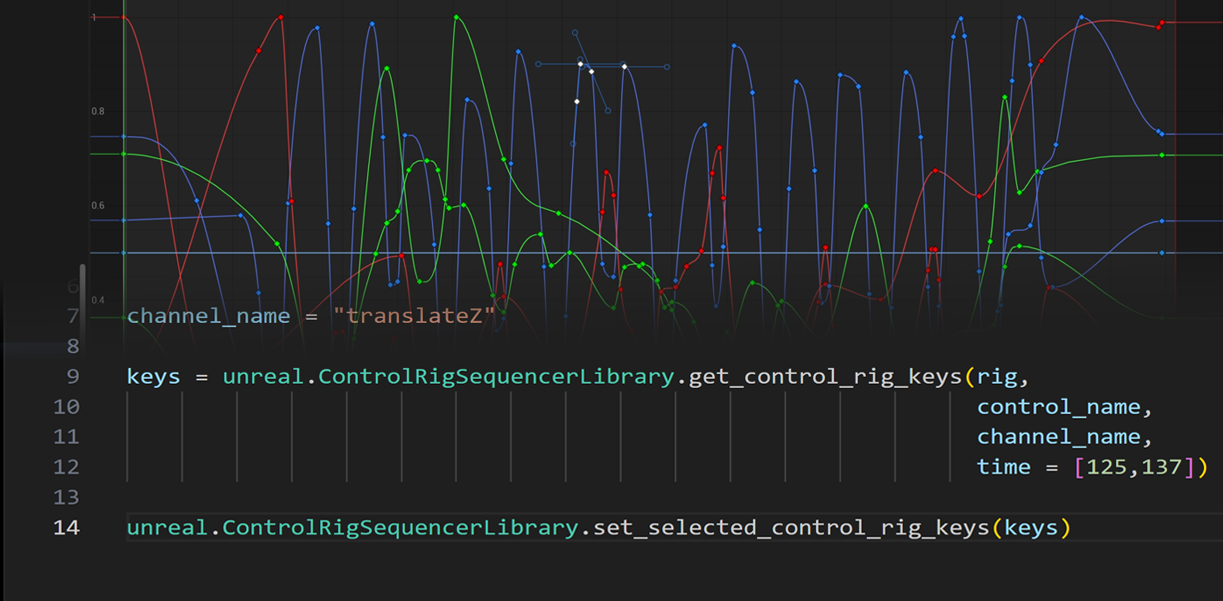
이 기능은 사용자가 애니메이션 제작을 위해 커스터마이징 가능한 툴을 만들 수 있도록 블루프린트/Python API 내에서 더 나은 확장성을 제공합니다.
- 향상된 선택 스크립팅 - 선택된 키프레임을 그랩하여 시퀀서 내에서 선택한 오브젝트를 편집할 수 있습니다.
레이어드 컨트롤 릭
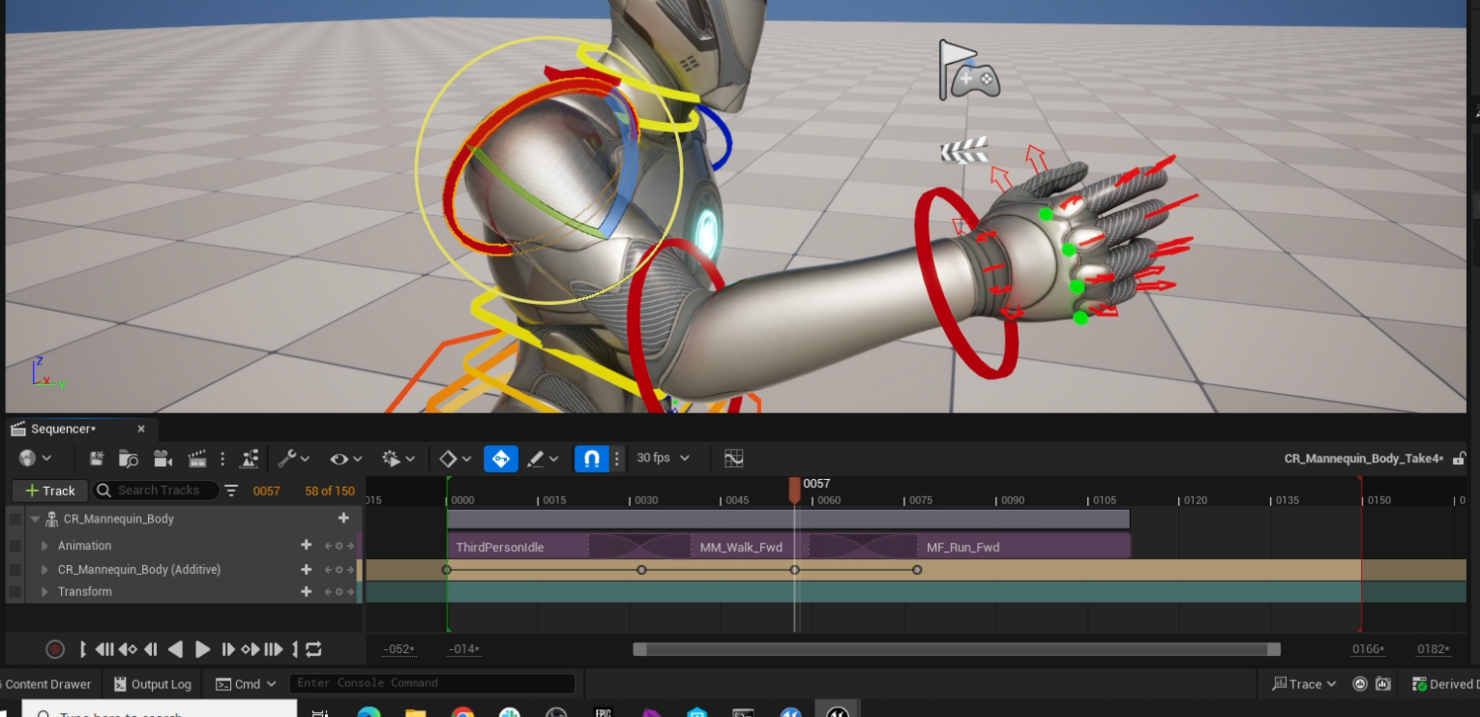
새로운 레이어드 컨트롤 릭 시스템(Layered Control Rig)을 사용하면 캐릭터를 편집할 때 변경사항을 되돌릴 수 없는 데이터 베이킹을 사용하지 않고도 다양한 워크플로에서 컨트롤 릭의 모든 기능을 사용할 수 있습니다.
애니메이션 제작
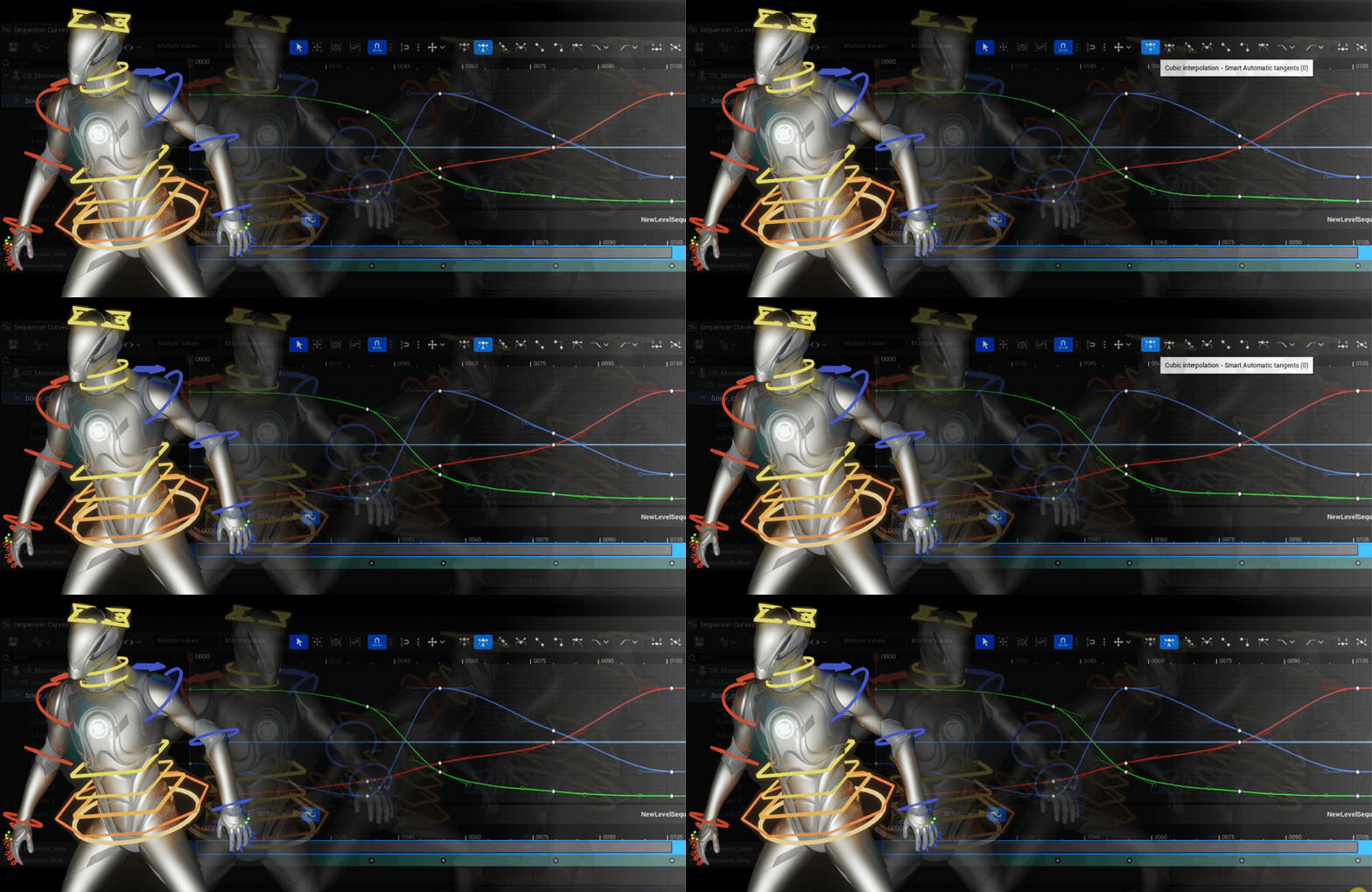
새 기즈모
이 업데이트에는 손쉽게 이동, 회전 및 스케일 조절할 수 있도록 새롭게 디자인된 기즈모가 도입되었으며, 포즈 지정과 애니메이션을 위한 친숙하고 직관적인 인터페이스를 제공합니다.
-
룩/스타일이 향상되었습니다.
-
효과적인 간접 조작 기능을 제공합니다.
-
아크볼이 향상되었습니다.
-
포즈를 지정하는 동안 뷰포트에서 부모 스페이스 옵션을 제공합니다. 이전에는 월드 및 로컬 옵션만 사용할 수 있었습니다.
컨스트레인트 2.0
레벨 시퀀스 워크플로를 더 잘 처리할 수 있도록 컨스트레인트 시스템의 상당 부분을 다시 작성했습니다.
-
이제 애니메이션이 적용된 컨스트레인트가 레벨 시퀀스에 모두 저장됩니다.
-
평가 엔진을 향상하여 사이클을 유발하지 않으면서 더 많은 컨스트레인트 구성을 보다 원활하게 지원합니다.
-
UX가 향상되어 툴을 보다 효율적으로 사용할 수 있게 되었습니다.
애님 디테일 2.0/채널 박스(목업)
애니메이션 채널 박스를 정비하여 인기 있는 다른 DCC 툴 사용자에게 보다 친숙한 경험을 제공합니다.
포스트 리타깃 페이즈
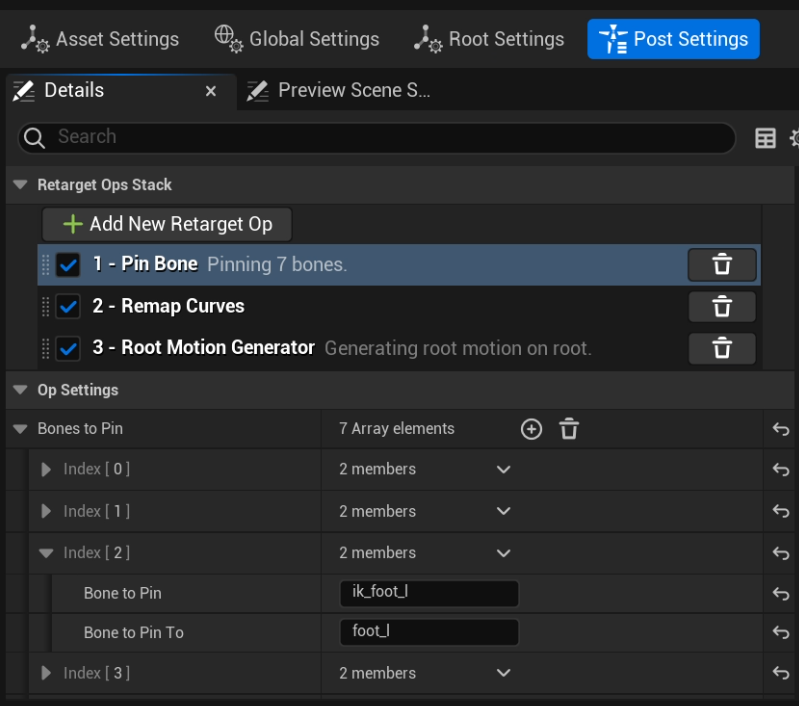
IK 리타기터의 리타기팅된 결과 이후 일련의 연산을 처리하는 새로운 리타깃 페이즈가 추가되었습니다. 이러한 연산은 스택 순서에 따라 적용되며, FK 리타깃 체인 맵 또는 풀 바디 IK 리타기팅으로 해결하기 어렵거나 완전히 해결할 수 없는 리타깃 문제를 해결합니다.
이를 통해 소스 애니메이션 또는 리타기팅된 결과와 일치하도록 IK 본을 적절하게 할당하고, 리타기팅된 애니메이션의 루트 모션을 생성하고, 애니메이션 커브를 리매핑할 수 있습니다.
시퀀서 가독성
시네마틱 작업 시 한층 효율적인 환경을 제공하여 폭넓은 사용자가 이전보다 더 빠르고 뛰어나며 복잡한 시네마틱 경험을 제작할 수 있게 해줍니다.
-
트랙 상태를 한 눈에 파악할 수 있는 아웃라이너 열 - 시퀀서 계층구조 트리의 왼쪽에 사용자가 아이콘으로 트랙의 핀/비활성/잠금/솔로 상태를 확인하고 액세스할 수 있는 새로운 열이 추가되었습니다.
-
키프레임 상태 인디케이터 - 이제 시퀀서에서 작업하는 동안 애니메이션을 적용할 수 있는 프로퍼티의 키프레임 아이콘이 프로퍼티의 현재 키프레임 상태에 따라 변경됩니다. 사용자는 프로퍼티에 키가 지정되어 있는지의 여부나 부분적으로 키가 지정되어 있는지 또는 수정되었는지 여부를 손쉽게 파악할 수 있습니다.
-
시퀀서 트리 룩 및 컬러 향상 - 시퀀서 트리의 룩과 컬러를 대폭 변경하여 시퀀서 트리 내에 포함되어 있는 콘텐츠를 보다 손쉽게 확인할 수 있습니다.
시퀀서 내 머티리얼 애니메이션 확장
시퀀서 내에서 머티리얼 애니메이션을 제작할 때 레이어드 머티리얼 파라미터, 오버레이 머티리얼, 볼류메트릭 클라우드 컴포넌트 및 커스텀 프리미티브 데이터 지원을 활용할 수 있도록 확장되었습니다. 이제 머티리얼 슬롯은 인덱스가 아닌 슬롯 이름으로 레퍼런스되며, 메시 컴포넌트를 업데이트할 때 시퀀서 내에서 리바인딩할 수 있습니다.
이와 같은 확장을 통해 사용자는 시퀀서 내에서 머티리얼 기반 애니메이션을 제작하는 데 필요한 모든 기능을 사용할 수 있습니다.
바인딩 수명 트랙
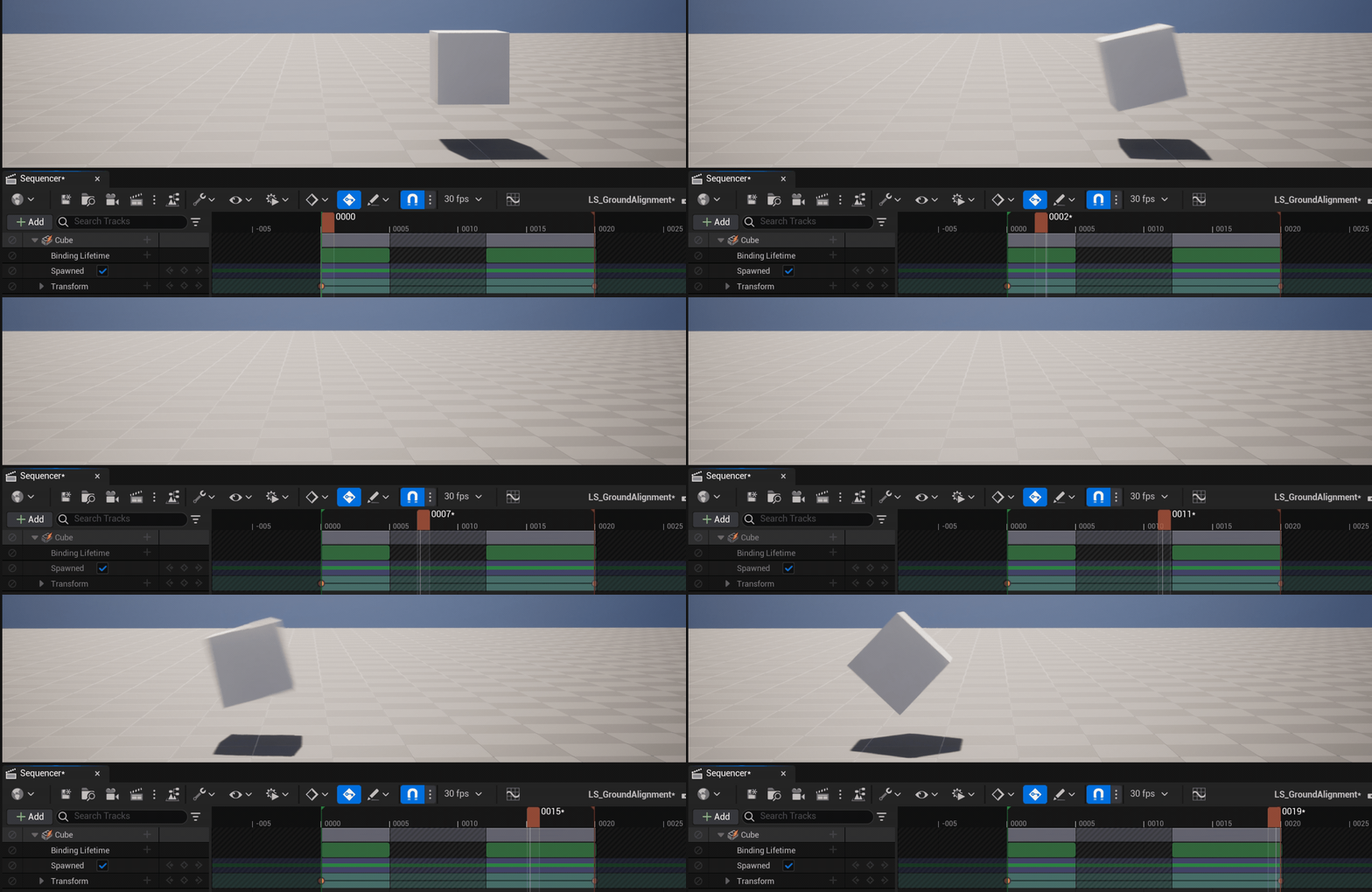
이제 시퀀서에서 오브젝트가 언제 바인딩되는지 결정할 수 있도록 모든 바인딩에 바인딩 수명 트랙이라는 새로운 트랙이 제공됩니다. 사용자는 섹션을 추가하여 시퀀서가 바인딩된 오브젝트를 제어할 수 있는 시간을 결정할 수 있습니다.
인게임 시네마틱의 경우 이 트랙은 게임플레이 또는 시퀀서가 플레이어 캐릭터와 같은 다이내믹 오브젝트를 제어할 수 있는지 여부를 결정하는 데 도움이 됩니다.
모듈형 컨트롤 릭(실험단계)
모듈형 컨트롤 릭(Modular Control Rig) 은 컨트롤 릭의 전체 프레임워크를 사용하여 스켈레톤에 즉시 애니메이션을 적용할 수 있는 강력한 애니메이션 릭을 빌드할 수 있게 해줍니다.
모듈을 사용한 리깅 지원 툴
-
새로운 모듈형 릭 에셋 및 에디터
-
뷰포트에서 즉각적인 피드백을 확인할 수 있는 새로운 구조 표현 방식(Visual Schematic) 추가
-
네이티브 모듈 라이브러리 포함
모듈 제작 지원 툴:
-
컨트롤 릭을 모듈로 즉시 변환
-
모듈을 연결하는 커넥터 및 소켓 생성
-
모듈 간 연결을 자동화하는 새로운 커넥터 이벤트
-
Get/Set Metadata 노드를 사용하여 모듈에 메타데이터 추가
-
프리/포스트 포워드 솔브 이벤트를 통한 모듈 간 릭 로직 사용
디포머 그래프 라이브러리(베타)
디포머 그래프를 함수화 할 수 있게 지원합니다. 디포머를 함수로 캡슐화하고 서로 연동하여 새로운 디포메이션 기능을 생성할 수 있습니다. 이렇게 하면 디포머 그래프가 대폭 단순화되고 디포머 라이브러리 에서 사전에 빌드된 디포머를 조합하여 애니메이션에 사용할 커스텀 디포메이션 기능을 생성할 수 있습니다.
-
디포머 노드 루핑
-
그래프 접기 및 함수 생성
-
디포머 함수 라이브러리(베타)
- 리니어 블렌드 스키닝, DQ 스키닝, 벤드, 트위스트, 스쿼시 및 스트레치, 플레어, 트위스트, 래티스
스켈레탈 에디터(베타)
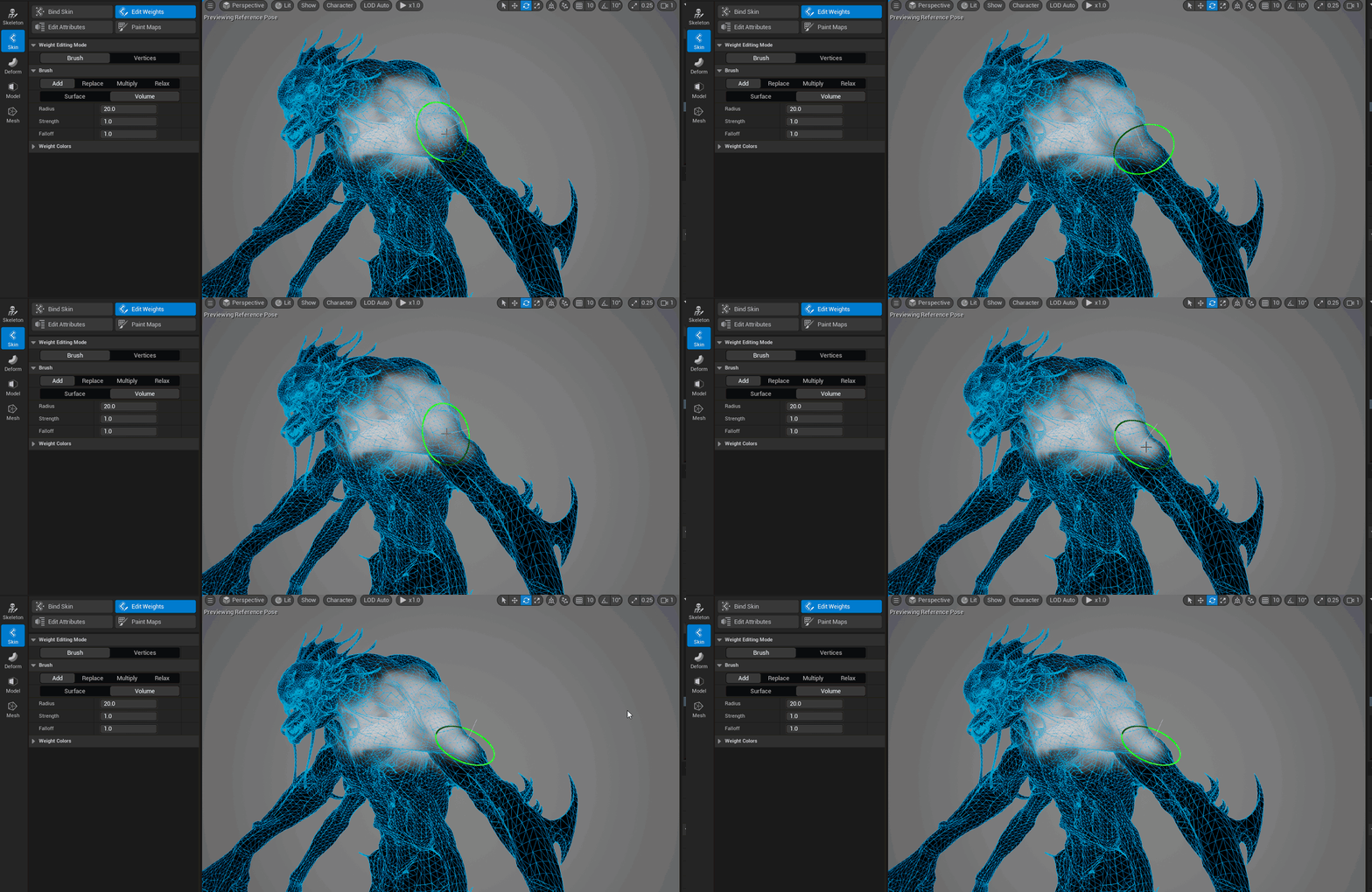
컴포넌트 편집기능 확장(Expand Component Editing) - 버텍스별 본과 가중치를 보다 손쉽게 편집하고 선택할 수 있습니다.
-
컴포넌트 에디터
-
본에 대한 컴포넌트 스냅(버텍스, 페이스, 에지)
-
추가 컴포넌트 선택 방식
-
이제 폴리그룹 생성 및 폴리그룹 페인트에서 쿼드 메시 표시 가능
애니메이션 인사이트(Animation Insights) - 애니메이션의 컨텍스트 내에서 본과 가중치를 생성합니다.
-
페인팅하는 동안 본 트랜스폼 지원
-
레퍼런스된 애니메이션에 본 변경사항 전파
캐릭터화(Characterization) - 개선된 시작점과 유용한 기본값을 제공하여 본 및 가중치 생성 툴을 더욱 단순화합니다.
- 본 복사/붙여넣기/복제
컨트롤 릭 직접 조작
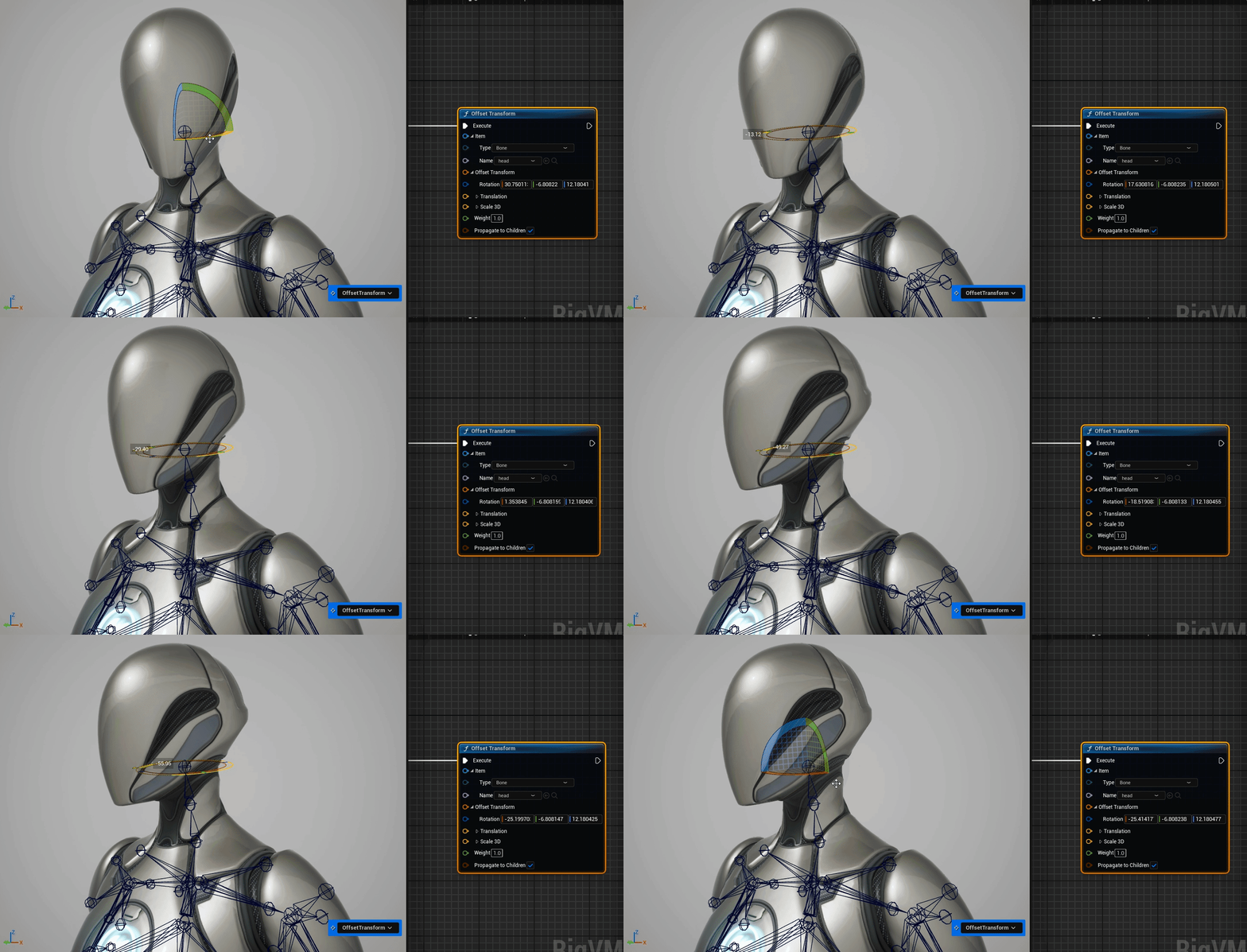
직접 조작(Direct Manipulation) 을 통해 뷰포트 내에서 릭 엘리먼트와 직접 인터랙션하는 것이 쉬워 졌습니다. 여기에는 컨트롤 릭 에디터 인터페이스와 관련된 편의성 향상 기능도 포함됩니다.
뷰포트에서 릭 엘리먼트(컨트롤, 본, null)의 포즈를 시각적으로 지정 하고 구현된 노드의 그래프에서 값을 업데이트할 수 있습니다.
- 그래프에서 노드를 선택하고 T, R, S 단축키를 사용하여 뷰포트에서 즉각적으로 인터랙션할 수 있습니다.
조작과 관련된 편의성 이 향상되었습니다.
-
범위 선택 지원
-
이제 Control Rig AnimBP 노드에서 컨트롤 릭 교체 가능
-
Control Rig AnimBP 노드에 AnimBP 함수 어태치 가능
-
이제 함수 프로파일링 가능
-
그래프에 프로파일 통계가 바로 표시됨
-
이제 프레임의 구동 평균으로 프로파일링하여 피드백의 정확성 향상
-
그래프 노드를 선택하여 프로파일링 분리 가능
-
메타데이터 노드 속도 20% 향상
-
릭 계층구조의 메모리 사용량 감소
이족 보행 캐릭터에 대한 자동 애니메이션 리타기팅 지원
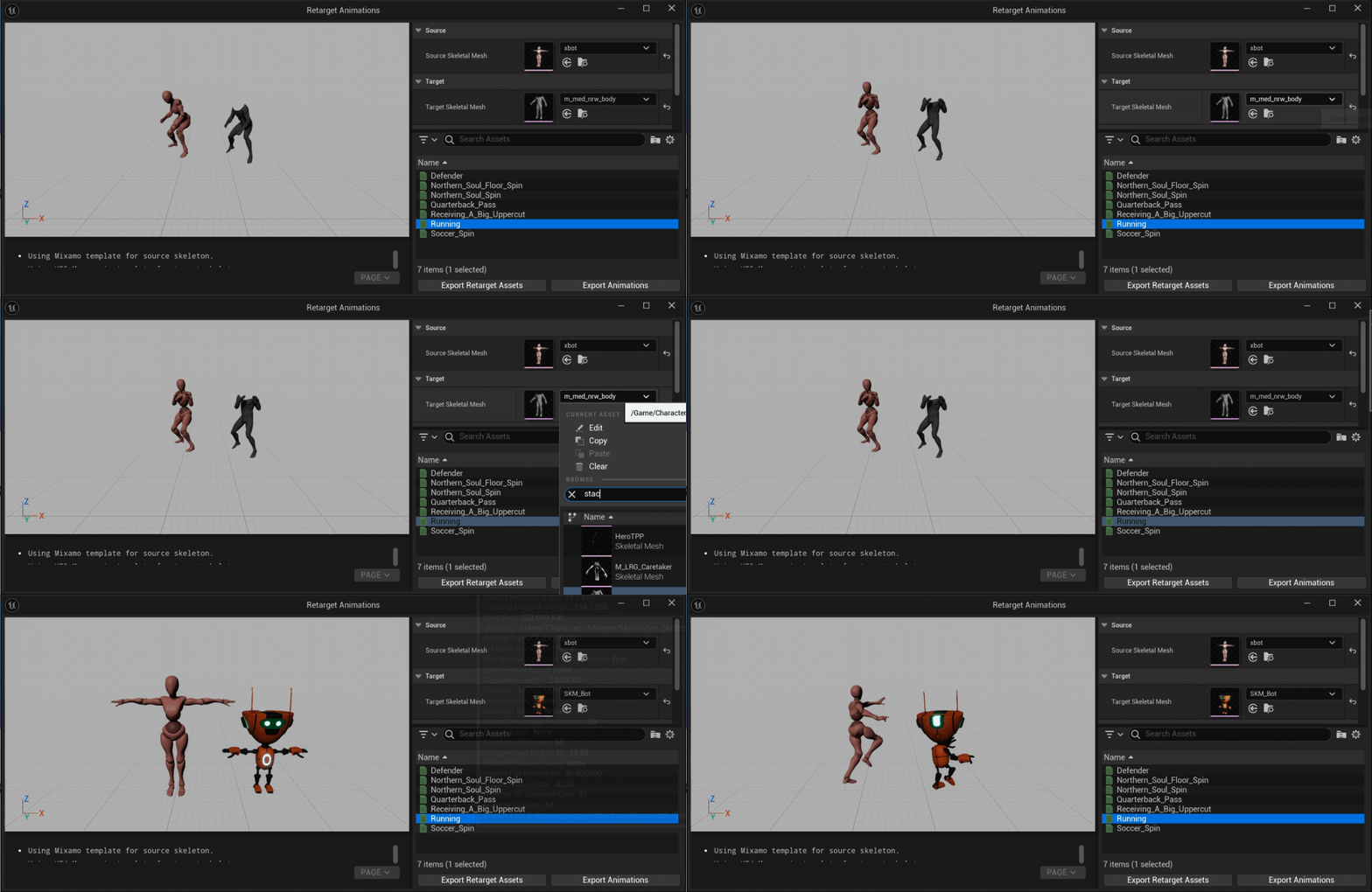
이 워크플로를 통해 언리얼 엔진 내에서 일반적인 이족 보행 스켈레톤에 대한 애니메이션 리타기팅을 보다 손쉽고 일관적으로 수행할 수 있게 되었습니다.
일반적인 이족 보행 스켈레톤의 경우, 리타깃 체인 생성 및 풀 바디 IK 구성이 이제 버튼 클릭 한 번으로 완전히 자동화됩니다. 리타기터에서 새로운 포즈 정렬 툴을 사용하면 리타기팅 시 소스와 타깃을 더 잘 일치시킬 수 있습니다.
자동화 프로세스가 결합된 간단한 새 대화창을 통해 리타기팅을 빠르고 일괄적으로 처리하고 자동화된 에셋을 생성하여 추가 편집 작업을 수행할 수 있습니다.
선택기 및 프록시 테이블(베타)
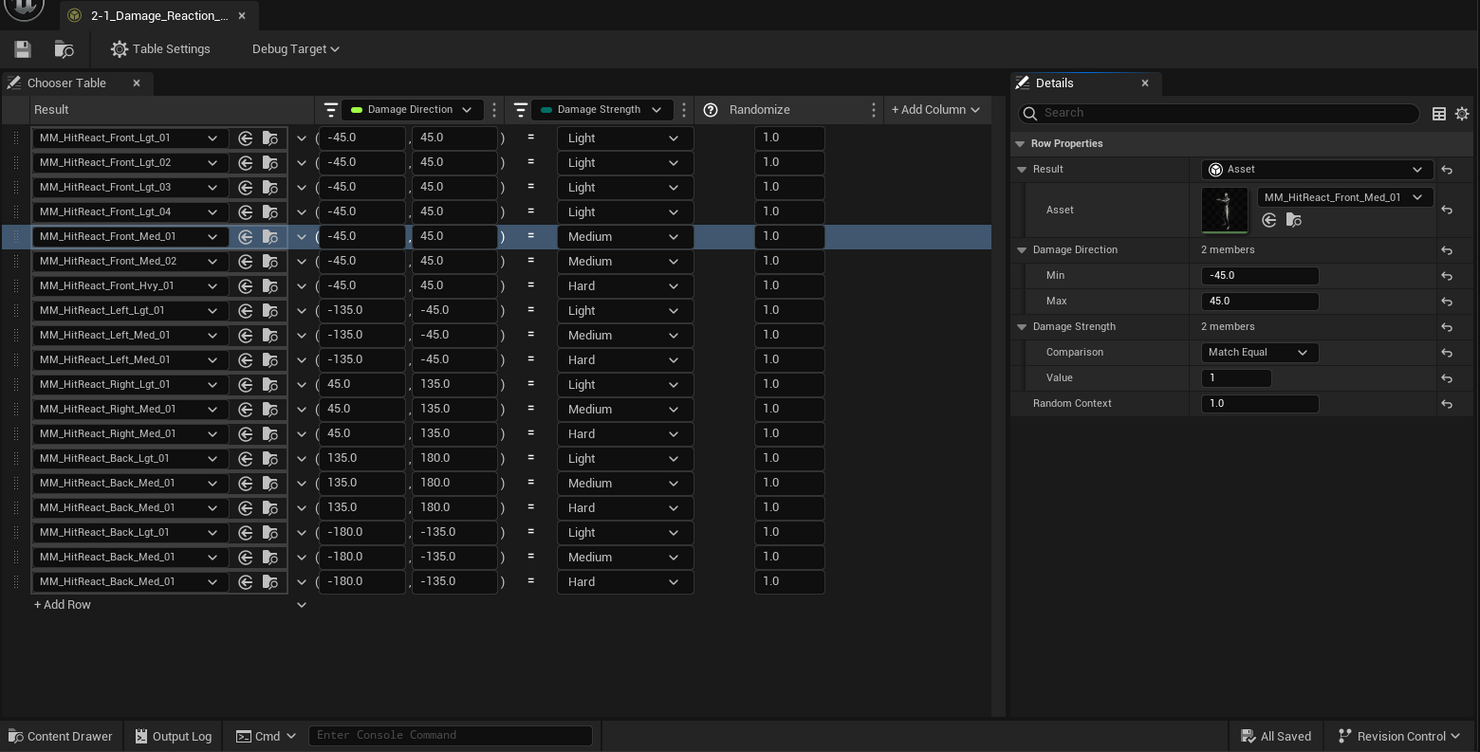
선택기 및 프록시 테이블은 복잡한 로직을 작성할 필요 없이 게임 컨텍스트에 따라 재생할 애니메이션을 선택할 수 있는 프레임워크를 제공합니다. 이러한 기능은 현재 언리얼 엔진 5.4에서는 베타 버전으로 제공됩니다.
모션 매칭
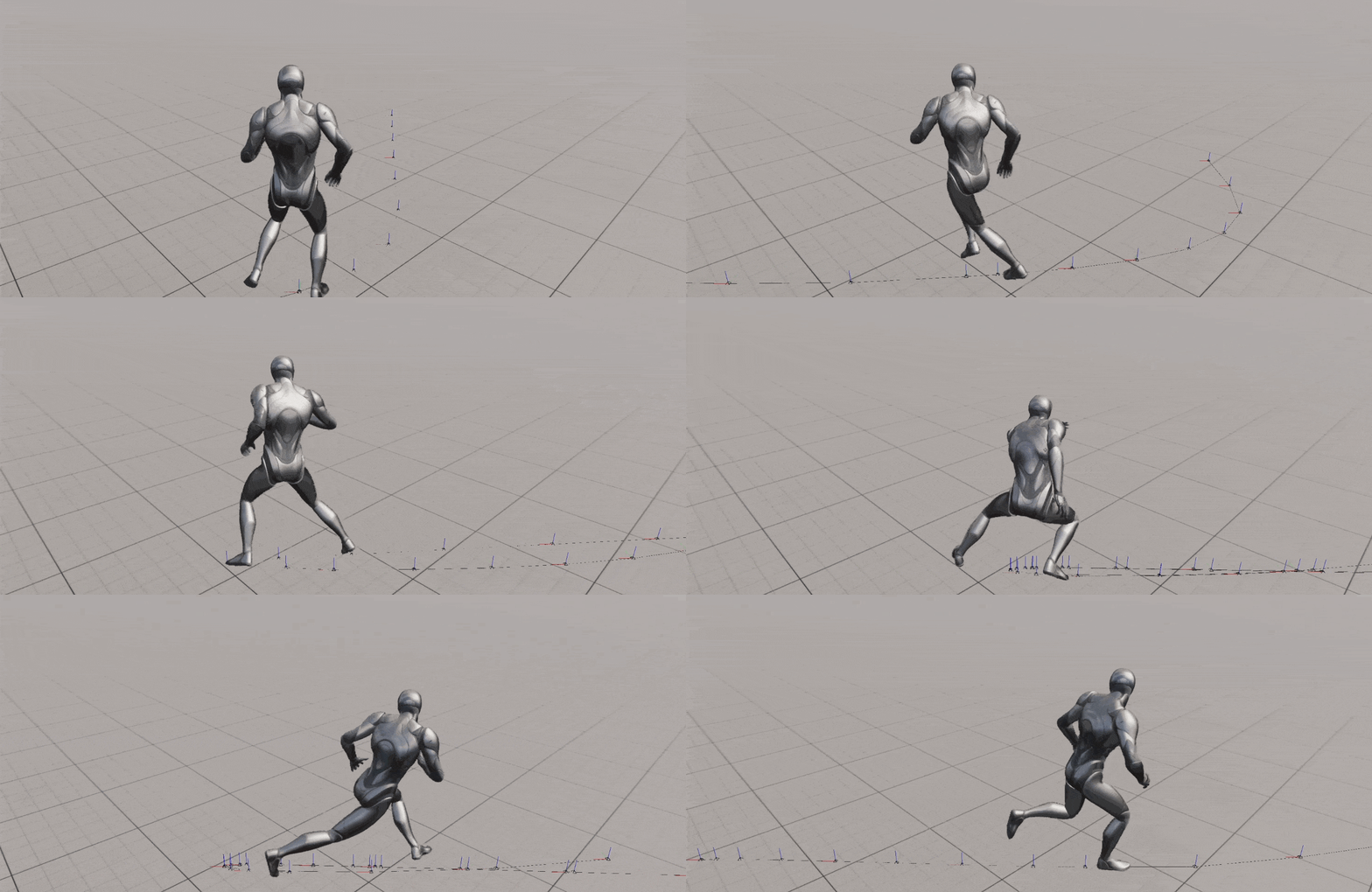
모션 매칭(Motion Matching)은 언리얼 엔진 5.4에서 정식 버전으로 제공됩니다. 게임플레이 애니메이션을 위한 애니메이터 중심의 워크플로를 제공하는 툴세트가 함께 제공됩니다. 언리얼 엔진의 모션 매칭은 포트나이트 챕터 5에서 검증되었습니다. 포트나이트 챕터 5는 모션 매칭 시스템의 확장성 덕분에 모든 플랫폼에 출시되었으며 100명의 플레이어 캐릭터와 NPC에 걸쳐 원활하게 실행되었습니다.
렌더링
신경망 엔진
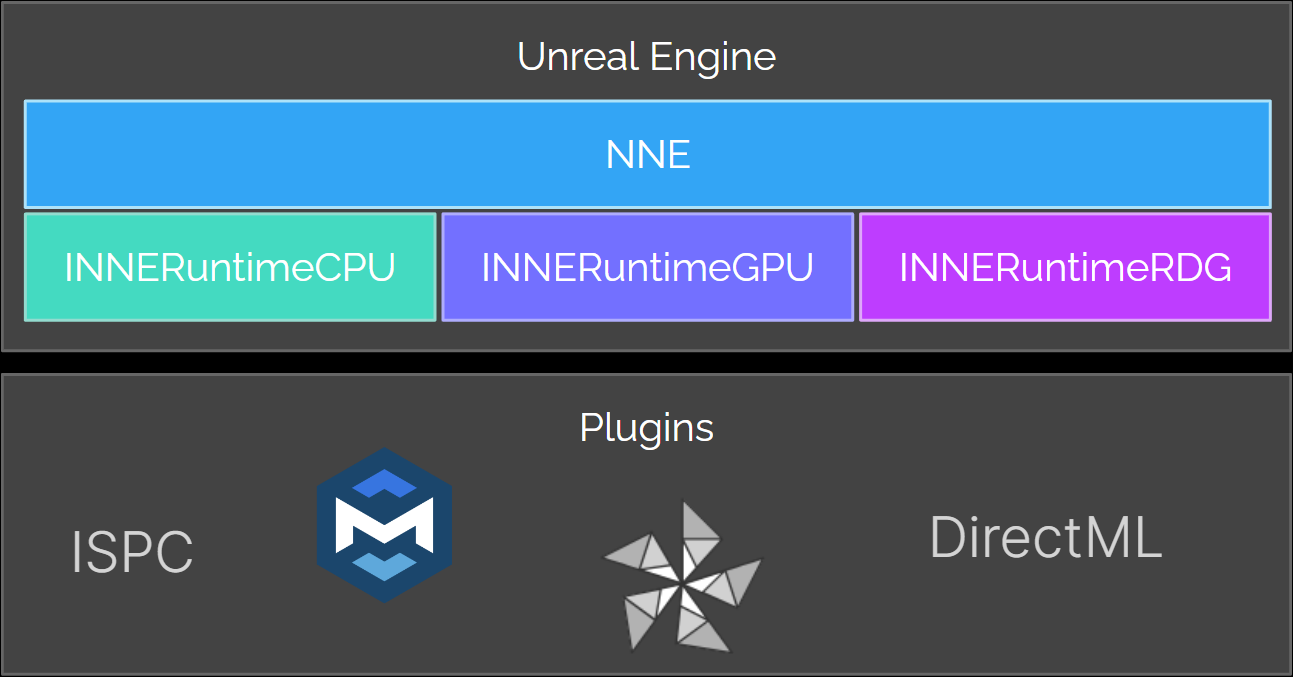
에디터 내에서와 인게임에서 CPU와 GPU를 사용하는 신경망 애플리케이션에 대한 수요가 증가하고 있습니다. 개발자는 UE의 신경망 추론 엔진을 통해 사전 트레이닝된 신경망 모델을 로드하고 효율적으로 실행할 수 있습니다. 신경망 엔진(Neural Network Engine, NNE)은 각 애플리케이션의 특정 요구 사항에 따라 백엔드를 손쉽게 교체할 수 있는 기존의 렌더 하드웨어 인터페이스(Render Hardware Interface, RHI) 레이어와 유사한 공용 API를 제공함으로써 이러한 서로 다른 요구 사항을 해결합니다.
대표적인 사용 사례로는 툴링, 애니메이션, 렌더링, 피직스 등이 있으며, 각 사용 사례마다 플랫폼 및 모델 지원 측면의 요구 사항이 서로 다를 수 있습니다. 존재하는 수십 가지의 다양한 ML 백엔드를 모두 구현하는 것은 현실적으로 불가능하므로, 언리얼 엔진에서는 플러그인을 통해 외부 개발자가 자체 런타임을 제공하고 NNE 인터페이스를 구현할 수 있도록 확장성 훅을 제공합니다.
나나이트 - 테셀레이션(실험단계)

동적으로 프로그래밍 가능한 디스플레이스먼트는 디스플레이스먼트 맵 또는 프로시저럴 머티리얼을 사용하여 나나이트 메시를 런타임에서 수정할 수 있게 해줍니다. 원본 메시 버텍스에서만 작동하는 월드 포지션 오프셋과는 다르게 나나이트 디스플레이스먼트는 런타임에서 메시를 디스플레이스먼트 맵의 디테일에 맞게 추가 트라이앵글로 테셀레이션합니다. 나나이트는 현재 픽셀 밀도에 필요한 만큼의 트라이앵글 디테일만 생성합니다.
이 기능을 사용하면 다음과 같은 이점을 얻을 수 있습니다.
-
제작 파이프라인에서 더 가벼운 소스 메시를 사용할 수 있음
-
머티리얼 기반 및 애니메이션되는 디스플레이스먼트
-
디테일이 살아 있는 나나이트 랜드스케이프 생성
자세한 내용은 나나이트 가상화 지오메트리를 참고하세요.
나나이트 - 셰이딩 최적화

나나이트 컴퓨트 기반 셰이딩은 나나이트 머티리얼을 기존의 래스터 셰이딩에서 컴퓨트 셰이더로 이전하여 다양한 최적화와 새로운 기능을 위한 기회를 제공하고, 래스터 방식에 필요한 수많은 복잡한 코드를 정리하는 데 초점을 맞춘 장기 프로젝트입니다.
궁극적인 목표는 픽셀 셰이더 패스를 완전히 대체하여 CPU와 GPU 모두에서 향상된 퍼포먼스를 제공하고, 코드 관리 유지보수 가능성을 높이며, 다른 방식으로는 불가능했던 고급 나나이트 머티리얼 기능을 구현할 수 있도록 하는 것입니다.
자세한 내용은 나나이트 가상화 지오메트리를 참고하세요.
나나이트 - 스플라인 메시
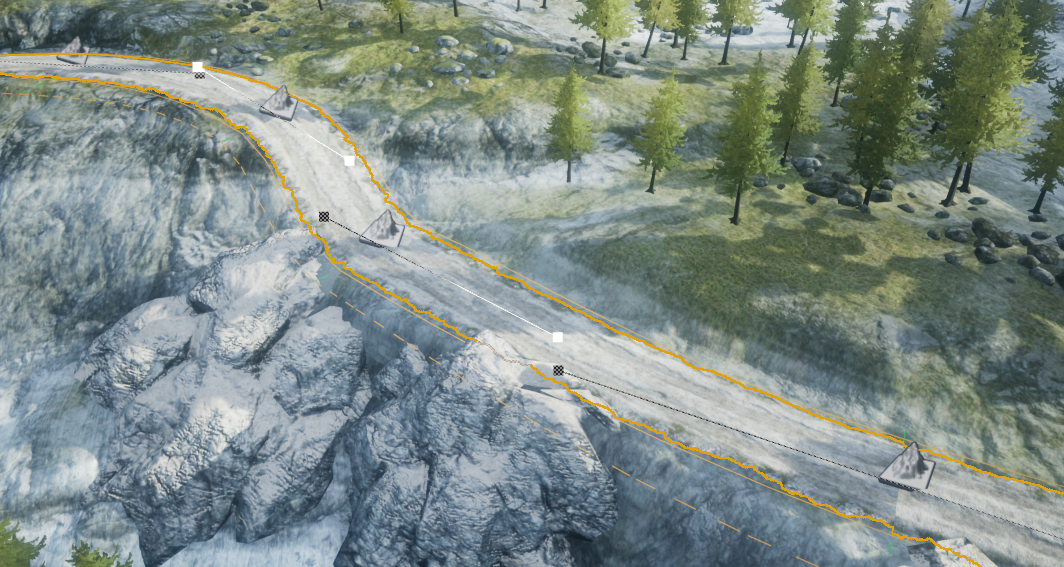
스플라인 메시는 랜드스케이프 터레인 위에 도로를 모델링하는 경우와 같이 스태틱 메시를 스플라인의 셰이프에 따라 디폼하는 데 사용됩니다. 스플라인 메시는 씬 콘텐츠, 특히 루멘 및 버추얼 섀도 맵 퍼포먼스 향상을 위해 점점 더 많은 씬 콘텐츠에 나나이트를 사용하는 UE의 트렌드에 맞춰 지속적으로 개선을 해나가야 하는 부분입니다.
나나이트 스플라인 메시 지원은 UE 5.3에서 실험단계로 출시되었습니다. 현재 퍼포먼스 및 메모리 최적화, 크랙 방지와 레벨 스트리밍 및 트랜스폼 캐싱과 같은 영역에 대한 수정 작업 등이 남아 있는 상태입니다.
자세한 내용은 나나이트 가상화 지오메트리를 참고하세요.
직교 카메라 렌더링(베타)
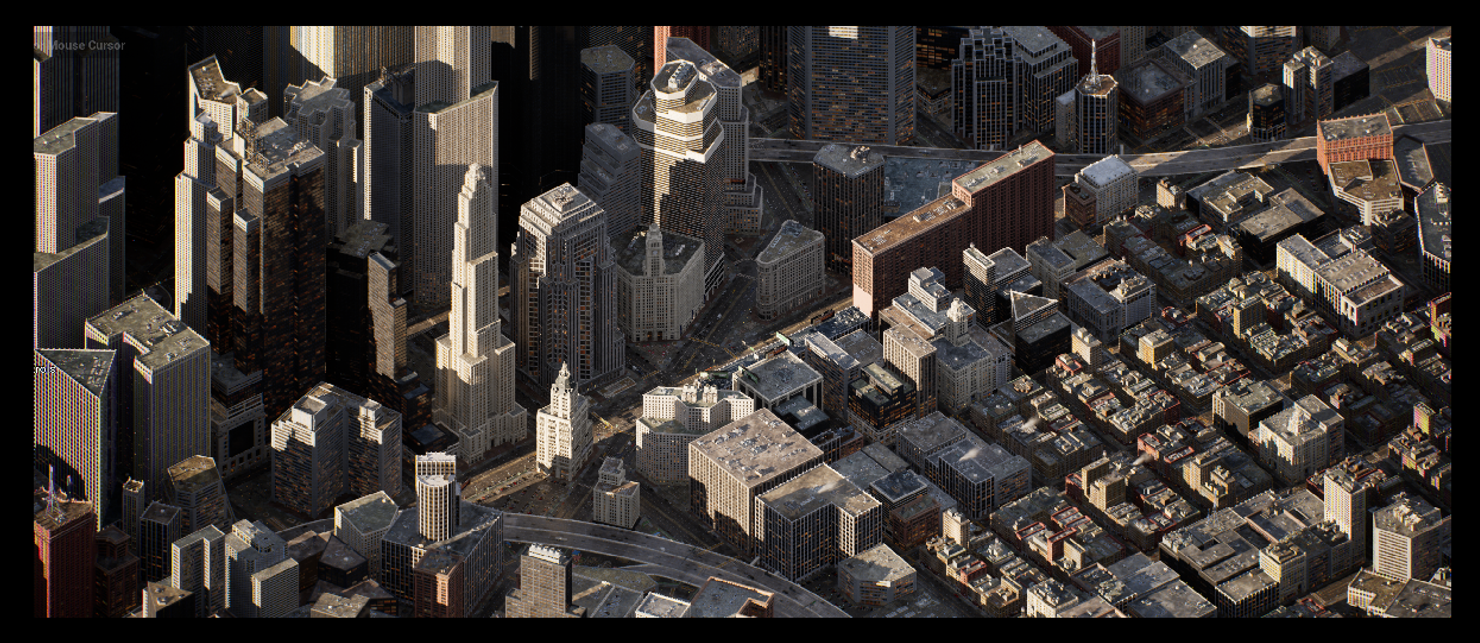
직교 렌더링(Orthographic rendering)은 건축 및 제조 산업에서 프로젝트를 시각화하는 데 사용되는 매우 일반적인 방법으로, 게임에서도 독특한 스타일의 카메라 옵션으로 사용됩니다. 언리얼 5.4에서는 직교 렌더링이 베타 상태로 전환되었습니다. 이제 디퍼드 렌더링의 대부분의 측면이 지원되지만 아직 면밀하게 검토되지 않은 엣지 케이스가 있을 수 있습니다.
정식 버전 상태로 전환되기 위해서는 다음과 같은 영역의 작업이 남아 있습니다.
-
AO
-
데칼
-
볼류메트릭
자세한 내용은 직교 카메라를 참고하세요.
템포럴 슈퍼 해상도
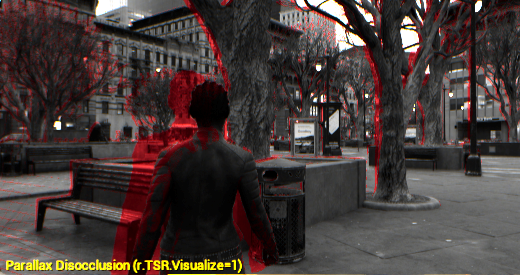
템포럴 슈퍼 해상도(Temporal Super Resolution, TSR)는 UE에서 기본으로 제공되는 크로스 플랫폼 업스케일링 기술입니다. 비용이 많이 드는 렌더링 계산의 일부를 여러 프레임에 걸쳐 분할하여 전체 해상도 비용의 일부로 이미지를 렌더링합니다.
언리얼 엔진의 다음 버전에서는 TSR에 다음과 같은 변경사항이 포함될 예정입니다.
-
히스토리 리저렉션(History Resurrection) - 높음, 에픽, 시네마틱 안티 에일리어싱 엔진 퀄리티에 새로운 기능이 추가됩니다. 이전에 누적된 디테일은 차폐, 셰이딩 변경, 화면 벗어남 등 다양한 이유로 인해 버려질 수 있습니다. 이러한 디테일이 화면에 다시 나타나면 TSR은 해당 디테일을 다시 누적해야 하므로 노이즈나 트레일 아티팩트가 발생할 수 있습니다. 히스토리 리저렉션은 이전 TSR 히스토리를 유지하여 최근 누적된 프레임보다 더 잘 일치하는 샘플이 있는 경우 이를 활용하여 샘플을 재투영합니다.
-
'픽셀 애니메이션 보유(Has Pixel Animation)' 머티리얼 플래그 - 머티리얼에 애니메이팅된 텍스처 또는 패턴 모션이 있는지 여부를 나타내는 새로운 머티리얼 옵션으로, 오브젝트의 모션 벡터에는 표시되지 않습니다. 이 플래그를 사용하면 모션 벡터가 없는 경우 고스트 현상을 발생시킬 수 있는 깜박임 방지 휴리스틱 기법을 비활성화할 수 있습니다.
-
TSR 표시 플래그 시각화: 이 시각화 모드를 사용하면 TSR의 작동 방식을 더 잘 이해할 수 있으며, 에픽게임즈에 TSR 문제를 보고하는 데 도움이 될 수 있습니다.
자세한 내용은 템포럴 슈퍼 해상도를 참고하세요.
불균질 볼륨 - 디퍼드 렌더링(실험단계)

불균질 볼륨 렌더링(Heterogeneous Volume Rendering)을 사용하면 나이아가라 유체 또는 OpenVDB 파일로 제어되는 불, 연기, 유체와 같은 볼류메트릭 현상을 통합하여 렌더링할 수 있습니다.
5.4에서는 불균질 볼륨에 대한 섀도 캐스팅 지원을 제공하고 반투명 오브젝트와 같은 기존 렌더링 패스와의 통합에 중점을 두었습니다.
디퍼드 렌더러에는 글로벌 일루미네이션에 대한 지원 추가와 기능 및 성능 향상 등의 작업이 남아 있습니다.
자세한 내용은 불균질 볼륨 및 스파스 볼륨 텍스처를 참고하세요.
셰이더 쿠킹 시간 최적화
쿠킹은 패키징된 게임의 배포를 위해 메시, 텍스처, 머티리얼과 같은 에셋을 플랫폼별 포맷으로 변환하는 프로세스입니다. 규모가 큰 프로젝트의 머티리얼을 쿠킹하는 작업은 매우 오래 걸릴 수 있으며, 종종 몇 시간이 소요되는 경우도 있습니다.
5.4에서는 셰이더 컴파일 작업이 실행되는 방식이 대폭 향상되어 병렬화가 증가하고 중복 작업이 감소되었습니다. 이러한 최적화 노력의 결과로, 컴파일되는 셰이더 수가 약 30% 감소하고, 셰이더 컴파일 작업을 위한 게임 스레드 작업이 감소했으며, 셰이더의 전처리 속도가 크게 빨라졌습니다. 이러한 모든 요인이 합쳐져 프로젝트 쿠킹 시간, 특히 셰이더 무효화와 관련된 프로젝트 쿠킹 시간이 대폭 줄어들었습니다.
RHI - 렌더 병렬화
렌더 스레드 퍼포먼스는 UE 타이틀을 제한하는 요소로 작용하는 경우가 많습니다. 이는 현재 플랫폼과 그래픽 API가 작업을 병렬로 수행할 수 있더라도 일부 작업은 이 특정 스레드로 제한되기 때문입니다. 이러한 제약을 제거하고 타깃 하드웨어의 멀티스레딩 기능을 최대한 활용할 수 있도록 RHI API를 리팩터링하여 퍼포먼스를 향상하려 합니다.
5.4에서는 렌더링 시스템의 대규모 리팩터링을 통해 작업의 오버랩이 극대화되어 타깃 프레임 시간이 크게 단축되었습니다. 도시 샘플(CitySample) 테스트에서 5.4의 렌더 스레드 퍼포먼스는 5.0와 비교하여 약 2배 빨라졌습니다.
RHI - 바인드리스 렌더링(실험단계)
바인드리스 리소스는 DX12, Vulkan, Metal과 같은 최신 RHI의 텍스처 및 기타 타입의 데이터 버퍼 관리와 관련된 로우 레벨 기능입니다. 바인드리스 리소스에 대한 지원을 추가하여 렌더러 내에서 보다 유연한 GPU 프로그래밍 패러다임과 추가 기능을 사용할 수 있으며, 이는 Vulkan의 레이 트레이싱을 완벽하게 지원하기 위한 요구 사항이기도 합니다.
5.4 출시 버전에서는 SM6과 호환되는 대부분의 플랫폼에서 이 기능이 지원됩니다. 하지만 이 기능은 비교적 최근에 활성화되었기 때문에 아직은 실험단계 기능으로 간주되며, 해결해야 할 몇 가지 버그가 있을 수 있습니다.
Vulkan - 레이 트레이싱(실험단계)
5.4에서는 Linux 플랫폼을 포함하여 DX12와 동등한 수준의 Vulkan 레이 트레이싱 기능이 실험단계로 출시되었습니다. 이제 루멘의 히트 라이팅(Hit Lighting) 모드와 패스 트레이싱(Path Tracing)을 포함한 모든 레이 트레이싱 기능을 사용할 수 있게 되었습니다. 실험단계 출시이므로 버그 및 기타 오류가 있을 것으로 예상되며, 프로덕션용으로는 사용하지 않는 것이 권장됩니다.
프로그래밍 방식 PSO 프리캐싱
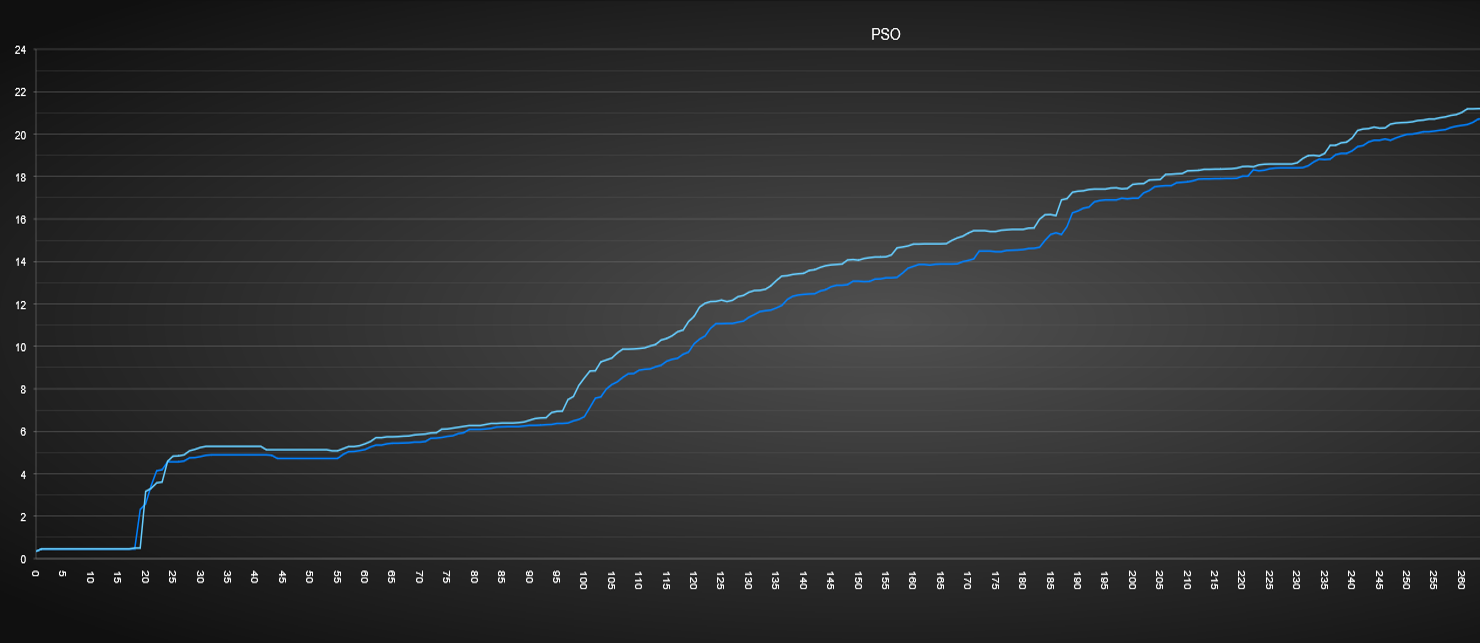
자동화된 PSO 수집 및 캐싱은 게임에 필요한 모든 가능한 PSO 조합을 수집하는 수동 프로세스를 완전히 제거하기 위한 것입니다. PSO 요소 중 가장 중요한 상태는 셰이더 자체이며, 런타임 히치 현상을 방지하려면 셰이더의 각 조합을 적절하게 사전에 캐싱해야 합니다. 이를 위해 셰이더 프리캐싱은 유효하며 사용될 가능성이 있는 모든 셰이더 조합을 찾아 저장하는 것을 목표로 합니다.
하드웨어 레이 트레이싱

하드웨어 레이 트레이싱(Hardware Ray Tracing, HWRT)이 대폭 향상되었습니다. 이러한 향상으로 프리미티브의 경우 속도가 2배 빨라졌으며, 이는 HWRT를 사용하는 60Hz 경험을 시장에 출시하도록 지원합니다.
-
GPU 인스턴스 컬링, 인스턴스 및 프리미티브 병렬화
-
추가 프리미티브 타입
-
패스 트레이서 최적화 - 기능의 감소 또는 추가적인 셰이더 순열 도입 없이 UE5.3 대비 약 15% 성능 향상/5.2 버전과 거의 동등
-
패스 트레이서 라이트 그리드를 사용하여 매우 많은 수의 라이트 지원
자세한 내용은 하드웨어 레이 트레이싱을 참고하세요.
GPU의 대규모 월드 좌표 지원
UE의 대규모 월드 좌표(Large World Coordinates, LWC)는 배정밀도 트랜스폼과 데이터 타입을 지원하여 최대 월드 크기를 21km에서 88,000,000km로 늘릴 수 있게 되었습니다. GPU에서의 LWC 렌더링 지원은 타일 표현을 기반으로 했기 때문에 타일 경계 근처에서 타일 표현이 부정확해지거나 지터링이 발생하는 등 여러 한계점이 있습니다.
GPU에서 완전한 배정밀도 표현을 지원하기 위해 LWC 렌더링을 리팩터링하고 있으며, 이를 통해 카메라가 원점에서 멀리 떨어져 있을 때 대규모 월드를 보다 안정적으로 렌더링할 수 있게 될 것입니다. 작업 내용은 다음과 같습니다.
-
확장된 GPU 부동 소수점 표현을 변경하여 중요한 부분에서 더 높은 정밀도 실현
-
LWC에서 머티리얼 작업을 보다 손쉽게 수행할 수 있게 해주는 사용자 툴 제작
-
퍼포먼스 절약을 위해 실제로 필요한 곳에만 LWC 계산이 수행되도록 보장
자세한 내용은 대규모 월드 좌표 렌더링을 참고하세요.
개발자 반복작업
언리얼 젠 스토리지를 로컬 DDC로 사용
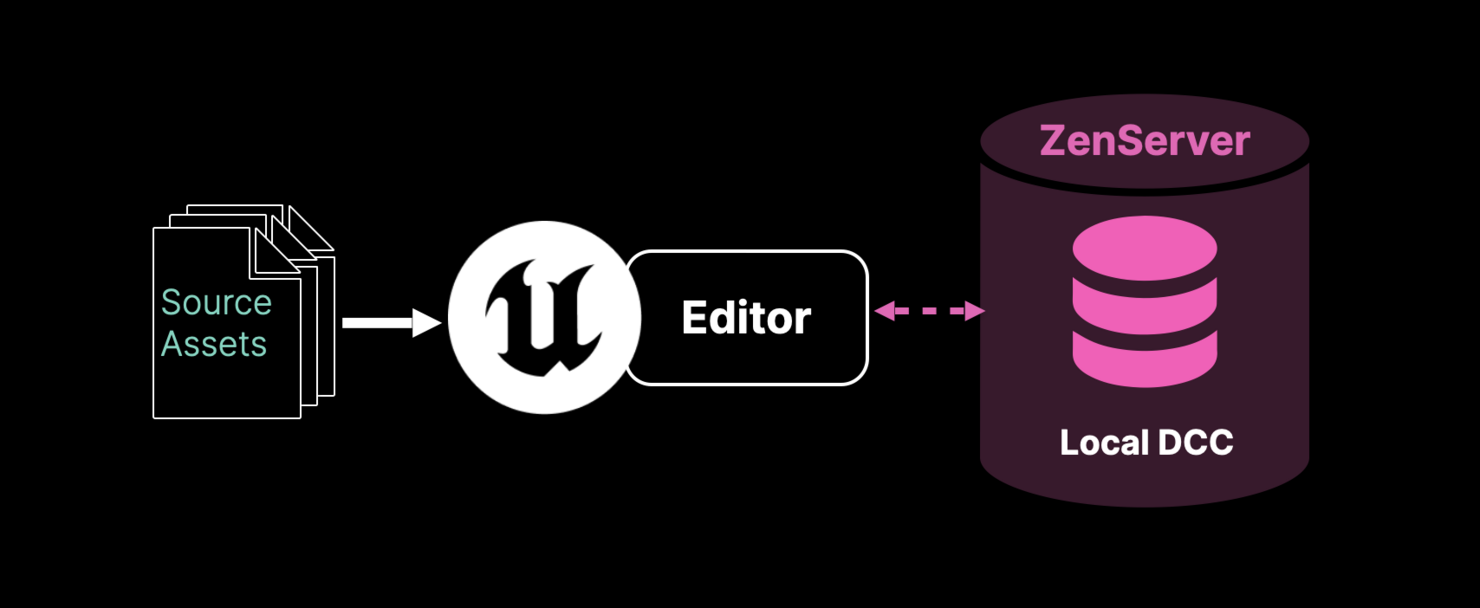
UE 5.4에서는 새로운 언리얼 젠 스토리지 서버 아키텍처를 도입하여 데이터 정리 퍼포먼스가 향상되고 에디터 로딩 및 에디터에서 플레이 워크플로 시간이 단축되었습니다. 젠은 로컬 파일시스템 퍼포먼스 병목 현상을 방지하기 위해 이전 출시의 버전의 '느슨한 파일(loose file)' 기반 DDC를 대체하고 캐시 쓰기, 제거 및 데이터 중복 제거를 한층 효과적으로 제어할 수 있게 해줍니다.
언리얼 클라우드 DDC
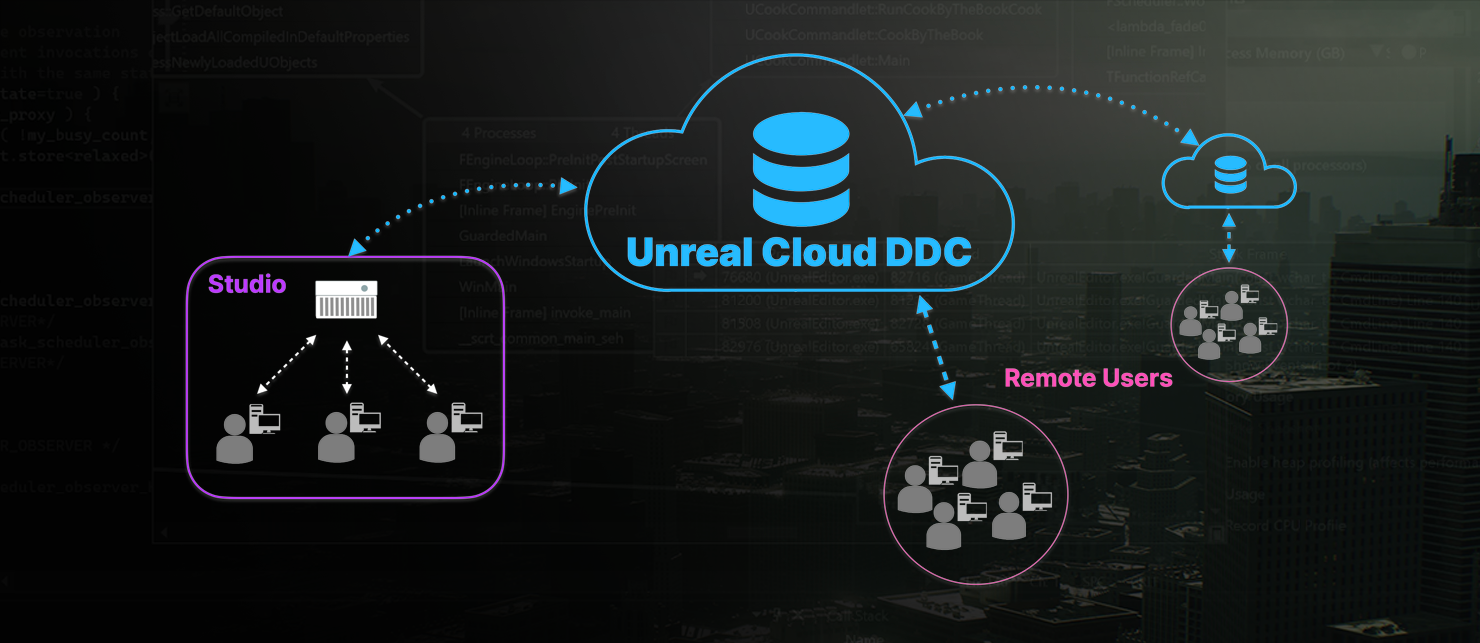
언리얼 클라우드 DDC는 분산형/하이브리드 스튜디오 및 팀을 위해 자체 호스팅 클라우드 인프라스트럭처에 디플로이할 수 있도록 디자인된 파생 데이터 캐시(Derived Data Cache, DDC) 및 콘텐츠 어드레스블 스토리지(Content Addressable Storage, CAS) 솔루션입니다. 액티브/패시브 지역 리플리케이션, 최근접 지역 자동 연결, 엔터프라이즈 로그인 및 인증 기능을 통해 팀 멤버 간에 쿠킹된 데이터를 효율적으로 공유할 수 있게 해줍니다.
AWS: 지원, 프로덕션용으로 테스트됨(소스 및 도커 이미지 포함)
Azure: 디플로이를 위한 지침 제공(소스 및 도커 이미지 포함)
멀티 프로세스 쿡
멀티 프로세스 쿡(Multi-process cook)이 이제 UE 5.4에서 정식 버전으로 전환되었습니다. 멀티 프로세스 쿡은 사용 가능한 모든 CPU 코어와 메모리 리소스를 활용하여 빌드 팜 서버 또는 로컬 워크스테이션에서 쿠킹 결과물을 만드는 데 걸리는 전체 시간을 줄여줍니다.
퍼포먼스는 프로젝트의 크기와 데이터 구분 방식에 따라 달라질 수 있습니다. 최상의 결과를 얻으시려면, 프로젝트 및 사용 가능한 하드웨어 사양에 따라 여러 'CookProcessCount' 값을 테스트해 보는 것을 권장합니다.
언리얼 호드 - 지속적 통합(베타)
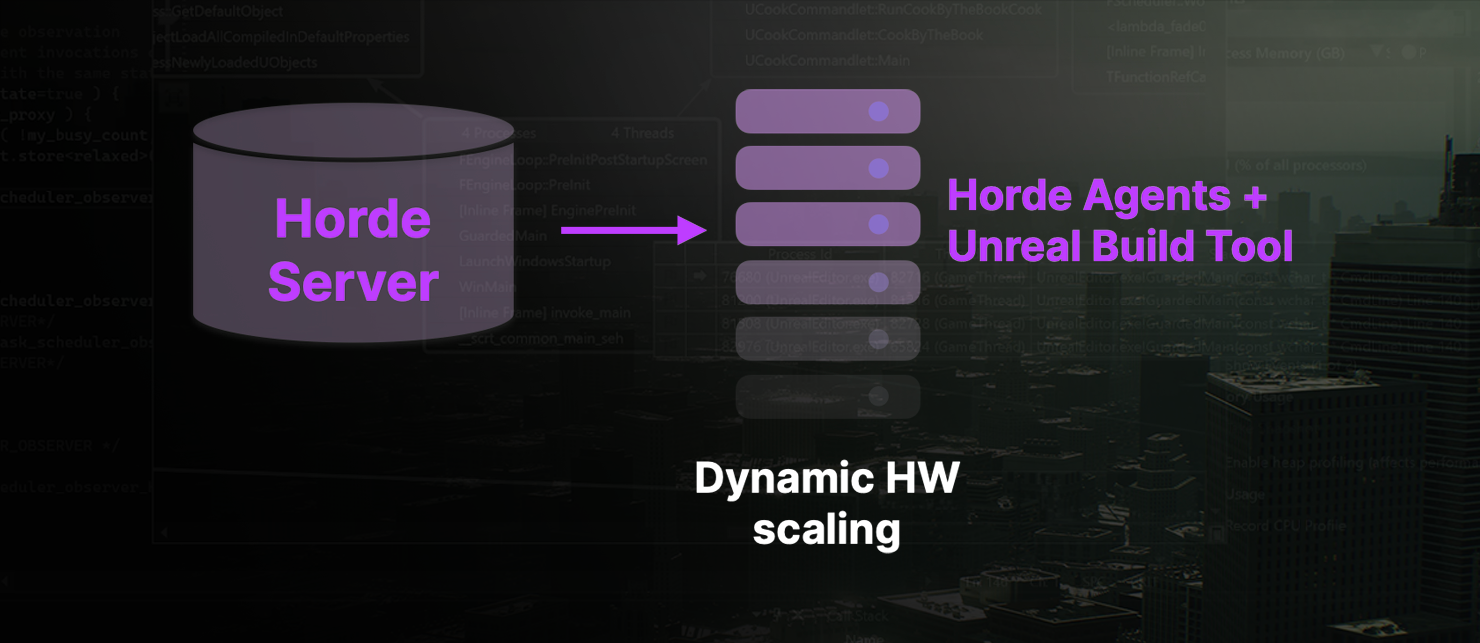
호드(Horde)는 모든 언리얼 엔진 개발팀을 위해 디자인된 '즉시 사용 가능한' 지속적 통합(CI) 솔루션입니다. 호드는 Perforce를 활용한, 수평 확장 가능한 분산형 지속적 통합 및 빌드 플랫폼 시스템으로, 언리얼 엔진 개발자 반복작업 툴 및 워크플로와 긴밀하게 통합되어 있습니다.
언리얼 빌드 액셀러레이터(베타)
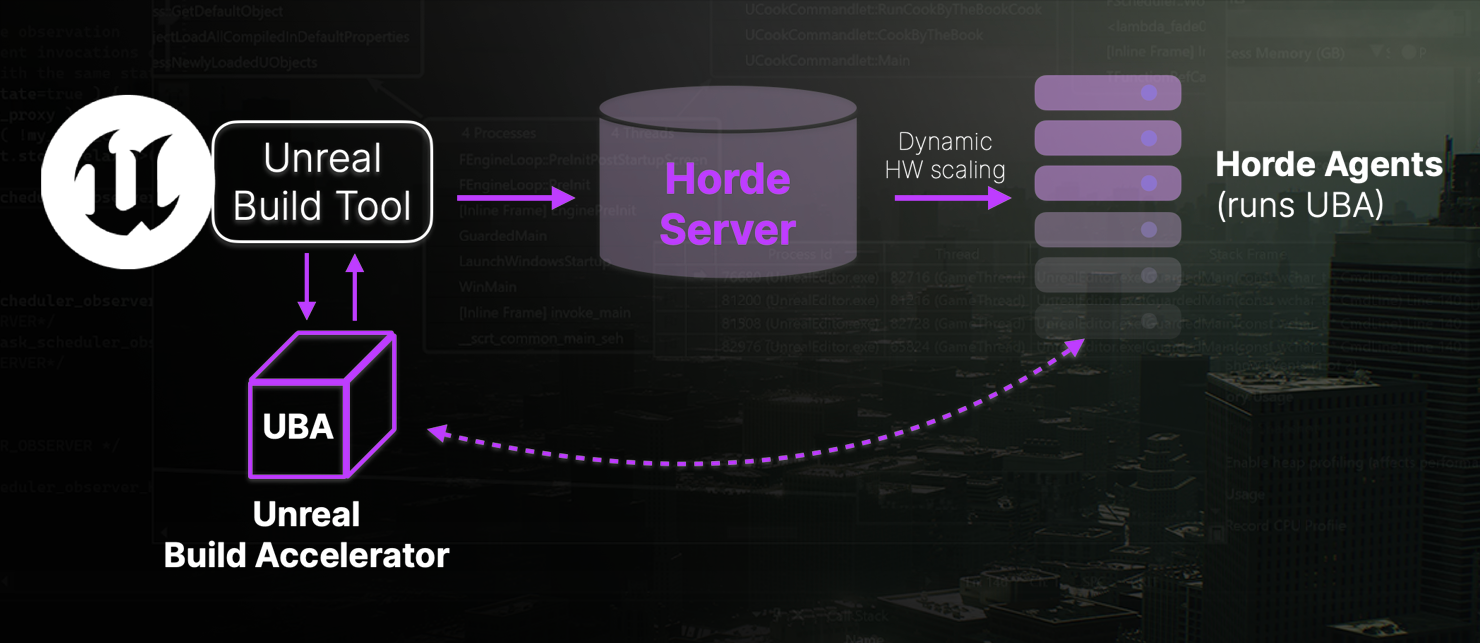
언리얼 빌드 액셀러레이터(Unreal Build Accelerator, UBA)는 C++ 컴파일용 로컬 및 분산형 컴파일 솔루션으로, 언리얼 빌드 툴(Unreal Build Tool, UBT) 및/또는 호드의 원격 빌드(컴퓨트 작업) 시스템과 함께 연동하여 사용됩니다. 호드는 헬퍼 리소스를 할당하는 코디네이터 역할을 수행합니다. UBA는 로컬 데이터를 전송하고 원격 작업을 실행한 후 결과를 반환합니다.
언리얼 엔진 5.4 출시 버전에서 UBA는 베타 상태이며, Windows OS에서 C++ 컴파일 작업과 함께 작동합니다. 동일한 물리적 또는 프라이빗 네트워크의 인프라스트럭처에서 UBA를 사용하는 것을 권장합니다. UBA는 도달 가능한 가상 또는 외부 네트워크 또는 클라우드 컴퓨트 인스턴스에서 작동할 수 있지만, 이번 출시 버전에서는 이러한 경로를 권장하지 않습니다.
네이티브 macOS 및 Linux 지원, 프로세스 유휴 상태 탐지 및 셰이더 컴파일은 실험단계이며 향후 출시 버전에 적용할 예정입니다.
언리얼 젠 스토리지를 공유 DDC로 사용(실험단계)
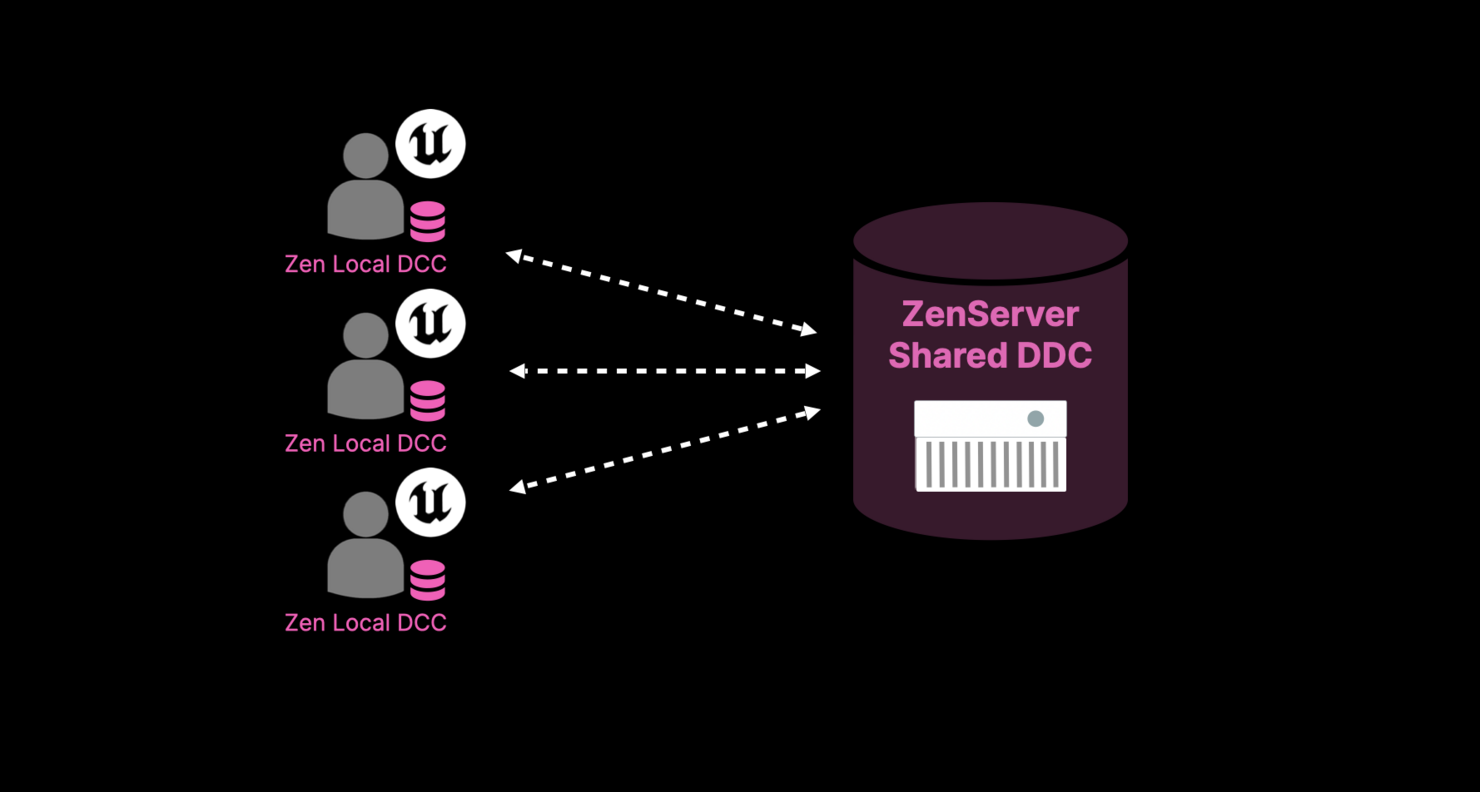
DDC 스토리지를 통한 네트워크 파일 공유가 새로운 언리얼 젠 스토리지 서버 아키텍처로 대체됩니다.
이 아키텍처는 지연시간에 더욱 유연하고, 원격 머신에 대한 DDC 네트워크 커뮤니케이션이 최적화되었습니다. 또 기존 시스템의 파일 시스템 동작과 달리, 더이상 DDC 스토리지 레벨에서 동기식 IO를 수행하지 않습니다.
모션 그래픽
모션 그래픽 모드
모션 그래픽 디자이너에게 정밀하게 맞춤화된 툴을 제공하기 위해 세심하게 제작된 획기적인 환경인 언리얼 엔진 모션 그래픽(Motion Graphics) 모드가 도입되었습니다. 꼼꼼하게 디자인된 레이아웃은 워크플로를 끊김없이 진행하고 생산성을 일관되게 확보할 수 있게 해줍니다. 2D 캔버스에 특화된 툴과 직관적인 계층구조를 제공하는 강화된 월드 아웃라이너를 갖춘 모션 그래픽 모드는 3D 셰이프, 클로너, 이펙터, 모디파이어, 애니메이터와 비선형 애니메이션을 위한 다양한 기능을 포함하는 포괄적인 툴세트를 제공합니다. 이 전용 모드는 모션 그래픽 디자인 경험을 한 단계 끌어올릴 수 있도록 디자인되어 디자이너가 창의적인 비전을 실현할 수 있는 강력하고 사용자 친화적인 플랫폼을 제공합니다.
뷰포트: 눈금자 및 가이드
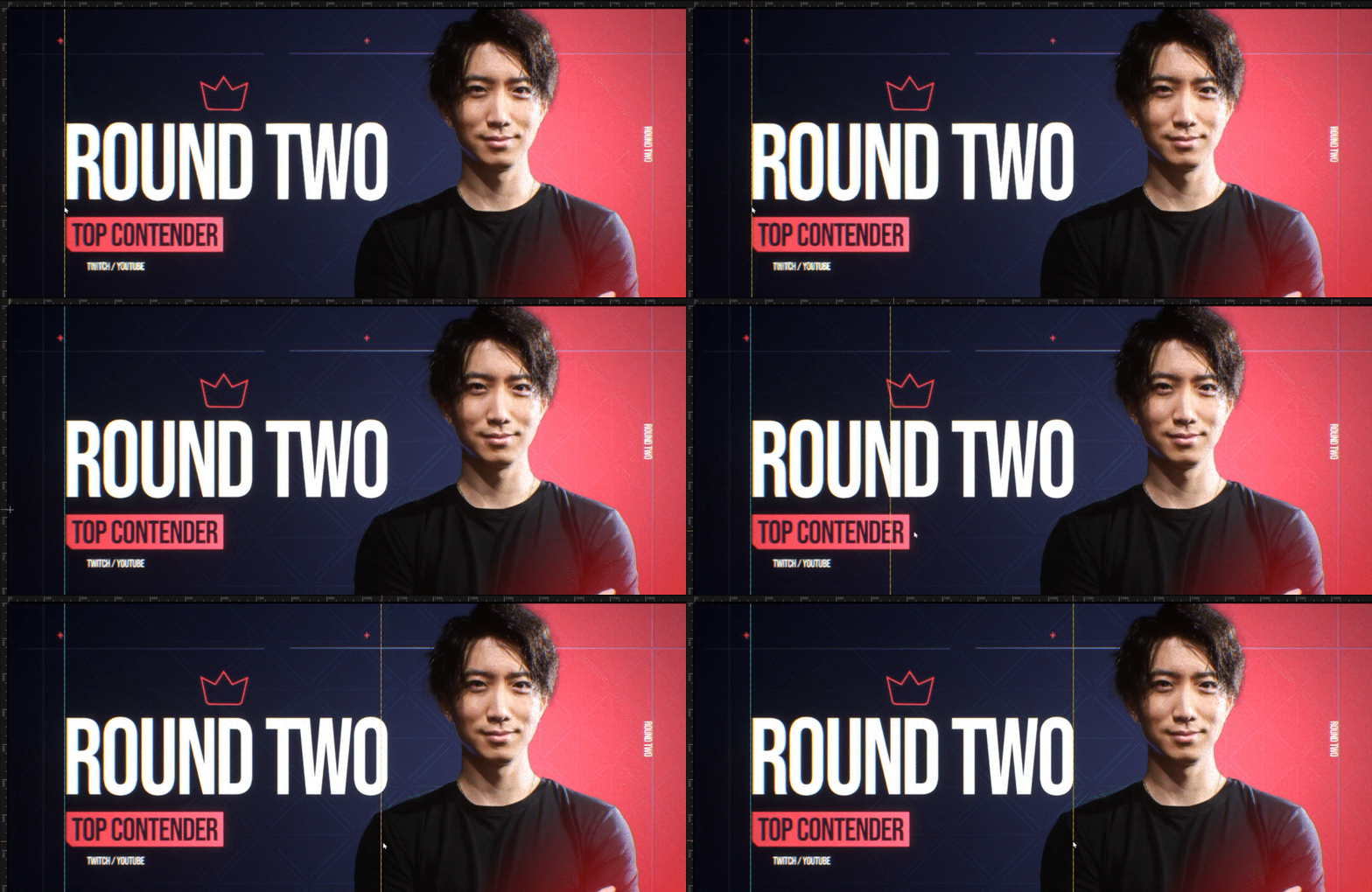
화면 디자인 분야에서는 정밀함이 가장 중요합니다. 콘텐츠가 의도한 위치에 정확하게 표시되도록 하는 것은 그 어떤 것과도 타협할 수 없는 중요한 문제입니다. 이러한 정밀함을 추구하는 모션 디자이너를 위한 획기적인 기능인 모션 디자인 뷰포트(Motion Design Viewport)가 도입되었습니다.
모션 디자인 뷰포트의 기능
2D 그리드 및 눈금자: 2D 그리드와 눈금자를 사용하여 캔버스를 정밀하게 탐색할 수 있습니다. 사용자는 이러한 시각적인 보조 장치를 활용하여 콘텐츠를 원하는 위치에 정확하게 배치할 수 있습니다.
스냅: 스냅 기능을 통해 완벽한 정렬을 실현할 수 있습니다. 모든 엘리먼트가 자동으로 제자리에 잠기므로 정렬이 어긋나 다시 작업해야 하는 불편을 최소화할 수 있습니다.
패닝 및 줌: 패닝 및 줌 기능으로 작업 시야가 향상되어 특정 디테일에 집중할 수 있습니다. 디자인을 더 가까이에서 살펴보고 세심하게 조정할 수 있습니다.
카메라 뷰 밖으로 확장되는 캔버스 경계: 캔버스를 카메라 뷰 밖으로 확장할 수 있습니다. 이 기능을 통해 디자인 전체를 시각화하여 모든 엘리먼트를 빠짐없이 확인할 수 있게 해줍니다.
2D 셰이프를 위한 드래그 앤 드롭 워크플로: 2D 셰이프를 위한 사용자 친화적인 드래그 앤 드롭 워크플로를 통해 디자인 프로세스가 간소화되었습니다. 이제 직관적으로 구성을 만들 수 있습니다.
트랜스폼 패널을 통한 빠른 액세스: 엘리먼트를 효율적으로 관리하고 조정할 수 있도록 '트랜스폼(Transform)' 패널이 제공됩니다. 이제 핵심 컨트롤에 빠르게 액세스하여 매끄러운 수정 작업을 할 수 있습니다.
뷰포트 배경 이미지 또는 단색: 뷰포트에서 배경 이미지 또는 단색으로 디자인 환경을 커스터마이징할 수 있는 기능이 제공됩니다. 이제 작업 공간을 원하는 대로 조정할 수 있습니다.
RGBA - 프리뷰 모드: RGBA 모드를 사용하여 디자인을 정밀하게 미리 볼 수 있는 기능이 제공됩니다. 이 기능을 사용하면 정확한 표현을 보장하고 이에 따라 콘텐츠를 세밀하게 조정할 수 있습니다.
클로너 및 이펙터
디자인된 클로너(Cloner)와 이펙터(Effector) 시스템을 통해 디자이너는 쉽게 셰이프와 패턴에 생동감을 불어넣을 수 있습니다. 클로너의 핵심은 언리얼 엔진의 강력한 나이아가라 파티클 시스템을 기반으로 제작되었습니다. 이 강력한 조합은 디자인에 애니메이션을 적용하기 위한 원활한 플랫폼을 제공하여 디자이너가 무한한 베리에이션을 손쉽게 실험해 볼 수 있게 해줍니다.
클로너

클로너 옵션
-
그리드
-
스피어 균등
-
스피어 랜덤
-
원형, 라인
-
메시
-
스플라인
-
허니콤
기능
-
스텝 - 클론별 위치 트랜스폼 및 스케일
-
랜덤 - 최소/최대 및 베리에이션 추가
-
마스크 - 텍스처 기반 패턴 제한
-
진행률 - 클론 전체에 진행률 애니메이션 적용
이펙터
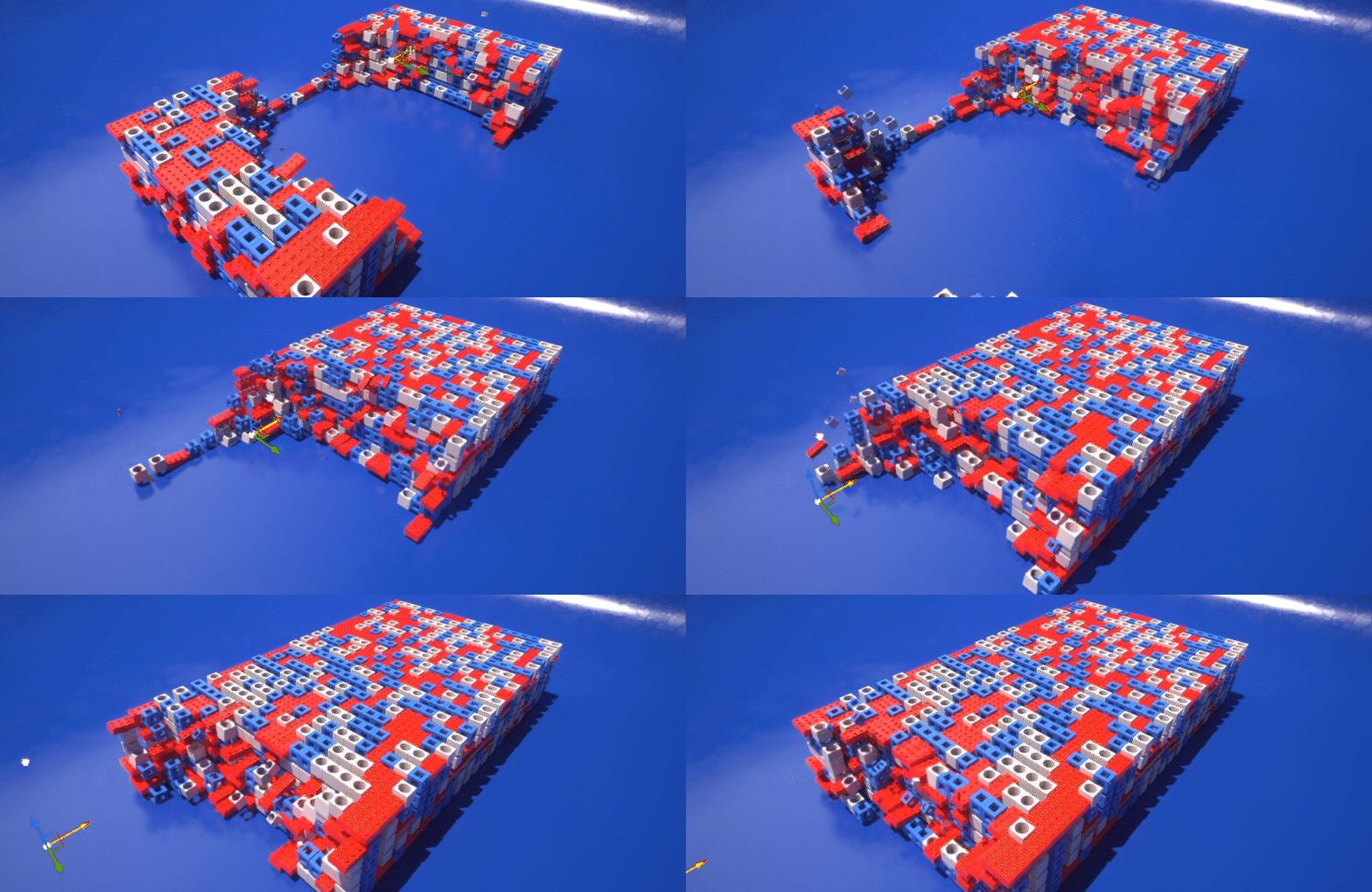
이펙터 기능
-
반경 및 감쇠 시스템 내에서 클론을 프로시저럴 방식으로 애니메이션 적용
-
위치, 스케일, 회전 애니메이션 적용
-
원형, 박스, 평면, 언바운드 셰이프
-
커스텀 감쇠 및 이징
- 이즈 인, 이즈 아웃, 바운스 인, 바운스 아웃 등
-
크기
-
힘
-
방향
-
보텍스
-
컬 노이즈
-
중력
-
이펙터 힘
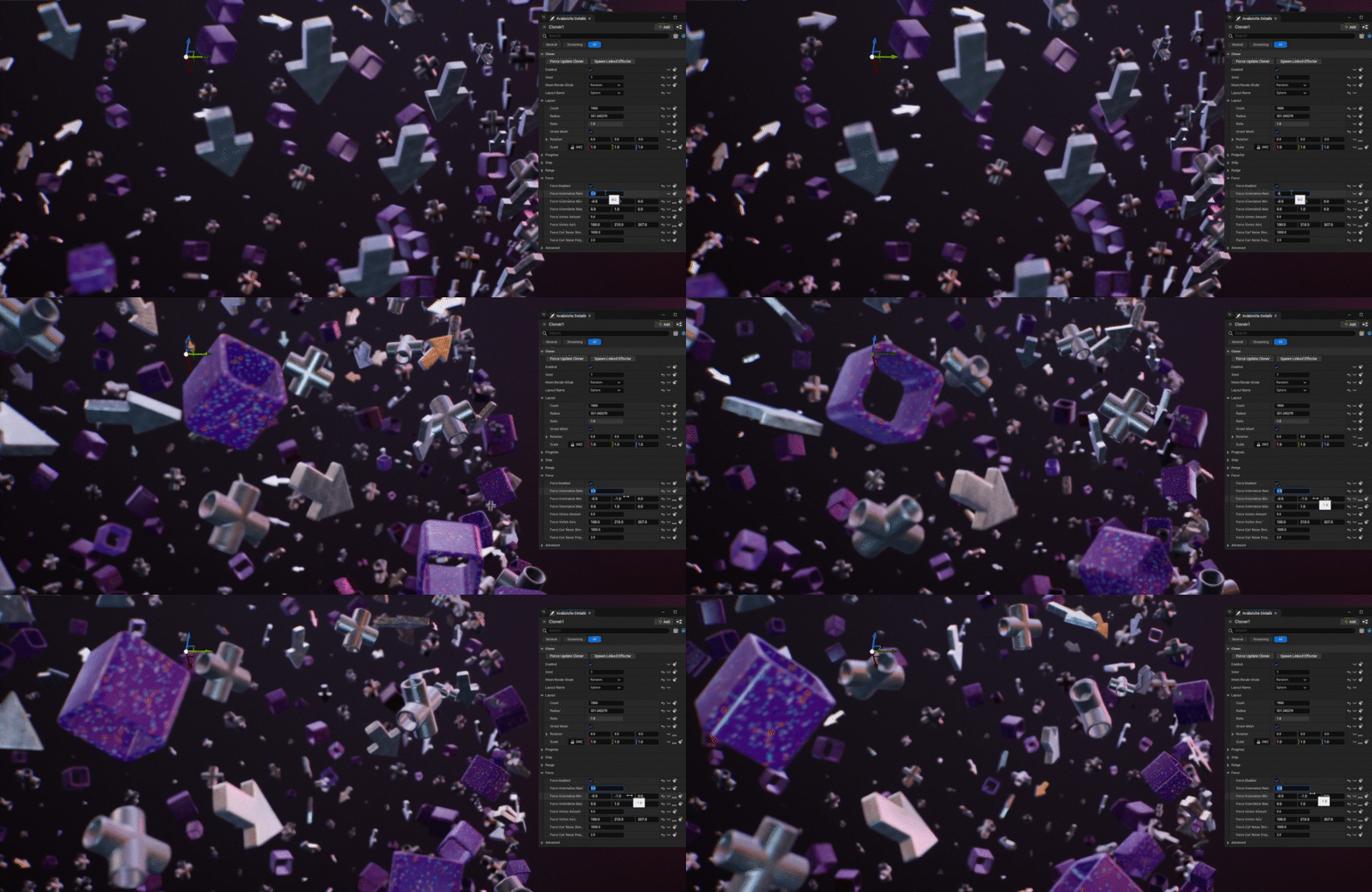
디자인에서 프로시저럴 애니메이션은 필수적이며 최신 업데이트에서는 이를 한 단계 더 발전시켰습니다. 이펙터 시스템에 보텍스, 방향, 노이즈, 중력에 대한 힘이 도입되어 디자이너가 무한한 베리에이션을 손쉽게 실험해 볼 수 있는 툴을 제공합니다. 이제 수많은 클론을 동시에 손쉽게 조작할 수 있게 되어 창의성을 극대화하고 뛰어난 결과물을 빠르게 얻을 수 있습니다.
힘
-
방향
-
보텍스
-
컬 노이즈
-
중력
머티리얼 디자이너
머티리얼 디자이너(Material Designer)는 직관적이고 사용자 친화적인 레이어 스택을 도입하여 복잡한 머티리얼을 즉시 제작할 수 있는 매끄러운 경험을 제공합니다. 효율성을 극대화할 수 있도록 디자인된 이 툴은 사용자에게 익숙한 블렌드 모드, 오파시티 컨트롤, 마스킹 기능들을 제공합니다. 이 툴을 사용하면 복잡한 머티리얼을 빠르고 손쉽게 제작할 수 있어 전체 과정을 보다 접근성 있고 효율적으로 만들어 줍니다.
머티리얼 디자이너 기능
-
도킹 가능한 UI 패널
-
텍스처 적층을 위한 레이어 시스템
-
디자이너에게 친숙한 블렌드 모드
-
범용 UI에서 텍스처 패닝, 스케일 조절, 회전 가능
-
범위제한, 미러링
-
리컴파일 없이 옵션 토글
-
다이내믹 머티리얼 생성 및 익스포트
-
키프레임 설정이 가능한 프로퍼티
머티리얼 디자이너 FX 레이어

머티리얼 디자이너를 발전시키는 데 있어 궁극적인 목표는 레이어 이펙트를 통합하여 블러, 색 보정, 디스토션 이펙트와 같은 기능의 가능성을 열어주는 것입니다. 이 이니셔티브는 사용자가 언리얼 엔진 내에서 수많은 셰이더 이펙트를 제작할 수 있도록 지원하는 다용도 프레임워크를 구축하여 플랫폼의 창의적인 기능을 강화하는 것을 목표로 합니다.
필터 및 FX
-
블러/재생속도 조절/침식
-
컬러: 색상/채도/휘도
-
레벨
-
디스토션
-
픽셀화
-
선명화
액터 정렬 툴
디자이너는 그리드 기반 시스템에 그래픽을 적용하는 경우가 많기 때문에 신뢰할 수 있는 정렬 툴이 매우 중요합니다. 이러한 툴은 디자이너가 레이아웃의 정확성과 일관성을 확보할 수 있게 해줍니다.
액터 정렬 툴
-
정렬: 왼쪽, 가운데, 오른쪽
-
분포: 왼쪽, 가운데, 오른쪽
-
스택: 정면, 가운데, 후면 정렬
-
회전: 회전을 카메라에 정렬
-
크기: 콘텐츠 크기를 화면에 맞춤
2D 및 3D 프리미티브

디자이너의 창작 과정에서 핵심은 프로시저럴 셰이프를 디자인에 원활하게 통합할 수 있는 툴을 제공하는 것입니다. 이를 위해서는 다양하고 고유한 셰이프를 생성할 수 있는 다재다능한 툴세트가 필요합니다. 디자이너는 뷰포트 내에서 직접 실시간으로 조정할 수 있는 다이내믹 툴을 사용하여 라이브 인터랙션 방식으로 디자인을 수정함으로써 워크플로를 향상할 수 있습니다.
3D 셰이프:
-
스피어 - 시작 위도, 끝 경도, 시작 위도, 위도 각도, 측면 옵션
-
실린더 - 측면, 상단 반경, 각도, 시작 각도
-
큐브 - 베벨, 베벨 수
-
원뿔 - 측면, 상단 반경, 각도, 시작 각도
-
원환면 - 슬라이스, 측면, 내부 크기, 각도, 시작 각도
-
코그/기어 - 슬라이스, 측면, 내부 크기, 각도, 시작 각도
각 셰이프에는 베벨 및 캡이 있을 수 있으며 베벨 에지에 머티리얼을 적용하는 기능이 있습니다.
2D 셰이프:
-
직사각형 - 왼쪽 경사, 오른쪽 경사, 글로벌 베벨 크기, 글로벌 베벨 스무드 정도, TL, TR, BL, BR
-
폴리곤 - 포인트, 내부 크기 양, 베벨, 베벨 스무드 정도
-
선, 원형, 별, 화살표 및 셰브론
지오메트리 모디파이어
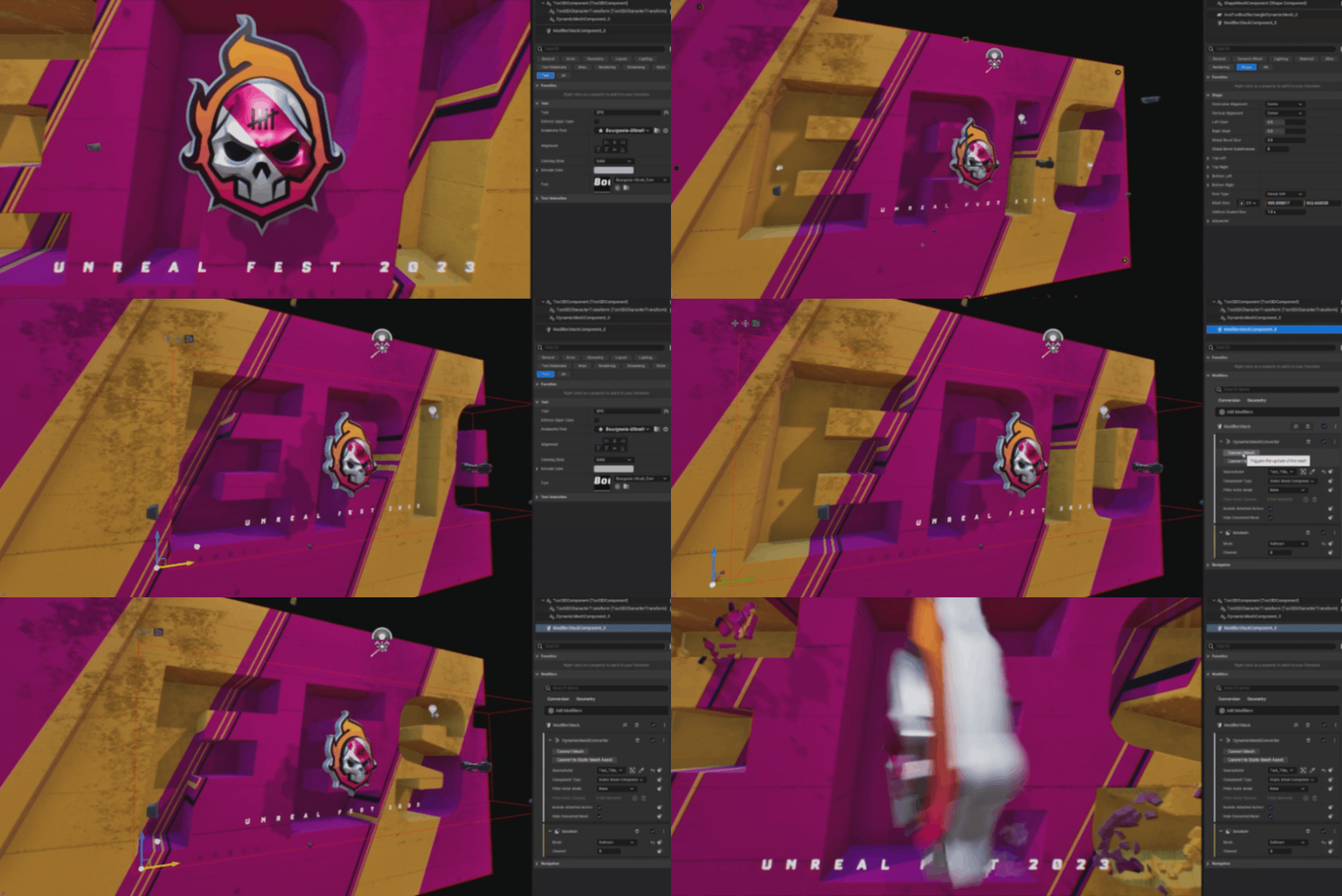
디자이너는 디자인 작업 시 지오메트리를 프로시저럴 방식으로 수정할 수 있는 기능을 필요로 합니다. 이 시스템은 부울과 같은 연산을 위해 베이스 지오메트리에 프로시저럴 모디파이어를 손쉽게 추가할 수 있게 해줍니다. 사용자는 이러한 모디파이어를 손쉽게 활성화 또는 비활성화하고 순서를 다시 지정할 수 있어 다양하게 커스터마이징된 디자인을 제작할 수 있습니다. 지오메트리 모디파이어는 언리얼 엔진 지오메트리 스크립팅 함수 위에 구축되어 있으므로 향후 시스템이 한층 확장될 수 있습니다.
지오메트리 모디파이어
돌출 - 지오메트리 조각을 깊이별로 돌출시키는 기능입니다. 디자이너는 전면 캡, 후면 캡, 라운딩, 측면에 걸쳐 UV의 스케일을 조절할 수 있습니다.
베벨 - 다이내믹 지오메트리 조각에 베벨을 추가합니다.
부울 - 채널을 기준으로 빼고, 더하고, 결합합니다.
외곽선/스트로크 - 2D 셰이프에 디자이너의 필요에 따라 0픽셀에서 20픽셀 이상의 다양한 너비로 외곽선 또는 스트로크를 추가합니다.
미러 - 모디파이어를 사용하여 지오메트리를 손쉽게 플립하거나 미러링합니다. 디자이너는 피벗을 고려하면서 X, Y 또는 Z축을 따라 지오메트리를 미러링할 수 있습니다.
패턴 - 지오메트리를 그리드, 원형 등의 패턴으로 리플리케이트합니다.
노멀 - 노멀을 재계산합니다.
디포메이션:
벤드 - 지오메트리 조각을 벤딩하거나 디폼할 수 있습니다.
테이퍼 - 오브젝트의 길이에 따라 지오메트리를 테이퍼링할 수 있습니다.
SVG 임포터
SVG 포맷으로 그래픽 디자인 및 브랜딩 정보를 생성하는 프로그램이 널리 사용되면서, 디자이너는 SVG 파일을 임포트하는 기능이 필요해졌습니다. SVG 임포터는 머티리얼 컬러는 그대로 유지하면서 SVG 파일에서 3D 지오메트리를 원활하게 생성하도록 디자인되었습니다.
-
SVG 액터
-
즉시 SVG 교체
-
SVG - XML 복사 및 붙여넣기를 통한 지오메트리 생성
-
돌출
-
베벨
-
캡
-
UV
텍스트 3D 향상
디자인에 개성과 표현력을 불어넣는 강력한 폰트 기능은 디자이너에게 기본적인 필수 요소입니다. 에픽게임즈는 폰트를 검색하고 테스트하는 프로세스를 간소화하여 전반적인 디자인 효율성을 높이기 위해 노력하고 있습니다.
기능
-
임포트 없이 폰트 프리뷰
-
폰트 즐겨찾기
-
폰트 카테고리
-
프로젝트에 폰트 임포트
-
최대 너비
-
최대 높이
-
비례 스케일
-
다이내믹 머티리얼
-
다이내믹 그레이디언트
-
커스텀 머티리얼
아웃라이너 향상
디자이너가 모션 그래픽 워크플로에 핵심적인 항목을 그룹화하는 데 매우 구체화된 계층구조를 생성할 수 있는 기능을 제공합니다. 현재, 이 기능은 월드 아웃라이너에서 별도의 탭으로 제공됩니다. 디자이너는 이 새로운 기능을 통해 정확한 요구 사항에 맞게 씬을 구성하고, 표시하고, 관리하여 더 많은 부분을 제어할 수 있습니다. 이 출시 버전의 월드 아웃라이너와 관련된 피드백은 언리얼 엔진의 UX를 향상하는 데 큰 도움이 됩니다.
월드 아웃라이너 기능
-
알파벳 이외 순서로 액터 정렬
-
null 오브젝트 아래 액터를 손쉽게 그룹화
-
액터별 비저빌리티 상태
-
레이어에 컬러를 지정하여 정리
-
지오메트리, 애니메이션 및 원격 제어를 위한 모디파이어 시스템
-
필요한 액터 또는 모디파이어만 손쉽게 표시할 수 있는 필터링 시스템
-
액터 계층구조를 자동으로 확장하지 않는 옵션 제공
-
지오메트리, 애니메이션 및 원격 제어를 위한 모디파이어 복사 및 붙여넣기
-
단축키를 사용하여 피벗 및 그룹 액터 이동
-
액터 이름 일괄 변경
이름 변경 툴
디자이너와 다른 사용자에게는 월드 아웃라이너에서 적절한 명명 규칙을 유지하는 것을 포함하여 간소화된 워크플로를 보장하는 것이 중요합니다. 반복적인 엘리먼트가 많은 프로덕션 환경에서 액터와 에셋의 이름을 일괄적으로 변경할 수 있게 해주는 툴을 도입합니다. 이 툴은 접두사, 접미사, 검색 및 대체 기능을 갖추고 있어 디자이너가 깔끔하고 정리된 워크스페이스를 유지 관리할 수 있는 효율적인 솔루션을 제공합니다.
아웃라이너
-
선택된 액터 이름 변경
-
선택된 클래스의 액터 이름 변경
콘텐츠 브라우저
-
선택된 에셋 이름 변경
-
선택된 클래스의 에셋 이름 변경
기능
-
베이스 이름 변경
-
접두사 - 추가, 제거, 번호 지정
-
접미사 - 추가, 제거, 번호 지정
-
검색 및 대체
애니메이션 모디파이어 시스템
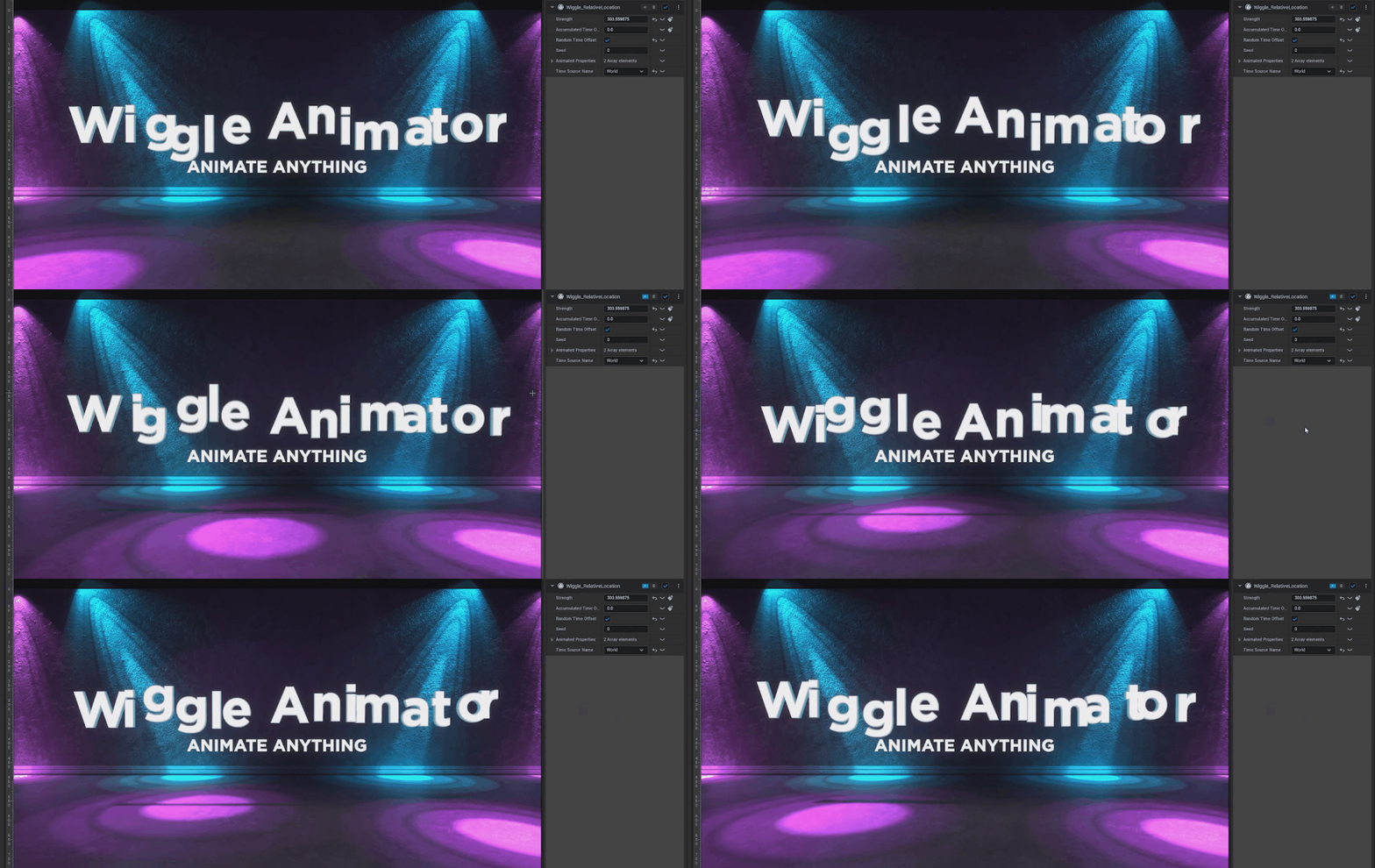
모션 그래픽 아티스트는 이제 거의 모든 프로퍼티에 프로시저럴 애니메이션을 손쉽게 추가할 수 있는 강력한 기능을 사용할 수 있습니다. 이 혁신적인 툴은 아티스트가 위글, 바운스, 진동 및 랜덤 애니메이션과 같은 다이내믹 이펙트를 끊김없이 통합할 수 있도록 지원하여 무한한 창작의 가능성을 열어줍니다. 이 툴은 효율성을 향상할 뿐만 아니라 창의적인 표현의 새로운 영역을 열어주어 아티스트가 매력적이고 역동적인 배경으로 모션 그래픽의 수준을 한 차원 높일 수 있게 해줍니다.
애니메이션 모디파이어
애니메이션을 위한 타깃 프로퍼티
프로퍼티를 제어하기 위한 프로시저럴 웨이브 함수 추가
애니메이션 함수
Sin, Cosine, Square, Inverted Square, Sawtooth, Triangle, Bounce, Pulse, Perlin
트랜지션 로직
생방송에서는 화면상의 여러 엘리먼트를 끊김없이 표현하고 이들 간의 부드러운 전환이 무엇보다 중요합니다. 트랜지션 로직(Transition Logic)은 생방송 중 엘리먼트가 들어오고 나가는 것을 정밀하게 제어하는 데 핵심적인 역할을 합니다. 디자이너는 이 기능을 통해 그래픽 시스템을 지능적으로 구성하고, 각 엘리먼트가 화면에 의도한 대로 정확하게 나타나고 사라지도록 하여 인상적인 라이브 브로드캐스트에 필수적인 수준의 정밀도를 제공할 수 있습니다.
트랜지션 로직 기능:
-
트랜지션을 결정하는 스테이트 머신
-
레이어에 여러 엘리먼트 추가
-
트랜지션 상태 디자인
브로드캐스트 런다운
브로드캐스트 디자이너에게는 방송 중에 그래픽을 실시간으로 실행하는 기능이 가장 중요합니다. 오퍼레이터는 레벨의 라이브 출력을 용이하게 해주는 툴인 브로드캐스트 런다운(Broadcast Rundown)을 사용합니다. 이 런다운은 그래픽을 테스트할 수 있을 뿐만 아니라 SDI 또는 IP 비디오 스트림을 통한 라이브 재생에도 유용합니다. 원격 제어 시스템에서는 오퍼레이터가 여러 페이지와 다양한 콘텐츠를 제작할 수 있도록 지원하며, 끊김없는 라이브 브로드캐스팅을 위한 포괄적인 솔루션을 제공합니다.
기능
-
페이지별 프리뷰 및 프로그램
-
페이지별로 텍스트, 이미지, 비디오, 프로퍼티 변경
-
손쉽게 리콜할 수 있도록 번호로 페이지 저장
-
드래그 앤 드롭으로 순서 조정
-
알파 채널 프리뷰
-
강력한 플레이리스트 API
-
필터링된 뷰
-
매크로
-
다중 채널 출력
-
MRQ를 사용하여 디스크에 렌더링
스태거 애니메이션
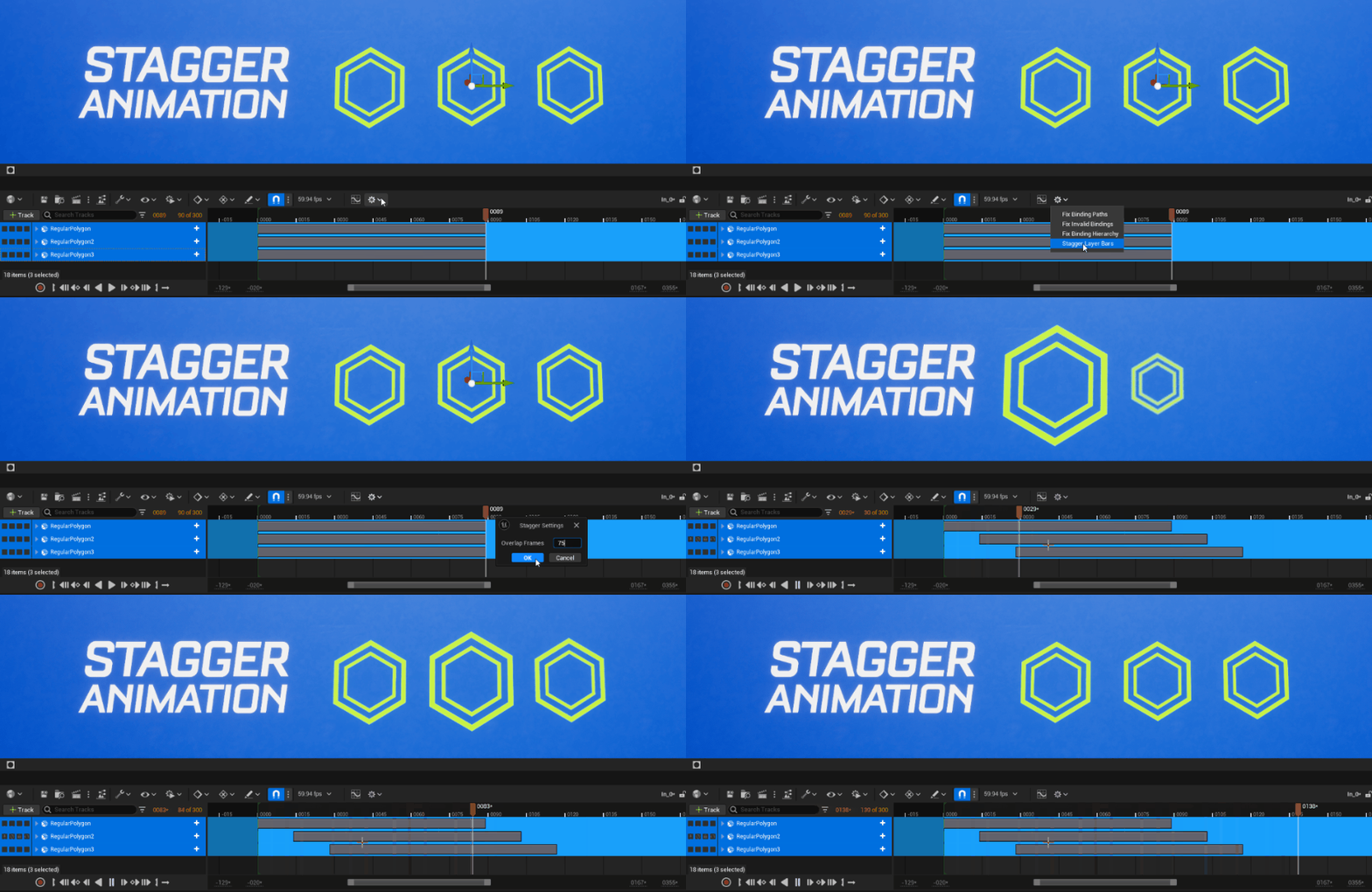
디자이너의 작업 효율성을 높이기 위해 애니메이션의 시간 오프셋을 간소화하는 기능을 도입합니다. 이 툴을 사용하면 여러 레이어 바를 간편하게 선택하고 손쉽게 시간 오프셋을 적용할 수 있어 동적인 팝업 애니메이션을 빠르게 제작할 수 있습니다.
모디파이어 마스킹

디자이너에게 있어서 마스킹은 특히 씬에 마스킹 엘리먼트가 항상 포함되는 모션 그래픽 영역에서는 핵심적인 기능입니다. 이 툴은 속도와 효율성을 우선시하는 머티리얼 기반의 다양한 마스킹 형식을 제공하고 퍼포먼스와 간편함을 동시에 보장하여 최적의 디자인 경험을 제공하는 것을 목표로 합니다.
오파시티: 오파시티 컨트롤을 사용하면 화면에 표시되는 모든 엘리먼트를 손쉽게 페이드 아웃할 수 있습니다. 이 컨트롤은 머티리얼 디자이너에 완벽하게 통합되어 있으므로 네이티브 지원 기능을 통해 매끄러운 트랜지션을 구현할 수 있습니다.
텍스처: 텍스처를 소스로 적용하기만 하면 3D 모델의 특정 부분을 마스킹할 수 있습니다.
지오메트리 마스크: 지오메트리의 소스 조각을 사용하여 잘 정의된 에지를 위한 마스크를 생성하고 마스킹 요구 사항에 맞는 간단하면서도 효율적인 솔루션을 제공합니다. 이 사용자 친화적인 툴로 디자인의 정교함을 높여보세요.
그리드 정렬 모디파이어
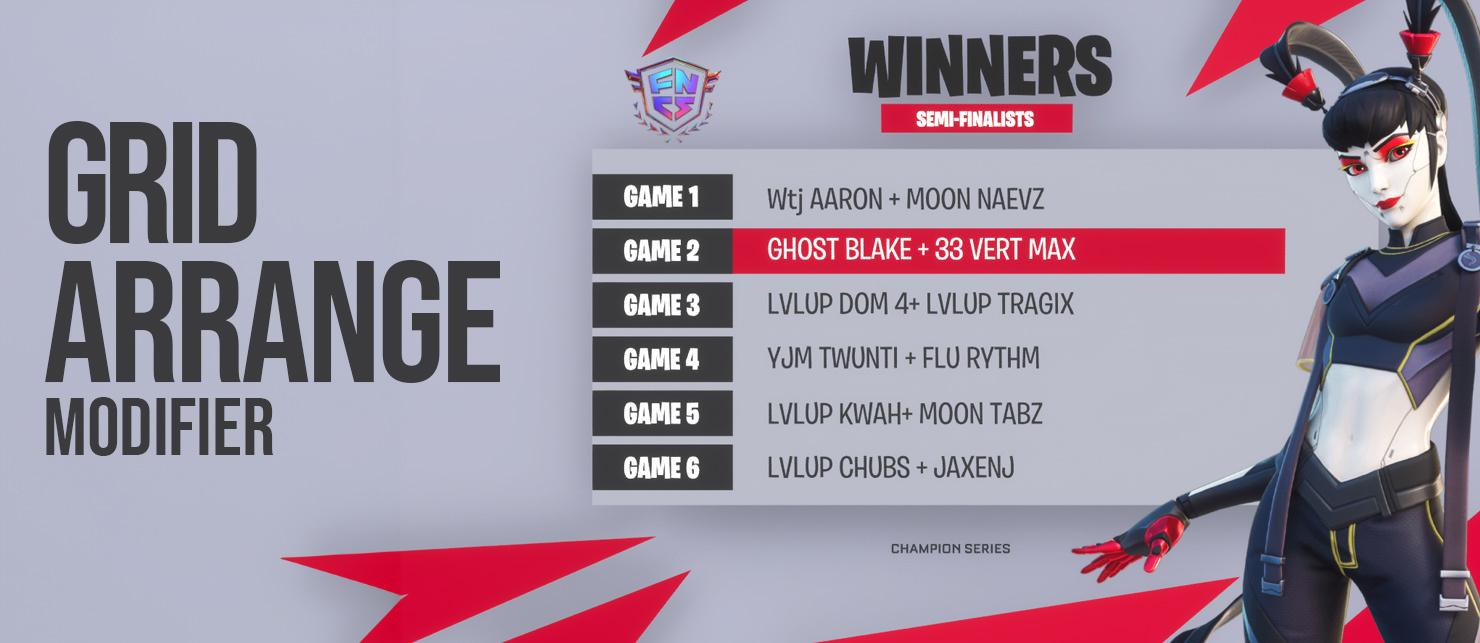
그리드 정렬(Grid Arrange) 모디파이어는 계층구조 내의 모든 액터를 균일하게 분포할 수 있게 해줍니다. 이 툴은 그리드 시스템을 사용하는 텍스트 기반 레이아웃에 특히 중요하며, 다양한 크기 요구 사항을 충족하기 위해 레이아웃을 동적으로 조정할 수 있습니다.
그리드 정렬 기능:
-
가로 정렬: (가운데 정렬이 디폴트)
-
세로 정렬: (가운데 정렬이 디폴트)
-
최대 가로 항목 수: 0은 최대값이 아니며, 4는 두 번째 행에 5번째 항목이 표시됨을 의미함
-
패딩: 항목 사이의 공간
-
크기(XY): 항목의 크기
버추얼 프로덕션
멀티 프로세스 내부 프러스텀
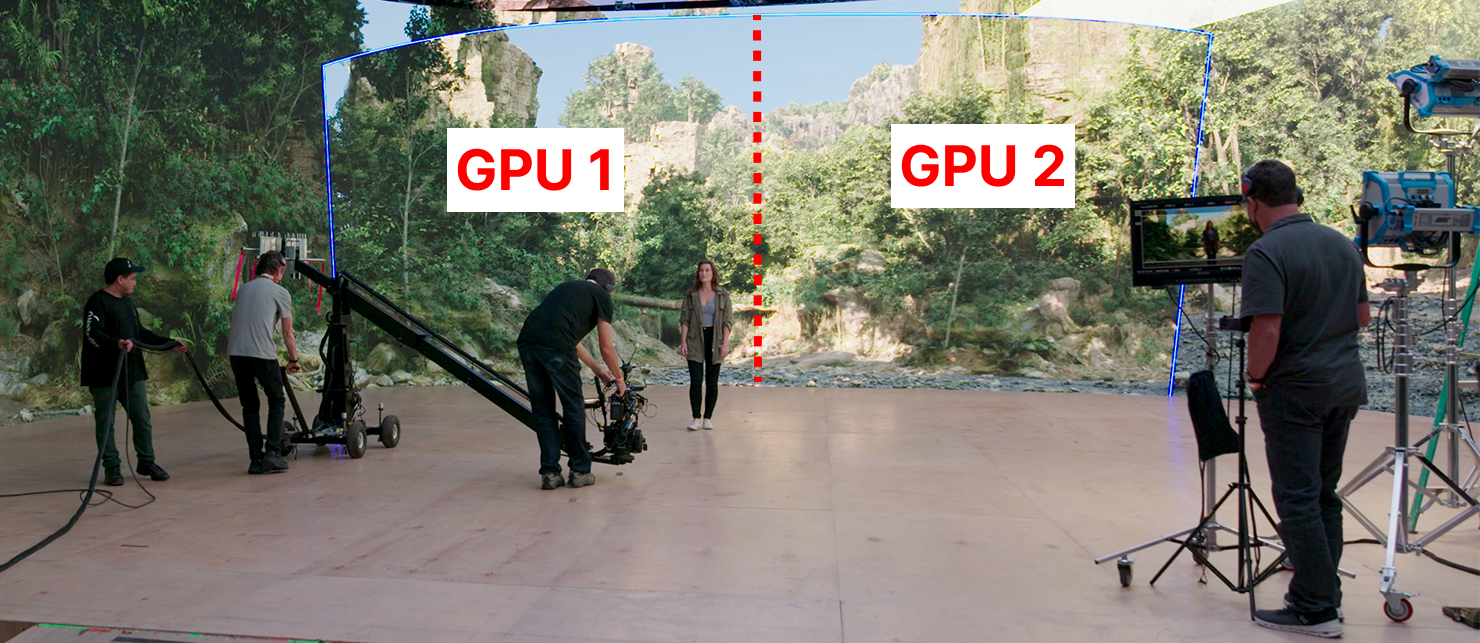
기존에는 언리얼 엔진/nDisplay 렌더링의 한계 및 다른 외부 뷰포트와 최소한 일부 리소스를 공유해야 한다는 점 때문에 ICVFX 카메라의 내부 프러스텀 렌더링에 mGPU를 사용할 수 없었습니다. SMPTE 2110 지원이 도입되면서 이제 전체 nDisplay 렌더 노드를 내부 프러스텀 전용으로만 사용할 수 있어 카메라에 보이는 것에 더 많은 하드웨어를 투입할 수 있게 되었습니다(예: GPU 하나가 아닌 두 개). 멀티 프로세스 내부 프러스텀(Multi-Process Inner Frustum) 은 내부 프러스텀을 가장 높은 퀄리티로 렌더링할 수 있게 해줍니다.
새로운 카메라의 해상도가 높아지고 볼륨의 크기가 커지면서 이러한 프로덕션 요구 사항에 따라 시스템을 확장할 수 있게 될 것입니다.
뎁스 오브 필드 추정
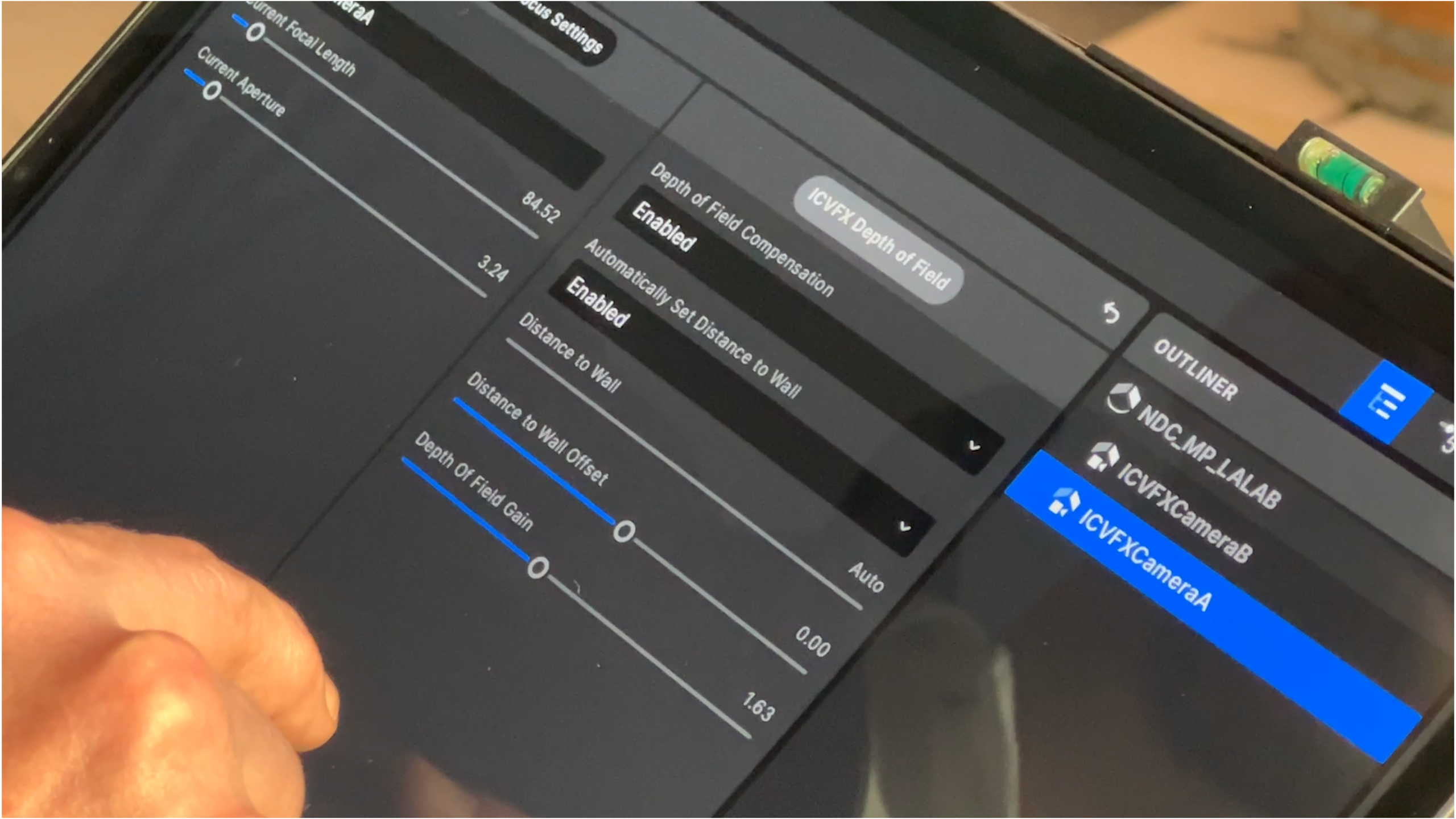

뎁스 오브 필드는 필수적인 영화 용어 중 하나로, 촬영감독이 관객의 주의를 집중시키려고 할 때 중요하게 사용되는 수단입니다. 하지만, LED 볼륨에서 인카메라 VFX 씬을 촬영하는 경우에는 기술적으로 씬의 일부 오브젝트가 카메라에서 다른 오브젝트보다 멀리 떨어져 있어도 nDisplay로 렌더링된 모든 오브젝트의 뎁스 오브 필드가 동일하기 때문에 실제로 정확한 뎁스 오브 필드를 구현하는 것이 불가능했습니다.
뎁스 오브 필드 추정(Depth of Field Estimation)은 언리얼 엔진 내에서 다음과 같은 '적절한' 뎁스 오브 필드를 계산하는 데 필요한 모든 사항을 알고 있다는 사실을 활용하여 이 문제를 해결합니다.
-
언리얼 엔진 씬 내 스테이지 볼륨의 위치와 방향
-
라이브 링크를 사용한 카메라 위치, 조리개, 렌즈 초점 길이 및 초점 거리
-
언리얼 엔진 씬 내 모든 오브젝트 사이의 거리
이를 토대로 언리얼 엔진 씬의 오브젝트에 위의 정보와 실제 조리개/렌즈 조합에 따라 렌즈가 이미 적용하고 있는 디포커스를 고려한 계산에 기반하여 디포커스를 적용할 수 있는 새로운 기능이 구현되었습니다.
버추얼 스카우팅 툴세트(실험단계)
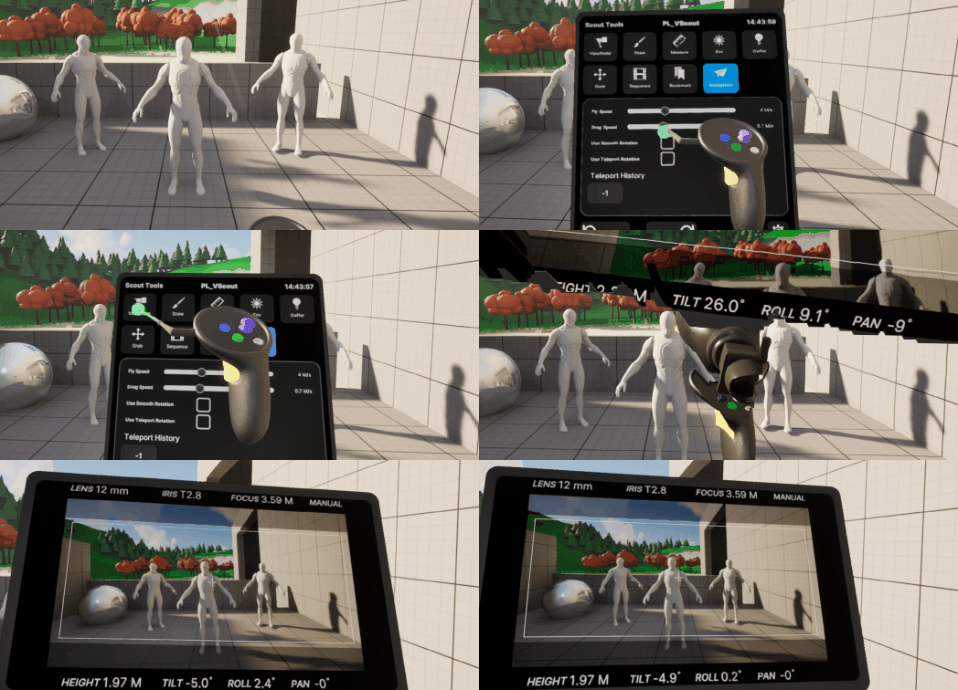
새로운 버추얼 스카우팅 툴을 사용하면 단방향 콘텐츠 크리에이터가 VR에서 씬을 보고, 주석을 추가하고, 편집할 수 있습니다.
새로운 XR 크리에이티브 프레임워크의 장점을 최대한 활용하기 위해 버추얼 스카우팅의 UX가 완전히 개편되었습니다. 이제 개발자는 이러한 버추얼 스카우팅 툴을 보다 손쉽게 사용하고 확장할 수 있습니다.
사용자는 다음과 같은 이점을 얻을 수 있습니다.
-
멀티 유저 에디터 세션에서 VR의 레벨을 보고 편집할 수 있음
-
측정
-
주석 추가
-
스크린샷 캡처 및 카메라 배치
-
레벨 시퀀스 재생
-
로컬 라이트 생성
-
인바이런먼트 라이트 제어
이 툴세트는 PIE 세션에서 실행하고 런타임 실행 파일로 패키징하는 기능도 지원합니다.
XR 크리에이티브 프레임워크
XR 크리에이티브 프레임워크(XR Creative Framework) 는 팀이 에디터 내에서 XR(VR 및 헤드셋 혼합현실) 툴을 제작할 수 있는 개발 프레임워크를 제공하여 최신 OpenXR 지원 HMD와 컨트롤러를 사용하여 커스텀 워크플로를 제작할 수 있게 지원합니다.
새로운 프레임워크는 업데이트된 버추얼 프로덕션 스카우팅 툴세트의 기반을 제공합니다. 이러한 툴은 XR 크리에이티브 프레임워크 내에서 어떻게 개발하면 좋을지 파악할 수 있는 예시로 제공됩니다.
Android용 Live Link VCam

에디터 내 버추얼 카메라 시스템의 연동 앱인 Live Link VCam이 Android에 출시됩니다. ARCore 호환 Android 디바이스를 보유하고 있는 버추얼 카메라 사용자는 이제 프로젝트에서 버추얼 카메라를 완벽하게 활용할 수 있습니다.
Mac용 버추얼 카메라
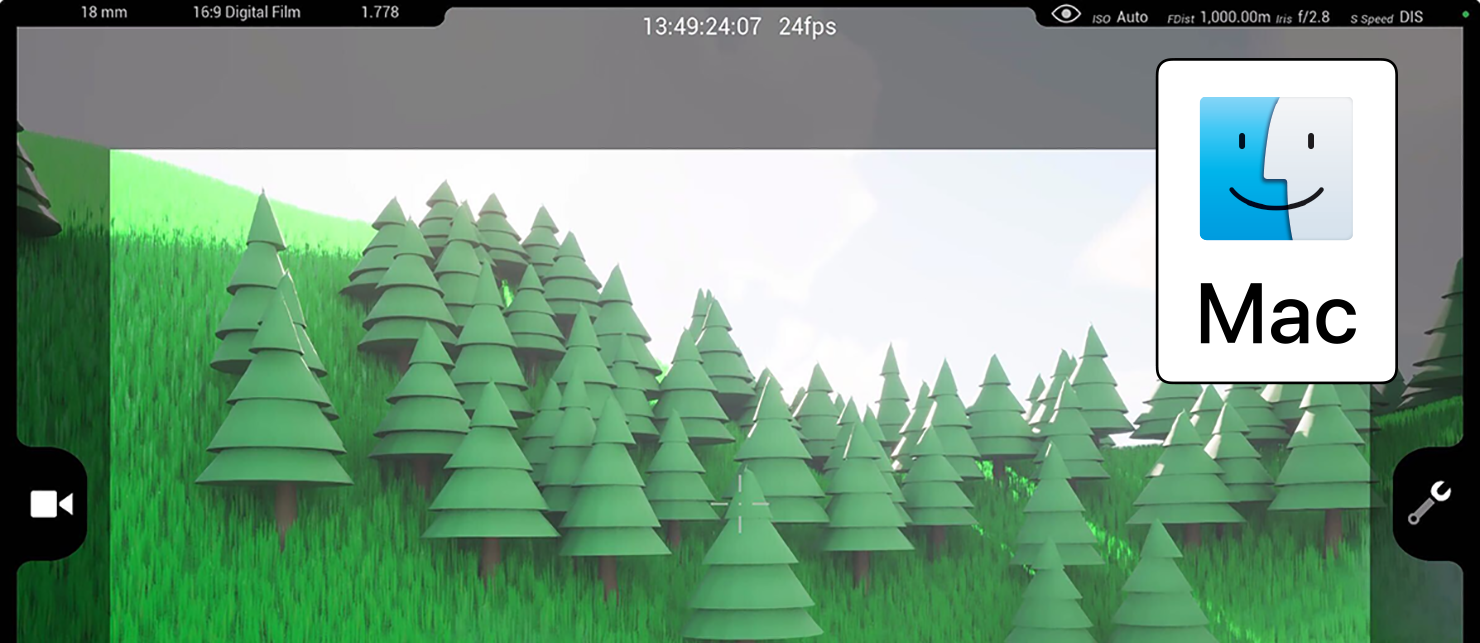
버추얼 카메라가 Mac에서 완전하게 지원됩니다. 사용자는 이제 x86/ARM에서 소프트웨어 픽셀 스트리밍을 활용하고, ARM 기반 M 시리즈 Mac 디바이스에서 하드웨어 가속을 활용할 수 있게 됩니다.
라이브 링크 허브
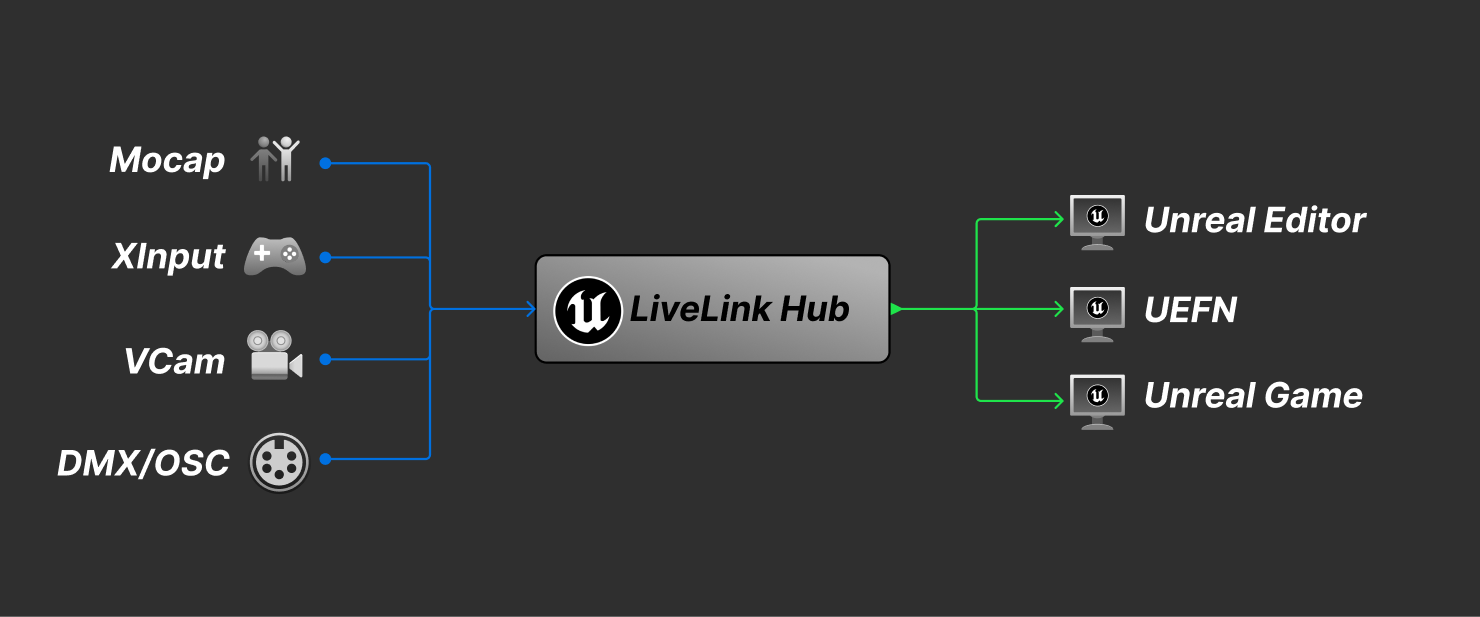
멀티 유저 편집 세션에서 여러 UE 인스턴스가 실행되는 스테이지 또는 구성(ICVFX, 라이브 컴포짓, 풀 CG 모캡 촬영, 브로드캐스트 스튜디오)에서는 에디터 세션별로 라이브 링크 소스를 설정해야 합니다. 때로는 구성에서 각 에디터 세션마다 조금씩 다른 환경설정이 필요하기 때문에 이전의 로드 시 디폴트 프리셋 워크플로로는 부족할 수 있습니다.
이에 실행 중인 에디터 세션을 모니터링하고 라이브 링크 소스에 연결 및 시각화하여 각 에디터 세션에 다시 브로드캐스트하는 외부 앱(멀티 유저 슬레이트 서버와 유사)을 제작하여 더 복잡한 워크플로를 지원할 수 있게 했습니다. 에디터 세션은 더는 라이브 링크 소스를 구독할 필요가 없으며, 앱이 각 UE 인스턴스에 수신할 라이브 링크 소스와 이를 해석하는 방법(프리프로세서, 축 교체, 역할 수정)을 알려줍니다.
초기 지원은 라이브 링크 워크플로를 대상으로 하며, 개발 로드맵에 따라 DMX, OSC 및 디바이스 제어도 지원할 예정입니다.
nDisplay 시네 카메라 프러스텀 맞춤

활성 카메라 FOV 애니메이션 내에 맞도록 동적으로 nDisplay 프러스텀의 크기를 조절합니다. nDisplay 시네 카메라 프러스텀 맞춤(nDisplay Cine Camera Frustum Fit) 을 사용하면 모든 산업에서 nDisplay 사용자가 시네 카메라를 사용하여 일반적인 UE 콘텐츠를 임의의 모양과 환경설정을 갖춘 물리적 디스플레이에 적절하게 매핑할 수 있습니다.
-
정의된 디스플레이 세트를 중심으로 바운딩 박스 계산
-
nDisplay 프러스텀을 활성화되거나 선택된 UE 시네 카메라 프러스텀에 맞추고 스케일을 조절하는 메커니즘 제공
-
화면비 불일치를 적절히 처리하기 위해 '채우기(Fill)' 및 '맞춤(Fit)'과 같은 옵션 노출
시뮬레이션 및 VFX
나이아가라 에셋 브라우저
새로운 나이아가라 에셋 브라우저(Niagara Asset Browser)는 나이아가라 이미터와 나이아가라 시스템에서 사용자 친화적인 방식으로 새로운 이펙트를 관리할 수 있게 해줍니다. 따라서 태그를 기준으로 콘텐츠를 검색할 수 있게 되어 다양한 이펙트를 손쉽게 탐색할 수 있습니다.
이전과 비교하여 다음과 같이 워크플로가 간소화되었습니다.
-
워크플로에 여러 단계의 프로세스가 아닌 단일 페이지 UI가 사용됩니다.
-
이전과는 달리 모든 이펙트를 한 번에 확인할 수 있습니다.
-
나이아가라 에셋 브라우저는 콘텐츠 브라우저와 유사하며 보다 직관적으로 사용할 수 있습니다.
사용자가 에셋에 직접 태그를 정의할 수 있어 콘텐츠 그룹을 손쉽게 구성할 수 있습니다. 마켓플레이스 크리에이터와 같은 외부 콘텐츠 제공자는 자체 태그 및 태그 정의와 함께 에셋을 제공하여 콘텐츠를 보다 쉽게 정리할 수 있습니다.
나이아가라 데이터 채널(실험단계)
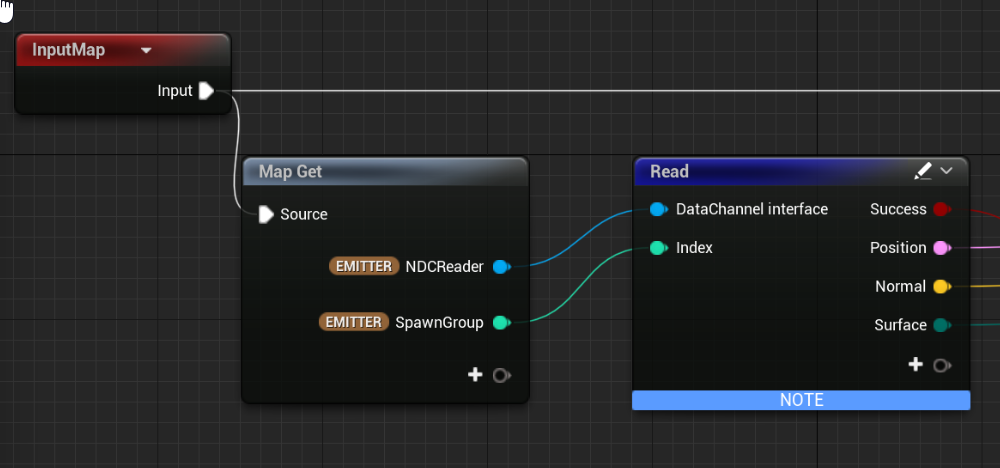
나이아가라 데이터 채널(Niagara Data Channel, NDC)은 5.4에서 실험단계 기능으로 사용할 수 있지만 아직 콘텐츠 출시에 사용하는 것은 권장되지 않습니다.
NDC를 사용하면 나이아가라 시스템, 나이아가라 및 UE의 다른 부분 간에 데이터를 전달할 수 있습니다. 한 가지 중요한 사용 사례는 NDC를 사용하여 대규모 공유 나이아가라 시스템에 이벤트를 주입하여 임팩트 FX와 같은 기능의 퍼포먼스를 향상하는 것입니다. 이는 사용자가 실험해 보고 싶어하는 주요 영역 중 하나입니다.
5.4에서 업데이트된 사항은 다음과 같습니다.
-
GetNDCSpawnData: NDC 리더 데이터 인터페이스의 새로운 함수입니다. 이를 통해 파티클이 NDC 데이터를 읽을 때 파티클 스크립트의 읽기 함수에서 사용할 스폰 NDC 인덱스와 관련 데이터를 얻을 수 있습니다.
- 이것은 파티클의 SpawnGroup을 오버라이드하는 대안이자 선호되는 방법입니다. 이 방법을 사용하면 NDC 스폰을 내부적으로 단일 스폰 이벤트로 결합할 수 있어 훨씬 빠를 뿐 아니라 이전에는 프레임당 8개로 제한되었던 NDC 스폰을 GPU에서 임의의 수만큼 허용할 수 있습니다.
-
Emitter.ID: 이제 NDC 리더 ID 함수는 호출자에서 Emitter.ID를 취하여 스폰할 이미터를 선택합니다. 이를 통해 DI에 설정된 직접 바인딩을 대체할 수 있으며, 각 이미터마다 DI를 필요로 하는 것이 아니라 단일 시스템 레벨 NDC 리더 DI로 나이아가라 시스템의 여러 이미터에 스폰할 수 있습니다.
-
향상된 블루프린트 UX: 이제 블루프린트에서 해당 NDC의 핀을 자동으로 채우는 단일 노드 경로를 통해 NDC에 엔트리를 작성할 수 있습니다.
-
여러 UX 및 편의성이 향상 되었습니다.
-
안정성 및 퍼포먼스 가 향상되었습니다.
자세한 내용은 나이아가라 데이터 채널 문서를 참고하세요.
나이아가라 경량형 이미터(실험단계)
5.4에서는 경량형 이미터를 실험단계 기능으로 사용할 수 있습니다. 아직 개발 중이므로 아직은 출시용 콘텐츠에 사용하지 않는 것이 권장됩니다.
이 이미터는 콘텐츠 제작 속도를 향상하고 경량형 이미터를 사용할 때 최적화할 필요성을 줄이는 것을 목표로 합니다. 사용자는 프로젝트 세팅을 활성화한 후 시스템에서 경량형 이미터를 생성하고 여러 유형을 서로 혼합해 사용할 수 있습니다. 경량형 이미터는 컴파일할 필요가 없으므로 워크플로 속도가 빨라지고 시스템 내 이미터의 양이 퍼포먼스에 미치는 영향이 줄어듭니다.
파티클 상태가 존재하지 않고 데이터는 표시될 때만 생성되므로 기본 기술은 상당히 다르지만 나이아가라 사용자에게는 익숙한 룩 앤 필을 제공합니다. 경량형 이미터의 기능 세트는 좀더 제한적입니다. 제한된 수의 모듈이 경량형으로 변환되었으며 일부 렌더러만 호환됩니다. 콘텐츠에서 프로그래밍할 수 없기 때문에, 스크래치 패드/모듈/동적 입력을 만들 수 없습니다. 사용자는 C++를 사용하여 기능 세트를 확장하고 새로운 모듈과 템플릿을 도입할 수 있지만, 이는 실험단계 기능이므로 출시 버전 간에 API가 대폭 변경될 수 있습니다.
자세한 내용은 나이아가라 경량형 이미터 문서를 참고하세요.
나이아가라 - CPU VectorVM(실험단계)
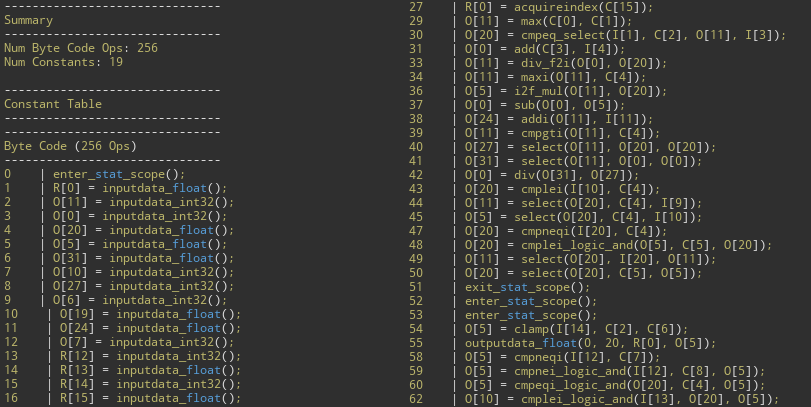
VectorVM은 나이아가라가 CPU에서 스크립트를 실행하는 데 사용되는 가상 머신입니다. CPU 스크립트를 처리하는 퍼포먼스를 향상하기 위해 VectorVM 인터프리터를 재작성했습니다. 이제 원본 바이트 코드는 다음을 포함하는 최적화 패스를 거칩니다.
-
필요한 임시 레지스터의 수를 대폭 줄여 하이 워터마크 메모리 사용량 최소화
-
불필요한 코드 제거
-
여러 일반 연산 쌍을 단일 연산으로 결합
-
메모리 사용량 최소화를 위해 바이트 코드 리포맷
이를 활성화하면 사용자에게 끊김없는 VectorVM 최적화가 제공됩니다. CPU 스크립트가 컴파일될 때 결과 바이트 코드가 최적화된 다음 가능한 경우 새 인터프리터가 사용됩니다.
사용자는 이러한 VectorVM CPU 스크립트 향상으로 훨씬 빠른 처리 속도를 경험할 수 있습니다. CPU 워크로드가 크게 감소했지만(일부 스크립트의 경우 사이클 수가 4배 향상됨) 실행이 메모리 처리량에 의해 심각하게 제한되기 때문에 실질적인 이득은 크지 않습니다. 실제 효과는 실행 시간이 10% 단축된 것으로 나타났습니다.
카오스 패널/패턴 클로스 에디터(베타)
언리얼 엔진 5.4의 카오스 클로스(Chaos Cloth) 에는 실험단계에서 베타 상태로의 업데이트와 같은 클로스 에디터(Cloth Editor)의 지속적인 개발이 포함됩니다.
5.3에서 5.4로 넘어오면서 변경된 사항
-
패브릭을 지원하는 USD 임포트 노드 추가
-
디폴트 데이터 플로 템플릿 추가
-
새로운 데이터 플로 노드 추가, 지오메트리 리메시 노드 업데이트
-
선택 노드 및 워크플로 업데이트
-
새로운 콜리전 시스템 추가, 셀프 콜리전 업데이트
-
스킨 웨이트 전송 업데이트
-
LOD 지원 추가
-
데이터 플로 노드로 노출된 프록시(래핑) 디포머
-
표시 시각화 및 디버그 업데이트
-
편의성 향상
카오스 비주얼 디버거(베타)
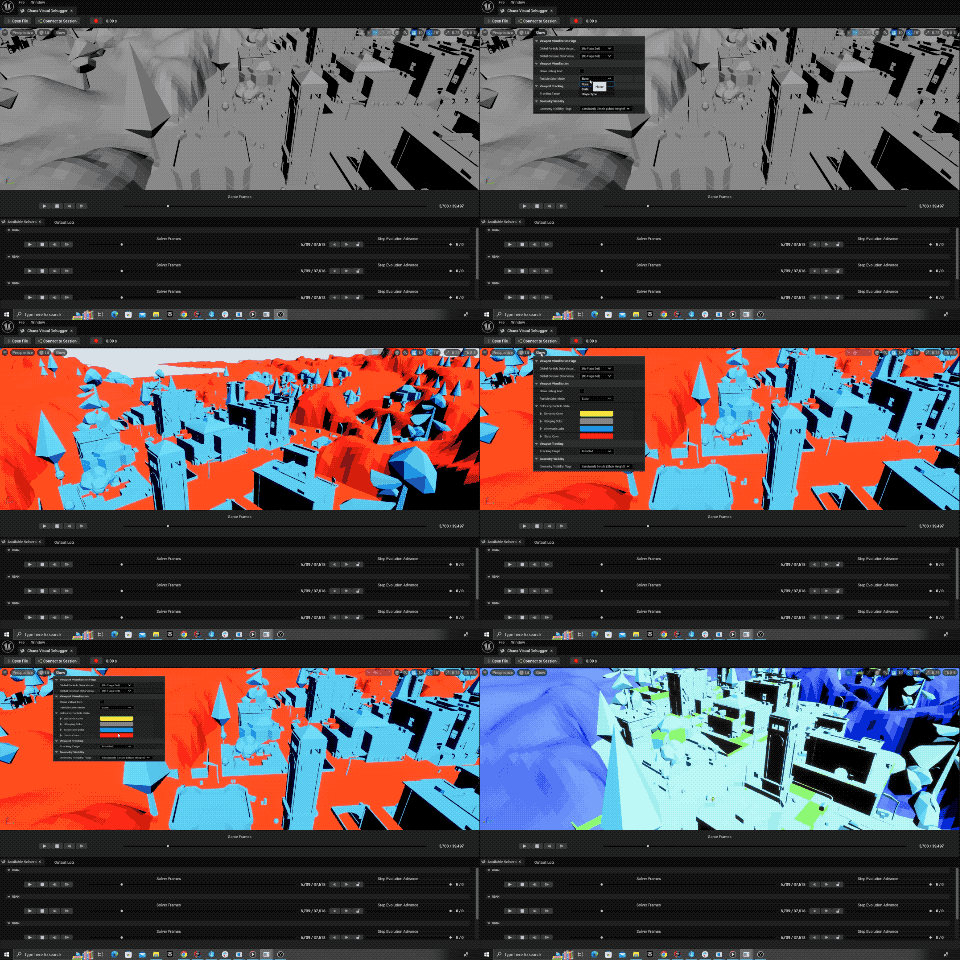
카오스 비주얼 디버거(Chaos Visual Debugger) 는 디버깅을 위해 특정 게임 또는 애플리케이션의 피직스 시뮬레이션 상태를 녹화하고 재생할 수 있게 해주는 새로운 툴이자 프레임워크입니다.
UE 5.4의 카오스 비주얼 디버거는 크게 두 가지 부분으로 나뉩니다.
-
디버그 데이터 생성(Debug Data Generation): 피직스 시뮬레이션의 상태를 녹화하는 시스템입니다.
-
디버그 데이터 시각화(Debug Data Visualization): 자체 에디터 월드, 뷰포트, 아웃라이너, '디테일' 패널, 녹화 재생 컨트롤을 갖춘 에디터 툴입니다. 이 툴에 트레이스 파일을 로드하면 시뮬레이션의 상태를 프레임 단위로, 그리고 서브 스텝별로 재생 및 시각화하고 오브젝트를 선택하여 해당 프레임 또는 서브 스텝에서 오브젝트의 상태를 볼 수 있습니다.
향후 버전에서는 이 툴을 통해 녹화된 모든 프레임에서 재시뮬레이션이 가능해질 것입니다.
자세한 내용은 카오스 비주얼 디버거 문서를 참고하세요.
물리 기반 캐릭터 무브먼트(실험단계)
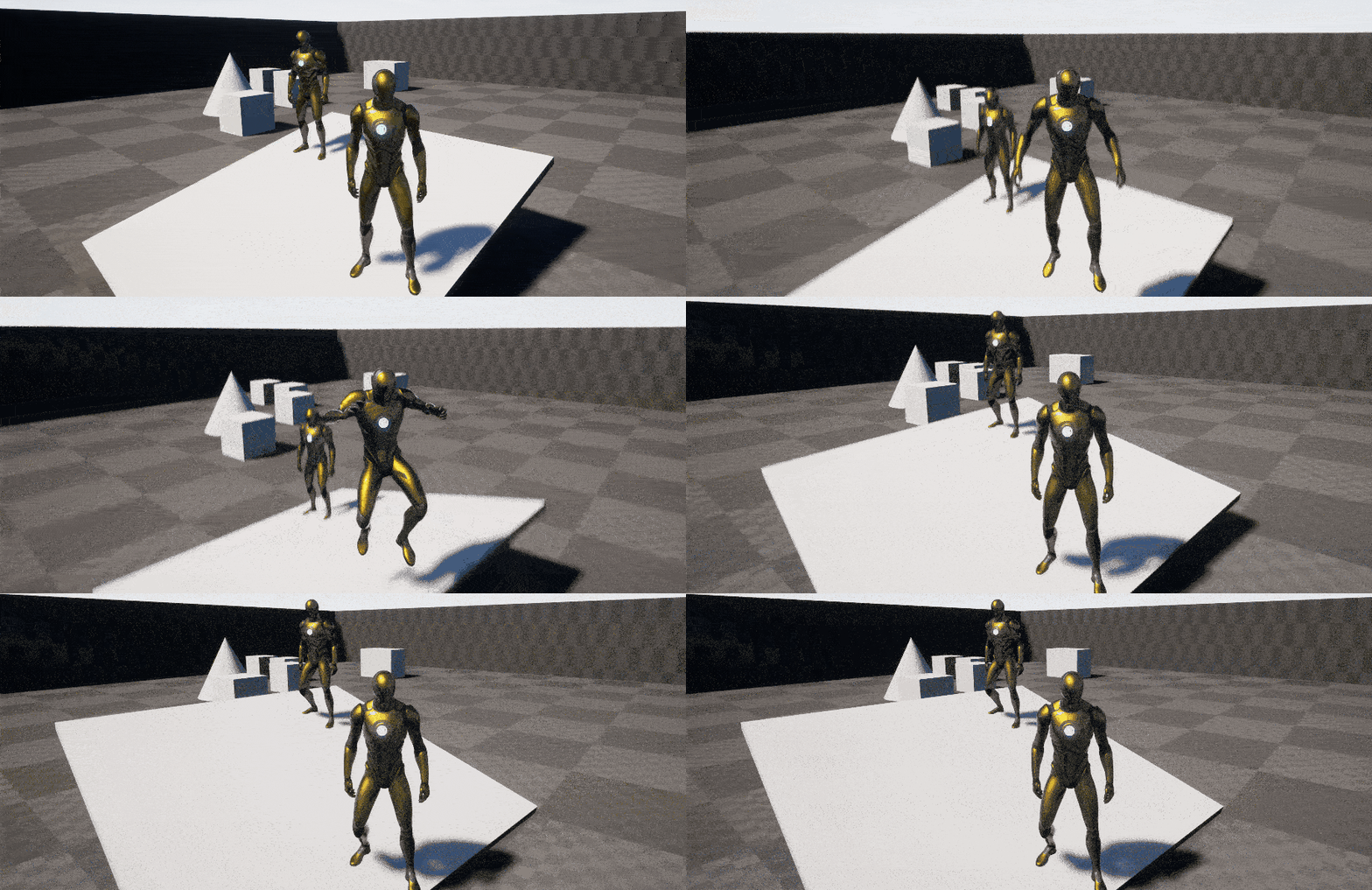
물리 기반 캐릭터(Physics Based Character) 무브먼트는 캐릭터 무버 2.0에 새롭게 빌드하고 있는 실험단계 기능으로, 캐릭터와 환경 사이의 양방향 물리 기반 인터랙션을 제공합니다.
-
시스템은 캐릭터 무버 2.0에서 생성된 무브먼트 모드를 사용하고 출력된 무브먼트를 캐릭터의 물리 표현을 위한 타깃 모션으로 사용합니다.
-
캐릭터는 캐릭터가 인터랙션하고 있는 피직스 월드 부분에 힘을 전하고 그 결과 피직스 힘과 컨스트레인트가 캐릭터의 무브먼트에 영향을 미칠 수 있습니다.
-
롤백 및 재시뮬레이션이 가능한 멀티플레이어 물리 기반 모션은 네트워킹된 피직스를 사용하여 지원됩니다.
나이아가라 유체(베타)
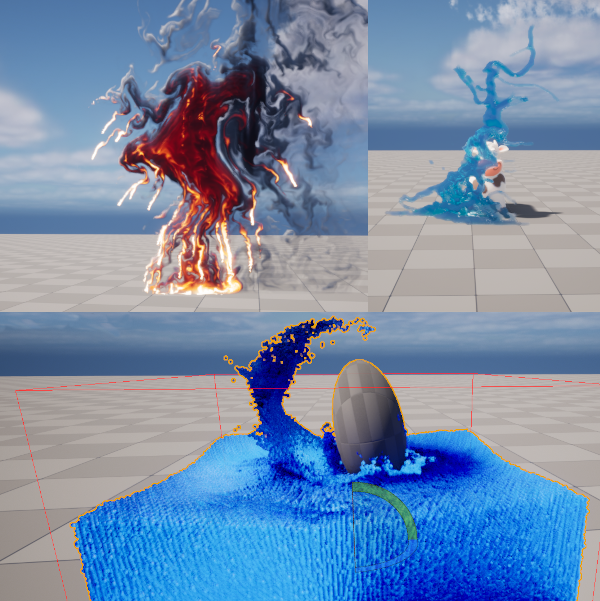
5.4에서 나이아가라 유체(Niagara Fluids) 는 다음과 같이 향상되었습니다.
-
2D 액체: 표면화 및 렌더링 향상
-
2D 가스: FFT 기반 압력 솔버 및 큐빅 보간
-
3D 가스/액체: 유한 체적법(Finite Volume Method, FVM)을 사용한 고정밀 바운더리 조건
-
3D 액체: GPU 파티클을 사용한 양방향 결합 시뮬레이션
-
2D 가스: 캐싱 지원
카오스 디스트럭션
카오스 디스트럭션(Chaos Destruction) 이 이제 언리얼 엔진 5.4에서 정식 버전으로 제공됩니다. 이번 출시 버전에서는 다음과 같은 향상점이 추가되었습니다.
-
지오메트리 컬렉션 퍼포먼스 및 메모리
-
지오메트리 컬렉션 인스턴스당 메모리 비용 대폭 감소
-
다양한 퍼포먼스 최적화 추가
-
-
카오스 캐시 매니저
- 이제 녹화된 트랙이 간단한 압축 스킴을 사용하므로 디스크와 메모리에 저장되는 캐시 컬렉션 에셋이 적어짐
-
지오메트리 컬렉션 렌더링
- 루트 프록시 메시가 이제 커스텀 렌더러 유무에 관계없이 지원됨
ML 클로딩(베타)
ML 클로딩(ML Clothing) 이 이제 5.4 버전에서 베타로 전환되었습니다.
-
스켈레탈 메시에서 여러 섹션을 정의하기 위한 유저 인터페이스 향상
-
모프 타깃을 학습하는 새로운 트레이닝 모드 추가
-
최근접 이웃 데이터 세트를 자동으로 생성하도록 툴 향상
자세한 내용은 머신 러닝 시뮬레이션 문서를 참고하세요.
네트워킹된 피직스(베타)
네트워킹된 피직스(Networked Physics)가 5.4 버전에서 베타로 전환되었으며, 두 가지 주요 기능을 제공합니다.
-
예측 보간(Predictive Interpolation)(베타) 은 '보간' 타임라인에서 실행되는 동안 일부 로컬 피직스 예측을 처리하는 새로운 피직스 리플리케이션 모델로, 특정 한계까지 반응성과 정확성을 모두 갖춘 피직스 리플리케이션 결과를 제공합니다.
-
피직스 재시뮬레이션(Physics Resimulation)(실험단계) 은 피직스 리플리케이션에 예측 보간 솔루션이 처리할 수 있는 것보다 훨씬 빠른 반응성과 예측이 필요한 경우를 위한 솔루션입니다. 또한 이 솔루션을 사용하면 멀티플레이어 게임에서 폰을 피직스 기반으로 만들 수 있습니다. 새로운 NetworkPhysicsComponent를 사용하면 커스텀 피직스 폰을 구현하여 커스텀 입력과 상태를 처리할 수 있을 뿐만 아니라 네트워크 리플리케이션, 피직스 틱에 입력 링크, 피직스 재시뮬레이션 중 입력 및 상태 적용, 필요한 경우 입력 감쇠 및 예측 등을 처리할 수 있습니다.
자세한 내용은 네트워킹된 피직스 문서를 참고하세요.
월드 빌딩
3D 그리드를 사용한 월드 파티션 런타임 해시
새로운 월드 파티션 런타임 해시(World Partition Runtime Hash) 솔루션에는 파티션 오브젝트 목록이 포함되어 있어 다양한 타입으로 사용할 수 있으며, 프로젝트별 요구 사항에 따라 손쉽게 확장할 수 있습니다. 각 파티션 오브젝트는 해당 HLOD 레이어 세팅을 보유합니다. 런타임 해시는 여전히 데이터 레이어, 액터당 하나의 파일을 지원하며 스트리밍 소스 컴포넌트에 의존합니다. 새로운 월드 파티션 레벨은 기본값으로 런타임 해시를 사용합니다. 레벨에서 새 런타임 해시를 선택할 때 이전 공간 해시의 업그레이드 경로를 사용할 수 있습니다.
런타임 해시는 완전한 3D 스트리밍 그리드인 느슨한 계층형 그리드(Loose Hierarchical Grid) 파티션 타입을 사용하며, 액터의 범위로 스트리밍 셀 바운드를 변경하여 스트리밍 그리드 레벨의 승격을 줄입니다.
에디터 내에서 HLOD 지원
워크플로 향상의 일환으로 기존에는 에디터에서 플레이(PIE) 및 쿠킹된 빌드에서만 표시되었던 것과 달리 생성된 HLOD를 이제 에디터 내에서 직접 확인하고 개별적으로 업데이트할 수 있습니다.
에디터 내 HLOD의 최소 및 최대 그리기 거리는 메인 뷰포트의 표시(Show) 옵션에서 조정할 수 있습니다.
레벨 인스턴스 소프트 오브젝트 레퍼런스
월드 파티션은 이제 부모 레벨의 액터와 오브젝트에서 레벨 인스턴스 내부의 액터와 오브젝트로의 소프트 오브젝트 경로 레퍼런스를 지원합니다.
월드 파티션을 사용하는 경우 레벨 인스턴스 내 액터가 스트리밍 레벨 셀에 임베드되어 해당 런타임 오브젝트 경로가 변경될 수 있습니다. 이제 해당 액터에 대한 새로운 에디터 소프트 오브젝트 경로 레퍼런스가 런타임에서 리졸브되고 작동합니다.
서버 스트리밍
월드 파티션은 이제 스트리밍 소스 위치 리플리케이션을 기반으로 데디케이티드 서버 스트리밍 인/아웃을 지원합니다. 이는 멀티플레이어 게임에서 대규모 월드를 고려하면 더 나은 서버 밸런싱 및 최적화를 제공합니다.
서브 월드 파티션(실험단계)
이제 코드 또는 블루프린트를 통해 레벨 내에 여러 개의 서브 월드 파티션을 활성화할 수 있습니다.
레벨 인스턴스 액터의 레벨 동작 프로퍼티가 '독립형(Standalone)'으로 설정되어 있고 스트리밍이 활성화된 월드 파티션 레벨을 레퍼런스하면 자동으로 서브 월드 파티션 레벨로 간주됩니다.
서브 월드 파티션의 HLOD는 부모 월드에서는 지원되지 않으며, 독립형 레벨 인스턴스 액터가 스트리밍된 후에만 나타납니다.
런타임 데이터 레이어 로직 연산자
이전에는 런타임 상태를 정의하는 디폴트 런타임 데이터 레이어 'OR' 로직 연산자가 하드코딩되어 있었습니다.
프로젝트 세팅(Project Settings) 의 새 맵 데이터 레이어 로직 연산자(New Maps Data Layers Logic Operator) 옵션을 사용하면 프로젝트에서는 새롭게 생성된 맵의 런타임 데이터 레이어의 프로젝트 디폴트 런타임 상태 로직 연산자로 'OR' 또는 'AND' 중 하나를 선택할 수 있습니다.
이는 월드 세팅(World Settings) 의 데이터 레이어 로직 연산자(Data Layers Logic Operator) 옵션을 사용하여 레벨별로 설정할 수도 있습니다.
랜드스케이프 나나이트 자동 비동기 빌드
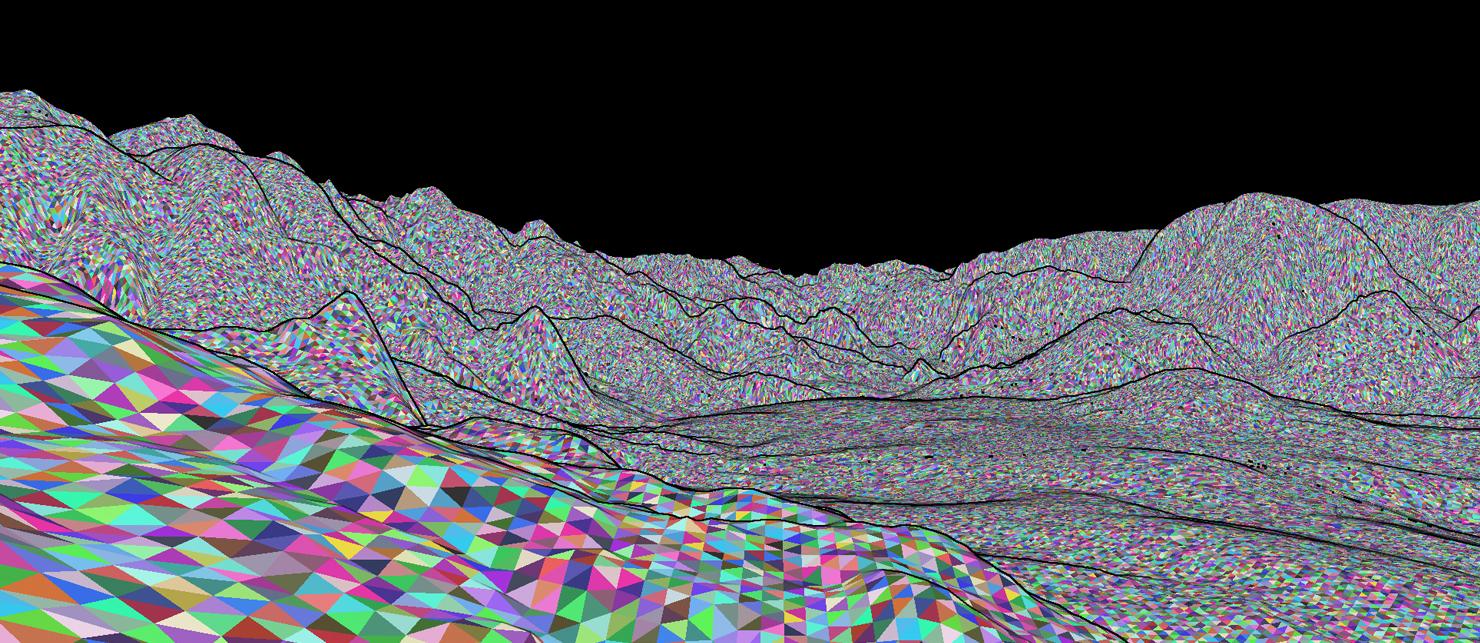
나나이트가 활성화된 상태에서 랜드스케이프를 편집하는 경우 편집된 타일의 나나이트가 표현되기 위해서는 다시 빌드해야 합니다. UE 5.4에서는 이 빌드 작업이 백그라운드에서 비동기 방식으로 자동 처리되어 에디터의 반응성을 유지하면서 최신 랜드스케이프 나나이트 데이터를 즉시 제공합니다.
크기가 크고 GPU 메모리를 많이 사용하는 나나이트 랜드스케이프의 경우, 다음 CVar를 사용하여 병렬로 트리거할 수 있는 랜드스케이프 나나이트 빌드의 양을 조정하는 것이 권장됩니다.
landscape.Nanite.MaxSimultaneousMultithreadBuilds VALUE
워터 퀄리티 확장성
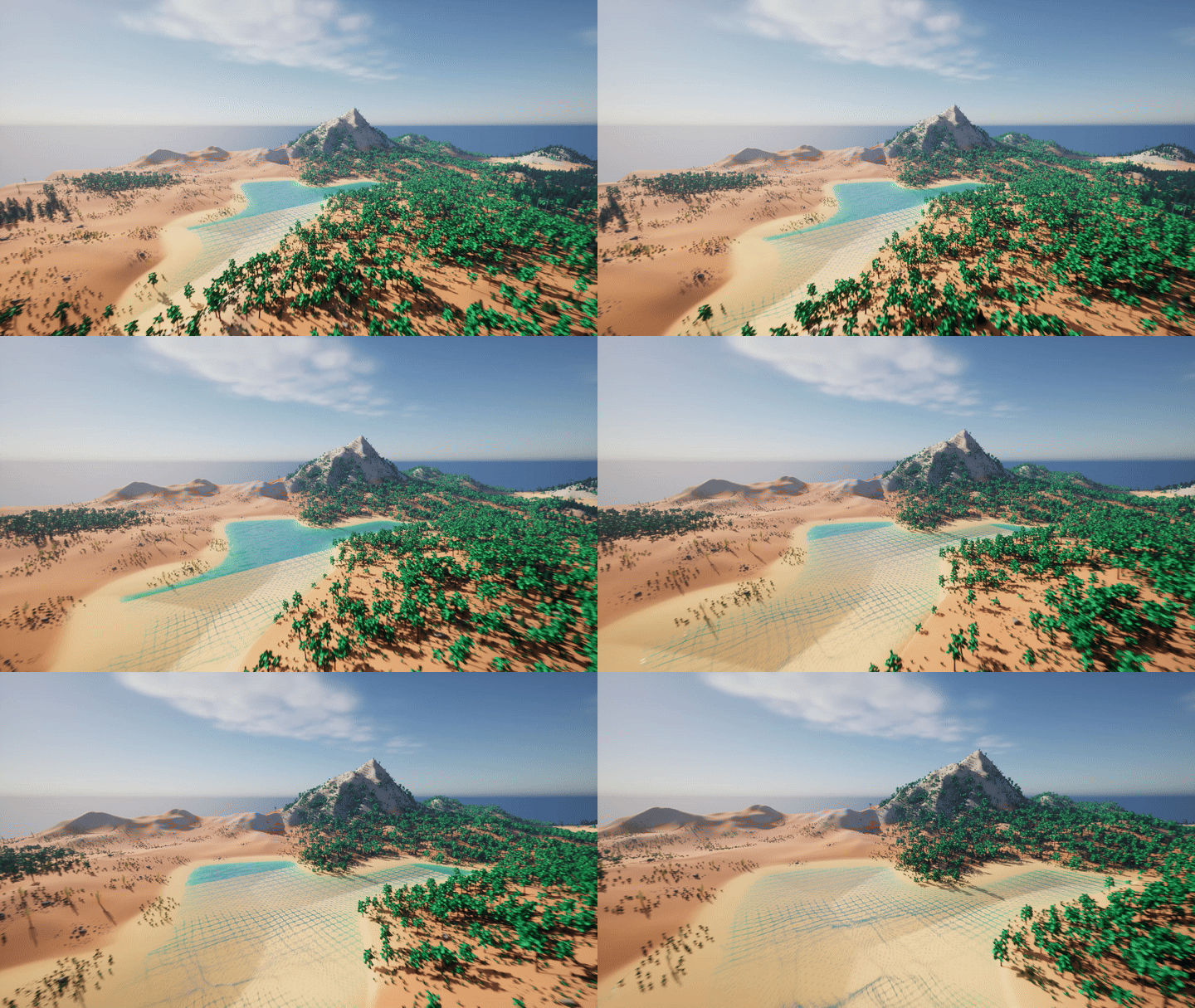
동적으로 테셀레이션된 워터 메시와 런타임에서 화면 위치 주변의 정의된 영역 내 워터 정보 텍스처의 로컬 처리를 통해 대규모 환경에 대한 워터의 퀄리티 확장성이 향상되었습니다. 이 영역 외부의 워터는 워터 바디의 셰이프와 일치하는 스태틱 메시로 예비 전환됩니다.
워터 존 액터의 로컬 전용 테셀레이션(Local Only Tessellation) 옵션은 런타임 워터 정보 텍스처 처리를 활성화하고 슬라이딩 창은 로컬 테셀레이션 규모(Local Tessellation Extent) 로 조정할 수 있습니다.
프로시저럴 콘텐츠 생성(PCG)
런타임 계층형 생성
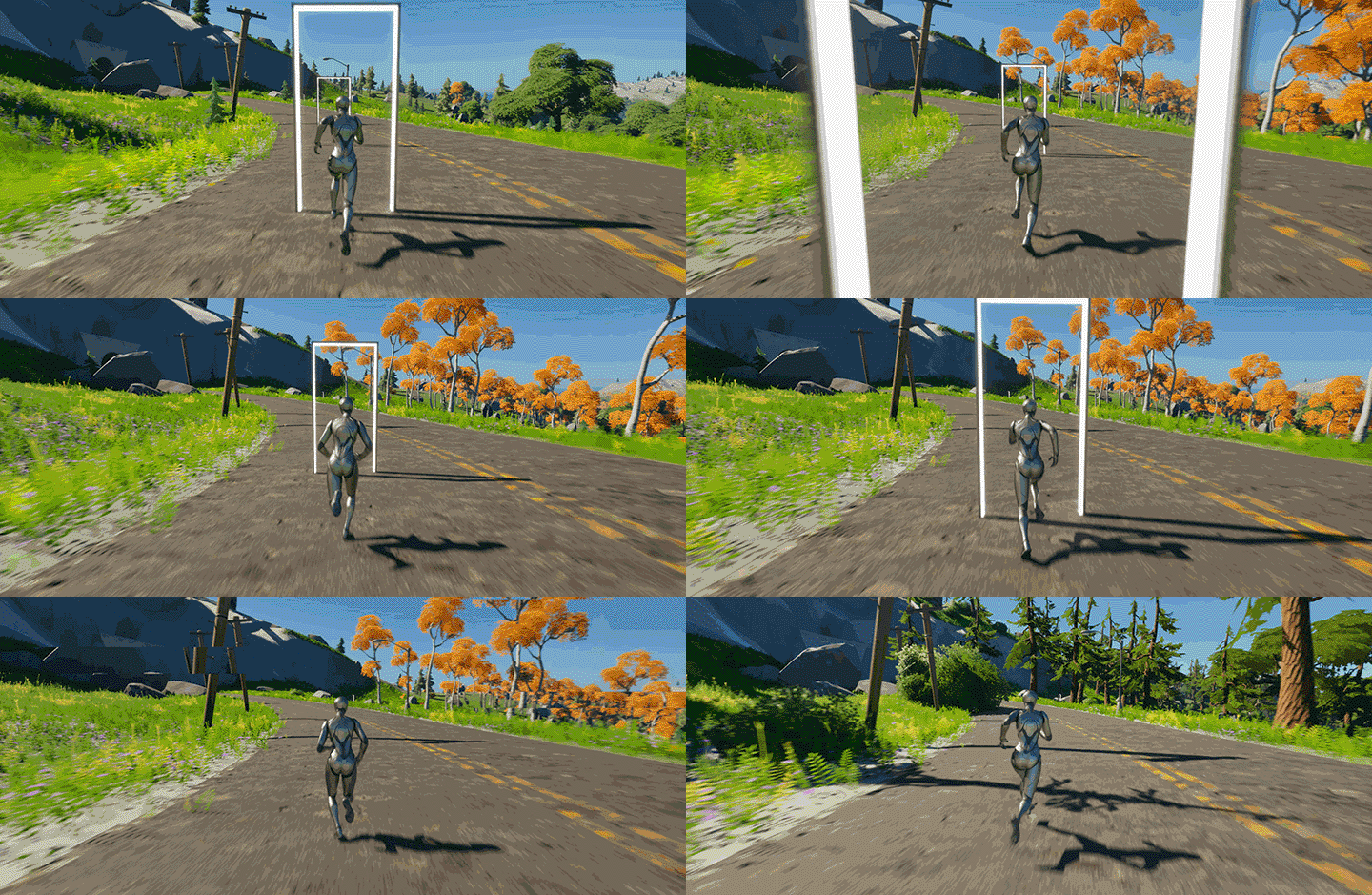
런타임 계층형 생성(Runtime Hierarchical Generation)은 사용자 정의 그리드 크기와 그리드별 생성 거리를 결합하고 PCG 생성 소스 컴포넌트를 추가하며 순서, 우선순위, 업데이트 빈도에 대한 생성 정책을 조정하여 런타임에서 PCG 그래프의 실행을 극대화합니다.
이를 통해 자동 분할 런타임 실행 솔루션으로 한층 풍부한 동적 환경과 복잡한 규칙을 실시간으로 생성하여 보다 규모가 큰 프로시저럴 월드를 생성할 수 있습니다.
또한 PCG 생성 소스를 사용하여 카메라 또는 다른 액터 주변에만 생성하여 에디터 전용 워크플로와 반복작업을 대폭 향상할 수 있습니다.
노드 그래프 UX
UE 5.4에서는 PCG 노드 그래프를 사용하는 작업을 위해 다음과 같은 다양한 UX 향상이 이루어졌습니다.
-
명명된 경유(Named Reroutes): 명명된 경유를 선언하고 동일한 그래프 내의 모든 위치에서 사용할 수 있습니다.
-
디버그 오브젝트 트리(Debug Object Tree): 디버그 오브젝트 선택이 이제 '디버그 오브젝트 트리' 창을 통해 이루어지므로 루프 반복작업과 서브그래프를 더 자세히 살펴볼 수 있고 관련 그래프 간의 전반적인 탐색 기능이 향상됩니다. 또한 각 디버그 오브젝트에 대한 경고 및 오류가 있는지 여부도 표시해줍니다. 그래프 내의 노드를 검사하려면 디버그 오브젝트를 선택해야 합니다.
-
더 스마트해진 그래프 새로고침: 연결되지 않은 노드를 추가하거나 사용하지 않는 노드를 삭제하는 경우 컴파일된 출력이 동일하므로 반복작업 속도를 높이기 위해 그래프를 새로 고치지 않습니다.
-
멀티 데이터 및 빈 에지 표시: PCG에서 노드에서 노드로 흐르는 에지는 멀티 데이터를 보유하거나 비어 있을 수 있습니다. 이제 멀티 데이터가 흐르면 에지가 더 두껍게 표시되고 비어 있으면 희미하게 표시됩니다. 일반적인 에지 두께는 단일 데이터를 나타냅니다. 에지 두께는 디버그 오브젝트를 선택한 상태에서 실행한 후에만 관찰할 수 있습니다.
-
멀티 어트리뷰트 목록 및 디테일 뷰: 최대 4개의 어트리뷰트 목록 및 디테일 뷰를 열고 잠글 수 있습니다. 노드 및 데이터를 비교할 때 유용합니다.
-
입력 및 출력 핀 구성: 행동(일반, 루프, 피드백)으로 핀을 설정할 수 있으며, 입력/출력을 제거하거나 편집할 수 있습니다.
-
랜드스케이프 트래킹 모드: 랜드스케이프 편집 콜백은 '랜드스케이프 데이터 구하기(Get Landscape Data)'를 사용하여 그래프의 PCG 업데이트를 트리거하며 워크플로 문제를 유발할 수 있습니다. 이제 '프로젝트 세팅' 내에서 랜드스케이프 트래킹 시간 딜레이를 설정하거나, 랜드스케이프 편집 모드에서만 비활성화하거나, 랜드스케이프 트래킹을 완전히 비활성화하거나, 글로벌 새로고침을 완전히 비활성화할 수 있습니다.
-
필수 핀 인디케이터: 이제 핀은 실행 컬링에 연결된 필수 인디케이터를 갖습니다. 연결되지 않은 필수 핀이 있는 노드는 그래프 실행에서 자동으로 컬링됩니다.
-
어트리뷰트 목록 뷰 복사/붙여넣기: 어트리뷰트 목록 뷰 콘텐츠를 선택하고 외부 애플리케이션에 쉼표로 구분된 콘텐츠로 복사하여 붙여 넣을 수 있습니다.
-
멀티 라인의 노드 제목 및 보다 간단한 이름 변경 지원: 명확한 정보를 제공하기 위해 노드 제목이 완전히 새롭게 디자인되었으며, 이제 우클릭 메뉴 또는 F2 키를 눌러야 노드 이름을 변경할 수 있습니다.
-
'퍼포먼스(Performance)' 창: 프로파일링 시 특정 노드를 분리하기 위해 '퍼포먼스' 창에 월 타임(wall time) 정보와 검색 필터 창을 추가했습니다.
-
'검색(Search)' 창: 이제 '검색' 창이 하위 검색을 지원하여 서브그래프 내의 노드를 반환합니다.
-
콘텐츠 브라우저의 그래프 인스턴스: 콘텐츠 브라우저 내에서 우클릭 메뉴를 통해 기존 그래프 또는 다른 그래프 인스턴스에서 바로 PCG 그래프 인스턴스를 생성할 수 있습니다.
노드 및 연산자
5.4에서는 다음과 같은 여러 네이티브 PCG 엘리먼트가 도입되었습니다.
-
Match and Set Attributes: 포인트 데이터 및 어트리뷰트 세트 테이블과 같은 두 데이터 엔트리 간에 어트리뷰트 값을 일치시킵니다. 일치하는 엔트리에 대해서는 일치 데이터 입력의 모든 어트리뷰트가 복사되어 덮어씌워집니다. 여러 항목이 일치하는 경우에는 랜덤으로 선택되거나 추가 가중치 어트리뷰트를 제공하여 선택을 더 잘 제어할 수 있습니다.
-
Get Property from Object Path: 이제 배열, 구조체, 배열 내의 서브 구조체를 포함한 오브젝트 경로 어트리뷰트에서 프로퍼티를 구할 수 있습니다. 확인된 각 오브젝트 경로는 플랫 어트리뷰트 세트 테이블 데이터를 반환합니다.
-
Multi Switch 및 Select 노드: 동적으로 설정할 수 있는 인티저 값에서 환경설정 가능한 입력/출력이 선택된 노드를 선택 및 전환할 수 있습니다.
-
Runtime Quality Branch 및 Select: 필요한 레벨을 사용하여 확장할 수 있는 런타임 전용 PCG 퀄리티 레벨 분기 및 선택 노드가 제공됩니다. 비활성화된 퀄리티 레벨 핀에는 디폴트 입력/출력이 사용됩니다. 활성화되었지만 연결되지 않은 퀄리티 레벨 핀은 해당 퀄리티 레벨에 대한 데이터를 생성하지 않습니다. 다이내믹 분기 컬링과 함께 작동합니다.
-
데이터 태그 연산자: 태그별로 데이터를 추가, 제거 또는 필터링할 수 있습니다.
-
Attribute Cast 노드: 가능한 경우 원하는 타입(Boolean, Double, Float, Integer, Name, Vector, 등)으로 형변환할 수 있습니다.
-
로직 노드: Data Count, Point Count, Filter Data by Attribute or Index, Get Loop Index
-
텍스처 샘플러: Get Texture Data 이후 텍스처를 손쉽게 샘플링할 수 있게 해줍니다. Get Texture Data는 Tex2DArray와 CPU 텍스처 샘플링도 지원합니다.
-
어트리뷰트 기준 포인트 정렬: 밀도, 스케일 또는 어트리뷰트별 기준으로 포인트를 정렬하는 데 유용합니다. Attribute Partition 노드 앞에서 특정 순서를 적용하는 데 유용할 수 있습니다.
-
네이티브 Create Points, Create Points Grid, Point Neighborhood: 여러 예시와 얼리 어댑터 로직에서 많이 사용되었던 초기 블루프린트 엘리먼트의 빠른 네이티브 버전입니다.
-
포인트 연산(Duplicate Point, Split Points, Apply Scale to Bounds, Combine Points, Reset Point Center): 포인트 데이터를 조작하는 여러 개의 새 노드입니다.
-
Print string: 커스텀 문자열 또는 어트리뷰트 값을 화면에, 로그 내에 및/또는 노드에 직접 출력합니다. 그래프를 디버깅하거나 편집하는 동안 지원되지 않는 툴 행동이나 데이터를 사용자에게 경고할 때 유용합니다.
-
Visualize Attribute: 월드의 포인트 위치에서 어트리뷰트 값을 직접 출력합니다. 노드에서 커스텀 접두사, 포인트 인덱스, 어트리뷰트 이름, 오프셋, 컬러, 경과시간을 환경설정할 수 있습니다.
어트리뷰트 세트 테이블
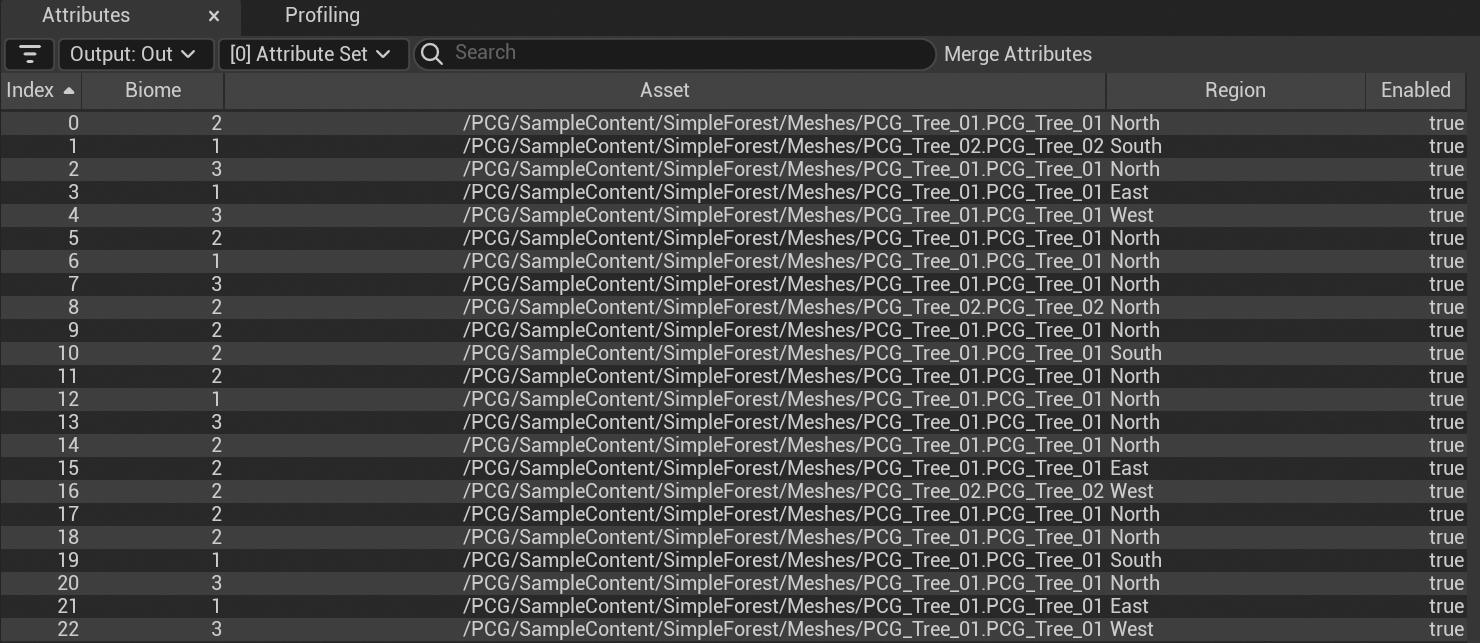
PCG 어트리뷰트 세트 테이블은 그래프 파라미터, 블루프린트 구조체와 배열에서 액터 프로퍼티 게터를 통해 생성되거나 PCG 그래프 내의 여러 어트리뷰트 세트로 구성됩니다.
이를 통해 에셋 세트가 포함된 바이옴과 같은 노출된 파라미터에서 한층 복잡한 로직을 제어할 수 있습니다.
필터, 추가, 어트리뷰트 복사와 같은 콘셉트 어트리뷰트 테이블을 지원하도록 여러 어트리뷰트 작업이 업데이트되었습니다. Attribute Set to Points 및 Points to Attribute Set 변환 노드도 추가되었습니다.
피드백 루프
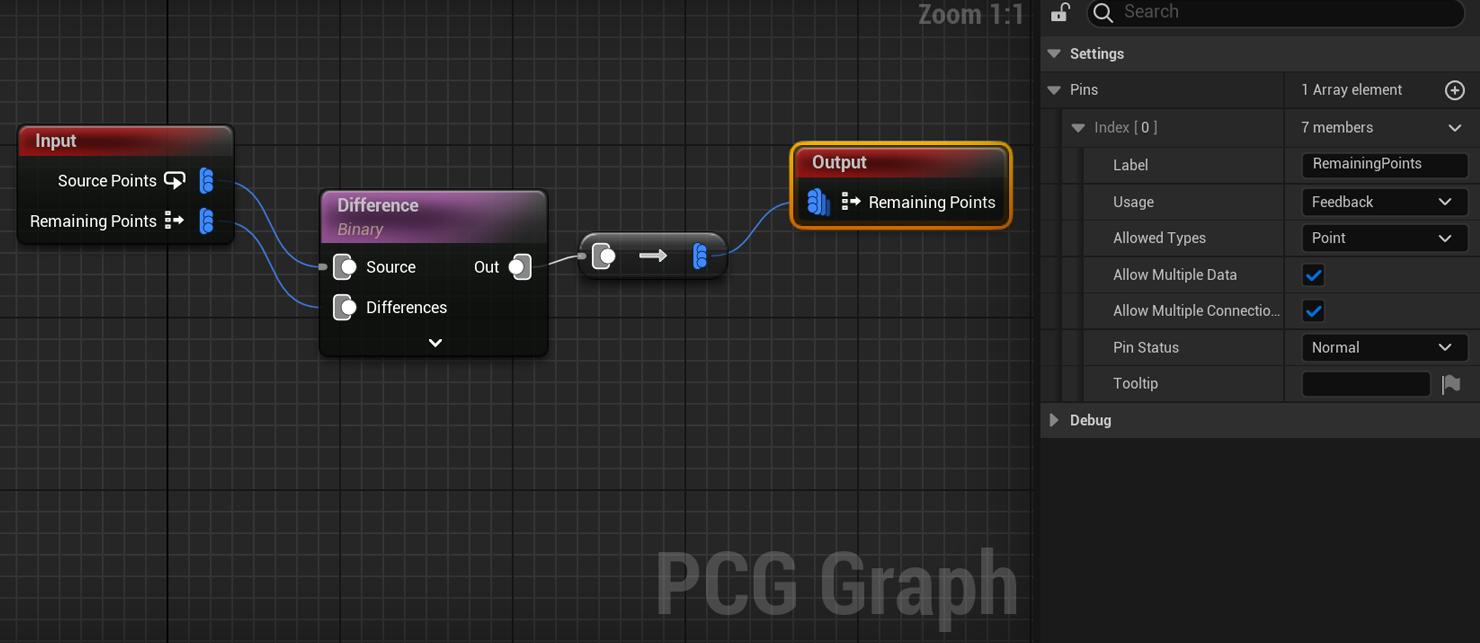
PCG 그래프 Input/Output 노드에서 핀별로 환경설정 가능한 새로운 사용(Usage) 옵션을 통해 이제 루프 서브그래프가 피드백 핀에서 각 루프 반복작업에 대한 데이터를 다시 입력할 수 있습니다.
부모 그래프의 루프 서브그래프 노드에 표시되는 외부 피드백 입력 핀은 첫 번째 반복작업에 대한 데이터로 초기화할 수 있으며, 출력 피드백 핀은 마지막 반복작업의 결과를 반환합니다.
루프와 피드백 루프를 보다 향상하기 위해 새로운 Get Loop Index 노드도 제공됩니다.
재귀 서브그래프
이제 PCG 그래프가 자신을 서브그래프로 재귀적으로 실행하고 부모 그래프 실행에서 자손 재귀로 데이터를 전달하여 계층형 로직을 생성할 수 있습니다. 재귀 서브그래프에 데이터가 제공되는 한 재귀가 발생됩니다.
'PCG 바이옴 코어(PCG Biome Core)' 플러그인은 이 콘셉트를 활용하며, 각 프라이머리 포인트가 모두 동일한 재귀적 서브그래프를 통해 처리된 자손 계층구조를 가질 수 있는 예시로 사용됩니다.
이 기능을 사용하려면 그래프 로직을 통해 무한 재귀를 방지하는 안전 장치가 필요합니다.
바이옴 코어 플러그인(실험단계)
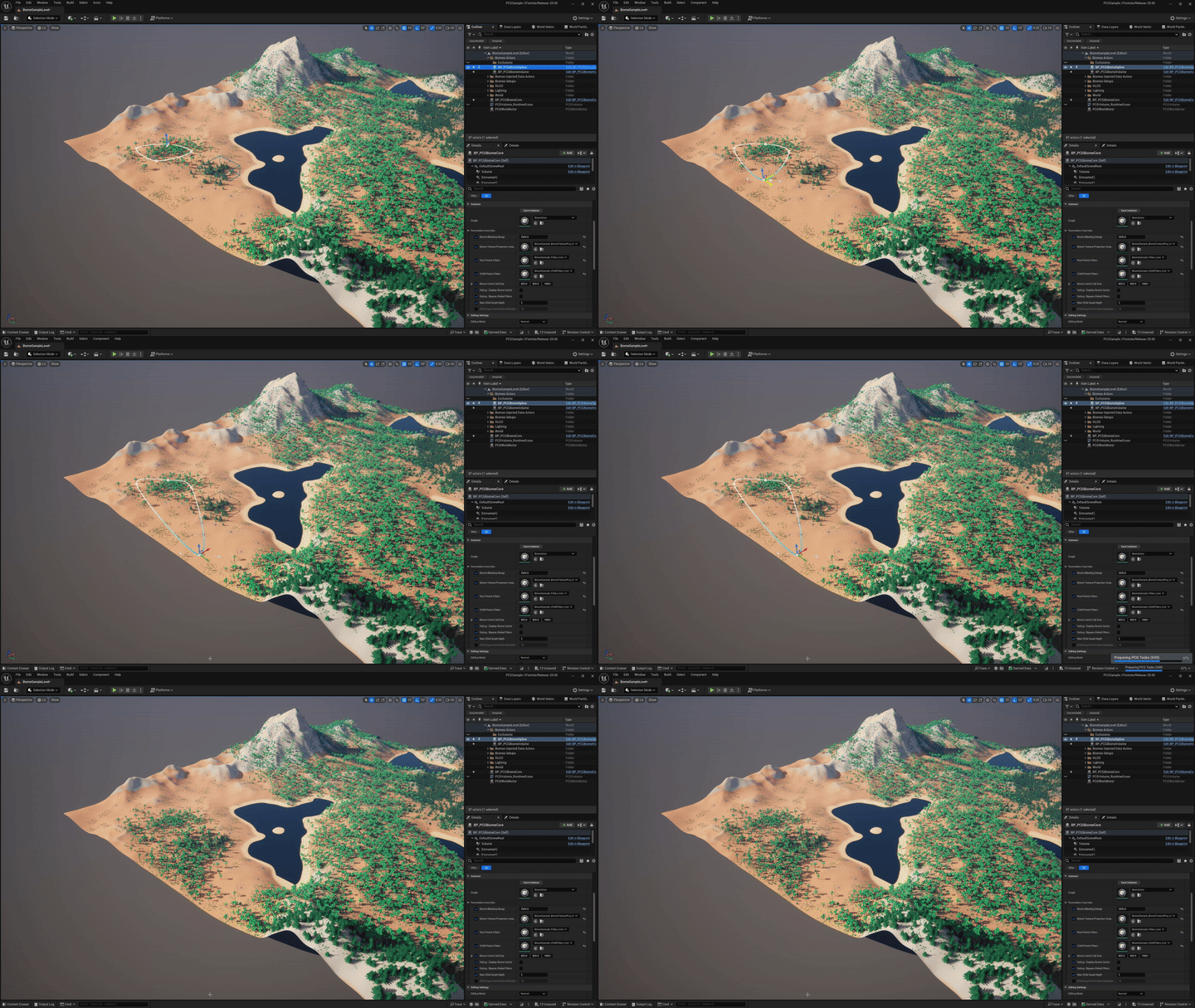
'PCG 바이옴 코어' 플러그인은 전적으로 PCG 프레임워크를 사용하여 빌드된 데이터 기반 시스템 바이옴 제너레이터입니다. 이 플러그인은 향상된 최신 기능을 선보이며 프로덕션을 위한 월드 빌딩 툴의 고급 예시로 사용됩니다. 이 툴은 독립적이며 그대로 사용하거나, 시작점으로 사용하거나, 커스터마이징할 수 있습니다.
바이옴 코어는 에셋과 바이옴 정의를 사용하는 고정된 파이프라인인 동시에 샘플링, 트랜스폼, 필터링과 같은 주요 컴포넌트를 별도의 문제 영역으로 나눠 매우 유연하게 디자인되었습니다. 이러한 각각의 요소는 PCG 프레임워크를 사용하여 프로젝트 컨스트레인트나 요구 사항에 맞게 완벽하게 커스터마이징할 수 있습니다.
초기 구성이 제공되면 아티스트와 디자이너는 그래프나 복잡한 로직을 편집하지 않고도 월드 내에서 바이옴을 손쉽게 정의할 수 있습니다.
'PCG 바이옴 샘플(PCG Biome Sample)' 플러그인은 PCG 바이옴 코어의 초기 구성 예시입니다. 이 플러그인은 정의 데이터 에셋을 제공하는 방법, 제공된 클래스를 사용하는 방법, 제너레이터/필터/트랜스폼 그래프를 빌드하는 방법을 이해하는 데 도움을 주기 위한 것입니다.
네이티브 레벨에서 PCG 데이터 에셋으로 변환
레벨에서 PCG 데이터 에셋으로 변환(Level to PCG Data Asset) 액션은 선택한 레벨 내에서 발견된 모든 스태틱 메시와 인스턴스화된 스태틱 메시를 나타내는 포인트 데이터가 포함된 PCG 데이터 에셋을 출력합니다. 트랜스폼, 메시, 머티리얼, 바운드, 액터 계층구조, 상대적 트랜스폼 및 사용자가 설정한 모든 액터 태그가 익스포트된 데이터의 각 포인트에 대해 작성됩니다. 이 액션은 새로운 메커니즘을 사용하여 PCG 데이터 에셋으로 익스포트하며 확장할 수 있습니다.
새로운 Load PCG Data Asset 노드를 사용하거나 익스포트된 PCG 데이터 에셋을 PCG 그래프에 드래그 앤 드롭하면 소스 레벨 비주얼을 나타내는 포인트 데이터를 스폰할 수 있을 뿐만 아니라 태그 필터링, 계층구조 또는 로직을 통해 스폰 전에 수정하고 조작할 수도 있습니다. 이를 통해 어셈블리에서 수동으로 미적인 부분을 제어한 다음 프로시저럴 방식으로 사용하고 수정할 수 있습니다.
PCG 어셈블리 워크플로는 일렉트릭 드림즈 GDC 데모 및 샘플에서 처음 선보였으며, 레고 포트나이트 월드 생성 시스템에서도 사용됩니다. 이 네이티브 버전은 이전의 에셋 액션 유틸리티 블루프린트를 대체하여 개선된 익스포트 및 업데이트 옵션, 자체 PCG 데이터 에셋 클래스, 특정 로드 PCG 데이터 에셋 노드를 제공합니다.
다이내믹 어트리뷰트 트래킹
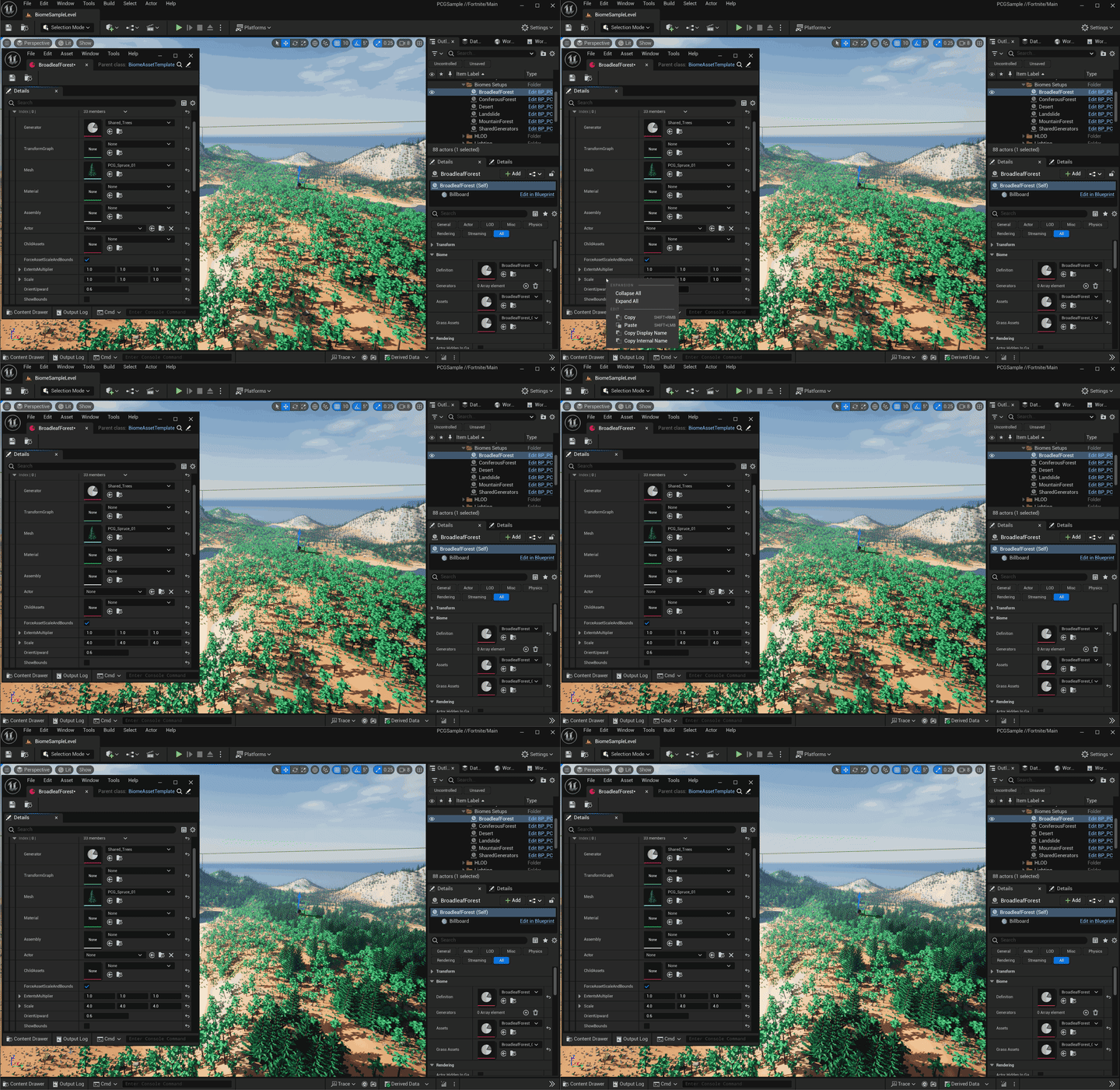
다이내믹 어트리뷰트 트래킹을 사용하면 외부 레퍼런스 데이터가 수정될 때 그래프 업데이트가 트리거됩니다. 여기에는 데이터 에셋, 데이터 테이블, 블루프린트에 노출된 변수, 그래프 파라미터, 그래프 인스턴스 세팅과 셀프, 부모, 특정 액터 태그가 있는 액터나 클래스, 랜드스케이프를 타기팅하는 게터에서 트리거된 모든 변경사항과 PCG 설정 변경사항이 포함됩니다.
분기 실행 컬링
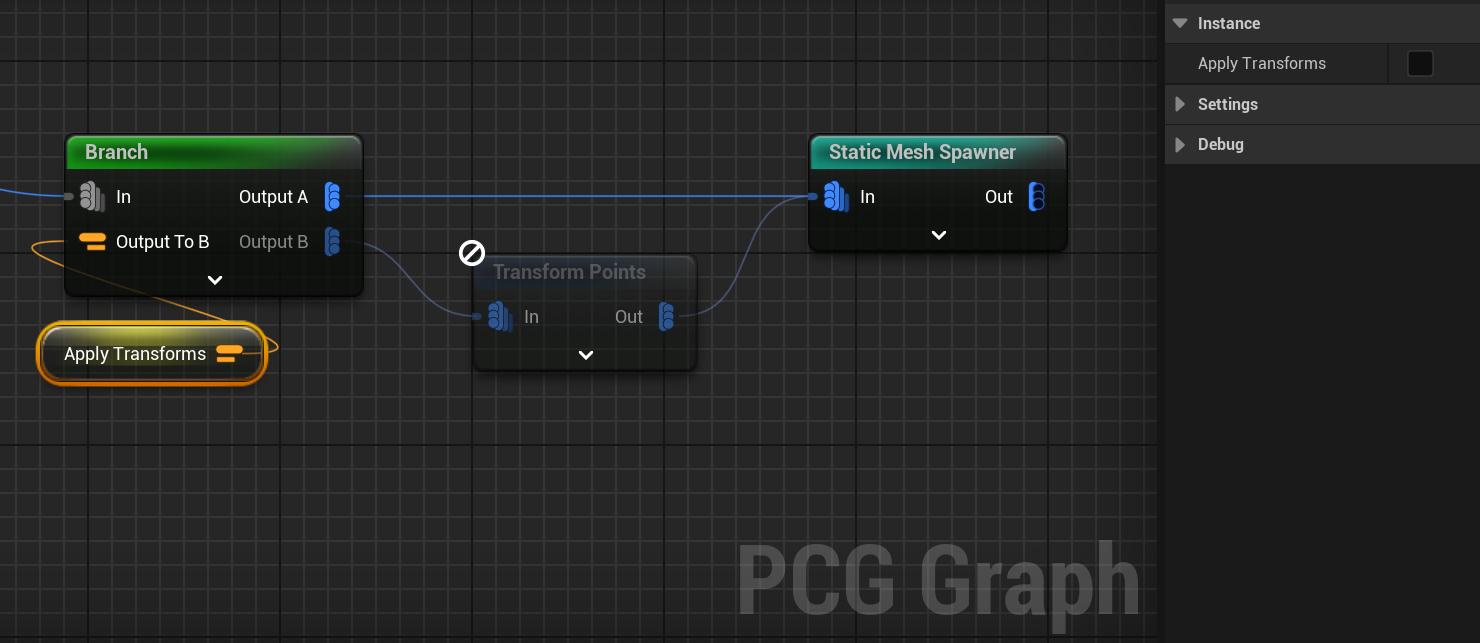
스태틱 및 다이내믹 그래프 실행 분기 컬링은 불필요한 프로세싱을 제거하여 퍼포먼스를 대폭 향상합니다.
실행 컬링은 다운스트림 엘리먼트에 Branch 노드를 사용할 때 자동으로 적용되며, 런타임에서 동적으로 설정된 분기 조건과 함께 작동합니다.
또한 PCG 노드가 업데이트되어 필수 핀 인디케이터가 추가되었습니다. 컬링은 필수 핀이 연결되지 않은 노드에도 적용되며, 게터와 같은 입력이 없는 노드는 항상 실행됩니다. 커스텀 블루프린트 엘리먼트 입력 핀도 필수 핀 옵션을 사용하여 환경설정할 수 있습니다.
다이내믹 서브그래프
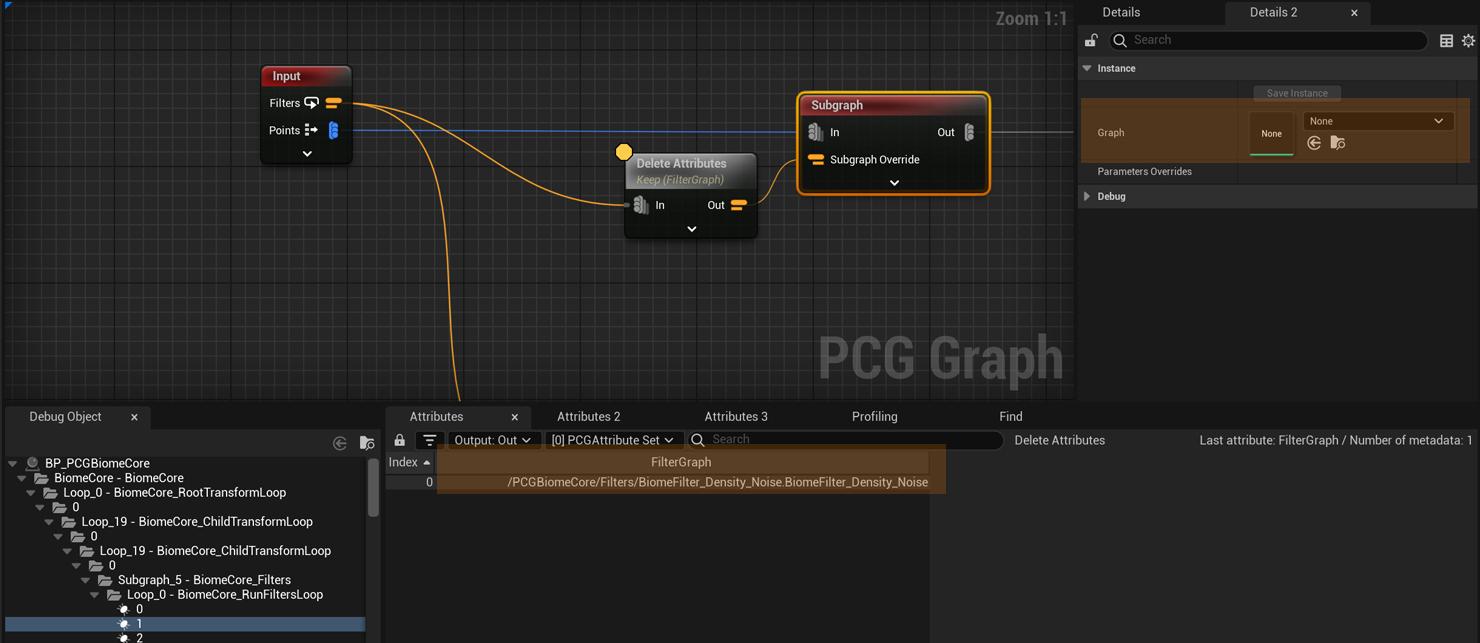
이제 Subgraphs 노드는 서브그래프 오버라이드 핀을 통해 기존 PCG 그래프에 오브젝트 경로 어트리뷰트를 적용할 수 있습니다. 에디터에서 런타임에 이르기까지 언제든지 그래프를 동적으로 컨텍스트에 맞게 변경하여 실행할 수 있도록 지원합니다.
Subgraph 노드 내에 그래프가 설정되어 있지 않으면 디폴트 입력/출력 핀이 사용됩니다. 그래프가 설정되어 있는 경우 해당 그래프는 오버라이드 시 서브그래프 노드 핀의 템플릿이 됩니다.
프록시 노드
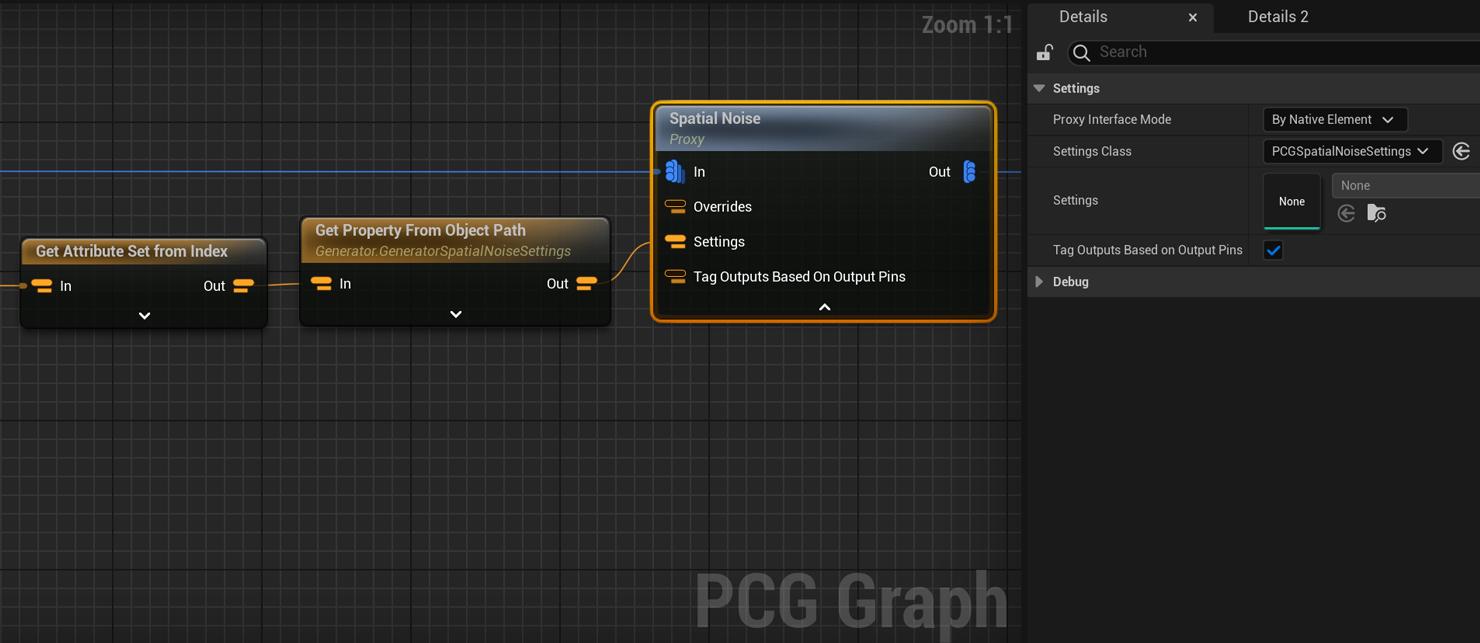
프록시 노드는 오브젝트 경로 어트리뷰트 세트에서 세팅 오버라이드 핀을 통해 PCG 세팅으로 연결되는 인디렉션입니다. 이 노드는 에디터에서 런타임에 이르기까지 언제든지 실행되는 노드 세팅을 동적으로 컨텍스트에 맞게 변경할 수 있도록 지원합니다.
프록시 노드는 네이티브 엘리먼트 클래스, 블루프린트 엘리먼트 클래스 또는 특정 세팅을 사용하여 템플릿을 지정할 수 있습니다.
트랜션트 프리뷰 모드
프리뷰 및 로드 시 프리뷰 설정 편집 모드는 PCG 컴포넌트의 옵션으로, 트랜션트 아티팩트와 데이터를 로컬로 생성합니다.
이러한 모드를 사용하면 기존 데이터를 손상시키지 않으면서 로컬에서 변경사항을 테스트하고 데이터 업데이트 시기를 결정할 수 있습니다. 또한 모든 사용자에게 실시간 편집 및 프리뷰를 유지하면서 원하는 경우 수동 또는 빌드 머신 프로세스로 업데이트를 연기하여 여러 사용자가 공유 PCG 콘텐츠를 업데이트하면서 발생하는 충돌을 방지합니다.
PCG 오프라인 빌더
PCG 월드 파티션 빌더는 레벨에서 PCG 컴포넌트를 생성하고 그 결과를 저장할 수 있습니다. 이는 콘솔에서 또는 명령줄에서 실행할 수 있습니다. 또한 이 프로세스는 빌드 머신에서 자동화된 작업으로 실행하기에도 적합합니다.
이 프로세스는 레벨을 완전히 로드하고 스태틱 메시 빌드 등과 같은 비동기 프로세스가 완료될 때까지 대기한 다음 일치하는 PCG 컴포넌트에 대한 생성 스케줄을 지정합니다. 모든 생성이 완료되면 프로세스는 레벨을 저장하고 종료합니다.
실행인자가 있는 명령줄 예시:
UnrealEditor.exe ProjectName MapName -Unattended -AllowCommandletRendering -run=WorldPartitionBuilderCommandlet -Builder=PCGWorldPartitionBuilder -IncludeGraphNames=PCG_GraphA;PCG_GraphB
콘솔 명령 예시:
pcg.BuildComponents -IncludeGraphNames=PCG_GraphA;PCG_GraphB
멀티 데이터 어트리뷰트 연산
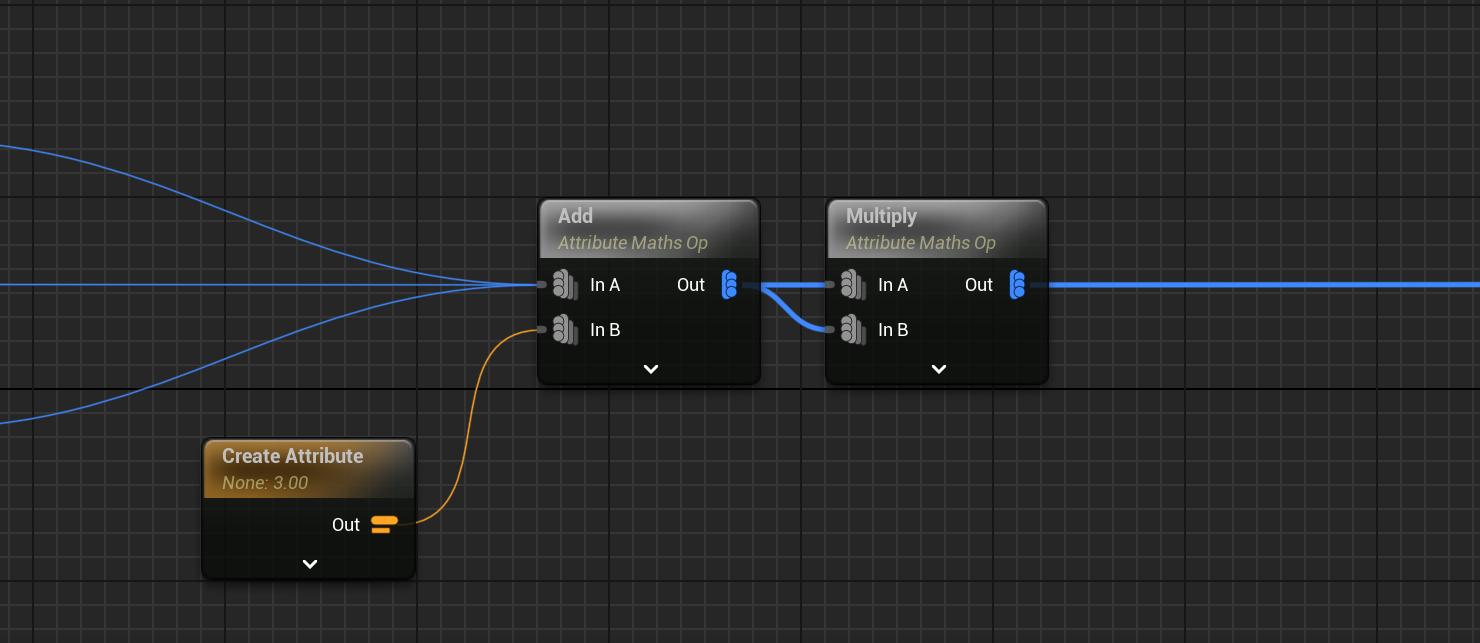
모든 어트리뷰트 연산 노드가 이제 모든 입력에 대해 멀티 데이터를 지원하므로 모든 입력에 동일한 연산을 적용하면서 별도의 데이터를 유지할 수 있습니다. 이전 버전에서는 어트리뷰트 연산이 하나의 데이터로 제한되어 있어 비용이 많이 들어도 어쩔 수 없이 데이터를 병합해야 하거나 중복된 연산이 다수 포함되어 그래프가 복잡해지는 경우가 많았습니다.
워터 스플라인 상호운용
PCG 워터 상호운용 추가 플러그인에 Get Water Spline Data 노드가 추가되었습니다. 워터 스플라인의 샘플은 리버의 너비에 맞게 스케일 조절되고 Depth, WaterVelocityScalar, RiverWidth, AudioIntensity와 같은 워터 스플라인 관련 메타데이터를 작성합니다.
플랫폼
모바일 렌더러
언리얼 엔진 5.4에서는 모바일 렌더러의 여러 부분이 향상되었습니다.
-
GPUScene 메모리 및 퍼포먼스 최적화를 통해 자동 배치 처리 향상 및 드로 콜 횟수 감소
-
다이내믹 라이트 렌더링의 퍼포먼스 향상과 다양한 로컬 라이트 지원
-
Android용 온디맨드 PSO 캐싱
Android 플랫폼
언리얼 엔진 5.4에서는 몇 가지 새로운 Android 플랫폼 전용 기능이 추가되었습니다.
-
런처에서 UE 설치 빌드에 x86_64 아키텍처 바이너리가 제공되어 Android x86_64 타깃에 디플로이하는 개발자의 워크플로가 간소화됩니다.
-
Android 에뮬레이터를 지원합니다(실험단계). 이를 통해 Android Studio에서 제공하는 에뮬레이터에서 UE로 제작한 게임을 실행할 수 있습니다.
모바일용 루멘(실험단계)
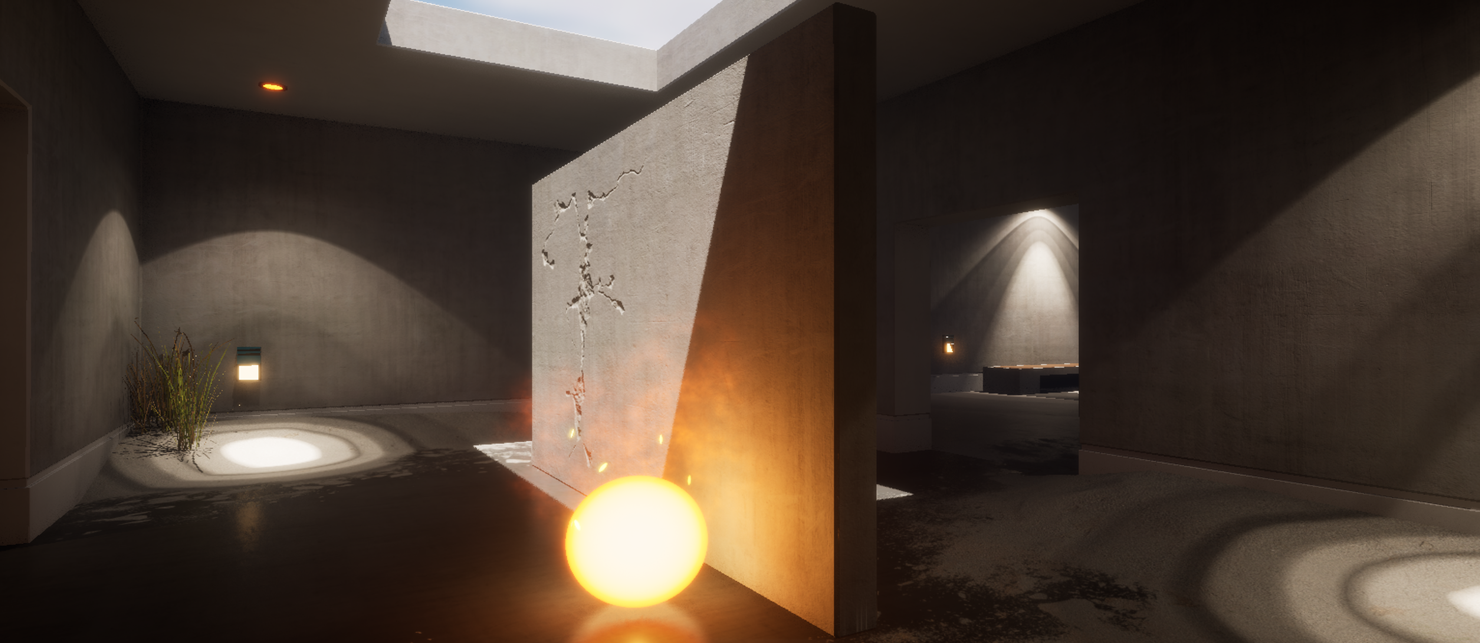
데스크톱 디퍼드 렌더러를 사용하는 최신 모바일 디바이스에서 루멘의 실험단계 기능을 지원합니다.
Apple Vision Pro 지원(실험단계)

5.4에서는 Apple Vision Pro의 Full Immersion Style(Full Immersion)에 대한 실험단계 기능을 출시할 예정입니다. 이 초기 구현을 통해 언리얼 엔진은 Metal을 통한 스테레오 렌더링과 헤드 마운트 디스플레이 포즈에 따라 작동되는 카메라 트랜스폼을 지원합니다.
Mac용 픽셀 스트리밍
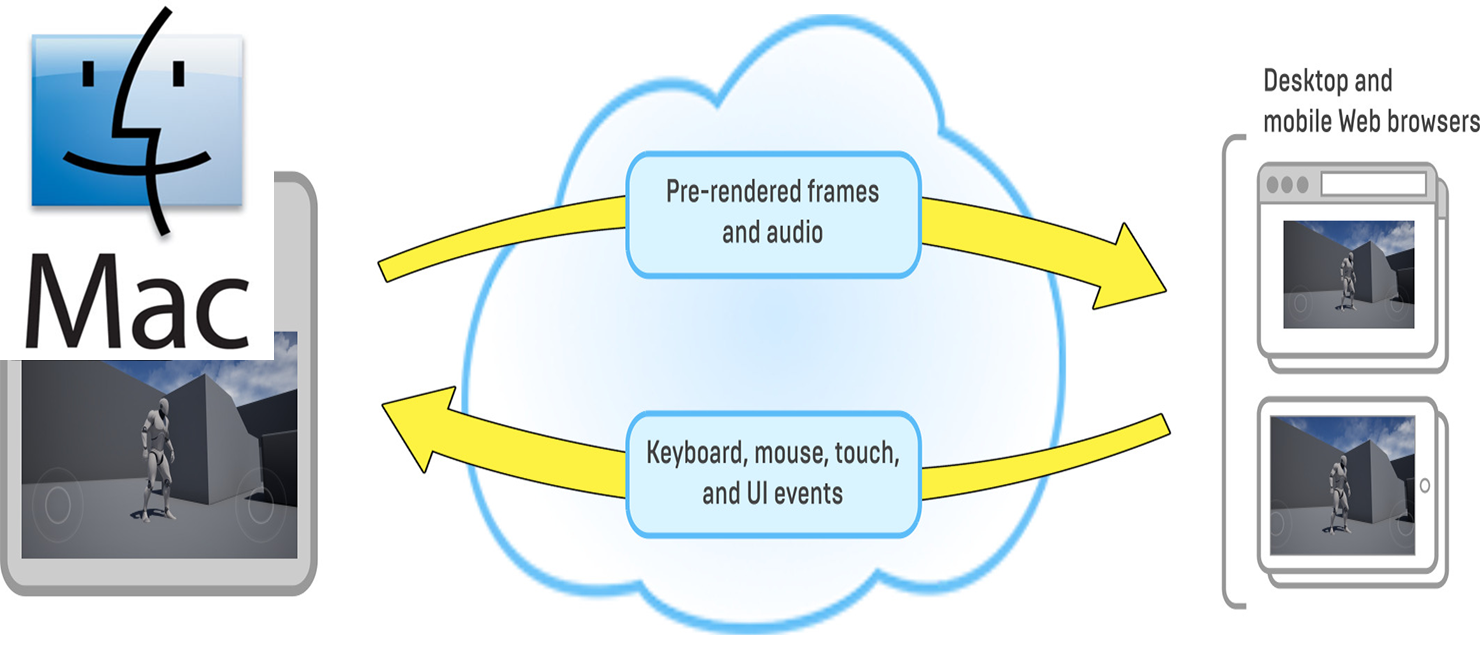
WebRTC 픽셀 스트리밍은 현재 Windows와 Linux에서 지원됩니다. 향후 개발을 통해 x86/ARM Mac 디바이스에서도 소프트웨어 픽셀 스트리밍을 지원할 예정입니다. 하드웨어 가속 픽셀 스트리밍은 ARM 기반 M 시리즈 Mac에서 사용할 수 있게 됩니다.
오디오
메타사운드
메타사운드 가 5.4에서 정식 버전 으로 전환되었습니다. 메타사운드는 아직 여러 기능과 향상점이 계획되어 있으며 개발이 한창 진행 중이지만, 에픽게임즈의 모든 타이틀에 제공되고 있으며 그 중 상당수는 처음부터 메타사운드를 기반으로 제작되었습니다. 이를 위해 다양한 퍼포먼스 및 메모리 향상이 이루어졌으며, 앞으로도 더 많은 향상이 이루어질 예정입니다.
-
빌더 API 향상
-
빌더 API는 게임 런타임과 에디터 툴에서 메타사운드를 프로시저럴 방식으로 빌드할 수 있게 해주는 블루프린트 스크립팅 API입니다.
-
빌더 API는 UEFN의 패치워크에 포함되었으며, 언리얼 엔진 5.4에서는 그래프 라이브 업데이트 등 여러 향상된 기능이 적용되었습니다.
-
-
메모리 및 CPU 사용 향상
-
오퍼레이터 캐싱 기능(오퍼레이터 메모리를 캐싱하는 데 사용되는 선택적 기능으로, 메타사운드 컴파일 시 CPU 사용량을 최소화함)
-
전반적으로 다양한 퍼포먼스 및 메모리 관련 사항 향상
-
-
에디터 워크플로 향상
-
콘텐츠 브라우저에서 스페이스바 프리뷰
-
메타사운드 에디터의 스펙트럼 및 오실로스코프에 대한 오디오 시각화
-
블루프린트에서와 같이 메타사운드 내에서 검색 기능을 지원하는 '찾기(Find)' 탭 제공
-
에디터의 '디테일(Details)' 패널과 그래프 멤버 메뉴에 기본적으로 더 많은 정보가 표시됨
-
메타사운드 프리셋 아이콘이 메타사운드 소스 아이콘 대신 프리셋 아이콘을 올바르게 표시함
-
이제 '디테일' 패널의 읽기 전용 프로퍼티를 복사할 수 있음
-
에디터 내에서 사운드 어테뉴에이션 라이브 업데이트 지원
언리얼 엔진 5.4는 는 PIE(Play-In-Editor) 중에 사운드 어테뉴에이션(Sound Attenuation) 세팅을 실시간으로 업데이트할 수 있는 기능을 제공합니다. 이 기능을 사용하면 다시 실행할 필요없이 에디터에서 플레이하는 동안 어테뉴에이션 세팅을 업데이트할 수 있습니다.
다이내믹 서브믹스
서브믹스 는 여러 소스를 하나의 출력으로 믹싱할 수 있게 해주는 DSP 그래프입니다. 5.4에서는 블루프린트의 서브믹스 그래프와 플러그인에서 서브믹스를 추가 및 제거할 수 있습니다. 이를 통해 임시 플러그인 콘텐츠나 임시 게임플레이 콘텐츠에 유연한 서브믹스 그래프를 제공할 수 있습니다.
오디오 인사이트(실험단계)
새로운 오디오 인사이트(Audio Insight) 플러그인은 오디오 개발자가 실시간으로 PIE 세션을 분석하고 디버깅할 수 있게 해주는 에디터 툴을 지원합니다.
-
여러 소스 파라미터에 대해 정렬 가능한 열이 있는 소스 이벤트 목록
-
관련 오디오 정보(볼륨, 피치, 거리 등)의 시간 플롯
-
재생된 에셋을 에디터에서 보여주는 클릭 가능한 리스트 아이템
-
소스를 실시간으로 솔로잉 및 음소거하는 서브스트링 기반 필터링
-
원하는 서브믹스 뷰에서 오디오 미터링 지원
-
글로벌 오디오 미터링 및 분석
-
오디오 로깅 자동 설정
-
커스터마이징 가능한 레이아웃
오디오 인사이트 는 5.4 버전에서 실험단계 이며, 향후 버전에 다음과 같은 기능을 적용하기 위해 작업 중입니다.
-
독립형 모드
-
모바일 및 콘솔 등 패키징된 게임과 연결
-
녹음 및 재생 프로파일 레코딩
-
테일(딜레이/리버브) 레코딩
하모닉스 플러그인(실험단계)
언리얼 엔진 5.4에서 새롭게 도입된 하모닉스(Harmonix) 플러그인은 음악 게임플레이를 생성하는 데 사용할 수 있는 툴세트와 런타임 기능을 제공합니다.
-
MIDI 파일 임포트 지원 추가
-
메타사운드에서 MIDI 파일 재생
-
음악 게임플레이 및 음악 시스템을 위해 디자인된 다양한 새 메타사운드 노드에 MIDI 이벤트 스트림 라우팅
-
메타사운드에 새로운 소프트웨어 샘플러 악기 추가
-
게임 스레드에서 MIDI 이벤트와 클럭을 확인하고 비주얼 이펙트 및 비트 매치 스코어링을 렌더링된 음악과 동기화
RAD 오디오 코덱(실험단계)
RAD의 오디오 코덱, 즉 RAC 는 새로운 멀티 플랫폼 인지 오디오 코덱으로, Bink 오디오 코덱보다 뛰어난 압축률, 빠른 디코딩 속도, 높은 퀄리티를 제공합니다.
모델링
UV 툴 향상(베타)
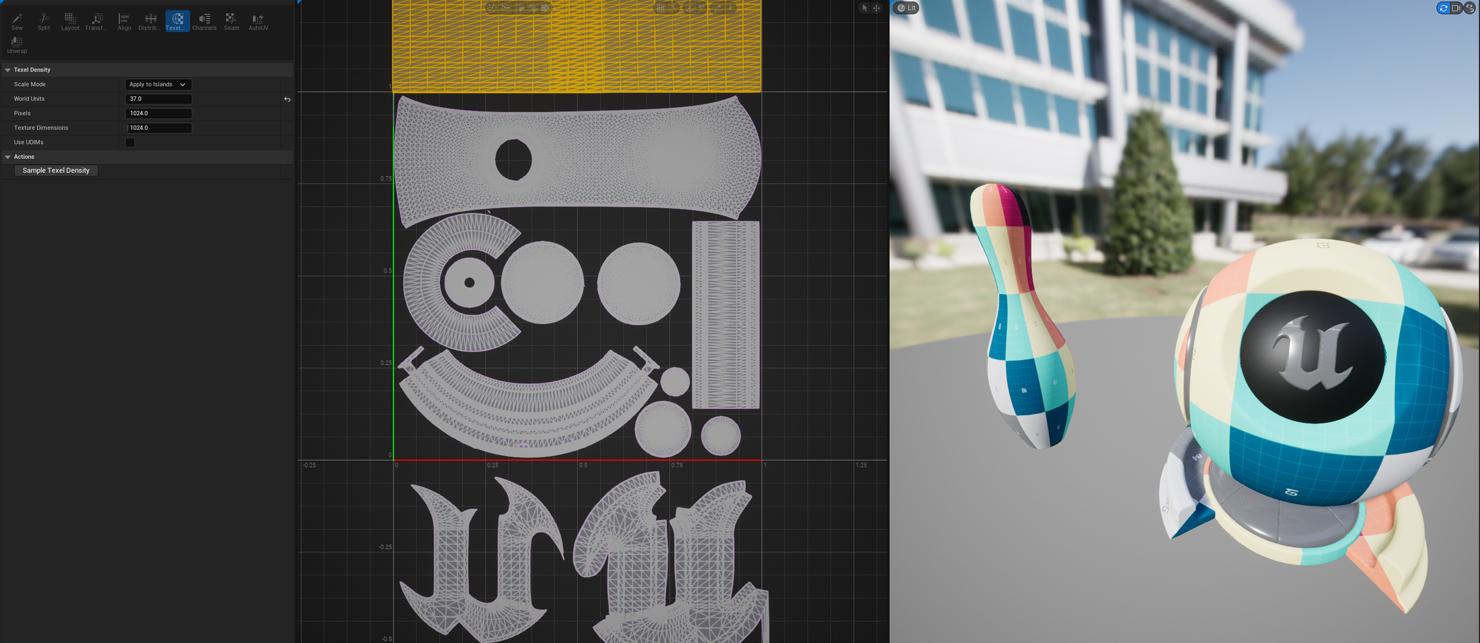
UV 편집은 효율적인 에셋을 개발하는 데 있어 매우 중요한 역할을 합니다. 레이아웃 와이어프레임이 제대로 표시되도록 UV 에디터 디스플레이가 수정되었습니다.
텍셀 밀도(Texel Density): 이제 새로운 텍셀 밀도 툴을 사용하여 스케일 및 텍스처 값을 기반으로 메시의 UV 텍셀 밀도를 일관된 값으로 설정할 수 있습니다.
여러 메시 표시(Multiple Mesh Display): 여러 개의 메시를 선택했을 때 적절하게 배치할 수 있게 3D 프리뷰를 업데이트했습니다.
모델링 툴(베타)
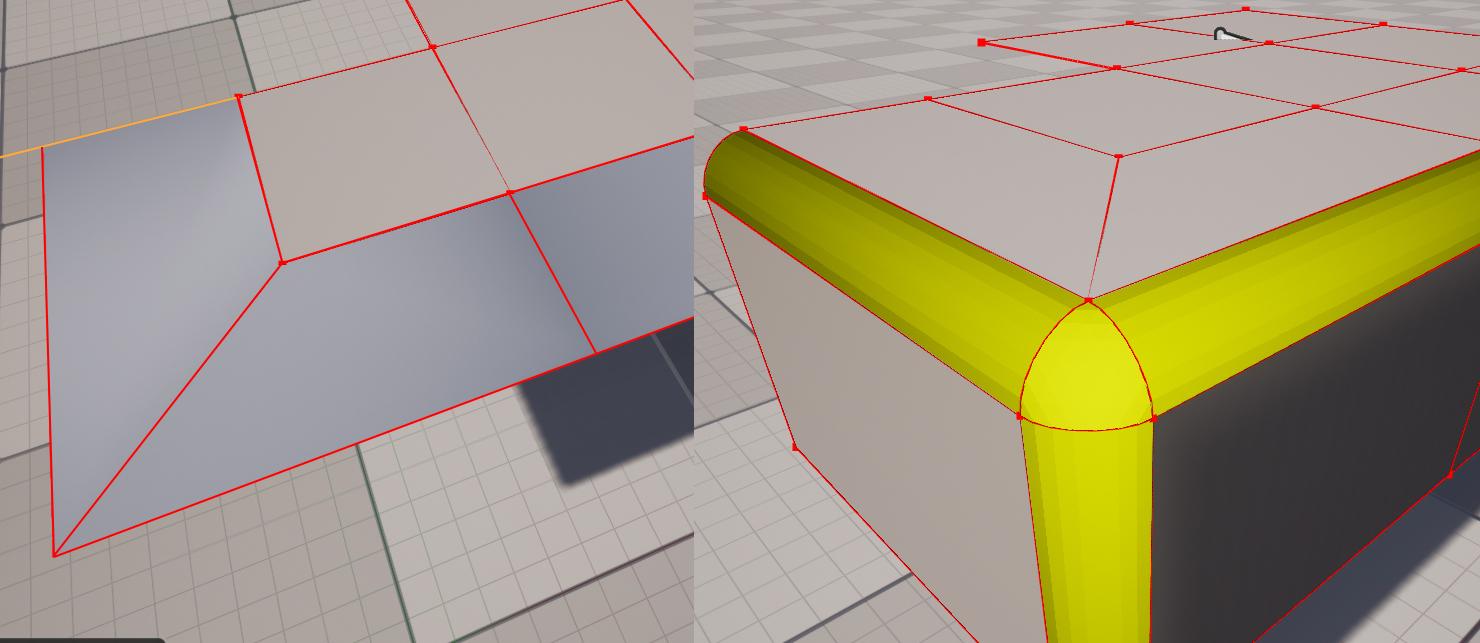
모델링 모드 툴은 모든 메시 타입을 효과적으로 개발, 편집하고 퀄리티를 관리할 수 있는 기반을 제공합니다. 언리얼 엔진 5.4에는 많은 요청이 있었던 몇 가지 기능과 향상점이 포함되었습니다.
베벨(Bevel): 이제 베벨 툴은 꺾인 하나의 에지 대신 서브디비전을 지원합니다. 이를 통해 보다 복잡하고 프로덕션 환경에 적합한 메시를 생성할 수 있습니다.
익스트루드 에지(Extrude Edge): 이제 선택 툴 카테고리, 폴리그룹 편집 툴, 트라이앵글 편집 툴에서 새 옵션으로 제공됩니다.
인스턴스 수집(Harvest Instance): 새로운 인스턴스 수집 툴은 선택한 액터에서 새 HISM 또는 ISM을 생성하므로 생성 프로세스가 빨라집니다.
폴리그룹 에지 삭제(Delete PolyGroup Edge): 폴리그룹 에지를 삭제하면 복잡한 메시에서 토폴로지를 보다 빠르게 편집할 수 있습니다. 삭제는 폴리그룹 병합과 유사한 기능을 수행하지만 더 적은 인터랙션으로 더 다양한 토폴로지를 변경할 수 있습니다.
모델링 워크플로(베타)
모델링 워크플로에는 효율적인 인터랙션과 피드백이 필요합니다. 모든 메시 엘리먼트의 선택, 트랜스폼, 스냅, 표시는 에셋과 월드를 효율적으로 빌딩하는 데 매우 중요합니다.
메시 엘리먼트 표시: 5.3에서 도입되었던 메시 엘리먼트 워크플로에서 이제 선택되지 않은 엘리먼트와 선택된 엘리먼트의 표시가 향상되었습니다. 이를 통해 아티스트는 선택 가능한 엘리먼트에 대한 적절한 피드백을 받을 수 있습니다.
엘리먼트 트랜스폼: 이제 트랜스폼 기즈모에 메시 엘리먼트 선택 시 오브젝트 축을 지원하는 추가 기능이 제공됩니다.
셰이프 생성: 이제 셰이프 툴에 원점에서 새 셰이프를 생성하는 옵션이 추가되어 메시를 배치한 후 다시 위치를 변경할 필요 없이 빠르게 생성할 수 있습니다.
모델링 모드의 워크플로 및 툴 등에 대한 자세한 내용은 모델링 모드 시작하기를 참고하세요.
지오메트리 스크립팅(베타)
지오메트리 스크립팅(Geometry Scripting) 은 언리얼 엔진 플러그인으로, 블루프린트와 Python을 사용하여 메시 지오메트리를 생성하고 편집하는 함수 라이브러리 세트가 포함되어 있습니다. 지오메트리 스크립팅 기능은 다양한 기능을 추가하여 계속 확장될 예정입니다.
TransferBoneWeightsFromMesh: 소스 다이내믹 메시에서 타깃 다이내믹 메시로 Inpaint 방식을 사용하여 본 가중치를 전송합니다. 이 방법은 Closest Point 방식보다 강력합니다. 타깃 메시는 일반적으로 이전에 가중치가 없던 메시, 즉 스태틱 메시에서 변환된 메시입니다.
GetRootBoneName, GetBoneChildren, GetAllBoneInfo, GetBoneInfo 는 본 정보를 수집하기 위한 추가 노드입니다.
BlurMeshVertexColors 노드는 Houdini의 AttribBlur 노드와 유사한 새로운 노드입니다.
콜리전 셰이프: 콜리전 셰이프를 직접 조작하고 콜리전 병합 알고리즘과 관련 기능을 노출하기 위한 새로운 함수를 추가했습니다.
-
GetSimpleCollisionFromComponent
-
SetSimpleCollisionOfDynamicMeshComponent
-
GetSimpleCollisionFromStaticMesh
-
SetSimpleCollisionOfStaticMesh
-
GetSimpleCollisionShapeCount
-
AppendSimpleCollisionShapes
-
MergeSimpleCollisionShapes
-
TransformSimpleCollisionShapes
-
CombineSimpleCollision
-
ApproximateConvexHullsWithSimplerCollisionShapes
-
SimplifyConvexHulls
-
AppendSphereCovering
-
StaticMeshHasCustomizedCollision
포인트 세트: 포인트 세트 작업을 위한 새로운 함수를 추가했습니다.
-
KMeansClusterToIDs
-
KMeansClusterToArrays
-
TransformsToPoints
-
FlattenPoints
-
UnflattenPoints
-
MakeBoundingBoxFromPoints
-
GetPointsFromIndexList
-
DownsamplePoints
-
OffsetTransforms.
스플라인: 컴포넌트에 샘플링 커스텀 범위를 지원하는 새로운 메서드를 추가하여 USplineComponent 샘플링을 향상했습니다.
-
ConvertSplineToPolyLineWithDistances
-
ConvertSplineToPolyline_InDistanceRange
-
ConvertSplineToPolyline_InTimeRange, SampleSplineToTransforms 및 ConvertSplineToPolyPath 는 이제 커스텀 범위도 지원합니다. 닫힌 스플라인의 경우 이러한 범위를 래핑할 수 있으므로 루프 주변에서 섹션을 부드럽게 스윕할 수 있습니다.
CopyMeshFromComponent 는 이제 지오메트리 컬렉션 컴포넌트와 인스턴스드 스태틱 메시 컴포넌트에서 메시 복사를 지원합니다.
AppendTriangulatedPolygon3D 는 3D 버텍스를 사용하여 폴리곤을 트라이앵글화하는 새로운 함수입니다.
다이나믹 메시: 지오메트리 스크립트로 생성된 메시에 사용되는 다이내믹 메시 컴포넌트 클래스를 향상했습니다. 이제 탄젠트에 대한 제어 및 디폴트 동작이 향상되었으며, 에디터 뷰포트의 '표시(Show)' 플래그를 사용하여 표준 버텍스 컬러 및 콜리전 셰이프 렌더링을 지원합니다.
자세한 내용은 지오메트리 스크립팅 소개를 참고하세요.
텍스처링 툴(실험단계)
텍스처는 언리얼 엔진에서 경험을 제작할 때 가장 중요한 역할을 수행하는 컴포넌트입니다. 텍스처는 머티리얼, UI, 랜드스케이프 및 모델 개발에 사용됩니다.
실험단계 기능인 텍스처 그래프 에디터(Texture Graph Editor)는 노드 중심의 디자인을 사용합니다. 에디터에서는 텍스처를 생성하고 수정할 수 있는 다양한 노드가 포함된 검색 가능한 노드 팔레트가 있습니다. 텍스처 그래프 에디터는 수학 노드 및 텍스처 서브그래프와 함께 기존 텍스처, 머티리얼 또는 머티리얼 함수를 사용할 수 있습니다. 텍스처 그래프를 블루프린트 및 에디터 유틸리티 위젯과 결합하여 일반적인 워크플로를 최적화하는 커스텀 툴을 제작할 수 있습니다.
콘텐츠 파이프라인
인터체인지 프레임워크 UX
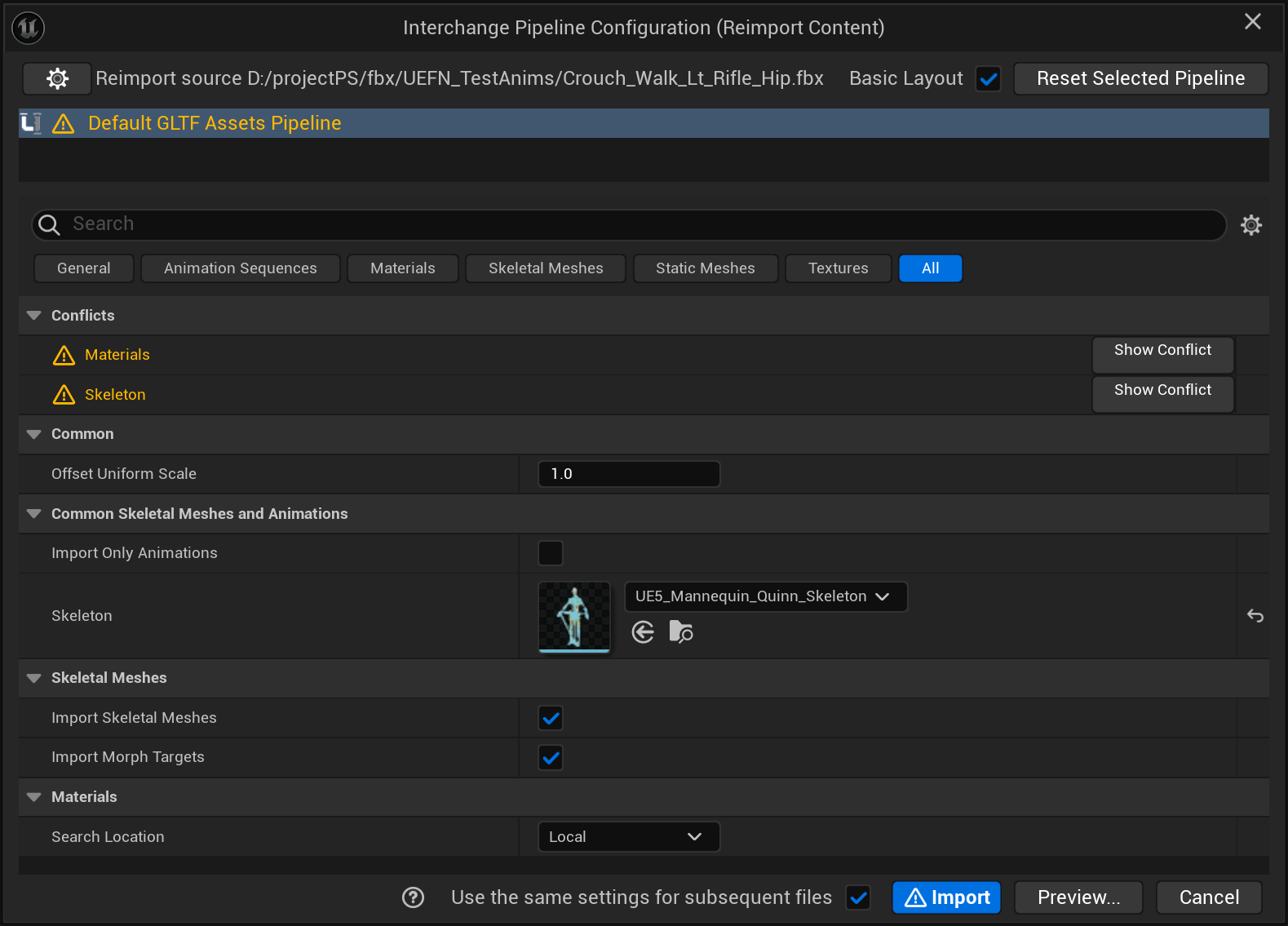
인터체인지 프레임워크는 사용자가 임포트/리임포트 워크플로를 손쉽게 생성, 확장 및 파라미터화할 수 있게 해주며, 곧 익스포트 워크플로도 지원할 예정입니다.
인터체인지는 임포트 세팅의 편집과 저장을 간소화하고, 사용 사례에 맞는 커스텀 세팅을 생성하며, 크리에이터 또는 파이프라인 관리자가 직접 커스텀 임포트 동작을 사용하여 임포트 프로세스를 확장할 수도 있습니다.
아티스트와 콘텐츠 크리에이터가 임포트 대화창과 보다 간편하게 인터랙션할 수 있도록 인터체인지 UI/UX가 업데이트되었습니다.
-
세팅 대화창의 복잡함을 줄이기 위해 필터 도입
-
임포트 프로세스에 대한 인사이트를 제공하는 프리뷰 모드 추가
-
레거시 옵션에서 대응하기 위한 상충 뷰 모드 추가
FBX 임포트 커스터마이징(베타)
인터체인지 프레임워크를 사용하여 FBX 임포트를 보다 세밀하게 커스터마이징할 수 있습니다.
이러한 기능을 통해 아티스트, 콘텐츠 크리에이터 및 파이프라인 관리자는 FBX 파일 포맷의 임포트 동작을 세밀하게 조정할 수 있습니다.
5.4에서 FBX 에셋 임포트 기능은 완성된 것으로 간주 되지만 씬 임포트는 여전히 UI 변경이 필요합니다. 두 기능은 여전히 기본적으로 비활성화되어 있습니다.
USD 사양 커버리지
USD는 3D 산업 전반에 걸쳐 채택률이 증가하고 있는 다용도 씬 디스크립션 파일 포맷입니다. 콘텐츠 크리에이터와 아티스트가 DCC 간에 3D 콘텐츠, 특히 씬 디스크립션을 전송할 때 사용합니다. 이 포맷은 원래 미디어 엔터테인먼트 산업에서 사용되었지만 현재는 게임 산업과 자동차, 건축 등 다른 산업까지 점차 그 사용 범위가 넓어지고 있습니다.
USD 표준 사양에 대한 UE의 지원 범위 확대로 콘텐츠 크리에이터의 사용 사례가 증가되고 DCC에서 UE로 씬을 임포트할 때 보다 원활한 경험을 제공할 수 있게 되었습니다.
5.4에서는 다음과 같이 사양 커버리지 범위가 확장되었습니다.
-
콜리전: UsdPhysicsCollisionAPI, UsdPhysicsMeshCollisionAPI
-
usdVol 스키마: OpenVDB 에셋 전용
-
프리미티브 메시 스키마: UsdGeomCube, UsdGeomSphere 등
-
스태틱 메시 서브디비전: OpenSubdiv를 사용한 서브디비전 방식 어트리뷰트
-
그리기 모드: UsdGeomModelAPI 스키마
-
프리미티브 메타데이터
-
primvars:normals
USD 익스포트 익스텐션

익스포트할 수 있는 UE 기능의 범위가 확대되어 콘텐츠 크리에이터의 사용 사례가 증가하고 보다 원활한 경험을 제공할 수 있게 되었습니다.
5.4에서는 다음과 같이 익스포트 기능의 범위가 확장되었습니다.
-
베이크된 PCG
-
지오메트리 캐시
-
중첩된 스켈레탈 데이터
-
프리미티브 메타데이터
glTF 임포트/익스포트 라운드트립

glTF는 3D 에코시스템에서 인터체인지 포맷으로 사용되는 일반적인 3D 모델 파일 포맷이자 웹 및 XR 애플리케이션용 퍼블리싱 포맷입니다. 일부 산업, 특히 웹에서는 콘텐츠 크리에이터와 아티스트가 주로 사용하는 작업 포맷입니다.
콘텐츠 크리에이터는 광범위한 glTF 기능을 통해 DCC 또는 퍼블리싱 애플리케이션과 손실 없이 원활하게 모델을 교환할 수 있습니다.
아티스트와 콘텐츠 크리에이터는 glTF 인터체인지 포맷을 사용하여 더 큰 생태계의 일부로 작업을 수행할 수 있습니다. 이를 통해 온라인 라이브러리에서 UE로 모델을 임포트하거나 UE 씬을 웹 지원 포맷으로 퍼블리싱할 수 있습니다.
UE 5.4에서는 가장 일반적으로 사용되는 glTF 익스텐션이 지원됩니다. 자세한 내용은 다음과 같습니다.
-
임포트/익스포트 격차 해소: 임포터와 동일한 익스텐션을 지원하도록 익스포터 조정
-
추가된 익스포트용 머티리얼 익스텐션:
-
KHR_materials_transmission(얇은 반투명)
-
KHR_materials_sheen
-
KHR_materials_specular
-
KHR_materials_ior
-
-
추가된 임포트용 익스텐션:
-
KHR_materials_iridescence
-
KHR_draco_mesh_compression
-
MaterialX - 서브스트레이트 및 OpenPBR(실험단계)
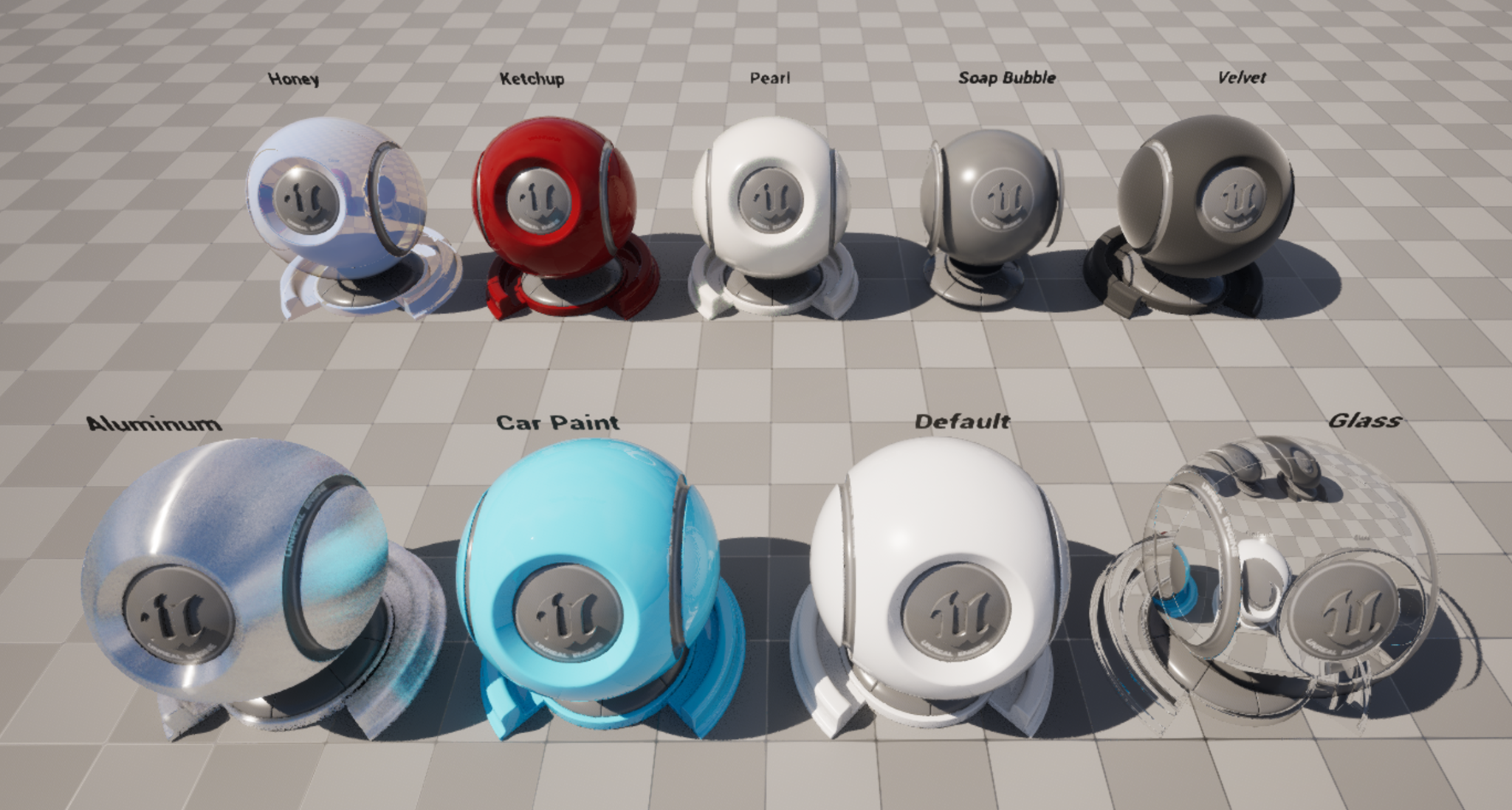
MaterialX 임포트가 확장되어 서브스트레이트 머티리얼 생성 및 OpenPBR 기반 셰이더의 변환을 지원합니다. OpenPBR 표면 디스크립션은 Autodesk와 Adobe에서 Autodesk 표준 표면 및 Adobe 표준 머티리얼을 계승하는 기능으로 시작되었습니다.
서브스트레이트 지원 을 통해 아티스트는 MaterialX 셰이더를 한층 사실적으로 표현할 수 있습니다. OpenPBR 지원을 통해 아티스트는 프로젝트 내에서 점차 성장하고 있는 산업 표준을 활용할 수 있습니다.
아티스트가 서브스트레이트를 활성화한 상태에서 MaterialX를 임포트하면 이제 서브스트레이트에서 레거시 머티리얼의 겉표현이 아닌 보다 적절한 서브스트레이트 표현을 사용하는 머티리얼을 얻을 수 있습니다. OpenPBR 임포트는 레거시 및 서브스트레이트 머티리얼과 함께 작동하지만 서브스트레이트를 사용하면 한층 뛰어난 머티리얼 표현을 제공합니다.
서브스트레이트 머티리얼은 아직 실험단계 기능입니다.
프레임워크
캐릭터 무버 2.0(실험단계)
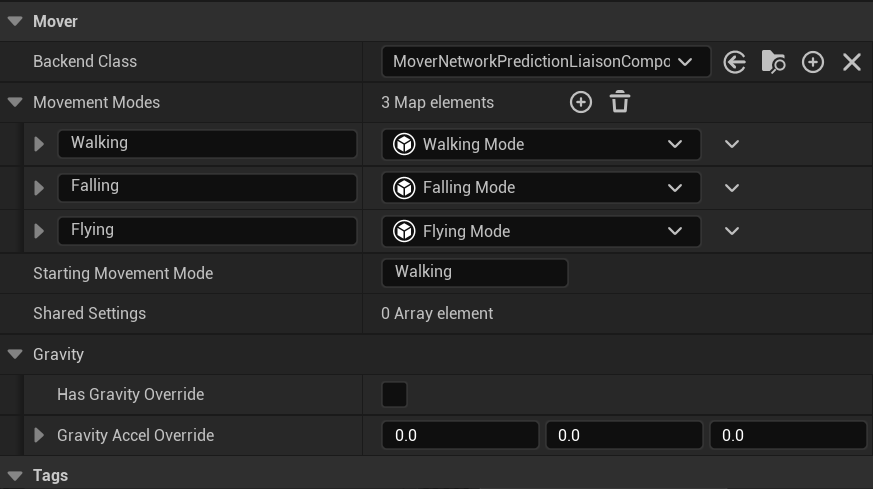
무버(Mover) 플러그인, 즉 캐릭터 무버(Character Mover) 2.0에서는 UE의 기존 캐릭터 무브먼트 기능이 대폭 향상되었습니다. 이 기능은 피직스에서 애니메이션, 네트워킹에 이르기까지 수많은 코드베이스 접점을 갖는 매우 큰 작업입니다.
이 작업에서 중점을 두고 있는 부분은 다음과 같습니다.
-
캐릭터뿐만 아니라 모든 액터 타입 을 지원합니다.
-
게임플레이 프로그래머가 복잡한 네트워킹보다 무브먼트에 더 집중 할 수 있게 지원합니다.
-
모듈화 를 통해 확장성과 커스터마이징을 향상하는 동시에 엔지니어가 아닌 작업자 도 자신만의 무브먼트를 제작할 수 있게 지원합니다.
-
게임플레이 가능성을 확장 하기 위해 엄격한 요구 사항을 버리고 피직스 시뮬레이션 오브젝트와의 인터랙션을 향상합니다.
-
다른 시스템에서도 사용할 수 있는 일반화된 롤백 네트워킹 모델을 지원합니다.
게임플레이 인터랙션 플러그인(실험단계)
게임플레이 인터랙션(Gameplay Interactions) 플러그인은 스테이트 트리와 스마트 오브젝트를 컨텍스트 애님 씬과 함께 사용하여 액터 간에 완전하고 유연한 인터랙션 시스템을 생성할 수 있게 해주며, 스테이트 트리가 오브젝트와 이를 사용하는 액터의 로직을 모두 처리할 수 있게 해줍니다.
외부 스테이트 트리 서브 트리(실험단계)
스테이트 트리에 대한 외부 서브 트리 지원은 이전에 소개된 서브 트리 기능과 유사하지만 실제로는 별도의 파일로 정의되어 현재 트리뿐만 아니라 여러 다른 트리에서 재사용할 수 있습니다. 이를 통해 콘텐츠 크리에이터는 기존에 존재하는 여러 청크로 스테이트 트리를 구성할 수 있으므로 모듈형 행동이 이전에는 비헤이비어 트리를 사용해야 달성할 수 있었던 것과 매우 유사해졌습니다.
자세한 내용은 외부 스테이트 트리 개요 문서를 참고하세요.
대규모 월드 좌표 네트워킹 지원(베타)
이제 UE의 네트워크 기술에서 대규모 월드 좌표가 공식적으로 지원되므로 멀티플레이어 환경에서 네트워크 관련 제한에 구애받지 않고 대규모 월드를 제작할 수 있게 되었습니다.
GAS 디버깅 향상
게임플레이 어빌리티 시스템(Gameplay Ability System, GAS)과 함께 사용할 수 있는 디버깅 툴이 대폭 향상되어 이 뛰어난 프레임워크를 사용하면서 더 많은 기본 디버깅을 활용할 수 있습니다.
데이터 전용 블루프린트 병합(베타)
5.3에서 도입된 데이터 에셋 병합 기능에 이어 5.4에서는 데이터 전용 블루프린트를 병합할 수 있는 기능이 도입되었습니다(전체 블루프린트 그래프 병합은 아직 지원되지 않음). 이를 통해 개발자는 BP 데이터 에셋을 비교하고 병합할 때 한층 더 뛰어난 인사이트를 얻을 수 있습니다.
Windows GameInput API(베타)
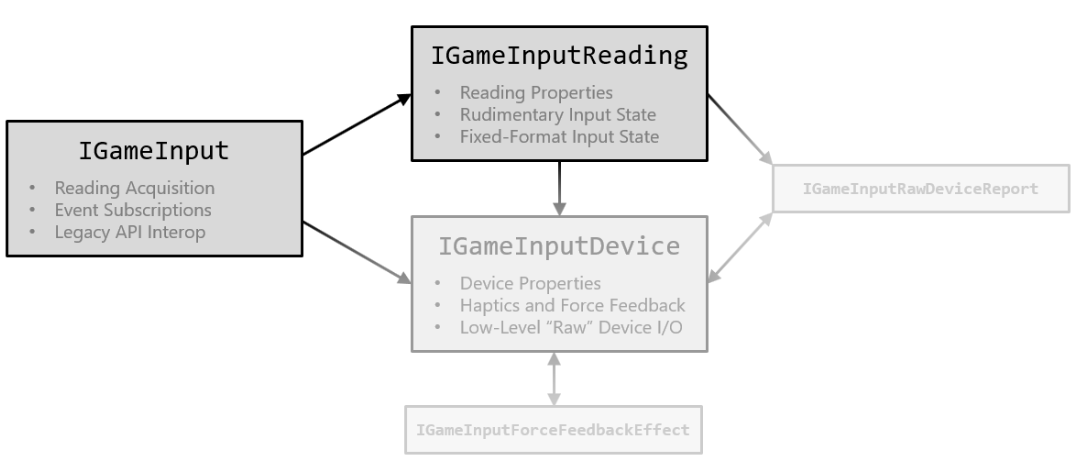
Microsoft는 최근 새로운 Windows용 GameInput API를 출시했으며, 이를 통해 Windows 플랫폼의 컨트롤러에 대한 '즉시 사용 가능한' 연결 지원을 추가할 수 있게 되었습니다.
여기에는 특별한 퍼스트 파티 라이선스 요구 사항(SDK 액세스)이 없는 PlayStation 컨트롤러가 포함됩니다. 첫 번째 실험단계 버전에서는 다음과 같은 디바이스를 지원합니다.
-
Xbox 컨트롤러
-
PS4/5 컨트롤러
-
레이싱 휠
-
비행 조이스틱
-
아케이드 조이스틱
그리고 UE에서 기존의 USB 플라스틱 악기도 기본적으로 지원하므로 게임에서 이러한 주변 기기를 사용할 수 있습니다(포트나이트 페스티벌 내 사용 가능!).
아이리스 리플리케이션(베타)
언리얼 엔진 5.4에서는 워크플로 향상뿐만 아니라 플러그인에 도입된 편의성 기능을 통해 어떤 네트워크 환경에서도 보다 손쉽게 플러그인을 사용하고 디버깅할 수 있게 되었습니다.
대규모 월드용 내비메시 생성(실험단계)
LEGO 포트나이트를 출시하면서 훨씬 더 크고 역동적인 월드를 제대로 지원하기 위해 내비게이션 툴 내부의 다양한 시스템을 최적화해야 했습니다. 이에 따라 런타임 생성 디버깅 툴이 대폭 향상되었습니다.
또한 인보커와 내비메시 해상도 부분에서도 툴이 향상되어 이러한 콘셉트를 도입할 경우 게임 퍼포먼스를 미세조정할 수 있으며, 필요한 시점과 위치에서 필요한 방법으로 내비메시를 생성할 수 있습니다. 이제 수많은 AI가 존재하는 대규모 오픈 월드에서 내비메시 생성의 병목 현상을 줄일 수 있게 되었습니다!
마지막으로, 더 나은 월드 파티션과 OFPA 지원을 통해 내비링크 생성에 대한 수정 작업이 추가로 진행되었습니다.
에디터
멀티 유저 액터 리플리케이션
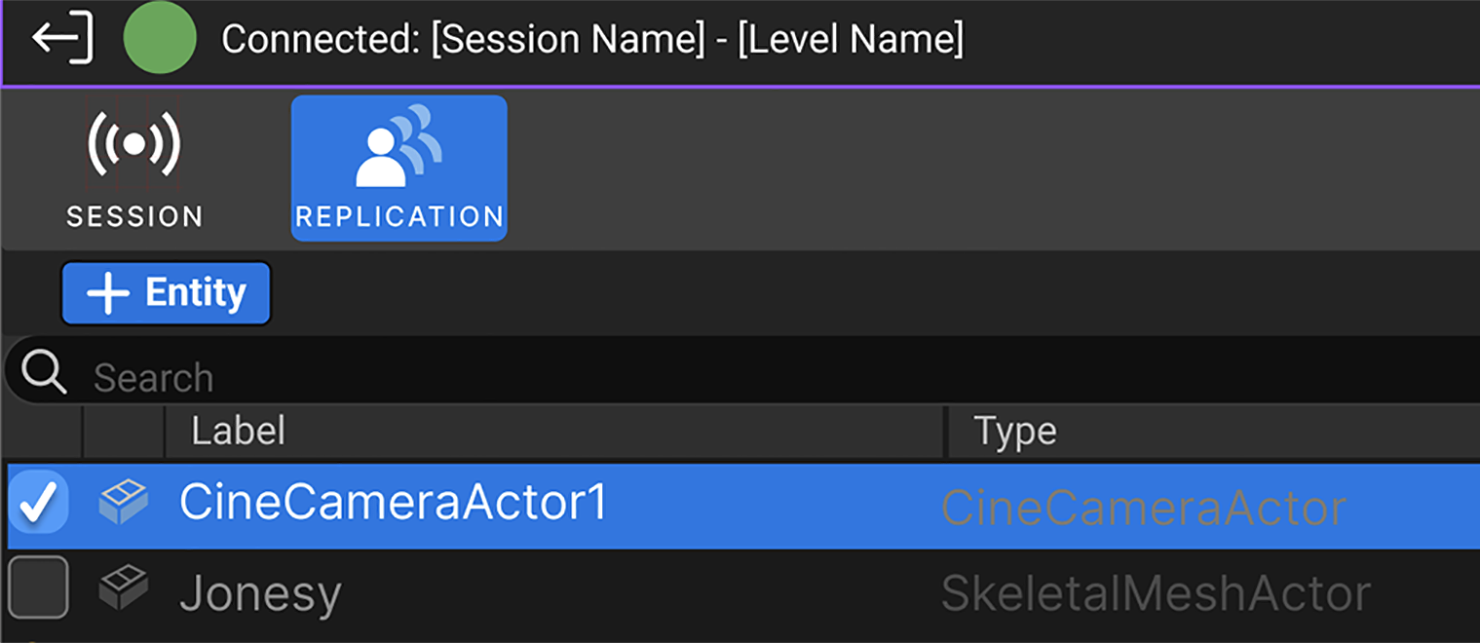
멀티 유저 편집을 통해 액터를 실시간으로 리플리케이트합니다. 별도의 트랜잭션으로 충분하지 않은 경우, 이제 사용자는 월드의 액터 목록과 그 위에 실시간으로 리플리케이트할 프로퍼티를 관리할 수 있습니다.
멀티 유저 원격 함수 호출
멀티 유저 원격 함수 호출은 한 클라이언트가 멀티 유저 편집을 통해 다른 클라이언트에서 사전 정의된 C++ 및 블루프린트 함수의 실행을 호출할 수 있게 해줍니다.
에디터 접근성: 애플리케이션 스케일(실험단계)
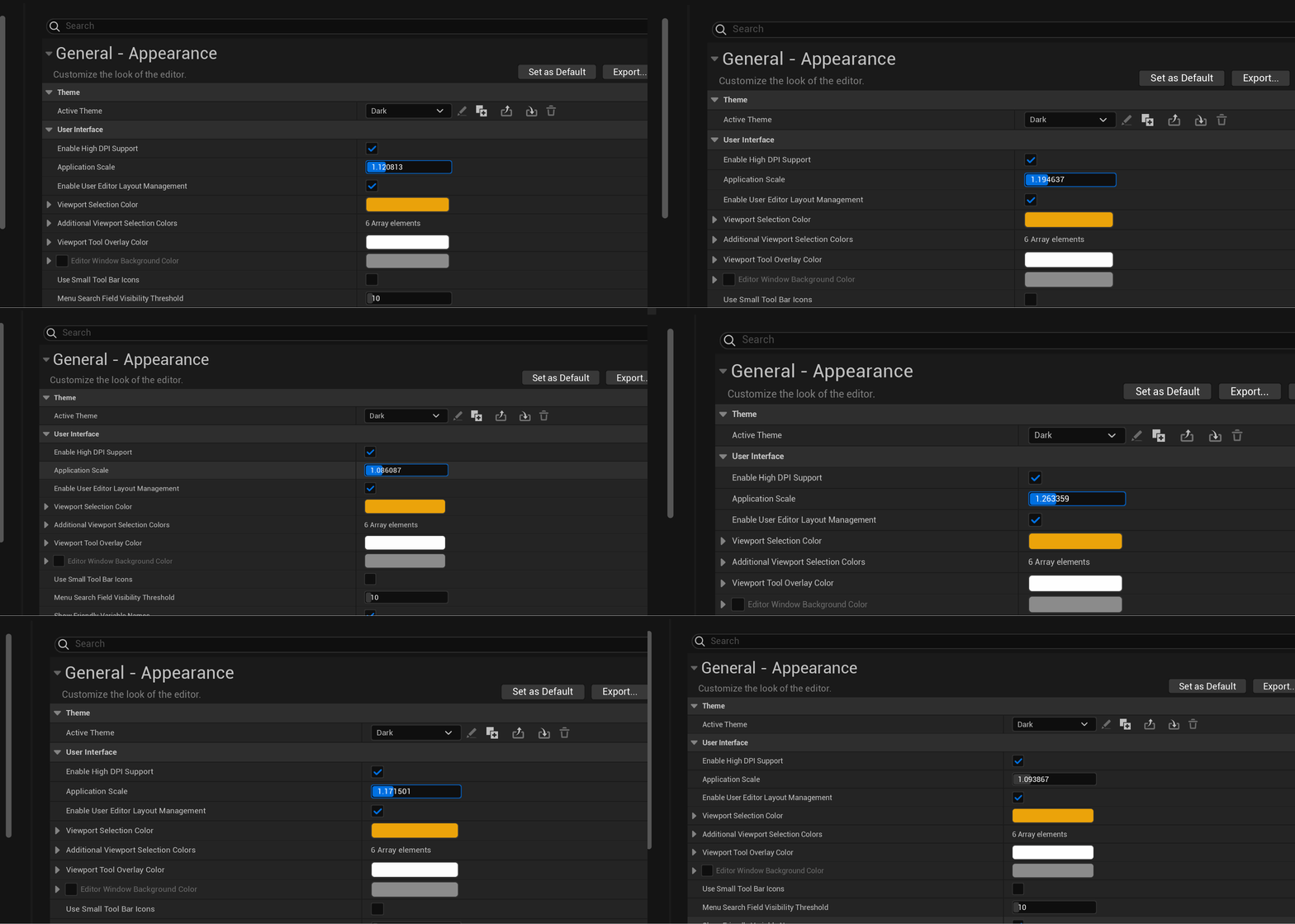
사용자는 이제 에디터 개인설정(Editor Preferences) > 일반 - 외형(General - Appearance) > 유저 인터페이스(User Interface) 에서 애플리케이션 스케일(Application Scale) 세팅을 사용하여 에디터의 UI 요소 크기를 조정할 수 있습니다.
이 값을 1.0 이상으로 설정하면 값에 비례하여 텍스트와 UI 컨트롤의 크기가 커지므로 라벨과 값을 보다 손쉽게 확인할 수 있습니다.
이 값을 1.0 이하로 설정하면 텍스트와 UI 컨트롤의 크기가 작아지므로 화면에 더 많은 콘텐츠를 표시할 수 있습니다.
UI 시스템
슬레이트 포스트 버퍼(실험단계)
UI 개발자는 이제 UI 머티리얼을 사용하여 씬을 보다 효율적으로 샘플링하고, 전체 화면 채도 감소 및 컬러 시프트와 같은 임의의 FX를 적용할 수 있습니다. 기존에는 UI 머티리얼에 SceneColor가 노출되지 않았기 때문에 이러한 작업이 불가능했습니다. 이번 실험단계 출시 버전에서는 씬 블러 FX만 사용할 수 있지만, 향후 출시 버전에서는 더 많은 이펙트가 추가될 예정입니다.
자세한 내용은 슬레이트 포스트 버퍼 문서를 참고하세요.
언리얼 엔진 마켓플레이스에서 콘텐츠 샘플 프로젝트를 다운로드한 다음 UI_SlatePostBuffer 맵을 확인하여 슬레이트 포스트 버퍼 샘플을 살펴볼 수도 있습니다.
UMG 뷰모델(베타)
모델-뷰-뷰모델(Model-View-Viewmodel, MVVM) 패턴을 기반으로 하는 UMG 뷰모델(UMG Viewmodel) 플러그인은 디자이너가 프로그래머와 독립적으로 작업하고 코드를 변경하지 않고 위젯을 구조적으로 변경할 수 있게 해줍니다.
이번 출시 버전에서는 UI 디자이너와 개발자가 한계를 넘어 더 많은 작업을 수행할 수 있도록 지원하는 다음과 같은 기능이 추가되었습니다.
-
이벤트에 바인딩: 이벤트가 발동될 때 실행되는 바인딩을 생성합니다.
-
스태틱 뷰모델: 뷰모델 인스턴스의 값을 UMG에서 직접 초기화합니다.
-
블루프린트 그래프 표시: 바인딩과 관련된 블루프린트 그래프를 볼 수 있습니다.
-
진단: 유효성 검사 및 오류 로깅 시 보다 정확한 정보를 제공합니다.
미디어
미디어 IO 리얼타임 밉 생성
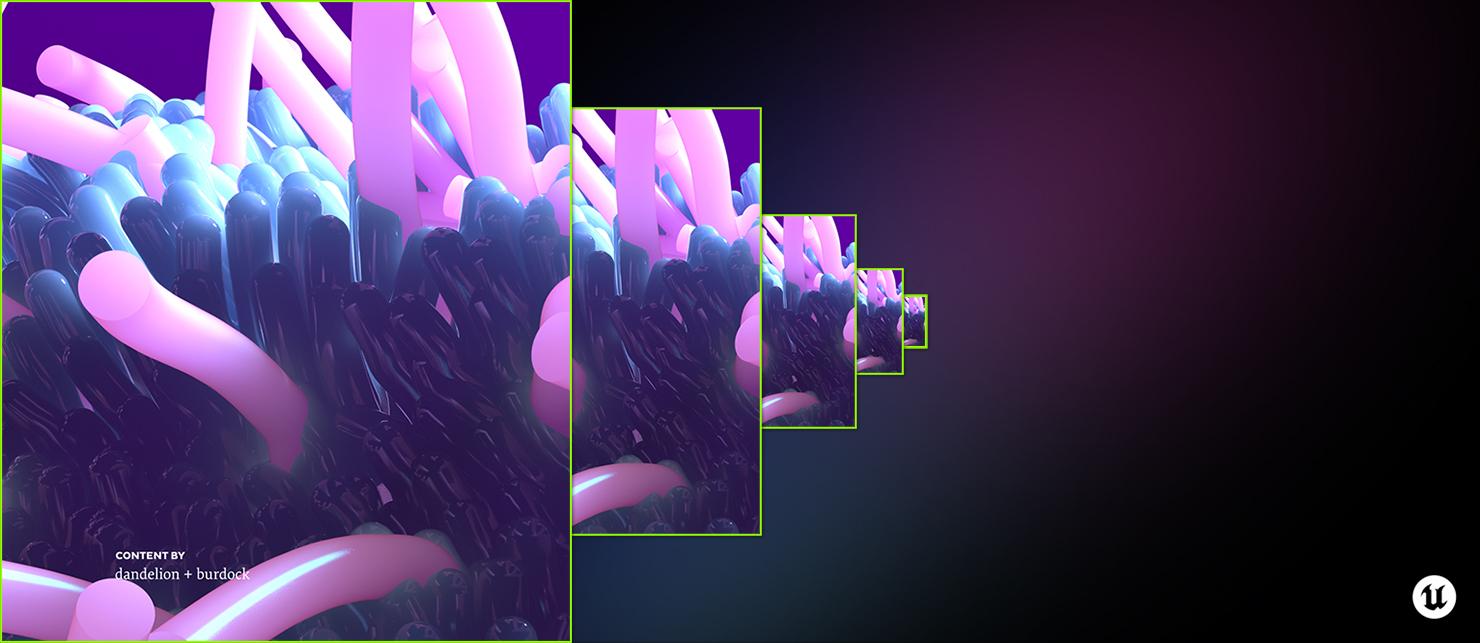
이제 렌더링 및 비디오 이미지 안정성을 향상하기 위해 미디어 트랙용 밉맵 체인을 실시간으로 생성하는 기능을 노출합니다. 다음과 같은 기능이 추가되었습니다.
-
실시간 밉맵 체인 생성을 지원하는 미디어 트랙 세팅
-
밉맵 섹션에서 위의 세팅을 노출하는 미디어 플레이트 액터 체크박스
미디어 IO EXR 위도/경도 폴 밉 오프셋
LED 스테이지를 사용하는 버추얼 프로덕션 사용자가 대규모 위도/경도 타일 EXR 파일을 재생할 때 극 지역에서 타일 요청이 증가하는 문제가 발생합니다. 이는 일반적으로 IO 요구 사항이 하드웨어 성능을 뛰어넘어 멈춤 또는 재생 버벅임을 유발하는 천장 nDisplay 노드에서 발생합니다. 따라서 이제 미디어 플레이트 액터를 통해 액세스 가능한 최적화된 시스템을 제공하여 요청된 밉 레벨을 자동으로 높이고 미디어 플레이트 대역폭 EXR 타일 요청을 제한하고 있습니다.
-
IO 요청을 일정하게 유지하기 위해 밉 오프셋을 자동으로 조정할 수 있도록 '적응형 폴 밉 오프셋(Adaptive Pole Mip Offset)'이라는 미디어 플레이트 액터 옵션을 추가했습니다.
- 이 옵션은 스피어 환경설정의 타일 EXR에서만 작동합니다.
미디어 IO TSR/TAA 아티팩트 최소화
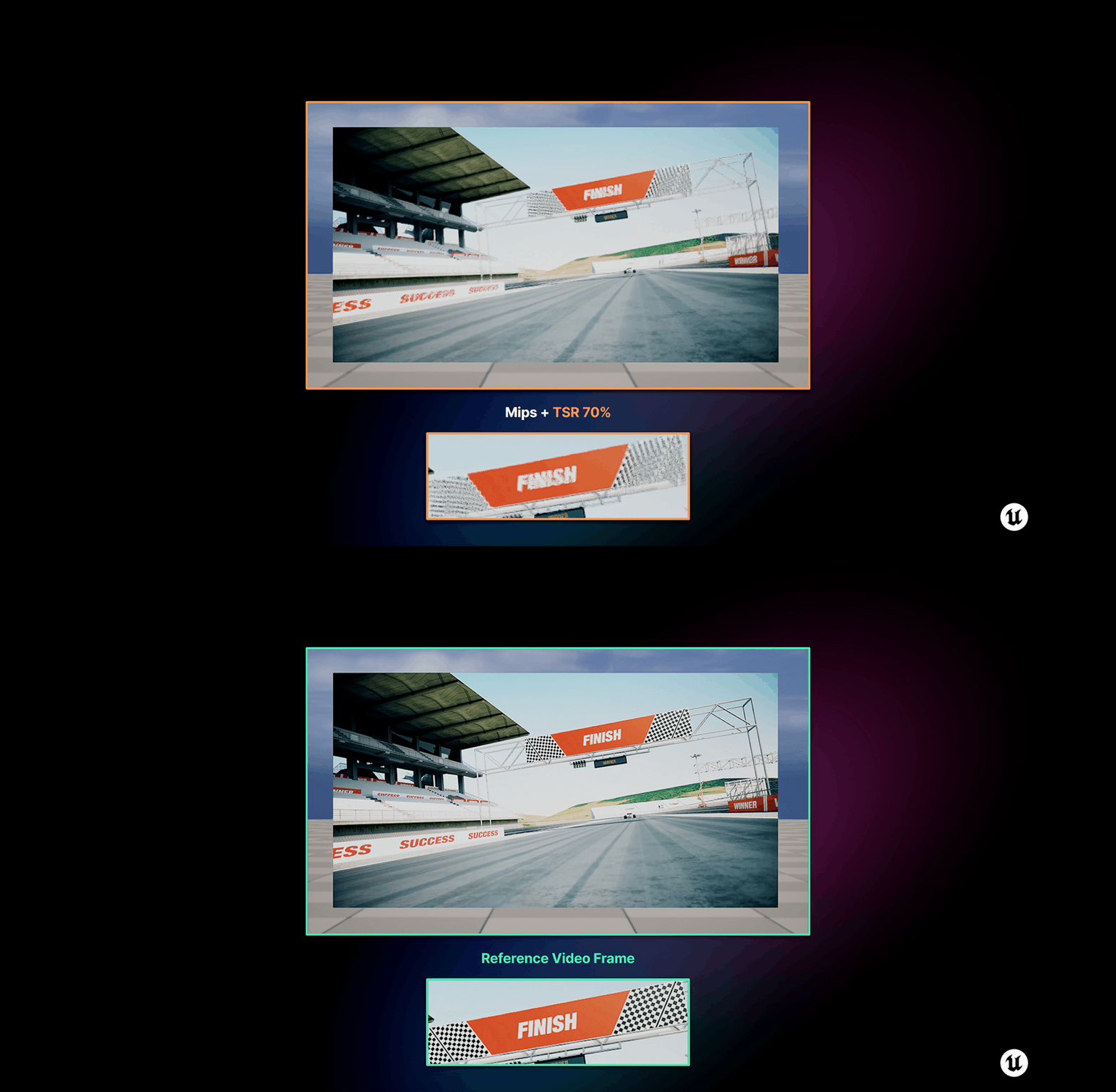
TSR 및 TAA를 사용하는 경우 비디오 재생 및 머티리얼 기반 애니메이션에 번짐과 같은 시각적 아티팩트가 나타납니다. 리얼타임 밉과 스크린 퍼센티지 증가로 시각적 화질 저하 현상을 줄일 수는 있지만 원하는 이미지 충실도를 구현하기에는 충분하지 않습니다. 미디어 IO TSR/TAA 아티팩트 최소화 는 템포럴 알고리즘과 부족한 모션 벡터로 인해 발생하는 아티팩트를 최소화합니다. 이는 비디오 재생 또는 스트리밍 콘텐츠를 사용하는 모든 산업의 사용자에게 도움을 줍니다.
-
TSR 및 기타 TAA(템포럴 알고리즘)로 인한 아티팩트를 최소화합니다.
-
재생 플레이트와 같은 특수한 태그가 지정된 지오메트리에 대해 템포럴 패스스루를 제공합니다.
프로덕션 렌더링 파이프라인
렌더 레이어

스튜디오 파이프라인 내에서 언리얼 엔진 연결의 연계성을 강화하기 위해 무비 렌더 큐에 포스트 컴포지팅을 위한 고퀄리티 엘리먼트로 렌더 레이어 를 쉽게 생성할 수 있는 기능이 추가되었습니다. 샷을 여러 레이어로 나누어 전경 캐릭터와 배경 환경을 분리하는 등의 작업을 할 수 있으므로 최종 이미지에 대한 제어를 향상하고 라이브 액션 플레이트 영상과 쉽게 통합할 수 있게 됩니다. 렌더 레이어는 패스 트레이서 및 디퍼드 렌더러 모두에 대해 지원됩니다.
무비 렌더 그래프
스튜디오가 언리얼 엔진 렌더링을 더욱더 큰 규모의 프로젝트에서도 사용하도록 지원하기 위해 무비 렌더 큐는 이제 렌더 세팅을 관리하는 새로운 노드 기반 아키텍처를 사용합니다. 무비 렌더 그래프 는 아티스트와 슈퍼바이저에게 데이터 플로 및 로직 노드와 함께 렌더를 정의하는 기본 요소를 제공하여 소규모 팀과 대규모 팀 모두의 요구 사항을 충족하는 데 필요한 만큼 단순하거나 복잡한 그래프를 빌드할 수 있습니다.
아티스트는 단일 샷을 렌더링하도록 그래프를 구성하거나 복잡한 멀티 샷 워크플로 전반에 걸쳐 확장하도록 그래프를 디자인할 수 있습니다. 강력하고 직관적인 상속 체계가 제공되므로 쇼, 시퀀스, 샷 등 모든 레벨에서 계층형 렌더 세팅을 구성할 수 있습니다. 또한 그래프 시스템은 사전/사후 스크립팅 및 자동화를 위한 편리하고 개발자 친화적인 엔트리 포인트를 통해 파이프라인 기능을 가장 중요한 위치에 배치합니다.
프로토콜
DMX 컨트롤 콘솔
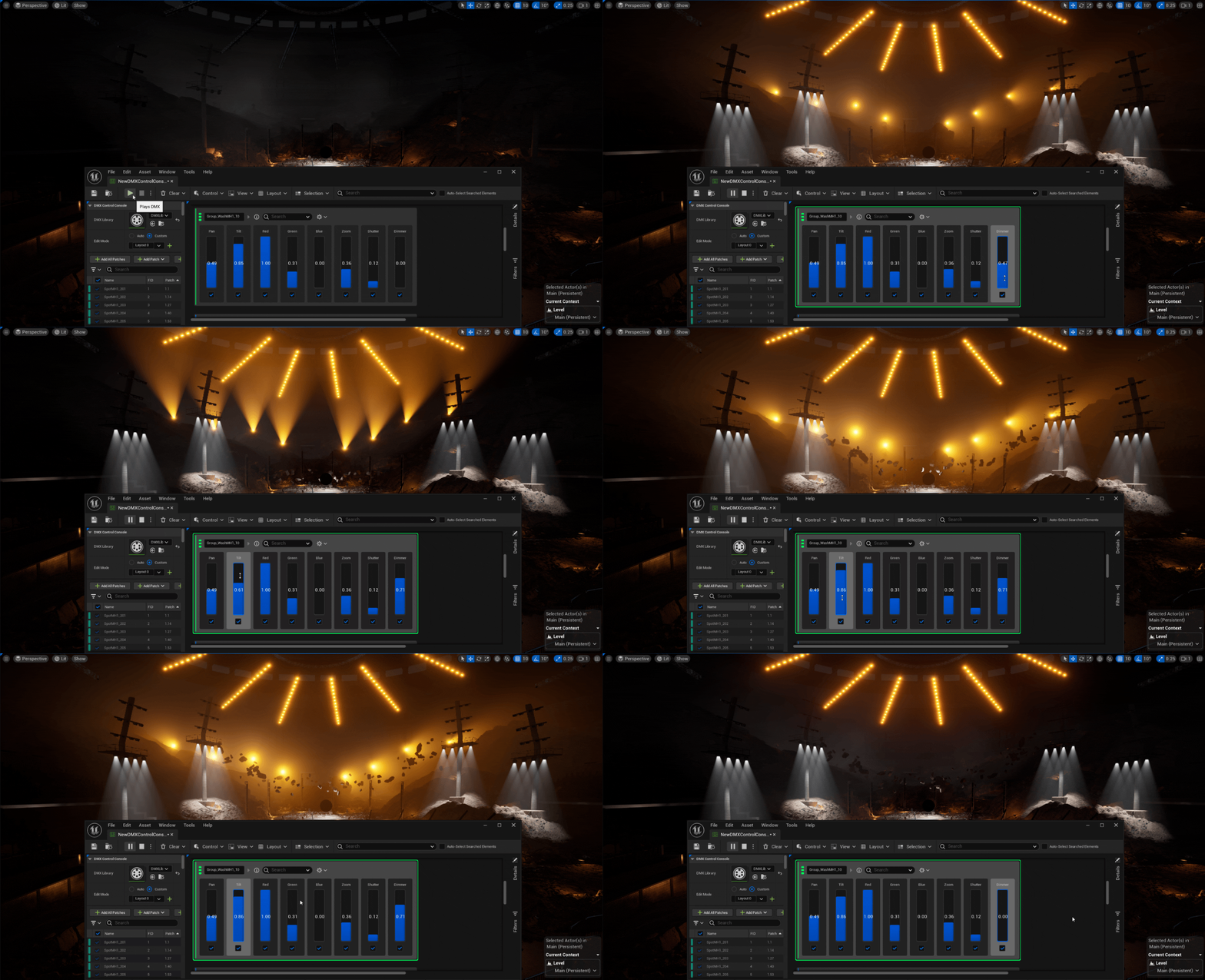
DMX 컨트롤 콘솔 로 대량의 픽스처와 페이더를 효과적으로 구동하고 제어할 수 있습니다. DMX 디버깅을 단순화하고 가상 또는 물리적일 수 있는 픽스처 세트를 빠르게 제어할 수 있도록 디자인되었습니다. 라이브러리 및 패치 선택을 기반으로 페이더를 자동 생성하고 채웁니다. 라이브 및 버추얼 프로덕션 산업의 사용자는 이러한 페이더를 사용하여 DMX 데이터를 생성하고 물리적 디바이스로 보낼 수 있습니다.
-
에셋 기반 구조 로 더 나은 UI 제어 및 UE 일관성을 제공합니다.
-
다중 선택 및 패치 그룹화 를 지원합니다.
-
다중 패치 선택 시 더는 여러 픽스처 그룹이 표시되지 않고 '디테일(Details)' 패널에서와 같이 하나만 표시됩니다.
-
그룹 내에 패치를 중첩하여 폴더로 만들고 특정 페이더 세트를 노출합니다.
-
검색 채널 히스토리 는 이제 사용자가 이전에 검색한 내용을 기억하므로 계속 다시 입력할 필요가 없습니다.
-
검색 템플릿 으로 특정 채널을 빠르게 검색할 수 있습니다. 특정 패치의 가능한 모든 채널은 이미 알려져 있으므로 이제 사용자가 임의로 검색하는 대신 그 중에서 선택할 수 있습니다.
-
큐 저장 및 리로드 로 페이더 상태의 프리셋을 리콜할 수 있습니다.
-
컨트롤 위젯 으로 보다 강력하고 직관적인 컨트롤 노브와 위젯을 사용할 수 있습니다.
DMX 픽셀 매핑
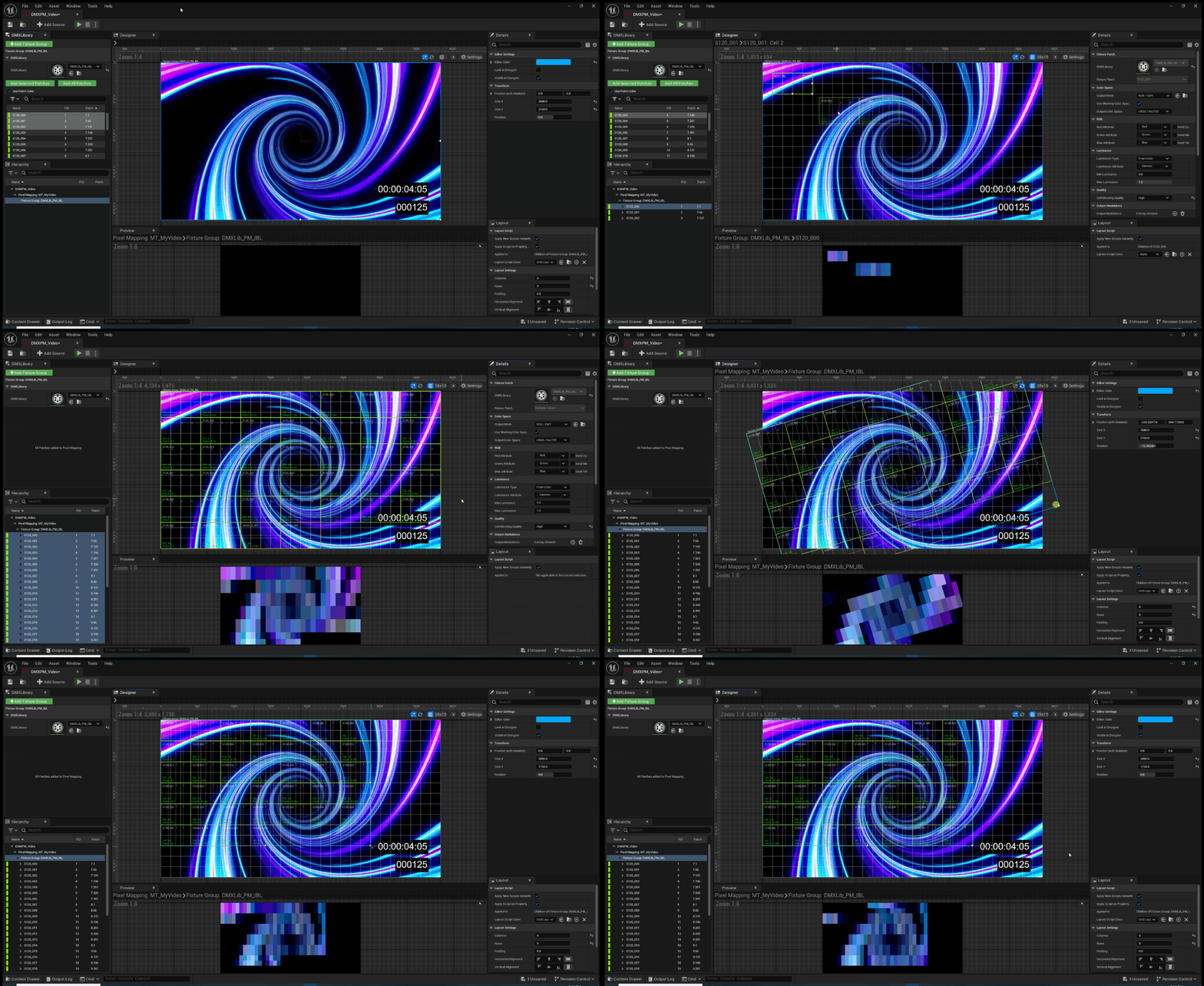
DMX 및 픽셀 매핑 기능은 이제 대량의 픽스처 패치를 효과적으로 제어하고 픽셀 매핑해야 하는 대규모 복잡한 설정에서 자주 사용됩니다. 픽셀 매퍼 UX를 보다 간소화하고 라이브/버추얼 프로덕션 사용자를 지원하기 위해 다음과 같은 기능 향상이 이루어졌습니다.
-
픽셀 그리드 정확도를 위한 그리드 시스템: 이제 패치를 그리드에 스냅할 수 있습니다. 그리드는 입력 텍스처에 관계없이 임의의 해상도(너비 및 높이)로 설정할 수 있습니다.
-
DMX 라이브러리에서 패치 컬러 구성표를 가져올 수 있음: 이제 컨트롤 콘솔 및 라이브러리와 일관성이 유지됩니다.
-
패치 하이라이트 크기 노출 을 통해 명확성이 향상되었습니다.
-
패치 회전 및 가로/세로 플립 지원으로 유연성이 향상되었습니다.
-
폰트 크기 확장 으로 패치 정보를 보다 손쉽게 확인할 수 있습니다.
-
다운스케일, 블러 및 픽셀 매핑 처리를 위해 고정밀도 내부 버퍼 가 제공됩니다.
-
입력 텍스처에 대해 선형성 플래그 가 지원됩니다.
DMX 데이터 상충 모니터링
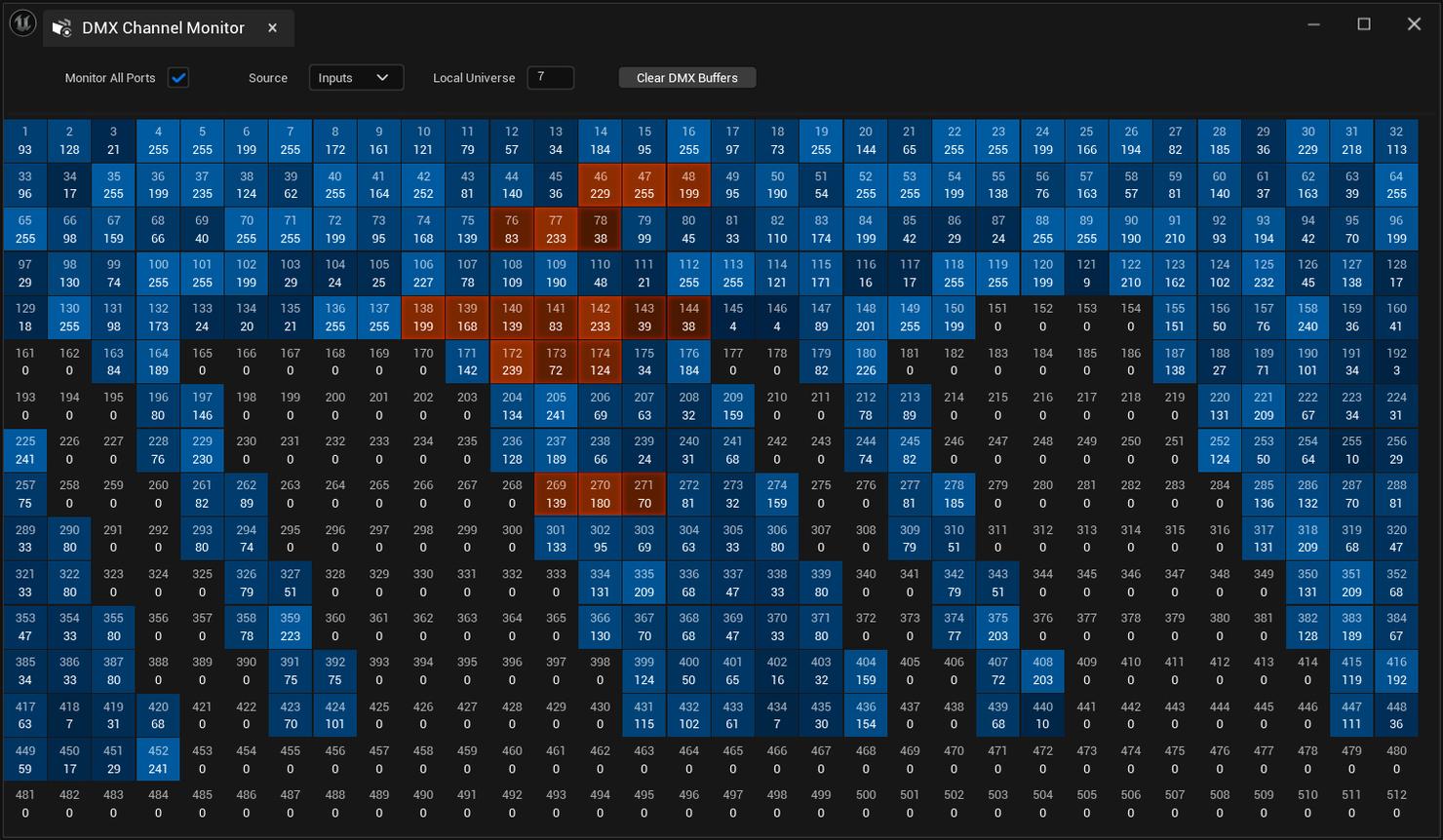
이전에는 잠재적인 DMX 데이터 충돌을 확인하고 식별할 수 있는 중앙 집중식 UI가 없어서 사용자가 이를 인지하지 못할 수 있었습니다. 이제 DMX 데이터 상충 모니터링(DMX Data Conflict Monitoring) 은 컨트롤 콘솔이나 픽셀 매퍼 또는 블루프린트와 같은 현재 전송 중인 모든 DMX 서브시스템 인스턴스를 노출하는 UI 패널 또는 창을 구현합니다. 이 기능은 DMX를 사용하는 모든 산업과 사용자, 특히 픽셀 매퍼 및 컨트롤 콘솔과 툴을 조합하여 사용하는 사용자에게 유용합니다.
-
중앙 집중화된 UI 패널 또는 창을 통해 모든 동시 DMX 전송 서브시스템 인스턴스를 노출하고 중앙화합니다. 예를 들어 컨트롤 콘솔, 픽셀 매핑 또는 블루프린트의 활성 인스턴스가 여기에 포함될 수 있습니다.
-
패치별 기반으로 충돌 및 상충되는 부분을 하이라이트합니다.
플랫폼 SDK 업그레이드

-
Windows
-
Visual Studio 2022 v17.4 이상
-
Windows SDK 10.0.18362 이상
-
LLVM Clang
-
최소 버전: 15.0.0
-
선호 버전: 16.0.6
-
-
.NET 4.6.2 Targeting Pack
-
.NET 6.0
-
-
빌드 팜 컴파일 IDE 버전
-
Visual Studio: Visual Studio 2022 17.8 14.38.33130 툴체인 및 Windows 10 SDK(10.0.18362.0)
-
Xcode: Xcode 14.2
-
-
GDK
-
최소 Windows SDK: 10.0.19041.0
-
GDK: October 2023 Update 3
-
최신 복구 버전
-
지원 IDE: Visual Studio 2022
-
-
Linux
-
네이티브 Linux 개발
-
권장 OS: Ubuntu 22.04 또는 CentOS 7
-
컴파일러: Clang 16.0.6
-
크로스 컴파일 툴체인: v22 Clang-6.0.6 기반(CentOS 7)
-
-
macOS
-
권장 사양
-
최신 macOS 13 Ventura
-
최신 Xcode 14.1 이상
-
-
최소 사양
-
macOS 13 Ventura
-
Xcode 14.1
-
-
-
EOSSDK
- 1.16.3 바이너리(1.16.2 헤더 포함)
-
Steam
- 1.57
-
iOS/tvOS/iPadOS
-
권장 사양
-
최신 macOS 13 Ventura
-
최신 Xcode 14 Sonoma
-
-
최소 사양
-
macOS 13 Ventura
-
Xcode 14.1
-
-
지원 타깃 SDK 버전: iOS 15 이상
-
그래픽 API: Metal 2.4 및 Metal 3.0
-
-
Android
-
Android Studio Flamingo 2022.2.1 Patch 2 May 24, 2023
-
Android NDK r25b
-
Android SDK
-
권장 버전: SDK 33
-
UE 컴파일 최소 버전: SDK 30
-
디바이스 실행용 타깃 SDK 최소 버전: SDK 26
-
-
AGDE 디버깅을 사용 중인 경우 AGDE v23.1.82+ 필요
-
빌드 툴: 33.0.1
-
Java 런타임: OpenJDK 17.0.6 2023-01-17
-
-
Switch
-
SDK 16.2.3
-
최소 펌웨어 버전: 17.0.0-7.0
-
Nintendo Dev Interface 2.5.5
-
지원되는 IDE: Visual Studio 2022
-
-
PS4
-
Orbis SDK 11.508.011
-
시스템 소프트웨어 11.508.011
-
지원되는 IDE: Visual Studio 2022
-
-
PS5
*Prospero SDK 9.00.00.40
-
시스템 소프트웨어 9.00.00.45
-
지원되는 IDE: Visual Studio 2022
-
-
ARCore
- 1.37
-
ARKit
- 4.0
-
OpenXR
- 1.0.27
출시 노트
Animation
API Change:
- Added the first version of Mutable extension API.
New:
-
Added a new LOD threshold property to rig logic anim graph nodes in order to compute facial animation earlier than other skeletal post-processing, which might be part of the same post-processing AnimBP.
-
Added the ability to disable or skip post-process AnimBPs at lower LOD levels. You can set the post-processing AnimBP LOD threshold similarly to how you can set LOD thresholds for some anim graph nodes. Additionally you can skip the post processing anim BP graph during set points entirely, to improve performance. The speed improvements scale with the complexity of the post-processing AnimBP and as well as the amount of nodes that do not support LOD thresholds or have setup node-based LOD thresholds.
-
Added the option to filter by Sync Marker to the Animation Sequence Browser.
-
Add new output warnings when the LegIK node is missing definitions or contains references to invalid bones.
-
IK Rig and IK Retargeter now available in UEFN.
-
IK Retarget poses can now be zeroed in local space to instantly straighten limbs for more accurate retargeting.
-
Added 0.75 and custom speed to Animation Viewport ToolBar, for Animation Speed and TurnTable speed.
Bug Fix:
-
Fixed an issue that could prevent the MeshBoneReduction module from loading as soon as the MeshUtilities module starts up, as it could be needed at any time from a background thread
-
Fixed an issue by adding a guard against the use of an invalid actor pointer in the Skeletal Mesh editors.
-
Fixed incorrect localized text in the LegIK Animation Blueprint node.
-
Fixed an issue occurring when creating animation assets overriding existing assets, by enabling replacing existing animation in the options to create new assets.
-
Fixed an issue occurring when pasting anim notifies from multiple tracks to a location that did not contain the same tracks.
Removed:
- Removed null links from Mutable graphs on load. This prevents incorrect behavior and editor instability when a node saved into a graph can't be loaded.
Animating in Engine
API Change:
- Fix inverted tangents on Y axis for 2D controls.
New:
-
Added a new
ControlRig.Sequencer.AutoGenerateTrackconsole variable to toggle whether control rig tracks should automatically be created for new components. -
Control Rig FBX animations can now be exported and exported between Unreal
Improvement:
-
Curve Editor filters have been improved and can now be set using ranges rather than individual selections, so you can now bake a range of frames or times.
-
Curve proximities can now be updated when there is a drag operation so that the curve tooltips show the proper time and value.
-
Curve Editor selections are now synchronized whenever new items are added to the editor.
Bug Fix:
-
Fixed an issue that could occur by delaying a level sequence asset's creation until the tick proceeding the tick the control rig actor is dropped into the viewport. This prevents the level sequence asset creation to be in the same transaction as the create actors transaction. Previously, the movie scene could be collected as garbage when undoing the action, because its creation took place during another transaction.
-
Fixed an issue that could cause a memory leak with the backbuffer Render Target not being released at the end of a render.
-
Constraints: propagate offset change so that local transform animations are synchronized.
Gameplay
New:
-
You can now use the new experimental Dead Blending AnimGraph node. This node is designed as a drop-in replacement to the Inertialization node but uses the new robust "Dead Blending" algorithm which is more equipped to handle multiple simultaneous Inertilization requests or when the Inertialization transition is between two very different poses.
-
Exposed a new method to blueprints that you can use to get the weight of a montage playing on a specified animation slot.
-
Added the following AnimNode functions:
On State Exit,On State Entry,On State Fully Blended In, andOn State Fully Blended Out. These are located in any Animation State Graph's Result Node. -
Added support for AnimNodes to show any bound functions and not have them hardcoded.
-
Added a way for users to specify the string for the default binding name of a function member reference in a blueprint by using the "DefaultBindingName" metadata tag.
-
Added support for animation sync groups when using initialization for a state machine transition.
-
Added support for explicitly specifying the transitions trigger time when using state machine automatic transition rules.
-
Added a context menu option to Animation Blueprints to create an Animation Template from the blueprint that can be used to override animations using Child Blueprints.
Improvement:
- The
PlayMontageCallbackProxycan now be derived from, in order to support plugins that want to provide customized versions.
Bug Fix:
-
Fixed an issue that could cause a crash when using the Inertialization AnimGraph node when re-parenting the Animation Blueprint.
-
Fixed standard blending not working as expected with sync groups.
-
Improved stuck detection in Distance Matching
-
Disabled option to duplicate a state from the animation blueprint editor's tree view.
Movie Render Queue
New:
-
Fixed issue where default settings would get added to a job that already exists when clicking on the Render Movie button from Sequencer.
-
Exposed UMoviePipelineImageSequenceOutput_EXR so C++ plugins can reference it.
-
When using the Render all Cameras feature, Spawnable cameras are now skipped if their default spawn track value is false.
-
Added support for camera rotation to be preserved during a Panoramic Render.
-
Updated the Console Variables setting to display the cvars contained within each cvar preset.
Improvement:
- Added a workaround for the UI Renderer setting having issues with some Layout Widgets not liking the 720p PIE preview window.
Optimization:
- Optimized the multi-sample accumulator for RGBA images on machines with many cores.
Bug Fix:
-
Fixed issue where canceling a job reporting as a successful job for some callbacks.
-
Fixed issue where UWorldSettings::Min/MaxUndilatedFrameTime were being modified and not restored after a render.
-
Fixed UI warning about losing unsaved changes to Queues when there weren't actually any changes.
-
Fixed issue where
{camera_name}resolved intomain_camerawhen not using the Render All Cameras feature is animating onto this. -
Fixed data type issue when exporting ProRes with OpenColorIO enabled.
Rigging
API Change:
- Creation of buffers is all done within the data interface at runtime.
New:
-
Added output bone transfer list for anim node. You can now limit the bones being driven by a Control Rig AnimNode in the Animation Blueprint Graph.
-
Added half edge connectivity data interface.
-
Added unit node to check if a shape is available in the shape libraries.
-
Added support for uint32 types.
-
Added Int32 to Name node (
IntToName) -
Added feature to update the Reference pose of a bone directly in the Control Rig Editor.
-
Added LocalChainDynamics function which creates simple chain dynamics for the given chain.
-
New skin weight editing tool enabled editing weights by painting or directly on selected vertices.
-
IK Rig/Retarget assets can now be created directly from Skeletal Meshes in the right-click menu.
-
Performance improvement to retrieve a template from its arguments.
-
IK Retargeter toolbar redesigned for instant access to common retarget settings.
- Improved physics constraint editing in the Physics Asset Editor viewport.
-
Extracted all instance data from Control Rig virtual machine and moved it to the context data struct, as a step for stateless virtual machine.
-
FBIK solver now supports animated translation at runtime. Squashing and stretching limbs can use FBIK.
- RigVM context now has to be passed as a parameter to the virtual machine functions, rather than being located in the virtual machine itself (a step towards stateless virtual machine).
Improvement:
- Skin weights on skeletal meshes can now be edited through a new API in BP or Python.
Bug Fix:
-
Fixed issue when adding curves to the output skeleton from
USkeletalMergingLibrary::MergeSkeletons. -
Fixed Control Rig Blueprint compilation error related to missing function definition after a Control Rig Blueprint containing function references is duplicated or renamed.
-
Fixed issue caused by Control Rig Editor Details panel when exiting PIE while debugging a Control Rig instance.
- Fixed an issue where sometimes the constraint viewport widget would be drawn relative to the wrong body.
-
Fixed an issue where pressing the keyboard modifier for editing the constraint's child frame (Alt + Shift) also activated the keyboard modifier for the Lock camera to widget feature (Shift) which caused the translation widget to move erratically when editing the child frame.
-
Fix for Control Rig Editor issue when adding comments and using undo / redo.
-
Fixed Control Rig compiler issue occurring when a specific function parameter usage is found on a rig, due to invalid remapping of inline function parameters.
-
Fixed an issue in the RigVM compiler when a rig function has more than 255 operands.
-
Fix IK Retarget automatic chain mapping mode "exact all"; now it does not reset non-exact matches to none.
-
FBIK solver will now dynamically reinitialize if the number of input bones changes dynamically at runtime.
-
Cleaned up Control Rig Python files to remove mixed tab/space error in runtime.
-
RigVMController: Added an array upgrade to reroute nodes with no source or target links where the value is an array, so it can load some deprecated rigs.
-
FBIK solver now works correctly with only one effector (regression from 5.2).
-
Fix for issue when adding a pin on Sequence Node in Control Rig graph.
-
Fixed memory leak in FBIK solver (regression from 5.2).
-
Spherical Pose Reader node in Control Rig fixed so it no longer flips when the activation region fills the whole sphere.
-
RigVM plugin now has a custom serialization object version.
- Fix for Control Rig Gizmos not working properly; after a changing the asset references to Soft Object Pointers.
Deprecated:
- Deprecated all Execution data interfaces. To set the execution domain of a custom compute kernel, use the Execution Domain field in the details panels of the kernel node. Valid domains should appear in the dropdown menu after connecting either a data interface to the kernel's primary group or a component binding node directly to the primary group pin.
Runtime
API Change:
- Extended the ImmediatePhysics_Chaos API so that you can now create Immediate Physics Constraints without copying values from Constraint Instances using a new CreateJoint function that accepts a JointSettings object instead of a FConstraintInstance.
New:
-
Added a new dedicated track for Inertializations to the Rewind Debugger.
-
You can now click on Animation node tracks in the Rewind Debugger and the node will be highlighted in the corresponding Animation Blueprint to improve debugging workflows.
-
Added missing tooltips for animation state machine schemas.
-
Animation Blueprint runtime errors are now logged in the PIE log, if they were found during a game session.
-
Anim blueprint logging can now use tokenized messages to hyperlink an error to the node it came from.
-
UAnimInstance::IsSlotActive() is now thread safe.
-
Player nodes in blendspace graphs are now added to GraphAssetPlayerInformation.
-
Reinstated some anim blueprint library methods which now use the Anim Pose API.
-
New colors to distinguish state aliases and conduits.
- Some LOD bone generation functions from the SkeletalMeshComponent have been extracted so they can be used from plugins.
- Updated the ComputeRequiredBones function to use the extracted functions.
-
Added a delegate to the SkeletalMeshComponent, so external systems can be notified when the RequiredBones get recalculated for a LOD.
-
Moved the SkeletionRemapping.h and SkeletonRemappingRegistry from private to public, to allow including these files in plugins
-
AnimBoneCompressionCodec now has a new DecompressPose function taking a FAnimBoneDecompressionData parameter, with the decompression data in the following separate array formats: translations, rotations, scales3D.
-
Added the ability to DoubleClick AnimSegmentsPanel, in order to jump to the target asset. You can also shift + DoubleClick to open it a in new window.
- Added a new compiler note and visual warnings to state machine transitions if the transition rule has logic but the flag for automatic rule based condition is set
Improvement:
-
Added a new helper function to find all external saveable packages.
-
Added current time accessors and library functions to Anim Notify events to allow for easy access to relative times and ratios.
-
Sync markers can now be managed in the same way as notifies.
-
Neural network mask curves are forwarded to RigLogic from both the Animation Blueprint node and Control Rig implementations.
Crash Fix:
-
Fixed an issue that could cause a crash when reloading a Control Rig Animation Blueprint.
-
Fixed an issue that could cause a crash when undoing or redoing an Animation Sequence edit while an async task is in flight.
-
Fixed an issue that could cause a reinstancing crash when using a custom Anim Instance proxy as a linked AnimGraph.
-
Fixed an issue that could cause a crash when calling
UAnimInstance::GetAllCurveNamesfrom worker threads. -
Fixed an issue that could cause a crash when compiling an Animation Blueprint during automated tests.
-
Fixed an issue that could cause a crash when right-clicking a modified curve node in a template Animation Blueprint.
-
Fixed an issue that could cause a crash when unloading animation assets in a game feature plugin that are referenced by editor thumbnails.
-
Fixed an issue that could cause a speculative crash during automated tests.
Bug Fix:
-
Fixed an issue that could cause a regression with curve inertial blending due to the curve refactor.
-
Fixed an issue that could cause the start position to be ignored when using sync groups.
-
Fixed an issue that could cause an ASan issue when unregistering property type customizations on shutdown.
-
Fixed an issue that could prevent the creation of a child Animation Blueprint in the Content Browser.
-
Fixed an issue that could cause a crash when opening a template Animation Blueprint with the Curves tab open.
-
Fixed an issue that could cause meshes to be distorted when the Leader Pose nod.
-
Fixed an issue that could cause blending to incorrectly skip blending in and out when using inertial blending curve filtering.
-
Fixed an issue that could cause Anim Node Functions to not be called in versioned builds when multiple are bound to the same Animation Blueprint node.
-
Fixed an issue that could cause cached poses to be invalid on subsequent evaluations of an AnimGraph.
-
Fixed an issue that could cause stack corruption caused by calling an Anim Node Function with an altered signature.
-
Fixed an issue that could cause out-of-bounds access in Control Rig curve I/O.
-
Fixed an issue that could cause distorted meshes when assigning assets using skeleton compatibility.
-
Fixed an issue that could cause curves to be missed intermittently in cooked content.
-
Fixed an issue that could cause bone LOD filtering to display incorrect results during automated tests.
-
Fixed an issue that could cause the Layered Blend per bone node to not work correctly with per-bone curve filtering.
-
Fixed an issue that could cause out-of-bounds access in PoseAssets that have additional poses with their respective curves.
-
Fixed an issue that could cause fired notifies to not be reached when looping by clamping remaining time.
-
Fixed an issue that could cause the virtual bone menus to not appear when adding additional virtual bones.
-
Fixed an issue with the Control Rig Anim Node that could cause the Rigid Body Anim Node in a post process AnimBP to stop working.
-
Fixed an issue that could cause OOM issue on consoles by reducing default alignment requirement of memory allocations in RigLogic.
-
Fixed an issue that could cause performance problems when multiple faces (DNAs) are loaded during gameplay.
-
Fixed issue when attempting to collect sync markers in a montage with an invalid slot track index.
-
Fixed
bCanUseMarkerSyncto default to true even when the animation asset did not have any sync markers. -
Fixed
bCanUseMarkerSyncbeing true for followers when all valid markers were filtered out. -
Fixed issue when linking/unlinking anim layers from UGameplayAbility::EndAbility.
-
Animation editor now correctly applies preview mesh from a compatible skeleton.
-
Fixed issue when filtering preview mesh on template anim BPs.
-
Fixed Anim BP asset definition correctly displays option to create child Anim BP.
-
Fixed issue when adding curves to anim sequences and immediately getting the bone pose.
-
Fixed issue in UBlendSpace::TickFollowerSamples due to hard coded bLooping flag.
-
Fixed NaN crash in FAnimNode_LinkedInputPose::Evaluate_AnyThread.
-
Ensure a clamped normalized time stays within the 0-1 range in the Blend Space Evaluator.
-
Fixed "Start" animation notify event for state machine transitions not being fired when bSkipFirstUpdateTransitions flag is set to false.
-
Fixed an issue that could cause a reinstancing crash in linked anim layers or graphs.
-
Fixed an issue that could cause use-after free when duplicating animation attributes.
-
Fixed an issue that could cause a crash when deleting a sync marker at the SyncMarkers Window, when finding an AnimMontage during the process.
-
Fixed a but that would only look at player controllers, and not something like AI controllers, when considering viewpoints for auto significance calculation.
-
Fixed an issue that could cause the GetLinkedAnimLayerInstanceByGroup tp not work for non-implemented layers with no instance assigned.
-
Fixed an issue that could cause the Details panel to disappear when making curve metadata edits.
-
Fixed an issue that could cause the preview instance from not being re-selecteable after selecting an external anim instance to debug.
-
Added some missing definitions for the UAnimInstance's function GetRelevantAssetPlayerInterfaceFromState.
-
Fixed an issue that could cause a crash in FMirrorSyncScope.
-
Fixed an issue that could cause blendspace sample entries from expanding when a sample animation is changed.
-
Fixed an issue that could cause a crash on loading an anim BP with pose hander nodes that require skeleton updates to their animations.
-
Added a missing ENGINE_API tag to SkeletetonRemappingRegistry, as it is required to use it from outside of the engine
-
Fixed an issue that could cause a crash when using an incorrect bone index type usage in UAnimationSequencerDataModel::GeneratePoseData.
-
Fixed an issue that could occur by ensure when transforming bone indices during animation compression.
-
Fixed an issue that could cause an issue with the SkeletalMeshComponent ComponentIsTouchingSelectionFrustum, as it was returning false positives due to missing check.
-
Fixed an issue that could cause issues with the FBX Import due to a name restriction not allowing bone names to start with a number at RigVM hierarchies.
-
Fixed an issue that could prevent the Animation Sequencer from triggering notifies repeatedly when using an animation mode track set to Use Anim Blueprint in a Level Sequence, by adding a parameter to the SkeletalMeshComponent SetAnimationMode function that allows not re-initializing the AnimationScriptInstance.
-
Fixed an issue that could cause a crash when using the PoseableMeshComponent, when the component is being incrementally unregistered and the unregistering process takes longer than the time limit set in the component.
-
Fixed an issue that could cause a crash when using one of the Animation editors when closing one viewport while additional viewports are open.
-
Fixed an issue that could prevent the BlueprintEditor from being refreshed after adding an animation layer node into an animation graph.
-
Fixed an issue that could cause an issue during an AnimComposite animation notify extraction when playing in reverse order.
Deprecated:
-
Added a deprecation warning for
AnimNode_StateResult.hlocated inAnimGraphRuntimemodule since the file got moved toEngine/Animation. -
Removed the deprecated mirroring functionality from SkeletalMesh.
Sequencer
New:
-
Added the ability to create Takes for Subsequences.
-
You can now add comments for shots and Sequencer sections.
-
Added support for tags when bindings are copied and pasted in Sequencer.
-
Added the option to select the material parameter collection asset from the track in Sequencer.
-
Reassigned the
LevelSequenceEditorSettings.hto public. -
Added command bindings for composition overlays to the Cinematic Viewport.
-
Exposed the ability to access setters and getters for audio section looping, suppress subtitles, and attenuation functions.
-
The Sequencer's Key editor now edits selected keys if they are selected. Otherwise, it edits at the current time as usual.
-
Bound recording commands in the Take Recorder now play in world space so that they work in Editor and in PIE.
-
The Clock Source menu is now always visible even in SubSequences, but is only editable when the Sequence Editor is focused on the root sequence.
- Several improvements have been made to the Sequencer's Import EDL:
- Added the support of KEY CLIP NAME
- Sequencer now parses the timecodes from the end of the line.
- If the EDL contains a shot multiple times, subsequent shots will be created in Sequencer when importing, corresponding to the EDL shots.
-
You can now change the Sequencer folder color of multiple folders by multi-selecting.
-
Sequencer Track filters are now saved in preferences.
-
Added a new transaction for toggling Show Marked Frames Globally.
-
Added support for a start offset to camera animations.
-
Upgrade audio track to use the new ECS evaluation.
-
Moved level-sequencer-specific editor code to the LevelSequenceEditor plugin.
-
Moved sequencer customizations to the editor view-model.
- Add the following improved edge interaction for sections:
- You can now use draw easing handles as rounded triangles sized to match the grip size, instead of the previous bitmap.
- Easing handles are bigger, with bigger hit-testing area to make selection easier.
- Exposed key size through the section interface in addition to grip size.
-
Added support for blend types and multiple rows for material parameter tracks (widget and MPC).
-
Exposed camera animation parameter to detail views.
-
String properties and String tracks now use the new ECS evaluation.
-
Add ability to lock marked frames on the time slider.
-
Register/unregister the camera animation stand-in object from its own module.
-
Added new user-defined bindings to Sequencer. This change adds the ability to define custom logic, using the directory blueprint, for object bindings. Instead of binding to the usual possessable or spawnable, this will optionally run arbitrary BP logic defined by the user to resolve the bound object. This makes it possible, for instance, to bind to the player pawn, or any other actor that might not exist at edit time. The UI is similar to that of the event track, and therefore reuses the director blueprint endpoint picker. There is however a new blueprint extension to compile these functions into the spawnables and possessables, and of course a spot to call these functions when appropriate.
-
Added a new key that you can use to allow the player to be closed.
-
You can now expand skeletal animation sections back to the left.
-
Added new feature: Smart Auto Key.
-
Smart Baking for Constraint Baking, Space Baking, Snapper, Control Rig collapsing and Baking Transforms.
-
Swap Root Bone on Track.
-
Animation Mode: Disable selection when clicking on an axis, avoids losing selection when manipulating.
-
Curve Editor: Make normalized mode scrollable and panable. This makes sure that if you frame to the normalized mode now it doesn't use the max/min values but defaults.
-
Control Rig: Shift now moves camera to stay with Control Rig when moving.
-
Curve Editor: Keep Output bounds the same even if curves are destroyed so you can select/deselect and keep their curve bounds.
-
Take Recorder now supports up to eight audio input sources for multi-track audio recording.
-
Added time scrubbing to Sequencer and Curve Editor to match Viewport behavior.
-
Added native accessors for common float/color light properties to improve performance when setting properties following sequencer evaluation.
-
Curve Editor: Added option to show constraint/space bars.
- Linked Anim Sequences are now editor only.
Improvement:
-
Take Recorder Timecode setting names now default to the same as Anim Sequence so that aligning works.
-
Removed the Sequencer's Add (+) button text rollover visibility. Now the text is a tooltip so that there's no overlap with key editor buttons.
-
Added the Sequencer's Browse to Actor property back to the actor's right-click context menu.
-
Control Rig Controls filter is no longer enabled by default in Sequencer. You can optionally enable it, and your preference will be saved between sessions.
-
Trim and Preserve now calculate the correct transform when the attached component isn't the root component.
Crash Fix:
- Fixed an issue that could cause a crash when sorting sections on load.
Bug Fix:
-
Fixed an issue that could prevented the ability to toggle on or off tags inside of shots and subsequences.
-
Fixed an issue that could cause new keys to be added when attempting to update an existing key.
-
Fixed an issue that could cause the group manager to not refresh when performing an undo or redo command.
-
Fixed an issue that could prevent the group manager selection to not function properly with folder paths.
-
Fixed an issue with path track evaluations that could cause component velocity to not be set properly when an object is moved by the path track.
-
Fixed an issue that could cause regenerating waveforms during playback to not function correctly by adding a slight delay to eliminate hitches.
-
Fixed an issue that could cause duplicate entries in the property menu.
-
Fixed an issue that could cause Show Marked Frames Globally to not be marked as a UPROPERTY so that it gets serialized.
-
Take Recorder: Fixed range for camera cut section so that it works for subsequences when recording cameras.
-
Remove unnecessary creation of camera cut track and section because they're already created when a camera is added.
-
Fixed an issue that could cause animation sequence to be marked dirty, due to the spawnable being modified, if the sequence is evaluating.
-
Fixed mute/solo nodes when hierarchy changes by tracking old and new nodes paths.
-
Fixed issue when the widget is replaced and no longer valid.
-
Fixed issue where duplicating keys is not undoable and doesn't update the UI properly.
-
Fixed an issue by keying the material parameter collection instance's current value if it exists, rather than always just the default value.
-
Fixed an issue by compensating for transform origin when adding an object's transform to Sequencer.
-
Fixed track row names when row indices have been remapped or a new row has been added.
-
Fixed an issue that could occur when pasting a possessable, by only parenting it to the pasted target if the possessable's class is not an actor, such as a component. This fixes an issue where an actor could be pasted into another actor.
-
Fixed an issue by ensuring the CineCamera actor's name is unique when creating as possessable. Normally this is done in the actor factory but here we spawn the actor directly.
-
Check for valid animation on skeletal animation FBX export.
-
Fixed issue where calling scripting functions (AddKeyInChannel, RemoveKeyFromChannel, SetDefaultInChannel, ReoveDefaultFromChannel, SetTimeInChannel, SetValueInChannel) is not undoable and doesn't update the UI properly.
-
Fixed an issue by initializing layers for spawned actors. This fixes issues where if you add a spawnable to a layer, hide the layer, and then reopen the sequence in a new level, the spawnable won't be visible and won't respond to layers in the new level.
-
Fixed an issue that could prevent Snap Sections in the Timeline by using the Source Timecode so that it takes tick resolution into account
-
Fixed an issue by preventing all camera actors from being selected in the camera cuts menu even if it is hidden.
-
Fixed an issue that could cause small sections to result in negative time-to-pixel conversion.
-
Fixed an issue by carrying over the previous view target from a previously playing level sequence, if any, so that the last sequence played restores the actual original view target, and not the previous sequence's camera. This fixes issues with stuck cameras when some sequences are played on top of each other.
-
Fixed an issue that could cause a crash when using the context menu in the Camera Cuts track to try and select an unspawned spawnable.
-
Fixed an issue by preventing global custom accessors from being unregistered on shutdown.
-
Fixed an issue that could cause recycling of view-models when track layouts are rebuilt. This fixes some UI issues with keys and sections being moved between track rows.
-
Fixed an issue that could cause a crash when shakes are previewed in Sequencer or in the Camera Shake Previewer tool.
-
Fixed an issue that prevented initial material parameter values to be cached correctly.
-
Fixed an issue that could cause a crash when recompiling a user widget while Sequencer is open.
-
Fixed an issue that could cause the Snap to Interval tool to not function when Snap to Keys and Sections was not selected.
-
Fixed an issue by restoring aspect ratio axis constraint directly on the player if the level has changed during sequence playback.
-
Fixed an issue by correctly restoring the Sequencer editor playback speed on stop and pause operations.
-
Fixed an issue that could cause the key editor widget to not be cleaned up correctly when a track goes from 1 to 2 or more rows.
-
Fixed an issue that could cause a crash when dragging an item from the Place Actor menu over a sub-scene section.
-
Fixed a UI issue where the preview for the section length shown was only as long as the first sub-sequence asset, not the longest asset in your drag or drop selection.
-
Fixed an issue that could cause Sequencer runners to detach and attach to linkers in interwoven ways.
-
Fixed an issue that could cause the Additive From Base blend type to be missing an icon in the UE5 style.
-
Fixed an issue by taking play-rate into account for blend times between blending camera cuts.
-
Fixed an issue that could cause a Control Rig Component to be constantly reinitialized when used in Sequencer.
-
Fixed an issue that could cause incorrect blending out of sequencer camera shake patterns.
-
Fixed an issue by not calling the NotifyMovieSceneDataChanged() function when pasting tracks. This fixes an issue with Niagara not setting up its data correctly after pasting a track.
-
Fixed an issue that could cause interactions to be incorrectly handled between the normal track area and the pinned track area.
-
Fixed an NVVM refresh issue that could cause view-models who already have a recycle list would not recycle their children. This meant that a re-used track-row view-model would not get its children cleared out before it is rebuilt with new underlying data.
-
Fixed an issue with the Channel Curve Models in Sequencer Curve Editor that could cause the tracking interpolation type of neighboring keys to not operate properly when a new key was added.
-
Fixed an issue that could cause the MovieSceneSequenceExtensions::GetBindingId to not be properly exposed to python scripting.
-
Fixed an issue that could cause ease-in curves to not show properly when a section starts at time 0 that also does not have an ease-out.
-
Fixed an issue by not caching pre-animated state on entities that are being torn down.
-
Fixed an issue that could cause BOOL and INT curves to not be drawn past left or right-most key value in Curve Editor.
-
Fixed an issue that could cause a null check in Movie Scene playback.
-
Fixed an issue that could cause autosizing of subsections, audio sections, and skeletal animation sections, to not function properly, as they were all missing taking into account start or end offsets.
-
Fixed an issue that could cause a spawnable binding to be overridden during the sequencer, the spawned actor will get left behind, creating duplicate characters. Now, when a binding is invalidated, and we detect an overridden binding, Sequencer checks if a spawnable is registered, and if so, destroys that spawnable.
-
Fixed an issue by setting a zero value on an additive Control Rig section, so it doesn't always add and uses default interpolation.
-
Fixed an issue by adding the sequencer ability to change the SkeletalMesh asset from a Skeletal Mesh Component in cooked builds.
-
Snapper: Use default key type when setting keys.
-
When changing time via translate hotkeys get all changes first, then apply them to avoid double transforms with space/constraint keys.
-
Control Rig: When looking for a binding that constrains a Control Rig, it takes into account the Control Rig so it picks the correct Actor or its component. For certain setups the face and body rig both bind to the same component on the Control Rig, but bind differently on the Sequencer side.
-
Fix for missing or incorrect timecode values being stored in audio assets when recording with Take Recorder.
-
Constraints baking: changed the tangent type to the default for the keys at compensation to avoid inserting keys that may have flat tangents.
-
Control Rig: Fix keying weighted additive sections.
-
Fix copying actors in Sequencer that live in sublevels, you can end up selecting the wrong Actor.
-
Only sync curve selection when updating the tree if we have no curves, otherwise this will blow away what the animator is working on.
-
Fixed silent failure case in Sequencer when scrubbing audio at low frame rates.
-
Fixed an issue that occurred when applying an FFT filter with insufficient number of keyframes selected in Curve Editor.
-
Calling PasteBindings() from Blueprints or Python correctly returns the newly created bindings.
-
Linked Anim Sequences work with nested sequences.
-
Curve Editor: Don't show the space or constraint key bar spaces unless there is a space.
-
Snapper: Do not include controls without shapes when snapping to avoid issues.
-
Animation Mode: Restore Gizmo Scale when leaving/entering Animation Mode.
-
Linked Anim Sequence: Only dirty if the data is changed, not if refreshing or changing sequences.
-
Control Rig: Make sure it is on game thread when handling initialize events, fix possible issues with procedural rigs.
-
Fixed Sequencer player playback replication synchronization to only happen once per tick.
Deprecated:
-
Deprecated the GetBoundObjects as it is incompatible with Spawnables. It is recommended to use ULevelSequenceEditorBlueprintLibrary::GetBoundObjects because it operates on the currently opened sequence in Editor and can return valid spawnable objects.
-
Remove Matinee's PostInterpChange, as it is not often used or compatible with projects.
Synthesis
New:
-
Added progress bars when creating and compressing Morph Targets.
-
Added support for using Physics Blend Weight alongside Physics Control Component.
-
Added a new
UpdateKinematicFromSimulationflag to BodyInstances. This allows kinematics to be treated the same as dynamic objects when simulating with async physics. The flag defaults tofalse, so there is no change in the default behavior, unless using the Physics Control Component, which sets the flag by default. -
You can now get the current or target transforms with Physics Control Component.
-
You can now set the Physics Control Component to use manual updates.
-
The Physics Control Component damping ratio in the PhysicsControlMultiplier struct has now been exposed.
-
You can now bulk edit Physics Control Component settings, such as the target positions and orientations.
-
You can now reset the physics transforms to the cached targets when using a Physics Control Component.
-
Added the ability to use profiling mark up when using a Physics Control Component.
-
Removed the NNI from ML Deformer VertexDeltaModel and NearestNeighborModel.
-
Fixed an issue that could cause a crash when initializing the ML Deformer on Linux operating systems.
Improvement:
- Improved ML Deformer reconstruction quality:
- The ML Deformer reconstruction method now uses a smoothed L1 loss function, adding a new beta Smoothing Loss property to the training settings.
- The reconstruction method also now uses cosine annealing learning rate scheduler, which removes the Learning Rate Decay setting.
-
The ML Deformer now displays a warning when using the Vertex Delta Model, that it should not be used in production.
-
The ML Deformer now uses extra Get functions to get private members.
-
Verbose logging has been added where non-verbose logging wasn't needed.
-
Added additional null safety checks to the ML Deformer.
-
The ML Deformer now prevents sampler reinit when not needed.
-
ML Deformer models can now specify the number of floats per bone.
-
The ML Deformer now detects changes in vertex count, and shows a warning in the morph target section, when dynamic Morph Target updates aren't possible until after retraining.
-
Improvement the cleanup of the external Morph Targets, which also clears out the weight data.
-
Improved the component reinits by reducing the number of units.
-
Improved the rendering of bones inside the ML Deformer asset editor.
- The Initialise Physics Control Component control strengths are now set to
0by default, instead of1.
Crash Fix:
-
Fixed an issue that could cause a crash by preventing the ML Deformer from updating dynamic Morph Targets when it is not possible
-
Fixed an issue that could cause a crash when the local bone transforms on the skeletal mesh component were empty.
-
Fixed an issue that could cause a crash when creating a new actor blueprint, adding the blueprint to a skeletal mesh and ml deformer component, then setting a neural morph model as ML Deformer asset, and selecting the vertex delta model mesh deformer in the skeletal mesh component.
Bug Fix:
-
Fixed an issue that could cause the ML Deformer asset to behave incorrectly. This could likely happen when aborting during training, or changing assets after training, and saving. Now, the editor correctly sets section indices inside the Morph Targets, rather than just including all sections and sorts the Morph Target deltas by vertex number.
-
Fixed an issue that could cause unexpected behavior when using curves in the Local Model.
-
Fixed an issue that could cause the ML Deformer editor to enter a state where the timeline does not function properly after changing the input of an asset, such as a property on a skeletal mesh.
-
Fixed an issue that could cause compatibility checks to fail after training.
-
Fixed an issue that could cause a check to fail in debug mode.
-
Fixed an issue by setting the Physics Blend Weight property to 1 by default when using a Physics Control Component to simulate physics. This ensures that using a mixture of kinematic and dynamic bodies works with skeletal meshes.
-
Fixed an issue that could occur where the ML Deformer time sampling was incorrect.
-
Fixed an issue that could occur when render graph errors in ML Deformer Vertex Delta Model.
-
Fixed some issues that could occur with ML Deformer Vertex Delta Model inferences.
-
Fixed an issue that could occur with the VertexDeltaModel which caused animation to appear frozen.
-
Fixed an issue that could cause a module in ML Deformer to be missing.
-
Fixed an issue that could cause an incorrect mismatched vertex error in MLDeformer.
Removed:
- Removed a substring redirect from the ML Deformer, which wasn't needed anymore and triggered a warning in the log.
Editor
API Change:
- There is no support for OpenGL on Linux, so the imaging and usdImaging USD libraries that depend on OpenGL are excluded on that platform.
New:
-
Added editor performance setting to control
r.VSyncEditor. - Added support for overriding enum value display names on a per-property basis.
- This can be specified by the Enum Value Display Name Overrides meta-data, and is a semi-colon separated list of
Name=DisplayNamepairs where the Display Name can be a raw string or a NS/LOCTEXT style localized value.
- This can be specified by the Enum Value Display Name Overrides meta-data, and is a semi-colon separated list of
-
Added Source Code Access plugin for the 10X editor.
-
Added a Copy References and Copy Paths button to the editor asset menu.
-
Disabled real-time viewports when the editor process is in the background and
bThrottleCPUWhenNotForeground. -
Optimized advanced copy by running its consolidate step less frequently.
-
Added new option for PNG import to fill RGB into transparent neighbors always, even on complex alpha channels. Previously was only doing RGB fill on simple binary transparency. This is configurable in Texture Import Settings.
-
Added a Fixup Group Actors function.
-
Added support for Windows ARM64, Linux, and Mac.
-
Changed floating point textures to default to BC6H compressed texture format on import, rather than RGBA16F. Existing textures are not changed. The format chosen by default can be set in the Texture Import Settings config; for VFX users may set it to default to 32 bit texture formats.
-
Added support for automatically wiring inputs when creating a node from a specific output.
-
Enabled easy command line override of shared linear encoding (
-ForceSharedLinearTextureEncoding=True/False). -
Fixed 32-bit size limits and bugs that prevented use of very large images (such as file sizes over 2 GB). Unreal should now be able to import very large images, only limited by memory use and the target platform or VT size limits, which is currently 16k x 16k for non-VT and 4 GB built size for VT.
-
Added button to Media Plate to browse to the material asset.
-
Updated the Fracture editor with a display of imported collision shapes in the convex tool if they are available and enabled. The display supports convex, box, sphere and capsule imported shapes.
-
Sound Cue Nodes now obey Class Viewer Filters.
-
Updated the Plastic SCM plugin to version 1.8.0.
-
Modified advanced color space transformations and source encoding overrides on textures to utilize the OpenColorIO library.
-
Added basic SCC support to Content Browser file data sources. This is enough to support the basic operations (on add, delete, move, rename), as well as the revision control file menu (to allow sync, revert, check-in, history, and diffing).
-
Added a context menu entry to perform asset validation on specific actors.
-
Upgraded OpenEXR version to 3.1.6.
-
Included the imaging and usdImaging libraries in the engine's build of USD.
-
Exposed
SetIgnoreBoundsForEditorFocusas Blueprint callable and addedGetIgnoreBoundsForEditorFocus. -
Exposed single click action within SGraphPanel to allow hooking custom logic.
-
Adding a new Cook Metadata file that gets generated adjacent to the development asset registry. This will be the home for metadata about the cook that is unrelated to assets moving forward. Currently this contains dependency information regarding the enabled plugins at cook time, as well as plugin size information that gets written to the cook metadata file during staging, if enabled.
-
Upgraded USD version to v23.02.
-
Properties Menus drawn from the Sequencer now obey the Property Editor Permissions List.
-
Updated icons for Check-in Changes and Sync Latest status bar buttons.
-
Added ability to revert conflicted files in the Submit Files window.
-
Added the
-AssetRegistryCacheRootFolder= commandlineoption to allow you to choose where to write the asset registry cache files. -
Added number of convex to the statistics widget in the Fracture editor.
-
Made the histogram Set Inspected Attribute method in the Fracture editor to be more resilient to ill formed geometry collections.
-
Triggered an autosave if there are any unsaved changes when a user clicks check-in changes.
-
Updated the debug focus plane bounds to not be taken into account anymore when focusing on a cine camera in the editor, making the viewport focus on the actual camera itself.
-
Improved editor startup performance related to populating
FAutocastFunctionMapentries. -
Improved editor asset scan performance.
-
Updated the Variant manager properties list to include static mesh and overlay material properties.
-
Updated
SyncBrowserToObjectsuse const arrays and addSyncBrowserToObject. -
Added Blueprint Display Name to Blueprint Generated Class editor tags to permit aliased class names in cooked editor.
-
Added a tooltip to the toggle visibility button in the scene outliner and the Pin button in the scene outliner.
-
Renamed Mobile Preview ES3.1 (PIE) to Standalone Game Mobile.
-
Renamed Vulkan Mobile Preview (PIE) to Standalone Game Vulkan Mobile.
-
Renamed Mobile Preview (PIE) to Standalone Game Target Device Mobile.
-
Renamed Preview Rendering Level to Preview Platform.
-
Rename DebugText in EditorViewport from Feature level: to Preview Platform:.
-
Added a callback to get notified when the
UObjectgarbage collection finishes purging objects. -
Loaded components ( including the one in blueprints ) are now properly updated when using Dataflow to generate a Geometry Collection asset.
-
Added parameter to enforce the cluster number when using the connectivity data in the Fracture editor.
-
Prevented non-server standalone instances from using Server Map Name Override.
-
Added the ability for objects to have alternate selection outline colors picked from a palette.
- Added support for statically and dynamically registering documentation redirects to allow licensees to override engine level documentation links without duplication / adding boilerplate menu overrides. Documentation redirects can be registered statically through INI editor config files or dynamically in code through the IDocumentation interface.
Improvement:
-
Updated the asset registry exporter to output to CSV to facilitate import into common database frontends. Additionally, support outputting dependency information based on a set of primary asset type roots for help in analyzing the source of build size.
-
Updated the function
UContentBrowserAssetDataSource::CreateAssetFilterto improve performance. For a large project with a lot of paths using a recursive search on all the folders, the change reduced the time it took to create the filter by about 86%. -
Improved the backend filter compilations of the asset views by adding a system to cache some part of the filter compilation.
-
Improved connectivity tool visualization in the Fracture editor:
- Centers are now displayed.
- Added controls for line thickness, point size, and colors.
Bug Fix:
-
Fixed a crash accessing null pointer on shutdown of editor.
-
Corrected Clear Thumbnail not working if asset is not already loaded into memory.
-
Fixed it so Additional Server Game Options in the Play in Editor options applies to externally launched dedicated servers as well as listen servers.
-
Corrected the clear on pie checkbox to work by putting in the correct path.
-
Fixed editor ensure startup when stats is not defined.
-
Fixed crash on exit in stall detector thread when editor closed by call to
RequestEngineExit(). -
Updated Ability System Component function to check the Spec's ability pointer before use.
-
Fixed crash on shutdown if a web browser window was open.
-
Fixed nested virtual roots (from aliases) failing to resolve correctly in the Content Browser.
-
Fixed regressions when undoing a deleted one-file-per-actor post-save.
-
Fixed the details panel failing to restore expansion state when running deferred actions.
-
Fixed an issue with the content browser not always showing the path filters. The
SLATE_ARGUMENTto determine if it should be shown was not initialized. -
Fixed a crash bug with Advanced Copy, where two asset dependencies with the same name would flatten down to overwrite each other.
-
Fixed crash when creating a parameter from a datatable asset or any asset.
- Fixed a couple of issues where packages were aggressively dirtied:
- Call cancel on the transaction if it is actually a camera movement input.
- Reset package dirty state when a widget drag is canceled (for example with escape key).
-
Made
FBoxesIsValidflags editable, otherwise editor-modified boxes will compare equal to the CDO and so not be saved. -
Usee
FLinearColorfor screen fades so that extreme values behave consistently between the editor and the runtime. -
Fixed Variant Manager opening an extra empty window.
-
Fixed Unreal Editor's crash when using Unreal Remote.
-
Fixed a crash where a Thumbnail Pool could be deleted while it is ticking because the asset view that owned it was destroyed while generating a thumbnail.
-
Fixed a crash on editor shutdown where the transactors for ISM typed element handles were cleaned up too aggressively.
-
Reworked component visualizer visibility to key off draw debug variable. When this is disabled, the component visualizer will still draw if the component is directly selected, and will allow editing this way. Supports helper splines for PCG workflows that are intended to be hidden by default to the user.
-
Fixed a memory leak caused by a circular dependency from the delete asset window. This also fixed a general performance degradation of the editor when deleting assets because of the leaking assets pickers widget.
-
Fixed an issue where the gizmo would rotate on an axis from keybinds, even if the user had selected a valid axis on the gizmo.
- Fixed a crash when prtining typed element debug ID.
- Speculative fix for seen once crashes in typed element debug ID printing.
-
Fixed duplicates being wrongly reported when adding elements to map or set properties in the editor, where the key type is a
UClass*key and the class name is a subset of a name which already exists as a key. -
Fixed an issue where the hovered/active gizmo hit proxy is incorrect when mouse tracking restarts This was causing the indirect manipulation axis to persist as new buttons were pressed, which would result in the wrong axis getting manipulated.
-
Updated the level editor place actors menu to respect Class DisplayName overrides.
-
Fixed an issue where an invalid
FNamecould cause category path look up to assert. -
Fixed the Convert to Static Mesh actor's tool to now handle Instanced Static Mesh Components (and HISM components) properly.
-
Fixed the inability to revert level file deletion in Check-in Window.
-
Fixed an issue that prevented the use of the property matrix on textures.
-
In the Subversion settings, only the path of the Executable Location setting will be used and any executable name after the path will be ignored.
-
Fixed a bug where the asset registry cache would not be written in certain situations related to synchronous scanning.
-
Implemented auto-save on check-in.
-
Fixed issue that prevented deleted objects from being restored on Revert All.
-
Fixed issue that caused not saving deleted files during Delete workflow to result in errors after sync.
-
Fixed issue that caused added and saved files to disappear after Sync Latest.
-
Fixed a bug where the class redirector of a renamed Blueprint asset would not be applied until the asset was loaded, causing the new class type to be missing from UI selection.
-
Modified
CleanupAfterSuccessfulDelete()to check if deleting a package is supported by source control first, and only if that is not the case, mark it for local deletion. This fixes an issue where deleting a file checked out by someone else (when working offline) and choosing only to save locally resulted in the file not being deleted on the local file system. -
The packages Core Redirect are no longer case sensitive (regression introduced in a previous version). Since package names are stored in case insensitive
FNames, the redirectors should be case insensitive as well. -
Fixed a memory corruption issue related to
UK2Node_EvaluateProxy. -
Fixed an issue where when moving multiple directories at the same time in the content browser, the asset references weren't always being updated correctly, leaving some assets pointing to invalid asset paths.
-
Fixed a crash that could occur during the static mesh build step.
-
Fixed an issue where the asset registry state of an cooked plugin would remove some of the needed development tags from an asset that already exist in the Editor Client Asset Registry.
-
Fixed a crash for the Cloth editor that occurred during shutdown due to SharedPtr cycle.
- Updated Approximate Actors method of Merge Actors to properly detect and return an error if the occlusion method removes all triangles in the approximation mesh.
Deprecated:
- Deleted DDS Loader and HDR Loader functions which were previously deprecated.
Content Pipeline
New:
-
Fixed many image importers to gracefully handle malformed files instead of crashing.
-
OBJ translator distinguishes multiple polygon groups with different materials within a group.
-
Virtual textures no longer allow the NoMips MipGenSetting, as VTs require mips in all cases. LeaveExistingMips is only allowed if the entire mip chain is provided. This generates a texture build warning, and the texture is forced to generate mips.
-
PSD loader support has been made more robust, and support for RLE compressed 16 bit PSDs has been added.
-
Optimized I/O usage when utilizing the reference chunk database for packaging.
-
When CADKernel mesher is the default mesher, if a failure occurs, the process of the file is relaunched with TechSoft mesher.
-
A post process of the static mesh during the import has been disabled. It can be reactivated by setting the CVar
ds.CADTranslator.SewMeshIfNeeded = true -
Added CVar ds.CADTranslator.EnableUnsupportedCADFormats to enable all unsupported CAD formats.
-
Improved quality of OBJ format material translator. Most of the basic and extended sets of parameters(and corresponding maps) are now supported. Illumination modes are extrapolated.
-
Added a CVar USD.SkipMeshTangentComputation to skip computation of tangents for static meshes. This can help import performance when the tangents are not needed.
-
USD: Baked mesh deformations can now be imported as GeometryCache assets.
-
Files with geometry caches loaded on the stage will now have associated tracks in the USD level sequence.
-
GeometryCache track section parameters in level sequence are now exposed to Blueprint.
-
AUsdStageActor can now be derived in C++ from other plugins than USDImporter.
-
Alembic: Face set names, when available, are now used as material slot names on geometry cache (and static and skeletal mesh) and can be used with SetMaterialByName in Blueprint.
-
Added support for extracting RootUV values from the Alembic UVsParam instead of the groom_root_uv attribute.
Bug Fix:
-
The import of assets via the asset tools now validates that the destination path is mounted and avoids crashing if this is not the case.
-
Fixed issue caused by updating a texture via a render target while it is being built/compiled.
-
Removed redundant data from telemetry of USD/AxF/MDL/Datasmith importers, Dataprep.
-
Fixed issue importing obj/gltf/datasmith/mtlx when a texture is missing.
-
Fixed matrix issue for Autodesk Alias format (.wire).
-
Fixed issue for longlat textures with LeaveExistingMips set.
-
Importing partial mip chains generates output to a full mip chain.
-
Made the paper2D on object reimported safe to use in a cooked editor and made the existing code more robust by not having issues if you are missing the SourceTexture metadata.
-
Made the Blueprint node for the function MigratePackages of the AssetTools non pure. This adds the missing execution pin this node should have.
-
Fixed possible issue when streaming multiple instances of the same GroomCache at the same time.
-
Alembic: Fixed possible computation error when composing hierarchy of transforms.
-
Fixed GeometryCache ignoring "Receive Decals" setting with Deferred Decal materials.
-
Alembic: Fixed import generating no animation when importing GeometryCache with "Flatten Tracks" and skipping the import of the first track.
-
Alembic: Fixed frame time computation error at import that could cause timing issue.
Datasmith
New:
-
Added a USD Stage import option to enable/disable the import of Groom and Groom Binding assets.
-
[USD Importer] Added UnrealUSDWrapper functions for registering USD plugins by path.
-
[USD Importer] Added UE wrapping for
UsdPayloads,UsdReferences, andUsdVariantSetsfrom USD API. -
Added resource size tracking for Geometry Cache assets stored in the USD Asset Cache.
-
Added support for using Interchange's MaterialX translator when opening or importing USD Stages with references to MaterialX files.
-
[USD Importer] Added config setting and API for setting the default search path for USD's default resolver.
-
[USD Importer] Added a file format arguments parameter to find/create/export functions of SdfLayer wrapper.
-
Added support for exporting LevelSequences with animation constraints to USD.
-
Added support for UV transform shader nodes connected to primvar readers, when opening or importing USD Stages.
-
[USD Importer] Added wrapping for token-based API schema functions (
CanApplyAPI(),ApplyAPI(), andRemoveAPI()) onUsdPrimfrom the USD API. -
Added support for geolocation to Datasmith API.
-
Added new C++ events to the Usd Stage Actor:
OnStageLoadedandOnStageUnloaded. -
Implemented automatic regeneration of UAssets whenever the source USD prims were updated on the opened USD Stage.
-
[USD Importer] Added optional
EUsdLoadPolicyparameter toFUsdPrim::Load()to mirror the USD API, allowing the underlying prim to optionally be loaded without loading any of its descendants. -
Added support for parsing USD Materials that use multiple UV sets (primvars).
Improvement:
-
The USD Stage Editor's right panel can now display prim relationships, metadata, and attribute metadata (once an attribute is selected).
-
[USD Importer] Exposed
UsdStage::CreateClassPrim()on theUE FUsdStagewrapper. -
[Solidworks] Components made from identical parts now reuse exported meshes.
-
When opening USD Stages, only materials bound by at least one prim will be parsed by default.
-
[3ds Max Exporter] Shared exported meshes for RailClone or ForestPack entities now use the same mesh.
-
You can now cancel loading the USD Stage by clicking the "X" on the dialog to pick the default USD Asset Cache for the project.
-
StaticMesh, SkeletalMesh and GeometryCache assets generated from USD Stages will now have the default material instead as a fallback, instead of fully unassigned material slots.
-
You can now create LevelSequence bindings to transient actors and generated components when opening USD Stages, from any LevelSequence. Those bindings will use the new Sequencer Dynamic Bindings feature to automatically repair themselves whenever they are broken due to the stage being closed or reloaded.
-
Importing skin weight profiles is now significantly faster.
-
[Solidworks] Exploded Views now export for each of configurations as additional variants
-
Changed the translucency lighting mode used by the USD preview surface reference materials to "Surface ForwardShading", to improve behavior in scenes with multiple translucent objects.
-
[Sketchup] Geolocation information is now exported.
-
Expanded the USD Asset Cache to support persisting Materials, Skeletal Meshes and Static Meshes to disk.
-
[Solidworks] Greatly improved AutoSync reaction time to material changes for bigger models.
-
[Solidworks] Model Tab is now toggled after exporting animation.
-
[Solidworks] Added plugin prerequisites to the installer to support installation on clean machines.
-
The USD Stage Editor now shows internal prim references when selecting a prim.
-
When baking materials to USD, diffuseColor will now bake as black as a fallback to retain the same visual appearance as in UE.
Crash Fix:
-
[Solidworks] Fixed crashes caused by enabling AutoSync.
-
Fixed a crash that would occur when changing collapsing rules on the USD Stage Editor in some scenarios.
-
[Solidworks] Fixed a bug that could cause an infinite reimport after deleting a component.
-
Fixed a crash that could occur when importing materials from USD which overrode previously imported materials.
-
[Solidworks] Fixed a crash that could occur when re-enabling DirectLink source.
-
Fixed an crash that could occur when trying to open or import USD Stages with skeleton prims that have more than one root bone.
-
Fix crashes related to Skeletal Mesh Components when importing USD Stages over previously imported actors and assets.
-
Fixed a crash that could occur when exiting the engine during the process of saving USD Stage changes.
-
Fixed a crash that occurred when undoing the addition of transform track keys in some scenarios, such as when manipulating the LevelSequence generated by opening an USD Stage.
-
Fixed a crash that occurred when importing USD files via automated tasks (like Python scripts) with no specified import options.
-
[Rhino] Fixed an export crash that occurred when exporting meshes with multiple UV sets.
-
Fixed a crash that occurred when translating USD point instancer prims with unexpected prims inside their prototypes, when opening or importing USD Stages.
Bug Fix:
-
[Solidworks] Actor visibility is now set appropriately in the Datasmith scene tree on export if it's suppressed in the selected config.
-
[Solidworks] Unused materials are now handled correctly in exported scenes.
-
Fixed USD Stage import options that weren't being autofilled from the currently opened stage actor when using the Actions → Import option on the USD Stage Editor.
-
HierarchicalInstancedStaticMeshComponents spawned when translating USD Point Instancer prims will no longer be missing their StaticMesh assets, if the source prototypes were being shared via the USD Asset Cache.
-
USD prim kinds will no longer be ignored when deciding if a prim subtree collapses or not.
-
[Solidworks] Exporter will now install as expected if only version 2023 is available.
-
Fixed an issue that would cause missing Static Mesh Components when importing some types of USD Stages generated by exporting Unreal levels with StaticMesh assets with multiple LODS.
-
Fixed visibility handling issues that occurred when traversing Mesh prims in order to generate Geometry Cache assets when opening or importing USD stages.
-
Switching render context (or other similar options) on the USD Stage Editor options will now update the Static Mesh Components on the level with new material assignments as expected.
-
Exporting levels to USD without any levels selected will no longer generate files.
-
AnimSequence assets generated from USD will no longer fail to drive morph target (blend shape) animations.
-
Setting material overrides on spawned components will no longer write to unexpected USD prims if the Static/SkeletalMesh/GeometryCache asset is shared via an USD Asset Cache.
-
[Revit] Fixed duplicated IDs for Level elements.
-
USD Stage Control Rig integration will no longer fail when using Control Rigs that modify their own topology in their construction scripts.
-
Fixed an issue related to material overrides on components that spawned when opening USD Stages with collapsible subtrees.
-
The mesh vertex count and Nanite material collapsing limits are now checked when collapsing large meshes from USD.
-
Direct link now works when offline.
-
The USD Stage Editor will no longer generate invalid reference or payload paths when adding references or payloads if the target file is near the engine binary.
-
[DatasmithImporter] Fixed a bug that would occur when reimporting DirectLink static mesh with changed material ordering.
-
Fixed an issue related to how material names were being used for texture assets when fully importing stages from USD.
-
[Sketchup] Available SketchUp versions will no longer be disabled in the installer.
-
[Solidworks] Fixed an issue which prevented proper shutdown of Solidworks.
-
Chosen material purpose will now be used when parsing material assignments directly for the generated mesh assets when opening an USD Stage.
-
Fixed a slowdown which occurred when trying to display array attributes with many entries in the USD Stage Editor.
-
[Solidworks] Removed the -1 on spot light scale.
-
UDIM textures will now be parsed from USD Stages as expected.
-
[Solidworks] Fixed a sync/export bug that occurred when the plugin was enabled manually (not on startup).
-
Fixed a bug that could cause the material overrides layer to be empty in some scenarios when exporting levels to USD.
-
Adding and removing USD layers will now automatically reload animations on the generated LevelSequence as expected.
-
Fixed issues related to handling the export of levels to USD with Static or SkeletalMesh assets with multiple LODs, leading to broken references or missing material assignments in some cases.
-
The "Save USD Layers" dialog will no longer be shown when switching Stage options on the USD Stage Editor.
-
Mesh prims without the SkelBindingAPI will no longer be incorporated into the generated SkeletalMesh assets when opening or importing USD Stages.
-
Groom and Groom Binding assets now import from USD Stages as expected.
-
Using the Actions → Import option to import an opened USD Stage will no longer lead to unexpected results if the chosen import options differ from the options used by the currently attached USD Stage Actor.
-
[Navisworks] Tooltips now appear as expected when docking/undocking plugin UI.
-
Fixed an issue that occurred when exporting Unreal levels to USD. The exporter will no longer fail to retrieve actors when exporting "only selected", if those actors belong to a sublevel.
-
[Solidworks] Deleted sub-assemblies are now removed from the Datasmith scene on sync.
-
Fixed an issue which could corrupt imported textures settings.
-
GroomBinding assets will now be set on the Groom components when opening USD Stages with Grooms as expected.
-
Animations on the generated LevelSequence will now be refreshed when adding or removing USD sublayers from an opened USD Stage.
-
The landscape material baking process will now generate consistent textures when exporting levels to USD.
-
[Solidworks] Fixed an issue involving Part materials exporting inconsistently in multiple configurations.
-
[Revit] Fixed a Direct Link error associated with the Datasmith Exporter for Revit 2018.3.
-
[Solidworks] Fixed an issue involving the deleting a sub-component of a sub-assembly.
-
USD Stages with animated meshes (that led to Geometry Cache assets being generated) will no longer be left permanently opened in some scenarios.
-
[Solidworks] Fixed a miscalculation involving child components variant transforms.
-
Fixed broken baked material references when exporting USD stages on Linux.
-
The USD Stage Actor will no longer write to the USD Stage when updating component properties on the level even if those properties are bound as tracks on the currently opened Sequencer.
-
Fixed an issue which could cause missing StaticMeshes on HISM components generated when opening or importing USD Stages with point instancer prims with LOD prototypes.
-
Fixed an issue which could cause missing static mesh components when opening or importing USD Stages with Light prims that have child Mesh prims.
-
UsdTransform2dUV transform shader nodes when opening or importing USD stages on Linux will now parse as expected. -
Actors spawned when importing USD stages via the Actions → Import button on the USD Stage Editor will no longer be marked as transient and disappear when loading into PIE or reloading the level.
-
The USD Stage Editor and UsdStageActor will no longer use an old generated UAsset when a stage option is changed.
Deprecated:
-
The FUsdPrim::HasPayload() function was deprecated in favor of HasAuthoredPayloads() to mirror the USD API.
-
[USD Importer] Deprecated the
HasAPI()function that takes an optional instance name parameter and replaces it with one- and two-FName parameter overloads that match the one- and two-token counterparts on UsdPrim from the USD API.
Framework
New:
-
Limited the number of paths reported in changelist descriptions generated by editor collection checkins to 1000. You can control this by setting the Cvar
Collections.MaxCLDescriptionPathCount. -
Added ability to change the importing behavior for assets so that if you import on top of a redirector, you'll instead import on top of the asset that redirector points to. Set the CVar AssetTools.FollowRedirectorsWhenImporting to 1 for this behavior.
-
Added an optional integration with Helix Swarm that provides a way for users to view/post comments from the UE changelist review tool.
Crash Fix:
-
Fixed a crash that occurred when copying actors in an editor from before 5.1 and then pasting the actors in a editor newer then 5.1.
-
Fixed crash when duplicating levels that contain a Level Blueprint.
-
Fixed intermittent editor crash when loading certain changes in the changelist review tool.
Bug Fix:
-
Fixed missing '#changelist validated' tag when submitting without editing the changelist text.
-
Added
bIgnoreEditorOnlyReferencestoAssetReferencingPolicySettingsin the Asset Reference Restrictions editor plugin. When true (which is the new default), the reference checker will ignore editor-only references to things like editor utility components. -
Input axis events now forward to the Editor World extension collection and give extensions an opportunity to consume input.
Landscape
API Change:
-
FMaterialCachedHLSLTree was not updated but already doesn't support the same features as the legacy HLSL material translator (e.g. AllowMultipleCustomOutputs).
-
Code accessing the Landscape GUID identifiers on instanced Landscapes now needs to take into account that instanced Landscapes modify their Landscape GUIDs. If you need the original value from the landscape asset, access it via
GetOriginalLandscapeGuid().
New:
-
Added command to dump a report of all landscape grass data currently used on landscape components: grass.DumpGrassData [optional: -csv -fullnames -showempty -detailed -byproxy -bycomponent -bygrasstype -full]
-
Added possibility for UMaterialExpressionCustomOutput to limit the max number of outputs. Displays an error when the material is using more than the max allowed number.
-
Added threshold to dirty landscape textures detection (CVars "landscape.DirtyHeightmapThreshold" / "landscape.DirtyWeightmapThreshold")
-
Added CVar landscape.DumpDiffDetails (to be used in conjunction with landscape.DumpHeightmapDiff and landscape.DumpWeightmapDiff) to dump additional details about the diff introduced on a given heightmap/weightmap.
-
Added Include Border to the landscape tool's component brush. Since the border is shared with neighbors, oftentimes the user wants to paint within the bounds of the component but not on the border.
-
Added blueprint getter and setter to WaterMeshOverride.
-
Added a new collision heightfield visualization mode to visualize the chaos material per-vertex.
-
Added the ability to synchronize LOD levels and eliminate geometry seams across adjacent Landscapes, by setting their LOD Group Keys to matching non-zero values.
-
Reworked landscape property sharing and override.
-
Added LandscapeInherited and LandscapeOverridable meta tag to mark shared properties.
-
Enforced synchronicity between shared properties when editing and loading ALandscape and LandscapeStreamingProxy.
-
Created textures with no mipchhain if used in as a layer height or weight.
-
Prevented computing the landscape texture hash twice when it has changed.
-
Multithreaded building of nanite meshes from Landscape geometry
-
Added the ability to store landscape heightmaps in a compressed representation to save disk space, at the expense of slower loading. Enable using landscape.ShowCompressHeightMapsOption to show this option.
-
Build Physical Materials command rebuilds all physical materials
-
Added new CVar to control heightmap detailed change tracking. Split
landscape.DirtyHeightmapThresholdintolandscape.DirtyHeightmapHeightThresholdandlandscape.DirtyHeightmapNormalThreshold. -
Added a gamma function to the paint tools strength to make more of the slider range useful for painting.
-
Adds Landscape BP Brush visibility layer editing.
-
Added FLandscapeBrushParameters struct that should be used to pass arguments when rendering a layer.
-
Added BP Brush visibility layer toggle in Landscape Editor.
-
Added visibility layer editing for LandscapeCircleHeightPatches and LandscapeTexturePatches.
-
Added helper method to determine if a layer info object name is a visibility layer.
-
Added ability to create multiple nanite components per Landscape Proxy if it has more than 64 components.
-
Added the ability to create multiple copies of a Landscape via Level Instancing.
-
Updated M_ProcGrid material to have nanite enabled.
Improvement:
-
Increased the maximum landscape grass type outputs from 18 to 32.
-
Save Modified Landscapes now acts as a way to fix every landscape actor that needs to be updated because of discrepancies.
-
Added viewport message for when Nanite meshes need to be regenerated. The message now indicates the number of landscape proxy actors needing updating.
-
Landscape heightfield now uses unlit vertex color material to better visualize physical materials.
-
Prevented updating water info until after a landscape painting operation is finished.
-
Modified ALandscapeProxy detail panel to reflect how the properties are shared.
-
Modified ELandscapeToolTargetType to be an enum class, usable by blueprints.
Bug Fix:
-
Fixed Open World map landscape normals.
-
Prevented all Runtime Virtual Textures from being invalidated when entering landscape mode just because we build a thumbnail material.
-
Disabled Save Modified Landscapes hyperlink in the map check after the action has been executed by the user.
-
Fixed Nanite landscape mesh object names, which were not guaranteed to be unique anymore.
-
Removed RF_Transactional flag from the static mesh since this data is not meant to be transactional.
-
Fixed bad tangent space computations for various landscape utilities.
-
Factorized redundant code in landscape for accessing weightmap/heightmap data.
-
Added CPU traces to LandscapeTrace.
-
Fixed important slowdown when using a landscape brush with a large radius.
-
Fixed Inactive world types interacting with Runtime Virtual Texture that caused changelist validation to create a new virtual texture producer.
-
Fixed visibility weightmaps being generated when using landscape patches. They are now only generated when a patch actually writes visibility.
-
Fixed missing landscape actor in landscape tools for debug visual log.
-
Fixed undo of Nanite-enabled landscape proxy deletion that didn't properly invalidate the Nanite component on redo.
-
Made bEnableNanite and NaniteLODIndex shared properties for landscape proxies so at cook time there is no ambiguity over whether Nanite is enabled or not on a given proxy.
-
Added map checks for when shared properties on proxies are not up-to-date.
-
Fixed ModifiedPackages system in ULandscapeInfo.
-
Changed outer of the Nanite static mesh.
-
Made the NaniteComponent TextExportTransient. Copy and pasting no longer leads to the mesh being shared between actors.
-
Made the NaniteComponent DuplicateTransient. Saving as a map no longer leads to the mesh being shared between packages.
-
Fixed crash when listing textures using the listtextures console command after having deleted a landscape actor.
-
Fixed Landscape Nanite Content Id taking into account the landscape material's StateId, leading to landscape actors being invalidated on 2 branches where the landscape material were not at the same version.
-
Fixed Landscape Nanite static meshes having a non-hash based Guid, leading to new DDC keys being generated when the meshes are invalidated.
-
Fixed navigation data being generated for nothing and being invalidated right after generation when building landscape Nanite meshes.
-
Corrected nanite mesh build not being cancellable when started from Build All Landscape.
-
Fixed rare case of desynchronization between CachedLocalBox and heightmap data.
-
Removed incorrect ULandscapeNaniteComponent from ALandscapeProxy's OwnedComponents upon copy/pasting.
-
Fixed performance issues related to landscape heightfield in show collision mode by using static draw commands.
-
Prevented landscape heightfield collision components being invalidated because of editor throttling.
-
Fixed a crash when copying a water body component in isolation. Spline component was not valid and crashed in PostDuplicate.
-
Fixed landscape component count display in editor when selecting streaming proxies.
-
Corrected water bodies which do not affect the landscape to still search for a landscape.
-
Corrected an issue where newly streamed in water bodies would not render into water info texture. Newly streamed in actors are forcibly hidden until all streaming is complete.
-
Fixed a crash in landscape when it contains null entries in LandscapeComponents.
-
Fixed landscape getting dirty even when the detected difference is lesser than the detection threshold.
-
Fixed landscape heights being incorrect after Sculpt Undo operation.
-
Override PostActorCreated to build WaterInfoMesh properly when spawning an actor using the UWorld::SpawnActor method.
-
Fixed an issue where Landscape Resize was not preserving all relevant landscape settings.
-
Fixed a rare crash when using the Landscape Editing modes.
-
Fixed a crash when alt-dragging or duplicating the landscape gizmo actor.
-
Fixed a crash when updating property permissions outside landscape mode
-
Fixed a crash when adding spline control points to a hidden landscape.
-
Fixed an issue with landscape LOD calculation that sometimes caused Landscape edges to have a higher-than-expected LOD.
-
Fixed a potential overflow security issue importing landscape PNG files.
-
Landscape Streaming Proxies were not being unloaded correctly if painted or sculpted in landscape mode.
-
Fixed a crash when creating multiple landscapes with regions
-
Fixed crashes and other unexpected behavior on Undo after adding a new LayerInfo to a Landscape Layer.
-
Fixed incorrect water velocities with some scalability settings.
-
Fixed an issue with large Instanced Foliage paint brushes taking a very long time when the Radius option is used.
-
Fixed an issue with normal calculations along the edges of landscapes.
-
Fixed a rare crash when double clicking a landscape spline control point tangent box.
-
Fixed a crash when undoing the creation of a landscape.
-
Fixed texture corruption when undoing mask painting back to the first mask paint operation.
Deprecated:
-
Removed the baked landscape GI texture system.
-
Removed Render method for BP Brushes, RenderLayer should now be used.
Scripting
New:
-
Added blueprint functions to convert from classes and soft class references to the TopLevelAssetPath struct used by asset utility functions.
- Exposed
GetClassPathName,GetStructPathName, andGetEnumPathNameto Editor Scripting, which return a TopLevelAssetPath containing the type info. For example:unreal.MyClass.static_class().get_class_path_name()unreal.MyStruct.static_struct().get_struct_path_name()unreal.MyEnum.static_enum().get_enum_path_name()
-
Exposed
FPlatformTime::Seconds()to scripts in Unreal Editor. -
Added a function to convert a normal widget blueprint to an editor utility widget.
-
Custom icons can now be configured for Scriptable Tool Blueprints in the Class Settings.
- The
UScriptableInteractiveToolclass now exposes a Blueprint-overrideableOnGizmoTransformStateChangeevent, which is called when a user starts and ends a Gizmo transform interaction, or on undo/redo of such an interaction.
Crash Fix:
- Fixed a crash that would occur when using an Editor Blueprint as the root of another Editor Widget Blueprint.
Bug Fix:
-
UE now only generates Python stub code when running full editor.
-
Changed Python remote execution to bind to localhost as the default multicast adapter.
UI
New:
-
In the Place Actor Window, Volume objects and recently-placed elements are now properly localized.
-
Implemented deep copy for sets in
CopySinglePropertyRecursive. -
Added an Icon extension point to the content browser path view that allows icons to be placed to the right of the item text.
-
The asset auditor now shows the staged sizes of assets if they are present in the asset registry, and also makes sure that tags show the data from the selected asset registry rather than the one in memory. Previously, the size displayed in the asset auditor would be uncompressed data estimated by looking at how much data the cooker output to disk. With the introduction of asset registry writeback (in the project packaging settings), the compressed sizes can be written back to the development asset registry. When viewing such development asset registries, those sizes are now displayed.
-
Added a Browse button to the Level Editor Toolbar.
-
Improved UX around unsupported assets in the Content Browser by removing unnecessary menu options and adding an indicator to the tooltip.
-
SBlueprintActionMenucheckbox text is no longer cut off. -
Changed the sorting of names in the scene outliner and changelist window to be in natural order, similar to OS file menus.
-
The Content Browser immediately flushes the config on adding/removing a folder from favorites to make sure the action is saved if the editor crashes.
-
In the DataflowGraphEditor, you can press the F key to zoom to fit either the selected nodes or the entire graph.
Bug Fix:
-
Opening a texture in the texture viewer now always shows Final encoding.
-
Fixed an issue where the color curve editor wouldn't update when gradient stops were moved.
-
Fixed the gradient preview in the Color Curve Editor.
-
Fixed an issue in the Reference Viewer preventing users from typing the address of non-package paths into the address bar.
-
In the Actor details view, archetype edits that occur while archetype instances are actively selected will now correctly sync the "reset to default" state.
-
Fixed a typo in FMessageDialog remark.
-
Folder names in the Content Browser now wrap properly with ellipses similar to asset names.
-
Fixed an issue where it was not possible to drag-and-drop below rows that have expanded items.
-
Fixed a drag-and-drop issue for Input Mapping Context that was not moving the element at the desired position.
-
Fixed tooltips that could appear on top of foreground programs.
UX
API Change:
- Changed message log action token so it doesn't disappear when the action has been executed, it becomes disabled instead. Visibility is only tied to the action's Execute callback validity now. This affects all actions where
CanExecuteActioncan return false.
New:
-
Added the ability for different verbosities in the Output Log to ignore category filter and always display.
-
Added option to auto select items in revision control revert window to reduce redundant actions for users.
-
Set the asset filter in
UAssetToolsImpl::CreateAssetWithDialog.This uses the Factory supported class as a filter for assets in the Save Asset As dialog. -
Migrated most main menu entries under Edit, Window, and Tools to the newer ToolMenus system.
-
Fixed a typo in the tool for importing glTF files.
-
Removed the Starship Gallery test suite from the editor. It was not designed to run inside the editor and can therefore cause crashes.
-
Sorted the viewport's Perspective > Placed Cameras menu by name to make it easier to use.
-
Improved overflow behavior of text on Notifications by adding ellipses and showing the full text on hover.
-
Reskined the Property Matrix to bring it up to standards with the UE5 style.
-
UX Improvements for the Restore Open Asset Tabs notification that shows up when you launch the editor. These include the notification staying active until you make a choice and the ability to remember your selection in the future.
-
Added a Recent Assets menu to the level editor and all asset editors for quick access to any assets you recently opened.
-
Added an option to the Outliner context menu to bulk edit components in the Property Matrix.
-
Modeling Mode favorites are now saved across editor sessions.
-
Added the ability for modes to add a secondary toolbar below the level editor toolbar to house mode specific tools.
-
Removed user-visible ES31 editor references and replace it with Mobile.
Improvement:
-
Closed the suggestion box when using the keyboard shortcut (tilde key, usually) to switch between status bar console input to Output Log console input.
-
Auto-adjusted the editable text box size so the content for long console command is more visible.
-
Optimized a variety of hotspots during the texture build path not associated with encoding the actual image, including decoding of source image and metadata generation.
-
Updated text overflow behavior of the Window > Save Layout > Save Layout As panel.
Bug Fix:
-
Adjusted the color to full brightness or opacity when picking from the color wheel/spectrum if it was previously almost black or transparent.
-
Fixed a bug in some tables where header text could drift horizontally relative to row text of the same column.
-
The viewport toolbar now correctly collapses its buttons as needed even on displays that use DPI scaling.
-
Fixed an issue where tab headers would appear to be wiggling when a tab was being closed.
-
Updated tabs in windows separate from the main editor from no longer getting lost when Dock in sidebar is clicked.
-
Fixed a crash on shutdown in the Outliner when an item tried to unregister from the Uncontrolled Changelists module in its destructor after the module was unloaded.
Foundation
New:
-
Allowed UBT to build individual plugins as though they were local.
-
Introduced Network component to CQ Test.
-
Prevented approved reference images to be copied to html test report for successful test.
-
Introducing Code Quality Test plugin. Extension of the Unreal Engine FAutomationTestBase to provide test fixtures and common automation testing commands.
-
Avoided displaying missing reference when image comparison was successful.
-
Allowed levels to turn off garbage collection clustering so that actors can be deleted.
Improvement:
- UAT addcmdline (RunCommandline) is now passed during launching of application on all platforms, where previously it could be embedded in UECommandLine.txt. It improves iteration times on some platforms as final bundle doesn't need to be rebuilt every time.
Crash Fix:
- Fixed crash when using Automation Wait node in BP when AutomationController is not loaded.
Bug Fix:
- Avoided a crash with Screenshot Functional Tests in PIE client net mode.
Build
New:
-
Added "UnrealInsightsBuildConfiguration" option to the BuildAndTestProject build graph so the CompileTools step can build Shipping, Debug, or Development configurations of Unreal Insights.
-
Added the option to throw exception when plugin in DisablePlugins list is enabled by another plugin's dependency.
-
Added EngineIncludeOrderVersion for UE5.3
-
Made the AutomationTool emit an error code when it terminates on an exception. This will result in failing the operation instead of reporting a false success.
-
BuildUAT.bat\BuildUBT.bat will suppress all messages from file compare.
-
Added support for Clang PCH chaining: https://clang.llvm.org/docs/PCHInternals.html#chained-precompiled-headers.
-
Added support to compile separate files in VisualStudio using the "Compile" menu item when you right click on the files.
-
Added flags to CSV metadata for LTO and PG_Instrumentation. LTO will be true if Link Time Optimisation is enabled. PG_Instrumentation will be true if Profile Guided Optimisation is currently in Instrumentation mode for gathering PGO profiling data. This change can be used to show if a particular build was running under these parameters when looking at CSV performance reports.
-
Broke several hidden circular dependencies between engine modules.
Improvement:
-
Tweaked the engine PCHs to improve compile times.
-
Improved overall Visual Studio project generation time by updating the UBT code to be thread safe and run in parallel.
Bug Fix:
-
Previously the "-ini:" command line argument may have been ignored when sent to UBT. These will now be applied.
-
Previously when multiple "Target" command line arguments were passed to UBT, ConfigCache::ReadHierarchy could read arguments from other Target arguments. It will now only read from the intended "Target" command line argument.
-
Fixed an issue where the public dependencies weren't being added to the include path list.
-
Fixed some random intellisense compile issues.
Deprecated:
- Deprecated TragetInfo::bUseMallocProfiler toggle. It is no longer used as MallocProfiler2 and FMallocProfiler runtime is removed in favor of UnrealInsights.
Core
API Change:
-
This breaks backward compatibility where WriteToString is used as a type or in a context where it would be copied.
-
Deprecated the FMessageDialog overloads that take the title by-pointer; use the overloads that pass it by-value instead.
-
Rename FInterpCurve
::InaccurateFindNearest into FInterpCurve ::FindNearest.
New:
- Added additional FPackageName::ObjectPathToX functions:
- ObjectPathToPathWithinPackage, eg) "/Game/MyAsset.MyAsset:SubObject.AnotherObject" -> "MyAsset:SubObject.AnotherObject"
- ObjectPathToOuterPath, eg) "/Game/MyAsset.MyAsset:SubObject.AnotherObject" -> "/Game/MyAsset.MyAsset:SubObject"
- ObjectPathToSubObjectPath, eg) "/Game/MyAsset.MyAsset:SubObject.AnotherObject" -> "SubObject.AnotherObject"
-
The behavior of ObjectPathToObjectName has been fixed to always return the leaf-most object name within the path (eg, "/Game/MyAsset.MyAsset:SubObject.AnotherObject" -> "AnotherObject"). Any code that relied on the old behavior should use ObjectPathToSubObjectPath instead.
-
Added FParkingLot, a framework for building locks and other synchronization primitives, based on WTF::ParkingLot from WebKit Added FMutex, a 1-byte mutex that is neither fair nor recursive, based on WTF::Lock from WebKit Added TUniqueLock and TDynamicUniqueLock, based on std::unique_lock.
-
Added UE_LIFETIMEBOUND macro to TStringBuilder to catch some cases where pointers are kept into temporary string builders.
-
Added -DDC-VerifyFix command to overwrite existing records and values that differ from newly generated records and values when using -DDC-Verify.
-
Added AppendV to TStringBuilder.
-
Converted WriteToString for TStringBuilder from a type to a function.
-
Added FMonotonicTimePoint and FMonotonicTimeSpan as an API for the monotonic clock exposed by FPlatformTime::Cycles64.
-
The PackageStore backend is now used to resolve dependencies for MemQuery requests.
-
ReplicationGraph amortize the cost of dormant Actor cleanup by allowing gathering Actor lists for one connection at a time.
-
Added FManualResetEvent, a 1-byte manual-reset event that is more efficient than FEvent.
-
Added FRecursiveMutex, an 8-byte unfair recursive mutex built on top of ParkingLot, as a drop-in replacement for FCriticalSection.
-
Added MemoryTrace implementation for Linux platform.
-
Added EnvOAuthSecretOverride parameter to Unreal Cloud DDC to allow providing an auth secret in the environment.
-
Refactored ListTexture command to output more data about UTexture derived classes.
-
When AGGRESSIVE_MEMORY_SAVING define is enabled, array slack growth factor will be set to 1.25x factor instead of an old ~1.375x This helps to save memory on platforms with no memory commit on a page fault for large arrays that are allocated directly by a page allocator and it saves memory on all platforms for smaller arrays (typically up to 64KB in size) that are allocated by a higher level allocator like MallocBinned.
-
Added TInstancedStruct to provide a type-safe wrapper for using FInstancedStruct in C++.
-
Added parallel decoding of FCompressedBuffer for targets with editor-only data.
-
Added FEventCount, an event type that provides a mechanism for avoiding a race between waiting and signaling through the use of a signal count token, and that is more efficient than FEvent.
-
Added -ExportBuildOutput command to include outputs in exported derived data builds.
-
Added partial implementation of GetResourceSizeEx for NiagaraComponent and NiagaraSystem.
-
Added a public API for structured log formatting in Logging/StructuredLogFormat.h
-
Added a way to upgrade existing sparse class data. Objects using sparse data can now override the ConformSparseClassDataStruct function to perform a custom upgrade step when loading a BPGC using a sparse data struct that no longer matches its archetype.
-
Added a new setting to CppStandardEngine so this can be controlled separately from the engine module.
-
Made AssetManager require engine use. The engine startup will give a fatal error if the AssetManager is not present.
-
Added ReverseIterate range adapter for reverse-iteration over ranges.
-
Adding ISaveGameSystemModule module, comparable to the platform chunk install module. Example usage added to Windows platform, allowing projects and Windows platform extensions to override the default save system.
[PlatformFeatures] SaveGameSystemModule=MySaveModule -
Replaced enable-if/disable-if overloads with if constexpr blocks.
-
Allow any engine module to access Internal include paths from other modules.
-
Added a CBaseStructureProvider concept for detecting if a type is supported by TBaseStructure. Deleted the concept-checking second template parameter from TStructOnScope, which doesn't work so well with forward-declared types.
-
Added TCallTraits::ConstPointerType overrides for common smart pointer types so that they you can look up a TSmartPtr
in a map or set with a TSmartPtr key. Fixed some const incorrectness caused as a fallout. -
Cooker and SavePackage: Move calls to BeginCacheForCookedPlatformData and ClearCachedCookedPlatformData from SavePackage into the cooker to satisfy the contract that objects do not have Clear called until the Save is completed.
-
Added lifetime-bound annotation to TOptional::Get parameter to catch dangling references when an rvalue argument is bound to an lvalue reference.
-
Upgraded to PROJ 9.1.1 and VS 2022
-
Added SupportedTargetTypes attribute, allowing for ModuleRules to be marked as supported for only specific TargetTypes (Editor, Game, Client, Server).
-
Added SupportedPlatformGroup attribute, which will resolve to a SupportedPlatform attribute that contains all the platforms in that group.
-
Allow SupportedConfigurations attribute on ModuleRules.
-
Enabled tvOS support for Electra Media Player.
-
Added Engine.ini:[AssetRegistry]:CommandletsUsingAR to identify commandlets that should load the AssetRegistry at startup.
-
Removed legacy hash table locks when collecting garbage as they are no longer used.
-
Added range support for Algo::Partition.
-
Updated MFW's PlayerFacade with reworked handling for playback control and timing for "v2 timing" players like Electra.
-
Added a UE_REQUIRES macro which replaces the UE_CONSTRAINT* macros and is concept-compatible.
-
Support for project-specific BuildConfiguration.xml and Programs during project file generation.
-
Allow overriding bWarningsAsErrors on a per module basis for Unreal Build Tool.
-
Option to write MSVC SARIF files for any errors and warnings when compiling or analyzing for Unreal Build Tool.
-
Added Fwd.h headers for WeakObjectPtrs.
-
Limited Fastbuild process count.
-
Added support for intrusive TOptional null states. Added intrusive TOptional null states to TFunctionRef and TSharedRef as examples.
-
Moved untracked memory coming from the third party Eigen library into the UE allocators, making it trackable.
-
FInterpCurve
::InaccurateFindNearest has been improved. According to the accuracy of the new algorithm result, it has been rename into FInterpCurve ::FindNearest. -
Added Max display to containers in .natvis.
-
Improved comments for UE_DEPRECATED examples, adding examples for class templates and function templates.
-
Added the ability to implement a function override that can decide to force garbage collection if the engine is close to reaching UObject count limit.
-
Allow overriding windows application icon with TargetRules.WindowsPlatform.ApplicationIcon for Unreal Build Tool.
-
UE_FNAME_OUTLINE_NUMBER memory optimization.
-
Added TargetRules.bWarnAboutMonolithicHeadersIncluded to control UE_IS_?.
-
Changed [Get|Set]WrappedUObjectPtrValues to take a flag which says whether the pointer is 'in container' or not.
-
Allow usage of incredibuild on macOS.
-
Allowed TFunction's debugger visualiser to be set at a global level via UE_ENABLE_TFUNCTIONREF_VISUALIZATION.
-
Added FMRSWRecursiveAccessDetector that is zero-initializable, supports upgrading a reader access to a writer access recursively, and destruction from inside an access
-
Added override to the temp directory to a subfolder, and allow specifying a directory to use instead of the default %TMP% in BuildConfiguration.xml for UnrealBuildTool.
-
Added WindowsTargetRules setting to control Inline Function Expansion Level for UnrealBuildTool.
-
Updated support for minimum cpu arch for x64 platforms. Replaces ModuleRules.bUseAVX. MinimumCpuArchitectureX64, valid values are None, AVX, AVX2, & AVX512.
-
Allowed OpenVDB to be enabled via a macro in the .Build.cs rather than hardcoded at a platform level.
-
Shared common THIRD_PARTY_INCLUDES* macro definitions between compilers rather than between platforms.
-
Upgraded msvc preferred version to 17.6-14.36.
-
Allow multiple DPCVars processed in a loop to allow for multiple entries form the command line.
-
Added the option to dump per class UObject counts to log when the maximum number of UObjects limit is reached.
-
Implemented -CookIncludeClass=Class1+Class2+. This allows cooking only packages containing an instance of the given class or classes. This relies on assetregistry dependencies to find all packages that would ordinarily be cooked. Packages found through dependencies that are discovered only during load of their referencer are not guaranteed to be cooked.
-
Used a release channel enum instead of a boolean to check if a toolchain is preview or not, so we can support additional release channels for Unreal Build Tool.
-
Added debugger member expansion to FString, TStringView and FName to allow individual character indexing, and allows the raw char buffer to be accessed from a Referenced String or Name array.
-
Enable deterministic msvc compiles by default for shipping configuration for UnrealBuildTool.
-
Added move semantics and removed other unnecessary TSharedPtr reference count churn to TSlotBase::operator[] declarative syntax.
-
Added ExecuteOnGameThread as a wrapper for FTSTicker::GetCoreTicker.
-
Added UE::Tasks::MakeCompletedTask method that produces an already completed task with given result value.
-
Updated RiderSourceCodeAccess.
-
Added operator to TMap's key iterators.
-
Added key iterator tests.
-
Added UE_LIFETIMEBOUND to bit iterators and bit references to warn when lifetime issues occur (like holding onto an iterator to a temporary bitarray).
-
Added UniqueBy to remove duplicates from a range from a projection to apply to the elements, similar to std::ranges::unique.
-
Added FStringFormatArg to natvis.
-
Added FindFrom function to TBitArray to allow a user to provide a start index when searching for a value.
-
Allow cheat extensions to add bugit logging.
-
Added FTopLevelAssetPathFastLess and FTopLevelAssetPathLexicalLess function objects for performing comparisons on FTopLevelAssetPath.
-
Added serializers for TPagedArray.
-
Added Algo::Includes, based on std::includes.
-
Allow MallocStomp2 allocator to be used in the windows editor.
-
Oodle is now updated to version 2.9.10b
-
Added a checkbox option for PriamryAssetLabels to not include/follow redirectors.
-
Added FCoreDelegates::OnCommandletPreMain and FCoreDelegates::OnCommandletPostMain This allows things to hook in to provide additional initialization or shutdown logic for any commandlet that may be run.
-
Added a way for objects to specify property overrides local to the save context of a package.
- Added two new commands to UAT:
- VirtualizeProject - Used to run the virtualization process on an entire project.
- RehydrateProject - Used to reverse the process on an entire project.
-
Replaced FInstancedStruct versioning implementation to use archive custom versioning.
-
Make serialization symmetrical so struct serialized in cooked builds can be loaded in Editor builds.
-
Added a new Settings parameter to a new FPlatformProcess::GetApplicationSettingsDir function for getting
%appdata%in Windows, and$HOMEin macOS and Linux. -
Moved #includes around in the shared Engine PCHs so the PCHs are hierarchal. This fixes issues where removing or adding a private module dependency would drastically change compile times because the includes in the PCHs were different.
-
StaticMesh Asset Validation now verifies that an uncooked StaticMesh Asset has valid a LOD0 SourceModel.
-
The virtualize and rehydrate project commandlets now accept the command line parameter '-PackageDir=' limiting the operation to the given directory.
-
FEditorBulkData is now thread safe.
-
Added a new commandline parameter '-LocalOnly' to the 'GeneratePayloadManifest ' commandlet. This new parameter should be used to generate a manifest containing only payloads that are stored locally on disk.
-
Added FindComponentByTag method to Actor class, which returns the first component in an Actor with a given type and tag name.
-
Added support to give actions in UBT "weight". "Weight" is an average measurement of how many cores and memory an action uses. Using one core with a normal amount of memory for an action would be a value of 1.
-
Added a simple S3 HTTP client.
-
A new error flow has been introduced. If a payload fails to pull we now block the editor and show the user a dialog allowing them to retry the operation or quit the editor. We no longer allow the editor to continue with missing data due to the danger of corrupting existing packages on disk.
-
A warning is now logged when attempting to virtualize a package with a package version older thanUE 5.0, as the package would need to be re-saved in order for virtualization to work with it.
-
Enabled virtualization on static meshes and audio assets by default rather than being opt in.
-
The commandlet 'ValidateVirtualizedContent' now validates that all virtualized payloads in a project can be found in persistent storage. The previous functionality has been moved to a new commandlet 'CheckForVirtualizedContent'.
-
Updated the logic that determines which dependencies a shared PCH has. This new logic goes through all the includes of the pch header and finds the actual headers and modules used. This creates a smaller list of dependencies than before, which is later used to determine whether it is safe or not for the PCH to be used by other modules.
-
Enabled profile guided optimization support when using Intel ICX compiler 2023.1.
-
Enabled msvc strict conformance mode by default for projects set to BuildSettingsVersion.V4.
- Added GetPropertyInstanceWithin to CPPStructOps so that classes like FInstancedStruct can have their internal properties reflected by property paths.
Improvement:
- Improved multi-edit behavior of instanced struct instances
- Editing multiple instanced struct instances will now edit the properties of the common struct of all instances (like object editing), rather than only editing instanced struct instances using the same struct type as the first instance being edited.
-
Always compile engine modules with C++20, unless the platform doesn't support it. Any module that sets bTreatAsEngineModule will be upgraded to c++20 unless it has already overridden it to c++17
-
Optimized StreamableManager::OnPreGarbageCollection.
-
Optimized TFunctionRef calling, as it can never be null. .
-
Removed FullLoadAndSave; it has been replaced in efficiency by MPCook, and further optimizations (concurrent save, async load) will also exceed it even without MPCook or Incremental Cook.
-
Improved deprecation comments surrounding the use of string conversion types and macros.
-
Improved comments on TBox and TIntRect to indicate how their Intersect, Contains, and IsInside Of functions handle overlaps on their borders. Fixed FVector parameter in TBox::IsInsideOrOnXY.
-
Optimized TChunkedArray::Add for speed.
-
Improved Clamp codegen.
-
Improved Swap codegen.
- Optimized FScriptMapHelper::FindInternalIndex
- FScriptSetHelper::FindInternalIndex now returns INDEX_NONE when the user provided index is out of bounds.
Crash Fix:
-
Fixed crashes and errors when using OIDC functionality from DesktopPlatform.
-
Fixed a crash after a failed request lookup in the CotF server.
-
Fixed a crash when shutting down the media player.
-
Fixed a crash when duplicating object with a within class in component instance data cache.
-
Fixed crash when doing recursive async loading in the legacy loader.
Bug Fix:
-
Updated FPaths::Combine method to work with FStringView.
-
Sparse data properties will be favored if they match the name of a deprecated object property. This allows Blueprints to function when object data is moved to sparse data, and the original object property deprecated.
-
Added a few missing definitions that were preventing "Debug Editor" builds of projects that disable GC from linking.
-
Fixed structured logging to work with Live Coding.
-
Added ElementType to TSubclassOf.
-
Fixed alignment and thread safety issues in FMallocStomp and TConcurrentLinearAllocator.
-
Fixed error reporting during execution of static destructors to avoid crashing on a destroyed lock.
-
Fixed merging and filtering of partial records in the derived data cache hierarchy.
-
Fixed vtable constructor to UAssetRegistryImpl to invoke the proper base class constructor. Code would asset during a Live Coding session. However, the asset registry does not support live coding.
-
Fixed using the TMap element after removal.
-
Fixed mismatch string formatting argument in SavePackage2.
-
Fixed assert firing in Debug mode when calling FScriptArrayHelper::MoveAssign.
-
Fixed FName == C string bug and added string view comparisons.
-
Fixed FStringView's operator!= which could result in circular overload resolution.
-
Added perfect forwarding of delegate Execute arguments.
-
Added a static assert when casting a non-UObject to an IInterface.
-
Set the chunks of the generated package equal to the chunks of its generator.
-
Fixed a mismatched user-defined copy constructor/assignment operators and their associated bugs.
-
Fixed a potential invalid quote count in CSV parser and added overloaded constructors for move semantics.
-
Fixed TSortedMap's key iterators which didn't compile.
-
Fixed issue where Electra Media Player would return incorrect HDR information after seeks.
-
Made FPlatformProcess::WritePipe use proper UTF-8 conversion rather than truncation.
-
When collecting objects referenced by properties, the property owner object will no longer be excluded and instead the owner of the reference list will be excluded to make sure all references are property exposed to the Garbage Collector.
-
Changed a texture on a material instance will now add the new texture to the material's Garbage Collector cluster.
-
Fixed JsonSerializer output where data loss occured when NumberStrings were being written as numbers, instead of strings.
-
Made ensure conditions likely when !DO_ENSURE.
-
Fixed inverted logic in FBindingObject::IsA<>.
-
Updated GenerateTLH to build and touch the output file with one command, to prevent cases where the .tlh doesn't exist and isn't created. Allow typelib headers to be generated when using the clang compiler, by using the toolchain's compiler to generate them instead.
-
Fixed TBitArray being implicitly constructible from a TBitArray of another allocator to stop accidental dangling references when constructing a const bit iterator with the wrong allocator type.
-
Fixed implicit conversions when comparing or doing bitwise operations between bit arrays with different allocators.
-
Removed 1 extra virtual function call (or more if ArrayDim > 1) from object-based CopyScriptVM property functions by having an implementation per property type instead of a top level override, also removing the need for the FSoftObjectPtrProperty::CopyScriptVM overloads.
-
Fixed invalid string length handling in FCborReader::ReadNext.
-
Allow AdditionalPlugins for use in multiple projects.
-
Fixed inverted assert conditions in Algo::Heap method.
-
Fixed FThreadSafeCounter64's copy constructor taking FThreadSafeCounter.
-
Automation Tool will now respect specified error level for commandlets.
-
Added a check for invalid counts in FScriptArrayHelper::Resize.
-
Fixed THIRD_PARTY_INCLUDES_END for Clang on Windows.
-
UnrealBuildTool will not pass /Zm unless specifically overridden.
-
Added a check for invalid reserves in TSet.
-
Fixed TMap::FilterByPredicate discarding template arguments in return type.
-
Fixed Clang static analysis false positives in our operator delete overrides by disabling them.
-
Removed redundant Unbind call from TDelegate's destructor.
-
Added guards to stop property size calculation overflowing.
-
Fixed Unreal.natvis to allow container indexing in the debugger.
-
Made FHeightField::FData::Serialize avoid using TArray
-
Object Handles will be initialized with the actual global UObject array capacity instead of the max UObject count value from ini since the actual array capacity may be larger.
-
Fixed broken bAddDefaultIncludePaths UBT setting.
-
Fixed a GeoReferencing issue where the data files were not found in a sandboxed environment.
-
Fixed incorrect size being reported by TArray's overflow checker. Fixed negative int32 sizes being reported as large uint64 sizes..
-
Fixed EnumAddFlags and EnumRemoveFlags to not require operators on the enum.
-
Made TIsCharType work with cv-qualified types.
-
Made sure running out of available UObject slots crashes regardless of checks being enabled or not otherwise it will silently result in stomps or out of memory crashes.
-
Added weak pointer to archetype cache to prevent returning stale pointers.
-
FProperty references resolved in PostLoad will now properly add their referenced objects to the bytecode owner UStruct's reference list.
-
Fixed rsca for toolbox 2 0 in rider.
-
Non-nullable object properties should now have a default object value assigned to them in case of serialization errors.
-
Fixed mismatch string formatting argument in core test.
-
Replaced some TArray operator new usage.
-
Fixed a bug that truncated the lost of valid paths when emitting an error about an invalid package name.
-
FMicrosoftPlatformString::Strupr is now consistent with other platform implementation and works with non-null-terminated strings.
-
FScriptMapHelper::Iterator and FScriptSetHelper::Iterator post-increment operators were pre-incrementing.
-
Made BuildU[A|B]T.bat explicitly call the Windows find.exe utility.
-
Fixed DrawDebugCircle to draw correct number of segments.
-
Fixed LLM not setting the program size.
-
Fixed UEngine::DrawOnscreenDebugMessages function which was returning the wrong value.
Deprecated:
-
Deprecated the FMessageDialog overloads that take the title by-pointer; use the overloads that pass it by-value instead.
-
Deprecated Engine::FindAndPrintStaleReferencesToObject as it was moved to FReferenceChainSearch.
-
Deprecated Engine::FindAndPrintStaleReferencesToObject and moved PrintStaleReferencesOption to its own file for better compile iterations. Moved FindAndPrintStaleReferencesToObject to ReferenceChainSearch.
-
Deprecated four FBulkData flags that no longer serve any useful purposes: BULKDATA_Unused, BULKDATA_ForceStreamPayload, BULKDATA_SerializeCompressedBitWindow and BULKDATA_BadDataVersion
-
Starting to remove support for delegate policies as they are incompatible with threadsafe delegates.
-
Removed usage of TRemoveConst and deprecated it.
-
Removed the deprecated rebasing Actor and the dependency to the rebasing offset.
-
Deprecated hashing arrays and TCHAR* with GetTypeHash.
-
Deprecated TScriptDelegate
. -
Replaced TModels traits class with TModels_V.
-
Deprecated UE_GC_TRACK_OBJ_AVAILABLE macro and simplified available UObject count tracking.
-
Moved FScriptSetHelper::HasElement and FScriptMapHelper::HasKey to the editor.
-
Removed DISABLE_DEPRECATION macro.
-
Removed UUnsizedIntProperty and UUnsizedUIntProperty which have been broken since the move to FProperties.
-
Removed UE::Core::Private::FWrappedObjectPtr, since it's unnecessary now that we have FObjectPtr.
-
Deprecated TRemoveCV.
-
Replaced TIsTArray trait class with TIsTArray_V.
-
Made ApplicationWillTerminateDelegate thread-safe: deprecated FCoreDelegates::ApplicationWillTerminateDelegate (because thread-safe delegates can't be statically initialised) and added FCoreDelegates::GetApplicationWillTerminateDelegate accessor for a thread-safe delegate.
-
Deprecated global Sort and StableSort functions. They only support an index type of int32 and can produce unexpected/undesirable behavior due to their use of TDereferenceWrapper. Uses of these functions have been replaced with the versions in the Algo namespace.
-
It is no longer possible to virtualize engine content and so the following config file options have been deprecated:
- Engine:[Core.VirtualizationModule]:FilterEngineContent
- Engine:[Core.VirtualizationModule]:FilterEnginePluginContent
Removed:
-
Removed GIsUCCMakeStandaloneHeaderGenerator since C++ UHT no longer uses engine types.
-
Removed core delegates deprecated in 5.2.
-
Removed the old FTicker that was deprecated in 5.0
-
Removed EGCOptions::WithClusters to reduce the number of template instance permutations in Garbage Collector code and improve compile times.
Dev Tools
New:
-
Removed C++ Unreal Header Tool (UHT).
-
Ported C# Unreal Header Tool
UhtBufferto new objects that use ArrayPool. - Add non-persistent metadata to the
CsvProfiler.- By default csv metadata persists between captures which may be problematic if capturing different modes that have specific metadata since prior captures can pollute future ones.
- This change adds a
CSV_NON_PERSISTENT_METADATAmacro which sets metadata that is cleared once the current capture ends.
- [UnrealVS]
- Added "Generate Assembly" menu option that asks UBT to compile a single file and generate an assembly file.
- Upgraded
UnrealVS.vsixto version 1.84.3
-
Added the ability to define new documentation policies and specify a default policy.
-
Added ability in UHT for arrays to be sized using
static_cast. -
Added the
Builddirectory as a location UBT scans for UBT plugins. -
[PerfReportTool] Added support for date formats and disabling column word wrap.
-
Added the ability to compute a hash from a slice of an array.
-
Modified UHT to not emit unused
#definedirectives. -
Updated UBT project code analysis to 4.2 and text encoding to 6.0.
-
Added the ability to set the
IoHashdirectly in the file hasher - [UnrealBuildTool]
- Added option to generate assembly files while compiling C++ files.
- Supported only on MSVC compiler for now.
- Generated files have the
.asmextension and are located in the same Intermediate folder as the corresponding.obj.
-
Added generic double buffer async file reader with the ability to specify buffer sizes.
- [Horde] Optimizations to Horde storage when dealing with larger data:
- Added ability to specify buffer size with
FileNodeWritermethodsCreateAsyncandAppendAsync. - Added ability to copy a
FileNodetree directly into a stream without creating the nodes themselves. - When reading data, avoid creating
byte[]for the cache if the cache is not enabled. - Reduced default read size from 15MB to 1MB when caching isn't enabled.
- New
ReadNodeAsyncmethod that invokes a callback with the data instead of creating the node instance. TreeWriteruses the current packet's full memory buffer size to detect the need to resize indead of the max packet size.- New bundle test for the streaming of
FileNodedirectly to a stream.
- Added ability to specify buffer size with
-
Removed comment and tooltip metadata from shipping builds.
-
Added Apple Silicon native binaries for
GitDependencies. -
Added
ErrorIfNotFoundoption toMoveTaskto allow throwing an error if the specified file is not found. This option is disabled by default. -
Optimized Visual Studio created projects and they are now much smaller.
-
Added validation logic to Unreal Build Tool (UBT) to ensure that plugins do not have dependencies on any plugin that is sealed.
-
[UGS] Error dialogs shown at the end of syncing (unresolved files, files needing deletion etc) are now focused when the UGS window is selected. In addition the UGS taskbar entry flashes before showing these modal dialogs and at the end of the sync to try and get the users attention.
- Added a new
bEnableLibFuzzeroption for desktop platforms.
Improvement:
-
Improved C# UHT file reads by limiting the buffer size to reduce garbage collection stress.
-
Modified the
ComputeAsynchash method to provide a file size hint so it can default to a larger buffer size to improve performance. -
Modified the
ComputeAsynchash method to use the double buffer reader above. -
Enhanced UHT to be able to parse more C++ attributes.
-
Improved checks for keywords placed in invalid conditional blocks.
Crash Fix:
-
Fixed Hot Reload and Live Coding to not bother serializing delegates and bulk data. Delegate serialization was causing asserts with new concurrency checks and could have resulted in crashes in the past.
-
Fixed live coding shutdown to eliminate a crash on exit.
-
[UGS] Disabled "Open Project..." when right clicking in the main window unless the context menu was opened over a valid tab. This prevents a crash when attempting to open an invalid project.
Bug Fix:
-
Fixed Unreal Build Tool (UBT) log event level check that resulted in spam to the logger.
-
Fixed issue where modules that were not currently loaded could prevent live coding from patching modules that were.
-
Fixed issue where using live coding with the Clang compiler would generate "unresolved external" errors.
-
Live Coding no longer generates errors about object files being missing after a source file is removed from a unity file by live coding.
-
Removed unnecessary iteration in
GetMaxEnumValuein UHT. -
Fixed issue with UBT where the
UE_TARGET_NAMEisn't the actual target name. This resulted in Hot Reload and Live Coding to no longer work when used with a non-unity build. -
Fixed C# UHT to allow functions with parameters in
WITH_EDITORONLY_DATAblocks. -
Fixed issue where the check for first header include was not being reported as an actual warning/error.
-
Fixed issue where Live Coding would fail with "unresolved external symbols" when used with Clang.
-
Fixed Live Coding Console to handle the patching of coroutines.
-
Fixed C# UHT strict documentation tests for function.
-
Fixed an issue with Live Coding where large projects might not have enough memory reserved around libraries preventing patching.
-
Fixed an issue where C# UHT metadata did not issue value change errors in metadata.
-
Fixed an issue in Live Coding preload module support where, if a module name is known but not currently loaded, then the engine would generate a check.
-
Fixed an issue where C# UHT failed to generate an error when an interface function was marked as
BlueprintPure. -
Fixed an issue where UBT failed to detect C# UBT plugins in the game folder.
-
Fixed an issue in C# UHT where, if a structure referenced itself, then it would end up in an infinite loop.
-
Fixed a rare threading crash when starting
UnrealPak. -
Fixed an issue where, if Unreal Header Tool (UHT) export code threw an exception, the build did not display the error message or fail the build.
-
Fixed UHT issue where invalid code would be generated if all
FieldNotifyproperties in a class were marked as editor-only data.
Deprecated:
- [UnrealFrontend] Disabled old Profiler (
UnrealFrontend/SessionFrontend/Profiler).- Old Profiler was deprecated in UE 5.0.
- Use
Trace/UnrealInsightsinstead. - Added
UE_DEPRECATED_PROFILER_ENABLEDglobal define toggle. This is off by default. This allows you to temporarily re-enable Profiler if needed; seeUnrealFrontend.Target.cs. - Profiler module/code will be removed in a future UE version.
Removed:
- [UnrealFrontend] Removed the deprecated
MEMORYDUMPrun command.
Insights
New:
-
Added FInstallBundleSuppressAnalytics class to help suppress install bundle analytics that avoid spamming during a specific bulk operator.
- Enabled Unreal Trace Server for all platforms.
- Unreal Trace Server now supports all desktop platforms (Win64, Mac, Linux).
- Precompiled binaries are now included for Linux and Mac. This removes the need to run Unreal Insights program when tracing on those platforms.
- Added user interface for displaying connection status to trace store.
- Added logic to re-connect when the connection to the store server is lost.
-
Added user facing message events in TraceLog. Previously, errors in TraceLog would silently stop traces without any information to the user. This adds a way to receive those messages and log them using regular engine logging.
-
The new session id is now used when requesting a process current trace session. This resolves the issue with getting the current session, when the machine has many live sessions running at the same time.
-
Added persistent settings for Unreal Trace Server which allows setting changes to be retained after restart. Settings can be changed without restarting the server.
-
Added UE_TRACE_METADATA_RESTORE_SCOPE(MetadataId) macro.
-
Added alloc event callstack id and free event callstack id in tooltip of the Callstack column for Memory Insights.
-
Added a package field to the asset metadata scope, in addition to the existing asset name and object class fields.
-
Added the "screenshot" trace channel to the "default" channel preset.
-
Symbol resolving now automatically tries to remap known packaged renamed binaries to their original filename.
-
xmake is now used for building Unreal Trace Server on all platforms.
-
Added LLM tracking for TraceLog memory usage.
-
Made TimingView.AutoScroll option persistent in ini file for Timing Insights.
-
In Timing View, when Ctrl is pressed while clicking an event to be selected, the time interval that includes both the old selected event (if any) and the new selected event will be also selected.
-
Added "Project Name", "Other Metadata" info, if available and added "TraceId" as an optional metadata.
-
Added FD3D12Adapter::TraceMemoryAllocation and D3D12PoolAllocator to resolved symbols filter in Memory Insights.
-
Added support for unlimited number of heap specs in Memory Insights. Previously, it was limited to 256 heap specs.
-
All trace files now contain a metadata field with a session id and a globally unique trace id. Session id can be set from the command line to group session from many machines together. If no session id is specified a random one is generated.
-
Memory Insights / Mem Allocs table: - Improved the status bar text display of query info, query status, number of allocs and added number of filtered allocs.
-
Added status bar text info for selected items (including the total alloc count and total mem size of selected items).
-
Added tracing for the existing "Stats_GPU_*" float counters when "stats" trace channel is enabled.
-
Added project field in session info event, separate from the app name. Previously we used project name rather than app name if it was available.
-
Added Get*ProviderName public API for all providers. Refactored the IModule derived classes to ensure consistent implementation.
-
Tree Table View improvements:
- Increased font size and updated text colors (ex.: when tree node is hovered/selected/filtered).
- Added default icons and colors for tree nodes.
- Added custom color for group nodes created by Callstack and Tags groupings.
-
Clip tracing of asset loading debug name to 1024 characters.
-
Updated Unreal Insights version to 1.04.
-
Memory Insights: Added option to include heap allocs in mem queries.
-
Memory Insights: Added analysis support for NeverFrees heaps.
-
Added limit for the number of log warnings generated.
-
Added EnterScope_TB / LeaveScope_TB (timestamps relative to BaseTimestamp) events ans to EnterScope_TA / LeaveScope_TA (absolute timestamps).
-
Network insights - Modified filtering to include sub-events when filtering packet content events.
- Added delta time display of selected range of packets. Filtering now supports using filter by NetId and EventType in combination, which is useful to highlight specific events for a specific instance.
Improvement:
- Users can now change store settings in Unreal Insights. Currently the user can change:
- Store directory: The directory where new traces are stored.
- Watch directories: A set of directories monitored for trace files. For example users can add their download folder and automatically see downloaded traces in the session browser.
Optimization:
- Refactored the IProvider / IEditableProvider interface for Trace Services to avoid diamond problem.
Crash Fix:
- Fixed crash in Frames track when there are no frame series created yet.
Bug Fix:
-
Fixed a deadlock that occured when stopping a trace with the "Open Trace in Insights" option enabled.
-
Avoid locking TraceAuxilliary destination and connection type while issuing delegates.
- Restored Uri functionality for traces (backward compatibility with current/older UTS).
-
Disabled a trace session after it was renamed, until the trace id is properly updated the trace name changes color to grey.
-
Fixed focus for the trace sessions list (initial focus and after renaming a trace).
-
-
Improved Session Browser UI responsiveness when using a remote/slow trace store connection.
-
Fixed opening a trace from a remote trace store. The new UnrealInsights process is launched by specifying the store address in addition to store port. The trace id can now be specified as hex number (prefixed by 0x).
-
Return allocator result in the case of zero sized allocations. Remove checks for zero sized allocations in Trace's allocation wrappers leaving it to the allocator implementation to decide. Analysis already supports zero sized allocations (as long as they have unique addresses).
-
Fixed late connect for the Counters trace channel.
-
Changed TraceAuxilliary internal management of tracing status and trace destination.
- Tree Views for Allocs Table, Tasks, Packages now have Separated tree view node filtering by hierarchy filtering. The order of async operations was changed. Node filtering (i.e. advanced filtering using the Filter Configurator) is applied first. Then grouping + aggregation is applied. Then sorting is applied. Finally, the hierarchy filtering (i.e. text search) is applied.
- This enables text search (hierarchy filtering) and advanced filtering (node filtering) to be used in the same time. Also, the aggregation is now applied only once. These changes enables significant performance improvements for the tree operations, especially when node filtering is applied.
-
Disabled Rename/Delete trace files when using a remote trace server.
-
Fixed updating the list of traces. If list is scrolled on bottom it will remain scrolled on bottom also when new traces are added.
-
Fixed initial channels example (including a typo) and usage of "default" preset to include "region" and "screenshot" channels (Connection tab).
-
Fixed trace recorder IP address to be prefilled with correct IP or host name of (remote) trace server (Connection tab).
-
Trace store uses entire path for id. Only using the stem hides files with the same name present in multiple mounts.
-
Fixed a missing check to make sure the entire packet was sent. This guards against any low level transmission errors.
-
Updated Unreal Trace Servers readme to reflect dynamic ports used.
-
Fixed missing channel check for metadata restore scopes.
-
Fixed Trace.Screenshot not working when not running PIE or simulation.
-
Fixed realloc scopes for the video memory allocations. Previously only realloc scopes for system memory were supported.
-
Fixed late connect support for the "stats" trace channel. Changed the batch trace event to always start with an absolute timestamp value (instead of being relative to previous event).
-
Reduced the overhead of stats tracing when the "stats" channel is not enabled.
-
Fixed memory tracing for block allocators used by TConcurrentLinearAllocator ,FOsAllocator, FAlignedAllocatorInternal, and FOutputDeviceLinearAllocator's block allocator.
-
Fix to try to update symbol search path until module provider is created. Previously the symbol search path string was updated only whenever the panel was reset, which doesn't always correspond to when the module provider was created, leaving the string blank until the panel was recreated.
-
Counters: Fixed "Export Values/Operations" incorrectly saving all values/ops for selected counter even if a timing selection is made in the Timing View.
-
Counters: Added name of the selected counter in the default filename when exporting values/ops.
-
Changed zoom in and out with mouse wheel to auto-pin the hovered track in the Timing View.
-
When opening the profiling directory from the Insights Status Bar Widget, the folder will be created if it does not exist.
-
Fixed trace analysis for scoped trace events.
-
Added explicit support for counters with dynamic name.
-
Added support for hierarchical Clear and Restore scopes. The Clear/Restore scopes replaces the current metadata stack with an empty/saved metadata stack and restores the previous metadata stack at the end of scope.
-
Fixed scope of metadata and mem tag for mem allocations made by the trace system (extends scope over the original allocator calls). So, heap allocations will inherit same "trace" tag.
-
Fixes for traced metadata scopes applied in tasks.
-
Fixed log messages in memory analysis regarding TagTracker errors when memalloc channel is not enabled.
-
Fixed time for scoped events to be relative to base timestamp at runtime. This allows packing on 8 bytes (as in trace protocol 5).
- Level streaming profiling is now disabled on the server by default.
Deprecated:
-
Removed RenderCore's FTracingProfiler which is deprecated since UE 4.26. Please use Trace system and Unreal Insights instead.
- Added UE_STATS_MEMORY_PROFILER_ENABLED to toggle on/off code related to MemoryProfiler in STATS system. It still requires STATS to be enabled and "-MemoryProfiler" to be specified in cmd line.
- This is off by default as MemoryProfiler in STATS system functionality is deprecated in UE 5.3. For memory profiling, use instead Trace/MemoryInsights and/or LLM.
- Removed the deprecated MemoryProfiler runtime:
- Removed the deprecated MemoryProfiler2 tool. Use Unreal Insights (Memory Insights; -trace=memory) instead.
Removed:
- Removed usage of MessageLog on analysis thread. With this change direct usage of MessageLog in the analysis engine is replaced with a callback system which allows the user of TraceAnalysis to implement display of the messages themselves.
Framework
New:
-
Moved all FInstancedStruct code that depends on the Engine module into a new StructUtilsEngine module. This allows modules that can't depend on the Engine to use FInstancedStruct.
-
Added nested containers support to PropertyBag (TArray
-
Added a DisallowedPlugins list that restricts which plugins can be used.
-
Added an experimental Plugin Reference Viewer tool that displays a plugins dependency graph. The experimental tool is disabled by default. You can enable the PluginReferenceViewer Access tool from the plugin browser window.
-
Added a new 'Sealed' plugin concept that will prevent other plugins from depending on a plugin.
-
Fixed an issue that would result in broken package references when creating new plugins using a plugin template that contains assets.
-
Added a NoCode plugin descriptor property that prevents a plugin from containing any code or modules.
-
Added a plugin template
subfolderproperty to define the sub folder a new plugin will be created within. -
Fixed an issue where creating a new plugin that could sometimes fail if the asset register scan is still pending during the plugin creation.
AI
New:
-
Added the experimental plugin Learning Agents. Learning Agents allows you to train AI characters using machine learning. This enables you to augment or replace traditional game AI, such as those written with behavior trees or state machines. In particular, the plugin allows you to use reinforcement and imitation learning approaches. In the long term, Learning Agents aims to be useful in a range of applications, including physics-based animations, game-playing NPCs, and automated QA testing.
-
Converted AI-related Asset Actions to Asset Definitions. This applies to State Trees, Behavior Tree, Blackboards, and Environment Queries.
Bug Fix:
- Fixed an issue where ZoneGraph would automatically build when the Build Zone Graph While Editing flag was enabled in Project Settings.
Deprecated:
- Deprecated UAvoidanceManager::bAutoPurceOutdatedObjects. Please use bAutoPurgeOutdatedObjects instead.
AI Behavior Trees
New:
-
Add a Default Blackboard config option for Behavior Trees.
-
Exposed Behavior Tree Editor functionality to be inheritable and accessible from other modules. Also introduced some smaller Behavior Tree Editor UX improvements.
-
Added a tooltip to the Behavior Tree context menu node descriptions.
Crash Fix:
- Fixed an issue where setting the KeyType to None in the base class of UBlackboardKeyType_Object would cause a crash.
Bug Fix:
- Fixed an issue where the BehaviorTreeEditorModule custom Toolbar Extenders were not being applied correctly.
AI Debugging
New:
- A newly created row in VisualLogger will now be hidden if all added items are filtered out by category verbosity.
Improvement:
- DebugDrawService now uses synchronization objects for delegate unregistration to prevent RecreateRenderState_Concurrent from registering and unregistering delegates from multiple threads.
Bug Fix:
- Fixed the position of the debug text for UE_VLOG_OBOX.
AI Navigation
API Change:
- FZoneGraphPathFilter now has an optional fourth FZoneGraphTagFilter parameter in its constructor.
New:
-
Added FZoneGraphTagFilter to FZoneGraphPathFilter so that FZoneGraphAStarNode can perform pathing requests using a given tag filter. Fixed UZoneGraphTestingComponent to properly use QueryFilter when performing a pathing request.
-
The oversized dirty area warnings now work with active tile generation (including Navigation Invokers). This fixes multiple unnecessary warnings when dirty areas are not touching the active tiles.
-
Added AgentMaxStepHeight to FNavMeshResolutionParam.
-
Added a display message when the Navigation Mesh version is compatible, but not the latest.
-
Added Navigation Invoker priorities (ENavigationInvokerPriority).
-
Fixed an issue where using LazyModifiersGathering by reading the resolution after GatherNavigationDataGeometry resulted in an Navigation Mesh resolution issue.
-
Added a task count and task wait time per layer to the CSV Profiler.
-
Added a log category and logs detailing invoker registration to LogNavInvokers.
-
Added a NavInvokers CSV category and track invokers count in CSV to the CSV Profiler.
-
Added tile generation history and stats when LogNavigationHistory is set to Log.
-
Increased the height where the Navigation Mesh can generate (now using 29 bits instead of 15, allowing 26000 km of altitude when using 5 cm CellHeight).
-
Changed rcCompactSpan to use rcSpanUInt for y.
-
Bumped the priority of dirty tiles near Navigation Invokers when sorting by invokers priority.
-
Added support for Geometry Collections in UNavModifierComponent. Before this change, a UNavModifierComponent on a Geometry Collection would not find the physics for the proxy mesh and fallback on an arbitrary FailsafeExtent.
-
Added support for Navigation Mesh resolution when doing async navdata gathering.
-
Added a console variable to toggle Navigation Mesh resolution.
-
Added NavMeshResolution to UNavModifierComponent.
-
Renamed the navigation console commands prefix from n. to ai.nav.
Improvement:
-
Added Navigation Mesh generation optimization when using it with Hierarchical Instanced Static Meshes. This avoids gathering unnecessary geometry when building tiles.
-
Added optimizations to UHierarchicalInstancedStaticMeshComponent::GetOverlappingBoxTransforms.
Crash Fix:
- Fixed an issue where modifying the NavigationRelevantData array during garbage collection (when FRecastTileGenerator::AddReferencedObjects is called) would result in a crash. The change moves emptying NavigationRelevantData to the main thread so that it does not occur at any moment.
Bug Fix:
-
Fixed a memory leak in FNavigationOctreeElement operator and added move operators.
-
Fixed an issue that would result in a crash if there was no Navigation System.
-
Fixed an issue in UGeometryCollectionComponent where the bIsDynamicObstacle flag from UNavCollisionBase was not taken into account when exporting UGeometryCollectionComponent.
-
Made UWaterMeshComponent not navigation relevant. This fixed an issue with hundreds of Navigation Mesh tiles being dirtied when adding a UWaterMeshComponent.
-
Fixed an issue where building navigation when there was nowhere to build caused reduced editor performance.
-
Fixed an issue when using the async flag where saving files using source control in WorldPartitionNavigationDataBuilder would cause an error. This fixes the "MarkForAdd, Error: Failed mark the file" issue that could occur during build.
-
Fixed Navigation Mesh holes on steep slopes caused by a rasterization issue (this also fixes Navigation Mesh issues in stairs). Also added the ai.nav.EnableSpanHeightRasterizationFix console command to disable the fix if needed.
-
Fixed an issue that would result in memory corruption from FRecastTileGenerator::MarkDynamicAreas.
-
Fixed an issue where using SAVE_Async would not wait for async file writes before adding packages to source control.
AI Smart Objects
New:
-
Moved registration to BeginPlay and unregistration to EndPlay for components used in a Game world. This will allow conditions to rely on a fully initialized Actor in case they need to access other components. It will also make it easier to spawn an Actor with a SmartObject component and set up its definition before finishing the spawning.
- Added new methods to the API to filter a list of request results or slot handles by evaluating the selection preconditions.
- Filter methods can accept external data as a struct with properties whose name and type match the WolrdConditionContext.
- FSmartObjectUserContext has been introduced to cover the common case of passing in a user Actor to the context.
- UserDescriptor is now stored as an instanced struct in the runtime slot.
- Claim methods now receive a user descriptor.
- Removed slot event delegate and reused the runtime instance one instead.
- Listeners can now filter for a given slot using Event.SlotHandle.
- Removed User Tags from the SmartObjectWorldConditionSchema. The User Tags are part of the query filter. Conditions requiring User Tags could fetch them from the Actors passed in the context.
-
Public methods relying on EvaluateConditionsForFiltering now validate that the Slot Handle is set and not stale. In such a case, a log message will be emitted that suggests to the user to call IsSmartObjectSlotValid to handle that scenario on the call site and avoid the log.
-
Added IsBoundToSimulation to the SmartObjectComponent to differentiate a registered component (valid Handle) from a registered component bound to the simulation (linked to its runtime instance).
-
Added unit tests for IsBoundToSimulation, RemoveComponentFromSimulation, and UnregisterSmartObject sequence to simulate the EndPlay issue.
-
Removed dependency on MassEntity to store slots.
- A new icon is now used for SmartObjectPersistentCollection, SmartObjectComponent and SmartObjectDefinition.
Improvement:
- Improved Blueprint integration with the Smart Objects subsystem.
- Deprecated the pure version of FindSmartObjects and added a new non-pure Blueprint wrapper that allows proper iteration of the returned objects.
- Changed the subclass parameters to use values instead of const references to allow direct selection on class pins.
Bug Fix:
-
Fixed an issue with container removal where removing multiple sequential entries in a batch would result in improper recomputed bounds.
-
RemoveComponentFromSimulation is now properly unbinding the component.
-
Unbinding a component from the simulation won't invalidate the registered handle anymore; this is handled by the FSmartObjectContainer.
-
Removed obsolete RuntimeCreatedEntries which was replaced by the registration type.
-
DebugUnregisterAllSmartObjects will no longer cause an ensure when calling EndPlay with the previous fixes.
AI State Tree
New:
- Added the ability to disable States and Tasks. In addition, it is now possible to force a condition result to true / false.
Improvement:
- Improved the way that property names are reconciled when they change.
- Added PropertyGuid to FStateTreePropertyPathSegment to allow reconciliation.
- Changed Blueprint class and User Defined Struct property names.
- Changed FStateTreePropertyPath to optionally handle property redirects and BP/UDS name changes.
- Renamed UpdateInstanceStructsFromValue to UpdateSegmentsFromValue to better reflect its use.
- Improved State Tree editor bindings to update when BP/UDS properties are changed.
Bug Fix:
- Fixed an issue that would result in ID clashes when duplicating transactions. In addition, added several editor fixes.
API
New:
-
The plugin manager can now find plugins using a plugin descriptor.
-
Instance static mesh components API improvements.
-
Added array view version of batching transform updates.
-
Added option for passing sorted array to removal function.
Audio
New:
-
Added a function to override the runtime format in FSoundWaveData.
-
[Audio Modulation] Added AD Envelope Generator. This is useful for temporarily modifying the volume of a control bus.
-
[MetaSound] Added support for integral underlying types to TEnum.
-
Added Deactivate All Bus Mixes BP function. This is useful to clear out all active mixes when changing game state.
-
[MetaSound] Added the ListenerOrientation and SourceOrientation parameter interfaces.
-
The WaveTable plugin now supports fidelity and performance tuning and a more intuitive data usage mode for sampling and granulating.
-
Added Runtime MetaSound Builder to support building MetaSounds via code or Blueprint and auditioning in the MetaSound DSP graph in real-time.
-
Added functions to SynthComponent for setting pre-sends and post-sends for AudioBuses and SourceBuses.
Improvement:
-
The IsSeekable method in USoundWave is now virtual.
-
You can now get the values of non-audio outputs of playing MetaSound Sources. See UMetaSoundOutputSubsystem for more information.
-
Added Modulation Destinations to the Synth Component.
-
[MetaSound] TVertexAnalyzerForwardValue now remembers LastValue to prevent unnecessary data pushes.
-
[MetaSound] Added support for passing parameters.
-
Changed the address of audio parameter transmitters from using AudioComponentID to a hash derived from NodeWaveInstanceHash, PlayOrder, and the Component ID.
-
WaveTableBanks now support serialization as 16-bit assets and perform runtime bit-depth conversions where necessary.
-
Abstracted the Waveform Editor toolset into a utility collection to be used as generic sample sequence display tools.
-
Refactored Waveform Editor Widgets to remove the use of RenderData.
-
You can now re-import assets within the Waveform Editor.
-
Audio inputs now use WASAPI for device management on Windows operating systems.
-
[Sound Cues] When Override Attenuation is selected, Attenuation Settings will now gray out to better communicate the override.
-
Added a NumRepeats field to the TriggerRepeat MetaSound node.
Crash Fix:
-
Fixed a crash that would occur when reimporting an audio file over a Sound Wave marked as Ambisonic.
-
Fixed a crash that would occur when importing audio files.
Bug Fix:
-
[MetaSound] TVertexAnalyzerForwardValue now initializes LastValue on first execution as expected.
-
Fixed a bug where logging the default audio settings displayed 0 for max channels.
-
[Audio Modulation] Added a missing tooltip on the Control Bus Mix Stage Value parameter.
-
[Audio Modulation] Fixed a bug where Audio Component Modulation ignored inheritance from SoundWave.
-
[MetaSound] TVertexInterfaceGroup's variadic constructor arguments are ensured to be move-constructible to the group's base type.
-
Fixed a bug where a member could share a name with an existing namespace member already on the parent MetaSound Source.
-
[MetaSound] The WavePlayer node will now immediately fire OnFinished if no WaveAsset is passed in.
-
Wave file metadata chunks will now be preserved in USoundWave assets when converting bit depth of the source file.
-
Fixed an issue with bus and submix sends on muted Sound Waves.
-
Fixed a miscalculation related to a WaveTableBank's entry tail percent.
-
[Sound Cues] Fixed a divide by zero bug in the Enveloper node.
-
Fixed a bug that would cause audio to not play in sequences when cooked audio is referenced in the current level.
Deprecated:
-
Deprecated the Steam Audio Plugin.
-
Deprecated the Modulator parameter on the Modulation Destination Settings.
Blueprint
New:
-
Added facility to make explicit and validate UBlueprint and UBlueprintGeneratedClass subclasses. Subclasses can publish their mappings from the methods: IKismetCompilerInterface::OverrideBPTypeForClass, IKismetCompilerInterface::OverrideBPTypeForClassInEditor, and IKismetCompilerInterface::OverrideBPGCTypeForBPType.
-
Blueprint functions that take parameters by reference no longer require Blueprints that call the function to connect the pin corresponding to the parameter(s) that are passed by reference. This makes it easier to toggle a Blueprint parameter to be passed by reference.
-
Linear Color ToHex is now exposed to Blueprint.
-
Added a Blueprint callable function to shuffle an array using a 'random stream' for the source of randomness.
-
Added gather search data for BlueprintExtensions. This is used by the FindInBlueprint system.
Crash Fix:
- Fixed potential crash when
bFavorPureCastNodesis enabled.
Bug Fix:
-
Fixed a typo in the FGraphNodeCreator class description.
-
Fixed the asset loader to preserve component transform in the editor after a Blueprint has been reparented.
-
Fixed a bug that could cause sparse class data to be lost on load after reparenting a Blueprint.
-
Fixed a bug that prevented you from moving a Blueprint to a location that has a redirector that points to a Blueprint. This can often happen if you move a Blueprint then attempt to move it back.
-
Both Find-in-Blueprint and Blueprint namespace asset discovery are now deferred until after the initial asset registry file scan is complete.
-
Soft class objects are now included in a cooked set When using CookSettings.SkipOnlyEditorOnly assets referenced by Blueprint bytecode.
Blueprint Compiler
Improvement:
- Improved redirect support for Blueprints. A reflected Blueprint type can now be changed without breaking existing content, so long as an autocast function exists for the two types.
Crash Fix:
-
Fixed a rare crash during Blueprint compilation after removing a variable from a component and compiling. The compiler was delta serializing against an archetype of a different type.
-
Fixed a crash when a skeleton class's CDO is accessed when the native class its based on is using sparse class data.
Bug Fix:
-
Improved handling for variables that were moved out of a class and into the corresponding sparse class data.
-
Stale DelegateSignatureGraphs are now removed before compiling, child Blueprints no longer improperly mutate their parent's delegate properties.
-
ExpandEnumAsExecs now always uses first Exec if an argument name matches Enum value (resubmit) ExpandEnumAsExecs was using an ambiguous pin lookup.
-
Fixed erroneous deprecation of BreakVector3f for float-based math functions.
-
Fixed a bug in Blueprint compilation that occurred when a Blueprint was recompiled when it had garbage subclasses.
-
Fixed references to trashed function objects after generating delegate properties during a batched Blueprint asset compile with inter-batch dependencies.
-
Avoid potential collisions with existing non-transient objects when creating transient event stub graph artifacts during Blueprint ubergraph compilation.
Removed:
- Removed HasNativeBreak from FVector3f.
Blueprint Editor
New:
-
Added the ability to mark custom events as private. Added default FunctionFlags values that custom events would need for specifiers. Modified the UI to show the access specifier drop down for both function entry nodes and custom events.
-
By default, the editor will no longer mark outer level/OFPA assets as dirty when propagating default value changes to instances that already match the archetype's value. Instances will still be marked dirty if the default value change results in the instance value becoming realigned with the archetype.
-
Added new Blueprint editor settings to control how assets selected in the Content Browser will generate pre-bound actions when invoking the Blueprint graph context menu. The default settings now disable this feature in order to improve menu responsiveness.
-
By default, the editor will no longer mark an outer level/OFPA asset as dirty after manually compiling its underlying Blueprint type.
-
Non-blocking context menu UI mode is now enabled by default in the Blueprint graph editor.
Improvement:
-
Optimized async Blueprint context menu building by avoiding resorting and inserting nodes in the desired order.
-
Improved performance of Blueprint debugger by only populating the children of visible properties and not recursing further.
Crash Fix:
-
Fixed crash in SGraphPin::GetPinLabel after removing pins from a node.
-
Fixed crash when compiling a Blueprint after invoking Undo in the editor.
-
Fixed an editor crash when editing sparse class data fields in Blueprint class defaults.
Bug Fix:
-
Reduced the amount of graph refreshes performed in the Blueprint editor, reducing hitching and flickering when making changes in the Blueprint graph editor.
-
Fixed Private and Protected functions from not displaying in the context menu in child Blueprints.
-
Fixed bug that would cause properties in an object's sparse class data to not display as altered in the diff panel, even if they had been altered.
-
Fixed malformed asset resulting from duplicating a Blueprint with sparse class data.
-
Fixed variables that are dragged and dropped to the node with split struct pins from not being added.
-
Fixed issue where disconnecting an orphan pin would cause ensure to trigger due to an invalidated graph pin.
-
Fixed the potential for data loss when loading hierarchical Blueprint class assets with circular dependencies asynchronously in the editor.
-
Fixed the Blueprint Namespace entry widget's tree view from not working properly when only one root item matches the search box filter text.
-
Dragging new connections from interface(output)->object(input) will now include an explicit autocast node. Additionally, it is no longer possible to connect an array of interfaces output pin to a function call node's Target input pin. These changes apply to new connections only; existing connections will continue to work as before.
-
Fixed a bug that prevented copy pasted Actor Components from being removed.
-
Deferred validation of user-defined struct types in the pin type selector list until selection time for the member variable type widget in the user-defined struct asset editor. Invocation of the pin type selector menu for member variables is now a bit faster as a result.
-
The editor will no longer orphan pins during Blueprint graph node fixup if they are linked to an autocast or other implicit conversion node that supercedes the original link.
-
Avoided unnecessary serialization of editor-only references at cook time when analyzing Blueprint assets for external imports.
-
Relocated where we purge stale references from the Blueprint editor's MRU document list in order to avoid attempts to resolve those paths during asynchronous asset loads.
Blueprint Runtime
Improvement:
- Optimized UUserDefinedStruct::InitializeStruct by avoiding redundant operations for STRUCT_IsPlainOldData macro instances.
Bug Fix:
-
Fixed a memory scribble when constructing struct literals with bitfields.
-
Added runtime capacity checks to Blueprint-facing script container library API to mitigate crashes due to integer type overflow.
-
Fixed a bug that caused circular component attachments when changing the constructor of native classes.
Gameplay
API Change:
-
It is now safe to call Super::ActivateAbility in a child class. Previously, it would call CommitAbility.
-
This will make it a little easier to write triggers/modifiers in Enhanced Input that want to access the Local Player if they want access to the User Settings object to check aim sensitivity or other things.
-
This is useful piece of state for games to use during pawn initialization.
-
Commands are prefixed with AbilitySystem.
-
GameplayTagQueries that are empty are ambiguous and should be handled on a case-by-case basis by the caller.
-
We can go back to the old way of loading the source texture if this breaks something with the "Paper2d.DisableSyncLoadInEditor" CVar flag.
-
passing nullptr into SDetailsViewBase::HighlightProperty no longer does nothing and will instead un-highlight all properties
-
This is a critical fix if you are attempting to use the input device subsystem.
New:
-
Added an option to a Targeting System's AOE Targeting Task to offset based on relative space rather than world space.
-
Moved TargetingSubsystem functions into the same metadata category.
-
Added ULocalPlayerSaveGame base class to the engine that provides utility functions for saving and loading a save game object for a specific Local Player. This wraps the existing save/load logic on GameplayStatics and provides functionality needed to properly support save/load on non-PC platforms.
-
OnAvatarSet is now called on the primary instance instead of the CDO for instanced per Actor Gameplay Abilities.
-
Added the source location of the AOE task trace as the _TraceStart _of any _FHitResult _returned by that task so users have that information available after targeting.
-
Input slots now support enum ranges.
-
Updated enhanced input settings to allow deferral of settings updates.
-
MatchAnyTags, MatchAllTags, and MatchNoTags tag queries now have exposed make nodes in Blueprint.
-
Marked UTargetingTask as Abstract so it can't be chosen for EditInlineNew properties.
-
Added Data Store for Collision parameters used by the AOE targeting Task.
-
Added hook to override collision data from the data store in the AOE Targeting Task.
-
Exposed Async Task in the Perform Targeting node so we can get the Targeting Handle before get targeting results.
-
Added GetPlatformUserIndex function to LocalPlayer and fixed comments to explain the different indices.
-
Expanded AInfo's constructor to support a default ObjectInitializer parameter, covering cases where derived classes could override the default constructor and miss AInfo-specific initialization.
-
Allow both Activate Ability and Activate Ability From Event in the same Gameplay Ability Graph.
-
AnimTask_PlayMontageAndWait now has a toggle to allow Completed and Interrupted after a BlendOut event.
-
Post-process settings from camera shakes and camera animations are now handled as overrides, rather than base world values.
-
Added aspect ratio axis constraint override on camera components.
-
Added a GetOwningLocalPlayer function to the UPlayerInput class.
-
GAS: Added a GameplayTagQuery field to FGameplayTagRequirements to enable more complex requirements to be specified.
-
Added a ReceivedPlayerController function to UPlayer, called from it's owning Player Controller when the owning APlayerController pointer is now valid on that player. Alongside this, add a "OnPlayerControllerChanged" delegate to ULocalPlayer and Local Player Subsystems for an easy hook in.
-
Introduced FGameplayEffectQuery::SourceAggregateTagQuery to augment SourceTagQuery.
-
GAS: ModMagnitudeCalc wrapper functions have been declared const.
-
Marked all exec pins as advanced view on Input Action event nodes except for "Triggered".
-
Added continuous Input Injection to Enhanced Input.
-
Added support for setting AllowedTypes on FPrimaryAssetId function parameters. To use this, add UPARAM(meta = (AllowedTypes = "SomeAssetType")) to a parameter.
-
Added EKeys::AnyKey support to Enhanced Input.
-
GAS: Extended the functonality to execute and cancel Gameplay Abilities & Gameplay Effects from a console command.
-
Added the ability to perform an "Audit" on Gameplay Ability Blueprints that will show information on how they're developed and intended to be used.
-
FGameplayTagQuery::Matches now returns false for empty queries.
-
Exposed FDateTime's To/From Unix Timestamp functions to Blueprints.
-
Added support for properly replicating different types of FGameplayEffectContext.
-
Updated FGameplayAttribute::PostSerialize to mark the contained attribute as a searchable name.
-
FGameplayEffectContextHandle will now check if data is valid before retrieving "Actors".
-
Retain rotation for Gameplay Ability System Target Data LocationInfo.
-
Gameplay Ability System now stops searching for PC only if a valid PC is found.
-
Updated GetAbilitySystemComponent to default parameter to Self.
-
When diffing assets, their detail panels now have colored highlights signifying the changed properties.
-
Updated the comments on the Enhanced Action Key Mapping and the Input Action asset to be explict about the order of which modifiers are applied. Modifiers defined in individual key mappings will be applied before those defined in the Input Action asset. Modifiers will not override any that are defined on the Input Action asset, they will be combined together during evaluation.
- Added callback options with metadata on FInstancedPropertyBag
- Added a TypeFilter callback to filter out some types when changing the type of a property
- Added a RemoveCheck callback to cancel the removal of a property
- Added a generic way to invoke
-
You can now merge DataAssets that are conflicted in revision control by right clicking on them in the content browser and selecting "Revision Control/Merge".
-
Implemented support for changing default type in PropertyBag detail view Also move Metadata names to a seperate header to reference all available metadata values for StructUtils
-
Added a Debug Display Name string to Player Controller input modes. This is useful for doing a quick debug session of why input may not be getting to the player because it could be consumed by the UI.
-
Added clarification to the TouchInterface directions.
-
Marked functions as virtual in AbilityTask_WaitTargetData.
-
Added an advanced setting on the Input Action for the input accumulation behavior. This setting would allow you to change an input action to cumulatively combine input from different Action Key Mappings instead of always accepting the mapping with the highest key value. A practical example of when to use this would be for something like WASD movement, if you want pressing W and S to cancel each other out.
-
Added filtering on containers you can use with Properties for StructUtils.
-
Added SSourceControlReview::OpenChangelist method to allow external code to open the changelist review dialog.
-
Diff tool overhaul that allows asynchronous diffing and improves diff accuracy for details panels.
-
Added a EHardwareDeviceSupportedFeatures and EHardwareDevicePrimaryType enums to hardware device identifiers. These allow hardware device identifiers to set flags for themselves to identify some common traits that they have and check what kind of support they have. These are config flags that provide your game a method to change what they support for a given input device and add custom hardware types if desired.
-
Added support for instanced struct object references in DataTable and DataRegistry.
- Allow for input injection based on a player key mapping name as well as a UInputAction pointer. We can do this by keeping track of the UInputAction* associated with each player mapping. Keep track of the owning Platform User ID of each player mappable key profile so that you can access the Local Player without needing to get the outer of the profile, which will be useful for custom profile subclasses.
Improvement:
-
Refactored camera shakes' time management.
-
Improved post-process settings blending between view targets.
-
Added option for ProjectileMovementComponent to avoid interpolation transform updates on some frames when an object isn't as relevant. Default version is based on not recently rendered but can be extended.
-
Added FScopedMovementUpdate around movement of interpolated component in ProjectileMovementComponent. This avoids moving its child components more than once if it then again simulates during the tick.
Crash Fix:
-
Fixed a crash when trying to apply gameplay cues after a seamless travel.
-
Fixed a crash caused by GlobalAbilityTaskCount when using Live Coding.
-
Fixed UAbilityTask::OnDestroy to not crash if called recursively for cases like UAbilityTask_StartAbilityState.
-
Fixed a crash caused by having entries added to the _AsyncTargetingRequests _while they were being processed (When an async targeting request node is chained with another one). Now we queue those and process them at the end of the tick.
-
Fixed AddTimedDisplay crash when changing a level.
-
Prevented a crash when attempting to add an invalid subobject class type with the Subobject Data Subsystem.
-
Fixed a crash caused by AGeometryCollectionISMPoolActor holding a garbage pointer.
-
Fixed a crash when diffing an Animation Blueprint.
-
Fixed a crash when diffing asset additions and removals in the review tool.
Bug Fix:
-
Use existing GameplayCueParameters if it exists instead of default parameters object in RemoveGameplayCue_Internal.
-
Changed Play in Editor initialization to create game instance subsystems before it creates and initializes world subsystems to match how it works in packaged games and map transfers.
-
Fixed GetInputAnalogStickState double-to-float wrapper from calling the wrong function.
-
GameplayAbilityWorldReticle now faces towards the source Actor instead of the TargetingActor.
-
Cache trigger event data if it was passed in with GiveAbilityAndActivateOnce and the ability list was locked.
-
Fixed RawScores from getting populated incorrectly in Targeting System Tasks.
-
Fixed an issue with Blueprint Debugging 'StepOver' command stopping in incorrect Blueprints.
-
TargetingSelectionTask_AOE now respects source actor rotation instead of being axis-aligned.
-
Skip processing TargetingTaskSet elements that are null.
-
Fixed SCS_Node Actor scenecomponents from not getting re-registered correctly after Build events.
-
Fixed some issues with blending out some infinite camera shakes.
-
Fixed composite camera shake pattern duration info as shown in sequencer.
-
Support has been added for the FInheritedGameplayTags to update its CombinedTags immediately rather than waiting until a Save.
-
Fixed Actor loading in the editor to correctly set the transform when a native root component changes class during reparenting.
-
Fixed issue affecting the timing of server-forced pawn position updates when time dilation was involved.
-
Limited the length of a player mappable name to the max length of FName's to properly check for the max length. This fixes a possible ensure that you could get if you used a name that's too long.
-
Fixed regression that would cause erroneous "AttachChildren count increased while detaching" error when a USceneComponent was garbage collected
-
Prevented AActor::RerunConstructionScripts from calling a redundant SetWorldTransform inside ExecuteConstruction when the transform hasn't changed. This was causing error accumulation in the relative and world transforms of a component that has an attach parent.
-
Fixed character movement issue that could prevent client moves from being submitted at the intended rate when time was dilated.
-
Fixed issue where a Character could intend to stay vertical (aligned with gravity) but unable to change pitch or roll to get there.
-
Moved ShouldAbilityRespondToEvent from client-only code path to both server and client.
-
Fixed an issue where subobjects that are stored in container properties (TArray, TSet, and TMap) would not show up in the details panel if they were created dynamically at runtime.
-
Newly created Blueprint Child Classes are now marked as Transactional and therefore allow undo immediately upon creation, rather than after first save.
-
Fixed pathing warnings when working with certain types of data assets and data tables.
-
Only attempt to auto upgrade to Enhanced Input if the project has a name. This solves an issue where you would get toasts about EI from the project launcher.
-
Check for null world pointer before starting/stopping shakes.
-
Added some data validation for Combo Step Completion and Cancellation States to make sure at least one state is set.
-
Do not attempt to synchronously load the source texture of a Paper2D sprite if we are already in the ASYNC loading thread. This can occur in the editor if cooked content is enabled, on post load of the sprite asset.
-
Fixed FAttributeSetInitterDiscreteLevels from not working in Cooked Builds due to Curve Simplification.
-
Set CurrentEventData in GameplayAbility.
-
Ensure MinimalReplicationTags are set up correctly before potentially executing callbacks.
-
Made Blueprint functions on the camera animation subsystem gracefully handle null pointers.
-
Fixed comment for UPawnMovementComponent::AddInputVector.
-
Fixed ShouldAbilityRespondToEvent from not getting called on the instanced GameplayAbility.
-
Gameplay Cue Notify Actors executing on Child Actors no longer leak memory when gc.PendingKill is disabled.
-
Made AActor::SetActorTickEnabled virtual.
-
Fixed an issue in GameplayCueManager where GameplayCueNotify_Actors could be 'lost' due to hash collisions.
-
WaitGameplayTagQuery will now respect its Query even if we have no Gameplay Tags on the Actor.
-
PostAttributeChange and AttributeValueChangeDelegates will now have the correct OldValue.
-
The minimal view info has been correctly reset to prevent parameters from "leaking" from one view target to the next.
-
Applied current scale and easing value to post-process settings weight
-
Fixed FGameplayTagQuery from not showing a proper Query Description if the struct was created by native code.
-
When bIgnoreAllPressedKeysUntilRelease is true, don't only ignore key presses for keys that were in the previous key mappings, but for every key.
-
Fixed not being able to Copy & Paste the Mappings list in an Input Mapping Context.
-
Only modify config files if the project has a name, which avoids modifying default engine ini files from the project launcher.
-
Fixed package load warning when loading changelists in the review tool that contain non-asset files.
-
Resetting the value of the action value bindings when the action is not present in the current mappings.
-
Added a "Force Reset" flag to device properties that gets set when PIE ends. This fixes an small bug where the light color or trigger effect could persist between PIE sessions.
-
Updated text exporting of objects (used for copy/paste) to sanitize property names containing special characters that would otherwise break the parser on import
-
Marked the FKey::KeyName as EditAnywhere so that its value is correctly propagated if it is changed on a subobject. Without this, the KeyName property will be filtered out when determining if a property has changed on a subobject, leading to an unusable UPROPERTY. This has no effect visually in the editor since the FKey has a custom details row.
-
Fixed non-deterministic behavior during cook time with regard to the Scale Method pin in on SpawnActorFromClass nodes
-
Fixed a regression that caused SDetailsViewBase::HighlightProperty to not support nullptr and thus removing any way to unhighlight a property
-
Fixed an issue where some key mappings would incorrectly be displayed as overriden in the "showdebug EnhancedInput" command. This was happening because the AddUnique call to the array would always add a new mapping, since it was comparing the instanced arrays of modifiers and triggers.
-
Removed an invalid "break" in a loop that created an order dependant check for chorded actions being blocked.
-
Fixed the Input Device Subsystem not finding a valid Game World in a packaged windows project.The subsystem was searching for a PIE only play world, not a cooked game world as well.
-
Fixed an issue when comparing enhanced action mappings during RebuildControlMappings because of a deep copy of the modifiers and triggers arrays, so any time we compare a new instance to old instance it would return false no matter what.
-
Fixed a bug that caused OneFilePerActor Actors to always diff the local asset against itself instead of against a previous version.
-
Ensure that the UAbilitySystemGlobals::InitGlobalData is called if the Ability System is in use. Previously if the user did not call it, the Gameplay Ability System did not function correctly.
-
Fixed route gamepad to second window. When this setting is enabled, if you have a gamepad connected to the editor, all gamepad inputs will be routed to the next PIE window.
-
Reduced false positives in text-based asset diffs by excluding export paths from the diff.
-
Fixed a bug that caused RefreshPropertyObjects in SKismetInspector to not get garbage collected.
Deprecated:
-
Removed unused function FGameplayAbilityTargetData::AddTargetDataToGameplayCueParameters.
-
Removed vestigial GameplayAbility::SetMovementSyncPoint
-
Deprecated UPlayerMappableInputConfig in favor of the new UEnhancedInputUserSettings with 5.3.
-
Deprecated the FPlayerMappableKeySlot and all its related functions for 5.3, along with all the old player mapped key functions in favor of UEnhancedInputUserSettings.
Removed:
-
Removed unused replication flag from Gameplay tasks & Ability system components
-
Removed ensure when no combo actions are present. Logs a warning instead.
Mass
New:
-
Simplified UMassActorSpawnerSubsystem subclassing by moving post actor spawn steps from SpawnActor into SpawnOrRetrieveFromPool. SpawnActor now calls World->SpawnActor.
-
Added the bRandomize property to FMassTransformsSpawnData to control whether UMassSpawnLocationProcessor assigns transforms randomly (defaults to true to maintain current behavior) or if false, assigns transforms in order.
Bug Fix:
-
Fixed a bug in FMassEntityManager::BatchDestroyEntities where the ObserverManager wasn't being informed of the entity deletions, causing fragment destructors not to run.
-
Fixed processor execution flag for world for PIE.
-
Fixed multithreading access detector in FMassBatchedEntiityCommand's Add methods.
Networking
New:
- [NetBitArray]
- Added
IsBitSet. - Added
CombineMultipleto run bit operations on two const bit arrays in 1 loop. - Added
ToStringthat prints how many set bits the array currently has. Slightly expensive do not abuse with active logs. - Added
FNetBitArrayPrinterutility functions.
- Added
- [Network]
- Added
FNetContextfor user code to tell if inside a real network RPC or not. - Added support to
FNetContext::IsInsideNetRPCin both Iris and legacy.
- Added
- [NetBitArray]
- Added
InitAndCopyfunctions onFNetBitArray. Used to quickly construct a bit array from an existing source, either bitarray or bitarrayview. - Added
Setfunctions used to overwrite the bitarray with the word operations of two other arrays.
- Added
- [SubObject Replication]
- Added cvar
net.SubObjects.DetectDeprecatedReplicatedSubObjects. - When enabled, it will ensure that it detects that
ReplicateSubObjectsis implemented in a class that switched over to the new registration method. This is only available in development builds.
- Added cvar
-
[NetDriver] Added
FWorldDelegate::OnNetDriverCreateddelegate called after anyNetDriverwas created. -
[Iris] A struct derived from a struct with a custom Net Serializer somewhere in the hierarchy is no longer required to implement a Net Serializer itself. The custom Net Serializer is automatically used appropriately and additional replicated properties will be replicated as expected.
-
Clients now disconnect on a bunch error when Iris is enabled. This prevents trying to deserialize packets indefinitely. When an error is set, it's unrecoverable.
-
FNetBitArraycan now be used in range-based for loops. This loops over set bits and gives you the index of the set bit. -
Added documentation to Network Prediction plugin
READMEfile. - Added
ELifetimeConditionCOND_Dynamicsupport.COND_Dynamicallows for a property to decide its actual replication condition after instantiation of the actor/component rather than being the same for all instances.- The condition can be changed using the macros:
DOREPDYNAMICCONDITION_INITCONDITION_FAST: when used in the object'sGetReplicatedCustomConditionStateimplementationDOREPDYNAMICCONDITION_SETCONDITION_FAST: in any other place where it's appropriate to change the condition.- If the condition is never modified, thus remaining
COND_Dynamic, the property will always replicate when changed. It's possible to use theDOREPCUSTOMCONDITION_macros on properties with this condition.
- [Iris]
NetObjectConnectionFilteris now available for Iris replication. This can be used to dynamically filter objects to only replicate to certain connections.- The main use case is when objects added to this filter may also be dependent objects as dependent objects override dynamic filtering, but not any type of static filtering.
-
Added additional Insights CPU scopes in Network Prediction plugin code.
-
Added a unit test program for the Network Prediction plugin that covers basic simulation ticking in forward prediction and interpolation modes.
-
ReplicatedPredictionKeysnow explicitly copiesReplicatonIDandReplicationKeysto properly support being initialized with preservedReplicationID. - Net Driver updates:
- Collect the amount of packets sent and received by each connection, each frame.
- Output the average and max per-connection packets received and sent every frame in CSV Profiler.
- Added
net.ForceOnePacketPerBunchconsole variable to force every packet to contain a single bunch. This can be used to debug rare ordering issues when two actors are dependent, but should not.
-
Added
net.AlwaysUpdateGuidReferenceMapForNetSerializeObjectStructconsole variable to always updateGuidReferenceMapentries forNetSerializestructs with object properties, in order to prevent issues with old property values being applied when the struct's object reference is remapped. CVarNetEnableDetailedScopeCountersis now cached in a global variable in order to prevent unnecessary work getting the console variable value every conditional scope cycle counter.ReplicateCustomDeltaPropTimeis now only recorded if the object has any custom delta properties.
Crash Fix:
- Fixed the seamless travel handler to handle PIE renaming for the transition map the same way it does the destination map. This fixes a crash with multiplayer PIE where it tries to reuse the same map package
Bug Fix:
-
Fixed
GetNetModeto work properly in Play in Editor for functions likeInitGamecalled halfway through world startup, and fixed related issues withEnableListenServerand dedicated server PIE worlds. -
[ReplicationGraph] Added fix to prevent sending multicast RPCs on a channel that is closing but not yet cleaned up.
-
[ReplicatedSubObject] Fixed refcount breaking due to accessing invalid memory from a
TSetiterator after having removed the iterator. - [RepGraph]
- Fixed log spam caused by actors going outside the legal world bounds and staying OOB.
- Only log a warning once when the actor goes OOB.
net.ReplicationGraph.PrintGraphnow prints the list ofDynamicSpatializedActorsmonitored by the Grid2D node.
- Fixed an issue where actor channels were closed due to level being unloaded/streamed-out destroying NetStartupActors unless the channel had been explicitly broken.
- This behavior can be disabled by setting the console variable as:
net.SkipDestroyNetStartupActorsOnChannelCloseDueToLevelUnloaded 0.
- This behavior can be disabled by setting the console variable as:
-
Fixed behavior of simulated proxies controlled by the Network Prediction plugin when there's no autonomous proxy, such as when a client un-possesses a pawn and doesn't immediately possess another one. Interpolation of simulated proxies now continues while there's no local autonomous proxy.
-
FastArraySerializeris no longer allowed to modify state of Archetype or CDO when initializing base state as this lead to inconsistencies with assignment ofReplicationID -
Fixed issue with missing detection of items being marked dirty.
-
Fixed issue with
NetTraceReportercrashing when processing certain trace files. - Fixed an issue where
FNetBitArray::FindLastZeroreturned index out of bounds for array sizes not aligned with the size of the storage.
Deprecated:
- [NetDriver]
- Deprecated
NetServerMaxTickRatevariable and replaced them withGet/Setfunctions. - Added
FOnNetServerMaxTickRateChangeddelegate. Register to receive callbacks when the server tick rate changes.
- Deprecated
- Deprecated obsolete packet handler components.
Removed:
-
Removed calls to
SetNetVersionsOnArchiveandSetNetVersionsFromArchiveand redirectFInBunch::GameNetVerandFInBunch::EngineNetVerto use the internal connection pointer. -
Removed
FloatCastCheckedinPreFrameReceiveto fix an assert with a largeDeltaTimethat could occur in certain circumstances.
Level Design and Art Tools
Geometry Core
New:
-
Added the ability to store and fetch temporary debug named-FDynamicMesh instances via global C++ functions
UE::Geometry::Debug::StashDebugMesh()andFetchDebugMesh(). A new cvargeometry.DynamicMesh.EnableDebugMeshesmust be set to 1 to enable this functionality. A console commandgeometry.DynamicMesh.ClearDebugMeshescan be used to clear the debug mesh set. -
The
FConvexDecomposition3class now has a merge-only API, which can be used to approximate an input set of convex hulls with a smaller number of convex hulls. -
Added Transform and Inverse Transform functions to Geometry Core's TPlane3.
-
Added Transform Normal and Inverse Transform Normal functions to Geometry Core's VectorUtil.
-
Added a
FSphereCoverconcept as a new, optional representation of negative space forFConvexDecomposition3. This can be used to guide the merge phase of convex decomposition, more accurately keeping the convex hulls away from the object's negative space. Multiple methods are provided to generate a sphere covering that efficiently covers the negative space, with settings to allow some leeway to ignore negative space in small gaps or near the object surface. -
The Clipper2 wrapper in the Geometry Algorithms module now supports taking the intersection, union, difference, and exclusive-or of arrays of polygons.
-
Added FindAllHitTriangles function to get all the triangles intersected by a ray (not just the closest one).
-
Dynamic Mesh Component now provides the option to control which color-space conversion is applied to Vertex Colors when creating the Render Buffers from the
UDynamicMeshvertex color attribute (SRGB to Linear, Linear to SRGB, or No Conversion). This option is exposed as the Color Space Mode property on the class, as well as via new Blueprint functions Set Vertex Color Space Transform Mode and Get Vertex Color Space Transform Mode. The default is to not apply any conversion or transform. -
DynamicMeshComponent now supports specifying custom vertex color remappings in C++, by passing a lambda to the new API function
SetVertexColorRemappingFunction. ClearVertexColorRemappingFunction and HasVertexColorRemappingFunction have also been added. -
Added the Clear Vertex Color Remapping function.
-
Added the Has Vertex Color Remapping function.
-
Added a Split Attribute Welder function.
FSplitAttributeWeldercan be used to weld split-attributes that share the same vertex in the parent mesh.
Bug Fix:
-
Fixed exact predicate float control settings for clang, making exact predicates work correctly on platforms where clang was configured to use fast math.
-
Made the Geometry Core AABB types respect the
IsValidflag on conversion to or from the Core FBox type. -
Dynamic Mesh Component can now render a wireframe overlay in shipping builds, if an Engine wireframe material is available.
-
Prevented an issue where the editor might crash when determining the number of UV channels during mesh conversion.
-
Fixed issue in
TMeshSimplificationwhere explicitly-constrained vertices could result in collapses that ignore geometric constraints.
Geometry Script
New:
-
Added two functions that compute the shortest distance between mesh points: Get Shortest Vertex Path (using Dijkstra ) and Get Shortest Surface Path (using intrinsic mesh edge flips.)
-
Added the ability to trace a straight line on a mesh surface through geodesic functions.
- Added new mesh bone weight functions for getting information about individual bones of the skeleton stored in the dynamic mesh:
- Get Root Bone Name
- Get Bone Children
- Get All Bones Info
- Get Bone Info
-
Added the function Blur Mesh Vertex Colors for blurring mesh vertex colors.
-
Added the function Transfer Bone Weights From Mesh for transferring bone weights from one mesh to another.
-
Created new functions Discard Bones From Mesh and Copy Bones From Mesh.
-
Dynamic meshes now inherit the skeleton information when converting from skeletal meshes.
-
Create New Skeletal Mesh Asset From Mesh (LODs) can now use the proportions of bones stored in the input dynamic meshes. This is enabled through the Use Mesh Bone Proportions flag in the Geometry Script Create New Skeletal Mesh Asset Options.
-
Added Create New Static Mesh Asset From Mesh LODsand Create New Skeletal Mesh Asset From Mesh LODs functions for creating static and skeletal meshes from an array of LODs instead of just a single mesh.
-
Added the Append Bounding Box function, which takes an
FBoxinstead of separate box parameters -
Added the Mark For Mesh Rebuild Blueprint function to Generated Dynamic Mesh Actor, which allows other Blueprints to explicitly queue up a Mesh Rebuild event without re-running the Actor Construction Script.
-
Added Get Vertex Connected Triangles, Get Vertex Connected Vertices, and Get All Split UVs At Vertex functions, which can be used to query the one-ring triangles or vertices of a vertex, as well as the set of split UVs at a vertex in a given UV channel
-
Added the ability to run Delaunay Triangulation on an input set of points, and optionally a Constrained Delaunay Triangulation that preserves specified edges as well.
-
Updated the dynamic mesh component to expose new Blueprint functions Notify Mesh Updated and Notify Vertex Attributes Updated. These functions can be used to force either a full or partial update of the rendering buffers for the Component after the
UDynamicMeshhas been modified with deferred notifications. -
Added the function Recompute Normals For Mesh Selection to allow normals recomputation to be limited to a mesh selection.
-
Added the Compute Mesh Local UV Param function, which can compute an Discrete Exponential/Log Map (ExpMap) UV parameterization on a bounded-geodesic-radius area of a mesh. The subset of computed vertex/UV pairs is returned as output, rather than set on a mesh UV channel.
-
Added a Channel Pack node which has up to four input textures and creates an output texture where the RGBA channels are sourced from the inputs.
-
Added a new function, Select Mesh Elements In Box With BVH allowing efficient range queries on large meshes using a bounding box and an AABBTree.
-
Added the Get Mesh Volume Area Center function to compute the center of mass for a mesh, as well as volume and surface area.
-
The dynamic mesh component's Externally Provided tangent type setting has been renamed From Dynamic Mesh.
-
Added new polygon and path offset functions.
-
Added new functions and data types for managing simple polygons (polygons without holes) and lists of general polygons (polygons with support for optional holes) in 2D.
- Editor-only functions Stash Debug Mesh and Fetch Debug Mesh have been added, which can be used to save temporary copies of
UDynamicMeshobjects associated with string names. The cvargeometry.DynamicMesh.EnableDebugMeshesmust be set, otherwise these functions are ignored.
Improvement:
-
Updated the polygon triangulation functions to have better error handling and a more robust winding-number-based fallback mode to generate better results in cases where input polygon edges overlap.
-
Recompute Normals function now has a
bDeferChangeNotificationsoption. -
Updated the Copy Mesh From Component function to support Instanced Static Mesh Components; each instance of the static mesh is appended to the output mesh
-
The Bake Texture function was updated to expose an option to control the type of texture filtering applied.
-
Updated dynamic mesh components to use the tangents provided on their dynamic mesh by default, and the setting controlling this tangent source is now also exposed in the UI under the Dynamic Mesh Component properties.
Bug Fix:
-
Removed incorrect clamping of the Radial Samples parameter in Append Disc.
-
Fixed an issue where passing an invalid path to Geometry Script's new asset utility functions could cause a crash. Package names are now automatically sanitized before use by these functions.
-
Fixed issue where Create Skeletal Mesh Asset From Mesh was not assigning materials correctly.
-
Fixed a crash when splines with duplicate constant points are converted to polylines.
-
Updated modules in the GeometryScripting plugin that are Runtime-capable to load in the PreDefault loading phase, before user construction scripts that may depend on Geometry Script.
Modeling Tools
New:
-
Added a Mesh Topology Selection Mechanic which enables or disables different selection modes in the details customization.
-
Added a Generate Lightmap UVs option under the New Mesh Objects settings in the Modeling Tools Project Settings panel. If enabled, this will enable light map UVs on any new static mesh created within Modeling Mode.
-
Moved the Bake RC tool from Mesh Modeling Tools Exp to Mesh Modeling Tools Editor Only Exp module.
-
Adding a two-sided vertex color material. Same as Mesh Vertex Color Material but with Two Sided checked. Useed the new two-sided material in the cloth weight map paint tool so that we can paint on the back side of the 2D panels.
-
The Bake Transform and Edit Pivot tools now update all LODs by default, not just the active LOD, and exposed an 'Apply to All LODs option to control this behavior.
-
Updated Simplify To Minimal Planar to work on the boundary of meshes.
-
Added the Copy From Inputs option in Mesh to Collision tool to transfer existing simple geometry over to the target.
-
Added helper methods to count the number of Actor Components which match Target Requirements to assist with special tool needs.
-
Added helper methods to test for existence of volume components and components that support UVs in Tool Targets.
-
Updated the box finding code in
MeshSimpleShapeApproximationto prefer to orient the boxes such that they align with the world frame better. -
Harden and improved various conversions between dynamic meshes and volumes, to make modeling tools work more reliably on volumes.
-
Added a Gradient Interaction type to the Cloth Paint tool. The user selects high and low vertices and a gradient is automatically computed between them.
-
Added the Mesh Vertex Paint Tool has been added to Modeling Mode. This Tool can be used to directly paint asset vertex colors (but not per-instance override vertex colors).
-
Created the Draw Spline tool for drawing splines and spline-based blueprints.
-
Added a Revolve Spline tool.
-
Moved various settings from the secondary toolbar to the cog icon in quick settings, since the secondary toolbar is not enabled by default in some builds.
-
Added a PolyGroupID option to the Bake Textures and Bake Vertex Colors tools.
-
Exposed mesh simplification options in the Mirror and Plane Cut tools, to reduce excess triangulation along the cut and mirror plane.
-
Added a reusable geometry selection visualization system intended to be used in modeling tools with minimal boilerplate.
-
Unbinded the toggle gizmo action in some tools from a default hotkey to prevent users from accidentally pressing it and thinking that the tools are broken. Users can still set their own hotkey if their workflow benefits from it.
-
Adjusted how the Combined Transform Gizmo displays scale axis handles when only two axes are needed. The old approach had the handles react to the camera direction at all times, causing issues in the UV Editor and inconsistent orientations of the handles relative to the plane in the case of only two axes. The new approach only is reactive to the camera in cases of one or three axes and locks the handles into a single plane if exactly two axes are configured in the gizmo.
-
Added a Simple Collison Editor tool to assist with editing of simple collision primitive shapes directly within Modeling Mode for static and dynamic meshes.
- Added Subdivide tool improvements dealing with meshes with open boundaries:
- Factor out extra corner finding code from PolyEd and add support for it in the subdivide tool.
- Added support for rounded corners for mesh boundaries.
- Override subdivision scheme during tool usage rather than just at tool start, to allow extra corners to fix some issues.
- Added some clarifying comments about schemes.
-
Changed the Mac bindings for grid size changes in Cube Grid tool to Option + A/D because Option + E is consumed by Mac.
-
Added geometry selection support to the Normals tool.
-
Added an edge simplification operation to the PolyEdit tool.
- Added a Mesh Splines tool, which creates meshes from a selection of spline components. The tool enables triangulation and extrusion of the splines, as well as Boolean combinations of the spline shapes.
Improvement:
-
Updated the Weld Mesh Edges tool to optionally merge attributes.
-
Improved the documentation of options in the SubDiv tool.
-
The BakeRC tool now outputs a material which is configured to use any generated textures.
-
UModelingObjectsCreationAPIwas extended to support materials by duplicating a given material. -
Updated the Pattern tool to have an option to place a random selected object at each pattern position, rather than always placing all selected objects at each position.
-
Updated the Mesh To Collision, Convert, and Transfer tools to properly handle simple collision on Dynamic Mesh Components.
-
Updated the Displace Mesh Tool to show feedback about the vertex and triangle counts of the output mesh.
-
Moved the preview settings to above the list of generated textures in the BakeRC tool
-
Updated Volume to Mesh tool's tooltips to better reflect the tool's behavior.
Bug Fix:
-
Fixed a bug where the Trim tool starts a potentially expensive boolean calculation when only the opacity color alpha changes.
-
Updated the New Mesh Objects options under Modeling Tools Project Settings to be used more consistently by all Modeling Mode tools that create new mesh objects.
-
Prevented several UV modeling tools from launching on volume targets, which are not applicable target types.
-
Fixed an issue where the viewport level collision rendering would not correctly show the updated collision geometry after accepting the results of the Mesh to Collision tool.
-
Fixed the static mesh to dynamic mesh conversion not recomputing tangents with the recompute tangents option set, in some cases.
-
Improved checks for launching tools against assets that might be cooked in the editor.
-
Updated the Pattern Tool to emit contextually correct static mesh actors.
-
Fixed
GetElapsedComputeTimeso that the preview material kicks in after the proper delay. -
Updated the Convert Tool to no longer copy incorrect Material IDs to the output mesh if the the Transfer Materials option is disabled.
-
Prevented several tools from running on volume targets since the operations didn't apply to that target type.
-
Dynamic mesh components now show vertex colors when the setting to show vertex colors is enabled in the viewport.
-
Fixed an issue where the Extrude Path tool generated a result with incorrect extrusion in some cases.
-
Hit-testing for the rectangular scaling and plane-translation handles in the Modeling Mode gizmo has been improved.
-
Fixed per-channel baking of curvature and ambient occlusion for the Bake Vertex tool.
-
The Subdivide tool now works on Mac and Unix targets.
-
Fixed previous collision geometry incorrectly remaining visible when Collision Type was changed in the AutoLOD tool. Now only the collision geometry for the active Collision Type is shown.
-
Fixed various tooltips, edit conditions and reset buttons in the AutoLOD tool
-
Fixed an issue where the PolyCut tool would generate a bad result if the cutting polygon was self-intersecting.
-
Updated the Bend operation in the Warp tool to support negative bend angles.
-
Fixed a crash in the Edit Pivot tool when multiple tool targets are backed by the same asset.
-
Fixed static mesh components created by modeling tools to set to static mobility by default, instead of movable.
-
Improved Project and Remesh tool's Target Edge Length tooltip, explaining why it's not starting at the default value hardcoded into the property.
-
Replaced the wireframe visuals in UV Layout Preview to use Mesh Elements Visualizer, to address Z-fighting visual artifacts in wireframe displays.
-
Fixed an issue in the Pivot Actor tool where changing the transform using the gizmo did not cause the reset to default arrow to appear in the details panel.
-
Fixed a crash in the Subdivide tool when adding Extra Corner Vertices was enabled for some meshes. Extra Corner Vertices can now only be added along open boundaries.
-
Adjusted the Project tool's settings to properly disable the smooth filling options when smooth filling is disabled.
-
Fixed a crash in the Bake Transform tool when some selected meshes have the same source asset.
-
Fixed issue with the Recompute UVs Op where an ensure would fire when no components contained at least one full triangle.
-
Updated the Simplify tool to conditionally disable the Prevent Normal Flips and Prevent Tiny Triangles, depending on the simplify algorithm used. This also enables support for the Prevent Tiny Triangles and Prevent Normal Flips under certain tool settings.
-
Updated The Voxel Blend and Voxel Offset tools to warn about possible artifacts when processing meshes with open boundaries when the Vox Wrap Preprocess option is not enabled.
-
Fixed computation of edge collapse lerp parameter which reduces artifacts in UV layers when remeshing.
-
Fixed readability issue in mesh statistics display.
-
Adjusted the behavior of the Mesh Visualizer settings to properly disable when the Visible property is checked off.
-
Prevented a crash when asset editors are closed with local changes during an asset reload, due to the static mesh tool target checking for transaction success incorrectly.
-
Fixed speckles in border regions when creating textures using the BakeTX tool.
-
The Mesh to Volume tool automatically simplifies models with too many faces for the BSP processing code to handle, preventing the editor from hanging when large meshes are converted to volumes with this tool.
-
Fixed a crash in the Paint Maps tool that occurred on painting on a mesh with no attributes then attempting to undo.
-
Disabled the rendering of the indicator circle in the Seam Sculpt tool, since it was not needed for the tool's functioning and caused visual confusion.
-
Fixed incorrect handling of texture source format BGRE8 in
UE::AssetUtils::ReadTexture. -
Updated the Mesh Tangents tool to warn users when attempting to copy tangents from a mesh that does not have tangents.
-
Changed the smoothing weight scheme to IDT Cotangent in the Hole Fill tool.
-
Updated the Hole Fil tool to re-check for mesh seams to constrain between iterations of remeshing.
-
Removed the stylus plugin from Modeling Mode, because of a performance issue that occurs when the stylus plugin is enabled.
-
Updated USkinnedAsset to allow a potentially running AsyncTask to finish before deleting it.
-
Updated the mesh visualization component used by many modeling tools, including Simplify and Remesh, to correctly distinguishes between normal and tangent seams, rather than treating both seam types as normal seams.
-
Updated the Editor 2D Mouse Wheel Zoom Behavior Target in the Interactive Tools Framework to make the clip plane math work out if the camera has negative z coordinates.
Procedural
New:
-
Created convenience functions in PCG data collections and PCG blueprint to remove some boilerplate.
-
Added substring/matches search which support wildcards in the PointFilter node for string types.
-
Provided a method to convert points along Landscape Spline into points on a Spline Component. Works best with single path or circular Landscape Splines.
-
Added missing steepness controls to the Volume, Spline, and Mesh Sampler nodes.
-
Added support for soft object reference user parameters & soft object pointers internally. Behaves like generic soft object paths but with the appropriate type narrowing.
-
Added support for overridable texture in the Get Texture Data node.
-
Added Loop node that behaves like a subgraph but will pass on a single data from the designated loop pins (first pin only by default).
-
Renamed Attribute Operation node to Copy Attribute.
-
Copy Attribute now uses the Attribute from another Attribute Set source (with an extra pin). New pin is marked (and shown) un-used if the pin is not used.
-
$Indexis now a valid accessor to access the index of a point. -
Improved behavior of Get Actor Data node for PCG partition actors in the case of Single Point.
- Added an option to merge all points when querying multiple actor data with single point .
-
Added an option to ignore self in the Get Actor Data node.
-
Added SoftPath getter and setter support in PropertyBag to interact with properties that are SoftObjectPtr or SoftObjectClass.
-
PCG Tracking system is now centralized, improving performances.
-
The PCG Static Mesh Spawner now respects the ISM component type selected in the component descriptor, with the exception of changing to an ISM if the selection is HISM and the mesh is using Nanite.
-
Added a OneMinus node.
-
Added a Make Rotator attribute.
-
Some native nodes now have a Preconfigured Settings entry in the context menu, to quickly add a node with the wanted settings.
-
Preconfigured settings are available for Custom BPs, in the class settings.
-
Changed DensityNoise into AttributeNoise node, to support noise on all attributes.
-
Added aliases support on overridable PCG parameters in Settings, to facilitate deprecation.
-
Added ability to spawn Actor by attribute in the Spawn Actor node.
-
Added inspection support for subgraphs in the PCG editor.
-
Improved attribute operations by propagating the first non-param pin.
-
Input to propagate can now be overridden in the settings.
-
Added default value concept for all Make operations.
-
Changes that trigger PCG re-generation now cancel ongoing generation more efficiently. This should have a positive impact on landscape editing with PCG content and ensure that no stale data is present.
-
Added @Last and @Source as new Attribute Selectors.
@Lastgets the latest modified attribute. @Source gets the attribute specified by the input. -
None becomes a valid attribute name.
-
Added a new Point Filter Range node, to filter on a range.
-
Read-only accessors are now throwing an error if it is used as an output accessor.
- Added Is Cacheable Override for more fine-grained control when needed.
Improvement:
-
Improved naming for nodes with custom names and blueprint nodes in the node palette.
-
Improved support for name clashes, especially in BP exposed variables.
-
Properties need to be exposed to be added to the Attribute Set using the Get Actor Property node.
-
Seed for new nodes is not constant, but dependent on the node name. Seeds are kept as-is for existing nodes, to not break existing graphs.
-
Replaced Creates Artifacts with Is Cacheable in PCG blueprints to be clearer. Previously cached blueprints which did not have Creates Artifacts checked should be manually updated to set the 'Is Cacheable' flag to true.
-
Added getters for input/output pin properties by label in settings. Renamed getters on data collection to clarify it is done by label.
-
Added Get Target Actor, to be used instead of accessing the Target Actor variable directly. Refrain from getting the Target Actor variable on PCG Spatial data directly. Instead use the Get Target Actor method on the context.
Bug Fix:
-
Fixed some instances where PCG would access pending kill landscapes in some instances when getting landscape proxies.
-
Forced usage of the landscape original GUID for the landscape cache in cases where landscapes are instanced.
-
Fixed an issue where the world ray/volumetric query parameters would not be properly overridable.
-
Fixed outstanding bug in the metadata partition where the partition would not behave correctly for non-string values
-
Fixed the Landscape Blend Layer not sampling correctly when using 2x2 Subsections.
-
Fixed distance checks between the same source and target would lead to checking points against themselves.
-
Fixed issue with PCG partition actors not reacting to landscape changes before a full graph refresh.
-
Fixed issue where numerical values were not accepted for MakeTransform and MakeVector.
-
Improved logging for Metadata operation, making it easier to know why an operation is failing.
-
Fixed issue where the Create Spline node was ignoring custom tangents.
Deprecated:
-
Support
@SourceName(previous behavior of None = Create attribute with the same name as input). Not exposed. Used for deprecation. -
Support
@LastCreated(previous behavior of None = Get the latest created attribute in input). Not exposed. Used for deprecation.
UV Editor
New:
-
The UV Editor now supports a UV distortion visualization feature. When enabled, it computes a per triangle distortion value of the triangle's UVs vs its world space positions. This is then displayed as a color blind friendly color overlay on the 2D UV mesh. The feature supports several metrics for distortion and one metric for relative texel density over the mesh.
-
Moved UV Editor plugin from Experimental plugin directory to the Editor plugin directory.
-
Refactored unwrapped to applied selection conversion slightly to make it more convenient for areas of the code outside of the selection mechanic to perform conversions.
Bug Fix:
-
Changed the Quick Translate options in the Transform tool to produce a single undo entry for the corner transforms.
-
Corrected issue where focusing on selections in the 3D viewport was using selections on the unwrapped 2D mesh instead.
-
Corrected issue where the background grid was being incorrectly drawn due to mishandling of minimum and maximum Y-axis bounds.
-
Adjusted the language in the Transform tool's tooltips to be more consistent between different direction buttons.
World Building
API Change:
-
In PIE, UWorldPartitionLevelStreamingDynamic::RequestLevel now behaves like what ULevelStreaming::RequestLevel.
-
ULevelStreaming sets ULevel::StreamedLevelsOwningWorld so that ULevel::PostLoad can now set the level OwningWorld. Since UWorldPartitionLevelStreamingDynamic creates a memory level, it sets the OwningWorld right before loading OFPA actors.
New:
-
Added a delay to AddToWorld of a partitioned world if this same partitioned world hasn't finished removing it's sub-levels triggered by a prior RemoveFromWorld.
-
Added a LevelStreamingPersistence experimental plugin. LevelStreamingPersistenceManager handles persistence of tagged object properties when streaming-out/in levels. Persistent object properties that are tagged as public can be accessed and modified even when the level is not loaded.
-
Added UDataLayerManager which is local to each WorldPartition. Instanced world partition maps can now maintain their own Data Layer runtime states.
-
Added helpers UWorld::GetDataLayerManager and UWorldPartitionBlueprintLibrary::GetDataLayerManager which will automatically find the associated DataLayerManager.
-
Added World Partition Runtime Grid origin in grid settings to help properly align game content on runtime grid cells (for example landscape proxy actors)
-
Added a Preview Grid Level option to preview other levels of the grids
-
Added the ability to edit data layers of a level instance when editing the level instance.
-
Added editing data layer of level instance when editing the level instance even when the main world is not partitioned.
-
Added support for Make Current on Level instance DataLayerInstances when editing a level instance.
-
Unreal Engine now Includes time spent in FLevelStreamingDelegates OnLevelBeginMakingVisible/OnLevelBeginMakingInvisible and ULevelStreaming::BroadcastLevelVisibleStatus in their respective time budget.
-
The WorldPartitionSubsystem is now responsible for sorting cells and executing cell loading and activation for all registered world partitions.
-
Add Project Setting for default value to assign to new Level Instances
-
Packed Level Actors now avoid updating blueprints if packing result is unchanged.
-
DirtyFilesChangelistValidator now outputs the assets that need to be saved during changelist validation.
-
New IsMainWorldOnly actor property for filtering actors when they are being used in a Level Instance.
Improvement:
-
Optimized UpdateStreamingState for Server streaming, It now computes ClientsVisibleLevelNames once for all registered world partitions.
-
Added the wp.Runtime.UpdateStreamingStateTimeLimit command for incremental updates of registered world partitions (disabled by default). This is only useful when there's a lot of registered partitioned worlds.
-
Lowered the Net Update Frequency for HLOD actors (AWorldPartitionHLOD) in case they're ever set to replicated.
-
Any actor inheriting from AWorldPartitionHLOD with replication turned on will be affected, since there is now a NetUpdateFrequency of 1 by default as opposed to the default 100.
-
Changed default value of wp.Runtime.UpdateStreaming.EnableOptimization to true.
-
Set UDataLayerManager::SetDataLayerInstanceRuntimeState to BlueprintAuthorityOnly.
-
Replaced import data layer menu option with drag and dropping level instance data layers into main world AWorldDataLayers.
-
Disabled changing visibility and editor loading of DataLayerInstances of editing level instance.
-
Changed font from bold to bold+italic on DataLayerInstances containing actors that are part of editor selection.
-
Colorized and appended (Current) to the WorldDataLayer of the editing Level Instance in the DataLayer Outliner.
-
Optimized World Partition UpdateStreamingSources. Saves 1ms on project using >300 instances of partitioned worlds.
-
Moved initialization of game instanced world partition to happen when the level starts to be added to the world instead of when it is loaded.
-
Moved the uninitialization of game instanced world partition to happen when the level starts to be removed from the world instead of when it is done being removed from the level.
-
Centralized the initialization/uninitialization logic in WorldPartitionSubsystem
-
Instanced world partition IsServerStreamingEnabled/IsServerStreamingOutEnabled now forwards the logic to their parent world partition (if any) when using project default modes.
-
Disabled replication of WorldSettings on levels created for world partition streaming cells.
-
Added other missing deprecated UDataLayerSubsystem methods.
-
World Partition now relies on World's NumStreamingLevelsBeingLoaded instead of computing its own number of loading cells.
-
Fixed Data Layer asset paths when loading WorldPartitionActorDescs.
-
Level Instances with bEnableStreaming=true will now act as regular World Partitions when loaded on their own. Big Level Instances can now be partially loaded outside of their owning world.
Bug Fix:
-
Fixed UDataLayerManager::SetDataLayerRuntimeState helper to avoid having to resolve a DataLayerInstance for a Data Layer asset.
-
Fixed the case where an instanced world partition was added to the world, then removed from the world, then re-added to the world without being unloaded first.
-
Fixed deprecated UDataLayerSubsystem::GetDataLayerInstances to properly map to UDataLayerManager::GetDataLayerInstances.
-
Fixed pending cells to be loaded and to be added to the world not updating their cell sorting info.
-
Fixed UWorld::CanAddLoadedLevelToWorld to work with multiple world partitions.
-
Properly hooked Data Layers menu extenders and pass selection to delegate.
-
Fixed broken foliage instance selection after deleting an instance
-
Corrected missing initializations in FInstanceUpdateCmdBuffer ctor
-
Uninitializing a partitioned world should always trigger unloading of all cells regardless if server streaming and/or server streaming out are enabled/disabled.
-
Fixed replay playback not resetting runtime data layer states to their initial state.
-
In PIE, UWorldPartitionLevelStreamingDynamic::RequestLevel now behaves like what ULevelStreaming::RequestLevel does. ULevelStreaming sets ULevel::StreamedLevelsOwningWorld so that ULevel::PostLoad can set the level OwningWorld. Since UWorldPartitionLevelStreamingDynamic creates a memory level, it sets the OwningWorld right before loading OFPA actors.
-
Added server's client visible level names in update streaming state hash.
-
Fixed rare case where a WP streaming cell would contain an actor and this actor is also an editor-only reference of another actor of this cell. In this case, the editor-only reference must not be part of the WP streaming cell.
-
WorldPartitionSubsystem no longer updates streaming sources on the server when none of its registered world partition has server streaming enabled.
-
When sorting world partition cells, world partition doesn't rely on cell grid level, but instead uses grid cell extent to sort cells between multiple grids.
-
Fixed how MaxCellsToLoad is computed by World Partition to limit the total number of loading and pending load streaming cells.
-
Fixed infinite loop in Level streaming caused by UWorld::RemoveFromWorld completing in non incremental removal move after first starting in incremental mode and not resetting CurrentLevelPendingInvisibility.
-
Prevented async loading flush when world partition cell is activated.
-
Fixed bug where garbage marked levels were not given unique names, causing them to be reloaded.
-
Attached Actor Pre/PostSaveRoot transform fix.
-
Fixed cooked FunctionalTest not getting discovered for WorldPartition maps
-
Recompile skeleton class after clearing SimpleConstructionScript to avoid component name clashes when adding the new components to Packed Level Actor blueprints.
Deprecated:
-
Removed DataLayerSubsystem since DataLayerManager supersedes its functionality.
-
UWorldPartitionRuntimeCell::IsLoading, UWorldPartition::UpdateStreamingState and UWorldPartition::CanAddLoadedLevelToWorld have been deprecated.
-
Removed CanBeUsedByLevelInstance. Level Instances that are World Partition-enabled still get embedded in their parent world grid independent of the value of bEnableStreaming.
Removed:
-
Removed menu option Create Data Layer under
DataLayer as it will never be allowed for DataLayerInstanceWithAsset since it is created without any valid DataLayerAsset. -
Removed suffix - WorldDataLayers on parent node of DataLayerInstances in the DataLayer Outliner
Localization
API Change:
- Implemented async loading of localization data, and extended dynamic loading to handle explicitly loaded plugins.
BeginInitGameTextLocalizationandEndInitGameTextLocalizationhave been removed as part of this change.- You would now just use
InitGameTextLocalization(which is async) followed byFTextLocalizationManager::WaitForAsyncTasks.
New:
-
Implemented
MinimumGroupingDigitsforFastDecimalFormat. - Enabled "min two" grouping for Spanish by default.
- This can be disabled via the
Localization.SpanishUsesMinTwoGroupingconsole variable. - When enabled, "1234" formats as "1234" rather than "1 234", but "12345" still formats as "12 345".
- This can be disabled via the
-
Added an overload of
FTextProperty::Identical_Implementationthat lets you control the fallback lexical compare mode. - Implemented async loading of localization data, and extended dynamic loading to handle explicitly loaded plugins.
- This change takes the existing support for async loading that was added for game localization data and expands it to cover all localization data.
- Async localization tasks are chained together as dependencies to preserve the existing order of operations, and can be waited on at any point (eg, after a loading screen) by calling
FTextLocalizationManager::WaitForAsyncTasks(though the engine init flow takes care of waiting for you unless you're loading additional plugin/chunked localization data). - This change takes the existing support for dynamically loading chunked localization data on PAK chunk load, and extends it to support dynamically loading any additional localization data.
- This is used by the engine to support dynamically loading the localization targets associated with explicitly loaded plugins. These loads are all async, so must be waited on if you need them to block.
- Added the
Localization.DumpLiveTablecommand to dump the current live table state to the log. This can be optionally filtered using any of the following wildcard arguments:Namespace: The namespace to filter against.Key: The key to filter against.DisplayString: The display string to filter against.
- The validator to make sure localized assets do not contain dangling redirectors now properly considers the case where the localized and non-localized assets are both redirectors that point to the same respective path.
Bug Fix:
-
Always use a space and a comma as the group and decimal separator when using RAE-style Spanish numbers.
-
Fixed an assert when gathering localization data from a World Partition world that had already been loaded as the editor world.
-
Fixed text created from
FText::FindTextwith a null source string failing to resolve correctly if the language changes.
Online
New:
-
Add Join in Progress to list of social debug commands.
-
MPA activity now set/unset in sync with joinability privacy. If undesired, set
setMpaActivityInPrivateSessiontotrue. - Added replacements for deprecated IAP blueprint nodes:
- Make an In-App Purchase v2 has been replaced by the new "Start an In-App Purchase" node.
- Process any New Unprocessed Purchases v2 has been replaced by the new "Get known In-App Receipts" node.
- Query for Owned Purchases has been replaced by the new "Query for Owned In-App Products" node.
- Restore In-App Purchases v2 has been replaced by the new "Restore Owned In-App Products" node.
- New nodes allow validation/granting logic to be reused because they share common types for the receipts on their outputs.
- Also added "Finalize In-App Purchase Transaction" so licensees can finalize the transactions using the receipts after processing.
- All transactions should be finalized. Any non finalized transaction locally or server side will be refunded by GooglePlay and not finalizing locally the transactions on iOS may lead to bad performance
- The recommended flows in a game should be:
- On startup/after login "Query for Owned In-App Products", then validate/grant the missing products and finalize those receipts.
- When the user initiates a purchase using "Start an In-App Purchase" validate/grant the products and finalize the receipt.
- Any time the game may need to check for updates on products it can "Query for Owned Purchases" if they need a full update or "Get known In-App Receipts" if it is not interested in updating data from store servers.
- After that products can be validated/granted and receipts should be finalized.
- "Restore Owned In-App Products" does the same as "Query for Owned Purchases" on Android.
- On iOS it calls restoreCompletedTransactions on the payment queue thus making available all already processed receipts for non consumable transactions.
-
Added a conditional in the
BuildPatchServicessystem to ascertain if the destination file system is currently throttled, and, if so, stall file writing. - Convert online subsystem defines to be global FNames to avoid a lookup every time we use one.
Improvement:
-
Improved POSIX ICMP code and added a console command to test ICMP directly.
-
Moved
USocialDebugTools::PrintExecCommandsto protected so it can be overridden by subclasses.
Deprecated:
- Marked deprecated IAP blueprint nodes and created replacements:
- Make an In-App Purchase v2 has been replaced by the new "Start an In-App Purchase" node.
- Process any New Unprocessed Purchases v2 has been replaced by the new "Get known In-App Receipts" node.
- Query for Owned Purchases has been replaced by the new "Query for Owned In-App Products" node.
- Restore In-App Purchases v2 has been replaced by the new "Restore Owned In-App Products" node.
HTTP
New:
-
Added non-game thread support for http request.
-
Added http streaming download interface.
-
Added new test project WebTests with corresponding web server to test HTTP.
-
Added 64 bits length of file download support in http request.
-
Added LLM tags to
CurlHttpallocation hooks.
Bug Fix:
- Enabled
WinHttpwebsockets to be created with an empty protocol list, which results in the corresponding header not being added.
Online Subsystem
New:
-
Added a LobbyId override option to the
CreateLobbymethod in the OnlineServices Lobbies interface. Added logic toLobbiesEOSGSto use the new option. -
Added
UE_ONLINE_ERROR_EXTERNALmacro to enable online errors to be defined outside of theUE::Online::Errorsnamespace. -
Added presence tracking for OSSv2 Lobbies.
-
Added logic to trigger
OnQueryUserInfoCompletedelegates on OSS EOS. -
Added support for
BuildIdOverrideon the command line to be surrounded by quotes. -
Added
GetInterfaceaccessor toIOnlineServicesto allow for additional/implementation specific interfaces to be accessed via the baseIOnlineServices.
Improvement:
- Modified
OnlineBeaconClientlogin parameters to allow for more parameters than just the auth ticket.
Bug Fix:
-
Changed the default cache directory for Switch used by OSS EOS.
-
Delayed callback execution to match alternate flow paths in OSS EOS Session search code.
-
Refactored OSS EOS Friend status update handler method to trigger the appropriate corresponding UE delegates and keep a coherent state.
-
Refactored EOS Lobby Creation logic to destroy the lobby if the update step fails.
- Added critical section around
FOnlineSubsystemModule::OnlineSubsystems.- This fixes race conditions when multiple threads are accessing
FOnlineSubsystemModule::GetOnlineSubsystem, observed to happen as part of multi-threadedFUniqueNetIdRepldeserialization.
- This fixes race conditions when multiple threads are accessing
-
Refactored session update code in OSS EOS Sessions interface to ensure non-owner lobby members can update their own lobby member settings, to match API functionality.
- [Online Services] Added support to handle more operation cache settings, duration based and provide a setting to cache error results.
- Limit concurrent operations in flight.
- Fixed some operations not being removed/destroyed when we are done with them.
Removed:
-
Removed unsupported members of
LobbyMembertype:PlatformAccountIdandPlatformDisplayName. -
Removed early exit in OSS EOS'
FriendStatusChangedmethod in order to handle accepted friend invites via the EOS overlay.
Pixel Streaming
New:
-
Added the ability for the bundled get_ps_servers script to pull down a release from Github.
-
Added a new framework to allow passing arbitrary configuration settings to the streaming infrastructure.
Improvement:
- The default viewer port for PixelStreaming on Linux is now 8080. Port 80 requires root privileges on Linux, so this avoids elevation.
Crash Fix:
-
Fixed a crash caused by using UPixelStreamingSignallingComponent Blueprint types.
-
Fixed a crash that occurred when using OfferToReceive on Firefox.
-
Fixed a crash that occurred on shutdown.
-
Fixed a deadlock that occurred when using DX11 on AWS instances.
-
Fixed a crash that occurred when running with -onethread and encoding VPX.
-
Fixed a crash that occurred when a port was not provided for -PixelStreamingURL.
Bug Fix:
-
Fixed a bug where the embedded signaling server would not serve the images directory as expected.
-
Fixed a bug where showcase.html would not display images when using an embedded signaling server.
-
Fixed a bug where the embedded signaling server could not connect to the frontend.
-
Server targets can now build with PixelStreaming Blueprints enabled.
-
Fixed a race condition that could occur during stats collection.
-
Fixed a bug where the minimum bitrate could be set higher than the maximum bitrate.
Platform
Bug Fix:
-
Added a check to prevent memory mapping compressed or encrypted memory made with IoStore.
-
Fixed address sanitizer compile error on current versions of MSVC.
Desktop
Crash Fix:
- Fixed a crash that occurred when playing 2 startup movies using WindowsMoviePlayer.
Linux
New:
-
Added sigaction failure check.
-
Provided an option to disable
dump_symswhere iteration speed is desirable. (-NoDumpSymsor setbDisableDumpSyms).
Bug Fix:
-
Stopped tooltips from popping up during window drags.
-
Replaced use of
sa_handlerwithsa_sigaction. IfSA_SIGINFOis specified insa_flags, thensa_sigactionspecifies the signal-handling function instead ofsa_handler. -
Started accounting for Linux dock dimensions when computing positions.
-
Fixed
TWeakObjectPtrs not being indexed properly in LLDB. -
Fixed launching on a remote Linux box from a Windows editor.
-
Fixrf DPI scale in Linux being incorrect on Odyssey G9 5120x1440 displays. These displays report invalid display information to the window system, resulting in very high scale values.
-
Fixed crash reporter not always showing up on Linux due to config variables being unexpectedly overridden.
-
Fixed some instances where modal window behavior on Linux didn't match other platforms.
-
Corrected some incorrect event resetting code in FramePro.
Mac
New:
-
Moved some MacMenu calls to MainThread to avoid creating errors in the Main Thread Checker, which will be fatal in future MacOS versions.
-
Added encoder fault tracking to help diagnose GPU crashes.
Crash Fix:
-
Fixed crash with Dump GPU on Macs due to missing viewport.
-
Fixed a freeze that could occur on Mac when some pop ups were displayed.
Bug Fix:
-
Fixed incorrect timestamp queries calculation on Apple Silicon.
-
On Mac, UE will no longer rebuild cached menus on every key press. This prevents an FPS drop in editor/preview when the user is pressing keys on the keyboard.
-
MacSystemIncludesnow undefinesPF_MAXso it can be defined by UE for pixelformat instead ofsocket.h. This is the result of a long include chain whereinCocoa.hpulls in networking code fromPrintCore.h, which in turn leads tosocket.hdefiningPF_MAXinstead of UE. -
Added some checks on CRC to make sure it actually exists and is executable.
XR
New:
-
Added an interface within IOpenXRExtensionPlugin.h to access StereoLayers.
-
Added support for XR_FB_composition_layer_alpha_blend extension.
-
Added support for cylinder and equirect layers in OpenXR plugin.
-
Added support for XR_FB_foveation OpenXR extension.
-
Added setting to enable/disable OpenXR foveation.
-
[ARSessionConfig] Added candidate image removal methods.
-
[OpenXR] You can now disable the depth layer via cvar.
-
[PSVR2] Adjustable max eye texture size now allows for PixelDensity > 1.0 with a setting to control the limit.
Improvement:
-
Hololens device detection will now occur after editor startup by default to reduce startup time.This setting can be changed in the Hololens Project Settings.
-
ARCore SDK for Android was updated to 1.37.
-
[OpenXR] Android apps on non-Oculus Android platforms can now startup OpenXR if they are not configured for Oculus Mobile Devices by changing
vr.DisableOpenXROnAndroidWithoutOculusto false. -
Reduced XR EControllerHand use.
-
Reduced total memory use overhead of HeadMountedDisplay modules by moving them to the XRBase plugin.
-
[OpenXRHandTracking] Improved support for using hand tracking along with controllers.
-
Packaging settings for Meta Quest devices has been changed from a list of devices to a single checkbox that enabled packaging for all Meta Quest devices.
-
OpenXR headers have been updated to OpenXR SDK 1.0.27 (2023-03-21).
-
Added a tooltip to MotionControllerComponent's MotionSource.
-
[PSVR2] Removed reliance on pre-registered buffers for reprojection.
-
[OpenXR] Runtime-supported extensions will now be logged.
-
[OpenXR] Refined CopyTexture operations for layer and spectator screen usage.
Crash Fix:
-
Fixed a crash related to planar reflection on SteamVR.
-
Fixed a crash that occurred when accessing vr.SpectatorScreenMode CVar without a controller connected.
Bug Fix:
-
[AR Pins] Fixed a bug where
TrackingToWorldTransformandWorldScalewere updating incorrectly. -
[ARKit] ARKit anchors are now released when the ARPin is removed.
-
StereoLayerManager no longer uses invalidated FLayerData.
-
The
xr.OpenXRForceStereoLayerEmulationconsole variable now picks up runtime changes only at the next VRPIE restart. -
Stereo layers are now correctly removed when their actor is destroyed.
-
Fixed a bug related to the alpha of emulated stereo layers on the HMD and spectator screen.
-
Fixed a bug where XRDeviceVisualizationComponent would not correctly start the visualization of the device model.
-
Fixed Mobile Preview VRPIE being darker than what was shown in the HMD.
-
Fixed sorting function that made world locked layers render on top of face locked layers.
-
Fixed a bug related to
FOpenXRHMD::UpdateLayerthread safety. -
Fixed an Unknown ARCore Trackable Type assert which occurred during ARLineTrace.
-
[ARCore Trackables] Fixed a case where an ArTrackable handle was not released.
-
[OpenXR] Emulated layers swapchain will now use the prescribed layer format.
-
Fixed a bug involving a platform RHI disable check.
-
[OpenXR] Fixed a bug which occurred when stereo was disabled and re-enabled.
-
[VulkanRHI] LLM tags are now initialized earlier.
-
[ARKit] Invalid camera images will no longer be processed after pause and resume.
-
[ARKit] Camera texture resources will no longer be accessed on the delegate thread.
-
[OpenXR] Quad layers now respect component scale as expected.
-
Fixed several issues related to MotionControllerComponent Velocity.
-
[XRScribe] Pose replay will now match the original timescale instead of playing poses back as fast as possible.
-
Fixed an issue where OpenXRHMD SystemProperties was uninitialized until OnStereoStartup.
Deprecated:
-
EnableAutoLoadingSplashScreen functionality has been deprecated.
-
[ARCore] Deprecated
UGoogleARCoreFrameFunctionLibrary::GetCameraMetadataand -
Deprecated ARCore AR Trackable Render Components.
Removed:
-
Removed the deprecated camera metadata API.
-
Removed deprecated ARCore features.
-
Removed HoloLens "Multi" packaging.
-
[ARBlueprintLibrary] Deleted functions deprecated in 4.22 and 4.26.
-
Removed
GetMobileVariableRateShadingImageto make Variable Rate Shading behavior consistent across mobile and desktop.
Platform Mobile
New:
-
Optimized directional light uniform buffer update on mobile.
-
Added support for pixel shader version of TAA upsampling on mobile.
-
Added support for instance custom data in pixel shader while mobile GpuScene is enabled.
-
Changed Light Grid Data buffers to be StructuredBuffers.
-
Added support for ISM with mesh paint vertex color on mobile.
-
Detect hardware Cyclic Redundancy Check (CRC) instruction support on ARM platforms. Depending on the compilation environment, this can be a runtime or compile time detection. CRC is used in hash computations everywhere in the engine and this change will provide ~7x performance improvement on supported devices.
-
Replaced RHICommandListImmediate with RHICommandList to enable RDG pass parallelism on mobile platforms.
-
On Android and iOS, UE will now only update the list of receipts received from
IOnlinePurchase::GetReceiptsby user request. Receipts retrieved usingIOnlinePurchase::GetReceiptsare updated as a result of calls toIOnlinePurchase::QueryReceipts. After a successful call toIOnlinePurchase::Checkout, the receipt for the successful purchase is added to that list. Asynchronous transaction updates received only trigger theIOnlinePurchase::UnexpectedPurchaseReceiptdelegate. Restored transactions on iOS are automatically finished so the end user does not need to do it. - Added support to handle subscriptions on OnlinePurchaseGooglePlay and OnlineSubsystemIOS. Subscription product types are now also queried to the stores. Whether a subscription is valid or not can only be handled by server-to-server calls to the store.
- You can disable local acknowledge-and-consume by setting
bDisableLocalAcknowledgeAndConsume_in the[OnlineSubsystemGooglePlay.Store]_section from your.inifiles. This supports the server-to-server validation recommended by Google. - Product IDs consumed by the engine for subscription products should be composed by be the actual product ID defined in the store, prefixed by "s-".
- Several product entries will be received for a subscription product when the application invokes
IOnlinePurchase::QueryOffersById__ using a subscription product ID. The product ID on the received products will contain: - ++ The prefixed product ID
- ++ The base plan
- ++ The offer in the base plan
- ++ The different price points.
- As an example, this could be the list of ids created by
_IOnlinePurchase::QueryOffersById_ requesting information for "s-test_subscription_1" (which in the store would be identified as just "test_subscription_1").
- You can disable local acknowledge-and-consume by setting
-
r.Mobile.EarlyZPassOnlyMaterialMaskingis now handled per shader platform. -
Increased ShaderComplexity cost of Masked Materials on Mobile ShaderPlatforms that do not use
MaskedInEarlyZ. -
r.Forward.LightLinkedListCullingis now set to 0 for platforms that do not benefit from it. This saves about 0.1ms on the GPU. -
Added support for Inline RT Shadows on Vulkan.
-
Tonemapping LUT pass now runs only when needed.
-
Added support for CollisionMode
PCM_DistanceFieldon mobile platforms that support Distance Field. -
Removed
SupportsCopyImage, as GL ES 3.2 standard hasglCopyImageSubData. -
Volumetric Support For Mobile is disabled by default in Device Platforms. Removed bSupportsVolumetricFog from DataDrivenPlatformInfo.
-
Added a new mode for rendering local lights in the Mobile forward renderer. You can enable this mode by setting
r.Mobile.Forward.EnableLocalLightsto 2 andr.Mobile.EarlyZPassto 1. -
Mobile Light Prepass is now disabled by default.
- Removed
bSupportsMobileDistanceFieldfrom DDSPI in Global Distance Field For Mobile.
Crash Fix:
- Fixed a crash that occurs when enabling transmission on directional light with spot light shadow on mobile.
Bug Fix:
-
Mobile rendering now samples SceneDepth instead of fetching SceneDepthAux when full depth prepass is enabled.
-
Fixed a bug where decals are missing skylight when using the mobile deferred renderer with static lighting disabled.
-
Directional lights with a light channel of none (0) can now cast shadows on mobile deferred.
-
Fixed a bug where simple light was missing on mobile deferred.
-
Fixed a bug where static meshes are missing local light when they are dragged in editor.
-
Fixed issue where distortion pass was not using the same pixel format as a base pass.
-
Previously, objects with masks would still do mask clipping in the pixel shader even with full depth pre-pass enabled. This issue has been resolved.
-
Fix a bug where the depthRT is empty during passes when DepthStencilState is enabled while doing DrawMaterialToRenderTarget on the mobile deferred renderer.
-
Fixed a bug where a black color would render on thin translucent material on mobile.
-
Fixed IBL reflections for Surface LightingVolume.
-
Fixed a GPU crash caused by Niagara Mesh Renderer shader which occurred on IOS 13 as well as some PowerVR android devices.
-
Fixed GPUScene uploader size limit check.
-
Indirect lighting scale is now correctly applied on mobile.
-
Moved Temporal Anti-Aliasing back to the end of the post-processing chain to save bandwidth. It now filters the bloom input to get rid of the flickering white spots.
-
Fixed a modulated shadow rendering issue on mobile.
-
Fixed a bug in GenerateGlslShader that occurs when a string is a substring of another in the ReflectData.
-
Fixed handling of Target Device in Mobile Preview.
-
Quad Complexity now works correctly for mobile preview.
Android
New:
-
Added a way to provide command line to Android apps using adb shell. You can now launch Android apps from adb shell and provide a command line arguments using the parameter
-cmdline "arguments". -
Purchasing multiple products in one transaction is now allowed in OnlineSubsystemGooglePlay.
-
Set Java 1.8 for sourceCompatibility and targetCompatibility.
-
Capped Low-Level Memory Tracker (LLM)'s Total stat to be no less than Total Tracked on Android, since on some devices UE can't read the GPU part of the total memory allocated by the process. However, LLM does its own counting on Unreal Engine's side for GPU-related allocations.
-
Advanced binary compression is now enabled by default on Android.
-
Upgraded Android Studio (Flamingo 2202.2.1) and Gradle (7.5 and use OpenJDK 17 from 2202.2.1).
-
Added support for Lumen Diffuse Indirect without requirement for Dual Source Blending in the desktop renderer.
- Updated force feedback support on Android:
- Use VibrationEffect for intensity control.
- Forward feedback to controller(s) if
Android.UseControllerFeedbackhas a value other than zero (defaults to 1). - Does not continue feedback when application is in the background.
-
Added Overflow 3 and 4 for Android OBB files. Use OverflowOBBFileLimit project setting to set number allowed. The default value for OverflowOBBFileLimit is 2, but you can set it up to a maximum of 4.
-
Updated Google-Services plugin for Firebase.
-
Updated Swappy to the latest from Android GoogleSource. Modified to always use the Java DisplayManager and refresh rate selection as it is more reliable on some devices.
-
Added additional Razer Kishi gamepad recognition.
- Added the WebViewTextureSize CVar to control Android WebBrowser texture size in
DefaultEngine.ini.
Crash Fix:
- Fixed a crash when playing a
.mp4from UMG.
Bug Fix:
-
Fix a bug that prevented rendering custom depth on OpenGL.
-
Fixed bug where CommitComputeResourceTables were missing for dispatching indirect compute shader on OpenGL.
-
Fixed a bug where media couldn't resume after entering the background on Android devices.
-
Changed the location of the
.apkgenerated by Gradle to avoid usingoutputFileNameto redirect the.apklocation. -
Fixed a race condition when generating
.apkin newer Gradle versions by usingcleanPackageDebug/cleanPackageReleaseinstead of manual.apkremoval. -
Forward key pressed to UI even if virtual keyboard is shown on the screen. This enables hardware keyboard usage with EditText fields.
-
Removing emoji filtering on Android. Now it's possible to type emoji's from Android on-screen keyboard.
-
Fixed IME with hardware keyboard.
-
Fixed an issue causing fingerprint scanners being falsely detected as controllers.
-
Only archive AAB if App Bundles are enabled for Android.
-
Corrected performance issues by performing updates to device vibrator intensity less frequently.
-
Fixed Xbox and Razer wired controllers on Android 12+.
-
Use /sdcard/Android/obb for OBBs for all build types. /sdcard/obb is no longer used due to storage access restrictions.
-
Clear
ANDROID_SDK_HOMEenvironment variable in the SetupAndroid script. This should NOT be set with new tools. -
Slight improvement to GetEntryLength in Android filesystem.
-
If the Android background downloader plugin is disconnected, it will now monitor network status and resume background downloads if reconnected.
-
Fixed OnLocationChanged broadcast for Android location services to use the game thread properly.
Deprecated:
libc++_shared.sois no longer included in.apkpackages on Android by default, as Unreal Engine no longer supports any dynamic libs built againstlibc++_shared.so.
iOS, tvOS, and iPadOS
Crash Fix:
- Refactored resource transitions on Metal. Removed PrologueEncoder since it's not synchronized properly. This fixed a flickering and crash issue on iPhone14 with mobile GPUScene enabled.
Bug Fix:
- Fixed a bug that occurrs when sampling SceneDepthAux in SunMask on IOS mobile deferred.
Deprecated:
- IHttpRequest implementation based on NSUrlConnection is marked deprecated. This functionality will be removed in 5.4.
Quixel
New:
- Quixel Bridge 2023.0.3 improves version handling for MetaHuman exports.
Rendering
API Change:
- If your shader references GPUScene or another field in the scene uniform buffer, the RHI validation expects a valid reference for the scene UB. If this is not set, you may see an error like this:
Shader expected a uniform buffer at slot 5 but got null instead (Shader='
' UB='Scene'). Rendering code needs to set a valid uniform buffer for this slot. This can be resolved by adding a SHADER_PARAMETER_RDG_UNIFORM_BUFFER(FSceneUniformParameters, Scene) field to the shader parameter struct and setting its value using the helper method in FSceneView. If you're having trouble identifying which shader is missing the reference, you can run with "-rdgimmediate -rdgdebug -onethread" and find the shader in the callstack.
New:
-
Added a Volumetric Clouds console variable "r.VolumetricRenderTarget.MinimumDistanceKmToEnableReprojection" to help hide reprojection issues to due to imperfect approximation of cloud depth as a single front surface. This is especially visible when flying through the cloud layer. This doesn't hide all issues but will help in a lot of cases. The problem when using this method is that clouds will look noisier when closer to that distance.
-
Optimized Volumetric Cloud shadows by using CloudSampleNormAltitudeInLayer correctly. This can result in performance wins between 5 to 10 percent.
-
Added support for Groom streaming. This allows you to load and unload content based on usage. This is experimental and disabled by default. You can use the console variable "r.HairStrands.Streaming" to enable it.
-
Added AutoLOD setting to Grooms. This allows it to dynamically adapt the number of active curves based on screen coverage. This avoids having to set this with manually discrete LODs, and adapt curve count at a more finer grain. Combined with streaming, it lowers GPU timing/memory usage. This is experimental and can be opt-in per asset. AutoLOD can be forced on all grooms with "r.HairStrands.AutoLOD.Force".
-
"WPO Disable Distance" material expression now works for non-Nanite Static Meshes.
-
Avoid unnecessary ray tracing shadow tracing for hair strands which saves 25% of shadow cost in test cases with many lights.
-
Added hair attribute value picking when attribute view mode is active.
-
Made sure GPU-scene instance count is clamped to the maximum GPU-representable index (16M), preventing overflow crashes.
-
Added ShaderPrint GPU string, which allow to upload strings to GPU(for example, asset name)
-
Added Blueprint exposed setter function for "NumCustomDataFloats" on Instance Static Mesh Component.
-
Added LOD curve/point count into the hair LOD panel.
-
Changed Groom RootUV to be optional. If an imported groom does not have RootUV imported, we no longer generate spherical mapping.
-
Make FAtlasTextureInvalidationScope public so that external code (plugins) can invalidate a particular texture (For example, for CPU data upload).
-
Added coverage threshold for hit proxy, in order to control at which coverage hair can be selected.
-
Added guide type to ease understanding/manipulation of the different types of guides. This allows editing rigging directly from the Groom Editor.
-
Added an option on the physics settings to force the Niagara component to be visible. This allows users to leverage Niagara rendering when using a custom solver.
-
Improved Distance Field Scene Management to support more than 4M instances.
-
Add Groom Memory Stats.
-
Added necessary conversions from / to the working color space in Volumetric Cloud rendering.
-
Changed how simulation cache is handled on groom to fix dynamic assignment. A groom asset now needs to opt-in to support groom cache. This opt-in ensures that interpolation data are property built for the groom asset. This option is automatically enabled when assigning a groom cache in the property grid. A groom asset with simulation cache support enabled, can now get a groom cache assigned through Blueprint at runtime. This avoids spawning actual simulation when running with a simulation cache.
-
Groom deformer (experimental) can now write out attributes (CV color, radius, etc) in addition to position. Attributes are also readable, as well as guide data.
-
Add visualization of imported attributes in Groom Asset Editor.
-
Added second Virtual Shadow Map resolution bias for moving lights along with tracking of what lights are moving. When a light stops is does a gradual transition to the original bias. Added Scalability console variables r.Shadow.Virtual.ResolutionLodBiasLocal, r.Shadow.Virtual.ResolutionLodBiasDirectional, and r.Shadow.Virtual.ResolutionLodBiasDirectionalMoving to configure the LOD bias for a light that is currently moving.
-
Attached VRAM info to AppendStaticClientPerformanceAttributes.
-
Added per-primitive enum (ShadowCacheInvalidationBehavior) to enable users to override default engine behavior for shadow invalidations. This is useful to prevent invalidations from for example static WPO.
-
Changed GPU-Scene data to shrink as well as grow. The console variable "r.GPUScene.UseGrowOnlyAllocationPolicy" can be used to disable the new behavior.
-
Prevented instance over-allocation from crashing the editor / engine, clamping gpu-scene size to MAX_INSTANCE_ID, 16M. Added logging + on-screen message to surface the issue.
-
Added the console variable "r.CaptureNextDeferredShadingRendererFrame" to trigger capture a following deferred scene render. For example, RenderDoc or PIX.
-
Added the ability to trigger Virtual Shadow Map invalidation on Nanite LOD streaming changes. This is experimental and is controlled using "r.Nanite.VSMInvalidateOnLODDelta" (default: off).
-
Added a new global uniform buffer scoped for the scene rather than the view, and moved GPUScene from the view to this buffer. The scene UB uses RDG (unlike View), and is modular.
Improvement:
-
Reduced groom cluster resources size (~ -15%).
-
Improved groom per-CV color precision from 8/8/8bits to 11/11/10bits.
-
Improved the consistency of scene view extension calls in the game viewport and scene captures.
-
Changed cluster culling to be done in a single pass. This saves about 20% cost of the interpolation work. Clusters are not computed based on the first curve to avoid expensive cluster bound computation.
-
GPU Skin Cache update render thread optimizations. Rendering multiple Skin Cache enabled skeletal meshes should now process faster due to batching of work.
-
Improved how Groom Cache updates its data. Interpolation now runs on the GPU, and GPU resources are now cached to avoid constant reupload of the data every frame.
-
Improved the Pixel Inspector naming, fixed transparency, allowed negative values and ensured that luminance also respects the working color space.
Crash Fix:
-
Fixed crashes when importing groom-only guide cache. Also fixed a crash when importing guide with zero size radius.
-
Fixed a crash with hair with nDisplay.
Bug Fix:
-
Fixed tracing cut for Volumetric Clouds that could happen when traveling in and out of the cloud layer.
-
We now make sure we flush occlusion queries out of memory if we've turned them off.
-
Cloud shadow evaluation now works on the SkyAtmosphere when LUT are generated using async compute.
-
Fixed "GeForceNOWWrapper::GetClientCountryCode()" not writing the output parameter with the country code. (2 char country code).
-
Fixed Volumetric Cloud flickering happening after some time. The extra camera cut logic was unsafe and unstable.
-
Applied a fix for height fog on Volumetric Cloud not working when start distance is greater than or equal to 1.
-
Fixed Sky Atmosphere SkyLightLUT not accounting for overridden light direction.
-
Fixed flickering SkyViewLUT texture when viewed from afar in space.
-
Applied a fix for Static Meshes being marked dirty on load when built asynchronously.
-
Fixed hair bound with scaled transform and take into account hair width, so that large width increases correctly the bound size.
-
Fixed incorrect scratch buffer address when using more than two RayTracingScene layers causing crash or GPU hang.
-
Fixed Groom Cache (guide/strands) rendering and guide cache debug visualization
-
Fixed groom details refreshing in Blueprint.
-
Fixed how CPU bounds are computed for groom when attached to Skeletal Mesh.
-
Fixed slow opening of Groom Binding tab in Groom Asset Editor by avoiding loading assets.
-
Fixed missing groom shadow when "Hidden in Game" and "Hidden Shadow" settings are enabled at the same time with Movie Render Queue using the Path Tracer.
-
Fixed Rect Light support with MediaTexture. These textures, when assigned to a rect light, were missing invalidation to refresh their atlas content.
-
Fixed incorrect group names when the groom does not have group ID mapping.
-
Fixed hair strands rendering with stereo rendering.
-
Fixed hair scene scattering not running when the scene does not have a sky component.
-
Fixed hair physics settings working correctly with custom reset.
-
Fixed issue where the shadow mask texture was incorrectly marked as used due to the preview shadows indicator when the preview indicator was not actually rendered because of a missing Material (in cooked builds, for example).
-
Fixed a bug with Nanite Custom Depth rendering on some console platforms.
-
Fixed incorrect alpha channel output for the canvas "Translucent" blend option. It now uses "AlphaBlend" internally.
-
Fixed Directional Light preshadows in Cascaded Shadow Maps, which were broken after a recent change to WORLD_MAX for Large World Coordinates.
-
Fixed an issue where the "Draw Debug Capsule" option on Blueprint capsule components would render with incorrect scale.
-
Validate we have vertex data for the current MinLOD for InstancedStaticMeshes before creating SceneProxy, preventing a crash in some situations.
Deprecated:
-
Deprecated direct access to groom and groom binding members.
-
Deprecated Ray Traced Skylight and removed it from Project Settings.
Architecture
New:
-
Moved all immutable geometry collection rendering data into the Geometry Collection asset. This is built as part of Geometry Collection DDC contents. The scene proxy has been reworked to use this data.
-
Added optional use of "Remove At Swap" when removing instances from Instanced Static Mesh Component. Also added a console variable to force the behavior with "r.InstancedStaticMeshes.ForceRemoveAtSwap". RemoveAtSwap should be faster than the previous behavior, but may break any code that depends on the current behavior.
-
Hide MarkedForDelete resources from RenderResourceViewer
-
Added Insight asset metadata tracking on DX12 buffers
-
Added the DECLARE_UNIFORM_BUFFER_STRUCT API macro to allow decoupling of uniform buffer parameter struct declaration and definition. Uniform buffer parameter structs can be forward declared, and so can be used by third parties without making the full definition public.
-
If the morph vertex buffer hasn't updated this frame or for some frames, use the last updated morph buffer for the previous morph data, so it cancels out the motion vector. This fixes a jittery issue in the Morph Target Preview tab in editor previewing using morph sliders.
-
Added Insight memory trace DirectX12 memory allocator tracking.
-
Changed the behavior of flag checkbox based on user feedback for the Render Resource Viewer. When unticked the resources with the flag set are now hidden from display. Also remove None flag checkbox and hide Transient resources by default.
-
Added "r.SceneCapture.DepthPrepassOptimization" to speed up pre-pass depth rendering for Scene Capture. This is a short-term optimization to support certain features requiring a depth pre-pass and can only utilize SceneCapture to achieve it currently. Note turning it on means rendering after depth pre-pass (e.g. SingleLayerWater) is ignored, hence the result is different from when the console variable is off.
-
Added output owner name to rhi.DumpResourceMemory command.
-
Added Insight asset metadata tracking on DX12 textures
-
Exposed CreateSinglePrimitiveSceneUniformBuffer in the IRendererModule to make it possible to create a Scene UniformBuffer using public interface.
-
Added a context menu on selected resource, and context command to find assets in the Content Browser (shortcut CTRL+B) to the Render Resource Viewer.
Crash Fix:
-
Fixed an Editor-only GPU crash on unaligned texture copy when loading a streaming virtual texture with border less than 2.
-
Fixed a crash when trying to render with empty Geometry Collection mesh data.
-
Fixed "r.SkinCache.RecomputeTangents=0" causing crashes when rendering Skeletal Mesh with the skin cache.
Bug Fix:
-
Fixed a GPU hang that could occur when changing material type on an Runtime Virtual Texture asset.
-
Fixed GPUScene per instance HZB instance culling on mobile where previously the HZB was not being bound.
-
Fixed bad motion vectors being generated for some instanced objects.
-
Fixed bad hash calculation of virtual texture pool settings. This could lead to an issue where we did not correctly detect when the pool size settings are changing.
-
Removed render thread access of parent UTexture from FVirtualTexture2DResource. This fixes race condition check firing when the Virtual Texture sRGB flag is flipped.
-
Fixed off by one logic in check() for Static Mesh LOD count. This would trigger a check() if we used 1 less LOD than the maximum.
-
Fixed Skeletal Mesh post load being called on game thread from Niagara when actual loading is still happening from the loading thread.
-
Fixed an issue when multiple viewports are open, only the viewport in focus has valid velocity on skeletal meshes. This is fixed by switching to use GFrameCounter which is incremented once per engine tick, so multi views of the same frame share the same value.
-
Fixed the Skin Cache Editor debug visualization modes looking different from their console variable equivalent. Fixed the shading difference and the debug texts not showing up correctly.
-
Fixed Instanced Static Mesh loose params warnings in debug build. Create a loose parameter uniform buffer to capture those parameters.
Lighting
New:
-
Volumetric Fog buffer allocations are now independent from dynamic resolution scaling.
-
Sky Light created from Environment Light Mixer uses real time capture by default.
-
Added support for Rect Light Volumetric Fog light functions.
-
Fixed wrong color of translucent shadow volume when light is an atmospheric light.
-
Added Exposure as new light unit.
-
Improved order independent transparency triangle sorting precision.
-
Added Virtual Shadow Map high quality shadow filtering for translucent surface for Substrate and legacy path. This is a global opt-in feature (r.Shadow.Virtual.TranslucentQuality).
Bug Fix:
-
Fixed Subsurface Profile causes an orange rim using Ray Traced lighting at certain angles. The issue is caused by not enough penalty to the depth in the screen-space bilateral filtering.
-
Fixed missing Volumetric Fog light function from atlas for Spot Light.
-
Fixed incorrect atlas packing when textures are streamed in / out and require a full atlas refit. Also fixed a crash when Rect Light atlas force update is enabled and lights get toggled on and off.
-
Fixed a potential Ray Tracing performance issue with invalid shadow rays being traced.
-
Fix incorrect ref counting decrements when texture is removed from Rect Light texture manager.
-
Fixed unclamp radius / length for Point / Spot Lights causing visual artifacts.
-
Fixed overflow when computing Rect Light texture MIP causing incorrect atlas packing.
Lumen
New:
-
Height fog in Lumen Reflections is now partially supported (only Height Fog, not Volumetric Fog).
-
Lumen reflection on translucent now accounts for roughness and goes through the denoising process.
-
Lumen reflections with hit lighting now support multi-bounce reflections, controlled by "Max Reflection Bounces" setting in Post Process Volume.
-
Lumen Hardware Ray Tracing path is now fully compatible with async compute and it's enabled by default on supported platforms for improved performance.
-
Added boolean "Allow Front Layer Translucency" to material, which allows to control whether given material should write Front Layer Translucency. This is useful to disable small particles from using Front Layer Transparency or solve sorting issues.
-
Improved Lumen Scene tracking of primitives. Primitives are now included in the Lumen Scene only if they can be traced by a currently active tracing method.
-
Added support for Nanite Ray Tracing in Lumen HWRT and Ray Tracing Debug Visualizations
-
Increased "r.Lumen.Reflections.MaxBounces" limit to 64. It controls the max number of bounces when multi-bounce Lumen reflections are enabled.
-
Added "r.Lumen.Reflections.VisualizeTraces" debug utility. It visualizes a dedicated reflection ray traced from the current cursor position.
-
Replaced Lumen Scene visualization with Geometry Normals visualization in Lit->Lumen->Overview visualization mode. Geometry Normals view is useful to spot any issues with distance fields or ray tracing setup.
-
Added support for two sided and thin foliage shading models in Lumen hit-lighting path.
-
Enabled ray tracing culling by default in order to simplify initial setup.
-
Improved global distance field ray hit evaluation, decreasing possibility of sampling surface of an occluded object which is near to the hit point.
-
Made significant Lumen HWRT optimizations which hit-lighting optimizations targeting PC.
Crash Fix:
- Fixed a crash when setting world space radiance cache probe resolution below supported values.
Bug Fix:
-
Fixed opacity clipping not happening on Lumen front translucency.
-
Fixed geometry normals on meshes with negative scale (flipped culling) when using hit lighting reflections.
-
Fixed Lumen not working with ISM / HISM due to automatic primitive merging in surface cache.
-
Fixed an issue with "r.Lumen.ScreenProbeGather.ScreenTraces.HZBTraversal.SkipFoliageHits" when Substrate is enabled.
-
Fixed mesh card generation hangs on specific meshes due to an EmbreeRay issue where EmbreeRay.ray.tnear could end up being further than EmbreeRay.ray.tfar causing an infinite loop.
-
Fixed Material Ambient Occlusion which was incorrectly applied on top of emissive when not using async Lumen, and on top of emissive and direct lighting when using async Lumen.
-
Fixed Time material node being always set to 0 when capturing Nanite meshes into surface cache.
-
Fixed artifacts when running on GPUs supporting only 64 thread wide waveops.
-
Fixed missing reflections far away in the distance due to a hardcoded 1000000.0 cutoff in the bilateral filter.
-
Fixed surface cache corruption after surface cache atlas resize or compression settings change.
-
Fixed SWRT reflection traces feedback for mesh SDF and heightfields
-
Fixed radiance cache lag in scenes with lots of geometry detail (foliage, trees). Such scenes were requesting too many new probes per frame, preventing cached probes from getting any updates.
Materials and Shaders
API Change:
-
Please use the more efficient UMaterialExpression::GetInputsView() instead.
-
Any code explicitly using FShaderCompilerInput::bGenerateDirectCompileFile should be replaced with EnumHasAnyFlags(Input.DebugInfoFlags, EShaderDebugInfoFlags::DirectCompileCommandLine) instead.
-
FShaderCompilerEnvironment::GetDefinitions is now deprecated; only internal shader preprocessing code can now access values of preprocessor definitions. Any code which was previously retrieving definitions by value should set such values via FShaderCompilerEnvironment::SetCompileArgument (or via the helper SetDefineAndCompileArgument which can be used for values which are consumed by both the preprocessor and compilation code) and retrieve these values via FShaderCompilerEnvironment::GetCompileArgument.
-
Remove any usage of the FShaderPipelineCompileJob::bFailedRemovingUnused; it's no longer needed or used anywhere in engine code.
-
In the unlikely case there is code referencing FShaderCompilerEnvironment::RemoteServerData it should be removed if possible. If there are use cases of this for which other mechanisms (such as the new compile argument functionality) are not sufficient, please contact the UE dev team.
New:
-
Optimized material expressions concerning loop detection. This removed individual calls to UMaterialExpression::ContainsInputLoop() and instead moved graph loop search in HLSLTranslator::Translate(). Since this can be done once for all inputs, the visited node set can be shared, making the loop search algorithm O(n), which visits each node exactly once rather than O(n^2) that performs the loop check for each node independently. This optimization, combined with other optimizations, makes translating an expensive material from 5.6 seconds to 0.9 s (a material from Fortnite was used in this test).
-
Added code in Material Interface serialization function that validates the associated EditorOnlyData name to be "canonical" (name of the material followed by "EditorOnlyData"). If the name isn't canonical it may cause problems with the editor running on cooked content. The validation code will try to rename the EditorOnlyData to the correct name.
-
Added support for virtual texture feedback behind a Single Layer Water Material. We stochastically drop some writes to the feedback buffer so that we don't overwrite all of the content from the surface beneath.
-
The legacy MCPP preprocessor was removed and all shader preprocessing is now done with the new "stb_preprocess" library.
-
Made a change that modifies and future-proofs the mechanism which determines which debug outputs should be dumped for a particular shader compile input. Rather than an ad-hoc collection of boolean flags, a bitfield enum class is now used instead.
-
Added a new "compile argument" functionality on the FShaderCompilerEnvironment class. This is intended to be used for any generic arguments required by the IShaderFormat implementations as input to the actual compilation process; previously the preprocessor definitions were being abused for such arguments. This is a requirement for forthcoming work which improves the job caching and deduplication mechanisms.
-
Added functionality to validate the consistency of the shader job cache. If enabled, compilation will be run for all shader jobs, even those that would have been cache hits, and then the resulting output will be compared with the existing cached value. Output for any mismatches will be dumped to Saved/ShaderDebugInfo/CacheMismatches, with files named according to the input hash whose outputs do not match, along with log warnings indicating the mismatch and the associated filenames. Since this effectively disables the job caching mechanism by always compiling jobs, this should only be enabled locally in the case where a cache collision is suspected (which could potentially be the case when DDC is reporting non-determinism in shader maps).
-
Implemented "GetShadowReplaceState" for ray traced shadows.
-
Implemented support for explicit #error directives in the shader source in the new preprocessor library.
-
Fixed a mismatched string formatting argument in the shader compiler (for hlslccflags).
-
Dragging a cubemap texture onto a mesh in the Editor now generates a compiling Material.
-
Added camera relative origin options for object, actor, and particle Material expressions. Performing calculations in camera space is more precise and is usually faster by avoiding double precision math in Materials.
- ODSC + Staged builds — The ability to launch a staged build and only use the COTF server to process
recompileshaderscommands.- Adds a cmd line option,
-odschost=127.0.0.1which allows the game to connect directly to the COTF server, but only to send ODSC recompileshaders commands. - If we don't have a default COTF connection (for cooking assets), we create our own connection to the COTF server.
- Refactor code to send a command to the COTF server into a function. That way if we don't have a "special" ODSC only connection we can use the command that way.
- Fixed an issue with the "RecompileShaders material" command. It would only search and find a single material and recompile it. This ignored any material instances. Now the code takes into account finding all dependent instances and issuing a recompile command for them.
- Adds a cmd line option,
-
Added cook stats to track critical path, game thread time to submit Material compile jobs. On Lyra this accounts for ~10.4% of a full cook with
-noshaderddcand a warm cache for everything else. On CitySample this accounts for ~8.9% of a full cook with-noshaderddcand a warm cache for everything else. - Added EffectiveParallelization to the cook analytics for shader compilation. This statistic shows up as "Shaders_EffectiveParallelization".
- NewGatherAnalytics should be grabbing the CompileStatsLock since it is reading the stats -
-
The console variable r.SSProfiles.Transmission.UseLegacy was added to use the legacy transmission profile. This is enabled by default. When legacy transmission is disabled, the transmission profile is more physically accurate. When enabled, more artistic license is possible by adjusting the ExtinctionScale.
-
ComputeAllStateCRC()was added. This provides a way to more quickly detect changes to a Material, including changes to any Material Functions or Material Instance parameters.
-
The Material option "Always Evaluate World Position Offset" was added. When enabled, World Position Offset is always evaluated for a Material, and cannot be disabled by "Evaluate World Position Offset" or "World Position Offset Disable Distance" on the component. This override is intended for Materials that should not disable World Position Offset, even for performance purposes.
- Added Shader Compilation stats to cook analytics. This adds GatherAnalytics to the various shader compilation classes allowing each of them to pass their own stats back to the cook. These stats have the base name "Shaders_" as a prefix. The goal is to capture high level stats which are good indicators of performance and are useful for catching regressions. Also added:
- Shader Job Cache stats to track Queries Hits, NumInputs, NumOutputs, and MemUsed.
- MemBudget Stats that include ShadersCompiled, TotalThreadTimeForAllShaders, and TotalThreadPreprocessForAllShaders.
-
The compiler options flags CFLAG_CullBeforeFetch and CFLAG_WarpCulling were added to control warp culling and Cull Before Fetch hardware optimizations.
-
Added the console variable r.MaterialLogErrorOnFailure which emits an error when a Material fails to compile (instead of a warning). This variable defaults to false, but you can enable it from the command line with the following: -dpcvars="r.MaterialLogErrorOnFailure=1"
- Added a cook stat to provide path time metrics on UMaterialInstance::PostLoad. This accounts for 7% of critical path time when cooking certain projects.
Improvement:
-
Optimizations in Material translation code amounting to 50% speed up. Optimized function UMaterialExpression::GetInputs() with highest exclusive run-time during material translation from 19.79% to 1.79% exclusive run time. This change caches the inputs upon expression creation by default and returns a TArrayView instead of always creating a new transient dynamic array. The optimization also simplifies code for some Expression types. Also optimized ContainsInputLoopInternal() to use a linked list of stack allocated nodes instead of Pushing/Popping from a dynamic array.
-
Don't set EarlyZ if we are sampling virtual textures but not doing any virtual texture feedback. This is a small optimization for the case of rendering with runtime virtual texture and not using feedback. Typically that can happen with landscape grass.
-
Implemented changes to hash and calculate Material Debug Name once per-Material instead of once per-shader job. FStrings are passed by reference in PrepareMaterialShaderCompileJob instead of copying them.
Crash Fix:
-
Added a check that reports errors if a parameter in a Material is bound to different values, instead of silently trying to compile the Material anyway. This was causing a crash when two Material functions containing a shared parameter bound to different values (for example, different textures) were used in the same Material.
-
Fixed access in "ItemPropertyNode.cpp" to a shared ptr constructed from a weak ptr. Code was not testing that object still exists, causing a crash when resetting Linked Material Blend Layer to Default.
-
Fixed a bug in MaterialX Luminance, which caused the Editor to crash after dragging an additional Luminance variable from the same connected node.
-
Fixed a crash caused by errors in the code for Material duplication.
-
Implemented changes to prevent the Editor from crashing when the user selects a Material whose ShaderMap contains null shaders. This change only makes the Editor more robust and prevents the crash; shaders in the ShaderMap may be null after loading due to external issues.
-
Fixed an Editor crash when Material Parameter nodes were renamed to an empty string. Empty strings are now ignored when renaming a Material Editor node.
Bug Fix:
-
Fixed too intense transmission in the Subsurface Profile shading model by extending ExtinctionScale from 1 to 100. This reduces the transmission distance when the scale is larger than 1.
-
Resolved several issues with CompileFXC.bat which prevented it from working correctly.
-
Addressed issues with the FRHIDispatchIndirectParameters size which could unnecessarily cause a full shader recompile on some platforms.
-
Fixed an issue with decals being rendered a second time in the translucent pass. This could happen for some depth of field setups, including the cine camera view.
-
Fixed an issue which caused oversaturated emissive GBuffer decals caused by shader code typo using DECAL_RENDERTARGET instead of DECAL_RENDERTARGETMODE.
-
Fixed an issue with wireframe colors on shipping builds.
-
Fixed a bug where MaterialInstanceDynamics created in the Blueprint Editor were not marked as public. This prevented the level from being saved.
-
Fixed a subsurface transmission bug where the transmission lookup table (LUT) is incorrectly built based on unit scale for the subsurface profile.
-
Fix a bug preventing some Materials from being moved to a different folder in the Content Browser. The issue was caused by an invalid state of the Material EditorOnlyData.
-
Disabled ability to override parameters that cause Material Instances to create a new shader permutation when parenting a restricted (non-base game cooked) parent. In restrictive mode, material instances could not inherit from a cooked material not in base modules. Now material instances can inherit from such restricted materials as long as they do not introduce a new static parameters permutation and thus a new shader. To prevent this, the user interface disables the checkboxes that would trigger a new shader to be created, with full validation is still performed at cook time, so even if a user manages to create a material instance with a static permutation, this would be rejected by the content worker.
-
Fixed a memory leak which occurred when Planar Reflections outside the camera view were culled without releasing the memory.
-
Solved an issue with incorrect Material EditorOnlyData name messaging being generated during cooking.
-
Fixed artifacts in the Clear Coat shading model which occurred when one of the components of the base color is exactly 0.0.
-
Fixed a bug with DistanceFieldApproxAO returning an incorrect result when the Material specifies an input Normal.
-
Fixed a bug whereby Material Instances with different sets of static parameter values and other flags would race to print out debug information, resulting in different sets of debug info from one run to the next.
-
Solved a regression in the job cache hit rate, which occurred because the debug info path was always included as part of the computation of the job input hash. This information is now excluded from the hash, restoring and potentially improving the hit rate.
-
Fixed a minor bug in the shader parameter parser functionality which was assuming only a single space between #line and the line number in line directives.
-
Fixed a crash in the Material Analyzer which occurred when a StaticComponentMaskParameter was present.
-
Fixed an enum mistake in UMaterialInterface::GetFontParameterValue.
Deprecated:
-
Reintroduced (and deprecated) the older version of ContainsInnerLoopInternal() in UMaterialExpression.
-
The FShaderPipelineCompileJob::bFailedRemovingUnused field was deprecated. The only purpose of this field was to append some information to a log message which was determined to be unnecessary.
-
The FShaderCompilerEnvironment::RemoteServerData field was deprecated. Since some IShaderFormat-specific remote compile functionality was removed, this is only used for adding unnecessary ifdef'd out debug info to associated shaders.
Removed:
- Removed
constfrom GatherAnalytics since it now needs to grab the lock and call GetTimeShaderCompilationWasActive.
Nanite
New:
-
Add an option on Static Mesh for WPO not to write velocity. We default to writing velocity, but the option can be useful if we know that we have "static" WPO for things like camera-facing impostors where we don't want that to generate motion vectors.
-
Added support for Spline Mesh Component with Nanite. This is experimental.
-
Improved visual quality of selection outlines of Nanite in the editor. There are no more jittering, or occlusion issues.
-
Implemented instance culling hierarchy and support for Nanite instance culling based on this. The feature is disabled by default (r.SceneCulling), and may be considered Beta for this release.
-
Added a new show flag to enable/disable the visualization of Nanite streaming data (Show -> Nanite -> Streaming Geometry). When disabled Nanite meshes will only be rendered at the quality level that is always resident in memory.
-
Added new Explicit Tangents option to Nanite mesh settings. When enabled, the tangents are stored explicitly on disk instead of being derived implicitly at runtime. While this comes at a small additional storage cost, it can be preferable in cases where the implicit tangents are not precise enough.
-
Optimized CPU overhead of Nanite streamer
Improvement:
-
Implemented performance improvements to NaniteStreamOut.
-
New sliding window vertex cache for pixel programmable. 20% faster masked foliage rasterization in forest scene.
Crash Fix:
-
Fixed a crash that would happen in building Nanite if the mesh had no triangles.
-
Fixed a crash in the Nanite streamer that could occur on shutdown.
-
Fixed a crash in the Nanite streamer that could occur on IO errors.
Bug Fix:
-
Fixed a bug in the editor where selecting an ISM / HISM actor or component would not render selection outlines for Nanite instances.
-
Fixed the "Shadow Pass Switch" Material node for World Position Offset, Pixel Depth Offset, and Opacity Mask on Nanite materials.
-
Applied a fix for the Camera Position Material Expression node returning the wrong position for shadow views with Nanite programmable rasterization.
-
Fixed issues with selection and deletion of Nanite Foliage Instances in the editor.
-
Fixed an issue where some Nanite visible clusters' flags could get cleared, causing WPO to be disabled for them.
-
Fixed issues with Custom Depth rendering of Nanite on consoles.
-
Fixed an issue where reading custom data as a vector in a Nanite Material to calculate World Position Offset would always result in using the default value.
-
Fixed issues with rendering Nanite custom depth with multiple views (for example, split-screen and VR)
-
Added a check when the build process goes out of memory and prints better log info (error code and Graph->Num when PartGraphRecursive fails).
-
Fixed Client issue that does not respect Allow Masked Material set in the editor
-
Fixed an ensure that could trigger when Nanite meshes were loaded, but there were no Nanite meshes in the scene.
Neural Network Engine (NNE)
New:
-
NNEModelInstance has been introduced to prepare weight sharing optimizations. A runtime now creates a model, and one or multiple inferable model instances are created from a model.
-
NNE runtimes have been moved to own plugins which need to be enabled in addition to NNE to become available.
Improvement:
-
The NNERuntimeORTCpu has been updated to use the ORT 1.14.1 library.
-
UNNEModelData assets have an allow list to exclude certain runtimes from cooking it. It can be accessed by double clicking the asset. The feature defaults to an empty list which will cook for any runtime matching the previous behavior.
-
UNNEModelData assets can be reimported and opened in editor (using netron).
Deprecated:
- The old NeuralNetworkInference (NNI) has been removed, please use NeuralNetworkEngine (NNE) instead.
Niagara
New:
-
Niagara opaque particles can now collide with depth buffer without colliding with themselves. It can be achieved using the new PartialDepthBufferCollisionQuery node. This is Experimental.
-
Implemented Summary View 2.0 which allows the user to create custom views for an emitter. The primary use case is exposing specific inputs for complicated emitters, such as fluids. However, this is a useful feature to put emphasis on specific parts of an emitter.
-
Now we allow Python conversion scripts to reset values to their default and set hidden inputs on the new module.
-
Exposed Timed Niagara Effect Properties to Blueprint.
-
Added drag/drop support for emitter assets in the system editor.
-
Made visuals for convert nodes more compact.
-
Added support for curve assets to the curve data interfaces.
-
Added Collapse Categories support for the stack. If a Data Interface (any object, but primary consumers are Data Interfaces) has that flag, root level categories are skipped and instead their children are used.
-
Revamped the Stack type UI (more compact, more color, better visuals).
-
Added a setting to make numeric inputs feel snappier by updating the sim after every input change.
-
Improved metadata for module inputs.
-
Added True argument to allow the deletion of a static switch variable when no static switch is referencing it anymore.
- Added Inline enum support for static switches to Niagara.
- To use it, set a static switch node to Integer mode. The case labels are now editable. If edited, the display of the integers will show up like an enum in the Niagara stack when editing module inputs.
- To change this, access the Widget Customization entry in a variable's settings. Default is the default integer view, and Enum Style is the enum-like view.
- This is useful for one-off static switches that are kept in a single module and don't need an entire enum asset to be created and maintained.
-
Added widget support for stack inputs (sliders, min/max, volume).
-
Niagara renderers can now be moved via context action.
-
When pasting an entire emitter from one system to another, user parameters are now copied with them and added to the new system, if they don't exist yet.
-
Added age update mode dropdown to life cycle track.
-
Added a component and life cycle track by default when adding a Niagara Actor to sequencer.
-
Added a warning if life cycle track is not set up correctly for sim caching.
-
Added Python script support for deprecated module changes.
-
Changed the Reset Simulation command (hitting Space) to also resume playback if currently paused.
-
Reordered system properties.
-
User Parameters now support widget customization via the User Parameters Hierarchy Editor. This includes setting Min and Max, displaying floats or integers as sliders, and more.
-
Added a default UI state option for emitters that determine if they will be shown in Summary View or default view when added to a system or creating a new emitter.
-
Changed the Behavior Examples label to Learning Examples.
-
Added logic to ensure the emitter editor data exists when an emitter is post loaded or initialized.
- Simplified emitter properties:
- Removed Combine Event Spawn option.
- Removed Script Category property for emitters in systems.
- Removed Asset options properties for emitters in systems.
- Moved Attributes To Preserve to the advanced view.
- Hide Pre Allocation Count is now hidden if the mode is automatic estimate.
- Moved Max Delta Time Per Tick to the plugin settings.
-
Added a decal icon for the decal renderer.
-
Changed the tab names Selection and Selected Emitters in the Niagara System editor to Details, including the icon, to be more consistent with the engine.
-
Fixed pin coloring for constant value make nodes.
-
Added thumbnails for curve assets.
-
Added a context menu option to record multiple cache tracks at once.
-
Added a new scratchpad action and set parameters to suggested in menu.
-
When renaming User Parameters in the User Parameters tab, name verification is now implemented.
-
Added duplicate script variable validation and fix logic. Validation and Fix can be run via command line in editor. The commandlet can be run via the project startup command line and will print out all scripts with their given guid conflicts.
-
Added a custom search box that adds filtering for parameters in the NPC editor.
- More view settings are now saved per-asset (view location, view rotation and orbit mode) or in a config file to maintain Niagara viewport settings across sessions.
Improvement:
- Improved the UX to expose options of function script input nodes.
Crash Fix:
-
Added reallocate pins when a static switch node references a different, pre-existing script variable via renaming. This fixes a crash where the visuals expect the pins to be created under the new static switch variable.
-
Fixed a crash when trying to set uobject-attributes in the stack.
-
Refactored a temporary array of transient stack entries that could get garbage collected anytime and cause various crashes. These stack entries managed stack entries for comment nodes, so now we have a proper comment collection stack entry.
Bug Fix:
-
Added various small fixes to static switch nodes.
-
Fixed an ensure being triggered when editing any FText field in Niagara script details.
-
Fixed a bug where sim caching can lead to minute-long hitches with large numbers of particles.
-
Fixed a bug where disabled modules could generate compile warnings.
-
When applying modules that are in use in an emitter/system, the module no longer gets deselected, and the UI gets refreshed so we get live changes.
-
Fixed a bug where component renderers were still visible when another emitter was running isolated.
-
Fixed a compilation bug with disabled nodes and data interfaces.
-
Removed the search box in the Details panel of the NPC editor.
-
Fixed the scroll bar not appearing in the Niagara Parameter Collections.
-
Fixed copy paste of modules not properly pasting values for static switches in static switch chains.
-
Fixed issue when finalizing empty sim caches.
-
Removed of incorrect default pins that would show up as 'None'.
-
Fixed scratch pad parameter panel bug where if a used function had the same parameter as the script asset that owned it, it would override the asset's own parameter. UI wise it would look fine due to the same name + type, but selecting it wouldn't work as the guid wouldn't match. - Removed sub graphs adding their script variables to be used for the script parameter panel - Refactored into using the graph's script variables directly instead of using the reference map. Reference map is now only used for reference count, not for item creation.
-
Fixed copy paste of modules not properly pasting values for static switches in static switch chains.
-
Fixed system parameter panel selecting parameters in scratch pad via name instead of via guid.
-
Fixed dragdrop ops of different types than FNiagaraHierarchyDragDropOps from being used in the hierarchy editor.
-
Fixed issue when adding a new user parameter while a custom section is selected.
-
Fixed issue where the length of the life cycle track was not evaluated correctly when caching a Niagara simulation.
-
Fixed LWC issue in camera DI.
-
Fixed emitters opening up the parameter panel to "Active Module" instead of "Active Overview".
-
Fixed editor only parameters not being marked as RF_Transactional. This fixes issues with transactions not properly being recorded in Niagara.
-
Fixed issue where replacing a module with another module using the same name caused it to lose static switch inputs.
-
Fixed issue where HLSL compile errors were not correctly shown in the stack.
-
Fixed a crash when using LWC structs.
-
Fixed issue where SWC structs would appear in the UI.
-
Fixed issue where using LWC structs as module inputs would not use the correct struct converter.
-
Fixed the script variable customization to also account for parameter pins that are disconnected from an output node. This fixes an issue in which a disconnected parameter pin wouldn't show its custom pin if the value mode was set to 'custom'. Also, you no longer need to reselect a parameter after adding it to a parameter map get node to make it show the default value
-
Added additional call to replace user param references on emitters and fixed renderer attribute binding references not being fixed when renaming a user parameter.
-
Fixed issue where the wrong asset was used to initialize sequencer recording.
-
Fixed emitter assets not dirtying when disabling a sim stage.
-
Fixed loss of parameter references when updating an input parameter's name in a module. The 'BoundPinNames' array was getting updated with an incorrect parameter handle, which made the lookup for subsequent renames break
-
Fixed issue where changing versioned properties would not dirty a script/emitter.
-
Fixed issue with async raytrace data interface not issuing traces.
-
Stopped considering input pins for get nodes as parameter reference This fixes an issue where a pin that was only referenced in a get node would count 2 references, which would stop it from being renamed properly from pin as it would duplicate a new parameter
-
Fixed transform function descriptions in camera DI.
-
Fix for the Apply button in Niagara scripts only checking for the exposed version guid instead of the currently edited version.
-
Fixed missing stack refresh when changing a user parameter name.
-
Fixed issue where the Details view would not properly show rows with changed visibility after a tree refresh.
-
Fixed issue when undoing an emitter add transaction.
-
Fixed an unnecessary refresh in the parameter panel causing loss of selection after modifying a value of a variable.
-
Added metadata to allow multiline text entry for python script.
-
Fixed sequencer caching bugs.
-
Fixed Blueprint API of "spawn system with parameter" functions.
-
Fixed output & transient parameters appearing outside their own stage when opening a parameter menu.
-
Fixed Custom HLSL pins not being modifiable. Also added visibility delegates for action "Reset to Default" and "Promote to Parameter". Also changed the Pin Section name used in Niagara to use the parent section name so we no longer have 2 sections called "Pin Actions" at times
-
Cleanup of old rapid iteration parameters used name only, not type. This resulted in cases where old parameters that used the same name as a new parameter of different type would not get cleaned up.
-
Fixed multiple lookups in the merge manager that looked up by name only instead of name + type. This in conjunction with the fix above results in more stable diff process. All of this fixes an issue where some fluid emitters were showing or not showing the 'reset to parent emitter' arrow wrongly
-
'Ghost entries' no longer appear and a stack search result gets maintained even after changing a value in the stack.
-
Focusing the scratch pad manager tab when creating a new scratch pad so you can immediately rename it Made the toolkitmodebase public so that other parts in the plugin can access the tab names properly
-
Fixed "parameter for" node.
-
Fix highlighting of multiline HLSL comments.
-
Fixed issue where the simulation was always reset after a change, even when paused.
-
Heterogeneous Volumes: Introduce per-volume step size based on local-space step factors. Step size is now calculated in local space as a function of voxel width, projected along the ray direction. Toggle global step-size values to -1 (disabled). Change default MaxStepCount to 512 steps.
-
Fix for alpha-compositing issues with Heterogeneous Volumes when using the Niagara baker.
-
Sort heterogeneous volumes by camera-depth and adjust compositing to match.
Path Tracer
New:
-
Added depth pass for path tracing that matches the behavior of the rasterizer path. The output is in DepthZ so post process depth of field works now as a bonus. You can use the same depth post process material to output in Movie Render Queue. If you'd like to disable the path traced depth buffer and use the depth from the rasterizer instead, you can use "r.PathTracing.Override.Depth 0". Also, the "Output Depth" has been renamed to "Output Depth and Velocity" in Materials.
-
Added Post Process Material and Movie Render Queue support for path tracing buffers. This means that Post Process can access path tracing buffers (raw/denoised radiance, albedo, normal, variance) with unique materials using the "Path Tracing Buffer Texture" Material Expression. And, access means that output in Movie Render Queue is supported.
-
Added basic support for Substrate has been implemented. The path tracer can now handle Substrate Materials, including multi-layered ones. Substrate's MFP is mapped to random walk subsurface scattering for opaque materials and to absorption in translucent cases. We expect to see fairly close agreement in many cases, though this support should still be regarded as experimental. Support for translucency and thin shading models are expected to improve in future releases.
-
Sky meshes should be included for raytracing when using the path tracer The console variable "r.RayTracing.ExcludeSky" is now ignored when the path tracer is active.
-
Implemented support for DBuffer Material Expression functionality in Path Tracer
-
Added a Blueprint call to invalidate path tracing output. The intent of this call is to give control over cases that cannot be handled by automatic invalidations.
-
The path traced image now invalidates itself when a Skeletal Mesh morph target changes.
-
Changed refraction rays to behave more like camera rays with respect to the "Affect Indirect" primitive setting. This makes refraction and transparency behave more consistently with one another.
-
Added support for path tracing heterogeneous volumes. This uses the Voxel Grid Pipeline to create global acceleration structures to represent heterogeneous volumes in the path tracer. Creation of global acceleration structures is memory intensive. Refer to the corresponding Voxel Grid Pipeline CL 25170595 for instructions on parameter tuning to control memory and quality. r.PathTracing.HeterogeneousVolumes (default = 0) Enables heterogeneous volume rendering in the path tracer r.PathTracing.HeterogeneousVolumes.RebuildEveryFrame (default = 1) Rebuilds the acceleration structures every frame.
-
Adding volume emission to the path tracer.
Improvement:
-
Improved SSS random walk sampling.
-
Improved volume light sampling for local lights.
-
OpenImageDenoise transfers have been sped up. Some optimizations were made to the pixel readback which saves some denoising time.
Bug Fix:
-
Fixed darkening in subsurface scattering when the scattering radius is small. The code now more seamlessly blends towards the diffuse behavior instead.
-
Fixed issue where materials using non-tangent space normals could have flipped normals in some cases.
-
Fixed fireflies that can occur from the rough diffuse shading model at grazing angles.
-
Fixed the "Path Tracing Quality Switch" node in materials not working in decal materials.
Removed:
- The Path Tracing Post Processing Volume setting for Filter Width for anti-aliasing has been removed. We found the default value (3.0) is effectively the optimal one and that there wasn't much reason to change it. If you still need this property, you can use the console variable "r.PathTracing.FilterWidth" to adjust it.
Postprocessing
New:
- Added a Post Process Setting to Image Effects with Sharpen. This controls the strength of image sharpening applied during tonemapping.
RHI
New:
-
Vulkan Bindless: Push a draft implementation of the FVulkanBindlessDescriptorManager that uses VK_EXT_descriptor_buffer. Uses one descriptor set for each type of resource, each backed by a descriptor buffer. Everything is bound and visible to every shader, except uniform buffers which are bound per draw/dispatch. Uses a single pipeline layout for everything. Initial buffer sizes for each descriptor type can be configured through CVars (they do not automatically grow yet). Still very experimental, and requires multiple other features to be disabled.
-
VulkanRHI: Use array for dynamic buffer allocations and removed the hardcoded "NUM_BUFFERS=3" value. Use a fence to manage buffer availability. Do not rotate dynamic buffer usage when a staging buffer is used for the copy.
-
VulkanRHI: Vulkan SDK upgrade to 1.3.239
-
Removing full-type RHI_API uses and adding them to members that need it. This reduces export counts and is part of upcoming coding standard changes.
-
Moving D3D12 Extension includes into their own headers.
-
Updating to Agility SDK 1.610.2
-
Moving a couple DDSPI fields to Editor-only code blocks, and moving Editor-only DDSPI types into the cpp files to keep Editor includes out of the global scope.
-
VulkanRHI: Moved Engine minimum core version to Vulkan 1.1.
-
VulkanRHI: Added VULKAN_SM6. Moved features and requirements around to match what was done on D3D12 SM6.
-
Making FRayTracingGeometryInitializer not a memory layout type since nothing needs it like that anymore.
-
VulkanRHI: Use Vulkan profiles to validate support for a feature level on startup before call to CreateRHI().
-
VulkanRHI: Added Vulkan_1_3 support for shader compilation, which is used for VULKAN_SM6.
-
Improved DX12 GPU breadcrumbs that track all active, finished and not started scopes on the GPU. The new implementation logs all scopes currently scheduled or active on the GPU.
-
RHI: Avoid re-allocating the OutData array in RHIRead*SurfaceData when possible.
-
Enabled async compute by default in D3D12 on NVIDIA Ampere and newer cards.
-
The command line argument "-vulkandebug" allows usage of our distributed vulkan validation layers for both Windows and Linux.
Bug Fix:
-
Bumped nVidia minimum version to 527.27. A random issue with landscape tools has been known to be problematic for drivers less than version 526.67. The exact cause is unknown but a resolution appears to have been made in one of the 527 releases. The first version to not exhibit the problem is 527.27.
-
Fixed FRHIGPUTextureReadback to work with subrects, as well as volumes and texture arrays.
-
Fixed structure init in Vulkan RHI.
Removed:
-
Removing RHI code deprecated in 5.0.
-
Removing deprecated RHI symbols.
-
Removed CoreMinimal includes from public RHI headers.
-
Removed the deprecated RHISetComputeShader.
Substrate
New:
-
Brought back proper premultiplied alpha that can be toggled on Materials and Material Instances. Coverage over the background can be overridden from the root node when Alpha Composite Blend Mode is selected. If not plugged in, coverage of over background is off and regular blending is used.
-
Added support for decals with Substrate Materials.
-
GPU Lightmass now supports Substrate Materials.
-
Added support for glint BSDF to Substrate.
-
Ray tracing material shaders use fully simplified material for smaller payload.
-
Optimized Substrate shader compilation time.
-
Added in Material Editor complexity on Slab node.
-
Substrate now uses progressive material simplification to fit in memory. Simplifying Slabs at the bottom of the material topology first.
-
Made multiple improvements to the Material Editor Substrate tab.
-
Added support for Planar Reflections to Substrate.
-
Lumen card capture now uses fully simplified material with Substrate.
-
Added distortion coverage mode to be compatible with legacy distortion in Substrate Materials.
-
Fixed some editor pop up message due to bad bitfield macro when using Substrate Materials.
-
MFP is no longer clamped to fp111110 when in forward to be able to get to an transmittance closer to identity=1 (invisible surface).
-
Allocation of tile tile list buffers is now independent from the dynamic resolution when using Substrate.
-
When a new material is created using Substrate, a simple UE4-like lit shading model material function is used instead of a Slab. This shows that Substrate works with material function and makes material authoring simpler by default.
-
Added Substrate node for converting Index of Refraction to F0 and rotating anisotropy tangent.
-
Added Substrate Standard Surface nodes.
-
Add Specular Profile to Substrate. This allows the artist to provide a custom LUT describing specular behavior for view and light angles. The LUT can be procedurally generated or provided from a texture.
-
Added material buffer allocation policy. This allows control of how the material buffer is allocated. This is controlled with "r.Substrate.BytesPerPixel.Mode". When set to 0, allocate material buffer based on view requirement. When set to 1, allocate material buffer based on view requirement, but can only grow over frame to minimize buffer reallocation and hitches. When set to 2, allocate material buffer based on platform settings.
-
Added Byte Per Pixel view mode for Substrate.
-
Change Substrate Cloth / Sheen model to From Charlie to Disney LTC.
-
Added normal curvature-based roughness support.
-
Added Substrate Topology previsualization on the Substrate node within Material Editor.
Improvement:
- Improved Substrate diffuse color sRGB encoding.
Crash Fix:
-
Fixed a crash when assigning a Material Function onto new material that is reopened later.
-
Fixed a crash when a Substrate Material has more shared tangent basis than allowed.
Bug Fix:
-
Fixed Substrate Material Preview on nodes to account for the Substrate tree from the previewed node only. This fixed material function input / output, reroute nodes and everything in between that is not directly connected to FrontMaterial.
-
Applied a fix for Virtual Shadow Maps and Subsurface Scattering using Substrate Materials.
-
Fixed opacity clipping for translucent writing velocity.
-
DXC and SPIRV-Cross fixes to enable Substrate in D3D11.
-
Fixed Volumetric Cloud Extinction being grayscale.
-
The Unlit Shading Mode now also works with refraction.
-
Fixed emissive exhibiting different behavior when enabling Substrate.
-
Decals now do not impact the look of other substrate material when in range of effect.
-
Fixed a wrong opacity with Substrate for depth and velocity.
-
Fixed "UseDiffusion" affecting the look of simple Volume Slabs.
-
Slab now respects Additive Blend Mode.
-
Fixed bad transmittance when doing masking through a vertical layer operator and more than 2 layers.
-
Applied a fix for Substrate interacting with responsive anti-aliasing.
-
Fixed microoclusion/F0/F90 usage.
-
Brought back support for "Custom UV" on root node.
-
Substrate now properly accounts for "Allow Negative Color."
-
Fixed Lumen ScreenProbeGather ReferenceMode when Substrate is enabled.
-
Fixed Lumen ScreenProbeGather and Lumen Reflection temporal filtering with multi-BSDFs.
-
Fixed Lumen history being reset on LumenScreenProbeGather & LumenReflections when Substrate 'max BSDF count' change.
-
Fixed legacy Eye Material conversion with Substrate.
-
Avoid non-necessary initialization causing massive shader stall. Reduce base pass cost of complex material by ~50%.
-
Fixed ray traced shadows with Substrate
-
Fixed Lumen specular interreflection with Substrate.
-
Fixed Lumen ScreenProbe / Reflection history reprojection with dynamic resolution scaling when enabled. Also fix Lumen ScreenProbe normal disocclusion.
-
Fixed Lumen.Visualize.IndirectDiffuse with Substrate enabled.
-
Added support for short range Ambient Occlusion with Lumen HWRT path.
-
Fixed "IsThin" support with SSS diffusion and SSS profile diffusion (now it works as expected, and diffusion is no longer scaled incorrectly) Also fixed "IsThin" to support surface for translucent case.
-
Fixed Substrate legacy material conversion with Virtual Texture input.
-
Fixed Substrate missing tangent frame when using parameter blending.
-
Fixed increase of energy when light transmission is enabled due to incorrectly normalize phase function
-
Fixed incorrect VSM backface culling with Substrate for pixel having subsurface.
-
Fixed missing Emissive input on Hair materials with Substrate.
Simulation
Physics
API Change:
- GlobalMatrices has been deprecated and ComponentSpaceTransforms should be used instead. If there's a need to get FMatrix type, Unreal Engine provides simple ways to convert from the FTransfom type to FMatrix type.
New:
-
Added the ability to add collision profile overrides per particle, per level, and for abandoned particles on Geometry Collections.
-
Added cluster unions which are functionally equivalent to welding, but for Geometry Collections. This will eventually be expanded to support Static Meshes.
-
Introduced new external context-safe payload that can be used for Chaos acceleration structures.
-
Revamped scene query interfaces with templates to be able to accept additional types of scene query overrides.
-
Exposed a ComponentOverlapComponent function on the primitive component that also returns the overlap result.
-
Geometry Collections will not try to replicate empty internal clusters.
-
Added support for implicit object unions in OverlapQuery and SweepQuery.
-
Added an option (p.Chaos.DebugDraw.ConnectionGraphLevelOffset) to change what level of connection graph is being drawn in Chaos Debug Draw.
-
Disabled cluster particles when they no longer have children.
-
Geometry Collection particles now have a debug name set.
-
Added functions to the physics object interface to make line trace, overlap, and sweep on the UPrimitiveComponent generalizable beyond Static Meshes.
-
Modified the K2 overlap functions to return a hit result as well
-
Introduced a new FPhysicsObjectId alias to add some type clarity to the various functions on the IPhysicsComponent that deal with this ID.
-
Moved ChaosSQTypes from PhysicsCore to Chaos.
-
Exposed getters for the XR and Velocities property on geometry particles.
-
The FaceNormal is utilized in the sweep even when we hit implicit objects without a face index.
-
Added accessor functions to the FReadPhysicsObjectInterface to convert the physics object handle to the raw particle appropriate for the context.
-
The physics object interface and the Scene Query types should now be able to statically select the shape instance to operate on.
-
Added additional trace scopes for the various paths in OnSyncBodies.
-
Added functions to the physics object interface to query the hierarchy level of a particle and generate connectivity edges between particles.
-
Modified the various connectivity graph function APIs to be more flexible and to support filtering based on a "from" and "to" set of particles.
-
The physics object interface now uses const handles when possible.
-
Added a function to get the body ID from the component, given a raw game-thread particle.
-
Added support for merging collisions for contact pairs that appear with matching solver time. This removes cases where multiple hits for a contact pair would be received in a single frame with identical velocity data (since delta-V is updated per-frame). Includes information on multiple contact pairs that hit in the same solver frame to allow users to still use the same data.
-
Added torque units Nm and kg cm^2 / s^2, and force unit kg cm / s^2.
-
Added conversion utilities.
-
Optimized FPhysInterface_Chaos::SetMaterial by reusing a formerly temporary allocation.
-
Added render interpolation of the resulting offset from a physics resimulation via linear offset decay.
-
Added functionality to cache physics state of objects that are based on FPhysicsObject. The cached state is used by state replication and unlocks state/movement replication for objects like Cluster Unions which are based on FPhysicsObject.
-
Added the option to override an Actor's physics replication mode via physics object presets.
-
Added a Geometry Collection Dataflow node to simplify existing convex hulls on a Collection, with options to use either mesh-based simplification or a new dihedral angle threshold method.
-
Changed the cache collection object to be usable in Blueprints.
-
Geometry Collections now expose the IsRootBroken function to Blueprints.
- Made the following changes to Dataflow:
- Added new math library nodes.
- Moved make nodes to a separate file.
- Moved conversion nodes to a separate file.
-
Made sure the Geometry Collection custom renderer system is properly handling the bHiddenInGame flag.
-
Exposed Gravity settings on the immediate physics Actor.
-
Added the concept of internal call stack to the context to allow detection of loops in Dataflow.
-
ISM Pool optimization: made sure instantiated Static Meshed from the ISM Pool do not create their physics state.
-
Added override nodes to Dataflow.
-
Added Override properties to the Geometry Collection asset.
-
Added support for AssetUserData API to Geometry Collection assets.
-
Chaos: Optimized SpatialAccelerationCollection RemoveFrom by avoiding array allocation.
-
Added ability to set the gravity group index for a Geometry Collection.
-
Updated Geometry Collections to report sockets in their root proxy Static Meshes if they are available.
-
Added a Dataflow node to read specific float values from a float array.
- Optimized data marshalling of Geometry Collections' physics results between the physics thread and game thread.
- Removed global transforms from the payloads.
- Only send data for the transform indices that have been changed (reduced copies and memory allocations).
-
Optimized the processing of Geometry Collection physics results by using ref counting pointers instead of making copies of the entire data.
-
Added a setter on EnableNanite UProperty to Geometry Collections.
-
Added the Chaos debug command p.Chaos.DebugDraw.ColorShapesByInternalCluster to display which physics particle is an internal cluster.
-
Added support to LevelSet for the connection graph generation.
-
Added new options to the Auto Cluster tool in Fracture Mode for grid-based clustering and a minimum cluster volume option.
-
The Tiny Geo tool in Fracture Mode now has a Tiny Cluster mode, which merges tiny clusters. This includes options to control whether the clusters considered should be restricted to the current Fracture Level, or to sibling clusters in the current hierarchy, or to clusters connected via the current proximity graph.
-
Added new Fracture plugin project settings to control the default location for new Geometry Collection assets created in Fracture Mode.
-
Added a Quick Settings section to the Fracture Editor UI, to allow users to easily control the default folder for new assets and to jump to fracture project and editor settings.
-
Added a way to control at which level Geometry Collection position and velocity are replicated for clusters.
-
Added support for custom primitive data in Geometry Collection Assets.
-
The Fracture Mode now shows the Rest Collection of the first-selected Geometry Collection in the level, providing easier access to the asset.
-
Added a Get Root Index node to Dataflow for managed array collections.
-
Added Geometry Collection Dataflow nodes: Cluster Selected, Merge Clusters, and Select Target Level.
-
The Split Components setting for Geometry Collections has been renamed Split Meshes, to reduce confusion with the unrelated UE Component concept.
-
Added physics material options on to the Geometry Collection asset.
-
Added the ability to use density from the assigned material ( or the overridden ones on the component).
-
Added the ability to Apply Default from Asset on the component as a button in the editor properties.
-
Added a BranchCollection Dataflow node.
-
The Fracture Mode Materials Tool now shows and updates the materials of the Geometry Collection asset (the Rest Collection), rather than the override materials on the Geometry Collection Component.
-
The Fracture Mode Set Removal, State, and Convex tools now automatically change the Fracture Mode's Outliner Column Mode to Removal, State, and Collision, respectively on switching to the tool.
-
Chaos cloth XPBDSpringConstraints have been internally rescaled to be resolution independent. Existing constraints have their behavior changed depending on their current resolution (spring length). These constraints were not exposed through any existing cloth plugins, so minimal impact is expected.
-
The Fracture Mode Proximity Tool can now set up Geometry Collection proximity based on a measure of the contact area of the convex hulls of the bones. This allows for better filtering of connections where the bones were barely touching, or only touching along a sharp corner.
-
Added a float comparison Dataflow node. Int and Float comparison nodes are now in the Math > Compare category.
-
Added a new material-based Damage Model for Geometry Collections. It is using material tensile strength and surface area of contacts between pieces to compute damage thresholds.
-
Added a node to get the sum of convex hull volumes for a given Geometry Collection bone selection.
-
The Create Leaf Convex Hulls Dataflow node now exposes the option to run a convex decomposition on leaf nodes of a Geometry Collection, enabling more accurate convex collision.
-
Add an Uncluster Geometry Collection Dataflow node.
-
Added the ability to control server and/or client Chaos debug draw via the following console variables: p.Chaos.Solver.DebugDraw.ShowServer and p.Chaos.Solver.DebugDraw.ShowClient. Also added the p.chaos.debugdraw.seethrough console variable to control whether or not the lines are drawn over objects.
-
Cloth to Dynamic Mesh: set default material ID to zero on all sim triangles.
-
Cloth Editor: if any triangle in the render mesh has an invalid material ID, apply the default WoldGridMaterial to it.
-
Added new Dataflow nodes to support exporting of Geometry Collection surfaces, convex hulls, and sphere coverings as OBJ mesh files, and to write Strings to files for debugging purposes.
-
The Fracture Mode Convex Tool now only shows collision shapes for the current Fracture Level.
-
Added delegate InjectInputsExternal to FNetworkPhysicsCallback. This will be broadcast during InjectInputs_External.
-
Chaos Caching: Blueprints are now allowed to access the observed component's EnablePlayback and CacheCollection properties.
- Added a GetBoxLengths Dataflow node that can get the bounding box lengths for each transform in a Geometry Collection, where length can be measured along a chosen axis, the min or max axis, or the diagonal.
- Added a SelectFloatArrayIndicesInRange Dataflow node that can select indices in an array of floats where the floats match a specified value range.
-
Added a CollectionTransformSelectionFromIndexArray Dataflow node that can select Geometry Collection transforms with indices matching the values in an array of integers.
-
Made server authoritative Geometry Collection particles unbreakable on the client -
-
Added unbreakable flag to Chaos clustered particles SOA.
-
Added a new Merge Convex Hulls Dataflow node which can reduce the convex hulls used to represent collision on geometry collection bones.
-
Added GetAccumulatedTime function for obtaining the physics solver's AccumulatedTime in fixed step mode.
-
Added a new experimental Skinned Level Set primitive type for Physics Assets. This primitive embeds a Level Set into a lattice which is skinned by transferring the skinning weights from the associated mesh vertices to the lattice. This primitive can only be used by cloth simulations and is experimental. It has not been optimized.
- Added material strength information to the Chaos physics material.
Improvement:
-
Modified primitive component wake/sleep events so that they don't depend on the existence of a BodyInstance, which makes them more generalizable.
-
Geometry Collections no longer construct FName types at runtime for the removal feature related facade classes.
-
Optimized Geometry Collections by removing feature runtime execution. Also reduced its memory footprint per Geometry Collection instance.
-
Moved rendering and navigation updates from the Geometry Collection Component TickComponent method to PostPhysicsUpdate one. Also cached RootIndex in the Geometry collection asset to avoid scanning through all the transforms each time to find it
-
Geometry Collections's bool-typed managed arrays now use BitArray instead of TArray in order to save memory
-
Geometry Collection Optimization: Only enable the primary Geometry Collection Component tick function when removal features are needed (after the root breaks).
-
Optimized the memory storage of Geometry Collection clustered particle flags.
-
Chaos now uses a smaller data type to store clustered particle properties when possible and better manage memory allocation when populating the connection graph.
-
Geometry Collection ISM Pool rendering optimization: Now uses new API to pass transform more efficiently by reducing array allocation.
- Improved the convex collision generation of Geometry Collection by doing the following:
- Added Dataflow node to generate Geometry collection cluster convex collision from leaf nodes.
- Improved Fracture Editor convex visualization (display of convex union when parent convex is missing).
- Added a column to the Fracture Editor Outliner showing the number of convex and when a parent is using a union.
- Geometry Collection optimization: Changed GlobalMatrices array of FMatrix to ComponentSpaceTransforms array of FTransform. This reduces the number of back and forth conversion between FTransform and FMatrix.
Crash Fix:
-
Fixed a crash issue where clearing a Chaos property flag would cause it to try to remove a dirty proxy when that proxy still had dirty shapes.
-
Fixed an issue with cloth simulation where setting a new Skeletal Mesh asset would sometimes cause a crash.
-
Fixed Chaos unit test crash when using LevelSets in cluster union.
-
Fixed a potential crash in Geometry Collections when a physics state is created while the Rest Collection is not set. This may happen when adding a Geometry Collection component to a Blueprint while having it open for editing in the editor.
-
Fixed a crash when evaluating Dataflow terminal node from Blueprint with a name that does not exist in the graph.
-
Fixed a Chaos Cloth crash in FClothVisualization when the debug materials are loaded.
-
Fixed a crash in the Skeletal Mesh cloth painting tool caused by bone mapping indices left invalid after adding existing cloth data to a Skeletal Mesh asset using a different skeleton.
-
Fixed several bugs that could cause crashes when using Take Recorder while PIE was running with cloth simulations.
-
Fixed an issue where a Landscape would potentially dispatch a newly created physics Actor and then subsequently destroy the geometry it uses before the next physics update, leading to a crash due to use-after-free.
Bug Fix:
-
Fixed an issue where disabling a Geometry Collection particle could leave the particle in acceleration structures.
-
FReadPhysicsObjectInterface
::AreAllShapesQueryEnabled now works on both external and internal contexts. -
Chaos event dispatching no longer iterates through all the listeners even when there are no events to dispatch, resulting in a slight performance improvement.
-
Collision conversion now checks against the inner shape type to handle the case of a transformed union.
-
Applying external strain to a Geometry Collection particle should now apply even if that particle doesn't have children.
-
The Blueprint library function for finding the closest physics object will now filter based on whether the particle is enabled or not.
-
Fixed an issue where Chaos Fields would make all particles it made dynamic also enabled, which would cause Geometry Collection particles to collide against their root particle.
-
Removed ensure when drawing unions which have a single shape.
-
Fixed an issue where OnComponentPhysicsStateChanged was not getting called properly for Geometry Collections.
-
Fixed an issue where Geometry Collection events would not be registered properly after the Construction Script re-registers the component.
-
Fixed an issue where internal clusters were not being cleaned up property when children were removed from them, regardless of which path that removal came from.
-
Fixed an issue where Geometry Collection replication was relying on bFirstUpdate to determine whether or not to replicate a cluster. The particle level is used instead.
-
Fixed an issue where Geometry Collections would not properly pull the state from PrevData/NextData for some of its particles with non-interpolatable properties.
-
Fixed an issue where Geometry Collection particles were not being added to the external Scene Query queue. This ensures that they are always in the external Scene Query, even after it gets swapped.
-
Fixed an issue where Geometry Collection cluster particles had a cluster group index set on them when they were the root particle (does not have another parent).
-
Fixed an issue where the RewindData and MarshallingManager would have different sizes of their data history.
-
Fixed a crash happening when simulating physics with a Geometry Collection that has no rest collection assigned.
-
Fixed an issue where populating the physics replication cache consumed a lot of CPU time in levels with many Actors.
-
Fixed an ensure triggering from duplicate Geometry Collection particles caching in rewind data.
-
Fixed an issue that made all islands resimulate when one triggered a re-simulation.
-
Fixed an issue where the Geometry Collection RestTransform was not in sync with the RestCollection transforms, causing incorrect asset thumbnails.
-
Replaced an ensure by a non-breaking verbose log when not finding a supported collision type during cloth collision with the environment.
-
Fixed an issue in the Chaos Cloth editor where the transform gizmo and numeric input in the Preview Scene were out of sync.
-
Fixed an issue in Geometry Collections where the Mass attribute was being accessed as a Double, instead of a Float causing potential out of bounds access.
-
Fixed a Dataflow stack overflow in invalidation code when connecting nodes in a loop.
-
Made serialization of Dataflow node more robust to input and outputs changes.
-
Fixed the cloth painting material offset z-fighting with the source render section by adding a small normal offset.
-
Fixed a compilation error related to duplicated Solver symbols in TUserDataManagerPT::SetData_GT.
-
Fixed a Chaos Cloth crash when undoing mask targets in the Clothing window of the Skeletal Mesh editor.
-
New Geometry Collections now convert vertex colors from Linear to sRGB space for rendering by default, to match the behavior of Static Mesh rendering. Old assets keep the previous behavior for compatibility by default. Use the new ConvertVertexColorsToSRGB checkbox on a Geometry Collection asset to toggle this behavior.
-
Fixed an issue where in some cases Geometry Collection data would not be consistently updated, which caused an ensure on pressing 'Reset' in Fracture Mode.
-
Removed unnecessary tick function from event dispatcher base class which could lead to accumulating no-op ticks from Geometry Collection components in Post Physics tick groups.
-
Removed allocation of multi-find array in GetPendingCollisionForContactPair.
-
Fixed an issue where heightfield overlaps where not taking into account entire materials.
-
Reduced the stack reserved hit buffer sizes down to 16K from 64K in scene queries, still reserving 128 hits for queries prior to heap allocating.
-
Fixed the physics thread Geometry Collection Active attribute not being properly initialized (and taking one update cycle to do so).
-
Fixed a Fracture Mode issue where the alpha channel on Geometry Collection vertex colors would be reset to 1 when a Geometry Collection was fractured.
-
Fixed breaking model considering a parent multiple times when classifying required breaking particles.
-
Fixed children with strains not being processed when their parent cluster breaks.
-
Fixed an issue where IsHole for heightfields was returning True when no materials were present in the heightfield.
-
Disabled sleeping event handling in Geometry Collection event handler. This avoids multiple dispatches of identical sleeping events as they are handled by the scene.
-
Fixed an issue where changes to a Geometry Collection asset in Fracture Mode would not propagate to other Geometry Collection components using the same asset.
-
Updated Chaos Cache Managers to now work correctly when they're spawnable if they're observing components that belong to the cache manager itself. In particular, they will now work if they were created by adding a destruction Cache Collection to the scene. Cache Managers observing other components (e.g., cloth) continue to not be able to be spawnable.
-
Fixed an issue where FRewindData::RewindToFrame would keep dirtying particles/joints every rewind. If the game was constantly rewinding, this would cause the size of the FRewindData::DirtyParticles array to get too big.
-
Fixed an issue where Geometry Collection rendering would not match the Static Mesh rendering because the Static Mesh recomputed tangents and the Geometry Collection did not.
-
Fixed an issue where the GeometryCollectionComponent implicit generation was calculating incorrect sizes for box clusters.
-
Updated Chaos Cloth caching to store the necessary transforms to playback with the correct transforms. Existing caches will continue to work as before (e.g., if they did not require the additional transform information, they will continue to work).
-
Fixed an issue where undoing the creation of a new Geometry Collection would leave a broken asset, which could crash the editor if used. We no longer transact the creation of the Geometry Collection asset, so the asset will persist in a valid state.
-
Fixed an issue where a tiny triangle could make cloth simulation with self collisions very slow.
-
Fixed repeated calls to update Geometry Collection particle views during Geometry Collection proxy initialization.
-
Fixed an issue where the altered rigid clustering advance was considering all top level particles for breaks, instead of only considering the particles that were strained. This greatly reduces the steady state cost of the breaking model.
-
Fixed an issue in Geometry Collections where removal of random generated timer values were not consistent between client and server.
-
Fixed an issue with Geometry Collection caching where caching was not properly recording and replaying if the break event notification was not set on the Geometry Collection.
-
Fixed a Chaos Cloth bug where the shared config ownership was preventing a Skeletal Mesh asset from being saved after adding their clothing data to another Skeletal Mesh.
-
Fixed an issue where the Explode Amount slider was not working when the selected Geometry Collection was inside a Blueprint.
-
Fixed the Chaos Cloth Deformer when using a mirrored transform.
UI
New:
- UE attempts to select the best solution when opening files using Visual Studio source code accessors.
Bug Fix:
-
Fixed clamping issue in
SAnalogSliderwhere the MinValue and MaxValue were ignored when navigating with a controller. This behavior is now consistent when using a mouse or a controller. -
Fixed a bug where navigating past the min or max value of
SSliderwould invalidate the widget and call a value change delegate despite not changing the value. -
In
USlider, fixed a MVVM notification and delegate that were not called when the value was changed from code.
Slate
New:
-
Moved
STextScrollerimplementation from CommonUI to Slate. -
Added cache functionality to
SDropTargetfor expensive AllowDrop operations. This is turned off by default. By default, OnAllowDrop is called every frame, which is user bound. SettingbUseAllowDropCachetotruewill cache AllowDrop the first time it is called. The cache is cleared whenever a drag & drop operation starts. -
Added
OpenComboBoxfunction toSObjectPropertyEntryBoxwidget -
Added ObservableArray pattern to ListView, TitleView and TreeView in Slate. The TreeView implementation only supports the new pattern for the root items, as that is where performance improves the most when it is changed. The observable array automatically notifies the view when an item is added/removed from the array.
- Slate batching improvements for large element sets:
- Group similar elements at compile time using tuples.
- Merge similar renderbatches in same-typed element buckets (currently for box and lines only).
- Reserve verticies / elements in a batch before using them.
-
Slate element creation is now batched per element type to improve instruction coherency.
-
It is now possible in
SHeaderRowto specify the text overflow mode by providing a value of typeETextOverflowPolicyto the new argumentOverflowPolicy. -
UE now resaves Slate PNG files with incorrect sRGB profile, logging PNG filename during libpng warnings and errors.
-
Added widget state, which is intended to be used by external systems to generically respond to widget changes regardless of type.
-
To avoid temporary array allocations per draw, Slate now uses static indexes for both text and shaped text where possible.
-
Retained widgets now group by element type.
- You can now add a widget inside the global window overlay.
Bug Fix:
-
When UE creates a Modal window using
FSlateApplication::AddModalWindow, if it can't find the Slate Virtual Window, it falls back to a non-modal window. -
Slate only allows explicit navigation if the target widget is enabled.
-
SlateFontInfo now limits Outline to 1024.
-
Fixed an issue where a widget in scroll box could get stuck in its hover state.
-
Fixed issue where mouse position would not be calculated correctly when dragging a scroll area.
-
Added Variation Selector characters to the list of characters that require full text shaping.
-
Fixed scroll box scroll lag that occurred when scrolling by holding the scroll bar with the mouse.
-
Fixed an issue causing ellipsis to appear on multiple lines on multline text, and for each text block in each line for combination of multiline + rich text or multiline + bidirectionnal text, instead of having a single ellipsis as expected.
-
Fixed an issue causing ellipsis to not show or be misplaced on text with multiple runs, such as rich text or bidirectionnal text. This bug was more likely to happen on left to right text.
-
Fixed ellipsis not showing or showing the wrong side for multiline right-justified text, or right-to-left text that was left-justified.
-
Fixed a bug that prevented selecting an item in the list view when the list view was empty.
-
Combo boxes no longer always trigger a value change event when opened.
-
Added support for the
-nullrhicommand option to all standalone Slate applications. -
Fixed an issue where tooltips could be spawned while not using a mouse.
-
The PropertyViewer's container now rebuilds when a Blueprint is recompiled. Depending on whether UE performed full rebuilds or skeletal rebuilds of Blueprints, they were not always marked as "newer class exists."
-
Fixed SlateTextureAtlas creating free nodes in empty slot lists that have dimensions smaller than what can be used by glyphs. The code previously created two nodes as long as one of them exceeds the minimum dimension. In practice, this results in iterating over 94+ unused elements each time a glyph is added. With this update, it should only create the smaller node if it exceeds the minimum.
Deprecated:
- Removed & deprecated
FSlateDataPayloadused by Slate elements. Relevant data is instead built into subclasses to avoid indirection. For example, instead of usingFSlateBoxPayload, useFSlateBoxElement.
UMG
New:
-
Adding Desired Focus widget to UserWidget. This new property makes it possible for the user widget to forward the focus to one of its children when it receives focus. It can be set at runtime and in UMG Designer as a default value.
-
URichTextBlock::ClearAllDefaultStyleOverridesis now BlueprintCallable. -
Added
OnIsItemSelectableOrNavigabledelegate to list views. -
UListViewBase: Added pure virtualOnIsItemSelectableOrNavigablefunction.OnIsSelectableOrNavigableInternalchecks ifOnIsItemSelectableOrNavigableis bound, and if it is, it returns its value. -
IMPLEMENT_TYPED_UMG_LIST: AddedOnIsItemSelectableOrNavigableDelegate. This oiverridesOnIsItemSelectableOrNavigableand returnsOnIsItemSelectableOrNavigableDelegate. -
Added support for specifying Input Configs from BP for activatable widgets.
- Added several debug CVars to CommonUI:
CommonUI.Debug.WarnDesiredFocusNotImplemented– Provides a warning when activating widget without GetDesiredFocusTarget implemented.- Added CVars to track Input Config changes:
CommonUI.Debug.TraceConfigChangesCommonUI.Debug.TraceConfigOnScreenCommonUI.Debug.TraceInputConfigNumCommonUI.Debug.CheckGameViewportClientValid– Provides a warning when using CommonUI without CommonGameViewportClient.CommonUI.Debug.WarnAllWidgetsDeactivated– Provides a warning when deactivating all widgets.Slate.Debug.TraceNavigationConfig– Logs when navigation config changes in Slate.
-
Moved UMG/FieldNotification files for Viewmodels to the FieldNotification module.
-
Added support for Viewmodel FieldNotify broadcast on Blueprint-defined variables.
-
Added Editor Utility version of UMG widget components to prevent serialization conflicts.
-
Added a delayed to when Viewmodel bindings are ticked by a world. If the widget changed worlds, the binding might not be ticked anymore.
-
Filter Viewmodel context creation type per class. Use
MVVMAllowedContextCreationTypeorMVVMDisallowedContextCreationTypeto allow or disallow types. -
Added
COMMONUI_APItoFUIInputActionand some related functions inUCommonUIInputSettings. -
The View Binding picker now filters conversion functions by display name and by keyword.
-
In the View Binding panel, the Add button now adds the widget the user has selected in the UMG designer. You can change this behavior, and it is saved in a setting (Add Binding Mode).
-
Added support for ascent and descent override for FontFaces, which you can edit in the Font Face editor.
-
Added the ability to scale font size in the font editor's preview.
-
Views are no longer added to the WidgetBlueprintGeneratedClass if there are no bindings.
-
Added a Blueprint view to the AssetSearch. The module is not added by default because it depends on the AssetSearch plugin.
-
Added a menu extension to Viewmodel editor. The Bindings panel is now "MVVM.ViewBindings.Toolbar" and the viewmodel panel is "MVVM.Viewmodels.Toolbar"
-
Return the World of a widget when it's valid. Added a message when the widget cannot be added to the World.
-
Added the Viewmodel tag data to the UserWidget generated class. It was present on the blueprint asset but that data is not present in cooked build.
-
Added a callback to add tag data to a widget's generated class asset.
-
Added the Auto execution mode for Viewmodels. Auto will decide at compile time if it should run the binding immediately or on a delay. A binding will be run in delay mode if the binding can be triggered from more than one field.
-
Added extension to insert a Customization for the Designer DetailView from a Blueprint extension.
-
Removed the need to have a SourcePath for ComplexConversionFunction in Viewmodels. The source data is inside the function itself and the fieldnotify name is already saved in the class binding.
-
Updated GetBindingInfoFromFieldPath to support nesting a Viewmodel inside another Viewmodel.
-
Added a unit test for the GetBindingInfoFromFieldPath function.
-
Added DoesInitializeAtConstruction on the View class to support manual initialization. When the flag is false, the user is responsible for initializing the view.
-
Added ReevaluateSourceCreator for Viewmodels. A source discovered at compile time and added to the list of SourceCreator may need to be evaluated if the path contains a notify. This function is similar to SetViewModel but finds the new value from the SourceCreator.
-
Exposed Viewmodel properties to the Details panel. You can now inspect Viewmodels with the Object Inspector. You can then see which Viewmodel is attached/bonded to the View.
-
Added support for nesting Viewmodels inside Viewmodels.
-
Added support for Viewmodel sources that are not UserWidget properties. The compiler generates the missing path.
-
Viewmodels now use
FText::Identicalto compareFText. -
Added Viewmodel performance stats to the runtime View.
-
Added an option to log all Viewmodel bindings after compilation. Enable the CVar
MVVM.LogViewCompliedResultto log this information. -
Added a virtual method so that CommonInputProcessor can be overriddenoverriden.
-
You can select an abstract class as a Viewmodel class, but you can't create an instance from an abstract Viewmodel class.
-
Added Resolver, a new way to select a Viewmodel. You can extend the Resolver and can implement your own logic on own to find/create the Viewmodel.
-
Updated style defaults on UMG widgets to use default style cache.
-
Added option to hide the BindingWidget, NavigationSimulation, Pallets, and Hierarchy windows from the UMG Designer.
-
Renamed CommonUI
FUICameraConfigtoFActivationMetadata. -
Added a message at compile time notifying when 2 Views will be used at runtime.
-
Added unit test for FieldNotificationDelegate for Viewmodels.
- Added support for custom pins for complex conversion functions.
Crash Fix:
- Fixed a crash in the loading screen when clicking the X window button before the end of the Loading Screen.
Bug Fix:
-
Fixed an issue where multiple default action prompts could appear on CommonUI buttons when disabled and re-enabled.
-
Correction to Favorite features in UMG Designer to allow more than one Widget to be favorited when the Library Window is shown.
-
The Design View Widget sets the desired size of the selection border to 0 to prevent the UMG Design View from representing the layout of 0-sized widgets incorrectly.
-
Fixed an issue that prevented CommonUI actions from updating when the activated root doesn't support activation focus.
-
Applied fixes to Analog Cursor functionality to support gamepad-driven cursor movement.
-
Viewmodels are no longer overridden when set before widget initialization.
-
Fixed an issue preventing Blutility classes from being included in other modules.
-
The Viewmodel system now tests if the Binding library is loaded before accessing it.
-
Fixed an issue preventing users from renaming Viewmodels from the details panel.
-
Moved the Global Viewmodel Collection to GameInstance subsystem to allow PIE and splitscreen.
-
Fixed retainer widgets not rendering in editor. These are now configurable via 'Slate.EnableDesignerRetainedRendering'.
-
Fixed a bug where removing a View Binding didn't return the correct state of the bindings.
-
Fixed the order of delegates in Viewmodels when adding and removing delegates while a delegate is executing.
-
Before deleting a Viewmodel, UMG will now check if the Viewmodel is in use by looiking through its bindings and conversion functions.
-
Updated the compiler error message for Viewmodels when a field is not found, most likely due to a missing FieldNotify.
-
Fixed accessing private UFunctions in Viewmodels with AllowPrivateAccess.
-
Fixed the ViewModel IsBindingValid error message, which did not include the full property type.
-
Fixed Viewmodel field pickers that do not show function when there is no filter.
-
Added support for arrays of object bindings in Viewmodels (the same way BP does).
-
UMG now detects circular reference in the widget tree at compilation.
-
Fixed an issue preventing widgets from registering multiple enhanced input actions.
-
Fixed an issue which caused cached slots in the viewport subsystem to fail to update when modified in a Blueprint's construction script.
-
Fixed CommonUI Action Domains not resetting config on editor reload.
-
Changed the displayname of some Viewmodel properties.
-
Changed the error message for when a Viewmodel field does not exist to include a possible solution to the problem. This tests if the field exists on the downcast struct instead of the previous property owner struct.
Deprecated:
- Removed the specialized Viewmodel editor in favor of using the Blueprint base editor instead.
Virtual Production
IO
New:
-
Added a tool for making fine adjustments to the nodal offset by hand.
-
Added an anamorphic distortion model and support for calibrating an anamorphic lens to the Camera Calibration plugin.
-
[Remote Control] Exposed websocket server bind address in project settings.
-
[Aja] Add options for HDR support.
- [Rivermax] Additions to Rivermax:
- Added more logs in the output stream for missing chunks.
- Changed rivermax output scheduling when stalls are detected.
- Added a Rivermax TRO override console variable.
-
Added HDR support for blackmagic media output.
-
Added additional deinterlacing methods and the ability to provide your own deinterlacer for video input.
-
[Remote Control] Added a setting to control allowed origins.
-
Added new frame locking mode to Rivermax capture.
-
[Remote Control] Enforce passphrase usage for clients outside localhost by default.
-
Added OCIO support for Aja and Blackmagic media sources. You can now select an OCIO configuration to be applied to your SDI feed before it's displayed in the engine.
-
Added media capture markup to track frames.
- Enabled new style output by default on any newly created media texture.
Improvement:
-
Changed Rivermax RTP timestamp to reduce media latency seen by analyzers.
-
Moved media capture sync point to its own thread for frame locking work.
Crash Fix:
-
Added protection against crash during Rivermax initialization when prerequisites are not met.
-
Fixed a Remote Control crash that occurs when invoking a setter method on a property in
CreateRCCall.
Bug Fix:
-
Fixed Media Plate tiles and mips support in scene captures.
-
Fixed an issue where pre-cached EXR tiles missed updates with the Media Plate.
-
[Remote Control] Fixed Websocket server from keeping port open after changing it.
-
[Remote Control] Fixed remote control presets sometimes not finding objects in Play-In-Editor (PIE).
-
Fixed a race condition preventing Rivermax input stream to play.
- Fixed remote control crashes:
- GEditor was accessed without testing for nullptr.
PropertyWatchersare now only used in-gameexcept for transform properties.- In
PropertyWatcher->CheckForChange,IsIdenticalwas called onLastFrameValue.GetDatawithout first checking if the last frame value had any data in it.LastFrameValueshould now be correctly initialized if it couldn't be done at the creation of the property watcher.
- Fixed Media Capture pooled render targets becoming invalid in the rendering thread during garbage collection.
Deprecated:
-
Deprecated the
UImgMediaPlaybackComponentand its functionality has been entirely superseded by the Media Plate. -
[Media Capture] Deprecated
FMediaCaptureOptionsResizeSourcein favor ofResizeMethod.
nDisplay
New:
-
Added a new tab to the ICVFX panel to display the stage actor's details panel and components list. This allows users to edit any property on the stage actor without needing to go to the level editor window.
-
Added ability to alphabetically sort nDisplay cluster nodes and viewports in the tree view in the nDisplay editor.
-
Added global chroma key settings to nDisplay stage actor that can be used by any ICVFX camera, as well as for any overlapping chromakey when enabled.
Bug Fix:
-
Ensured the media plate material instance constant is properly transacted.
-
Fixed OpenColorIO display-view transforms not working on nDisplay nodes.
-
Fixed an issue where the buttons on the left panel of the color grading drawer overlap with other UI elements if the splitter was dragged too far to the left.
-
Fixed
UDisplayClusterGameEngine::Initpotentially corrupting command-line arguments during parsing. If a quoted argument contained a space (such as a path), other common sequences such as\nand\t, or octal escapes, were mishandled.
Deprecated:
- Deprecated the Custom Chroma key Enable flag, which has been replaced by a combo box in the parent chroma key settings that determines what kind of chroma key is used for the ICVFX camera.
Rendering
API Change:
- Assets must be re-saved to gain efficiency improvement. The asset must also be resaved if the configuration changes or when the library version is updated.
New:
-
Exposed OpenColorIO CPU color transforms on textures to editor blueprints.
-
Exposed OpenColorIO active viewport configuration control to editor blueprints.
-
Improved OpenColorIO asset load times by caching generated resources into the UAsset.
-
Added premultiplication and alpha inversion controls to the OpenColorIO public rendering interface.
-
Added OpenColorIO support for automatic conversions to and from the engine working color space when configs have a defined interchange color space.
Improvement:
- Updated default media plate material in Composure to new style output (regular color texture sampler).
Bug Fix:
-
Fixed in-game OpenColorIO to ensure it remains active when a high resolution screenshot is taken.
-
Patched the OpenColorIO library to disallow 1D texture resources.
-
Added the option to select
.ociozfiles in OpenColorIO configs. -
Fixed texture Derived Data Cache (DDC) invalidation for advanced source color and encoding settings.
Tools
New:
CineCameraRigRailupdates:- Added checkbox option to set all inheritance options at once.
- Added option to visualize and manipulate point rotation in the context menu.
- Implemented Drive Mode in the rig rail.
- Implemented speed visualization in the rig rail.
-
Disabled speed heatmap when
CineCameraRigRailis driven by Sequencer. -
Added a mechanism to multi-user which enables clients to request preloading of level sequence assets.
-
Integrated the new multi-user level sequence preloading functionality into Sequencer Playlists.
-
Reintroduced the
bCheckReferencesOnDeleteeditor setting. This is used by stage operators to prevent long running operations in fast paced environments. - Render Grid plugin:
- Made the render grid blueprint graph be an editor-time blueprint graph, to support editor-only blueprints.
- Made non-transient variables in render grid assets work again.
Improvement:
-
Fixed jumping current position when switching drive mode.
-
Fixed several bugs and issues in Render Grid plugin:
- Added multiple new blueprints.
- Added additional python example scripts
- Cleaned up the render grid UI.
Bug Fix:
-
[Virtual Scouting] Fixed user getting stuck and unable to deselect actors if both hands are holding an interact tool. Second tool now falls back to the navigation tool if the context menu is activated.
-
[Virtual Scouting] Prevent users from selecting zoom lens in VR Viewfinder. If lens options are changed during editor session by editing Project Preference > Cinematic Camera, VR Viewfinder will respect newly added lenses.
-
[Virtual Scouting] Disabled collision on camera mesh in Viewfinder tool.
-
The UDP message processor does not start processing messages until the PostDefault phase of engine startup. Users should not rely on the UDP message processor at startup.
-
Fixed missing key frames when importing 30 FPS ARKit takes recorded by the Live Link Face iOS app, using the Live Link Face Importer plugin.
업그레이드 노트
Animation
Runtime
Upgrade Notes:
- Added the Animation Compression Library (ACL) Plugin as an Engine plugin and set the ACL Plugin as the default animation compression codec. Licensees already using the ACL Plugin from the Unreal Marketplace with binary builds of the engine will automatically upgrade to the new version. Those using a source version of the ACL Plugin will have to remove their old version and bring any code changes manually over. New animations will use the ACL Plugin while old animations will continue to use their current codec.
Sequencer
Upgrade Notes:
- [Sequencer] Duplicating a shot or creating a new take now retains the shot's color tint.
Editor
API Change:
- Added API to
NodeTestGraphBuilderto explicitly define custom names when connecting input/output nodes to the test graph.
Foundation
Core
Upgrade Notes:
- Deprecated
TDepletableMpmcQueueas it uses spin-waiting that can cause priority inversion and subsequently deadlock on some platforms. UseTConsumeAllMpmcQueueinstead ofTDepletableMpmcQueue.
Dev Tools
Upgrade Notes:
- LazyObjectPtr and ObjectPtr are no longer allowed as TMap keys in blueprint-enabled function arguments.Functions utilizing TMaps with an ObjectPtr as a key must be changed to use the raw pointer.
Framework
Blueprint Editor
Upgrade Notes:
- Input Event nodes are no longer allowed in animation blueprint event graphs. Instead, set a property value on the animation blueprint and set it in an input-enabled actor.
Gameplay
Upgrade Notes:
-
[Modular Gameplay Effects - Gameplay Ability System (GAS)] Moved some gameplay effect functionality into optional components. All existing content will automatically update to use components during PostCDOCompiled, if necessary.
-
Changed the default aspect ratio constraint to maintain Y FOV since camera FOV is now always handled as horizontal FOV. If preserving the exact framing for a given window size is important, you can specify the old setting value (maintain X FOV) in DefaultEngine.ini.
-
Added Enhanced Input User Settings, which stores player mappable keys and other input settings in a save game object. This feature is off by default and can be enabled in the Enhanced Input developer settings or in a config file.
-
Made the behavior of Enhanced Input when flushing the pressed keys consistent with the legacy system. This behavior is Default ON, but can be toggled off in the Project Settings > Enhanced Input.
Level Design and Art Tools
Geometry Core
API Change:
- Added a new
FLocalPlanarSimplifyclass to provide an algorithm to locally simplify triangles connected to a specified set of edges, which is useful to improve mesh quality after operations that tend to add extra vertices only in known regions of a mesh – such as plane cuts and polygroup edge insertions. It is now used by the FMeshPlaneCut algorithm to improve the resulting mesh quality.
Modeling Tools
Upgrade Notes:
- The MatEd tool now warns the user if they have removed materials that are used by the mesh. If the user accepts the result with this warning active, the faces that used the removed material will be re-assigned a valid material, so the MatEd tool now cannot create meshes with invalid material assignments.
Procedural
Upgrade Notes:
-
The Spline Sampler now has a toggle to choose between bounded and unbounded sampling. To preserve behavior, previous Spline Samplers will remain unbounded. Newly created samplers will be bounded by default.
-
The Difference Node now better adheres to a common standard. Source Inputs are iterated on and Difference Inputs are combined into a union before the operation takes place. Previous nodes will receive an injected Union node along their input edge to preserve older behavior.
-
Refactored usage of TargetActor so it is used to do artifact targeting. In PCG blueprints, instead of using the TargetActor variable on PCGSpatialData, please use the GetTargetActor call on the PCGContext, passing it the previously used PCGSpatialData. When retrieving the target actor, use Context->GetTargetActor(SpatialData) instead of SpatialData->TargetActor.
Online
Online Subsystem
Upgrade Notes:
-
Refactored OSS EOS logic surrounding setting the BucketId for Sessions and Lobbies on creation and searches. Any BucketId can be set now from the game side by adding a setting with the following key FOnlineSessionSettings::Settings:
OSSEOS_BUCKET_ID_ATTRIBUTE_KEY -
Added config toggle for OSS EOS to use EOS_Achievements_UnlockAchievements instead of unlocking achievements through stats. Added deprecation marker for stat implementation, to be removed in 5.4. To be added to a relevant engine config file:
[OnlineSubsystemEOS] bUseUnlockAchievements=True -
Added bUsesPresence as an attribute in OSS EOS Sessions and Lobbies to retrieve it reliably instead of inferring it from other data. Wrapped new logic in config option bUseSessionPresenceAttribute. To be added to a relevant engine config file:
[OnlineSubsystemEOS] bUseSessionPresenceAttribute=True
Pixel Streaming
Upgrade Notes:
- Multiple Pixel Streaming streamers supported on one signaling server. This requires streamer id to be uniquely set and the updated Pixel Streaming infrastructure from Github.
Rendering
Lighting
Bug Fix:
- Fixed a bug related to light bounds for volumetric fog rendering.
Simulation
Physics
Upgrade Notes:
-
Added Predictive Interpolation, a new type of physics replication. Predictive Interpolation is a replication method that replicates behind the last received state from the server (interpolates), while still allowing for local physics manipulation (predictive). This replication is experimental and still a work in progress. The replication can be accessed by switching on Physics Prediction in Project Settings and then setting the Physics Replication Mode to Predictive Interpolation on the actor. Ensure the actor is set to replicate, replicate movement and the root component to simulate physics.
-
[Geometry Collection] The 'Bone Selected Material' has been removed from the user-facing materials list on Geometry Collection Components, simplifying the user experience, and removing the ability for the user to break Fracture Mode selection visualizations by changing this material.
UI
Slate
Upgrade Notes:
- Exposed the console variable
Slate.EnableInvalidationPanelsto shipping builds. Ensure the console variable is not in your .ini file to keep the previous behavior.
UMG
Upgrade Notes:
- Added viewmodel capability on all blueprints that implement the notification interface and removed the hidden viewmodel editor from the build. If you used the old editor, the regular blueprint editor should take over but you'll need to mark your properties as FieldNotify manually.
Virtual Production
Tools
Upgrade Notes:
-
Enabled multi-user support for Procedural Content Generation (PCG) actors.
-
GPU Memory and CPU Memory stats have been added to the Stage Monitor Tool.
-
Landscape Actor support has been enabled for multi-user.
-
Multi-user session information has been exposed in editor-only blueprints.
-
Improved the display of Live Link Face App in Switchboard tool.
-
Added multi-user custom event sequencing.
-
The
UE_ADDITIONAL_PLUGIN_PATHSenvironment variable is now only supported in editor builds.