

Introduction
The Gameplay Camera System provides an intuitive way for developers and designers to create complex camera behaviors in the editor.
This is a general-purpose system that contains one or more camera rigs, along with their behaviors and transitions inside a data asset, unlike the traditional workflow that uses a Blueprint component. This data asset can drive the camera behavior during gameplay when ingested by a Blueprint actor or a Blueprint component.
Benefits
The Gameplay Camera System has several benefits over the traditional workflow using a Blueprint Camera component.
This includes:
- A modular design.
- Simpler creation of complex camera behaviors.
- Ability to create custom transition behaviors.
The system is designed to be modular, with Camera Assets that can be ingested by one or more Gameplay Camera actors and components. This means you can author your camera behavior once, and use it on many actors in your scene.
The system makes it easier to create complex camera behaviors, reducing the need to script the behavior in Blueprints. This makes it more accessible for designers that are not familiar with coding.
The Gameplay Camera System can create custom transition behaviors between cameras without the need for C++ coding, which increases iteration speed and frees programmers to do other tasks.
The system comes with a Camera Debugger tool that makes it easier to debug camera behavior and transitions during gameplay.
System Design
The Gameplay Camera System consists of the following components:
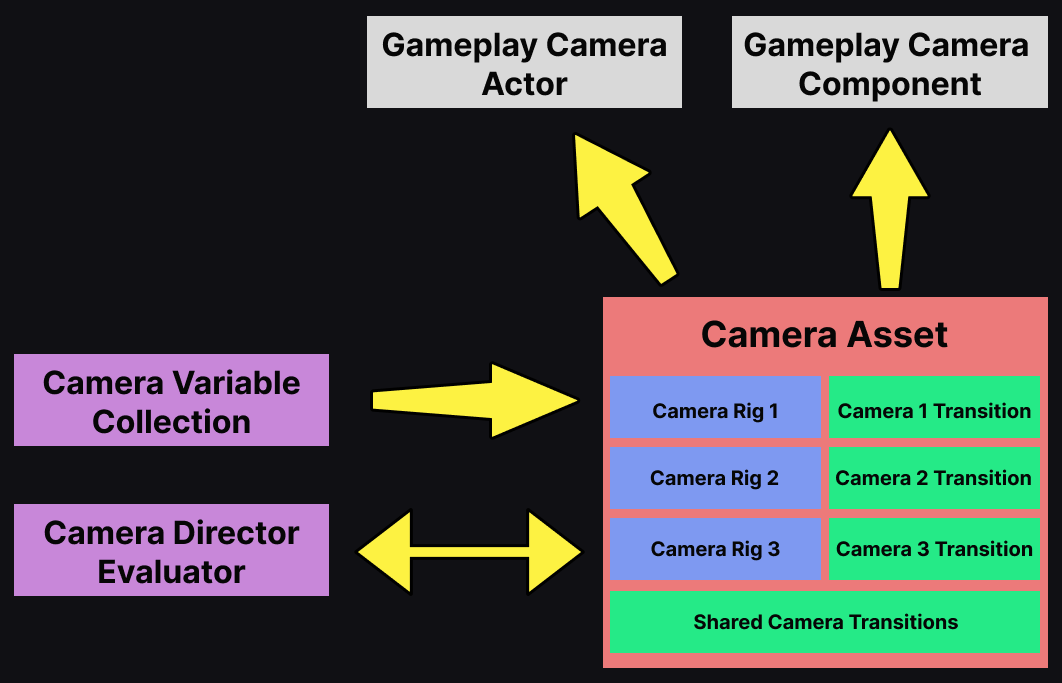
| Component | Description |
|---|---|
| Gameplay Camera Component | This is a Blueprint component that consumes a Camera asset. |
| Gameplay Camera Actor | This is a Blueprint actor that contains a Gameplay Camera component and consumes a Camera asset. |
| Camera Asset | This is an asset that contains data about Camera Rigs, transitions, and the Camera Director. |
| Camera Rigs | Defines the behavior of a camera by using a network of nodes. |
| Camera Transitions | Defines the enter and exit transitions for each Camera Rig. |
| Shared Camera Transitions | Enter and exit transitions that any Camera Rig can use, if no transitions are specified. |
| Camera Director Evaluator | A reference to the Camera Director Evaluator Blueprint class. |
| Camera Director | This manages which Camera Rig is active at any given time. The Director can be one of the following types: Blueprint Camera Director, Single Camera Director, or State Tree Camera Director. |
| Blueprint Camera Director | This is a Blueprint class that contains custom logic to select the active Camera Rig during gameplay. |
| Single Camera Director | This activates the assigned Camera Rig, and contains no selection logic. |
| StateTree Camera Director | This uses a State Tree to select the active Camera Rig. |
| Camera Variable Collection | This contains a collection of variables used to modify properties inside the Camera asset. |