

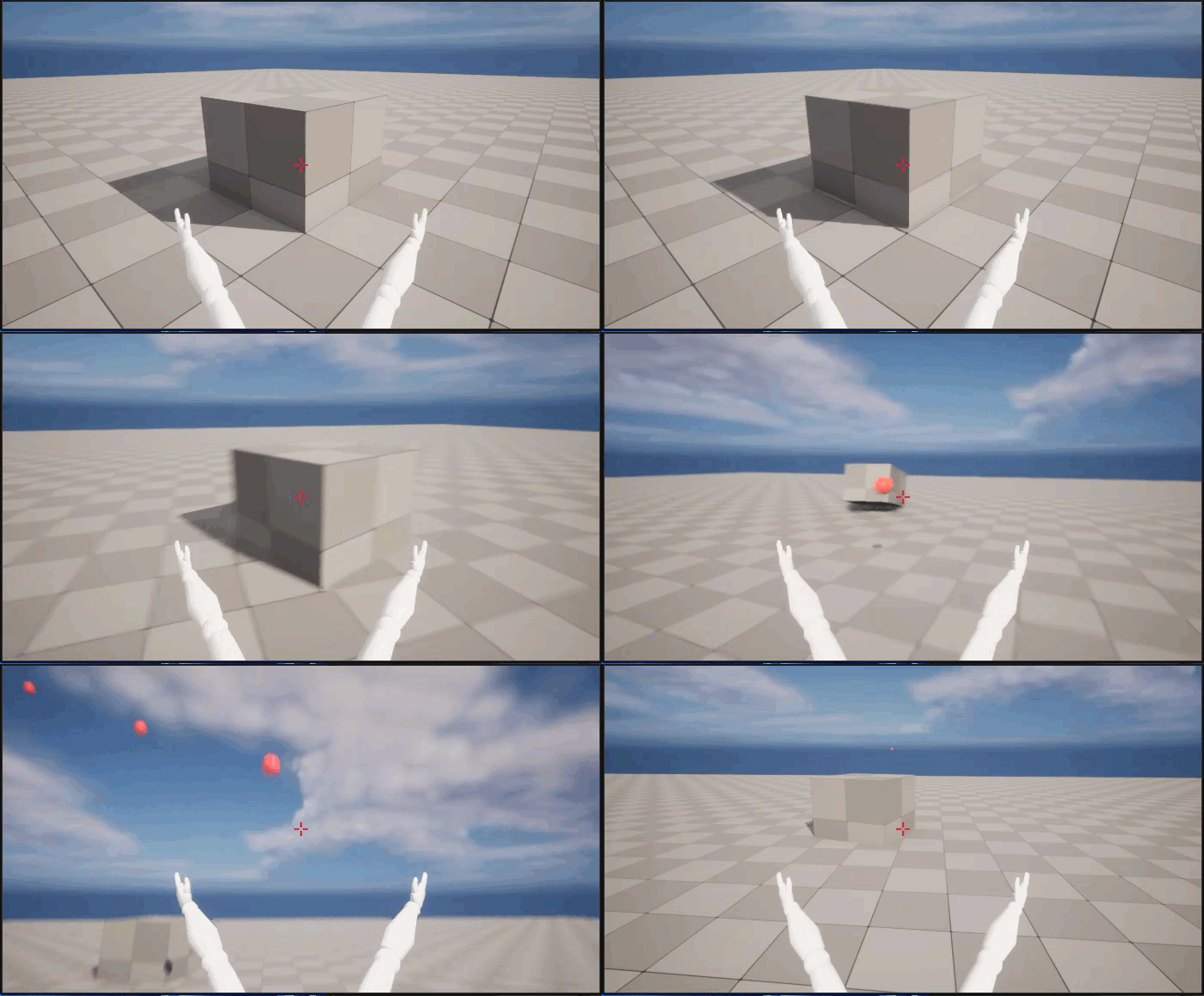
このセクションを終了すると、このような画面になります。
目的
このセクションでは、ファースト パーソン シューター ゲームに発射物を実装する方法を説明します。
目的
このチュートリアルのこのセクションを完了すると、次のことができるようになります。
- 発射物をゲームに追加する
- シューティングを実装する
- 発射物のコリジョンと存続期間を設定する
- 発射物をワールドとインタラクトさせる
- 照準線をビューポートに追加する
ステップ
- 3.1 - 発射物をゲームに追加する
- 3.2 - シューティングを実装する
- 3.3 - 発射物のコリジョンと存続期間を設定する
- 3.4 - 発射物をワールドとインタラクトさせる
- 3.5 - 照準線をビューポートに追加する
3.1 - 発射物をゲームに追加する
キャラクターの設定が完了したので、発射される武器を実装します。手りゅう弾のような単純な発射物を画面の中央から発射し、ワールドに衝突するまで飛び続けるようにプログラムします。このステップでは、入力を追加し、発射物の新しいクラスのコードを作成します。
Fire アクション マッピングを追加する
-
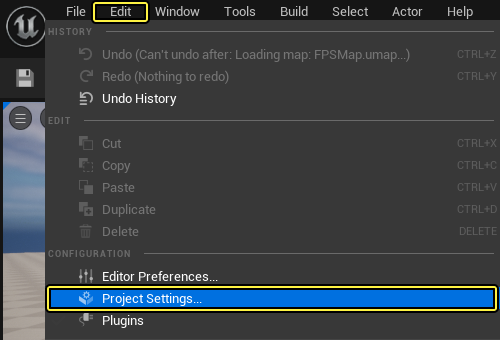
メイン メニュー パネルで [Edit (編集)] をクリックし、[Project Settings (プロジェクト設定)] を選択します。
-
[Project Settings] タブの左側にある [Engine (エンジン)] セクションで、[Input (インプット)] をクリックします。
-
右側にある [Bindings (バインディング)] で、[Action Mappings (アクション マッピング)] の隣にある [+ (プラス)] 記号をクリックします。
-
[Action Mappings] の左側にある 矢印 をクリックします。
-
表示されるテキスト フィールドに「Fire」と入力します。
-
ドロップダウン メニューで、[Left Mouse Button (マウスの左ボタン)] を [Mouse (マウス)] ドロップダウン リストから選択します。
-
ここでの入力設定は次のようになります。
クリックしてフルサイズで表示
- [Project Settings] メニューを閉じます。
発射物クラスを追加する
-
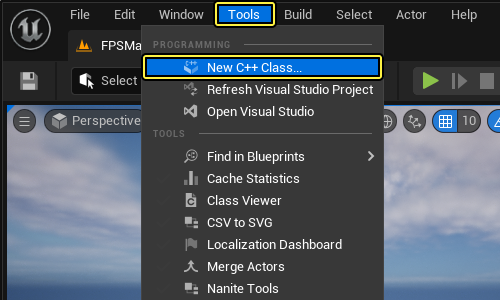
[Tools (ツール)] を メイン メニュー パネルでクリックし、[New C++ Class... (新規 C++ クラス...)] を選択します。
-
[Choose Parent Class (親クラスを選択)] ウィンドウが表示されます。[Actor (アクタ)] を親クラスとして選択し、[Next (次へ)] をクリックします。
クリックしてフルサイズで表示
- 新規クラスに「FPSProjectile」という名前を付けてから、[Create Class (クラスを作成)] をクリックします。
クリックしてフルサイズで表示
USphere コンポーネントを追加する
-
C++ クラスが作成されると、Visual Studio が自動的に、
FPSProjectile.hヘッダ ファイルとFPSProjectile.cpp実装ファイルが開いた状態で表示されます。 -
FPSProjectile.hクラス ヘッダ ファイルに移動します。 -
SphereComponent ヘッダ ファイルを追加します。
FPSProjectile.h
#include "Components/SphereComponent.h"
USphereComponentへの参照をFPSProjectileインターフェースに追加するには、次のコードをpublicアクセス指定子のFPSProjectile.hに追加します。
FPSProjectile.h
// Sphere collision component.
UPROPERTY(VisibleDefaultsOnly, Category = Projectile)
USphereComponent* CollisionComponent;
FPSProjectile.hは次のようになります。
FPSProjectile.h
// Copyright Epic Games, Inc. All Rights Reserved.
#pragma once
#include "CoreMinimal.h"
#include "GameFramework/Actor.h"
#include "Components/SphereComponent.h"
#include "FPSProjectile.generated.h"
UCLASS()
class FPSPROJECT_API AFPSProjectile : public AActor
{
GENERATED_BODY()
public:
// Sets default values for this actor's properties
AFPSProjectile();
protected:
// Called when the game starts or when spawned
virtual void BeginPlay() override;
public:
// Called every frame
virtual void Tick( float DeltaTime ) override;
// Sphere collision component
UPROPERTY(VisibleDefaultsOnly, Category = Projectile)
USphereComponent* CollisionComponent;
};
-
FPSProjectile.cppクラス用の実装ファイルに移動します。 -
次のコードを
AFPSProjectileコンストラクタのPrimaryActorTick.bcanEverTickの後 (FPSProjectile.cpp内) に追加します。
FPSProjectile.cpp
if(!RootComponent)
{
RootComponent = CreateDefaultSubobject<USceneComponent>(TEXT("ProjectileSceneComponent"));
}
if(!CollisionComponent)
{
// Use a sphere as a simple collision representation.
CollisionComponent = CreateDefaultSubobject<USphereComponent>(TEXT("SphereComponent"));
// Set the sphere's collision radius.
CollisionComponent->InitSphereRadius(15.0f);
// Set the root component to be the collision component.
RootComponent = CollisionComponent;
}
シミュレーションで動かすため、CollisionComponent を RootComponent にしています。
FPSProjectile.cppは次のようになります。
FPSProjectile.cpp
// Copyright Epic Games, Inc. All Rights Reserved.
#include "FPSProjectile.h"
// Sets default values
AFPSProjectile::AFPSProjectile()
{
// Set this actor to call Tick() every frame. You can turn this off to improve performance if you don't need it.
PrimaryActorTick.bCanEverTick = true;
if(!RootComponent)
{
RootComponent = CreateDefaultSubobject<USceneComponent>(TEXT("ProjectileSceneComponent"));
}
if(!CollisionComponent)
{
// Use a sphere as a simple collision representation.
CollisionComponent = CreateDefaultSubobject<USphereComponent>(TEXT("SphereComponent"));
// Set the sphere's collision radius.
CollisionComponent->InitSphereRadius(15.0f);
// Set the root component to be the collision component.
RootComponent = CollisionComponent;
}
}
// Called when the game starts or when spawned
void AFPSProjectile::BeginPlay()
{
Super::BeginPlay();
}
// Called every frame
void AFPSProjectile::Tick( float DeltaTime )
{
Super::Tick( DeltaTime );
}
発射物移動コンポーネントを追加する
-
FPSProjectile.hクラス ヘッダ ファイルに移動します。 -
ProjectileMovementComponent ヘッダ ファイルを追加します。
FPSProjectile.h
#include "GameFramework/ProjectileMovementComponent.h"
- 次のコードを
FPSProjectile.hのpublicアクセス指定子の下に追加します。
FPSProjectile.h
// Projectile movement component.
UPROPERTY(VisibleAnywhere, Category = Movement)
UProjectileMovementComponent* ProjectileMovementComponent;
FPSProjectile.hは次のようになります。
FPSProjectile.h
// Copyright Epic Games, Inc. All Rights Reserved.
#pragma once
#include "CoreMinimal.h"
#include "GameFramework/Actor.h"
#include "Components/SphereComponent.h"
#include "GameFramework/ProjectileMovementComponent.h"
#include "FPSProjectile.generated.h"
UCLASS()
class FPSPROJECT_API AFPSProjectile : public AActor
{
GENERATED_BODY()
public:
// Sets default values for this actor's properties
AFPSProjectile();
protected:
// Called when the game starts or when spawned
virtual void BeginPlay() override;
public:
// Called every frame
virtual void Tick( float DeltaTime ) override;
// Sphere collision component.
UPROPERTY(VisibleDefaultsOnly, Category = Projectile)
USphereComponent* CollisionComponent;
// Projectile movement component.
UPROPERTY(VisibleAnywhere, Category = Movement)
UProjectileMovementComponent* ProjectileMovementComponent;
};
-
FPSProjectile.cppクラス用の実装ファイルに移動します。 -
次のコード行を
AFPSProjectileコンストラクタ (FPSProjectile.cpp内) に追加します。
FPSProjectile.cpp
if(!ProjectileMovementComponent)
{
// Use this component to drive this projectile's movement.
ProjectileMovementComponent = CreateDefaultSubobject<UProjectileMovementComponent>(TEXT("ProjectileMovementComponent"));
ProjectileMovementComponent->SetUpdatedComponent(CollisionComponent);
ProjectileMovementComponent->InitialSpeed = 3000.0f;
ProjectileMovementComponent->MaxSpeed = 3000.0f;
ProjectileMovementComponent->bRotationFollowsVelocity = true;
ProjectileMovementComponent->bShouldBounce = true;
ProjectileMovementComponent->Bounciness = 0.3f;
ProjectileMovementComponent->ProjectileGravityScale = 0.0f;
}
FPSProjectile.cppは次のようになります。
FPSProjectile.cpp
// Copyright Epic Games, Inc. All Rights Reserved.
#include "FPSProjectile.h"
// Sets default values
AFPSProjectile::AFPSProjectile()
{
// Set this actor to call Tick() every frame. You can turn this off to improve performance if you don't need it.
PrimaryActorTick.bCanEverTick = true;
if(!RootComponent)
{
RootComponent = CreateDefaultSubobject<USceneComponent>(TEXT("ProjectileSceneComponent"));
}
if(!CollisionComponent)
{
// Use a sphere as a simple collision representation.
CollisionComponent = CreateDefaultSubobject<USphereComponent>(TEXT("SphereComponent"));
// Set the sphere's collision radius.
CollisionComponent->InitSphereRadius(15.0f);
// Set the root component to be the collision component.
RootComponent = CollisionComponent;
}
if(!ProjectileMovementComponent)
{
// Use this component to drive this projectile's movement.
ProjectileMovementComponent = CreateDefaultSubobject<UProjectileMovementComponent>(TEXT("ProjectileMovementComponent"));
ProjectileMovementComponent->SetUpdatedComponent(CollisionComponent);
ProjectileMovementComponent->InitialSpeed = 3000.0f;
ProjectileMovementComponent->MaxSpeed = 3000.0f;
ProjectileMovementComponent->bRotationFollowsVelocity = true;
ProjectileMovementComponent->bShouldBounce = true;
ProjectileMovementComponent->Bounciness = 0.3f;
ProjectileMovementComponent->ProjectileGravityScale = 0.0f;
}
}
// Called when the game starts or when spawned
void AFPSProjectile::BeginPlay()
{
Super::BeginPlay();
}
// Called every frame
void AFPSProjectile::Tick( float DeltaTime )
{
Super::Tick( DeltaTime );
}
発射物の初期速度を設定する
-
FPSProjectile.hクラス ヘッダ ファイルに移動します。 -
次の関数宣言を
FPSProjectile.hのpublicアクセス指定子の下に追加します。
FPSProjectile.h
// Function that initializes the projectile's velocity in the shoot direction.
void FireInDirection(const FVector& ShootDirection);
この関数では物体の発射を処理します。
FPSProjectile.hは次のようになります。
FPSProjectile.h
// Copyright Epic Games, Inc. All Rights Reserved.
#pragma once
#include "CoreMinimal.h"
#include "GameFramework/Actor.h"
#include "Components/SphereComponent.h"
#include "GameFramework/ProjectileMovementComponent.h"
#include "FPSProjectile.generated.h"
UCLASS()
class FPSPROJECT_API AFPSProjectile : public AActor
{
GENERATED_BODY()
public:
// Sets default values for this actor's properties
AFPSProjectile();
protected:
// Called when the game starts or when spawned
virtual void BeginPlay() override;
public:
// Called every frame
virtual void Tick( float DeltaTime ) override;
// Sphere collision component.
UPROPERTY(VisibleDefaultsOnly, Category = Projectile)
USphereComponent* CollisionComponent;
// Projectile movement component.
UPROPERTY(VisibleAnywhere, Category = Movement)
UProjectileMovementComponent* ProjectileMovementComponent;
// Function that initializes the projectile's velocity in the shoot direction.
void FireInDirection(const FVector& ShootDirection);
};
-
FPSProjectile.cppクラス用の実装ファイルに移動します。 -
次の関数定義を
FPSProjectile.cppに追加します。
FPSProjectile.cpp
// Function that initializes the projectile's velocity in the shoot direction.
void AFPSProjectile::FireInDirection(const FVector& ShootDirection)
{
ProjectileMovementComponent->Velocity = ShootDirection * ProjectileMovementComponent->InitialSpeed;
}
ここでは発射方向を指定するだけです。発射物の速度は ProjectileMovementComponent で定義されているからです。
FPSProjectile.cppは次のようになります。
FPSProjectile.cpp
// Copyright Epic Games, Inc. All Rights Reserved.
#include "FPSProjectile.h"
// Sets default values
AFPSProjectile::AFPSProjectile()
{
// Set this actor to call Tick() every frame. You can turn this off to improve performance if you don't need it.
PrimaryActorTick.bCanEverTick = true;
if(!RootComponent)
{
RootComponent = CreateDefaultSubobject<USceneComponent>(TEXT("ProjectileSceneComponent"));
}
if (!CollisionComponent)
{
// Use a sphere as a simple collision representation.
CollisionComponent = CreateDefaultSubobject<USphereComponent>(TEXT("SphereComponent"));
// Set the sphere's collision radius.
CollisionComponent->InitSphereRadius(15.0f);
// Set the root component to be the collision component.
RootComponent = CollisionComponent;
}
if(!ProjectileMovementComponent)
{
// Use this component to drive this projectile's movement.
ProjectileMovementComponent = CreateDefaultSubobject<UProjectileMovementComponent>(TEXT("ProjectileMovementComponent"));
ProjectileMovementComponent->SetUpdatedComponent(CollisionComponent);
ProjectileMovementComponent->InitialSpeed = 3000.0f;
ProjectileMovementComponent->MaxSpeed = 3000.0f;
ProjectileMovementComponent->bRotationFollowsVelocity = true;
ProjectileMovementComponent->bShouldBounce = true;
ProjectileMovementComponent->Bounciness = 0.3f;
ProjectileMovementComponent->ProjectileGravityScale = 0.0f;
}
}
// Called when the game starts or when spawned
void AFPSProjectile::BeginPlay()
{
Super::BeginPlay();
}
// Called every frame
void AFPSProjectile::Tick( float DeltaTime )
{
Super::Tick( DeltaTime );
}
// Function that initializes the projectile's velocity in the shoot direction.
void AFPSProjectile::FireInDirection(const FVector& ShootDirection)
{
ProjectileMovementComponent->Velocity = ShootDirection * ProjectileMovementComponent->InitialSpeed;
}
発射の入力アクションをバインドする
-
Visual Studio の [Solution Explorer (ソリューション エクスプローラー)] に移動し、
FPSCharacter.hクラス ヘッダ ファイルを開きます。 -
次の関数宣言を
FPSCharacter.hのpublicアクセス指定子の下に追加します。
FPSCharacter.h
// Function that handles firing projectiles.
UFUNCTION()
void Fire();
FPSCharacter.hは次のようになります。
FPSCharacter.h
// Copyright Epic Games, Inc. All Rights Reserved.
#pragma once
#include "CoreMinimal.h"
#include "GameFramework/Character.h"
#include "Camera/CameraComponent.h"
#include "Components/CapsuleComponent.h"
#include "FPSCharacter.generated.h"
UCLASS()
class FPSPROJECT_API AFPSCharacter : public ACharacter
{
GENERATED_BODY()
public:
// Sets default values for this character's properties
AFPSCharacter();
protected:
// Called when the game starts or when spawned
virtual void BeginPlay() override;
public:
// Called every frame
virtual void Tick( float DeltaTime ) override;
// Called to bind functionality to input
virtual void SetupPlayerInputComponent(class UInputComponent* PlayerInputComponent) override;
// Handles input for moving forward and backward.
UFUNCTION()
void MoveForward(float Value);
// Handles input for moving right and left.
UFUNCTION()
void MoveRight(float Value);
// Sets jump flag when key is pressed.
UFUNCTION()
void StartJump();
// Clears jump flag when key is released.
UFUNCTION()
void StopJump();
// FPS camera
UPROPERTY(VisibleAnywhere)
UCameraComponent* FPSCameraComponent;
// First-person mesh (arms), visible only to the owning player.
UPROPERTY(VisibleDefaultsOnly, Category = Mesh)
USkeletalMeshComponent* FPSMesh;
// Function that handles firing projectiles.
UFUNCTION()
void Fire();
};
-
Visual Studio の [Solution Explorer] に移動し、
FPSCharacter.cppクラス用の実装ファイルを開きます。 -
Fire関数をバインドするには、次のコードをFPSCharacter.cpp:のSetupPlayerInputComponent関数に追加します。
FPSCharacter.cpp
PlayerInputComponent->BindAction("Fire", IE_Pressed, this, &AFPSCharacter::Fire);
- 次の関数定義を
FPSCharacter.cppに追加します。
FPSCharacter.cpp
void AFPSCharacter::Fire()
{
}
FPSCharacter.cppは次のようになります。
FPSCharacter.cpp
// Copyright Epic Games, Inc. All Rights Reserved.
#include "FPSCharacter.h"
// Sets default values
AFPSCharacter::AFPSCharacter()
{
// Set this character to call Tick() every frame. You can turn this off to improve performance if you don't need it.
PrimaryActorTick.bCanEverTick = true;
// Create a first person camera component.
FPSCameraComponent = CreateDefaultSubobject<UCameraComponent>(TEXT("FirstPersonCamera"));
check(FPSCameraComponent != nullptr);
// Attach the camera component to our capsule component.
FPSCameraComponent->SetupAttachment(CastChecked<USceneComponent, UCapsuleComponent>(GetCapsuleComponent()));
// Position the camera slightly above the eyes.
FPSCameraComponent->SetRelativeLocation(FVector(0.0f, 0.0f, 50.0f + BaseEyeHeight));
// Enable the pawn to control camera rotation.
FPSCameraComponent->bUsePawnControlRotation = true;
// Create a first person mesh component for the owning player.
FPSMesh = CreateDefaultSubobject<USkeletalMeshComponent>(TEXT("FirstPersonMesh"));
check(FPSMesh != nullptr);
// Only the owning player sees this mesh.
FPSMesh->SetOnlyOwnerSee(true);
// Attach the FPS mesh to the FPS camera.
FPSMesh->SetupAttachment(FPSCameraComponent);
// Disable some environmental shadowing to preserve the illusion of having a single mesh.
FPSMesh->bCastDynamicShadow = false;
FPSMesh->CastShadow = false;
// The owning player doesn't see the regular (third-person) body mesh.
GetMesh()->SetOwnerNoSee(true);
}
// Called when the game starts or when spawned
void AFPSCharacter::BeginPlay()
{
Super::BeginPlay();
check(GEngine != nullptr);
// Display a debug message for five seconds.
// The -1 "Key" value argument prevents the message from being updated or refreshed.
GEngine->AddOnScreenDebugMessage(-1, 5.0f, FColor::Red, TEXT("We are using FPSCharacter."));
}
// Called every frame
void AFPSCharacter::Tick( float DeltaTime )
{
Super::Tick( DeltaTime );
}
// Called to bind functionality to input
void AFPSCharacter::SetupPlayerInputComponent(class UInputComponent* PlayerInputComponent)
{
Super::SetupPlayerInputComponent(PlayerInputComponent);
// Set up "movement" bindings.
PlayerInputComponent->BindAxis("MoveForward", this, &AFPSCharacter::MoveForward);
PlayerInputComponent->BindAxis("MoveRight", this, &AFPSCharacter::MoveRight);
// Set up "look" bindings.
PlayerInputComponent->BindAxis("Turn", this, &AFPSCharacter::AddControllerYawInput);
PlayerInputComponent->BindAxis("LookUp", this, &AFPSCharacter::AddControllerPitchInput);
// Set up "action" bindings.
PlayerInputComponent->BindAction("Jump", IE_Pressed, this, &AFPSCharacter::StartJump);
PlayerInputComponent->BindAction("Jump", IE_Released, this, &AFPSCharacter::StopJump);
PlayerInputComponent->BindAction("Fire", IE_Pressed, this, &AFPSCharacter::Fire);
}
void AFPSCharacter::MoveForward(float Value)
{
// Find out which way is "forward" and record that the player wants to move that way.
FVector Direction = FRotationMatrix(Controller->GetControlRotation()).GetScaledAxis(EAxis::X);
AddMovementInput(Direction, Value);
}
void AFPSCharacter::MoveRight(float Value)
{
// Find out which way is "right" and record that the player wants to move that way.
FVector Direction = FRotationMatrix(Controller->GetControlRotation()).GetScaledAxis(EAxis::Y);
AddMovementInput(Direction, Value);
}
void AFPSCharacter::StartJump()
{
bPressedJump = true;
}
void AFPSCharacter::StopJump()
{
bPressedJump = false;
}
void AFPSCharacter::Fire()
{
}
発射物のスポーン位置を定義する
-
FPSProjectileアクタをスポーンする際に、OnFire関数の実装に関して、次の 2 点の考慮事項があります。- 発射物をスポーンする場所。
- 発射物クラス (
FPSCharacterとその派生ブループリントがスポーンする発射物の種類を認識するため)。
カメラ空間のオフセット ベクターを使用して、発射物のスポーン位置を決定します。このパラメータを編集可能にして、BP_FPSCharacter ブループリントで設定し調整できるようにします。最終的に、このデータに基づいて発射物の初期位置を計算できます。
-
FPSCharacter.hクラス ヘッダ ファイルに移動します。 -
次のコードを
FPSCharacter.hのpublicアクセス指定子の下に追加します。
FPSCharacter.h
// Gun muzzle offset from the camera location.
UPROPERTY(EditAnywhere, BlueprintReadWrite, Category = Gameplay)
FVector MuzzleOffset;
EditAnywhere により、ブループリント エディタのデフォルト モード内、またはキャラクターのいずれかのインスタンスの [Details (詳細)] タブで、銃口オフセットの値を変更できます。BlueprintReadWrite 指定子により、ブループリント内で銃口オフセットの値を取得、設定できます。
- 次のコードを
FPSCharacter.hのprotectedアクセス指定子の下に追加します。
FPSCharacter.h
protected:
// Projectile class to spawn.
UPROPERTY(EditDefaultsOnly, Category = Projectile)
TSubclassOf<class AFPSProjectile> ProjectileClass;
EditDefaultsOnly の意味は、発射物クラスをブループリントでデフォルトとして設定できるだけで、ブループリントの各インスタンスではできないということです。
FPSCharacter.hは次のようになります。
FPSCharacter.h
// Copyright Epic Games, Inc. All Rights Reserved.
#pragma once
#include "CoreMinimal.h"
#include "GameFramework/Character.h"
#include "Camera/CameraComponent.h"
#include "Components/CapsuleComponent.h"
#include "FPSCharacter.generated.h"
UCLASS()
class FPSPROJECT_API AFPSCharacter : public ACharacter
{
GENERATED_BODY()
public:
// Sets default values for this character's properties
AFPSCharacter();
protected:
// Called when the game starts or when spawned
virtual void BeginPlay() override;
// Projectile class to spawn.
UPROPERTY(EditDefaultsOnly, Category = Projectile)
TSubclassOf<class AFPSProjectile> ProjectileClass;
public:
// Called every frame
virtual void Tick( float DeltaTime ) override;
// Called to bind functionality to input
virtual void SetupPlayerInputComponent(class UInputComponent* PlayerInputComponent) override;
// Handles input for moving forward and backward.
UFUNCTION()
void MoveForward(float Value);
// Handles input for moving right and left.
UFUNCTION()
void MoveRight(float Value);
// Sets jump flag when key is pressed.
UFUNCTION()
void StartJump();
// Clears jump flag when key is released.
UFUNCTION()
void StopJump();
// Function that fires projectiles.
UFUNCTION()
void Fire();
// FPS camera
UPROPERTY(VisibleAnywhere)
UCameraComponent* FPSCameraComponent;
// First-person mesh (arms), visible only to the owning player.
UPROPERTY(VisibleDefaultsOnly, Category = Mesh)
USkeletalMeshComponent* FPSMesh;
// Gun muzzle offset from the camera location.
UPROPERTY(EditAnywhere, BlueprintReadWrite, Category = Gameplay)
FVector MuzzleOffset;
};
コードをコンパイルしてチェックする
ここで、新しく実装した発射物コードをコンパイルしてチェックします。
-
すべてのヘッダおよび実装ファイルを Visual Studio で保存します。
-
[Solution Explorer] に移動して [FPSProject] を選択します。
-
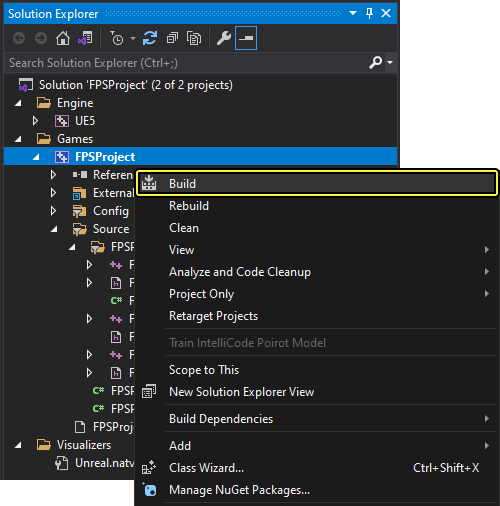
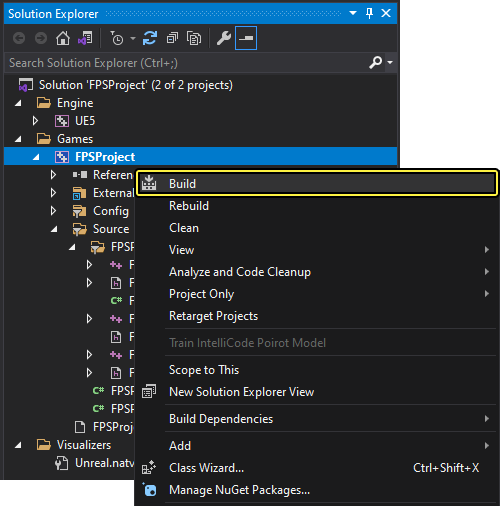
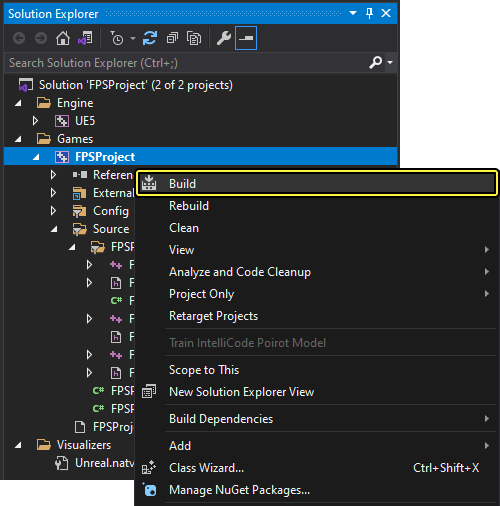
[FPSProject] を右クリックして [Build (ビルド)] を選択し、プロジェクトをコンパイルします。
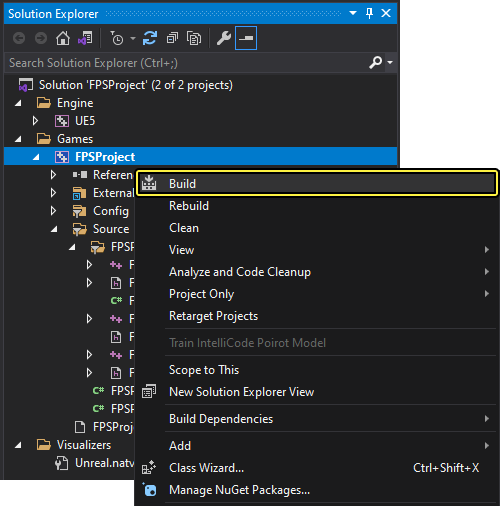
このステップの目的は、次のステップに進む前に、何らかのビルド エラーを検出することです。このチュートリアルの範囲を超えるビルド エラーや警告が発生した場合は、「 (コーディング標準)」や「Unreal Engine API リファレンス」を参照してください。
3.2 - シューティングを実装する
ファースト パーソン シューター キャラクターのシューティングを実装する方法を習得します。
Fire 関数を実装する
-
FPSCharacter.hクラス ヘッダ ファイルに移動します。 -
次のコード行を
FPSCharacter.hに追加します。
FPSCharacter.h
#include "FPSProjectile.h"
-
FPSCharacter.cppクラス用の実装ファイルに移動します。 -
次の
Fire関数定義をFPSCharacter.cppに追加します。
FPSCharacter.cpp
void AFPSCharacter::Fire()
{
// Attempt to fire a projectile.
if (ProjectileClass)
{
// Get the camera transform.
FVector CameraLocation;
FRotator CameraRotation;
GetActorEyesViewPoint(CameraLocation, CameraRotation);
// Set MuzzleOffset to spawn projectiles slightly in front of the camera.
MuzzleOffset.Set(100.0f, 0.0f, 0.0f);
// Transform MuzzleOffset from camera space to world space.
FVector MuzzleLocation = CameraLocation + FTransform(CameraRotation).TransformVector(MuzzleOffset);
// Skew the aim to be slightly upwards.
FRotator MuzzleRotation = CameraRotation;
MuzzleRotation.Pitch += 10.0f;
UWorld* World = GetWorld();
if (World)
{
FActorSpawnParameters SpawnParams;
SpawnParams.Owner = this;
SpawnParams.Instigator = GetInstigator();
// Spawn the projectile at the muzzle.
AFPSProjectile* Projectile = World->SpawnActor<AFPSProjectile>(ProjectileClass, MuzzleLocation, MuzzleRotation, SpawnParams);
if (Projectile)
{
// Set the projectile's initial trajectory.
FVector LaunchDirection = MuzzleRotation.Vector();
Projectile->FireInDirection(LaunchDirection);
}
}
}
}
FPSCharacter.hは次のようになります。
FPSCharacter.h
// Copyright Epic Games, Inc. All Rights Reserved.
#pragma once
#include "CoreMinimal.h"
#include "GameFramework/Character.h"
#include "Camera/CameraComponent.h"
#include "Components/CapsuleComponent.h"
#include "FPSProjectile.h"
#include "FPSCharacter.generated.h"
UCLASS()
class FPSPROJECT_API AFPSCharacter : public ACharacter
{
GENERATED_BODY()
public:
// Sets default values for this character's properties
AFPSCharacter();
protected:
// Called when the game starts or when spawned
virtual void BeginPlay() override;
// Projectile class to spawn.
UPROPERTY(EditAnywhere, Category = Projectile)
TSubclassOf<class AFPSProjectile> ProjectileClass;
public:
// Called every frame
virtual void Tick(float DeltaTime) override;
// Called to bind functionality to input
virtual void SetupPlayerInputComponent(class UIComponent* PlayerInputComponent) override;
// Handles input for moving forward and backward.
UFUNCTION()
void MoveForward(float Value);
// Handles input for moving right and left.
UFUNCTION()
void MoveRight(float Value);
// Sets jump flag when key is pressed.
UFUNCTION()
void StartJump();
// Clears jump flag when key is released.
UFUNCTION()
void StopJump();
// FPS camera
UPROPERTY(VisibleAnywhere)
UCameraComponent* FPSCameraComponent;
// First-person mesh (arms), visible only to the owning player.
UPROPERTY(VisibleDefaultsOnly, Category = Mesh)
USkeletalMeshComponent* FPSMesh;
// Function that fires projectiles.
UFUNCTION()
void Fire();
// Gun muzzle offset from the camera location.
UPROPERTY(EditAnywhere, BlueprintReadWrite, Category = Gameplay)
FVector MuzzleOffset;
};
FPSCharacter.cppは次のようになります。
FPSCharacter.cpp
// Copyright Epic Games, Inc. All Rights Reserved.
#include "FPSCharacter.h"
// Sets default values
AFPSCharacter::AFPSCharacter()
{
// Set this character to call Tick() every frame. You can turn this off to improve performance if you don't need it.
PrimaryActorTick.bCanEverTick = true;
// Create a first person camera component.
FPSCameraComponent = CreateDefaultSubobject<UCameraComponent>(TEXT("FirstPersonCamera"));
check(FPSCameraComponent != nullptr);
// Attach the camera component to our capsule component.
FPSCameraComponent->SetupAttachment(CastChecked<USceneComponent, UCapsuleComponent>(GetCapsuleComponent()));
// Position the camera slightly above the eyes.
FPSCameraComponent->SetRelativeLocation(FVector(0.0f, 0.0f, 50.0f + BaseEyeHeight));
// Enable the Pawn to control camera rotation.
FPSCameraComponent->bUsePawnControlRotation = true;
// Create a first person mesh component for the owning player.
FPSMesh = CreateDefaultSubobject<USkeletalMeshComponent>(TEXT("FirstPersonMesh"));
check(FPSMesh != nullptr);
// Only the owning player sees this mesh.
FPSMesh->SetOnlyOwnerSee(true);
// Attach the FPS mesh to the FPS camera.
FPSMesh->SetupAttachment(FPSCameraComponent);
// Disable some environmental shadowing to preserve the illusion of having a single mesh.
FPSMesh->bCastDynamicShadow = false;
FPSMesh->CastShadow = false;
// The owning player doesn't see the regular (third-person) body mesh.
GetMesh()->SetOwnerNoSee(true);
}
// Called when the game starts or when spawned
void AFPSCharacter::BeginPlay()
{
Super::BeginPlay();
check(GEngine != nullptr);
// Display a debug message for five seconds.
// The -1 "Key" value argument prevents the message from being updated or refreshed.
GEngine->AddOnScreenDebugMessage(-1, 5.0f, FColor::Red, TEXT("We are using FPSCharacter."));
}
// Called every frame
void AFPSCharacter::Tick(float DeltaTime)
{
Super::Tick( DeltaTime );
}
// Called to bind functionality to input
void AFPSCharacter::SetupPlayerInputComponent(UInputComponent* PlayerInputComponent)
{
Super::SetupPlayerInputComponent(PlayerInputComponent);
// Set up "movement" bindings.
PlayerInputComponent->BindAxis("MoveForward", this, &AFPSCharacter::MoveForward);
PlayerInputComponent->BindAxis("MoveRight", this, &AFPSCharacter::MoveRight);
// Set up "look" bindings.
PlayerInputComponent->BindAxis("Turn", this, &AFPSCharacter::AddControllerYawInput);
PlayerInputComponent->BindAxis("LookUp", this, &AFPSCharacter::AddControllerPitchInput);
// Set up "action" bindings.
PlayerInputComponent->BindAction("Jump", IE_Pressed, this, &AFPSCharacter::StartJump);
PlayerInputComponent->BindAction("Jump", IE_Released, this, &AFPSCharacter::StopJump);
PlayerInputComponent->BindAction("Fire", IE_Pressed, this, &AFPSCharacter::Fire);
}
void AFPSCharacter::MoveForward(float Value)
{
// Find out which way is "forward" and record that the player wants to move that way.
FVector Direction = FRotationMatrix(Controller->GetControlRotation()).GetScaledAxis(EAxis::X);
AddMovementInput(Direction, Value);
}
void AFPSCharacter::MoveRight(float Value)
{
// Find out which way is "right" and record that the player wants to move that way.
FVector Direction = FRotationMatrix(Controller->GetControlRotation()).GetScaledAxis(EAxis::Y);
AddMovementInput(Direction, Value);
}
void AFPSCharacter::StartJump()
{
bPressedJump = true;
}
void AFPSCharacter::StopJump()
{
bPressedJump = false;
}
void AFPSCharacter::Fire()
{
// Attempt to fire a projectile.
if (ProjectileClass)
{
// Get the camera transform.
FVector CameraLocation;
FRotator CameraRotation;
GetActorEyesViewPoint(CameraLocation, CameraRotation);
// Set MuzzleOffset to spawn projectiles slightly in front of the camera.
MuzzleOffset.Set(100.0f, 0.0f, 0.0f);
// Transform MuzzleOffset from camera space to world space.
FVector MuzzleLocation = CameraLocation + FTransform(CameraRotation).TransformVector(MuzzleOffset);
// Skew the aim to be slightly upwards.
FRotator MuzzleRotation = CameraRotation;
MuzzleRotation.Pitch += 10.0f;
UWorld* World = GetWorld();
if (World)
{
FActorSpawnParameters SpawnParams;
SpawnParams.Owner = this;
SpawnParams.Instigator = GetInstigator();
// Spawn the projectile at the muzzle.
AFPSProjectile* Projectile = World->SpawnActor<AFPSProjectile>(ProjectileClass, MuzzleLocation, MuzzleRotation, SpawnParams);
if (Projectile)
{
// Set the projectile's initial trajectory.
FVector LaunchDirection = MuzzleRotation.Vector();
Projectile->FireInDirection(LaunchDirection);
}
}
}
}
-
FPSCharacter.hとFPSCharacter.cppを Visual Studio で保存します。 -
[Solution Explorer] に移動して [FPSProject] を選択します。
-
[FPSProject] を右クリックして [Build] を選択し、プロジェクトをコンパイルします。
発射物メッシュをインポートする
先に進む前に、次のリンクからサンプル メッシュをダウンロードして展開してください。
-
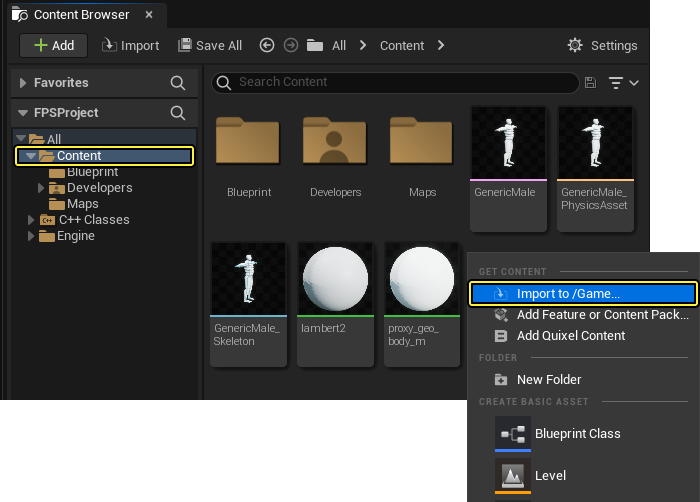
Unreal Engine を開き、コンテンツ ブラウザ に移動して「Content」フォルダを開きます。
-
コンテンツ ブラウザ のファイル ウィンドウ内を右クリックして、[Import Asset (アセットのインポート)] ダイアログ ウィンドウを開きます。
右クリックのインポートについて説明しましたが、コンテンツをインポートするには 3 つの方法があります。コンテンツのインポート方法については、「アセットを直接インポートする」を参照してください。
-
[Import to /Game... (/Game にインポート...)] をクリックして、[Import (インポート)] ダイアログ ウィンドウを開きます。
-
「Sphere.fbx」メッシュ ファイルをダウンロードしたフォルダで見つけて選択します。
-
[Open (開く)] をクリックして、メッシュのプロジェクトへのインポートを開始します。
-
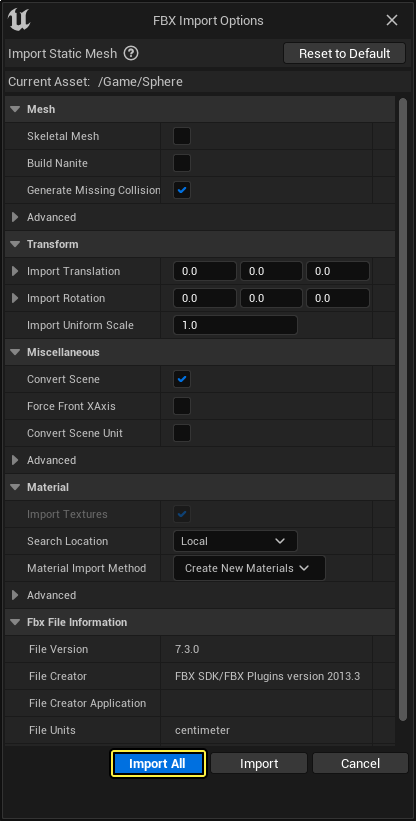
[FBX Import Options (FBX インポート オプション)] ダイアログ ウィンドウが表示されます。[Import All (すべてインポート)] をクリックすると、メッシュがプロジェクトに追加されます。
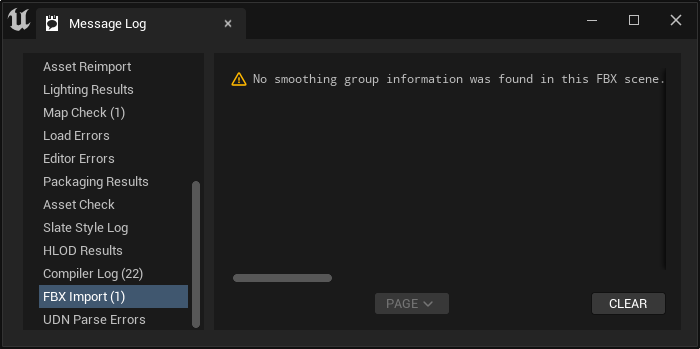
スムージング グループに関する次のエラーを無視します。
このメッシュではファースト パーソン メッシュ セットアップがまだ表示されます。後のセクションでセットアップするアニメーションと連動します。
-
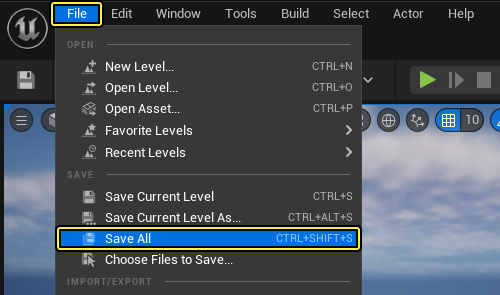
メイン メニュー パネルで [File (ファイル)] をクリックし、[Save All (全て保存)] を選択してインポートされたメッシュを保存します。
発射物のメッシュを追加する
-
Visual Studio を開き、[Solution Explorer] に移動します。
-
[Solution Explorer] で
FPSProjectile.hクラス ヘッダ ファイルを開きます。 -
次のコードを
FPSProjectile.hのpublicアクセス指定子の下に追加します。
FPSProjectile.h
// Projectile mesh
UPROPERTY(VisibleDefaultsOnly, Category = Projectile)
UStaticMeshComponent* ProjectileMeshComponent;
-
Navigate to the Solution Explorer in the Visual Studio and open the
FPSProjectile.cppclass implementation file. -
Add the following code to the constructor in
FPSProjectile.cpp:
FPSProjectile.cpp
if(!ProjectileMeshComponent)
{
ProjectileMeshComponent = CreateDefaultSubobject<UStaticMeshComponent>(TEXT("ProjectileMeshComponent"));
static ConstructorHelpers::FObjectFinder<UStaticMesh>Mesh(TEXT("[ADD STATIC MESH ASSET REFERENCE]"));
if(Mesh.Succeeded())
{
ProjectileMeshComponent->SetStaticMesh(Mesh.Object);
}
}
-
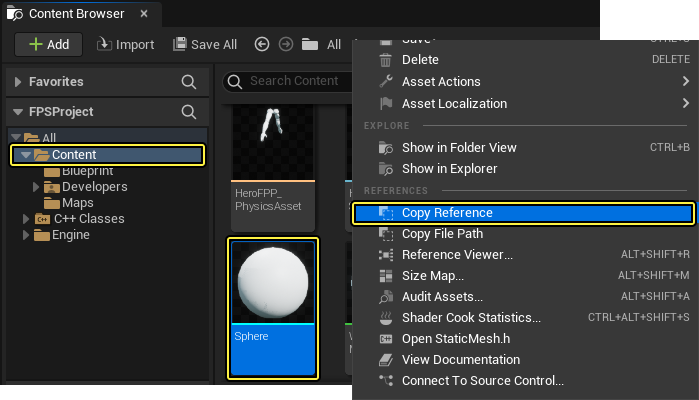
Unreal Editor を開いて コンテンツ ブラウザ に移動し、Sphere スタティックメッシュを右クリックして [Copy Reference (参照をコピー)] を選択します。
-
Visual Studio を開いて
FPSProjectile.cppのProjectileMeshComponentコードに戻り、[ADD STATIC MESH ASSET REFERENCE]をコピーした参照で置き換えます。コードは次のようになります。
FPSProjectile.cpp
if(!ProjectileMeshComponent)
{
ProjectileMeshComponent = CreateDefaultSubobject<UStaticMeshComponent>(TEXT("ProjectileMeshComponent"));
static ConstructorHelpers::FObjectFinder<UStaticMesh>Mesh(TEXT("'/Game/Sphere.Sphere'"));
if(Mesh.Succeeded())
{
ProjectileMeshComponent->SetStaticMesh(Mesh.Object);
}
}
アセットのリファレンス パスは、コンテンツ ブラウザで Sphere メッシュを保存した場所により変わります。また、コピーしたアセットのリファレンスを貼り付けたとき、リファレンスには、アセットのリファレンス パスの前にアセットのタイプ名が含まれます。この場合は、StaticMesh'/Game/Sphere.Sphere' です。必ずアセットのタイプ名 (StaticMesh など) をリファレンス パスから削除します。
FPSProjectile.hは次のようになります。
FPSProjectile.h
// Copyright Epic Games, Inc. All Rights Reserved.
#pragma once
#include "CoreMinimal.h"
#include "GameFramework/Actor.h"
#include "Components/SphereComponent.h"
#include "GameFramework/ProjectileMovementComponent.h"
#include "FPSProjectile.generated.h"
UCLASS()
class FPSPROJECT_API AFPSProjectile : public AActor
{
GENERATED_BODY()
public:
// Sets default values for this actor's properties
AFPSProjectile();
protected:
// Called when the game starts or when spawned
virtual void BeginPlay() override;
public:
// Called every frame
virtual void Tick(float DeltaTime) override;
// Sphere collision component
UPROPERTY(VisibleDefaultsOnly, Category = Projectile)
USphereComponent* CollisionComponent;
// Projectile movement component
UPROPERTY(VisibleAnywhere, Category = Movement)
UProjectileMovementComponent* ProjectileMovementComponent;
// Function that initializes the projectile's velocity in the shoot direction.
void FireInDirection(const FVector& ShootDirection);
// Projectile mesh
UPROPERTY(VisibleDefaultsOnly, Category = Projectile)
UStaticMeshComponent* ProjectileMeshComponent;
};
FPSProjectile.cppは次のようになります。
FPSProjectile.cpp
// Copyright Epic Games, Inc. All Rights Reserved.
#include "FPSProjectile.h"
// Sets default values
AFPSProjectile::AFPSProjectile()
{
// Set this actor to call Tick() every frame. You can turn this off to improve performance if you don't need it.
PrimaryActorTick.bCanEverTick = true;
if (!RootComponent)
{
RootComponent = CreateDefaultSubobject<USceneComponent>(TEXT("ProjectileSceneComponent"));
}
if (!CollisionComponent)
{
// Use a sphere as a simple collision representation.
CollisionComponent = CreateDefaultSubobject<USphereComponent>(TEXT("SphereComponent"));
// Set the sphere's collision radius.
CollisionComponent->InitSphereRadius(15.0f);
// Set the root component to be the collision component.
RootComponent = CollisionComponent;
}
if (!ProjectileMovementComponent)
{
// Use this component to drive this projectile's movement.
ProjectileMovementComponent = CreateDefaultSubobject<UProjectileMovementComponent>(TEXT("ProjectileMovementComponent"));
ProjectileMovementComponent->SetUpdatedComponent(CollisionComponent);
ProjectileMovementComponent->InitialSpeed = 3000.0f;
ProjectileMovementComponent->MaxSpeed = 3000.0f;
ProjectileMovementComponent->bRotationFollowsVelocity = true;
ProjectileMovementComponent->bShouldBounce = true;
ProjectileMovementComponent->Bounciness = 0.3f;
ProjectileMovementComponent->ProjectileGravityScale = 0.0f;
}
if (!ProjectileMeshComponent)
{
ProjectileMeshComponent = CreateDefaultSubobject<UStaticMeshComponent>(TEXT("ProjectileMeshComponent"));
static ConstructorHelpers::FObjectFinder<UStaticMesh>Mesh(TEXT("'/Game/Sphere.Sphere'"));
if (Mesh.Succeeded())
{
ProjectileMeshComponent->SetStaticMesh(Mesh.Object);
}
}
}
// Called when the game starts or when spawned
void AFPSProjectile::BeginPlay()
{
Super::BeginPlay();
}
// Called every frame
void AFPSProjectile::Tick(float DeltaTime)
{
Super::Tick(DeltaTime);
}
// Function that initializes the projectile's velocity in the shoot direction.
void AFPSProjectile::FireInDirection(const FVector& ShootDirection)
{
ProjectileMovementComponent->Velocity = ShootDirection * ProjectileMovementComponent->InitialSpeed;
}
-
FPSProjectile.hとFPSProjectile.cppを Visual Studio で保存します。 -
[Solution Explorer] に移動して [FPSProject] を選択します。
-
[FPSProject] を右クリックして [Build] を選択し、プロジェクトをコンパイルします。
発射物のマテリアルを追加する
- Visual Studio で
FPSProjectile.hに移動し、次のコードをFPSProjectile.hのpublicアクセス指定子の下に追加します。
FPSProjectile.h
// Projectile material
UPROPERTY(VisibleDefaultsOnly, Category = Movement)
UMaterialInstanceDynamic* ProjectileMaterialInstance;
FPSProjectile.cppに移動し、次のコードをif (!ProjectileMeshComponent)コンストラクタの下に追加します。
FPSProjectile.cpp
static ConstructorHelpers::FObjectFinder<UMaterial>Material(TEXT("[ADD MATERIAL ASSET REFERENCE]"));
if (Material.Succeeded())
{
ProjectileMaterialInstance = UMaterialInstanceDynamic::Create(Material.Object, ProjectileMeshComponent);
}
ProjectileMeshComponent->SetMaterial(0, ProjectileMaterialInstance);
ProjectileMeshComponent->SetRelativeScale3D(FVector(0.09f, 0.09f, 0.09f));
ProjectileMeshComponent->SetupAttachment(RootComponent);
-
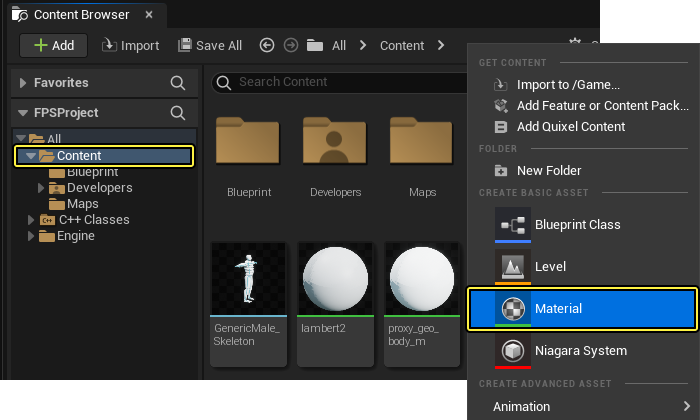
Unreal Engine を開き、コンテンツ ブラウザ の「Content」フォルダに移動します。コンテンツ ブラウザ のファイル ウィンドウ内を右クリックし、[Material (マテリアル)] を選択します。
-
新しいマテリアルに「SphereMaterial」という名前を付けます。
-
新規マテリアルのノード グラフを次のようなプロパティで設定します。
- Base Color: Base Color ピンからワイヤーを引き出すと表示されるウィンドウで Constant3Vector ノードを検索して選択し、「(R:1; G:0; B:0)」に設定します
- Specular: Specular ピンからワイヤーを引き出すと表示されるウィンドウで Constant ノードを検索して選択し、値 を「0.5」に設定します
- Emissive Color: Emissive Color からワイヤーを引き出すと表示されるウィンドウで Constant ノードを検索して選択し、値 を「0.05」に設定します
クリックしてフルサイズで表示
このステップでは、基本的なマテリアル アセットを作成します。複雑なマテリアルの作成方法を習得するには、マテリアルの使用と作成方法を参照してください。
-
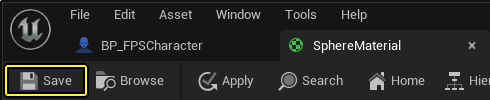
新規マテリアルのノード グラフを設定した後、[Save (保存)] をクリックし、コンテンツ ブラウザ を開きます。
-
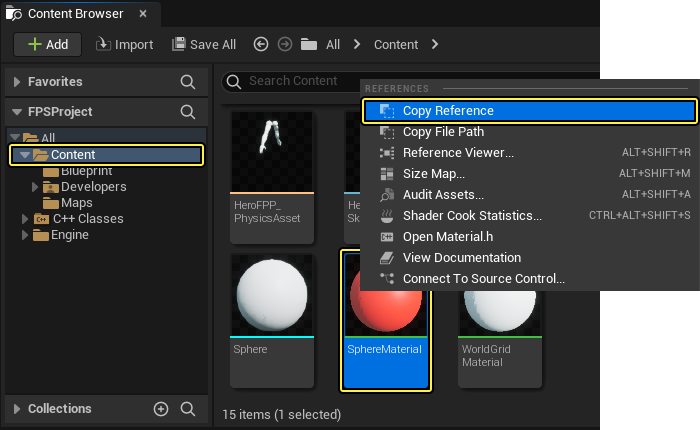
Sphere マテリアルを右クリックし、[Copy Reference] を選択します。
-
FPSProjectile.cppのProjectileMeshComponentコードに戻り、[ADD MATERIAL ASSET REFERENCE]をコピーした参照で置き換えます。コードは次のようになります。
FPSProjectile.cpp
static ConstructorHelpers::FObjectFinder<UMaterial>Material(TEXT("'/Game/SphereMaterial.SphereMaterial'"));
if (Material.Succeeded())
{
ProjectileMaterialInstance = UMaterialInstanceDynamic::Create(Material.Object, ProjectileMeshComponent);
}
ProjectileMeshComponent->SetMaterial(0, ProjectileMaterialInstance);
ProjectileMeshComponent->SetRelativeScale3D(FVector(0.09f, 0.09f, 0.09f));
ProjectileMeshComponent->SetupAttachment(RootComponent);
アセットのリファレンス パスは、コンテンツ ブラウザで Sphere マテリアルを保存した場所により変わります。また、コピーしたアセットのリファレンスを貼り付けたとき、リファレンスには、アセットのリファレンス パスの前にアセットのタイプ名が含まれます。この場合は、Material'/Game/Sphere.Sphere' です。必ずアセットのタイプ名 (Material など) をリファレンス パスから削除します。
FPSProjectile.hは次のようになります。
FPSProjectile.h
// Copyright Epic Games, Inc. All Rights Reserved.
#pragma once
#include "CoreMinimal.h"
#include "GameFramework/Actor.h"
#include "Components/SphereComponent.h"
#include "GameFramework/ProjectileMovementComponent.h"
#include "FPSProjectile.generated.h"
UCLASS()
class FPSPROJECT_API AFPSProjectile : public AActor
{
GENERATED_BODY()
public:
// Sets default values for this actor's properties
AFPSProjectile();
protected:
// Called when the game starts or when spawned
virtual void BeginPlay() override;
public:
// Called every frame
virtual void Tick(float DeltaTime) override;
// Sphere collision component
UPROPERTY(VisibleDefaultsOnly, Category = Projectile)
USphereComponent* CollisionComponent;
// Projectile movement component
UPROPERTY(VisibleAnywhere, Category = Movement)
UProjectileMovementComponent* ProjectileMovementComponent;
// Function that initializes the projectile's velocity in the shoot direction.
void FireInDirection(const FVector& ShootDirection);
// Projectile mesh
UPROPERTY(VisibleDefaultsOnly, Category = Projectile)
UStaticMeshComponent* ProjectileMeshComponent;
// Projectile material
UPROPERTY(VisibleDefaultsOnly, Category = Movement)
UMaterialInstanceDynamic* ProjectileMaterialInstance;
};
FPSProjectile.cppは次のようになります。
FPSProjectile.cpp
// Copyright Epic Games, Inc. All Rights Reserved.
#include "FPSProjectile.h"
// Sets default values
AFPSProjectile::AFPSProjectile()
{
// Set this actor to call Tick() every frame. You can turn this off to improve performance if you don't need it.
PrimaryActorTick.bCanEverTick = true;
if (!RootComponent)
{
RootComponent = CreateDefaultSubobject<USceneComponent>(TEXT("ProjectileSceneComponent"));
}
if (!CollisionComponent)
{
// Use a sphere as a simple collision representation.
CollisionComponent = CreateDefaultSubobject<USphereComponent>(TEXT("SphereComponent"));
// Set the sphere's collision radius.
CollisionComponent->InitSphereRadius(15.0f);
// Set the root component to be the collision component.
RootComponent = CollisionComponent;
}
if (!ProjectileMovementComponent)
{
// Use this component to drive this projectile's movement.
ProjectileMovementComponent = CreateDefaultSubobject<UProjectileMovementComponent>(TEXT("ProjectileMovementComponent"));
ProjectileMovementComponent->SetUpdatedComponent(CollisionComponent);
ProjectileMovementComponent->InitialSpeed = 3000.0f;
ProjectileMovementComponent->MaxSpeed = 3000.0f;
ProjectileMovementComponent->bRotationFollowsVelocity = true;
ProjectileMovementComponent->bShouldBounce = true;
ProjectileMovementComponent->Bounciness = 0.3f;
ProjectileMovementComponent->ProjectileGravityScale = 0.0f;
}
if (!ProjectileMeshComponent)
{
ProjectileMeshComponent = CreateDefaultSubobject<UStaticMeshComponent>(TEXT("ProjectileMeshComponent"));
static ConstructorHelpers::FObjectFinder<UStaticMesh>Mesh(TEXT("'/Game/Sphere.Sphere'"));
if (Mesh.Succeeded())
{
ProjectileMeshComponent->SetStaticMesh(Mesh.Object);
}
static ConstructorHelpers::FObjectFinder<UMaterial>Material(TEXT("'/Game/SphereMaterial.SphereMaterial'"));
if (Material.Succeeded())
{
ProjectileMaterialInstance = UMaterialInstanceDynamic::Create(Material.Object, ProjectileMeshComponent);
}
ProjectileMeshComponent->SetMaterial(0, ProjectileMaterialInstance);
ProjectileMeshComponent->SetRelativeScale3D(FVector(0.09f, 0.09f, 0.09f));
ProjectileMeshComponent->SetupAttachment(RootComponent);
}
}
// Called when the game starts or when spawned
void AFPSProjectile::BeginPlay()
{
Super::BeginPlay();
}
// Called every frame
void AFPSProjectile::Tick(float DeltaTime)
{
Super::Tick(DeltaTime);
}
// Function that initializes the projectile's velocity in the shoot direction.
void AFPSProjectile::FireInDirection(const FVector& ShootDirection)
{
ProjectileMovementComponent->Velocity = ShootDirection * ProjectileMovementComponent->InitialSpeed;
}
-
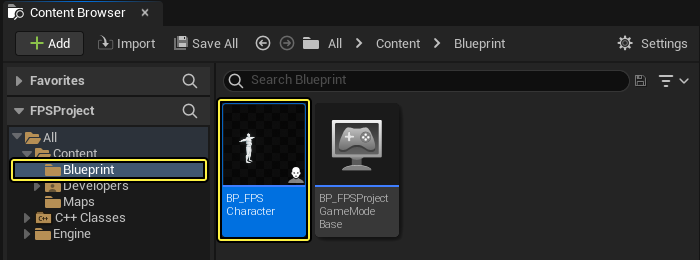
UE を開き、コンテンツ ブラウザ の「Blueprints」フォルダに移動して「BP_FPSCharacter」ファイルを開きます。
-
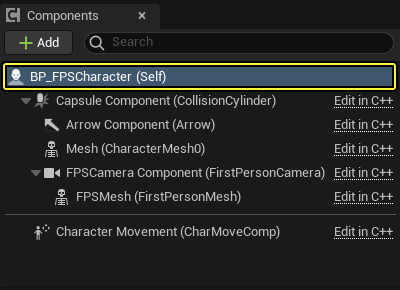
フル ブループリント エディタ を開き (必要な場合)、[Components (コンポーネント)] パネルに移動して [BP_FPSCharacter (Self)] コンポーネントを選択します。
-
開いている ブループリント エディタ の[Details] パネルに移動します。
-
[Projectile (発射物)] セクションを見つけて、[Projectile Class] の隣にあるドロップダウンから [FPSProjectile] を選択します。
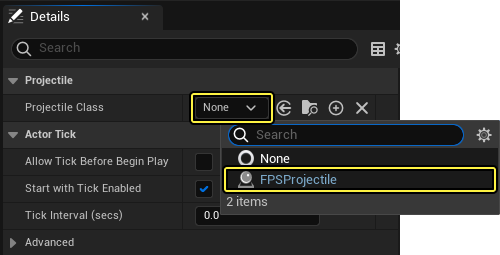
ドロップダウン メニューで [FPSProjectile] が見つからない場合は、Unreal Engine を再実行してください。
-
[Compile (コンパイル)] ボタンと [Save] ボタンを順にクリックします。
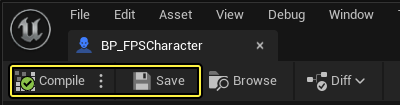
-
Visual Studio を開き、[Solution Explorer] に移動して [FPSProject] を選択します。
-
[FPSProject] を右クリックして [Build] を選択し、プロジェクトをコンパイルします。
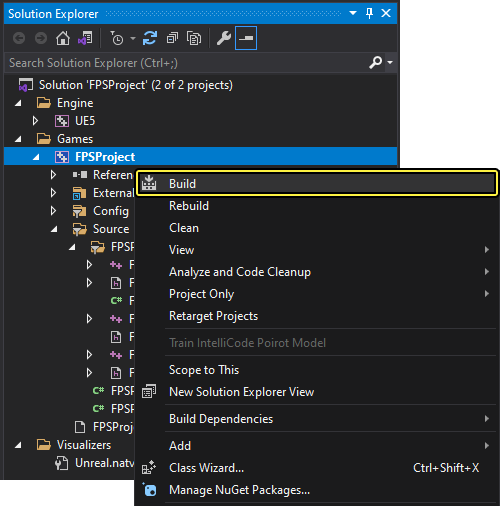
-
ゲームを PIE モードで実行して、スタティックメッシュやマテリアルがシーンにスポーンされていることを確認します。
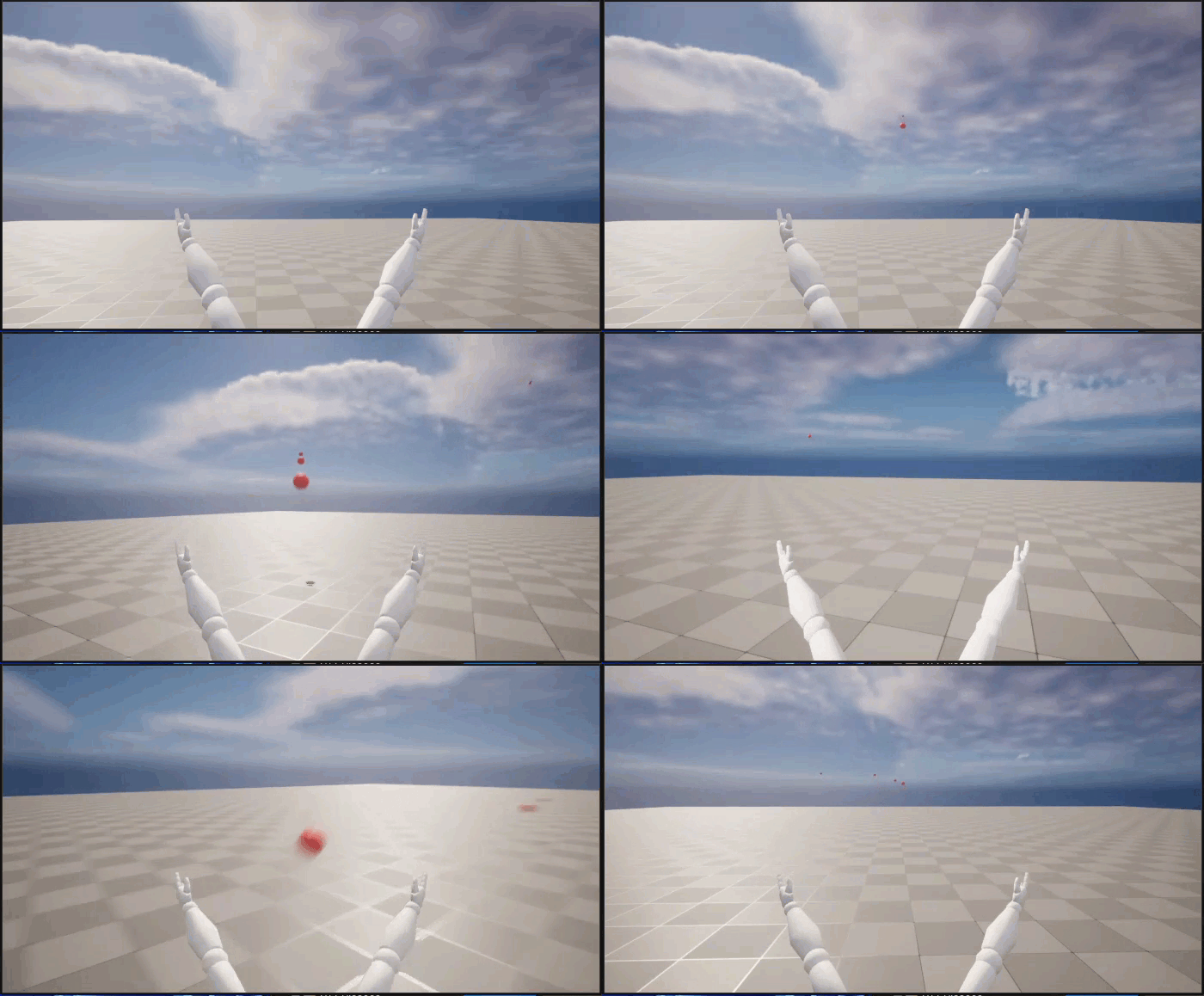
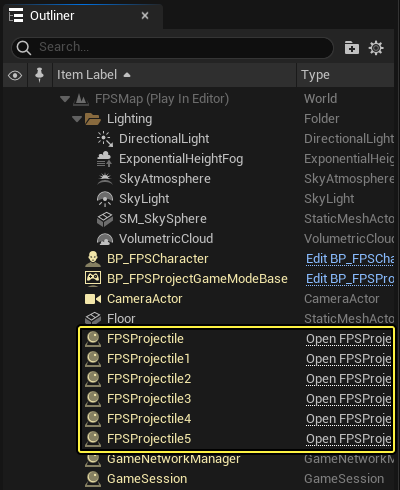
弾を発射すると、[Outliner (アウトライナー)] で発射物の数が増えていくのがわかります。これは、存続期間を定義していないためです。
次のセクションのチュートリアルでは、発射物の初期存続期間を定義する方法を示します。
3.3 - 発射物のコリジョンと存続期間を設定する
現時点で発射物は次のようになっています。
- 無限に存続 (シーン アウトライナーから消えない)
- ワールドの他のオブジェクトと衝突しない
このステップでは、発射物のコリジョンと存続期間を設定します。
発射物の存続期間を制限する
-
Visual Studio を開き、[Solution Explorer] に移動します。
-
[Solution Explorer] で
FPSProjectile.cppクラス用の実装ファイルを開きます。 -
次のコードを
FPSProjectile.cppのAFPSProjectile::AFPSProjectile()コンストラクタに追加し、発射物の存続期間を設定します。
FPSProjectile.cpp
// Delete the projectile after 3 seconds.
InitialLifeSpan = 3.0f;
FPSProjectile.cppshould look like the following:
FPSProjectile.cpp
// Copyright Epic Games, Inc. All Rights Reserved.
#include "FPSProjectile.h"
// Sets default values
AFPSProjectile::AFPSProjectile()
{
// Set this actor to call Tick() every frame. You can turn this off to improve performance if you don't need it.
PrimaryActorTick.bCanEverTick = true;
if (!RootComponent)
{
RootComponent = CreateDefaultSubobject<USceneComponent>(TEXT("ProjectileSceneComponent"));
}
if (!CollisionComponent)
{
// Use a sphere as a simple collision representation.
CollisionComponent = CreateDefaultSubobject<USphereComponent>(TEXT("SphereComponent"));
// Set the sphere's collision radius.
CollisionComponent->InitSphereRadius(15.0f);
// Set the root component to be the collision component.
RootComponent = CollisionComponent;
}
if (!ProjectileMovementComponent)
{
// Use this component to drive this projectile's movement.
ProjectileMovementComponent = CreateDefaultSubobject<UProjectileMovementComponent>(TEXT("ProjectileMovementComponent"));
ProjectileMovementComponent->SetUpdatedComponent(CollisionComponent);
ProjectileMovementComponent->InitialSpeed = 3000.0f;
ProjectileMovementComponent->MaxSpeed = 3000.0f;
ProjectileMovementComponent->bRotationFollowsVelocity = true;
ProjectileMovementComponent->bShouldBounce = true;
ProjectileMovementComponent->Bounciness = 0.3f;
ProjectileMovementComponent->ProjectileGravityScale = 0.0f;
}
if (!ProjectileMeshComponent)
{
ProjectileMeshComponent = CreateDefaultSubobject<UStaticMeshComponent>(TEXT("ProjectileMeshComponent"));
static ConstructorHelpers::FObjectFinder<UStaticMesh>Mesh(TEXT("'/Game/Sphere.Sphere'"));
if (Mesh.Succeeded())
{
ProjectileMeshComponent->SetStaticMesh(Mesh.Object);
}
static ConstructorHelpers::FObjectFinder<UMaterial>Material(TEXT("'/Game/SphereMaterial.SphereMaterial'"));
if (Material.Succeeded())
{
ProjectileMaterialInstance = UMaterialInstanceDynamic::Create(Material.Object, ProjectileMeshComponent);
}
ProjectileMeshComponent->SetMaterial(0, ProjectileMaterialInstance);
ProjectileMeshComponent->SetRelativeScale3D(FVector(0.09f, 0.09f, 0.09f));
ProjectileMeshComponent->SetupAttachment(RootComponent);
}
// Delete the projectile after 3 seconds.
InitialLifeSpan = 3.0f;
}
// Called when the game starts or when spawned
void AFPSProjectile::BeginPlay()
{
Super::BeginPlay();
}
// Called every frame
void AFPSProjectile::Tick(float DeltaTime)
{
Super::Tick(DeltaTime);
}
// Function that initializes the projectile's velocity in the shoot direction.
void AFPSProjectile::FireInDirection(const FVector& ShootDirection)
{
ProjectileMovementComponent->Velocity = ShootDirection * ProjectileMovementComponent->InitialSpeed;
}
-
ファイルを保存します。
-
[Solution Explorer] に移動して [FPSProject] を選択します。
-
[FPSProject] を右クリックして [Build] を選択し、プロジェクトをコンパイルします。
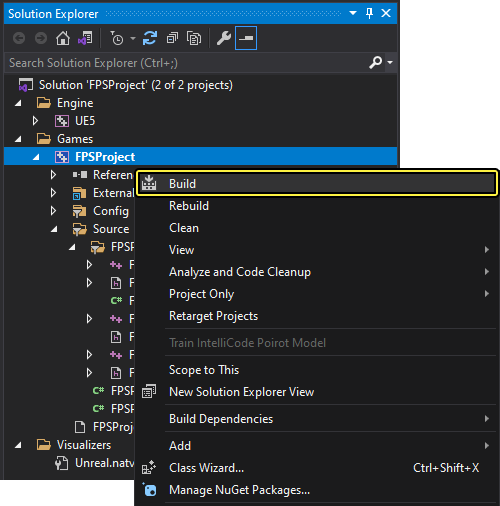
-
発射物が 3 秒後に破棄されるかどうかを確認するために、ゲームを PIE モードで実行します。
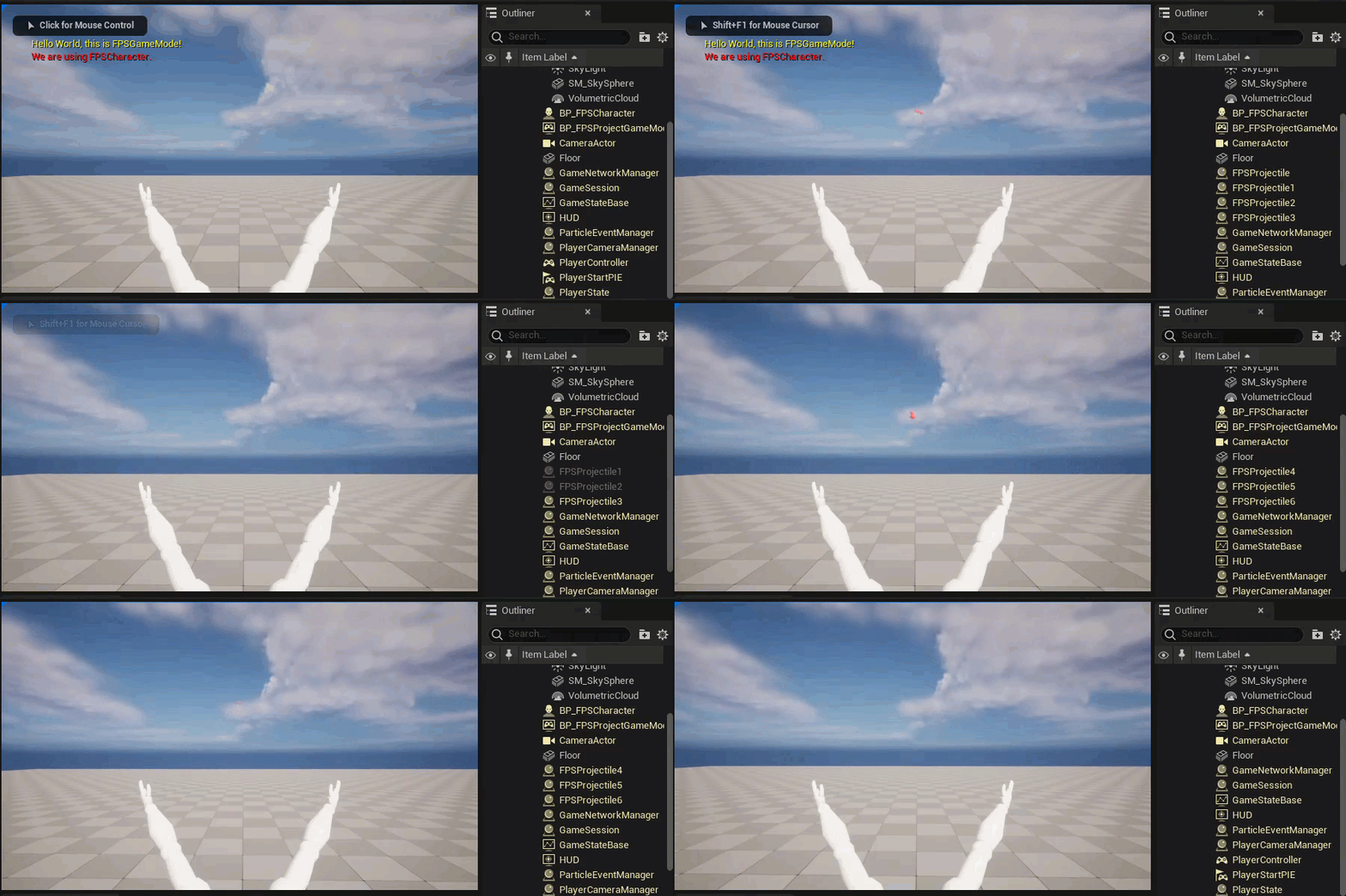
[Outliner] で確認すると、スポーンされた発射物が 3 秒後にシーンから消えます。
発射物のコリジョン設定を編集する
Unreal Engine には複数のプリセット コリジョン チャンネルがパッケージされています。ただしエンジンには、ゲーム プロジェクトで利用できる、カスタマイズ可能なチャンネルも用意されています。
- カスタム仕様のコリジョン チャンネルを作成するには、Unreal Engine に移動して [Project Settings] を開き、左側にある [Engine (エンジン)] セクションで [Collision (コリジョン)] を選択したら、右側にある [Preset (プリセット)] セクションを展開します。
クリックしてフルサイズで表示
-
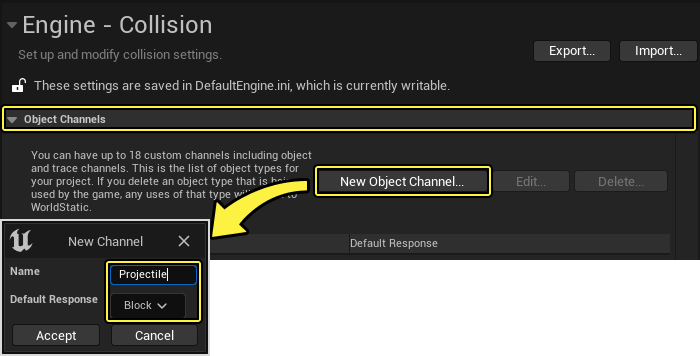
[Object Channels (オブジェクト チャンネル)] に移動して [New Object Channel... (新規のオブジェクトチャンネル...)] を選択し、新しいコリジョン チャンネルを作成します。新規コリジョン チャンネルに「Projectile」という名前を付けて、[Default Response (デフォルト応答)] が「Block」に設定されていることを確認してから、[Accept (承認)] をクリックします。
-
[Preset] で [New... (新規...)] を選択し、新規プロファイルに「Projectile」という名前を付けます。次の画像を参照してコリジョン プリセットを設定し、[Accept] をクリックします。
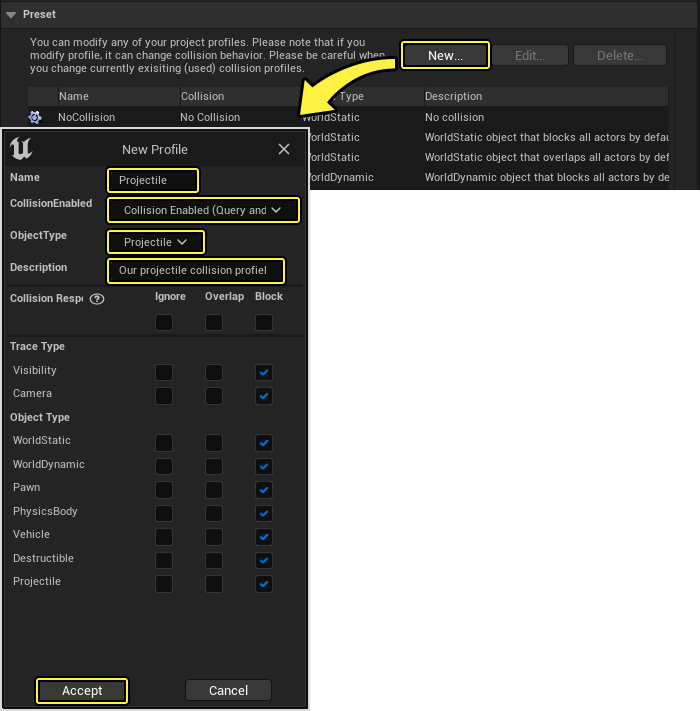
このコリジョン プロファイルでは、発射物がスタティック アクタ、ダイナミック アクタ、物理シミュレーションを利用するアクタ、乗り物、被破壊アクタでブロックされるように指定します。また、このコリジョン プロファイルでは発射物がポーンとオーバーラップすることも指定します。
新規コリジョン チャンネルの設定を使用する
-
Visual Studio を開いて
FPSProjectile.cppクラス用の実装ファイルに移動します。 -
FPSProjectileコンストラクタで、次のコード行をif (!CollisionComponent)ブロックのCreateDefaultSubobject<USphereComponent>(TEXT("SphereComponent"));の後に追加します。
FPSProjectile.cpp
// Set the sphere's collision profile name to "Projectile".
CollisionComponent->BodyInstance.SetCollisionProfileName(TEXT("Projectile"));
FPSProjectile.cppは次のようになります。
FPSProjectile.cpp
// Copyright Epic Games, Inc. All Rights Reserved.
#include "FPSProjectile.h"
// Sets default values
AFPSProjectile::AFPSProjectile()
{
// Set this actor to call Tick() every frame. You can turn this off to improve performance if you don't need it.
PrimaryActorTick.bCanEverTick = true;
if (!RootComponent)
{
RootComponent = CreateDefaultSubobject<USceneComponent>(TEXT("ProjectileSceneComponent"));
}
if (!CollisionComponent)
{
// Use a sphere as a simple collision representation.
CollisionComponent = CreateDefaultSubobject<USphereComponent>(TEXT("SphereComponent"));
// Set the sphere's collision profile name to "Projectile".
CollisionComponent->BodyInstance.SetCollisionProfileName(TEXT("Projectile"));
// Set the sphere's collision radius.
CollisionComponent->InitSphereRadius(15.0f);
// Set the root component to be the collision component.
RootComponent = CollisionComponent;
}
if (!ProjectileMovementComponent)
{
// Use this component to drive this projectile's movement.
ProjectileMovementComponent = CreateDefaultSubobject<UProjectileMovementComponent>(TEXT("ProjectileMovementComponent"));
ProjectileMovementComponent->SetUpdatedComponent(CollisionComponent);
ProjectileMovementComponent->InitialSpeed = 3000.0f;
ProjectileMovementComponent->MaxSpeed = 3000.0f;
ProjectileMovementComponent->bRotationFollowsVelocity = true;
ProjectileMovementComponent->bShouldBounce = true;
ProjectileMovementComponent->Bounciness = 0.3f;
ProjectileMovementComponent->ProjectileGravityScale = 0.0f;
}
if (!ProjectileMeshComponent)
{
ProjectileMeshComponent = CreateDefaultSubobject<UStaticMeshComponent>(TEXT("ProjectileMeshComponent"));
static ConstructorHelpers::FObjectFinder<UStaticMesh>Mesh(TEXT("'/Game/Sphere.Sphere'"));
if (Mesh.Succeeded())
{
ProjectileMeshComponent->SetStaticMesh(Mesh.Object);
}
static ConstructorHelpers::FObjectFinder<UMaterial>Material(TEXT("'/Game/SphereMaterial.SphereMaterial'"));
if (Material.Succeeded())
{
ProjectileMaterialInstance = UMaterialInstanceDynamic::Create(Material.Object, ProjectileMeshComponent);
}
ProjectileMeshComponent->SetMaterial(0, ProjectileMaterialInstance);
ProjectileMeshComponent->SetRelativeScale3D(FVector(0.09f, 0.09f, 0.09f));
ProjectileMeshComponent->SetupAttachment(RootComponent);
}
// Delete the projectile after 3 seconds.
InitialLifeSpan = 3.0f;
}
// Called when the game starts or when spawned
void AFPSProjectile::BeginPlay()
{
Super::BeginPlay();
}
// Called every frame
void AFPSProjectile::Tick(float DeltaTime)
{
Super::Tick(DeltaTime);
}
// Function that initializes the projectile's velocity in the shoot direction.
void AFPSProjectile::FireInDirection(const FVector& ShootDirection)
{
ProjectileMovementComponent->Velocity = ShootDirection * ProjectileMovementComponent->InitialSpeed;
}
-
ファイルを保存します。
-
[Solution Explorer] に移動して [FPSProject] を選択します。
-
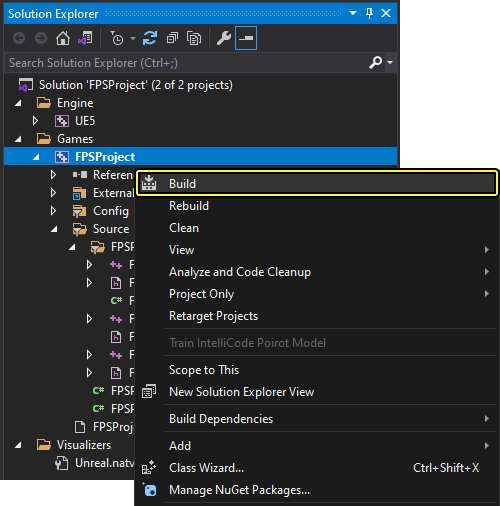
[FPSProject] を右クリックして [Build] を選択し、プロジェクトをコンパイルします。
3.4 - 発射物をワールドとインタラクトさせる
ここで、発射物のコリジョン インタラクションを検出でき、コリジョンに対応する方法を決定できます。このステップでは、OnHit 関数をコリジョン イベントに対応する FPSProjectile に追加します。
発射物をコリジョンに反応させる
-
FPSProjectile.h.を開く -
次のコードを
FPSProjectile.hのpublicアクセス指定子の下に追加します。
FPSProjectile.h
// Function that is called when the projectile hits something.
UFUNCTION()
void OnHit(UPrimitiveComponent* HitComponent, AActor* OtherActor, UPrimitiveComponent* OtherComponent, FVector NormalImpulse, const FHitResult& Hit);
FPSProjectile.hは次のようになります。
FPSProjectile.h
// Copyright Epic Games, Inc. All Rights Reserved.
#pragma once
#include "CoreMinimal.h"
#include "GameFramework/Actor.h"
#include "Components/SphereComponent.h"
#include "GameFramework/ProjectileMovementComponent.h"
#include "FPSProjectile.generated.h"
UCLASS()
class FPSPROJECT_API AFPSProjectile : public AActor
{
GENERATED_BODY()
public:
// Sets default values for this actor's properties
AFPSProjectile();
protected:
// Called when the game starts or when spawned
virtual void BeginPlay() override;
public:
// Called every frame
virtual void Tick(float DeltaTime) override;
// Sphere collision component
UPROPERTY(VisibleDefaultsOnly, Category = Projectile)
USphereComponent* CollisionComponent;
// Projectile movement component
UPROPERTY(VisibleAnywhere, Category = Movement)
UProjectileMovementComponent* ProjectileMovementComponent;
// Function that initializes the projectile's velocity in the shoot direction.
void FireInDirection(const FVector& ShootDirection);
// Projectile mesh
UPROPERTY(VisibleDefaultsOnly, Category = Projectile)
UStaticMeshComponent* ProjectileMeshComponent;
// Projectile material
UPROPERTY(VisibleDefaultsOnly, Category = Movement)
UMaterialInstanceDynamic* ProjectileMaterialInstance;
// Function that is called when the projectile hits something.
UFUNCTION()
void OnHit(UPrimitiveComponent* HitComponent, AActor* OtherActor, UPrimitiveComponent* OtherComponent, FVector NormalImpulse, const FHitResult& Hit);
};
FPSProjectile.cppを開いて、次のコードを追加します。
FPSProjectile.cpp
// Function that is called when the projectile hits something.
void AFPSProjectile::OnHit(UPrimitiveComponent* HitComponent, AActor* OtherActor, UPrimitiveComponent* OtherComponent, FVector NormalImpulse, const FHitResult& Hit)
{
if (OtherActor != this && OtherComponent->IsSimulatingPhysics())
{
OtherComponent->AddImpulseAtLocation(ProjectileMovementComponent->Velocity * 100.0f, Hit.ImpactPoint);
}
Destroy();
}
FPSProjectileコンストラクタで、次のコード行をif (!CollisionComponent)ブロックのBodyInstance.SetCollisionProfileName:の後に追加します
FPSProjectile.cpp
// Event called when component hits something.
CollisionComponent->OnComponentHit.AddDynamic(this, &AFPSProjectile::OnHit);
FPSProjectile.cppは次のようになります。
FPSProjectile.cpp
// Copyright Epic Games, Inc. All Rights Reserved.
#include "FPSProjectile.h"
// Sets default values
AFPSProjectile::AFPSProjectile()
{
// Set this actor to call Tick() every frame. You can turn this off to improve performance if you don't need it.
PrimaryActorTick.bCanEverTick = true;
if (!RootComponent)
{
RootComponent = CreateDefaultSubobject<USceneComponent>(TEXT("ProjectileSceneComponent"));
}
if (!CollisionComponent)
{
// Use a sphere as a simple collision representation.
CollisionComponent = CreateDefaultSubobject<USphereComponent>(TEXT("SphereComponent"));
// Set the sphere's collision profile name to "Projectile".
CollisionComponent->BodyInstance.SetCollisionProfileName(TEXT("Projectile"));
// Event called when component hits something.
CollisionComponent->OnComponentHit.AddDynamic(this, &AFPSProjectile::OnHit);
// Set the sphere's collision radius.
CollisionComponent->InitSphereRadius(15.0f);
// Set the root component to be the collision component.
RootComponent = CollisionComponent;
}
if (!ProjectileMovementComponent)
{
// Use this component to drive this projectile's movement.
ProjectileMovementComponent = CreateDefaultSubobject<UProjectileMovementComponent>(TEXT("ProjectileMovementComponent"));
ProjectileMovementComponent->SetUpdatedComponent(CollisionComponent);
ProjectileMovementComponent->InitialSpeed = 3000.0f;
ProjectileMovementComponent->MaxSpeed = 3000.0f;
ProjectileMovementComponent->bRotationFollowsVelocity = true;
ProjectileMovementComponent->bShouldBounce = true;
ProjectileMovementComponent->Bounciness = 0.3f;
ProjectileMovementComponent->ProjectileGravityScale = 0.0f;
}
if (!ProjectileMeshComponent)
{
ProjectileMeshComponent = CreateDefaultSubobject<UStaticMeshComponent>(TEXT("ProjectileMeshComponent"));
static ConstructorHelpers::FObjectFinder<UStaticMesh>Mesh(TEXT("'/Game/Sphere.Sphere'"));
if (Mesh.Succeeded())
{
ProjectileMeshComponent->SetStaticMesh(Mesh.Object);
}
static ConstructorHelpers::FObjectFinder<UMaterial>Material(TEXT("'/Game/SphereMaterial.SphereMaterial'"));
if (Material.Succeeded())
{
ProjectileMaterialInstance = UMaterialInstanceDynamic::Create(Material.Object, ProjectileMeshComponent);
}
ProjectileMeshComponent->SetMaterial(0, ProjectileMaterialInstance);
ProjectileMeshComponent->SetRelativeScale3D(FVector(0.09f, 0.09f, 0.09f));
ProjectileMeshComponent->SetupAttachment(RootComponent);
}
// Delete the projectile after 3 seconds.
InitialLifeSpan = 3.0f;
}
// Called when the game starts or when spawned
void AFPSProjectile::BeginPlay()
{
Super::BeginPlay();
}
// Called every frame
void AFPSProjectile::Tick(float DeltaTime)
{
Super::Tick(DeltaTime);
}
// Function that initializes the projectile's velocity in the shoot direction.
void AFPSProjectile::FireInDirection(const FVector& ShootDirection)
{
ProjectileMovementComponent->Velocity = ShootDirection * ProjectileMovementComponent->InitialSpeed;
}
// Function that is called when the projectile hits something.
void AFPSProjectile::OnHit(UPrimitiveComponent* HitComponent, AActor* OtherActor, UPrimitiveComponent* OtherComponent, FVector NormalImpulse, const FHitResult& Hit)
{
if (OtherActor != this && OtherComponent->IsSimulatingPhysics())
{
OtherComponent->AddImpulseAtLocation(ProjectileMovementComponent->Velocity * 100.0f, Hit.ImpactPoint);
}
Destroy();
}
発射物のコリジョンをテストする
-
ファイルを Visual Studio で保存します。
-
[Solution Explorer] に移動して [FPSProject] を選択します。
-
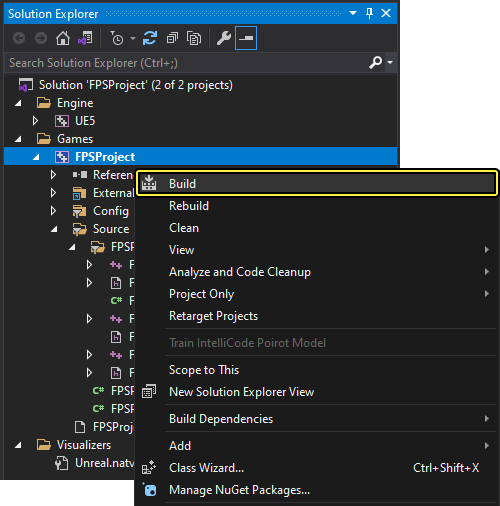
[FPSProject] を右クリックして [Build] を選択し、プロジェクトをコンパイルします。
-
ビルドが終了したら、Unreal Editor の FPSProject に戻ります。
-
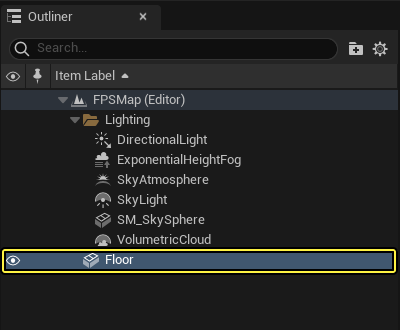
[Outliner] に移動して Floor スタティックメッシュを選択します。
-
選択した Floor メッシュをコピーして貼り付けます。
-
比率ロック ([Scale (スケール)] 行にある鍵型アイコン) が解除されていることを確認し、[Floor2] の [Detail] パネルにある [Transform (トランスフォーム)] セクションで、次のようにオプションを設定します。
- Location (位置):(0.0, 0.0, 150);
- Rotation (回転):(0.0, 0.0, 0.0);
- Scale (スケール):(0.2, 0.2, 3.0).
-
[Physics (物理)] セクションにスクロールダウンし、[Simulate Physics (物理シミュレーション)] ボックスをオンにします。
画像をクリックするとズームインします。
-
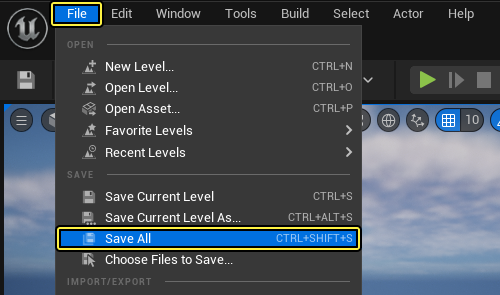
メイン メニュー パネルで [File] をクリックし、[Save All] を選択してインポートされたメッシュを保存します。
-
レベル エディタのツールバー で [Play (プレイ)] ボタンをクリックします。
-
発射物とキューブとのコリジョンを確認するために、マウスの左ボタンをクリックして物体を発射し、レベルでキューブをいろいろな場所に移動させてみます。
[
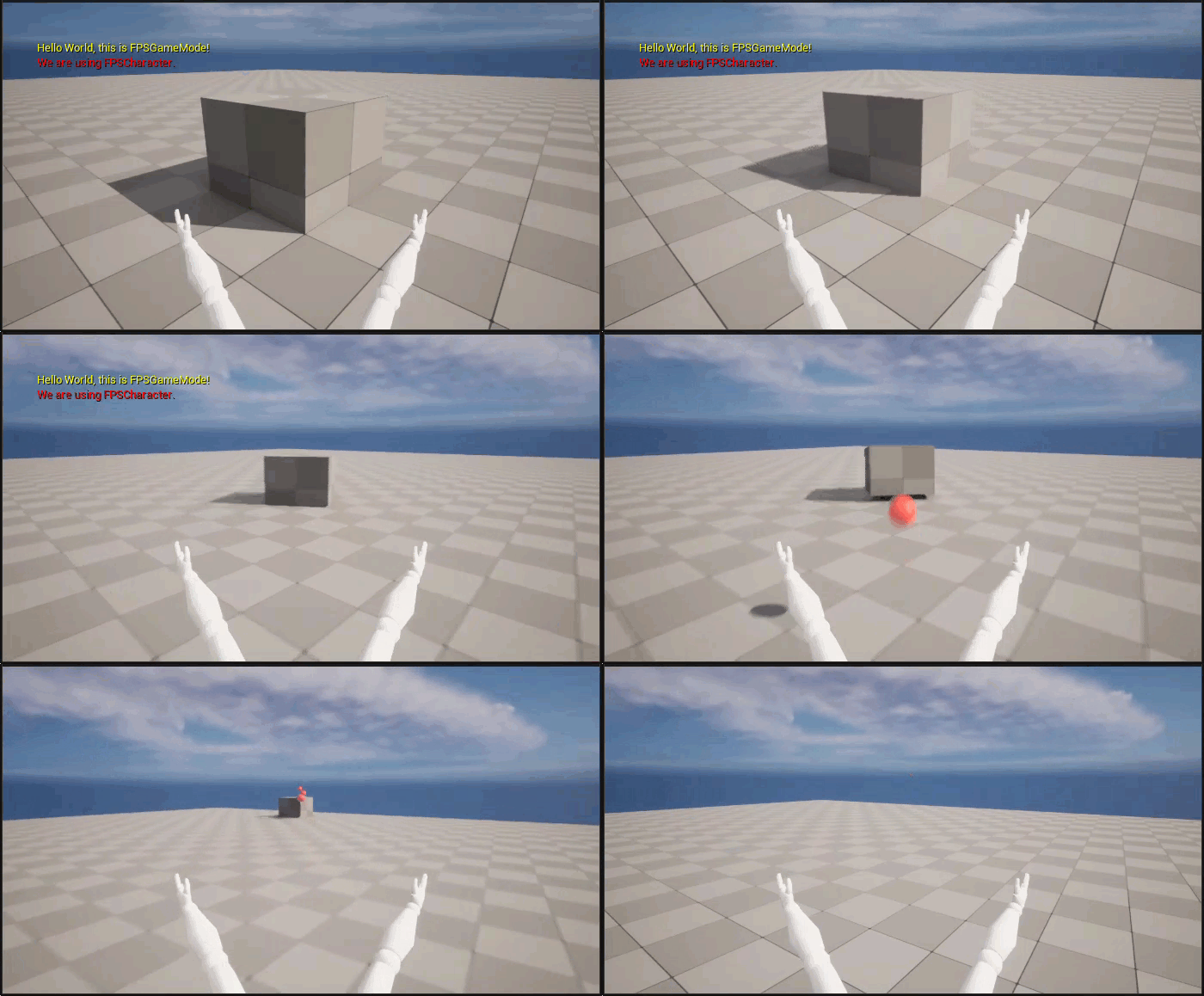
うまくいきました。発射物は完成です。
- Shift キーと Escape キー を押すか レベル エディタのツールバー にある [Stop (停止)] をクリックし、PIE モードを終了します。
3.5 - 照準線をビューポートに追加する
このステップでは、照準線 HUD 要素をゲームに追加して、狙いを定めて発射できるようにします。
照準アセットをインポートする
開始する前に、次のリンクからサンプル画像をダウンロードして展開してください。
-
コンテンツ ブラウザ に移動して「Content」フォルダを開きます。
-
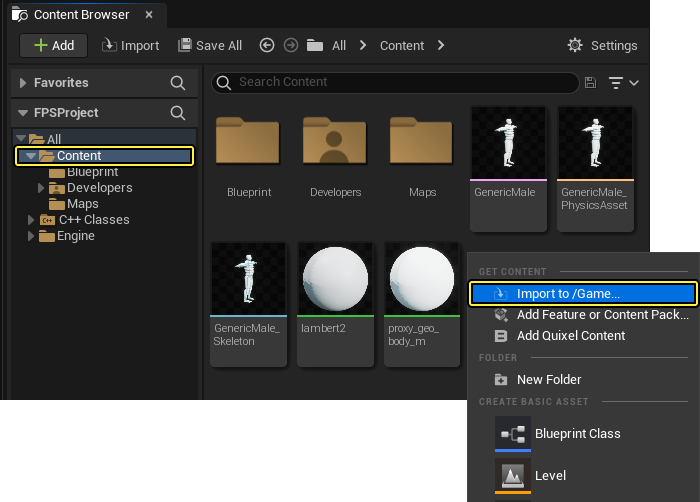
コンテンツ ブラウザ のファイル ウィンドウ内を右クリックして、[Import Asset] ダイアログ ウィンドウを開きます。
-
[Import to /Game...] をクリックして、[Import] ダイアログ ウィンドウを開きます。
-
「crosshair.TGA」画像ファイルをダウンロードしたフォルダで見つけて選択します。
-
[Open] をクリックして、画像ファイルのプロジェクトへのインポートを開始します。
-
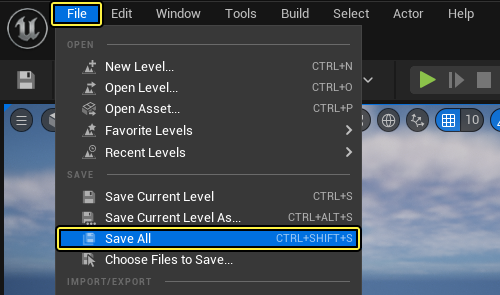
メイン メニュー パネルの [File] をクリックして、インポートされたメッシュを保存します。
新規 HUD クラスを追加する
-
[Tools] を メイン メニュー パネルでクリックし、[New C++ Class...] をクリックして新しい親クラスを選択します。
-
[Choose Parent Class] メニューが表示されます。[HUD] を親クラスとして選択し、[Next] をクリックします。
クリックしてフルサイズで表示
- 新規クラスに「FPSHUD」という名前を付けてから、[Create Class] をクリックします。
クリックしてフルサイズで表示
-
C++ クラスが作成されると、Visual Studio が自動的に、
FPSHUD.hヘッダ ファイルとFPSHUD.cpp実装ファイルが開いた状態で表示されます。 -
FPSHUD.hクラス ヘッダ ファイルに移動し、次の変数をprotectedアクセス指定子の下に追加します。
FPSHUD.h
protected:
// This will be drawn at the center of the screen.
UPROPERTY(EditDefaultsOnly)
UTexture2D* CrosshairTexture;
- 次の関数宣言を
FPSHUD.hのpublicアクセス指定子の下に追加します。
FPSHUD.h
public:
// Primary draw call for the HUD.
virtual void DrawHUD() override;
- 次のヘッダ ファイルを
FPSHUD.hに追加します。
FPSHUD.h
#include "Engine/Canvas.h"
FPSHUD.hは次のようになります。
FPSHUD.h
// Copyright Epic Games, Inc. All Rights Reserved.
#pragma once
#include "CoreMinimal.h"
#include "GameFramework/HUD.h"
#include "Engine/Canvas.h"
#include "FPSHUD.generated.h"
/**
*
*/
UCLASS()
class FPSPROJECT_API AFPSHUD : public AHUD
{
GENERATED_BODY()
protected:
// This will be drawn at the center of the screen.
UPROPERTY(EditDefaultsOnly)
UTexture2D* CrosshairTexture;
public:
// Primary draw call for the HUD.
virtual void DrawHUD() override;
};
FPSHUD.cpp実装ファイルを開き、DrawHUD関数を追加します。
FPSHUD.cpp
void AFPSHUD::DrawHUD()
{
Super::DrawHUD();
if (CrosshairTexture)
{
// Find the center of our canvas.
FVector2D Center(Canvas->ClipX * 0.5f, Canvas->ClipY * 0.5f);
// Offset by half of the texture's dimensions so that the center of the texture aligns with the center of the Canvas.
FVector2D CrossHairDrawPosition(Center.X - (CrosshairTexture->GetSurfaceWidth() * 0.5f), Center.Y - (CrosshairTexture->GetSurfaceHeight() * 0.5f));
// Draw the crosshair at the centerpoint.
FCanvasTileItem TileItem(CrossHairDrawPosition, CrosshairTexture->Resource, FLinearColor::White);
TileItem.BlendMode = SE_BLEND_Translucent;
Canvas->DrawItem(TileItem);
}
}
-
FPSHUD.hとFPSHUD.cppを Visual Studio で保存します。 -
[Solution Explorer] に移動して [FPSProject] を選択します。
-
[FPSProject] を右クリックして [Build] を選択し、プロジェクトをコンパイルします。
CPP HUD クラスのブループリントに拡張する
ここで、CPP HUD クラスをブループリントに拡張します。復習が必要な場合は、C++ とブループリント リファレンス ページで C++ クラスからブループリントへの拡張について確認してください。
-
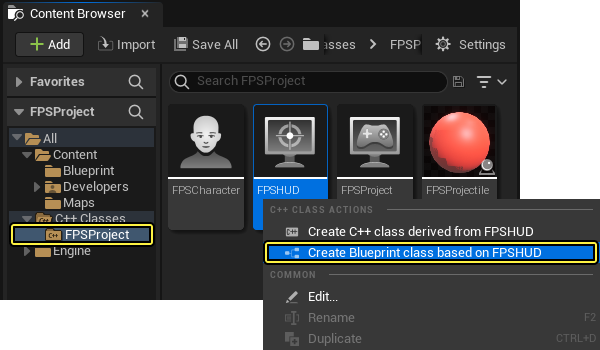
FPSHUDクラスを右クリックして、[C++ Class Actions (C++ クラスアクション)] メニューを開きます。 -
[Create Blueprint class based on FPSHUD (FPSHUD に基づくブループリント クラスを作成します)] をクリックして、[Add Blueprint Class (ブループリントクラスを追加)] ダイアログ メニューを開きます。
-
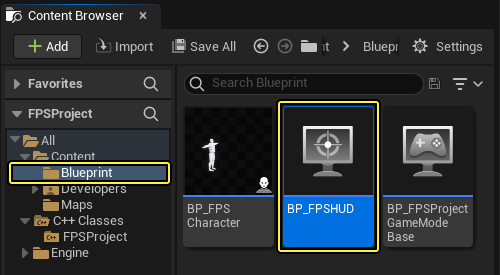
新規ブループリント クラスに「BP_FPSHUD」という名前を付け、「Blueprints」フォルダを選択してから、[Create Blueprint Class (ブループリントクラスを作成)] ボタンをクリックします。
クリックしてフルサイズで表示
-
これで、「BluePrints」フォルダ内に BP_FPSHUD ブループリント クラスが新しく作成されます。
-
必ず BP_FPSHUD ブループリントを保存してから、ブループリント エディタ を閉じます。
デフォルトの HUD クラスを設定する
-
メイン メニュー パネルで [Edit] をクリックし、[Project Settings] を選択します。
-
[Project Settings] タブの左側にある [Project (プロジェクト)] セクションで、[Maps & Modes (マップ & モード)] を選択します。
-
[BP_FPSHUD] を [Default HUD] ドロップダウン メニューで選択します。
クリックしてフルサイズで表示
-
[Project Settings] メニューを閉じます。
-
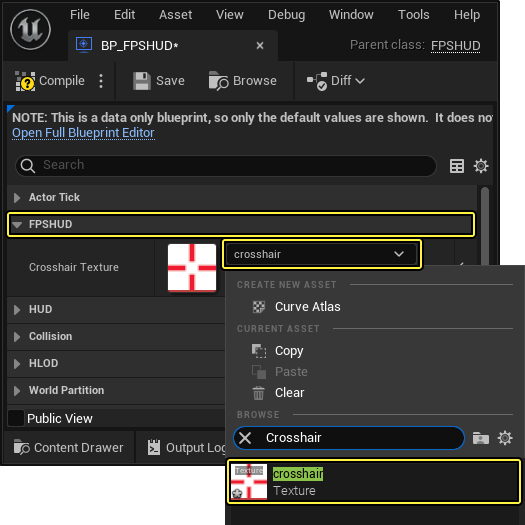
戻って BP_FPSHUD を ブループリント エディタ で開きます。
-
次に、ブループリント エディタ の [FPSHUD] セクションにあるドロップダウン メニューをクリックし、照準線テクスチャを選択します。
-
最後に、BP_FPSHUD ブループリントを コンパイル して 保存 してから、ブループリント エディタ を閉じます。
HUD を確認する
-
レベル エディタのツールバー で [Play (プレイ)] ボタンをクリックします。新しく追加された照準線で発射物の狙いを定められます。
 (convert:false)
 -
Shift キーと Escape キー を押すか レベル エディタのツールバー にある [Stop] をクリックし、PIE モードを終了します。
このセクションで完了したコード
FPSProjectile.h
// Copyright Epic Games, Inc. All Rights Reserved.
#pragma once
#include "CoreMinimal.h"
#include "GameFramework/Actor.h"
#include "Components/SphereComponent.h"
#include "GameFramework/ProjectileMovementComponent.h"
#include "FPSProjectile.generated.h"
UCLASS()
class FPSPROJECT_API AFPSProjectile : public AActor
{
GENERATED_BODY()
public:
// Sets default values for this actor's properties
AFPSProjectile();
protected:
// Called when the game starts or when spawned
virtual void BeginPlay() override;
public:
// Called every frame
virtual void Tick(float DeltaTime) override;
// Sphere collision component
UPROPERTY(VisibleDefaultsOnly, Category = Projectile)
USphereComponent* CollisionComponent;
// Projectile movement component
UPROPERTY(VisibleAnywhere, Category = Movement)
UProjectileMovementComponent* ProjectileMovementComponent;
// Function that initializes the projectile's velocity in the shoot direction.
void FireInDirection(const FVector& ShootDirection);
// Projectile mesh
UPROPERTY(VisibleDefaultsOnly, Category = Projectile)
UStaticMeshComponent* ProjectileMeshComponent;
// Projectile material
UPROPERTY(VisibleDefaultsOnly, Category = Movement)
UMaterialInstanceDynamic* ProjectileMaterialInstance;
// Function that is called when the projectile hits something.
UFUNCTION()
void OnHit(UPrimitiveComponent* HitComponent, AActor* OtherActor, UPrimitiveComponent* OtherComponent, FVector NormalImpulse, const FHitResult& Hit);
};
FPSProjectile.cpp
// Copyright Epic Games, Inc. All Rights Reserved.
#include "FPSProjectile.h"
// Sets default values
AFPSProjectile::AFPSProjectile()
{
// Set this actor to call Tick() every frame. You can turn this off to improve performance if you don't need it.
PrimaryActorTick.bCanEverTick = true;
if (!RootComponent)
{
RootComponent = CreateDefaultSubobject<USceneComponent>(TEXT("ProjectileSceneComponent"));
}
if (!CollisionComponent)
{
// Use a sphere as a simple collision representation.
CollisionComponent = CreateDefaultSubobject<USphereComponent>(TEXT("SphereComponent"));
// Set the sphere's collision profile name to "Projectile".
CollisionComponent->BodyInstance.SetCollisionProfileName(TEXT("Projectile"));
// Event called when component hits something.
CollisionComponent->OnComponentHit.AddDynamic(this, &AFPSProjectile::OnHit);
// Set the sphere's collision radius.
CollisionComponent->InitSphereRadius(15.0f);
// Set the root component to be the collision component.
RootComponent = CollisionComponent;
}
if (!ProjectileMovementComponent)
{
// Use this component to drive this projectile's movement.
ProjectileMovementComponent = CreateDefaultSubobject<UProjectileMovementComponent>(TEXT("ProjectileMovementComponent"));
ProjectileMovementComponent->SetUpdatedComponent(CollisionComponent);
ProjectileMovementComponent->InitialSpeed = 3000.0f;
ProjectileMovementComponent->MaxSpeed = 3000.0f;
ProjectileMovementComponent->bRotationFollowsVelocity = true;
ProjectileMovementComponent->bShouldBounce = true;
ProjectileMovementComponent->Bounciness = 0.3f;
ProjectileMovementComponent->ProjectileGravityScale = 0.0f;
}
if (!ProjectileMeshComponent)
{
ProjectileMeshComponent = CreateDefaultSubobject<UStaticMeshComponent>(TEXT("ProjectileMeshComponent"));
static ConstructorHelpers::FObjectFinder<UStaticMesh>Mesh(TEXT("'/Game/Sphere.Sphere'"));
if (Mesh.Succeeded())
{
ProjectileMeshComponent->SetStaticMesh(Mesh.Object);
}
static ConstructorHelpers::FObjectFinder<UMaterial>Material(TEXT("'/Game/SphereMaterial.SphereMaterial'"));
if (Material.Succeeded())
{
ProjectileMaterialInstance = UMaterialInstanceDynamic::Create(Material.Object, ProjectileMeshComponent);
}
ProjectileMeshComponent->SetMaterial(0, ProjectileMaterialInstance);
ProjectileMeshComponent->SetRelativeScale3D(FVector(0.09f, 0.09f, 0.09f));
ProjectileMeshComponent->SetupAttachment(RootComponent);
}
// Delete the projectile after 3 seconds.
InitialLifeSpan = 3.0f;
}
// Called when the game starts or when spawned
void AFPSProjectile::BeginPlay()
{
Super::BeginPlay();
}
// Called every frame
void AFPSProjectile::Tick(float DeltaTime)
{
Super::Tick(DeltaTime);
}
// Function that initializes the projectile's velocity in the shoot direction.
void AFPSProjectile::FireInDirection(const FVector& ShootDirection)
{
ProjectileMovementComponent->Velocity = ShootDirection * ProjectileMovementComponent->InitialSpeed;
}
void AFPSProjectile::OnHit(UPrimitiveComponent* HitComponent, AActor* OtherActor, UPrimitiveComponent* OtherComponent, FVector NormalImpulse, const FHitResult& Hit)
{
if (OtherActor != nullptr && OtherActor != this && OtherComponent != nullptr && OtherComponent->IsSimulatingPhysics())
{
OtherComponent->AddImpulseAtLocation(ProjectileMovementComponent->Velocity * 100.0f, Hit.ImpactPoint);
}
Destroy();
}
FPSCharacter.h
// Copyright Epic Games, Inc. All Rights Reserved.
#pragma once
#include "CoreMinimal.h"
#include "GameFramework/Character.h"
#include "Camera/CameraComponent.h"
#include "Components/CapsuleComponent.h"
#include "FPSProjectile.h"
#include "FPSCharacter.generated.h"
UCLASS()
class FPSPROJECT_API AFPSCharacter : public ACharacter
{
GENERATED_BODY()
public:
// Sets default values for this character's properties
AFPSCharacter();
protected:
// Called when the game starts or when spawned
virtual void BeginPlay() override;
// Projectile class to spawn.
UPROPERTY(EditAnywhere, Category = Projectile)
TSubclassOf<class AFPSProjectile> ProjectileClass;
public:
// Called every frame
virtual void Tick(float DeltaTime) override;
// Called to bind functionality to input
virtual void SetupPlayerInputComponent(class UInputComponent* PlayerInputComponent) override;
// Handles input for moving forward and backward.
UFUNCTION()
void MoveForward(float Value);
// Handles input for moving right and left.
UFUNCTION()
void MoveRight(float Value);
// Sets jump flag when key is pressed.
UFUNCTION()
void StartJump();
// Clears jump flag when key is released.
UFUNCTION()
void StopJump();
// FPS camera
UPROPERTY(VisibleAnywhere)
UCameraComponent* FPSCameraComponent;
// First-person mesh (arms), visible only to the owning player.
UPROPERTY(VisibleDefaultsOnly, Category = Mesh)
USkeletalMeshComponent* FPSMesh;
// Function that fires projectiles.
UFUNCTION()
void Fire();
// Gun muzzle offset from the camera location.
UPROPERTY(EditAnywhere, BlueprintReadWrite, Category = Gameplay)
FVector MuzzleOffset;
};
FPSCharacter.cpp
// Copyright Epic Games, Inc. All Rights Reserved.
#include "FPSCharacter.h"
// Sets default values
AFPSCharacter::AFPSCharacter()
{
// Set this character to call Tick() every frame. You can turn this off to improve performance if you don't need it.
PrimaryActorTick.bCanEverTick = true;
// Create a first person camera component.
FPSCameraComponent = CreateDefaultSubobject<UCameraComponent>(TEXT("FirstPersonCamera"));
check(FPSCameraComponent != nullptr);
// Attach the camera component to our capsule component.
FPSCameraComponent->SetupAttachment(CastChecked<USceneComponent, UCapsuleComponent>(GetCapsuleComponent()));
// Position the camera slightly above the eyes.
FPSCameraComponent->SetRelativeLocation(FVector(0.0f, 0.0f, 50.0f + BaseEyeHeight));
// Enable the Pawn to control camera rotation.
FPSCameraComponent->bUsePawnControlRotation = true;
// Create a first person mesh component for the owning player.
FPSMesh = CreateDefaultSubobject<USkeletalMeshComponent>(TEXT("FirstPersonMesh"));
check(FPSMesh != nullptr);
// Only the owning player sees this mesh.
FPSMesh->SetOnlyOwnerSee(true);
//Attach the FPS mesh to the FPS Camera.
FPSMesh->SetupAttachment(FPSCameraComponent);
//Disable some environmental shadows to preserve the illusion of having a single mesh.
FPSMesh->bCastDynamicShadow = false;
FPSMesh->CastShadow = false;
// The owning player doesn't see the regular (third-person) body mesh.
GetMesh()->SetOwnerNoSee(true);
}
// Called when the game starts or when spawned
void AFPSCharacter::BeginPlay()
{
Super::BeginPlay();
check(GEngine != nullptr);
// Display a debug message for five seconds.
// The -1 "Key" value argument prevents the message from being updated or refreshed.
GEngine->AddOnScreenDebugMessage(-1, 5.0f, FColor::Red, TEXT("We are using FPSCharacter."));
}
// Called every frame
void AFPSCharacter::Tick(float DeltaTime)
{
Super::Tick(DeltaTime);
}
// Called to bind functionality to input
void AFPSCharacter::SetupPlayerInputComponent(UInputComponent* PlayerInputComponent)
{
Super::SetupPlayerInputComponent(PlayerInputComponent);
// Set up "movement" bindings.
PlayerInputComponent->BindAxis("MoveForward", this, &AFPSCharacter::MoveForward);
PlayerInputComponent->BindAxis("MoveRight", this, &AFPSCharacter::MoveRight);
// Set up "look" bindings.
PlayerInputComponent->BindAxis("Turn", this, &AFPSCharacter::AddControllerYawInput);
PlayerInputComponent->BindAxis("LookUp", this, &AFPSCharacter::AddControllerPitchInput);
// Set up "action" bindings.
PlayerInputComponent->BindAction("Jump", IE_Pressed, this, &AFPSCharacter::StartJump);
PlayerInputComponent->BindAction("Jump", IE_Released, this, &AFPSCharacter::StopJump);
PlayerInputComponent->BindAction("Fire", IE_Pressed, this, &AFPSCharacter::Fire);
}
void AFPSCharacter::MoveForward(float Value)
{
// Find out which way is "forward" and record that the player wants to move that way.
FVector Direction = FRotationMatrix(Controller->GetControlRotation()).GetScaledAxis(EAxis::X);
AddMovementInput(Direction, Value);
}
void AFPSCharacter::MoveRight(float Value)
{
// Find out which way is "right" and record that the player wants to move that way.
FVector Direction = FRotationMatrix(Controller->GetControlRotation()).GetScaledAxis(EAxis::Y);
AddMovementInput(Direction, Value);
}
void AFPSCharacter::StartJump()
{
bPressedJump = true;
}
void AFPSCharacter::StopJump()
{
bPressedJump = false;
}
void AFPSCharacter::Fire()
{
// Attempt to fire a projectile.
if (ProjectileClass)
{
// Get the camera transform.
FVector CameraLocation;
FRotator CameraRotation;
GetActorEyesViewPoint(CameraLocation, CameraRotation);
// Set MuzzleOffset to spawn projectiles slightly in front of the camera.
MuzzleOffset.Set(100.0f, 0.0f, 0.0f);
// Transform MuzzleOffset from camera space to world space.
FVector MuzzleLocation = CameraLocation + FTransform(CameraRotation).TransformVector(MuzzleOffset);
// Skew the aim to be slightly upwards.
FRotator MuzzleRotation = CameraRotation;
MuzzleRotation.Pitch += 10.0f;
UWorld* World = GetWorld();
if (World)
{
FActorSpawnParameters SpawnParams;
SpawnParams.Owner = this;
SpawnParams.Instigator = GetInstigator();
// Spawn the projectile at the muzzle.
AFPSProjectile* Projectile = World->SpawnActor<AFPSProjectile>(ProjectileClass, MuzzleLocation, MuzzleRotation, SpawnParams);
if (Projectile)
{
// Set the projectile's initial trajectory.
FVector LaunchDirection = MuzzleRotation.Vector();
Projectile->FireInDirection(LaunchDirection);
}
}
}
}
FPSHUD.h
// Copyright Epic Games, Inc. All Rights Reserved.
#pragma once
#include "CoreMinimal.h"
#include "GameFramework/HUD.h"
#include "Engine/Canvas.h"
#include "FPSHUD.generated.h"
/**
*
*/
UCLASS()
class FPSPROJECT_API AFPSHUD : public AHUD
{
GENERATED_BODY()
protected:
// This will be drawn at the center of the screen.
UPROPERTY(EditDefaultsOnly)
UTexture2D* CrosshairTexture;
public:
// Primary draw call for the HUD.
virtual void DrawHUD() override;
};
FPSHUD.cpp
// Copyright Epic Games, Inc. All Rights Reserved.
#include "FPSHUD.h"
void AFPSHUD::DrawHUD()
{
Super::DrawHUD();
if (CrosshairTexture)
{
// Find the center of our canvas.
FVector2D Center(Canvas->ClipX * 0.5f, Canvas->ClipY * 0.5f);
// Offset by half of the texture's dimensions so that the center of the texture aligns with the center of the Canvas.
FVector2D CrossHairDrawPosition(Center.X - (CrosshairTexture->GetSurfaceWidth() * 0.5f), Center.Y - (CrosshairTexture->GetSurfaceHeight() * 0.5f));
// Draw the crosshair at the centerpoint.
FCanvasTileItem TileItem(CrossHairDrawPosition, CrosshairTexture->Resource, FLinearColor::White);
TileItem.BlendMode = SE_BLEND_Translucent;
Canvas->DrawItem(TileItem);
}
}
お疲れさまでしたここでは、以下の方法について学習しました。
✓ 発射物をゲームに追加する ✓ シューティングを実装する ✓ 発射物のコリジョンと存続期間を設定する ✓ 発射物をワールドとインタラクトさせる ✓ 照準線をビューポートに追加する
次のセクションでキャラクターをアニメートする方法を学習する準備ができました。
