
This page is not available in the language you have chosen. It will be displayed in English by default. If you would like to view it in a different language, you can try selecting another language.
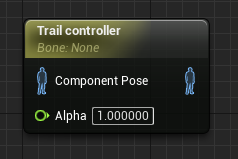
The Trail Controller can be used to affect a series of bones in a hierarchy.
| Property | Description |
|---|---|
| Trail | |
| Trail Bone | Reference to the active bone in the hierarchy to modify. |
| Chain Length | Number of bones above the active one in the hierarcy to modify. Chain Length should be at least 2. |
| Chain Bone Axis | Axis of the Bones to point along trail. |
| Invert Chain Bone Axis | Whether or not to invert the direction specified in Chain Bone Axis. |
| Trail Relaxation Speed | How quickly we "relax" the bones to their animated positions. Time 0 will map to top root joint, time 1 will map to the bottom joint. |
| Limit | |
| Limit Stretch | Limit the amount that a bone can stretch from its ref-pose length. |
| Stretch Limit | If Limit Stretch is true, this indicates how long a bone can stretch beyond its length in the ref-pose. |
| Velocity | |
| Fake Velocity | The "fake" velocity applied to bones. |
| Actor Space Fake Vel | If "fake" velocity should be applied in Actor or World Space. |
| Base Joint | Base Joint to calculate velocity from. If none, it will use Component's World Transform. |
| Pin | Description |
|---|---|
| Input Pins | |
| Component Pose | The incoming pose. |
| Alpha | The current strength of the control. |
Trail Controller nodes are also affected by the LOD Threshold system introduced in 4.11. You can find the setting for this in the Details Panel for the Trail Controller node.

| Property | Description |
|---|---|
| LOD Threshold | This is the max Level of Detail (LOD) that this node is permitted to run on. For example: if you have LOD Threshold set to 2, it will run until LOD 2, but disable itself once the component's LOD becomes 3. |