
This page is not available in the language you have chosen. It will be displayed in English by default. If you would like to view it in a different language, you can try selecting another language.
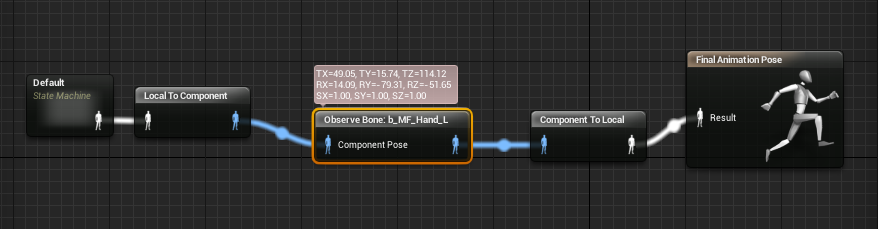
The Observe Bone node can be used to give debug transform information about a specified bone.

Below, a bone by the name of b_MF_Hand_L is being observed and debug information is being displayed.
| Property | Description |
|---|---|
| Skeletal Control | |
| Bone to Observe | Name of the bone to observe. |
| Display Space | Reference frame to display the bone transform in. |
| Relative to Ref Pose | Whether or not to show the difference from the reference pose. |
| Pin | Description |
|---|---|
| Input Pins | |
| Component Pose | The incoming pose. |
Observe Bone nodes are also affected by the LOD Threshold system introduced in 4.11. You can find the setting for this in the Details Panel for the Observe Bone node.

| Property | Description |
|---|---|
| LOD Threshold | This is the max Level of Detail (LOD) that this node is permitted to run on. For example: if you have LOD Threshold set to 2, it will run until LOD 2, but disable itself once the component's LOD becomes 3. |