

Overview
What This Page Covers
This page guides you through structuring and implementing some online services functionality in your game. This tutorial does not guide you on implementing every interface that the Online Services plugin supports, but rather a simpler interface, the Online Services Title File Interface, that illustrates common programming patterns for the Online Services plugins. This page guides you through how to:
- Obtain information about a local player from the online services.
- Retrieve a title file from the backend services.
- Display the title file contents in your game.
This guide uses a project titled OnlineSample and the Online Services Null plugin.
Before You Begin
Make sure that you have enabled and configured the Online Services plugin for use in your game. If you have not already done so, see the Setup and Configure the Online Services Plugins documentation page.
What You Will Do
First, you retrieve information about the local player that is currently logged in. The account ID of this local player is used as a parameter for all other Online Services plugin operations. Once you know how to obtain this information, you can perform all other Online Services functions. This guide uses the Online Services Null plugin. Users are automatically registered with the Null services so they do not need to call a login function. As a result, you do not need to make an explicit login call, but you do need to obtain the online information about local users from the online services.
Next, you retrieve a title file from the backend online services. Since this tutorial uses the Online Services Null plugin, the title file and its contents are added to Engine Configuration. The Title File interface handles querying and reading title files from the backend online services.
Finally, you display the title file on-screen. This is visual confirmation that the file has been retrieved successfully.
Configure
As previously mentioned, this guide uses the Online Services Null plugin. This plugin is designed for testing and debugging online services implementations. The Null service does not provide a backend service to store title files. As a result, this storage is simulated using engine configuration.
To add a Title File to the Null plugin, follow these steps:
- Open your project in Visual Studio. You can do this by navigating to Tools > Open Visual Studio from within the Unreal Editor.
- Open your project's
DefaultEngine.inifile in the Visual Studio Solution Explorer by navigating to Games > [YOUR_GAME] > Config > DefaultEngine.ini. -
Add the following to your project's
DefaultEngine.inifile:DefaultEngine.ini
; Null Platform Configuration [OnlineServices.Null.TitleFile] +Files=(Name=StatusFile, Contents="Explore this virtual world with me!")
Structure
Add a Game Instance
To use the Online Services plugins features, you need to create a C++ class to implement the online services you want to use. This tutorial uses a Game Instance class. Most game framework classes are re-instantiated between levels or maps. This means that information contained in game framework classes is reset or lost between levels or maps. Game Instances and their subsystems persist across the entire lifetime of your game, from initialization to shutdown. As a result, they can act as persistent structures to help you pass information from one map or level to another. In this walkthrough, the game instance class is named OnlineSampleGameInstance.
To add a Game Instance class, use the C++ Class Wizard in the Unreal Editor to create a new C++ class with the following information:
- Class: Game Instance
- Name: OnlineSampleGameInstance
- Path: ../OnlineSample/Source/OnlineSample/GameInstance
The Unreal Editor adds the new class to your Unreal Engine project code and initializes Live Coding. This recompiles your Visual Studio code so that your new class appears while the Unreal Editor is still open. Your new .cpp and .h files should also open in Visual Studio, ready for you to add code to your new class files.
A pop-up window may appear in Visual Studio stating that the solution file has been updated and the project needs to be reloaded. Choose "Reload All" to reload your project in Visual Studio. If your build failed because the system cannot open include file "GameInstance/OnlineSampleGameInstance.h", go to your "OnlineSampleGameInstance.cpp" and edit the line:
#include "GameInstance/OnlineSampleGameInstance.h"
to:
#include "OnlineSample/GameInstance/OnlineSampleGameInstance.h"
where OnlineSample is the name of your project. Once you have changed this, go back to the Unreal Editor and recompile your project with Live Coding. Your project should now properly locate the header file and build successfully.
Specify Your Project's Game Instance Class
Once you have created a game instance class for your project, you need to tell the engine to use your newly created game instance class instead of the default one.
To specify your project's game instance class, follow these steps:
- Navigate to the Unreal Editor.
- From the menu bar, select Edit > Project Settings.
- On the left side, choose Project > Maps & Modes.
- Find the Game Instance section and choose your Game Instance Class that you created in the Add a Game Instance section above. If you used the same name as this guide, choose OnlineSampleGameInstance.
Your project now uses your custom game instance class by default.
Add a Game Instance Subsystem
This walkthrough uses a Game Instance Subsystem to organize the online code within the game instance structure. Programming Subsystems help you to organize your code into modular systems, each with a particular focus.
To add a Game Instance Subsystem class, use the C++ Class Wizard in the Unreal Editor to create a new C++ class with the following information:
- Class: Game Instance Subsystem
- Name: OnlineSampleOnlineSubsystem
- Path: ../OnlineSample/Source/OnlineSample/GameInstance
The Unreal Editor adds the new class to your Unreal Engine project code, initializes Live Coding, and recompiles your project.
Add a Player Controller
The Player Controller class is an abstraction of the physical person playing your game in the game code. This class provides a BeginPlay function where online user registration and title file reading is called in your game.
To add a Player Controller class, use the C++ Class Wizard in the Unreal Editor to create a new C++ class with the following information:
- Class: Player Controller
- Name: OnlineSamplePlayerController
- Path: ../OnlineSample/Source/OnlineSample/Player
As before, the Unreal Editor adds the new class to your Unreal Engine project code, initializes Live Coding, and recompiles your project.
Add Code
Now that you have set up the structure of your project and the various files needed, the next step is to implement the functionality. This section contains subsections that have sample code for the header and source files for each C++ class created in the Structure Your Project section as well as subsections for editing existing project files.
These files contain code comments, logging, and error handling to help you learn more about the objects involved, track activity and problems in the logs, and diagnose errors.
If you are using Live Coding and you receive a log message reading "Build failed" in the Live Coding console for which you cannot diagnose the failure reason, try closing the Unreal Editor and Build with Visual Studio instead.
Game Instance
Game Instances and their subsystems persist across the entire lifetime of your game, from initialization to shutdown. This means that the same game instance object and subsystem objects, as well as their functions and fields, exist from initialization to shutdown of your game. This is a good place for Online Services plugin functionality to live as you might want to access online functionality whether in UI menus, in single player mode to chat with friends, or in multiplayer modes to join other users in an online session. The game instance also acts as a manager for game instance subsystems. In particular, the game instance acts as a manager for the Online Services game instance subsystem (OnlineSampleOnlineSubsystem) that is implemented in this tutorial.
OnlineSampleGameInstance.h
OnlineSampleGameInstance.h
#pragma once
#include "CoreMinimal.h"
#include "Engine/GameInstance.h"
#include "OnlineSampleGameInstance.generated.h"
// Forward Declare classes
class AOnlineSamplePlayerController;
class UObject;
DECLARE_LOG_CATEGORY_EXTERN(LogGameInstance, Log, All);
/**
* Custom Game Instance Class to manage Game Instance subsystem
*/
UCLASS()
class ONLINESAMPLE_API UOnlineSampleGameInstance : public UGameInstance
{
GENERATED_BODY()
protected:
/** Called to initialize game instance on game startup */
virtual void Init() override;
/** Called to shutdown game instance on game exit */
virtual void Shutdown() override;
public:
/** Called to initialize game instance object */
UOnlineSampleGameInstance(const FObjectInitializer& ObjectInitializer = FObjectInitializer::Get());
/** Called to retrieve the primary player controller */
AOnlineSamplePlayerController* GetPrimaryPlayerController() const;
};
OnlineSampleGameInstance.cpp
OnlineSampleGameInstance.cpp
#include "OnlineSampleGameInstance.h"
#include "OnlineSample/Player/OnlineSamplePlayerController.h"
DEFINE_LOG_CATEGORY(LogGameInstance);
/// <summary>
/// Initialize Game Instance object
/// </summary>
void UOnlineSampleGameInstance::Init()
{
UE_LOG(LogGameInstance, Log, TEXT("OnlineSampleGameInstance initialized."));
Super::Init();
}
/// <summary>
/// Shutdown Game Instance object
/// </summary>
void UOnlineSampleGameInstance::Shutdown()
{
UE_LOG(LogGameInstance, Log, TEXT("OnlineSampleGameInstance shutdown."));
Super::Shutdown();
}
/// <summary>
/// Initialize Game Instance object
/// </summary>
/// <param name="ObjectInitializer"></param>
UOnlineSampleGameInstance::UOnlineSampleGameInstance(const FObjectInitializer& ObjectInitializer)
: Super(ObjectInitializer)
{
}
/// <summary>
/// Retrieve a reference to the primary player controller
/// </summary>
/// <returns>AOnlineSamplePlayerController pointer</returns>
AOnlineSamplePlayerController* UOnlineSampleGameInstance::GetPrimaryPlayerController() const
{
return Cast<AOnlineSamplePlayerController>(Super::GetPrimaryPlayerController(false));
}
Game Instance Subsystem
All implementation details for Online Services plugin functionality live inside the Game Instance Subsystem. As previously mentioned, the game instance persists for the entire lifetime of a game, from initialization to shutdown. Game instance subsystems help to organize code that you might want to access across the lifetime of a game instance into distinct systems. This project organizes the Online Services plugin relevant code into a game instance subsystem that is called "OnlineSampleOnlineSubsystem". This example implements the Title File Interface functionality.
Implementation Details
The Online Services plugin contains common patterns that this page implements in the OnlineSampleOnlineSubsystem:
Query and Get
A common pattern in the Online Services plugin is to first query an interface for information. This information is then cached with the interface, then, when you want to retrieve this information, you get the information from the cache. The query constitutes the asynchronous portion of the query and get operation. There are a few different examples of this pattern in the OnlineSampleOnlineSubsystem sample code. In particular, you can look into:
RetrieveTitleFileand its call toHandleEnumerateFiles
OnlineSampleOnlineSubsystem.h
OnlineSampleOnlineSubsystem.h
#pragma once
#include "CoreMinimal.h"
#include "Online/OnlineServices.h"
#include "Online/OnlineAsyncOpHandle.h"
#include "Online/TitleFile.h"
#include "Subsystems/GameInstanceSubsystem.h"
#include "OnlineSampleOnlineSubsystem.generated.h"
DECLARE_LOG_CATEGORY_EXTERN(LogOnlineSampleOnlineSubsystem, Log, All);
/**
*
*/
UCLASS()
class ONLINESAMPLE_API UOnlineSampleOnlineSubsystem : public UGameInstanceSubsystem
{
GENERATED_BODY()
public:
////////////////////////////////////////////////////////
/// OnlineSampleOnlineSubsystem Init/Deinit
/** Called to determine whether the Subsystem should be created */
virtual bool ShouldCreateSubsystem(UObject* Outer) const override;
/** Called to initialize Game Instance Subsystem */
virtual void Initialize(FSubsystemCollectionBase& Collection) override;
/** Called to deinitialize Game Instance Subsystem */
virtual void Deinitialize() override;
/** Called to register local online user with the Game Instance Subsystem */
void RegisterLocalOnlineUser(FPlatformUserId PlatformUserId);
/** Called to retrieve online user info for this platform user id */
TObjectPtr<UOnlineUserInfo> GetOnlineUserInfo(FPlatformUserId PlatformUserId);
/** Called to read the Game's Title File from the backend services and return the contents */
FString ReadTitleFile(FString Filename, FPlatformUserId PlatformUserId);
protected:
struct FOnlineServicesInfo
{
/** Online Services Pointer - Access Interfaces through this pointer */
UE::Online::IOnlineServicesPtr OnlineServices = nullptr;
/** Interface pointers */
UE::Online::IAuthPtr AuthInterface = nullptr;
UE::Online::ITitleFilePtr TitleFileInterface = nullptr;
/** Online Services Implementation */
UE::Online::EOnlineServices OnlineServicesType = UE::Online::EOnlineServices::None;
/** Title File content */
UE::Online::FTitleFileContents TitleFileContent;
/** Reset struct to initial settings */
void Reset()
{
OnlineServices.Reset();
AuthInterface.Reset();
TitleFileInterface.Reset();
OnlineServicesType = UE::Online::EOnlineServices::None;
}
};
////////////////////////////////////////////////////////
/// Online Services Init
/** Pointer to an internal struct containing relevant online services pointers */
FOnlineServicesInfo* OnlineServicesInfoInternal = nullptr;
/** Called to initialize online services and interface pointers */
void InitializeOnlineServices();
////////////////////////////////////////////////////////
/// Title File
/** Called to retrieve title file from online services */
void RetrieveTitleFile(FString Filename, FPlatformUserId PlatformUserId);
////////////////////////////////////////////////////////
/// Events
/** Called to handle the EnumerateFiles async event */
void HandleEnumerateFiles(const UE::Online::TOnlineResult<UE::Online::FTitleFileEnumerateFiles>& EnumerateFilesResult, TObjectPtr<UOnlineUserInfo> OnlineUser, FString Filename);
/** Called to handle the ReadFile async event */
void HandleReadFile(const UE::Online::TOnlineResult<UE::Online::FTitleFileReadFile>& ReadFileResult, FString Filename);
////////////////////////////////////////////////////////
/// Online User Information
/** Called to create a UOnlineUserInfo object for this user */
TObjectPtr<UOnlineUserInfo> CreateOnlineUserInfo(int32 LocalUserIndex, FPlatformUserId PlatformUserId, UE::Online::FAccountId AccountId, UE::Online::EOnlineServices Services);
/** Called to register the user with the OnlineUserInfos map and add user after creation with CreateOnlineUserInfo */
TObjectPtr<UOnlineUserInfo> CreateAndRegisterUserInfo(int32 LocalUserIndex, FPlatformUserId PlatformUserId, UE::Online::FAccountId AccountId, UE::Online::EOnlineServices Services);
/** Information about each local user */
TMap<FPlatformUserId, TObjectPtr<UOnlineUserInfo>> OnlineUserInfos;
/** Friend the UOnlineUserInfo class to access it */
friend UOnlineUserInfo;
};
UCLASS()
class ONLINESAMPLE_API UOnlineUserInfo : public UObject
{
GENERATED_BODY()
public:
UOnlineUserInfo();
////////////////////////////////////////////////////////
/// Online User Fields
int32 LocalUserIndex = -1;
FPlatformUserId PlatformUserId;
UE::Online::FAccountId AccountId;
UE::Online::EOnlineServices Services = UE::Online::EOnlineServices::None;
////////////////////////////////////////////////////////
/// Online User Logging/Debugging Functions
/** Called to obtain OnlineUserInfo as a string */
const FString DebugInfoToString();
friend UOnlineSampleOnlineSubsystem;
};
OnlineSampleOnlineSubsystem.cpp
OnlineSampleOnlineSubsystem.cpp
#include "OnlineSampleOnlineSubsystem.h"
#include "Online/CoreOnline.h"
#include "Online/OnlineResult.h"
#include "Online/OnlineAsyncOpHandle.h"
#include "Online/OnlineError.h"
#include "Online/OnlineServices.h"
#include "Online/Auth.h"
#include "Online/TitleFile.h"
DEFINE_LOG_CATEGORY(LogOnlineSampleOnlineSubsystem);
/// <summary>
/// Whether to create this subsystem. For simplicity, the subsystem is only
/// created on clients and standalone games, not servers. This function
/// is often used to limit creation of subsystems to a server or client.
/// Be sure to null-check subsystem before usage!
/// </summary>
/// <param name="Outer"></param>
/// <returns>Boolean whether or not to create this subsystem</returns>
bool UOnlineSampleOnlineSubsystem::ShouldCreateSubsystem(UObject* Outer) const
{
#if UE_SERVER
return false;
#else
return Super::ShouldCreateSubsystem(Outer);
#endif
}
/// <summary>
/// Initialize called after the Game Instance is initialized
/// </summary>
/// <param name="Collection">Collection of subsystems that are initialized by the game instance</param>
void UOnlineSampleOnlineSubsystem::Initialize(FSubsystemCollectionBase& Collection)
{
UE_LOG(LogTemp, Log, TEXT("OnlineSampleOnlineSubsystem initialized."));
Super::Initialize(Collection);
// Initialize online services
InitializeOnlineServices();
}
/// <summary>
/// Deinitialize called before the Game Instance is deinitialized/shutdown
/// </summary>
void UOnlineSampleOnlineSubsystem::Deinitialize()
{
UE_LOG(LogTemp, Log, TEXT("OnlineSampleOnlineSubsystem deinitialized."));
// Unbind event handles and reset struct info
OnlineServicesInfoInternal->Reset();
// Deinitialize parent class
Super::Deinitialize();
}
/// <summary>
/// Handle the asynchronous EnumerateFiles function. Log if there is a failure.
/// Success calls the asynchronous ReadFile function handled by HandleReadFile.
/// </summary>
/// <param name="EnumerateFilesResult">Result of Enumerate Files attempt</param>
/// <param name="OnlineUser">User that queried for title file</param>
/// <param name="Filename">Name of file user queried</param>
void UOnlineSampleOnlineSubsystem::HandleEnumerateFiles(const UE::Online::TOnlineResult<UE::Online::FTitleFileEnumerateFiles>& EnumerateFilesResult, TObjectPtr<UOnlineUserInfo> OnlineUser, FString Filename)
{
using namespace UE::Online;
if (EnumerateFilesResult.IsOk())
{
FTitleFileGetEnumeratedFiles::Params GetParams;
GetParams.LocalAccountId = OnlineUser->AccountId;
TOnlineResult<FTitleFileGetEnumeratedFiles> GetResult = OnlineServicesInfoInternal->TitleFileInterface->GetEnumeratedFiles(MoveTemp(GetParams));
if (GetResult.IsOk())
{
FTitleFileGetEnumeratedFiles::Result& CachedFiles = GetResult.GetOkValue();
int32 FileIndex = CachedFiles.Filenames.Find(Filename);
if (FileIndex == INDEX_NONE)
{
UE_LOG(LogOnlineSampleOnlineSubsystem, Error, TEXT("Title File \"%s\" not found!"), *Filename);
}
else
{
FTitleFileReadFile::Params ReadParams;
ReadParams.LocalAccountId = OnlineUser->AccountId;
ReadParams.Filename = Filename;
OnlineServicesInfoInternal->TitleFileInterface->ReadFile(MoveTemp(ReadParams)).OnComplete(this, &ThisClass::HandleReadFile, Filename);
}
}
else
{
UE_LOG(LogOnlineSampleOnlineSubsystem, Error, TEXT("Get Title File Error: %s"), *GetResult.GetErrorValue().GetLogString());
}
}
else
{
UE_LOG(LogOnlineSampleOnlineSubsystem, Error, TEXT("Enum Title File Error: %s"), *EnumerateFilesResult.GetErrorValue().GetLogString());
}
}
/// <summary>
/// Handle the asynchronous ReadFile function. Log if there is a failure.
/// Success populates the user's TitleFileContent.
/// </summary>
/// <param name="ReadFileResult">Result of ReadFile attempt</param>
/// <param name="Filename">Name of file to read</param>
void UOnlineSampleOnlineSubsystem::HandleReadFile(const UE::Online::TOnlineResult<UE::Online::FTitleFileReadFile>& ReadFileResult, FString Filename)
{
using namespace UE::Online;
if (ReadFileResult.IsOk())
{
const FTitleFileReadFile::Result& ReadFileResultValue = ReadFileResult.GetOkValue();
OnlineServicesInfoInternal->TitleFileContent = *ReadFileResultValue.FileContents;
}
else
{
UE_LOG(LogOnlineSampleOnlineSubsystem, Error, TEXT("Read Title File Error: %s"), *ReadFileResult.GetErrorValue().GetLogString());
}
}
/// <summary>
/// Initialize the Online Services:
/// Obtain pointer to services
/// Obtain pointers to interfaces
/// Add event handles
/// Check pointer validity
/// </summary>
void UOnlineSampleOnlineSubsystem::InitializeOnlineServices()
{
OnlineServicesInfoInternal = new FOnlineServicesInfo();
// Initialize Services ptr
OnlineServicesInfoInternal->OnlineServices = UE::Online::GetServices();
check(OnlineServicesInfoInternal->OnlineServices.IsValid());
// Verify Services type
OnlineServicesInfoInternal->OnlineServicesType = OnlineServicesInfoInternal->OnlineServices->GetServicesProvider();
if (OnlineServicesInfoInternal->OnlineServices.IsValid())
{
// Initialize Interface ptrs
OnlineServicesInfoInternal->AuthInterface = OnlineServicesInfoInternal->OnlineServices->GetAuthInterface();
check(OnlineServicesInfoInternal->AuthInterface.IsValid());
OnlineServicesInfoInternal->TitleFileInterface = OnlineServicesInfoInternal->OnlineServices->GetTitleFileInterface();
check(OnlineServicesInfoInternal->TitleFileInterface.IsValid());
}
else {
UE_LOG(LogOnlineSampleOnlineSubsystem, Error, TEXT("Error: Failed to initialize services."));
}
}
/// <summary>
/// EnumerateFiles, GetEnumeratedFiles, and ReadFile. This implementation uses a lambda function
/// to handle the OnComplete callback.
/// </summary>
/// <param name="Filename">File to read</param>
/// <param name="PlatformUserId">User to retrieve file for</param>
void UOnlineSampleOnlineSubsystem::RetrieveTitleFile(FString Filename, FPlatformUserId PlatformUserId)
{
using namespace UE::Online;
FTitleFileEnumerateFiles::Params EnumParams;
FAccountId LocalAccountId;
TObjectPtr<UOnlineUserInfo> OnlineUser;
if (OnlineUserInfos.Contains(PlatformUserId))
{
OnlineUser = *OnlineUserInfos.Find(PlatformUserId);
LocalAccountId = OnlineUser->AccountId;
EnumParams.LocalAccountId = LocalAccountId;
if (OnlineServicesInfoInternal->TitleFileInterface.IsValid())
{
(OnlineServicesInfoInternal->TitleFileInterface)->EnumerateFiles(MoveTemp(EnumParams)).OnComplete(this, &ThisClass::HandleEnumerateFiles, OnlineUser, Filename);
}
else
{
UE_LOG(LogOnlineSampleOnlineSubsystem, Error, TEXT("Title File Interface pointer invalid."));
}
}
else
{
UE_LOG(LogOnlineSampleOnlineSubsystem, Error, TEXT("Could not find user with Platform User Id: %d"), PlatformUserId.GetInternalId());
}
}
/// <summary>
/// Register online user with local registry OnlineUserInfos
/// </summary>
/// <param name="PlatformUserId">Platform user id of user to register</param>
void UOnlineSampleOnlineSubsystem::RegisterLocalOnlineUser(FPlatformUserId PlatformUserId)
{
using namespace UE::Online;
FAuthGetLocalOnlineUserByPlatformUserId::Params GetUserParams;
GetUserParams.PlatformUserId = PlatformUserId;
if (OnlineServicesInfoInternal->AuthInterface.IsValid())
{
TOnlineResult<FAuthGetLocalOnlineUserByPlatformUserId> AuthGetResult = OnlineServicesInfoInternal->AuthInterface->GetLocalOnlineUserByPlatformUserId(MoveTemp(GetUserParams));
if (AuthGetResult.IsOk())
{
FAuthGetLocalOnlineUserByPlatformUserId::Result& LocalOnlineUser = AuthGetResult.GetOkValue();
TSharedRef<FAccountInfo> UserAccountInfo = LocalOnlineUser.AccountInfo;
FAccountInfo UserAccountInfoContent = *UserAccountInfo;
if (!OnlineUserInfos.Contains(UserAccountInfoContent.PlatformUserId))
{
UOnlineUserInfo* NewUser = CreateAndRegisterUserInfo(UserAccountInfoContent.AccountId.GetHandle(), PlatformUserId, UserAccountInfoContent.AccountId, UserAccountInfoContent.AccountId.GetOnlineServicesType());
UE_LOG(LogOnlineSampleOnlineSubsystem, Log, TEXT("Local User Registered: %s"), *(NewUser->DebugInfoToString()));
}
else
{
UE_LOG(LogOnlineSampleOnlineSubsystem, Log, TEXT("Local User with platform user id %d already registered."), PlatformUserId.GetInternalId());
}
}
else
{
FOnlineError ErrorResult = AuthGetResult.GetErrorValue();
UE_LOG(LogOnlineSampleOnlineSubsystem, Error, TEXT("Get Local Online User Error: %s"), *ErrorResult.GetLogString());
}
}
else
{
UE_LOG(LogOnlineSampleOnlineSubsystem, Error, TEXT("Auth Interface pointer invalid."));
}
}
/// <summary>
/// Obtain title file and read its contents.
/// </summary>
/// <param name="Filename">File to read</param>
/// <param name="PlatformUserId">User to read file for</param>
/// <returns>FileString with contents of Filename</returns>
FString UOnlineSampleOnlineSubsystem::ReadTitleFile(FString Filename, FPlatformUserId PlatformUserId)
{
using namespace UE::Online;
RetrieveTitleFile(Filename, PlatformUserId);
FTitleFileContents FileContents = OnlineServicesInfoInternal->TitleFileContent;
FString FileString = FString(FileContents.Num(), UTF8_TO_TCHAR(FileContents.GetData()));
UE_LOG(LogOnlineSampleOnlineSubsystem, Log, TEXT("Reading Title File: %s"), *Filename);
return FileString;
}
/// <summary>
/// Create a UOnlineUserInfo object from the given information.
/// </summary>
/// <param name="LocalUserIndex"></param>
/// <param name="PlatformUserId"></param>
/// <param name="AccountId"></param>
/// <param name="Services">Online services user is registered with</param>
/// <returns>Object pointer to the NewUser</returns>
TObjectPtr<UOnlineUserInfo> UOnlineSampleOnlineSubsystem::CreateOnlineUserInfo(int32 LocalUserIndex, FPlatformUserId PlatformUserId, UE::Online::FAccountId AccountId, UE::Online::EOnlineServices Services)
{
TObjectPtr<UOnlineUserInfo> NewUser = NewObject<UOnlineUserInfo>(this);
NewUser->LocalUserIndex = LocalUserIndex;
NewUser->PlatformUserId = PlatformUserId;
NewUser->AccountId = AccountId;
NewUser->Services = Services;
return NewUser;
}
/// <summary>
/// Create a UOnlineUserInfo object by calling CreateOnlineUserInfo then
/// register the user with the local registry OnlineUserInfos
/// </summary>
/// <param name="LocalUserIndex"></param>
/// <param name="PlatformUserId"></param>
/// <param name="AccountId"></param>
/// <param name="Services">Online services user is registered with</param>
/// <returns>Object pointer to the NewUser</returns>
TObjectPtr<UOnlineUserInfo> UOnlineSampleOnlineSubsystem::CreateAndRegisterUserInfo(int32 LocalUserIndex, FPlatformUserId PlatformUserId, UE::Online::FAccountId AccountId, UE::Online::EOnlineServices Services)
{
TObjectPtr<UOnlineUserInfo> NewUser = CreateOnlineUserInfo(LocalUserIndex, PlatformUserId, AccountId, Services);
OnlineUserInfos.Add(PlatformUserId, NewUser);
return NewUser;
}
/// <summary>
/// Get UOnlineUserInfo for provided platform user id.
/// </summary>
/// <param name="PlatformUserId">id of user to retrieve</param>
/// <returns>Object pointer to OnlineUser</returns>
TObjectPtr<UOnlineUserInfo> UOnlineSampleOnlineSubsystem::GetOnlineUserInfo(FPlatformUserId PlatformUserId)
{
TObjectPtr<UOnlineUserInfo> OnlineUser;
if (OnlineUserInfos.Contains(PlatformUserId))
{
OnlineUser = *OnlineUserInfos.Find(PlatformUserId);
}
else
{
UE_LOG(LogOnlineSampleOnlineSubsystem, Error, TEXT("Could not find user with Platform User Id: %d"), PlatformUserId.GetInternalId());
OnlineUser = nullptr;
}
return OnlineUser;
}
/// <summary>
/// Constructor for UOnlineUserInfo object
/// </summary>
UOnlineUserInfo::UOnlineUserInfo()
{
}
/// <summary>
/// Return debug string for UOnlineUserInfo
/// </summary>
/// <returns>String representation of UOnlineUserInfo</returns>
const FString UOnlineUserInfo::DebugInfoToString()
{
int32 UserIndex = this->LocalUserIndex;
int32 PlatformId = this->PlatformUserId;
TArray<FStringFormatArg> FormatArgs;
FormatArgs.Add(FStringFormatArg(UserIndex));
FormatArgs.Add(FStringFormatArg(PlatformId));
return FString::Format(TEXT("LocalUserNumber: {0}, PlatformUserId: {1}"), FormatArgs);
}
Player Controller
The player controller class is where you register your player with the online services and read the title file from the backend services.
OnlineSamplePlayerController.h
OnlineSamplePlayerController.h
#pragma once
#include "CoreMinimal.h"
#include "GameFramework/PlayerController.h"
#include "OnlineSamplePlayerController.generated.h"
/**
*
*/
UCLASS()
class ONLINESAMPLE_API AOnlineSamplePlayerController : public APlayerController
{
GENERATED_BODY()
public:
AOnlineSamplePlayerController();
protected:
/** Called once play begins */
virtual void BeginPlay();
/** Called once play ends */
virtual void EndPlay(EEndPlayReason::Type EndReason);
};
OnlineSamplePlayerController.cpp
OnlineSamplePlayerController.cpp
#include "OnlineSamplePlayerController.h"
#include "OnlineSample/GameInstance/OnlineSampleGameInstance.h"
#include "OnlineSample/GameInstance/OnlineSampleOnlineSubsystem.h"
AOnlineSamplePlayerController::AOnlineSamplePlayerController()
{
}
void AOnlineSamplePlayerController::BeginPlay()
{
Super::BeginPlay();
////////////////////////////////////////////////
/// ONLINE SERVICES
// Register this player with the Online Services
UOnlineSampleGameInstance* GameInstance = Cast<UOnlineSampleGameInstance>(GetWorld()->GetGameInstance());
UOnlineSampleOnlineSubsystem* OnlineSubsystem = GameInstance->GetSubsystem<UOnlineSampleOnlineSubsystem>();
ULocalPlayer* LocalPlayer = Super::GetLocalPlayer();
if (LocalPlayer)
{
FPlatformUserId LocalPlayerPlatformUserId = LocalPlayer->GetPlatformUserId();
if (OnlineSubsystem) // null-check subsystem before access
{
UE_LOG(LogOnlineSampleOnlineSubsystem, Log, TEXT("Registering PlatformUserId: %d"), LocalPlayerPlatformUserId.GetInternalId());
OnlineSubsystem->RegisterLocalOnlineUser(LocalPlayerPlatformUserId);
// Read the Title File and display contents on-screen
FString TitleFileContent = OnlineSubsystem->ReadTitleFile(FString("StatusFile"), LocalPlayerPlatformUserId);
if (GEngine)
{
GEngine->AddOnScreenDebugMessage(-1, 10, FColor::Black, TitleFileContent);
}
}
}
///////////////////////////////////////////////
/// NEXT SECTION...
}
void AOnlineSamplePlayerController::EndPlay(EEndPlayReason::Type EndReason)
{
Super::EndPlay(EndReason);
}
Edit Game Mode
You also need to edit the Game Mode source file titled <PROJECT_NAME>GameMode.cpp to use the Player Controller Class that you created in the previous section.
OnlineSampleGameMode.cpp
// Copyright Epic Games, Inc. All Rights Reserved.
#include "OnlineSampleGameMode.h"
#include "Player/OnlineSamplePlayerController.h"
#include "OnlineSampleCharacter.h"
#include "UObject/ConstructorHelpers.h"
AOnlineSampleGameMode::AOnlineSampleGameMode()
{
// set default pawn class to our Blueprinted character
static ConstructorHelpers::FClassFinder<APawn> PlayerPawnBPClass(TEXT("/Game/ThirdPerson/Blueprints/BP_ThirdPersonCharacter"));
if (PlayerPawnBPClass.Class != NULL)
{
DefaultPawnClass = PlayerPawnBPClass.Class;
}
// Assign our new player controller class
PlayerControllerClass = AOnlineSamplePlayerController::StaticClass();
}
Build
You are now ready to build your project. If you opened Visual Studio from within the Unreal Editor, you can use Live Coding to compile your project's C++ and immediately start a game in the Unreal Editor. If the Unreal Editor is closed, use Visual Studio to build your project. For more information, see the Compiling Game Projects in Unreal Engine documentation.
Test
At this point, you have:
- Enabled and configured the Online Services plugins.
- Appropriately structured your project.
- Added code to implement the Online Services plugins functionality.
- Compiled your project code.
Once you have successfully compiled your project, you are ready to test your project. To test your project, follow these steps:
- Open your project in the Unreal Editor.
- Begin Play In Editor to test your project.
For more information about testing your project, see the Playing and Simulating in Unreal Engine documentation.
Begin Play
This is similar to what you should see when you begin play:
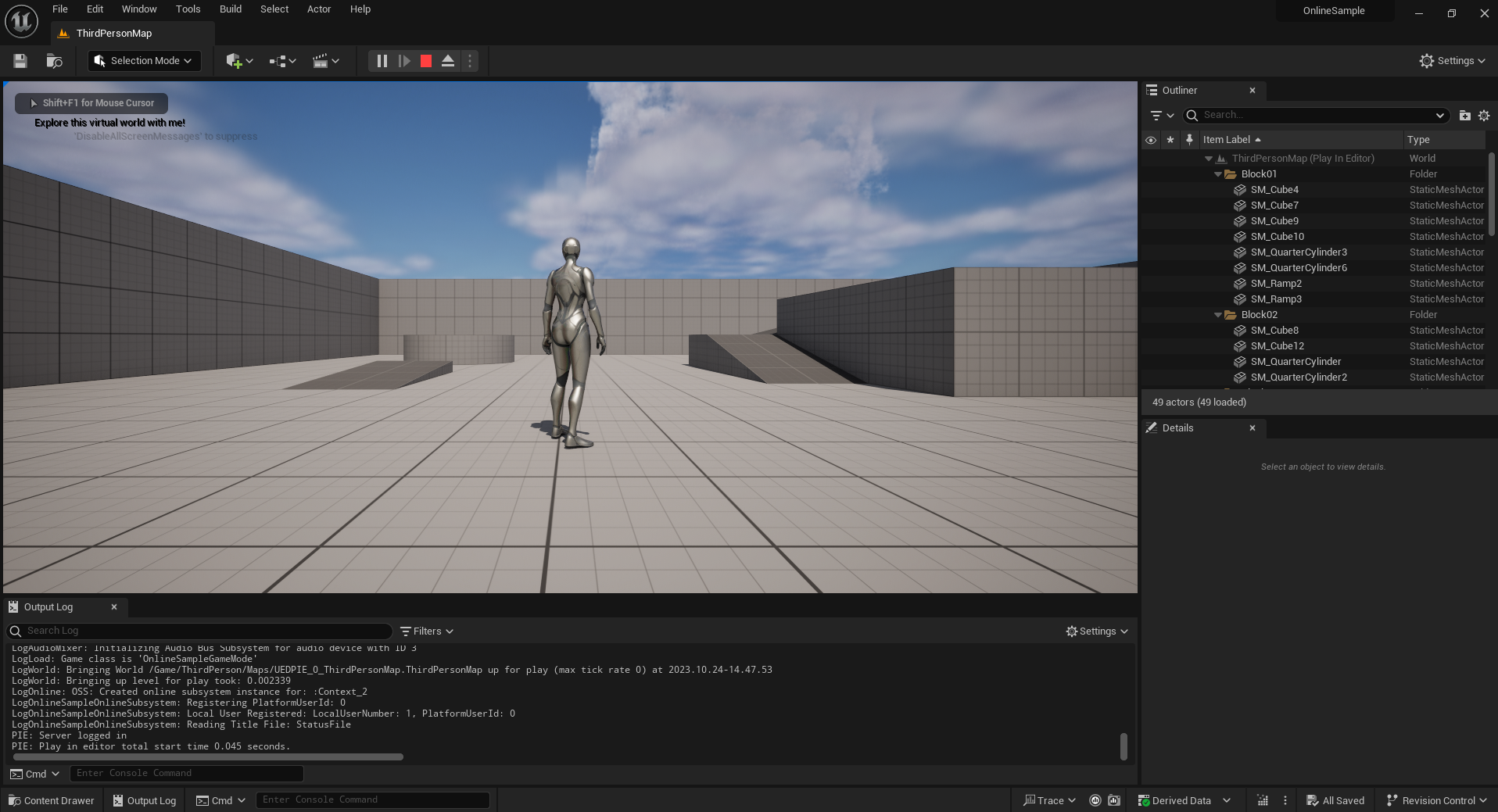
Console Commands
You can also use console commands to debug and test the current online services implementation:
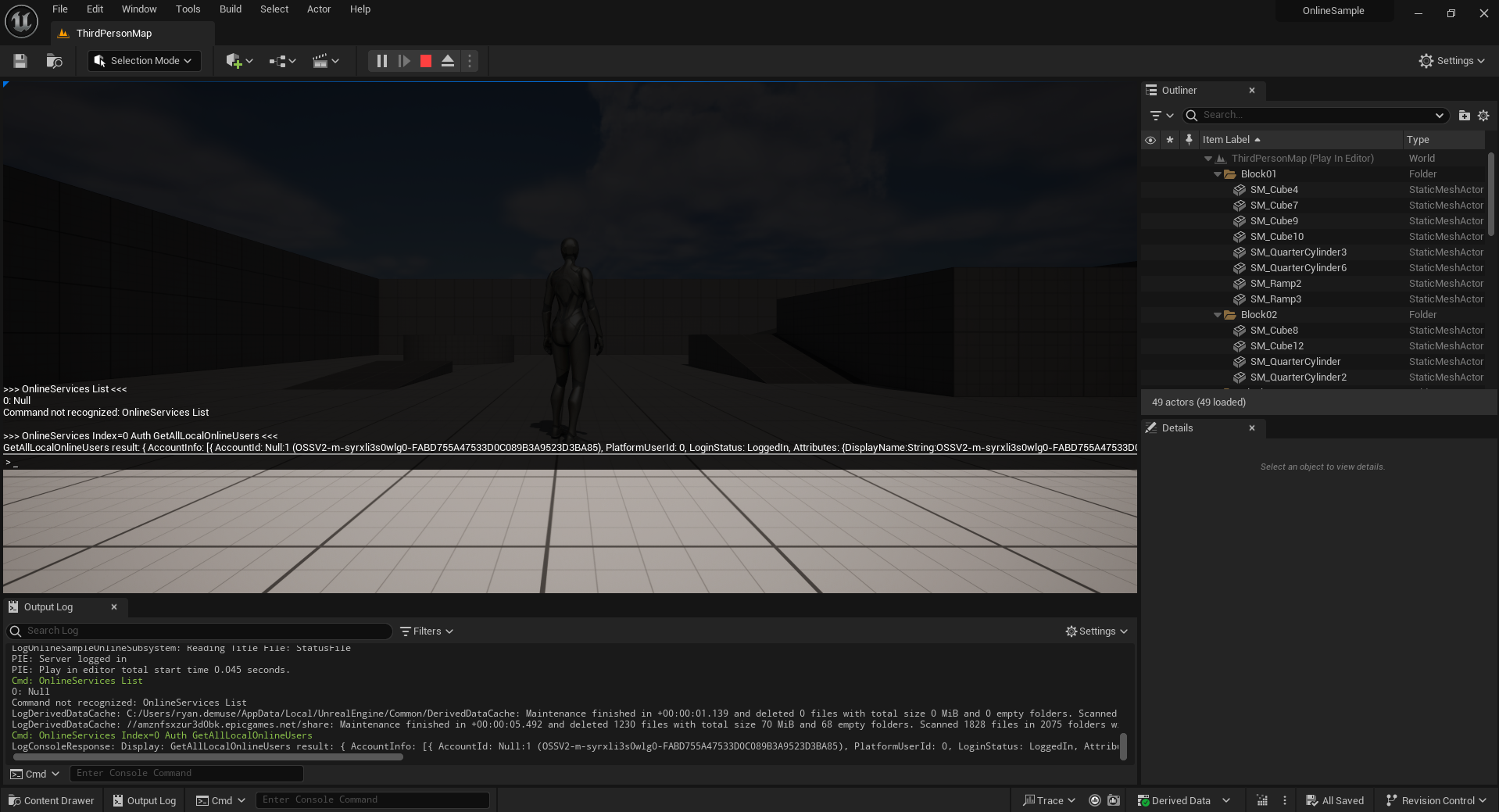
For more information about how to use console commands with the Online Services plugin, see the Online Services Console Commands documentation page.

