
This page is not available in the language you have chosen. It will be displayed in English by default. If you would like to view it in a different language, you can try selecting another language.
Once you installed the Datasmith Exporter Plugin for Solidworks, you will have the option to save your Solidworks scene as a .udatasmith file.
Follow the steps below in Solidworks to export your scene using this new filetype.
-
From the main toolbar, click the drop-down arrow next to the Save button, then select Save As.

-
In the Save As window, from the Save as type drop-down, select the Unreal (
*.udatasmith) filetype.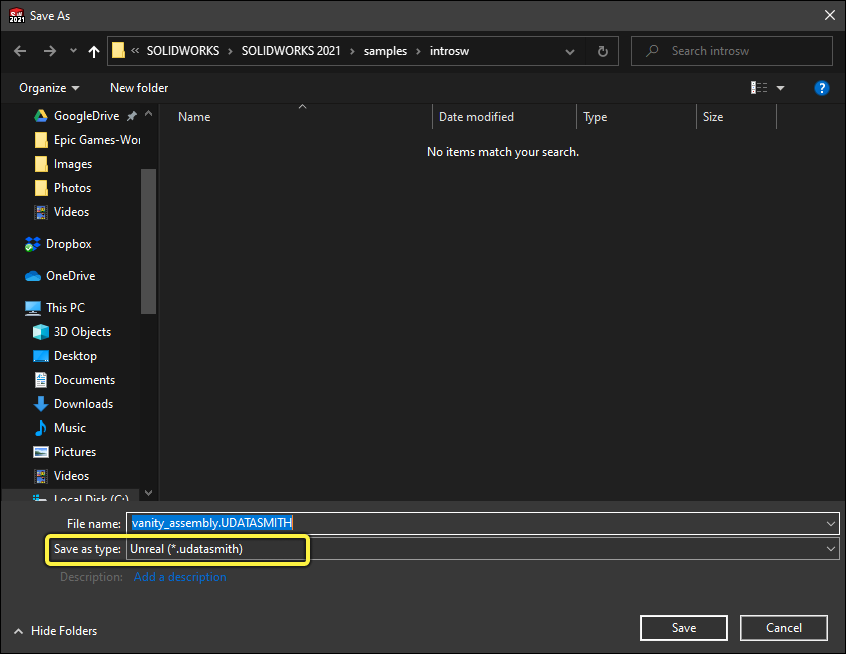
End Result
Your .udatasmith file should now be ready to try importing into Unreal. See Importing Datasmith Content into Unreal Engine 4. If your data needs additional cleaning, merging, or other modifications during the import process, see Visual Dataprep.