

The NFOR Denoiser is a spatial-temporal denoising engine for Unreal Engine’s Path Tracer designed to provide high temporal stability to offline path-traced rendering. This denoiser creates smooth camera animations and is GPU-accelerated with each pixel being denoised based on the surrounding patches in both time and space. This algorithm is inspired by the research paper Nonlinearly Weighted First-Order Regression for denoising Monte Carlo Renderings. We denoise the albedo demodulated radiance with bandwidth selections and scatters to preserve more details.
The NFOR denoiser is ideal for rendering with Movie Render Queue (MRQ) to produce high quality output, and is not intended to improve extremely low sample counts or fast moving objects.
Setting Up the NFOR Denoiser
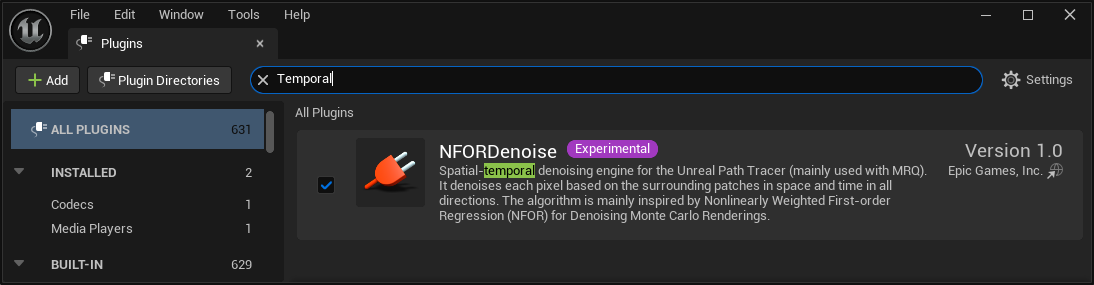
The NFOR Denoiser is a plugin of Unreal Engine named NFORDenoise. This should be enabled by default for all projects, but if it is not, you can enable it from the Plugins browser.
Path Tracer Requirements
Before you can use the path tracer, you must first enable Support Hardware Ray Tracing in the project settings.
For additional hardware requirements of using the Path Tracer with Unreal Engine, see the “System Requirements” section of Ray Tracing and Path Tracing Features.
Setting up Movie Render Graph
Movie Render Graph natively supports NFOR denoising. To use the temporal denoiser, you only need to modify some of the settings on the Path Traced Renderer pass node.
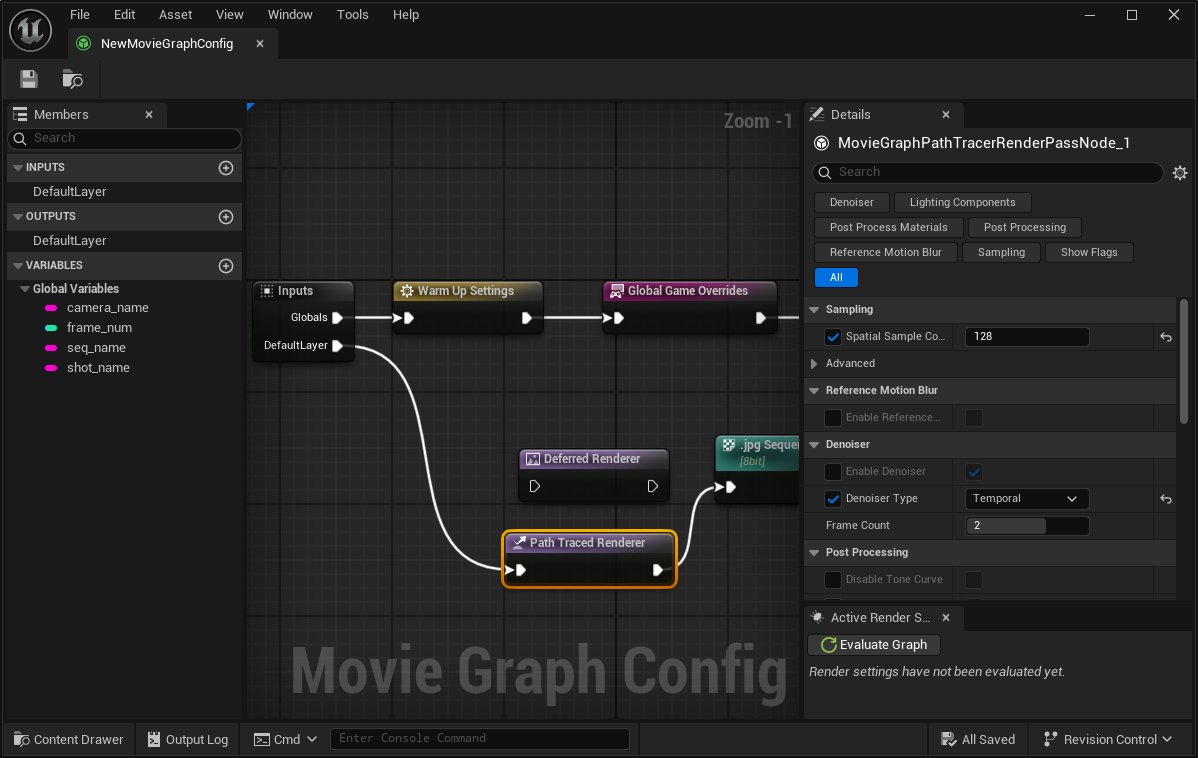
Change the following settings in the Details panel when the Path Traced Renderer node selected:
-
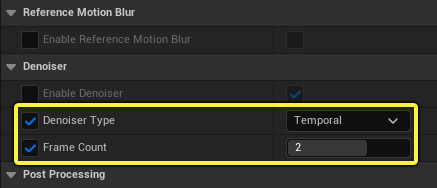
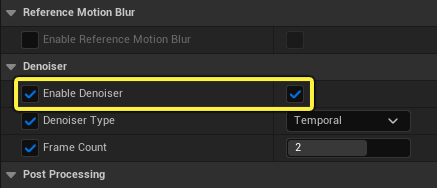
Under the Denoiser category, check the box for Denoiser Type and set it to Temporal. This enables the temporal denoiser NFOR
NFOR is the default temporal denoiser and is set with the console command
r.PathTracing.TemporalDenoiser.Name NFOR. When the denoiser type is set to Spatial in the setting dropdown selection, the default denoiser is the Neural Network Engine (NNE) version of Inte’s Open Image Denoise (OIDN) plugin. This can also be set with the console commandr.PathTracing.Denoiser.Name NNEDenoiser. -
Adjust the Frame Count as needed for your render. When used with NFOR denoising, this number refers to how many frames on both sides (past and future) of the current frame to use for denoising. You can use frame values between 0 and 3.
This setting is only used when the Denoiser Type is set to Temporal. When set to 0, NFOR works in Spatial.
You can verify if the temporal denoiser is running by checking the log output, which should show something like this in the log:
… LogNFORDenoise: Frame 322: Denoised NumOfHistory = 5 …
If you do not see this in the log, double check that the Enable Denoiser box is checked. This overrides the Denoiser setting found in the Post Process Volume settings.
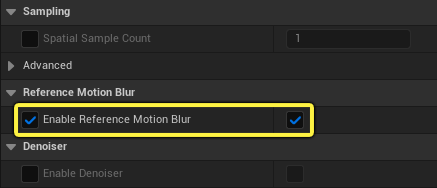
We recommend turning on Reference Motion Blur if too many temporal sub-samples are used. Otherwise, each temporal sub-sample triggers denoising, adding unnecessary time to denoising the frame. This tip applies to Movie Render Queue as well.
Setting Up Movie Render Queue
To use NFOR denoising with Movie Render Queue, you’ll need to set the following:
- Set the console variable
r.PathTracing.SpatialDenoiser.Typeto1to use the temporal denoiser. - Set the console variable
r.NFOR.FrameCountto a value between 0 and 3 as needed. This number refers to how many frames on both sides (past and future) of the current frame to use for denoising. The default value is 2 frames. -
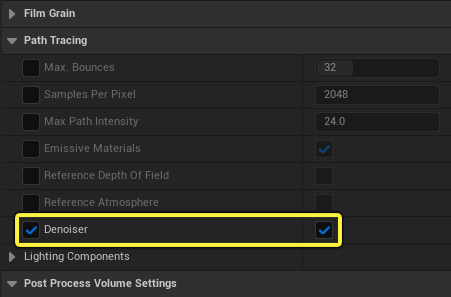
Enable the Denoiser checkbox in the Post Process Volume under the Path Tracing category.
When using MRQ, there are noisy initial frames and missing frames at the end of each shot due to the need for future frames. The Movie Render Graph path does not have this issue.
Miscellaneous NFOR Parameters
The following are some additional parameters of NFOR denoising you can use:
- Radiance Filtering:
r.NFOR.NonLocalMean.Radiance.PatchDistancesets the search distance of the non-local mean algorithm when denoising radiance. The searching patch width and height is equal to the Patch Distance multiplied by 2 + 1. Larger values can improve the smoothness of denoising but quadratically increases the rendering time. The default is 9.r.NFOR.NonLocalMean.Radiance.PatchSizesets the size of the non-local mean algorithm, whereby the patch width and height is equal to the Patch Size multiplied by 2 + 1. The default is 3. A larger values increases the smoothness.
- Feature Filtering:
r.NFOR.NonLocalMean.Feature.PatchDistance(Default is 5) It controls the denoising strength of the feature buffer and alpha channel.r.NFOR.NonLocalMean.Feature.PatchSize(Default is 3)
- Pre-Divide Albedo to preserve detail:
- Set
r.NFORPredivideAlbedo.Offsetto0.1. This offset is added to albedo before demodulation of the radiance to avoid issues caused by dividing by zero. This can help preserve more high frequency detail in the frame. Larger values can improve the denoising smoothness when the scene is too noisy. The default is 0.1.
- Set
- NFOR Frame Count:
- Set
r.NFOR.FrameCountto2to use 5 frames for history by default for offline rendering through Movie Render Queue. This includes 2 previous frames, the current frame, and 2 future frames. The frame counts value is always 0 in the editor to previous single frame denoising. You can use values from 0 to 3 currently.
You should not modify this parameter for Movie Render Graph. The path tracer node modifies this value and aligns it with the internal states of MRG to output proper frame renders.
- Set
Limitations
- Fireflies cannot be removed by the denoiser
- The denoiser requires a decent amount of samples.