
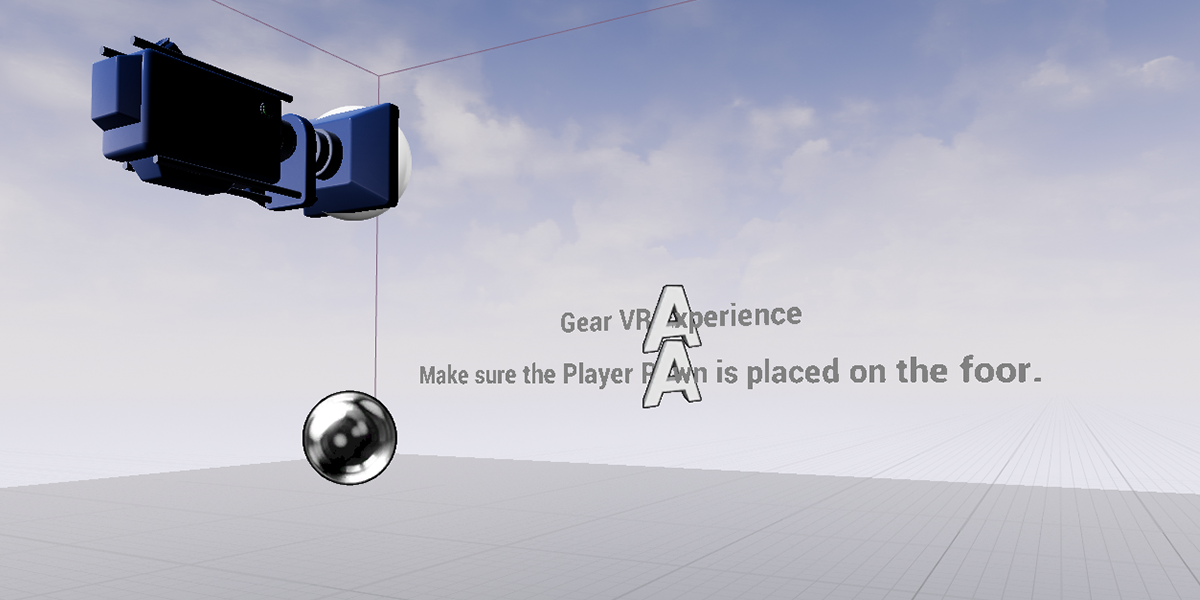
No matter if your Gear VR project is a sitting or standing experience, the manner in which the user's camera is set up will be the same. In the following How - To we will go over how to set up a UE4 camera for use with the Gear VR HMD.
Steps
Below you will find instructions on project setup requirements as well as how to create the needed Pawn Blueprints for Gear VR.
-
First, create a new UE4 project with the following settings and once the setting has been input, press the Create Project button to create the project.
- Blank Project
- Blueprint
- Mobile / Tablet
- Scalable 3D or 2D
- No Starter Content
- Location for the project to be saved
- Name for the project
-
Once the project loads, right-click in the Content Browser and from the displayed menu, go to the Create Basic Asset section and select the Blueprint Class option.
Click for full image.
-
From the Pick Parent Class window, select the Pawn option and then give it a name of GearVR_Pawn.
Click for full image.
-
Open up the GearVR_Pawn Blueprint and go to the Component section of the Viewport tab. Using the Add Component button add the following two components with the following names and also make sure that the VRCamera is a child of the VRCameraRoot.
- Scene - VRCameraRoot
- Camera - VRCamera
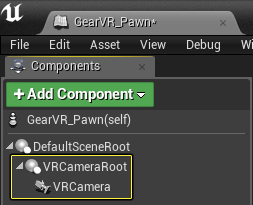
No matter what VR HMD you are using, this is the Epic recommend way to set up a VR camera as it allows you to offset the position of the camera without having to move the actual camera.
-
Now open up the GearVR_Pawn Blueprint and in the Event Graph drag off the Event Begin Play node to show the Executable Actions list and search for the Set Tracking Origin node, clicking on it to add it to the Event Graph.
Click for full image.
-
Make sure the Origin of the Set Tracking Origin node is set to Eye Level.
Click for full image.
-
In the Blueprint editor under the Variables section, create a new Vector variable called CameraHeight and set the Z value to 180.

This number set in CameraHeight should be set to the real world standing height of the user in Centimeters.
-
Drag off the output of the Set Tracking Origin node and search for the Set Relative Location node, selecting the SetRelativeLocation(VRCameraRoot) option.
Click for full image.
-
Connect the CameraHeight variable to the New Location input on the Set Relative Location node and then press the Compile button. When completed your Event Graph should look like the following image.
BEGIN OBJECT Begin Object Class=/Script/BlueprintGraph.K2Node_Event Name="K2Node_Event_0" EventReference=(MemberParent=Class'/Script/Engine.Actor',MemberName="ReceiveBeginPlay") bOverrideFunction=True bCommentBubblePinned=True NodeGuid=C59E43604E42C7F4DAD48BA1137C7EB9 CustomProperties Pin (PinId=FE39330745F60B4B61B9138BA2E683E1,PinName="OutputDelegate",Direction="EGPD_Output",PinType.PinCategory="delegate",PinType.PinSubCategory="",PinType.PinSubCategoryObject=None,PinType.PinSubCategoryMemberReference=(MemberParent=Class'/Script/Engine.Actor',MemberName="ReceiveBeginPlay"),PinType.PinValueType=(),PinType.bIsMap=False,PinType.bIsSet=False,PinType.bIsArray=False,PinType.bIsReference=False,PinType.bIsConst=False,PinType.bIsWeakPointer=False,PersistentGuid=00000000000000000000000000000000,bHidden=False,bNotConnectable=False,bDefaultValueIsReadOnly=False,bDefaultValueIsIgnored=False,bAdvancedView=False,) CustomProperties Pin (PinId=CFFCA1684C5D4AA0653641B0BB601A74,PinName="then",Direction="EGPD_Output",PinType.PinCategory="exec",PinType.PinSubCategory="",PinType.PinSubCategoryObject=None,PinType.PinSubCategoryMemberReference=(),PinType.PinValueType=(),PinType.bIsMap=False,PinType.bIsSet=False,PinType.bIsArray=False,PinType.bIsReference=False,PinType.bIsConst=False,PinType.bIsWeakPointer=False,LinkedTo=(K2Node_CallFunction_77 7227CDD94FDBCC1F02D6258FDC30999A,),PersistentGuid=00000000000000000000000000000000,bHidden=False,bNotConnectable=False,bDefaultValueIsReadOnly=False,bDefaultValueIsIgnored=False,bAdvancedView=False,) End Object Begin Object Class=/Script/BlueprintGraph.K2Node_CallFunction Name="K2Node_CallFunction_77" FunctionReference=(MemberParent=Class'/Script/Engine.HeadMountedDisplayFunctionLibrary',MemberName="SetTrackingOrigin") NodePosX=224 NodeComment="PS4" NodeGuid=42D9B736496D2754CE4A38880F53497B CustomProperties Pin (PinId=7227CDD94FDBCC1F02D6258FDC30999A,PinName="execute",PinToolTip="\nExec",PinType.PinCategory="exec",PinType.PinSubCategory="",PinType.PinSubCategoryObject=None,PinType.PinSubCategoryMemberReference=(),PinType.PinValueType=(),PinType.bIsMap=False,PinType.bIsSet=False,PinType.bIsArray=False,PinType.bIsReference=False,PinType.bIsConst=False,PinType.bIsWeakPointer=False,LinkedTo=(K2Node_Event_0 CFFCA1684C5D4AA0653641B0BB601A74,),PersistentGuid=00000000000000000000000000000000,bHidden=False,bNotConnectable=False,bDefaultValueIsReadOnly=False,bDefaultValueIsIgnored=False,bAdvancedView=False,) CustomProperties Pin (PinId=6F56A02B45E8A67EEE79388CF61A44BC,PinName="then",PinToolTip="\nExec",Direction="EGPD_Output",PinType.PinCategory="exec",PinType.PinSubCategory="",PinType.PinSubCategoryObject=None,PinType.PinSubCategoryMemberReference=(),PinType.PinValueType=(),PinType.bIsMap=False,PinType.bIsSet=False,PinType.bIsArray=False,PinType.bIsReference=False,PinType.bIsConst=False,PinType.bIsWeakPointer=False,LinkedTo=(K2Node_CallFunction_46 FE5D38794B000B7752514CAFCC5316E4,),PersistentGuid=00000000000000000000000000000000,bHidden=False,bNotConnectable=False,bDefaultValueIsReadOnly=False,bDefaultValueIsIgnored=False,bAdvancedView=False,) CustomProperties Pin (PinId=5E2D303F41CB55A5DAC09B8A4032EA14,PinName="self",PinFriendlyName=NSLOCTEXT("K2Node", "Target", "Target"),PinToolTip="Target\nHead Mounted Display Function Library Reference",PinType.PinCategory="object",PinType.PinSubCategory="",PinType.PinSubCategoryObject=Class'/Script/Engine.HeadMountedDisplayFunctionLibrary',PinType.PinSubCategoryMemberReference=(),PinType.PinValueType=(),PinType.bIsMap=False,PinType.bIsSet=False,PinType.bIsArray=False,PinType.bIsReference=False,PinType.bIsConst=False,PinType.bIsWeakPointer=False,DefaultObject="/Script/Engine.Default__HeadMountedDisplayFunctionLibrary",PersistentGuid=00000000000000000000000000000000,bHidden=True,bNotConnectable=False,bDefaultValueIsReadOnly=False,bDefaultValueIsIgnored=False,bAdvancedView=False,) CustomProperties Pin (PinId=C82F35534E48B3A5FF212CB4CAAEFD61,PinName="Origin",PinToolTip="Origin\nEHMDTrackingOrigin Enum",PinType.PinCategory="byte",PinType.PinSubCategory="",PinType.PinSubCategoryObject=Enum'/Script/Engine.EHMDTrackingOrigin',PinType.PinSubCategoryMemberReference=(),PinType.PinValueType=(),PinType.bIsMap=False,PinType.bIsSet=False,PinType.bIsArray=False,PinType.bIsReference=False,PinType.bIsConst=False,PinType.bIsWeakPointer=False,DefaultValue="Eye",PersistentGuid=00000000000000000000000000000000,bHidden=False,bNotConnectable=False,bDefaultValueIsReadOnly=False,bDefaultValueIsIgnored=False,bAdvancedView=False,) End Object Begin Object Class=/Script/BlueprintGraph.K2Node_CallFunction Name="K2Node_CallFunction_46" FunctionReference=(MemberParent=Class'/Script/Engine.SceneComponent',MemberName="K2_SetRelativeLocation") NodePosX=560 NodePosY=-16 NodeGuid=74BC1E504ADBB3371F22AB8555888796 CustomProperties Pin (PinId=FE5D38794B000B7752514CAFCC5316E4,PinName="execute",PinToolTip="\nExec",PinType.PinCategory="exec",PinType.PinSubCategory="",PinType.PinSubCategoryObject=None,PinType.PinSubCategoryMemberReference=(),PinType.PinValueType=(),PinType.bIsMap=False,PinType.bIsSet=False,PinType.bIsArray=False,PinType.bIsReference=False,PinType.bIsConst=False,PinType.bIsWeakPointer=False,LinkedTo=(K2Node_CallFunction_77 6F56A02B45E8A67EEE79388CF61A44BC,),PersistentGuid=00000000000000000000000000000000,bHidden=False,bNotConnectable=False,bDefaultValueIsReadOnly=False,bDefaultValueIsIgnored=False,bAdvancedView=False,) CustomProperties Pin (PinId=1C7A9A54494AE23B7164B7B8725F5D52,PinName="then",PinToolTip="\nExec",Direction="EGPD_Output",PinType.PinCategory="exec",PinType.PinSubCategory="",PinType.PinSubCategoryObject=None,PinType.PinSubCategoryMemberReference=(),PinType.PinValueType=(),PinType.bIsMap=False,PinType.bIsSet=False,PinType.bIsArray=False,PinType.bIsReference=False,PinType.bIsConst=False,PinType.bIsWeakPointer=False,PersistentGuid=00000000000000000000000000000000,bHidden=False,bNotConnectable=False,bDefaultValueIsReadOnly=False,bDefaultValueIsIgnored=False,bAdvancedView=False,) CustomProperties Pin (PinId=0811E84B4E91F1030D8FE3BAC770A247,PinName="self",PinFriendlyName=NSLOCTEXT("K2Node", "Target", "Target"),PinToolTip="Target\nScene Component Reference",PinType.PinCategory="object",PinType.PinSubCategory="",PinType.PinSubCategoryObject=Class'/Script/Engine.SceneComponent',PinType.PinSubCategoryMemberReference=(),PinType.PinValueType=(),PinType.bIsMap=False,PinType.bIsSet=False,PinType.bIsArray=False,PinType.bIsReference=False,PinType.bIsConst=False,PinType.bIsWeakPointer=False,LinkedTo=(K2Node_VariableGet_20 14EFDA2C47FF2DF1F58E7A9BA401135E,),PersistentGuid=00000000000000000000000000000000,bHidden=False,bNotConnectable=False,bDefaultValueIsReadOnly=False,bDefaultValueIsIgnored=False,bAdvancedView=False,) CustomProperties Pin (PinId=C2D0A283497566CAFA793CB992D07158,PinName="NewLocation",PinToolTip="New Location\nVector \n\nNew location of the component relative to its parent.",PinType.PinCategory="struct",PinType.PinSubCategory="",PinType.PinSubCategoryObject=ScriptStruct'/Script/CoreUObject.Vector',PinType.PinSubCategoryMemberReference=(),PinType.PinValueType=(),PinType.bIsMap=False,PinType.bIsSet=False,PinType.bIsArray=False,PinType.bIsReference=False,PinType.bIsConst=False,PinType.bIsWeakPointer=False,DefaultValue="0, 0, 0",AutogeneratedDefaultValue="0, 0, 0",LinkedTo=(K2Node_VariableGet_40 7FE7B76D4888DB151FF54EAB9D25F826,),PersistentGuid=00000000000000000000000000000000,bHidden=False,bNotConnectable=False,bDefaultValueIsReadOnly=False,bDefaultValueIsIgnored=False,bAdvancedView=False,) CustomProperties Pin (PinId=3D1069744CC4C94F298F3980C2A0F289,PinName="bSweep",PinToolTip="Sweep\nBoolean\n\nWhether we sweep to the destination location, triggering overlaps along the way and stopping short of the target if blocked by something. Only the root component is swept and checked for blocking collision, child components move without sweeping. If collision is off, this has no effect.",PinType.PinCategory="bool",PinType.PinSubCategory="",PinType.PinSubCategoryObject=None,PinType.PinSubCategoryMemberReference=(),PinType.PinValueType=(),PinType.bIsMap=False,PinType.bIsSet=False,PinType.bIsArray=False,PinType.bIsReference=False,PinType.bIsConst=False,PinType.bIsWeakPointer=False,DefaultValue="false",AutogeneratedDefaultValue="false",PersistentGuid=00000000000000000000000000000000,bHidden=False,bNotConnectable=False,bDefaultValueIsReadOnly=False,bDefaultValueIsIgnored=False,bAdvancedView=False,) CustomProperties Pin (PinId=63A901EA42073DA211529DBD9BDB4FF8,PinName="SweepHitResult",PinToolTip="Sweep Hit Result\nHit Result Structure\n\nHit result from any impact if sweep is true.",Direction="EGPD_Output",PinType.PinCategory="struct",PinType.PinSubCategory="",PinType.PinSubCategoryObject=ScriptStruct'/Script/Engine.HitResult',PinType.PinSubCategoryMemberReference=(),PinType.PinValueType=(),PinType.bIsMap=False,PinType.bIsSet=False,PinType.bIsArray=False,PinType.bIsReference=False,PinType.bIsConst=False,PinType.bIsWeakPointer=False,PersistentGuid=00000000000000000000000000000000,bHidden=False,bNotConnectable=False,bDefaultValueIsReadOnly=False,bDefaultValueIsIgnored=False,bAdvancedView=False,) CustomProperties Pin (PinId=03544D8C4FC9FC037BE82CB2780E14A1,PinName="bTeleport",PinToolTip="Teleport\nBoolean\n\nWhether we teleport the physics state (if physics collision is enabled for this object). If true, physics velocity for this object is unchanged (so ragdoll parts are not affected by change in location). If false, physics velocity is updated based on the change in position (affecting ragdoll parts). If CCD is on and not teleporting, this will affect objects along the entire sweep volume.",PinType.PinCategory="bool",PinType.PinSubCategory="",PinType.PinSubCategoryObject=None,PinType.PinSubCategoryMemberReference=(),PinType.PinValueType=(),PinType.bIsMap=False,PinType.bIsSet=False,PinType.bIsArray=False,PinType.bIsReference=False,PinType.bIsConst=False,PinType.bIsWeakPointer=False,DefaultValue="false",AutogeneratedDefaultValue="false",PersistentGuid=00000000000000000000000000000000,bHidden=False,bNotConnectable=False,bDefaultValueIsReadOnly=False,bDefaultValueIsIgnored=False,bAdvancedView=False,) End Object Begin Object Class=/Script/BlueprintGraph.K2Node_VariableGet Name="K2Node_VariableGet_20" VariableReference=(MemberName="VRCameraRoot",bSelfContext=True) NodePosX=304 NodePosY=144 NodeGuid=B62CB0404A6FE2645BBEDCA2875DCA91 CustomProperties Pin (PinId=14EFDA2C47FF2DF1F58E7A9BA401135E,PinName="VRCameraRoot",Direction="EGPD_Output",PinType.PinCategory="object",PinType.PinSubCategory="",PinType.PinSubCategoryObject=Class'/Script/Engine.SceneComponent',PinType.PinSubCategoryMemberReference=(),PinType.PinValueType=(),PinType.bIsMap=False,PinType.bIsSet=False,PinType.bIsArray=False,PinType.bIsReference=False,PinType.bIsConst=False,PinType.bIsWeakPointer=False,LinkedTo=(K2Node_CallFunction_46 0811E84B4E91F1030D8FE3BAC770A247,),PersistentGuid=00000000000000000000000000000000,bHidden=False,bNotConnectable=False,bDefaultValueIsReadOnly=False,bDefaultValueIsIgnored=False,bAdvancedView=False,) CustomProperties Pin (PinId=4018F2114B5E254238969EA5B9138178,PinName="self",PinFriendlyName=NSLOCTEXT("K2Node", "Target", "Target"),PinType.PinCategory="object",PinType.PinSubCategory="",PinType.PinSubCategoryObject=BlueprintGeneratedClass'/Game/GearVR_Pawn.GearVR_Pawn_C',PinType.PinSubCategoryMemberReference=(),PinType.PinValueType=(),PinType.bIsMap=False,PinType.bIsSet=False,PinType.bIsArray=False,PinType.bIsReference=False,PinType.bIsConst=False,PinType.bIsWeakPointer=False,PersistentGuid=00000000000000000000000000000000,bHidden=True,bNotConnectable=False,bDefaultValueIsReadOnly=False,bDefaultValueIsIgnored=False,bAdvancedView=False,) End Object Begin Object Class=/Script/BlueprintGraph.K2Node_VariableGet Name="K2Node_VariableGet_40" VariableReference=(MemberName="CameraHeight",MemberGuid=E6EDE9F147066500D13B0DA9CDB12D84,bSelfContext=True) NodePosX=320 NodePosY=224 NodeGuid=F6D021224B52F52FB98C4295DDB0F6E6 CustomProperties Pin (PinId=7FE7B76D4888DB151FF54EAB9D25F826,PinName="CameraHeight",Direction="EGPD_Output",PinType.PinCategory="struct",PinType.PinSubCategory="",PinType.PinSubCategoryObject=ScriptStruct'/Script/CoreUObject.Vector',PinType.PinSubCategoryMemberReference=(),PinType.PinValueType=(),PinType.bIsMap=False,PinType.bIsSet=False,PinType.bIsArray=False,PinType.bIsReference=False,PinType.bIsConst=False,PinType.bIsWeakPointer=False,AutogeneratedDefaultValue="0, 0, 0",LinkedTo=(K2Node_CallFunction_46 C2D0A283497566CAFA793CB992D07158,),PersistentGuid=00000000000000000000000000000000,bHidden=False,bNotConnectable=False,bDefaultValueIsReadOnly=False,bDefaultValueIsIgnored=False,bAdvancedView=False,) CustomProperties Pin (PinId=1FB8519E4FFBB7EC464F1BB843BC179D,PinName="self",PinFriendlyName=NSLOCTEXT("K2Node", "Target", "Target"),PinType.PinCategory="object",PinType.PinSubCategory="",PinType.PinSubCategoryObject=BlueprintGeneratedClass'/Game/GearVR_Pawn.GearVR_Pawn_C',PinType.PinSubCategoryMemberReference=(),PinType.PinValueType=(),PinType.bIsMap=False,PinType.bIsSet=False,PinType.bIsArray=False,PinType.bIsReference=False,PinType.bIsConst=False,PinType.bIsWeakPointer=False,PersistentGuid=00000000000000000000000000000000,bHidden=True,bNotConnectable=False,bDefaultValueIsReadOnly=False,bDefaultValueIsIgnored=False,bAdvancedView=False,) End Object You can copy the completed Blueprint by clicking on the upper left-hand corner of above and pressing CRTL + C to copy the graph. Once copied, go to your Blueprints event and press CTRL + V to paste it in.
-
Drag the GearVR_Pawn Blueprint from the Content Browser to a level, making sure that it is placed as close to the ground as possible.
Click for full image.
-
Select the GearVR_Pawn Blueprint and in the Details panel under the Pawn setting, set the Auto Possess Player from Disabled to Player 0.
Click for full image.
-
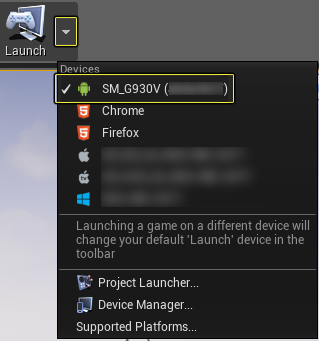
Finally, go to the Main Toolbar and click on the small white triangle next to Launch Options and then select your Android device from the list to start the packaging and deployment to that device.
End Result
Once the UE4 project has deployed, put your Smartphone into your Gear VR HMD and when you move your head around it should look like the following video.
UE4 Project Downloads
Below you will find a link to where you can download the UE4 project that was used to create this example.