| Available 16-Bit Selection Options |
|
| Parent Index (Int as float) |
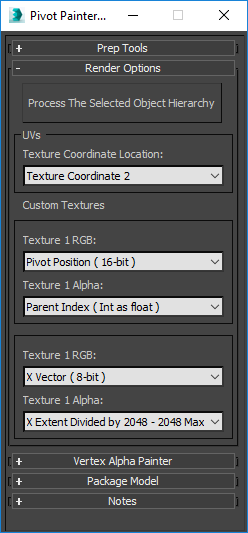
Pivot Painter 2 enables users to re-create complex hierarchies within the Unreal Engine's material system. It does so by iteratively sampling points within a texture, reconstructing the hierarchy with the information that it gathers in the process. The "Parent Index" option enables us to read a pixel and then to pinpoint where its parent object's pivot information is located within the same texture. Referencing this data directly is considered advanced. In most cases, it is expected that you will process models with the default texture settings which can then be used with the PivotPainter2FoliageShader function. This function recreates hierarchies up to four levels deep and provides many of the animation controls that you would need while animating foliage. For those that are interested in creating their own complex networks, the data in this channel is an integer that should be decoded to float form before being referenced via ms_PivotPainter2_UnpackIntegerAsFloat. That information can then be used in ms_PivotPainter2_ReturnParentTextureInfo to return the UV location of the object's parent object. A Is Child? (see Note section below) output pin will return a black or white value indicating whether or not the pixel points to another pixel as its parent or if it points to itself (meaning that it is the root object). Explore the PivotPainter2FoliageShader function if you would like more information. The Render Options between Texture 1 and 2 are the same. Picking a 16-bit RGB option will show 16-bit Alpha options and hide the 8-bit Alpha options. Conversely, picking an 8-bit RGB option will show those and hide the 16-bit options. |
| Number of Steps From Root |
This float value can be referenced without any additional decoding steps. It represents the number of steps that the current object is from being the root. |
| Random 0-1 Value Per Element |
This will store a randomly generated 0-1 number per item and can be referenced without using additional decoding material functions. |
| Bounding Box Diameter |
Store the local space diameter of the objects being processed as float values. This can be transformed into world space scale by multiplying the output by an output of the ObjectScale material function. |
| Selection Order (Int as float) |
The order in which objects were selected inside 3DS Max that is stored as an integer when this option is selected. Use ms_PivotPainter_UnpackIntegerAsFloat when referencing this information. Please see Content Examples PivotPainter2 map for a sample use case. |
| Normalized 0-1 Hierarchy Position |
When selected, the 3DS MAXScript will find the total depth of the hierarchy of the object selected, then find the object's depth within that hierarchy and then normalize the object's current depth by dividing it by the total depth. This information is stored as a 0-1 float value and does not need to be decoded. |
| Object X Width |
This returns a float value that's equal to the total length of the object being processed in 3DS Max along its local X vector. |
| Object Y Depth |
This returns a float value that's equal to the total length of the object being processed in 3DS Max along its local Y vector. |
| Object Z Height |
This returns a float value that's equal to the total length of the object being processed in 3DS Max along its local Z vector. |
| Available 8-Bit Selection Options |
|
| Normalized 0-1 Hierarchy Position |
When selected, the 3DS MAXScript will find the total depth of the hierarchy of the object selected, then find the object's depth within that hierarchy and then normalize the object's current depth by dividing it by the total depth. This information is stored as a 0-1 float value and does not need to be decoded. |
| Random 0-1 Value Per Element |
This will store a randomly generated 0-1 number per item and can be referenced without using additional decoding material functions. |
| X Extent Divided by 2048 - 2048 Max |
This returns an 8-bit float value that's equal to the total length of the object being processed in 3DS Max along its local X vector. These values use ms_PivotPainter2_Decode8BitAlphaAxisExtent to decode the value. This format can represent values between 8-2048 in increments of 8. |
| Y Extent Divided by 2048 - 2048 Max |
This returns an 8-bit float value that's equal to the total length of the object being processed in 3DS Max along its local Y vector. These values use ms_PivotPainter2_Decode8BitAlphaAxisExtent to decode the value. This format can represent values between 8-2048 in increments of 8. |
| Z Extent Divided by 2048 - 2048 Max |
This returns an 8-bit float value that's equal to the total length of the object being processed in 3DS Max along its local Z vector. These values use ms_PivotPainter2_Decode8BitAlphaAxisExtent to decode the value. This format can represent values between 8-2048 in increments of 8. |