

Macros are essentially the same as collapsed graphs of nodes. They have an entry point and exit point designated by tunnel nodes. Each tunnel can have any number of execution or data pins which are visible on the macro node when used in other Blueprints and graphs.
Creating Macros
In this tutorial, you will create a Macro to check if a Character has enough energy to jump. If they do have enough energy, then your macro will deplete energy from the player, print their current value to the screen, then call the jump function. If they do not have enough energy, your macro will print to the screen that "they are out of energy", and prevent them from jumping.
For this example, we are using the Blueprint Third Person Project with Starter Content enabled.
-
After Creating and Launching your project, navigate to the
Content/ThirdPerson/Blueprintsfolder, and open the BP_ThirdPersonCharacter Blueprint.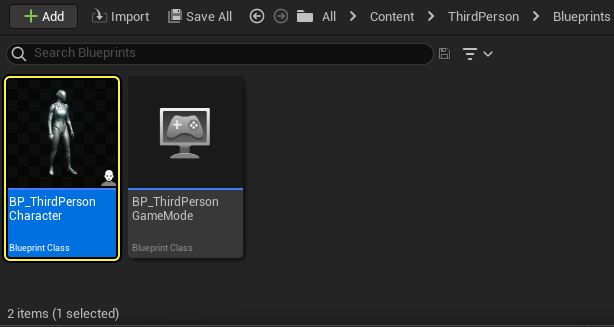
-
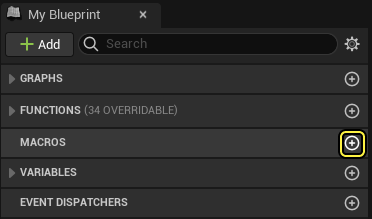
Navigate to the My Blueprint window, then click the Add Macro button.
-
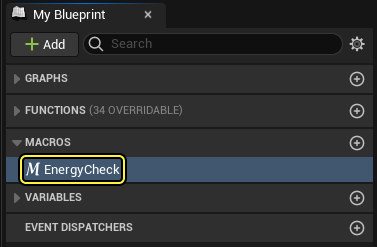
A new macro is created, select it and press F2 to rename it to EnergyCheck.
-
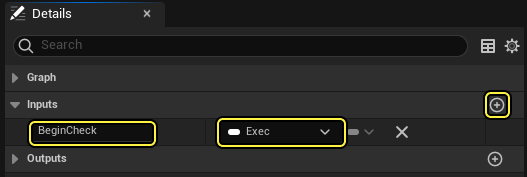
With the macro selected, navigate to Details > Inputs, click Add(+) to create a new Input named BeginCheck, then change its type to Exec** (Execution pin)
-
Navigate to Details > Outputs, and click Add(+) to create two new Outputs. Name one HasEnergy and the other NoEnergy, then set the Exec pin types.
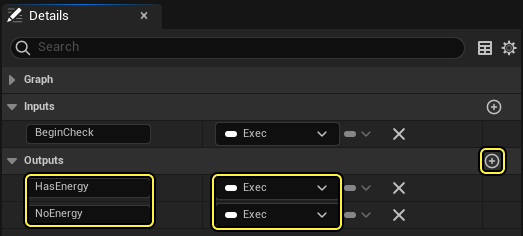
This will create Input / Output nodes on the Macro Node itself that can be used to pass data to and from the Macro.
For the Input, use an Exec pin called BeginCheck to start the Macro. Next, create a script that checks if the player has enough energy to jump and if so, execute the HasEnergy pin. If the player does not have enough energy, execute the NoEnergy pin.
-
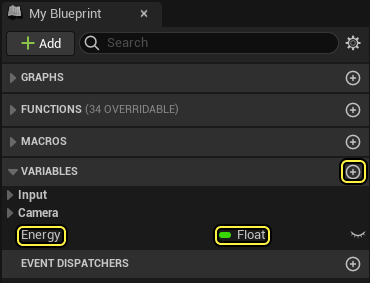
Inside the My Blueprint window, click the Add Variable button to create a new float variable named Energy.
-
On the Toolbar, click Compile, then select Energy and navigate to the Details panel to set its value to 100.
-
In the Energy graph, click B + Left-click to create a Branch node.
Begin Object Class=/Script/BlueprintGraph.K2Node_Tunnel Name="K2Node_Tunnel_0" bCanHaveOutputs=True NodePosX=-80 NodePosY=192 NodeGuid=4500150646970605E70A60A3C13D1FAA CustomProperties Pin (PinId=98F7CAA84E2A27C812123FBDF41F03E1,PinName="BeginCheck",Direction="EGPD_Output",PinType.PinCategory="exec",PinType.PinSubCategory="",PinType.PinSubCategoryObject=None,PinType.PinSubCategoryMemberReference=(),PinType.PinValueType=(),PinType.ContainerType=None,PinType.bIsReference=False,PinType.bIsConst=False,PinType.bIsWeakPointer=False,PinType.bIsUObjectWrapper=False,PinType.bSerializeAsSinglePrecisionFloat=False,PersistentGuid=00000000000000000000000000000000,bHidden=False,bNotConnectable=False,bDefaultValueIsReadOnly=False,bDefaultValueIsIgnored=False,bAdvancedView=False,bOrphanedPin=False,) CustomProperties UserDefinedPin (PinName="BeginCheck",PinType=(PinCategory="exec"),DesiredPinDirection=EGPD_Output) End Object Begin Object Class=/Script/BlueprintGraph.K2Node_Tunnel Name="K2Node_Tunnel_1" bCanHaveInputs=True NodePosX=512 NodePosY=64 NodeGuid=B25A99B147860ECA426757B2CFA92EE4 CustomProperties Pin (PinId=6D264E70477F620620962AA38813CEE1,PinName="HasEnergy",PinType.PinCategory="exec",PinType.PinSubCategory="",PinType.PinSubCategoryObject=None,PinType.PinSubCategoryMemberReference=(),PinType.PinValueType=(),PinType.ContainerType=None,PinType.bIsReference=False,PinType.bIsConst=False,PinType.bIsWeakPointer=False,PinType.bIsUObjectWrapper=False,PinType.bSerializeAsSinglePrecisionFloat=False,PersistentGuid=00000000000000000000000000000000,bHidden=False,bNotConnectable=False,bDefaultValueIsReadOnly=False,bDefaultValueIsIgnored=False,bAdvancedView=False,bOrphanedPin=False,) CustomProperties Pin (PinId=F9B1BBB04D96332C2C709AAF8E579689,PinName="NoEnergy",PinType.PinCategory="exec",PinType.PinSubCategory="",PinType.PinSubCategoryObject=None,PinType.PinSubCategoryMemberReference=(),PinType.PinValueType=(),PinType.ContainerType=None,PinType.bIsReference=False,PinType.bIsConst=False,PinType.bIsWeakPointer=False,PinType.bIsUObjectWr -
While holding Ctrl, drag the Energy float variable from the My Blueprint tab into the macro graph, click and drag off the output pin to search for a Greater operator node, then connect the output pin to the Branch.
Begin Object Class=/Script/BlueprintGraph.K2Node_Tunnel Name="K2Node_Tunnel_0" bCanHaveOutputs=True NodePosX=-80 NodePosY=192 NodeGuid=4500150646970605E70A60A3C13D1FAA CustomProperties Pin (PinId=98F7CAA84E2A27C812123FBDF41F03E1,PinName="BeginCheck",Direction="EGPD_Output",PinType.PinCategory="exec",PinType.PinSubCategory="",PinType.PinSubCategoryObject=None,PinType.PinSubCategoryMemberReference=(),PinType.PinValueType=(),PinType.ContainerType=None,PinType.bIsReference=False,PinType.bIsConst=False,PinType.bIsWeakPointer=False,PinType.bIsUObjectWrapper=False,PinType.bSerializeAsSinglePrecisionFloat=False,LinkedTo=(K2Node_IfThenElse_0 5D71C7E4443ED94B5AEDD4A6E9A4F787,),PersistentGuid=00000000000000000000000000000000,bHidden=False,bNotConnectable=False,bDefaultValueIsReadOnly=False,bDefaultValueIsIgnored=False,bAdvancedView=False,bOrphanedPin=False,) CustomProperties UserDefinedPin (PinName="BeginCheck",PinType=(PinCategory="exec"),DesiredPinDirection=EGPD_Output) End Object Begin Object Class=/Script/BlueprintGraph.K2Node_IfThenElse Name="K2Node_IfThenElse_0" NodePosX=128 NodePosY=192 NodeGuid=85E9DC52476273CDA995849E4CC9B0DA CustomProperties Pin (PinId=5D71C7E4443ED94B5AEDD4A6E9A4F787,PinName="execute",PinType.PinCategory="exec",PinType.PinSubCategory="",PinType.PinSubCategoryObject=None,PinType.PinSubCategoryMemberReference=(),PinType.PinValueType=(),PinType.ContainerType=None,PinType.bIsReference=False,PinType.bIsConst=False,PinType.bIsWeakPointer=False,PinType.bIsUObjectWrapper=False,PinType.bSerializeAsSinglePrecisionFloat=False,LinkedTo=(K2Node_Tunnel_0 98F7CAA84E2A27C812123FBDF41F03E1,),PersistentGuid=00000000000000000000000000000000,bHidden=False,bNotConnectable=False,bDefaultValueIsReadOnly=False,bDefaultValueIsIgnored=False,bAdvancedView=False,bOrphanedPin=False,) CustomProperties Pin (PinId=30D9E9634E4640AF8FFFAABD46197487,PinName="Condition",PinType.PinCategory="bool",PinType.PinSubCategory="",PinType.PinSubCategoryObject=None,PinType.PinSubCategoryMemberReference=(),PinType.PinValueType=(),PinType.Cont -
While holding Alt, drag in the Energy variable to add a Set node.
Begin Object Class=/Script/BlueprintGraph.K2Node_Tunnel Name="K2Node_Tunnel_0" bCanHaveOutputs=True NodePosX=-80 NodePosY=192 NodeGuid=4500150646970605E70A60A3C13D1FAA CustomProperties Pin (PinId=98F7CAA84E2A27C812123FBDF41F03E1,PinName="BeginCheck",Direction="EGPD_Output",PinType.PinCategory="exec",PinType.PinSubCategory="",PinType.PinSubCategoryObject=None,PinType.PinSubCategoryMemberReference=(),PinType.PinValueType=(),PinType.ContainerType=None,PinType.bIsReference=False,PinType.bIsConst=False,PinType.bIsWeakPointer=False,PinType.bIsUObjectWrapper=False,PinType.bSerializeAsSinglePrecisionFloat=False,LinkedTo=(K2Node_IfThenElse_0 5D71C7E4443ED94B5AEDD4A6E9A4F787,),PersistentGuid=00000000000000000000000000000000,bHidden=False,bNotConnectable=False,bDefaultValueIsReadOnly=False,bDefaultValueIsIgnored=False,bAdvancedView=False,bOrphanedPin=False,) CustomProperties UserDefinedPin (PinName="BeginCheck",PinType=(PinCategory="exec"),DesiredPinDirection=EGPD_Output) End Object Begin Object Class=/Script/BlueprintGraph.K2Node_IfThenElse Name="K2Node_IfThenElse_0" NodePosX=128 NodePosY=192 NodeGuid=85E9DC52476273CDA995849E4CC9B0DA CustomProperties Pin (PinId=5D71C7E4443ED94B5AEDD4A6E9A4F787,PinName="execute",PinType.PinCategory="exec",PinType.PinSubCategory="",PinType.PinSubCategoryObject=None,PinType.PinSubCategoryMemberReference=(),PinType.PinValueType=(),PinType.ContainerType=None,PinType.bIsReference=False,PinType.bIsConst=False,PinType.bIsWeakPointer=False,PinType.bIsUObjectWrapper=False,PinType.bSerializeAsSinglePrecisionFloat=False,LinkedTo=(K2Node_Tunnel_0 98F7CAA84E2A27C812123FBDF41F03E1,),PersistentGuid=00000000000000000000000000000000,bHidden=False,bNotConnectable=False,bDefaultValueIsReadOnly=False,bDefaultValueIsIgnored=False,bAdvancedView=False,bOrphanedPin=False,) CustomProperties Pin (PinId=30D9E9634E4640AF8FFFAABD46197487,PinName="Condition",PinType.PinCategory="bool",PinType.PinSubCategory="",PinType.PinSubCategoryObject=None,PinType.PinSubCategoryMemberReference=(),PinType.PinValueType=(),PinType.Cont -
Ctrl drag in Energy again and connect it to a Subtact(-) node, set to 10 and connect it to the Set node.
Begin Object Class=/Script/BlueprintGraph.K2Node_Tunnel Name="K2Node_Tunnel_0" bCanHaveOutputs=True NodePosX=-80 NodePosY=192 NodeGuid=4500150646970605E70A60A3C13D1FAA CustomProperties Pin (PinId=98F7CAA84E2A27C812123FBDF41F03E1,PinName="BeginCheck",Direction="EGPD_Output",PinType.PinCategory="exec",PinType.PinSubCategory="",PinType.PinSubCategoryObject=None,PinType.PinSubCategoryMemberReference=(),PinType.PinValueType=(),PinType.ContainerType=None,PinType.bIsReference=False,PinType.bIsConst=False,PinType.bIsWeakPointer=False,PinType.bIsUObjectWrapper=False,PinType.bSerializeAsSinglePrecisionFloat=False,LinkedTo=(K2Node_IfThenElse_0 5D71C7E4443ED94B5AEDD4A6E9A4F787,),PersistentGuid=00000000000000000000000000000000,bHidden=False,bNotConnectable=False,bDefaultValueIsReadOnly=False,bDefaultValueIsIgnored=False,bAdvancedView=False,bOrphanedPin=False,) CustomProperties UserDefinedPin (PinName="BeginCheck",PinType=(PinCategory="exec"),DesiredPinDirection=EGPD_Output) End Object Begin Object Class=/Script/BlueprintGraph.K2Node_IfThenElse Name="K2Node_IfThenElse_0" NodePosX=128 NodePosY=192 NodeGuid=85E9DC52476273CDA995849E4CC9B0DA CustomProperties Pin (PinId=5D71C7E4443ED94B5AEDD4A6E9A4F787,PinName="execute",PinType.PinCategory="exec",PinType.PinSubCategory="",PinType.PinSubCategoryObject=None,PinType.PinSubCategoryMemberReference=(),PinType.PinValueType=(),PinType.ContainerType=None,PinType.bIsReference=False,PinType.bIsConst=False,PinType.bIsWeakPointer=False,PinType.bIsUObjectWrapper=False,PinType.bSerializeAsSinglePrecisionFloat=False,LinkedTo=(K2Node_Tunnel_0 98F7CAA84E2A27C812123FBDF41F03E1,),PersistentGuid=00000000000000000000000000000000,bHidden=False,bNotConnectable=False,bDefaultValueIsReadOnly=False,bDefaultValueIsIgnored=False,bAdvancedView=False,bOrphanedPin=False,) CustomProperties Pin (PinId=30D9E9634E4640AF8FFFAABD46197487,PinName="Condition",PinType.PinCategory="bool",PinType.PinSubCategory="",PinType.PinSubCategoryObject=None,PinType.PinSubCategoryMemberReference=(),PinType.PinValueType=(),PinType.Cont With this script, we define if Energy is > 0, subtract 10 from the current Energy value.
-
Right-click in the graph and add a Print String node, then connect the Set Energy node to the In String pin.
Begin Object Class=/Script/BlueprintGraph.K2Node_Tunnel Name="K2Node_Tunnel_0" bCanHaveOutputs=True NodePosX=-80 NodePosY=192 NodeGuid=4500150646970605E70A60A3C13D1FAA CustomProperties Pin (PinId=98F7CAA84E2A27C812123FBDF41F03E1,PinName="BeginCheck",Direction="EGPD_Output",PinType.PinCategory="exec",PinType.PinSubCategory="",PinType.PinSubCategoryObject=None,PinType.PinSubCategoryMemberReference=(),PinType.PinValueType=(),PinType.ContainerType=None,PinType.bIsReference=False,PinType.bIsConst=False,PinType.bIsWeakPointer=False,PinType.bIsUObjectWrapper=False,PinType.bSerializeAsSinglePrecisionFloat=False,LinkedTo=(K2Node_IfThenElse_0 5D71C7E4443ED94B5AEDD4A6E9A4F787,),PersistentGuid=00000000000000000000000000000000,bHidden=False,bNotConnectable=False,bDefaultValueIsReadOnly=False,bDefaultValueIsIgnored=False,bAdvancedView=False,bOrphanedPin=False,) CustomProperties UserDefinedPin (PinName="BeginCheck",PinType=(PinCategory="exec"),DesiredPinDirection=EGPD_Output) End Object Begin Object Class=/Script/BlueprintGraph.K2Node_IfThenElse Name="K2Node_IfThenElse_0" NodePosX=128 NodePosY=192 NodeGuid=85E9DC52476273CDA995849E4CC9B0DA CustomProperties Pin (PinId=5D71C7E4443ED94B5AEDD4A6E9A4F787,PinName="execute",PinType.PinCategory="exec",PinType.PinSubCategory="",PinType.PinSubCategoryObject=None,PinType.PinSubCategoryMemberReference=(),PinType.PinValueType=(),PinType.ContainerType=None,PinType.bIsReference=False,PinType.bIsConst=False,PinType.bIsWeakPointer=False,PinType.bIsUObjectWrapper=False,PinType.bSerializeAsSinglePrecisionFloat=False,LinkedTo=(K2Node_Tunnel_0 98F7CAA84E2A27C812123FBDF41F03E1,),PersistentGuid=00000000000000000000000000000000,bHidden=False,bNotConnectable=False,bDefaultValueIsReadOnly=False,bDefaultValueIsIgnored=False,bAdvancedView=False,bOrphanedPin=False,) CustomProperties Pin (PinId=30D9E9634E4640AF8FFFAABD46197487,PinName="Condition",PinType.PinCategory="bool",PinType.PinSubCategory="",PinType.PinSubCategoryObject=None,PinType.PinSubCategoryMemberReference=(),PinType.PinValueType=(),PinType.Cont A Conversion node is added which converts the value of Energy into a string printed to the screen, displaying its value.
-
Off the False pin of the Branch, add another Print String node and enter the text "Out of Energy!" in the box. Then connect the first and second Print String nodes to the HasEnergy and NoEnergy pins, respectively.
Begin Object Class=/Script/BlueprintGraph.K2Node_Tunnel Name="K2Node_Tunnel_0" bCanHaveOutputs=True NodePosX=-80 NodePosY=192 NodeGuid=4500150646970605E70A60A3C13D1FAA CustomProperties Pin (PinId=98F7CAA84E2A27C812123FBDF41F03E1,PinName="BeginCheck",Direction="EGPD_Output",PinType.PinCategory="exec",PinType.PinSubCategory="",PinType.PinSubCategoryObject=None,PinType.PinSubCategoryMemberReference=(),PinType.PinValueType=(),PinType.ContainerType=None,PinType.bIsReference=False,PinType.bIsConst=False,PinType.bIsWeakPointer=False,PinType.bIsUObjectWrapper=False,PinType.bSerializeAsSinglePrecisionFloat=False,LinkedTo=(K2Node_IfThenElse_0 5D71C7E4443ED94B5AEDD4A6E9A4F787,),PersistentGuid=00000000000000000000000000000000,bHidden=False,bNotConnectable=False,bDefaultValueIsReadOnly=False,bDefaultValueIsIgnored=False,bAdvancedView=False,bOrphanedPin=False,) CustomProperties UserDefinedPin (PinName="BeginCheck",PinType=(PinCategory="exec"),DesiredPinDirection=EGPD_Output) End Object Begin Object Class=/Script/BlueprintGraph.K2Node_Tunnel Name="K2Node_Tunnel_1" bCanHaveInputs=True NodePosX=848 NodePosY=240 NodeGuid=B25A99B147860ECA426757B2CFA92EE4 CustomProperties Pin (PinId=6D264E70477F620620962AA38813CEE1,PinName="HasEnergy",PinType.PinCategory="exec",PinType.PinSubCategory="",PinType.PinSubCategoryObject=None,PinType.PinSubCategoryMemberReference=(),PinType.PinValueType=(),PinType.ContainerType=None,PinType.bIsReference=False,PinType.bIsConst=False,PinType.bIsWeakPointer=False,PinType.bIsUObjectWrapper=False,PinType.bSerializeAsSinglePrecisionFloat=False,LinkedTo=(K2Node_CallFunction_2 641BE2884B719D44EE1F7F8951AC28CF,),PersistentGuid=00000000000000000000000000000000,bHidden=False,bNotConnectable=False,bDefaultValueIsReadOnly=False,bDefaultValueIsIgnored=False,bAdvancedView=False,bOrphanedPin=False,) CustomProperties Pin (PinId=F9B1BBB04D96332C2C709AAF8E579689,PinName="NoEnergy",PinType.PinCategory="exec",PinType.PinSubCategory="",PinType.PinSubCategoryObject=None,PinType.PinSubCategoryMemberReference=(),PinType.PinValueT The macro is now set up to check (and if applicable, subtract from) the Energy variable and print if the player has enough energy or not, which is used to determine if the player can jump or not. Now, you need to implement the macro after pressing the "Jump" key, but before the Jump action is executed.
-
On the EventGraph, drag off the Pressed pin of InputAction Jump node and search for EnergyCheck.
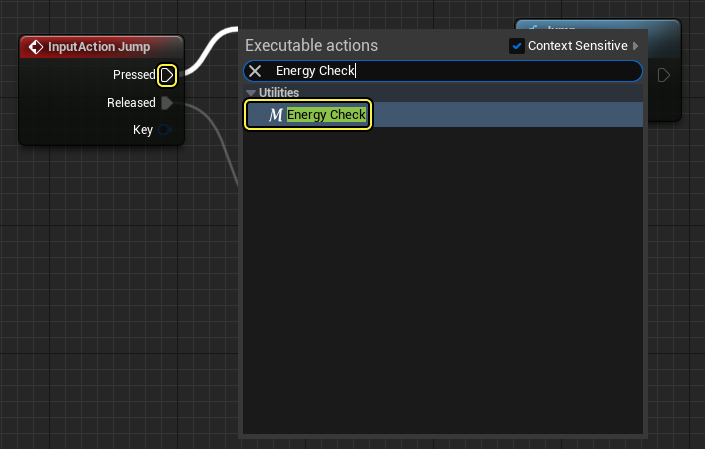 You should see that the macro you created is listed under Utilities and has the Macro icon next to its name.
 -
When the macro is added, the Jump script should look similar to below.
Begin Object Class=/Script/BlueprintGraph.K2Node_CallFunction Name="K2Node_CallFunction_1193" FunctionReference=(MemberName="Jump",bSelfContext=True) NodePosX=768 NodePosY=-144 ErrorType=1 NodeGuid=8A83DB3F49050555B45F79B064C3822E CustomProperties Pin (PinId=13FD260E4EE18FD0AA5F7085F9B509D6,PinName="execute",PinToolTip="\nExec",PinType.PinCategory="exec",PinType.PinSubCategory="",PinType.PinSubCategoryObject=None,PinType.PinSubCategoryMemberReference=(),PinType.PinValueType=(),PinType.ContainerType=None,PinType.bIsReference=False,PinType.bIsConst=False,PinType.bIsWeakPointer=False,PinType.bIsUObjectWrapper=False,PinType.bSerializeAsSinglePrecisionFloat=False,LinkedTo=(K2Node_MacroInstance_0 AAA4A8A04AE7F5E0D61D86BDEC4C3CB8,),PersistentGuid=00000000000000000000000000000000,bHidden=False,bNotConnectable=False,bDefaultValueIsReadOnly=False,bDefaultValueIsIgnored=False,bAdvancedView=False,bOrphanedPin=False,) CustomProperties Pin (PinId=B759CF2E40AB318E19979C8B6179C1E5,PinName="then",PinToolTip="\nExec",Direction="EGPD_Output",PinType.PinCategory="exec",PinType.PinSubCategory="",PinType.PinSubCategoryObject=None,PinType.PinSubCategoryMemberReference=(),PinType.PinValueType=(),PinType.ContainerType=None,PinType.bIsReference=False,PinType.bIsConst=False,PinType.bIsWeakPointer=False,PinType.bIsUObjectWrapper=False,PinType.bSerializeAsSinglePrecisionFloat=False,PersistentGuid=00000000000000000000000000000000,bHidden=False,bNotConnectable=False,bDefaultValueIsReadOnly=False,bDefaultValueIsIgnored=False,bAdvancedView=False,bOrphanedPin=False,) CustomProperties Pin (PinId=C70870CA40D142BE7CF87785CB510A0D,PinName="self",PinFriendlyName=NSLOCTEXT("K2Node", "Target", "Target"),PinToolTip="Target\nCharacter Object Reference",PinType.PinCategory="object",PinType.PinSubCategory="",PinType.PinSubCategoryObject=Class'"/Script/Engine.Character"',PinType.PinSubCategoryMemberReference=(),PinType.PinValueType=(),PinType.ContainerType=None,PinType.bIsReference=False,PinType.bIsConst=False,PinType.bIsWeakPointer=False,PinType.bIsUObjectW -
Click the Compile and Save buttons, then close the Blueprint.
-
Click Play on the main Toolbar in the Editor.

When you press the Spacebar to jump, in the upper left corner of the screen the value of Energy is printed to the screen. When Energy is 0, you should no longer be able to jump.
End Result
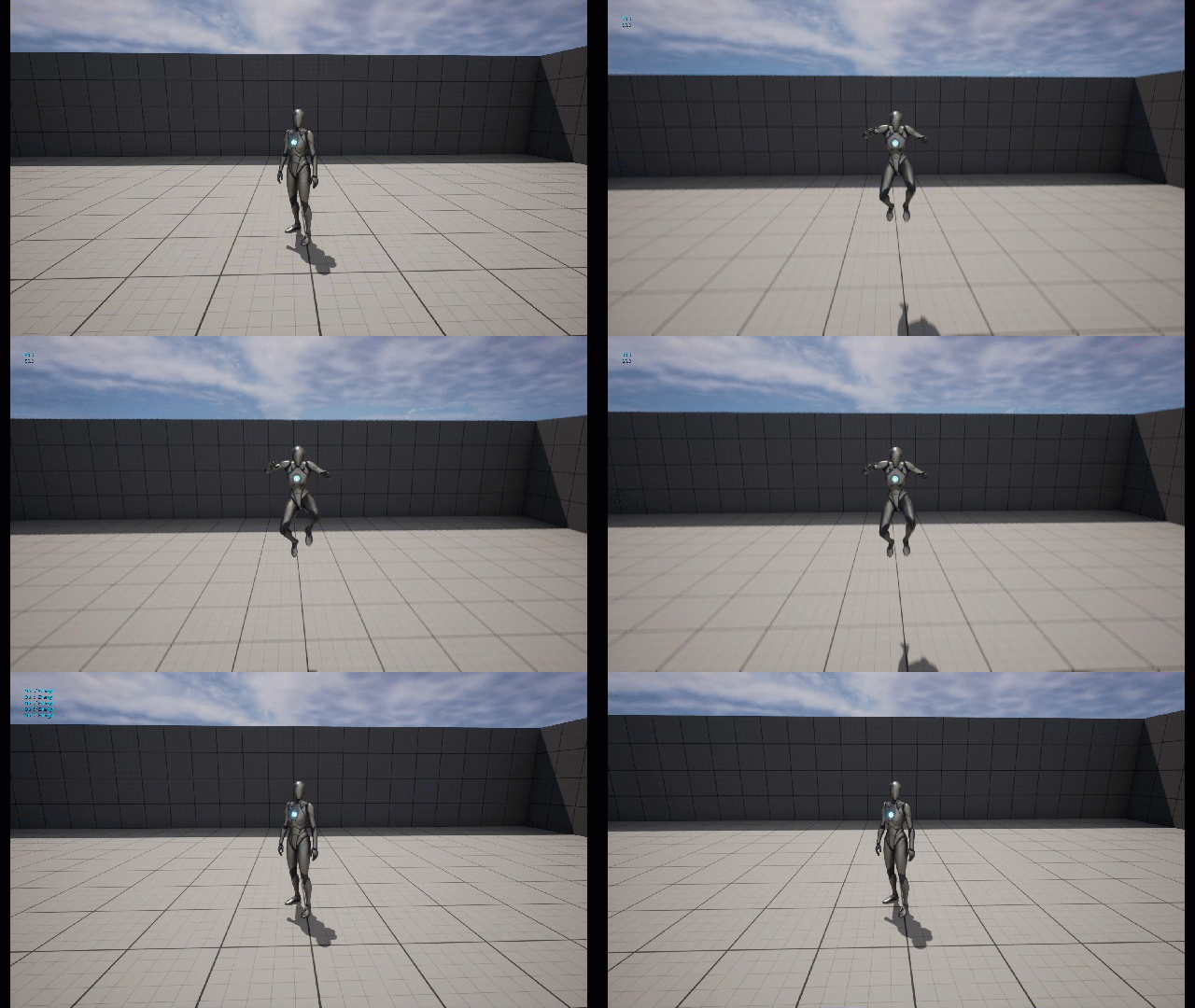
This is a basic example of using a Macro to execute and consolidate a script into a single node, improving the readability of our Event Graph and main character script. Additionally, you could call this Macro in other instances. For example, if you have some other action that reduces the player's energy, and you want to check if they have enough energy to perform the action (like attacking), you could run this Macro to check if the player has enough energy to Attack after pressing your Attack key then execute an attack off of the HasEnergy exec pin.
