
This page is not available in the language you have chosen. It will be displayed in English by default. If you would like to view it in a different language, you can try selecting another language.
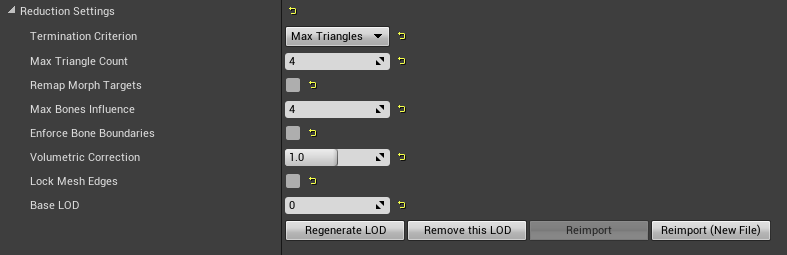
In the following table, you will find property descriptions for each of the settings in the Skeletal Mesh Reduction Tool:
| Property | Definition |
|---|---|
| Termination Criterion | The method to use when optimizing the Skeletal Mesh LOD. Available options are Triangles, Vertices First Percent Satisfied, Max Triangles, Max Vertices, First Max Satisfied. |
| Percent of Triangles | The percentage of triangle to retain as a ratio, eg. 0.1 indicates 10 percent. |
| Percent of Vertices | The percentage of vertices to retain as a ratio, eg. 0.1 indicates 10 percent. |
| First Percent Satisfied | Simplification will continue until either Triangle or Vertex count criteria is met. |
| Max Triangles | The maximum number of triangles to retain. |
| Max Vertices | The maximum number of vertices to retain. |
| First Max | Simplification will continue until either Triangle or Vertex count criteria is met. |
| Remap Morph Targets | Remap the morph targets from the base LOD onto the reduced LOD. |
| Max Bones Influence | Maximum number of bones that can assigned to each vertex. |
| Enforce Bone Boundaries | Penalize edge collapse between vertices that have different major bones. This will help articulated segments like tongues but can lead to undesirable results under extreme simplification. |
| Volumetric Correction | Default value of 1 attempts to preserve volume. Smaller values will lose volume by flattening curved surface, and larger values will accentuate curved surfaces. |
| Lock Mesh Edges | Preserve cuts in the mesh surface by locking vertices in place. Increases the quality of the simplified mesh at edges at the cost of more triangles. |
| Base LOD | Base LOD index to generate this LOD. By default, we generate from LOD 0. |